timothy
Health Warn
- License — License: MIT
- Description — Repository has a description
- Active repo — Last push 0 days ago
- Low visibility — Only 6 GitHub stars
Code Fail
- network request — Outbound network request in deploy/release/install.sh
- rm -rf — Recursive force deletion command in scripts/canary-coding.sh
Permissions Pass
- Permissions — No dangerous permissions requested
No AI report is available for this listing yet.
Self-hosted personal AI assistant: chat, cost tracking, tasks, and agents, running on your own hardware, on your own LLM providers.
Timothy




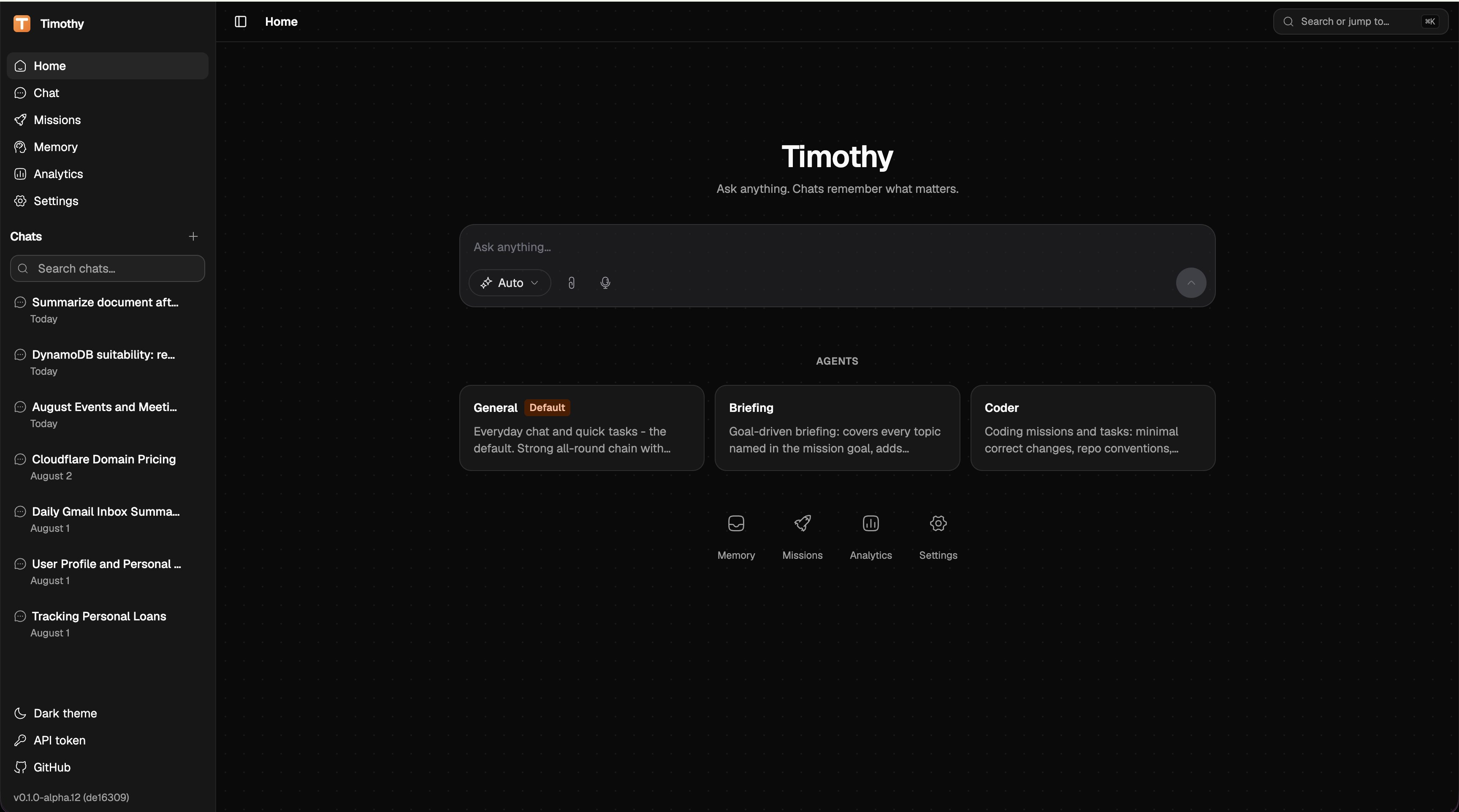
Self-hosted personal AI assistant: chat, cost tracking, tasks, and agents, running on your own hardware, talking to whichever LLM providers you configure.
Status: early, under active development.
Alpha releases with prebuilt images are available on the Releases page; expect rough edges and breaking changes between releases.
What works today
- Multi-provider chat: Anthropic, Amazon Bedrock, and any OpenAI-compatible API behind one gateway; providers, models, and per-task routing are database configuration, editable at runtime from the settings panel with hot reload.
- Sessions that survive: every conversation is an append-only event log; kill a container mid-stream and the session resumes and replays exactly.
- Tools, permissions, skills: the agent loop executes tools behind a constraint/permission chain (destructive actions require explicit approval in the UI); skill packs load lazily by task.
- Missions: long-running agent tasks with a pure state machine, harness-owned verification (artifacts must exist before any model claim counts), per-mission sandboxes, budgets, and LLM review; recurring missions fire from cron schedules.
- Long-term memory: staged fact extraction with a confirmation queue, hybrid pgvector retrieval (vector + text + entity, RRF-fused) under a strict token budget.
- Cost accounting: every request lands in a ledger with honest pricing (unknown price is recorded as null, never guessed); usage dashboard, spend budgets with alerts, Prometheus metrics on every service.
- Privacy floor: tools whose output carries sensitive data (raw email) pin the rest of their turn, and every downstream side-call (memory extraction, compaction), to a dedicated route you can chain to a local model.
Architecture
Go microservices behind a single public API, one PostgreSQL database, React web UI. All run via Docker Compose.
| Service | Role |
|---|---|
brain |
Public API: chat orchestration, agent loop, missions, event-sourced sessions, SSE streaming |
gateway |
Internal LLM gateway: multi-provider routing, cost ledger |
memoryd |
Internal memory service: pgvector-backed recall |
sandboxd |
Internal service holding the Docker socket: per-mission sandbox containers |
web |
React + Tailwind interface: chat, missions, usage, settings |
searxng |
Internal metasearch backend for the web_search tool |
markitdown |
Internal Python sidecar: file→markdown conversion |
whisper |
Internal Python sidecar: local speech-to-text for the web mic button |
Plus Postgres (18 + pgvector), internal only, no host port. Migrations are embedded in each Go binary and applied automatically at startup; there's no separate migrate command. Every Go service exposes GET /health and GET /metrics.
Sessions are an append-only event log: every turn, tool run, and compaction is an immutable event, so conversations survive crashes mid-stream and replay exactly as they happened.
Published ports (everything else is compose-internal):
| Port | What |
|---|---|
3300 |
Web UI |
8300 |
Brain (public API) |
3301 |
Vite dev server (make dev) |
Quick start (prebuilt images)
The fastest way to run Timothy: no Go/Node toolchain, no build step, just Docker and the released images.
Make an empty directory and download the installer from the latest release. While Timothy is alpha, every release is marked prerelease, so GitHub's
/releases/latestredirect doesn't resolve; look up the newest tag instead:mkdir timothy && cd timothy TAG=$(curl -fsSL https://api.github.com/repos/timothy-agent/timothy/releases \ | grep -E '"tag_name"|"published_at"' | paste - - \ | sed -E 's/.*"tag_name": "([^"]+)".*"published_at": "([^"]+)".*/\2 \1/' \ | sort -r | head -1 | awk '{print $2}') curl -fsSLo install.sh "https://github.com/timothy-agent/timothy/releases/download/$TAG/install.sh"Read
install.shbefore running it. Then run it:sh install.shIt downloads
docker-compose.ymlandenv.example, generates a.envwith fresh secrets (POSTGRES_PASSWORD,TIMOTHY_MASTER_KEY,TIMOTHY_API_TOKEN), pulls the images, starts the stack, and prints a magic sign-in link once the web UI is up.Open the printed link: the web UI signs in automatically from the token in the URL.
To upgrade later: bump TIMOTHY_VERSION in .env and run docker compose pull && docker compose up -d, or just re-run install.sh (it leaves an existing .env untouched and only refreshes docker-compose.yml and the searxng config).
The rest of this README covers building and running from source instead.
Build from source
Prerequisites:
- Docker (Desktop, or engine + compose plugin).
- A hugeicons.com account with an active token. The web UI's icons are HugeIcons Pro (a paid icon set) and the token is required to build the
webimage; without it,make upfails on the web build step. Not needed for the prebuilt-image quick start above.
Copy the env file and fill in the required values:
cp deploy/env.example deploy/.envOpen
deploy/.envand set:POSTGRES_PASSWORD: compose refuses to start without it.TIMOTHY_MASTER_KEY: generate withopenssl rand -base64 32. This is the root of trust for the encrypted secret store (provider API keys, OAuth tokens all live behind it). Compose hard-fails if it's blank. Back this up: losing it makes every stored secret unrecoverable.TIMOTHY_API_TOKEN: generate withopenssl rand -hex 32. Bearer token for the API; if it's blank, every request 401s.HUGEICONS_TOKEN: your HugeIcons Pro token, needed to build thewebimage.
(Optional) Missions sandbox.
deploy/env.exampleprefillsMISSION_SANDBOX_IMAGE=timothy-sandbox:latest, but that image doesn't exist until you build it:make sandbox-imageSkip this and leave
MISSION_SANDBOX_IMAGEempty in.envif you don't need missions isolated in their own container; mission shell commands then run in-process instead.(Linux only) Set
DOCKER_SOCK_GIDsosandboxdcan use the Docker socket:stat -c '%g' /var/run/docker.sockPut that number in
.env. On Docker Desktop the default of0works as-is. Note: mountingdocker.sockgivessandboxdroot-equivalent access to the host. It's isolated on its own compose network, read-only, and runs with all capabilities dropped, but the socket itself is the trust boundary, so only run this on a host you control.Start the stack:
make upWeb UI:
http://localhost:3300. API:http://localhost:8300.First login. There's no login page: the web UI auto-opens a settings dialog asking for an API token the first time it can't find one. Paste the
TIMOTHY_API_TOKENvalue fromdeploy/.env. It's stored in your browser'slocalStorage.Add a provider. A fresh install has zero LLM providers and no routing configured, so Timothy can't answer anything until you do this. Go to Settings → Providers, pick a preset tile (OpenAI, Anthropic, Bedrock, GLM, Grok, Ollama, or a custom OpenAI-compatible endpoint), fill in the form, and run the connection test before adding it. The API key you enter is encrypted into the secret store (default backend
db, encrypted withTIMOTHY_MASTER_KEY); the database only ever holds a reference to it, never the raw value, and it never appears in.env, logs, or API responses. Creating your first provider automatically bootstraps the 4 routes Timothy needs to work (default,summarize,embedding,vision); routes are otherwise fully user-managed (create, edit chain/strategy, delete) from Settings → Routing.
Optional: local models
Run Ollama natively on the host, not in a container: a containerized Ollama only gets CPU, while a host install can use Metal or CUDA. Then add a provider with the Ollama preset; it prefills the base URL http://host.docker.internal:11434/v1. On Linux, host.docker.internal may need a host-gateway entry in your Docker config to resolve.
Optional: Google connectors (Gmail, Calendar)
- Create an OAuth client in Google Cloud Console, type Web application.
- Set
TIMOTHY_PUBLIC_URLin.envto the URL your browser uses to reach Timothy (e.g.http://localhost:3300). This must match what you register with Google, or the OAuth callback fails. - Add
<TIMOTHY_PUBLIC_URL>/v1/connectors/oauth/callbackto the OAuth client's authorized redirect URIs. - In the UI: Settings → Connectors, pick the Gmail or Calendar tile, paste the client ID and client secret, and complete the consent flow. Scopes requested:
gmail.modify,calendar.
While the Google OAuth app is in "Testing" mode (the default for a new Cloud project), refresh tokens expire roughly every 7 days; when a connector stops working, reconnect it from Settings, or publish the OAuth app to avoid the expiry.
Optional: GitHub connector
Configured as an MCP preset in Settings → Connectors: paste a GitHub personal access token into the Bearer token field.
Optional: Amazon Bedrock
Create an IAM user scoped to bedrock:InvokeModel* only, generate an access key, and enter the access key ID and secret access key into their own fields on the Bedrock provider in Settings → Providers. Pick a region from the dropdown; no ~/.aws, no SSO, nothing to run on the host.
Operating the stack
make up      # start (builds images as needed)
make down    # stop
make logs    # follow logs for all services
Rebuild and restart a single service after a code change:
make brain # or gateway, memoryd, web, markitdown, whisper, sandboxd
Backups
Postgres has no host port, so back it up through the container:
docker compose -f deploy/docker-compose.yml exec postgres pg_dump -U timothy timothy > backup.sql
A full backup is the pgdata volume plus deploy/.env: without TIMOTHY_MASTER_KEY, the encrypted secrets in that dump are unrecoverable.
Upgrading
git pull
make up
Migrations are additive-only, never edited once applied, and run automatically at service startup; no separate migrate step.
Local development
The Go toolchain runs fully containerized; no host Go install required.
make build   # compile everything
make test    # unit tests
make vet     # go vet
make lint    # golangci-lint
Frontend development with hot reload:
make dev # Vite dev server on :3301, proxies /v1 to brain
make test-integration and make canary need the compose stack up (make up first).
Design decisions are documented as D-0XX markers in code comments next to the code they explain.
License
Reviews (0)
Sign in to leave a review.
Leave a reviewNo results found