clawtouch-hid
Health Warn
- License — License: MIT
- Description — Repository has a description
- Active repo — Last push 0 days ago
- Low visibility — Only 7 GitHub stars
Code Pass
- Code scan — Scanned 12 files during light audit, no dangerous patterns found
Permissions Pass
- Permissions — No dangerous permissions requested
No AI report is available for this listing yet.
ClawTouch open hardware layer — CircuitPython firmware for a Raspberry Pi Pico 2 + the frozen USB-CDC wire protocol it speaks. MIT.
English | 简体中文
clawtouch-hid
The open hardware layer of ClawTouch.
CircuitPython firmware for a Raspberry Pi Pico 2, the frozen USB-CDC wire
protocol it speaks, and a Python definition module for hosts that want to
drive the board directly.




What is this?
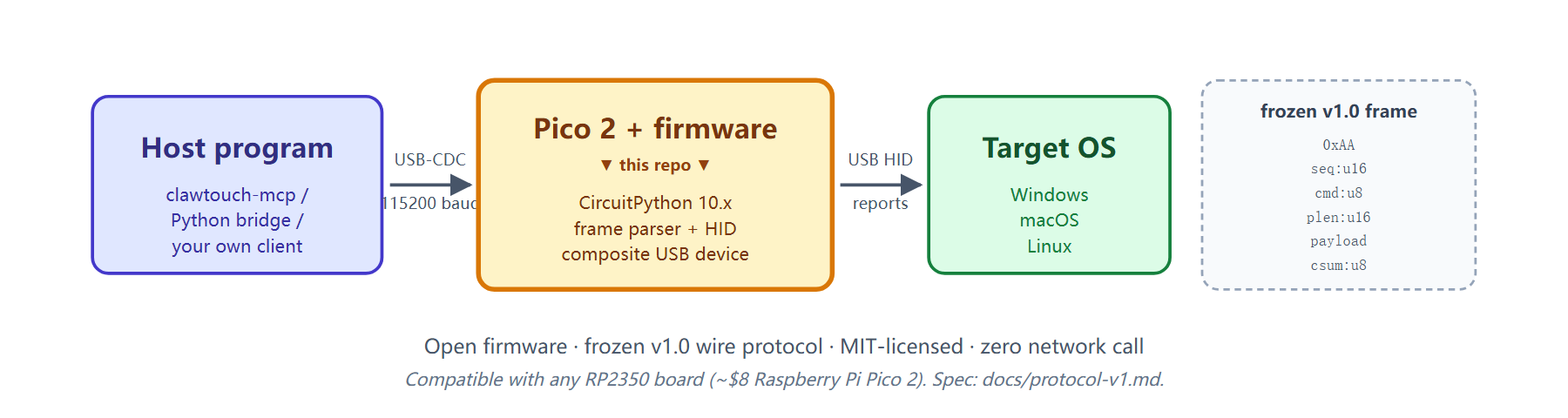
This repository contains three things that together let a Raspberry Pi Pico 2
become a "ClawTouch HID device" — a USB-attached keyboard / mouse that an
external program (running on your PC) can drive over a serial command channel:
firmware/— the CircuitPython firmware that runs on the Pico 2. It
exposes itself to the host operating system as a composite USB device:
a HID keyboard + HID mouse + a USB-CDC serial pair. The firmware does
nothing on its own — it waits for framed commands on the CDC data port
and translates each one into a HID report.clawtouch_hid_protocol/— a small, dependency-free Python module
that describes the wire protocol (command codes, payload layouts, frame
helpers). The wire format is epoch 1 (frozen frame envelope); this
module is its SemVer-versioned description (the drag opcodes were added
additively within epoch 1). Use it from your own host program to talk to
the board directly without going through MCP or any other layer.docs/— the wire protocol specification
(epoch 1 — frozen envelope, opcodes additive) and a step-by-step
flash guide.
The board is also the hardware that the clawtouch-mcp
MCP server talks to. If all you want is "let Claude Desktop drive a real
mouse and keyboard," start there — you don't need to read any of this. This
repo is for firmware hackers, protocol auditors, and anyone who wants to
build their own host stack on top of the same hardware.
📦 MIT-licensed. No backend, no LLM, no agent logic on top — just the
wire protocol and the firmware that speaks it.
Why a physical HID device?
Most "AI controls your computer" demos run inside a sandbox or inject
synthetic events through OS-level APIs. Those paths don't apply in
locked-down kiosks, embedded test harnesses, or cross-machine RPA
where the target's HID-input side must stay clean. A USB HID
peripheral routes input through the standard OS HID driver stack —
the same path as any plug-in keyboard or mouse — and needs no
mouse/keyboard driver or HID agent installed on the target (the Pico
is a standard USB HID class device, recognized natively by every OS).
The firmware in this repository is the smallest amount of code that
turns a $8 Pico 2 into exactly that kind of peripheral.
Local mode — agent and the controlled screen on the same PC — is the common
case, and there the real HID path plus zero driver on the input side is the
whole point. Cross-host control (the agent on one machine driving a target on
another over USB HID) is an additional capability the same hardware unlocks,
not what this repo is built around.
⚠️ This repo covers the input side only: protocol frames → HID
reports. Visual feedback (the agent reading the screen) is out of
scope — in local mode it captures the agent's own screen; in
cross-host mode you wire up a separate path (HDMI capture / VNC /
API checkpoints / blind operation). See the "Deployment modes"
section inclawtouch-mcp
README for the full breakdown.
Quick start
⚠️ This lets an agent drive a real keyboard / mouse — read Safety first.
Flash the Pico 2 with CircuitPython — see docs/flash-guide.md
for the three-step procedure (BOOTSEL→ drop UF2 → drop firmware).Talk to it from Python — install the host-side protocol module and
send aPING:pip install clawtouch-hid-protocol pyserialimport serial from clawtouch_hid_protocol import build_ping, HidCommand ser = serial.Serial("COM7", 115200, timeout=2) # use your CDC data port ser.write(build_ping(seq_id=1).serialize()) resp = HidCommand.deserialize(ser.read(7)) print(resp.cmd_type) # CommandType.PONGOr skip the wire protocol and use clawtouch-mcp
— same firmware, same hardware, but exposed as a Model Context Protocol
server that plugs straight into Claude Desktop / Cline / Continue /
OpenClaw / Hermes.
A complete, runnable PING example lives at examples/ping_test.py.
Hardware
| Item | Spec |
|---|---|
| Microcontroller | RP2350 (Raspberry Pi Pico 2 reference board) |
| Firmware framework | CircuitPython 10.x |
| Wire protocol | epoch 1 (frozen envelope 2026-03-15; opcodes additive) |
| USB interfaces | HID (keyboard + mouse) + CDC (console + data) + USB mass storage (CIRCUITPY drive, dev firmware) |
| CDC baud rate | 115200 (data channel) |
You can use any RP2350 board (e.g. a Raspberry Pi Pico 2, ~$8 from
electronics retailers), flash this firmware, and you have a working
ClawTouch HID device. Prefer not to flash it yourself? Pre-flashed,
enclosed kits are a separate commercial product — see
clawtouch.cn. The wire protocol is identical
either way; this repository targets the hardware-level open source path.
Wire protocol at a glance
+------+--------+--------+---------+---------+----------+
| 0xAA | seq:u16| cmd:u8 | plen:u16| payload | csum:u8  |
+------+--------+--------+---------+---------+----------+
   1B     2B       1B       2B       plen       1B
- Little-endian for multi-byte integers.
csumis the low byte of the sum of all preceding bytes.- Maximum payload length is 1024 bytes.
Fifteen command codes are defined: PING/PONG, MOUSE_MOVE/CLICK/SCROLL/BUTTON_DOWN/BUTTON_UP,KEY_PRESS/RELEASE/TYPE_STRING/COMBO, STATUS_REQUEST/RESPONSE, plusACK and ERROR. Full byte-level layout in docs/protocol-v1.md.
See it in action
A real session from a Python REPL, using nothing butclawtouch-hid-protocol (this repo's host-side module) and pyserial,
talking to a real Pico 2 over USB-CDC. Every byte is a v1.0 baseline
frame (frame structure unchanged in v1.1); you can run this against
any Pico 2 flashed with the firmware in this repo:
$ python
>>> import serial
>>> from clawtouch_hid_protocol import (
...     build_ping, build_mouse_move, build_mouse_click,
...     build_type_string, HidCommand, MouseButton,
... )
>>> ser = serial.Serial("COM7", 115200, timeout=2)   # CDC data port

# ── PING / PONG handshake (frozen v1.0 frame) ──────────────────────
>>> ser.write(build_ping(seq_id=1).serialize())
# wire bytes (hex):  aa 01 00 01 00 00 ac
#                    │  └─────┘  │  └───┘ └─ csum (low byte of sum)
#                    │   seq u16 │   plen u16 (payload empty)
#                    └ preamble  └ cmd: PING (0x01)
>>> HidCommand.deserialize(ser.read(7)).cmd_type
<CommandType.PONG: 0x02>             # Pico responded ✓

# ── move cursor 100px right, 50px down, then left-click ────────────
# v1.0 firmware always treats (x, y) as RELATIVE — USB Boot Mouse has
# no absolute-coordinate report. To click at a specific screen pixel,
# the host must query the OS cursor position and send a delta.
>>> ser.write(build_mouse_move(100, 50, relative=True, seq_id=2).serialize())
>>> HidCommand.deserialize(ser.read(7)).cmd_type
<CommandType.ACK: 0xFE>              # cursor moved, Pico ACK'd ✓
>>> ser.write(build_mouse_click(MouseButton.LEFT, seq_id=3).serialize())
>>> HidCommand.deserialize(ser.read(7)).cmd_type
<CommandType.ACK: 0xFE>              # Pico clicked ✓

# ── type a string — real characters appear in the host's focused app
>>> ser.write(build_type_string("Hello", seq_id=4).serialize())
>>> HidCommand.deserialize(ser.read(7)).cmd_type
<CommandType.ACK: 0xFE>              # Pico typed 'Hello' as HID reports ✓
The full frame format and all 15 command opcodes are in
docs/protocol-v1.md; a runnable smoke test
lives in examples/ping_test.py.
Safety
The firmware is a generic HID executor: it faithfully turns whatever
frames the host sends into HID reports, with no on-device guardrail and
no inspection of intent. The properties this README sells as features —
input that the OS treats like a physical keyboard/mouse, and "all
decisions live on the host" — have a symmetric consequence: an
autonomous agent driving the board has, in practice, the same reach
over the target as a person at the keyboard, and that can happen against
the user's intent via prompt injection, model error, or over-broad
autonomy.
This is an agent-behavior / deployment risk, not a firmware bug (see
SECURITY.md). For the full risk disclosure and the
operator mitigations (dedicated/least-privilege host, human-in-the-loop,
network isolation, panic stop, treating screen content as untrusted),
see the Safety section in theclawtouch-mcp README.
Scope — one device, one target
The hardware is a USB peripheral with a single host connection. The
firmware in this repo is the same — one Pico, one target machine.
That's by design. This is a tethered control device, not a fleet
automation tool. If you want to drive ten machines you flash ten
Picos.
Suitable for: RPA / automated testing of devices you can't install
software on, accessibility tooling (AI agent + HID = real keyboard
for a user who can't use a regular one), cross-machine workflows
where the target machine must stay clean.
Not suitable for: mass account creation or multi-account operations on
consumer platforms (a single-host peripheral is the wrong shape; users
are responsible for applicable laws and platform policies), or
application-specific scripted shortcut layers (those belong in agent /
RPA frameworks built on top of this primitive layer).
Acceptable use
This firmware translates host-issued protocol frames into HID
reports. This project does not support, document, or assist
with use cases that:
- Bypass, evade, or interfere with any target platform's anti-fraud,
anti-abuse, rate-limiting, or risk-control measures. - Operate accounts the user does not lawfully own or have explicit
authorization to operate. - Are prohibited by the target application's Terms of Service in
the user's jurisdiction. - Violate applicable law — including, but not limited to, PRC
Anti-Unfair Competition Law Art. 13 (the Internet sector
specific provision; promulgated 2025-06-27, effective
2025-10-15) covering improper means — including circumventing
technical management measures — to acquire or use another
operator's data; Personal Information Protection Law;
Cybersecurity Law; and equivalent laws in other jurisdictions.
These statements describe the scope of our maintainer support and
documentation — they are not additional restrictions on the
MIT License, which continues to govern all use, modification, and
redistribution of the source code. Users are independently
responsible for evaluating their specific use case against
applicable laws and the target platform's ToS.
This repository contains no AI / ML model and generates no text,
image, audio, or video content. Content-generation obligations
(e.g. PRC AI Generated Content Labeling Measure effective
2025-09-01) attach to whatever upstream agent drives this firmware,
not to the firmware itself.
Repository layout
clawtouch-hid/
├── clawtouch_hid_protocol/   ← Python protocol module (host-side, pip-installable)
├── firmware/                 ← CircuitPython firmware for the Pico 2
│   ├── boot.py               ← USB config (DEV: HID + CDC console/data + CIRCUITPY drive)
│   ├── boot_production.py    ← USB config (locked-down: HID + CDC data only)
│   ├── code.py               ← HID executor main loop
│   ├── packet_parser.py      ← Frame extractor, hardware-free for PC tests
│   └── lib/adafruit_hid/     ← Bundled HID library (MIT, see NOTICE)
├── docs/                     ← Protocol spec + flash guide (English + Chinese)
├── examples/                 ← Runnable smoke tests
├── pyproject.toml            ← Builds clawtouch-hid-protocol for PyPI
├── LICENSE                   ← MIT
├── NOTICE                    ← Third-party attribution
└── README.md / README.zh-CN.md
Design philosophy
- Firmware has no business logic. It only translates framed bytes into
HID reports. All decisions — what to type, when to click, how to pace
multi-step actions — live on the host. This keeps the firmware tiny,
auditable, and reusable across different host stacks. - The protocol is additive — one frozen epoch. The wire format is
epoch 1: the frame envelope was published 2026-03-15 and is
byte-level frozen forever. New capabilities arrive as new command codes
inside the same envelope (the drag opcodes, added 2026-05-28, are an
epoch-1 addition); the epoch bumps only on a breaking envelope change —
by design, almost never. Existing commands keep working forever. The
epoch is not SemVer; theclawtouch_hid_protocolpackage that
describes it is (see docs/protocol-v1.md). - Protocol-by-value, not protocol-by-name. The firmware, the
clawtouch_hid_protocolmodule, and the protocol spec each list the
command codes independently. The numbers are the source of truth; the
Python names exist for readability only.
Related work
ClawTouch is not the first project to put HID hardware between an
agent and a target PC. The closest neighbors:
- PiKVM Pico HID — Pi-Pico-as-HID-relay
for remote-management KVMs. RP2040 only (Pico 2 / RP2350 unsupported
as of writing); serves a KVM web UI, not an agent. No
wire-protocol versioning — host writes raw HID descriptors. sjmf/kvm-serial+ the MCP
wrappersunasaji/mcp-serial-hid-kvm—
CH9329 / CH9350L USB-HID ASICs plus a video-capture card, with an
optional MCP server on top. The closest direct peer in architecture.
Uses fixed-function chips (firmware not user-modifiable); ClawTouch
instead pairs a Pico 2 with CircuitPython behind a v1.1 wire protocol
(v1.0 baseline frozen, v1.1 additive), so new opcodes are additive
across hosts and the firmware stays auditable.- HIDAgent — Bigham et al.
(CMU, 2026-01). A < $30 RP2040 + HDMI-to-USB + CH340 serial bridge
research toolkit for UI agents driving HID-compatible devices. The
closest peer in hardware budget and design intent; ships a Python
library rather than a versioned wire protocol + MCP server + skill
catalog.
ClawTouch's irreplaceable edge is the genuine hardware HID path: the OS
sees a real physical keyboard / mouse, and this repo is the firmware + frozen
wire protocol that produces it. In local mode — the common case — that real
HID plus zero driver on the input side is exactly what makes it work for
accessibility, compatibility testing, and apps that reject synthetic input; if
your target is the same machine the agent runs on and the app doesn't care
where input comes from, AB498/computer-control-mcp,domdomegg/computer-use-mcp,
or the various mcp-pyautogui implementations will be simpler — they call
PyAutoGUI in-process. Cross-host control — the agent on one machine driving a
target on another — is an additional capability the same hardware unlocks,
something a software-only path can't do at all.
FAQ
Do I need ClawTouch's hardware to use this?
No. A bare Raspberry Pi Pico 2 (~$8) flashed with the firmware in this
repo is a working ClawTouch HID device. The commercial product bundles
that same firmware in a nicer enclosure with QA, drop-shipping, and a
support contract — the wire protocol is identical.
Do I need ClawTouch's backend / account / API key?
No. Nothing in this repository talks to any network. The firmware speaks
USB to the host machine; the host speaks USB to the firmware. That is the
entire stack.
Can I run any of this without a physical Pico?
The clawtouch_hid_protocol module and firmware/packet_parser.py are
both hardware-free Python and run on any machine. firmware/code.py is
CircuitPython-only and needs the board's usb_hid / usb_cdc modules at
import time, so it cannot be run on a normal Python interpreter directly
— use the protocol module or the parser for offline tests.
How is this different from the closed-source ClawTouch desktop app?
This repo is the bottom layer only — raw HID primitives over a frozen
wire protocol — so other agent stacks can use ClawTouch hardware
without adopting the whole ClawTouch product. The closed-source
desktop product is a separate agent that runs on top of the same
hardware; contact [email protected] for details.
Open source roadmap, contributing & license
Open-core model. Hardware and protocol primitives are open; the integrated commercial product stays closed.
| Component | Status |
|---|---|
| clawtouch-hid (this repo: firmware + protocol) | ✅ Released |
| clawtouch-mcp (MCP server) | ✅ Released |
| clawtouch-skills (markdown skill files for LLM agents) | ✅ Released |
| clawtouch-bridge-sdk (Python + Node HID SDK) | 🔵 Future |
| Backend / desktop app / adapters / vision models | 🔒 Closed source — contact [email protected] |
Contributing
PRs are welcome for: documentation fixes, additional examples, new client
language bindings against the v1.1 protocol (v1.0 baseline still works),
English translations, hardware compatibility reports.
We're not taking PRs for: agent-loop logic or application-level
features (intentionally out of scope — firmware translates frames to
HID reports, nothing else), protocol changes that break v1.0
compatibility, or application-specific adapters (those live in the
closed-source desktop app).
License
MIT © Beijing Tinqiao Technology Co., Ltd. — see LICENSE
(English, authoritative) and LICENSE.zh-CN.md
(non-official Chinese translation, for reference).
Third-party components bundled in this repository (the Adafruit
CircuitPython HID library) and their licenses are listed in
NOTICE. Trademarks (ClawTouch, Tinqiao, and third-party
marks referenced in this repository) are covered separately in
TRADEMARKS.md — the MIT License does not grant
any trademark rights.
For commercial deployments at scale, enterprise support, or OEM hardware
discussion: [email protected].
About
clawtouch-hid is maintained by Tinqiao Technology — the team behind
ClawTouch (clawtouch.cn), building plug-in USB
devices that let AI agents operate real Windows / macOS / Linux desktops
at the HID layer. This repository is the open, hardware-layer slice of
that stack.
Reviews (0)
Sign in to leave a review.
Leave a reviewNo results found