game-studio
Health Warn
- License — License: MIT
- Description — Repository has a description
- Active repo — Last push 0 days ago
- Low visibility — Only 5 GitHub stars
Code Pass
- Code scan — Scanned 12 files during light audit, no dangerous patterns found
Permissions Pass
- Permissions — No dangerous permissions requested
No AI report is available for this listing yet.
Game-development skills that make Claude Code and Codex work like a careful developer — and prove each step. A marketplace of plugins you install by need: game-assets (AI and Blender art, rigging, motion) and unity-dev (Unity 6, first idea to a build on a real phone).
game-studio
Game-development skills that make Claude Code and Codex work like a careful developer — and prove each step.
Split into plugins you install by need: game-assets (10 skills) and unity-dev (51).



Try asking
| You say | What happens |
|---|---|
| "The runner's jump doesn't always register." | unity-input latches each press in Update, spends it once in FixedUpdate, and a journey test proves one press gives one jump |
| "The sentry sees the runner through walls." | unity-game-ai builds the vision cone from distance, angle and one line-of-sight cast; a journey proves the chase starts only after sight |
| "It hitches when the third pickup spawns." | unity-profiling samples that moment in 90-frame windows (median, p95, worst), reads the work and GC counters, and compares before and after |
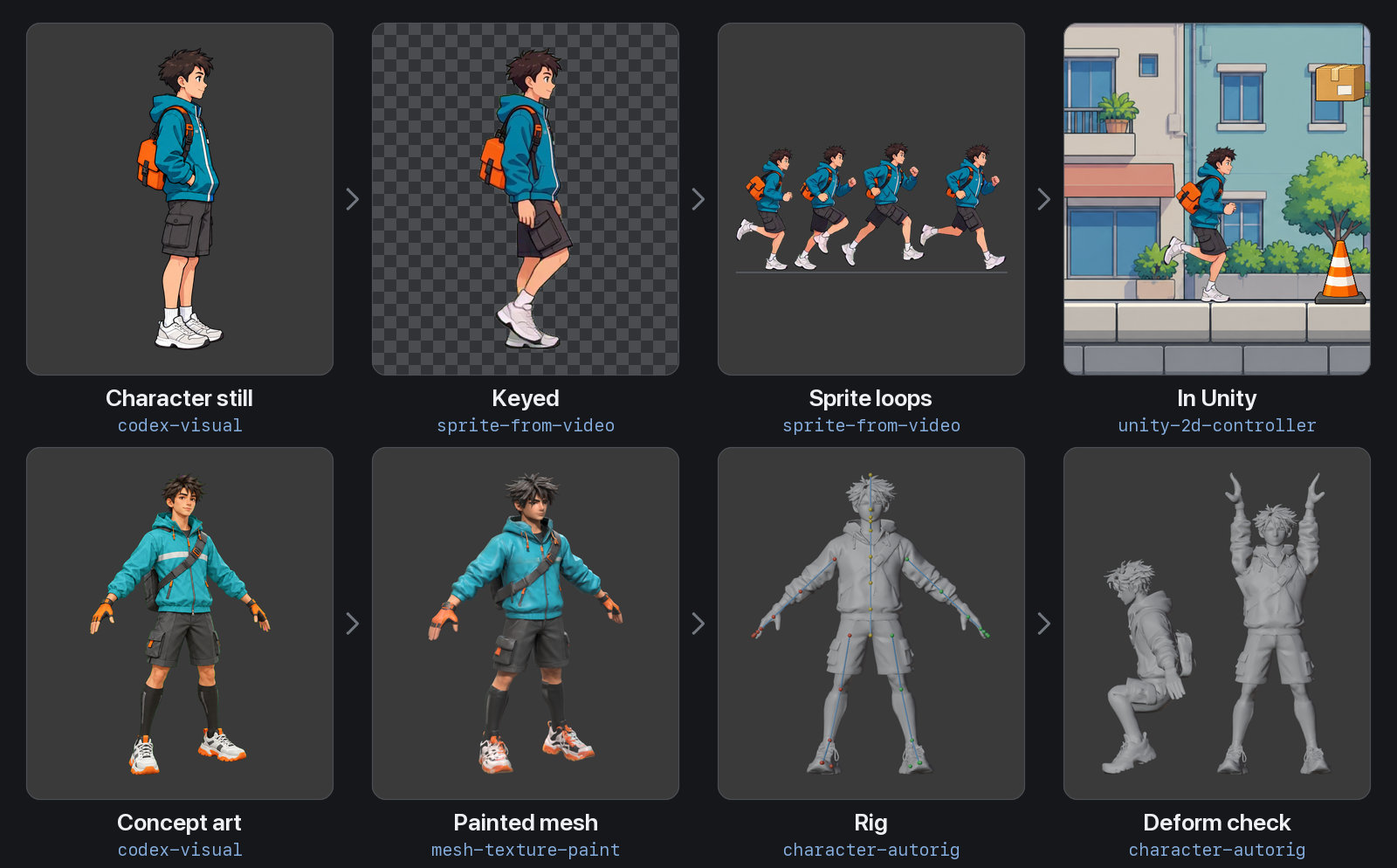
| "Turn this drawing of the runner into a character that runs in Unity." | game-character-pipeline sets the quality target and route first, then hands stages S0–S13 — views, 3D, rig, motion, import — to the skill that owns each, gated |
| "Rig the sentry. He wears a long coat." | character-autorig takes the skirt route: it follows each leg inside the coat to the crotch, weights the coat over the hips and both thighs, and fails the rig if a squat tears it open between them |
| "Show me the courier run before we write code." | unity-game-brief builds a timed simulated-gameplay preview from the game's own rule constants, with every sound logged |
| "Make a walk loop from this still of the runner." | sprite-from-video has a video model walk the still in place, keys every frame against the key the model actually painted, finds the loop by measurement, and writes equal-canvas frames plus frames.json |
| "Cut this drawing of the guard into layers and rig it in Unity." | comfyui-asset-generation cuts it into one layer per moving part and fills what the arms hide; unity-2d-animation gives the PSB bones, meshes and weights with no Skinning Editor step, the pole and shield riding his hands |
| "Put it on my iPhone — without opening Xcode." | unity-ios-build runs a headless build, a compile gate, signing with what your Mac holds, a devicectl install, and reads the app's console |
Plugins
Install what you need; each plugin works on its own.
| Plugin | What it covers | Start here | Install |
|---|---|---|---|
| game-assets (10 skills) | Engine-neutral art and character work: concept art and sprites, 3D from an image, textures, a rigged and animated humanoid, motion from video, an asset ledger. It hands plain files (FBX, frames.json, rig data) to an engine plugin. |
game-character-pipeline |
game-assets@game-studio |
| unity-dev (51 skills) | Unity 6, from an empty project to a verified build on a real phone: gameplay, UI, 2D and 3D worlds, production, polish, shipping, backend. | unity-gameplay, unity-game-ui, unity-live-services |
unity-dev@game-studio |
Plugins for Godot, Unreal and web games (three.js, Phaser) are planned.
Install
claude plugin marketplace add tipoLi5890/game-studio
claude plugin install game-assets@game-studio
claude plugin install unity-dev@game-studio
Install either one or both.
Codex reads the same tree: point it at .agents/plugins/marketplace.json, or atplugins/<name>/.codex-plugin/plugin.json for one plugin on its own. Both are generated from the
Claude-format manifests, so they cannot come to say anything different.
Or copy the skills straight into a project: plugins/<name>/skills/* into <project>/.claude/skills/.
Moving from unity-dev-skills
The repository was renamed from unity-dev-skills to game-studio, and the old URL redirects. The
marketplace is now game-studio (it was unity-dev), and the one plugin became two, so switch by hand:
claude plugin marketplace remove unity-dev
claude plugin marketplace add tipoLi5890/game-studio
claude plugin install game-assets@game-studio   # the asset and character skills
claude plugin install unity-dev@game-studio     # the Unity skills
Removing the old unity-dev marketplace also uninstalls the old unity-dev@unity-dev plugin, and the installs above replace it; skip the removal and you keep two copies of the same skills.
Requirements
- Required: Claude Code or Codex; a Unity 6 project for
unity-dev; Python 3.10 or newer for the scripts, with
NumPy and Pillow for the ones that read images or audio. - Optional, for
game-assetsonly: Blender, in a version your Auto-Rig Pro
release supports (character-autorigexplains); Auto-Rig Pro, a paid add-on by Artell: please
buy a genuine licence from Gumroad or
Superhive, which funds its development and
brings its updates (the optional AI files come with it, one device per licence); a self-hosted
ComfyUI on a GPU machine; thecodexCLI for 2D art; SciPy formesh-texture-paintand for the
part, layer and scene scripts incomfyui-asset-generation. - Optional, for video: ffmpeg, for anything that writes one (previews, reels, sprites from video).
- Optional, for devices: a Mac with Xcode 15 or newer for iOS; the Android SDK for Android.
unity-dev needs none of the asset-pipeline or video tools; a phone build needs only what
that platform already asks for.
See it work
Some of these span both plugins: each arrow names a skill, and the Skills section below says which plugin carries it.
See the game before code
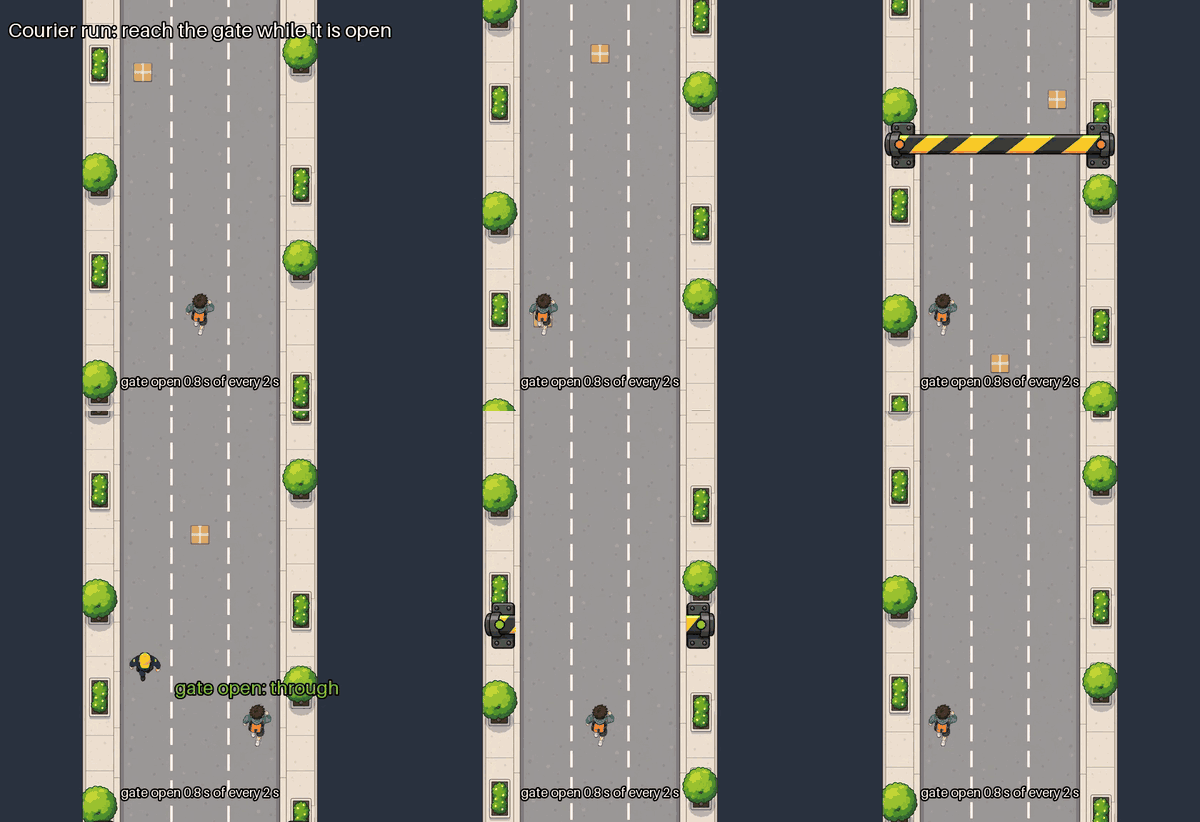
A simulated-gameplay preview of the courier run, drawn with the game's own art.
unity-game-brief →codex-visual
Every pickup and gate is timed from the game's own rule constants and logged as an event, before
any code is written.
From one still to a sprite that runs in Unity
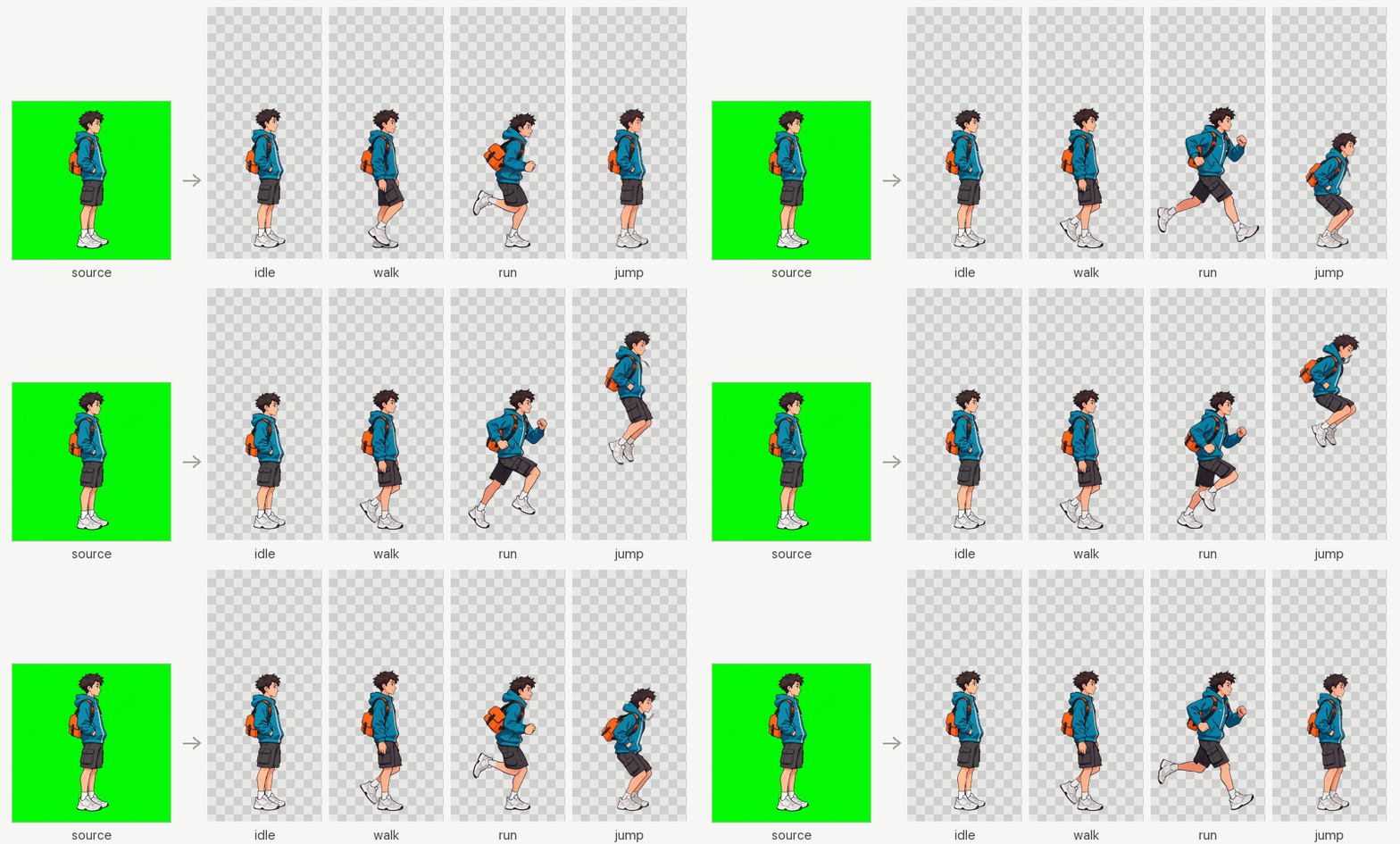
One still on a green key: a breathing idle made from the still alone, then walk, run and jump cut from generated video.
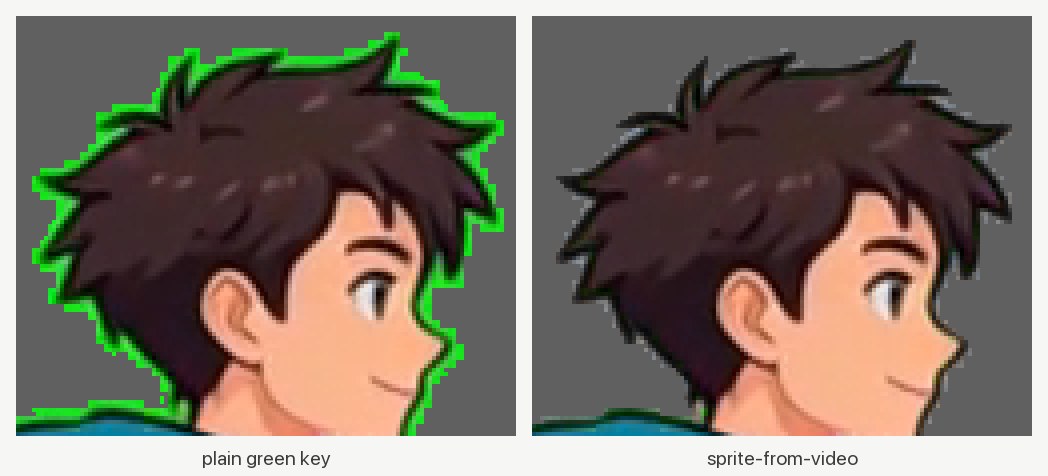
A plain green key leaves a green rim; sprite-from-video keys against the green the model actually painted and removes the spill.
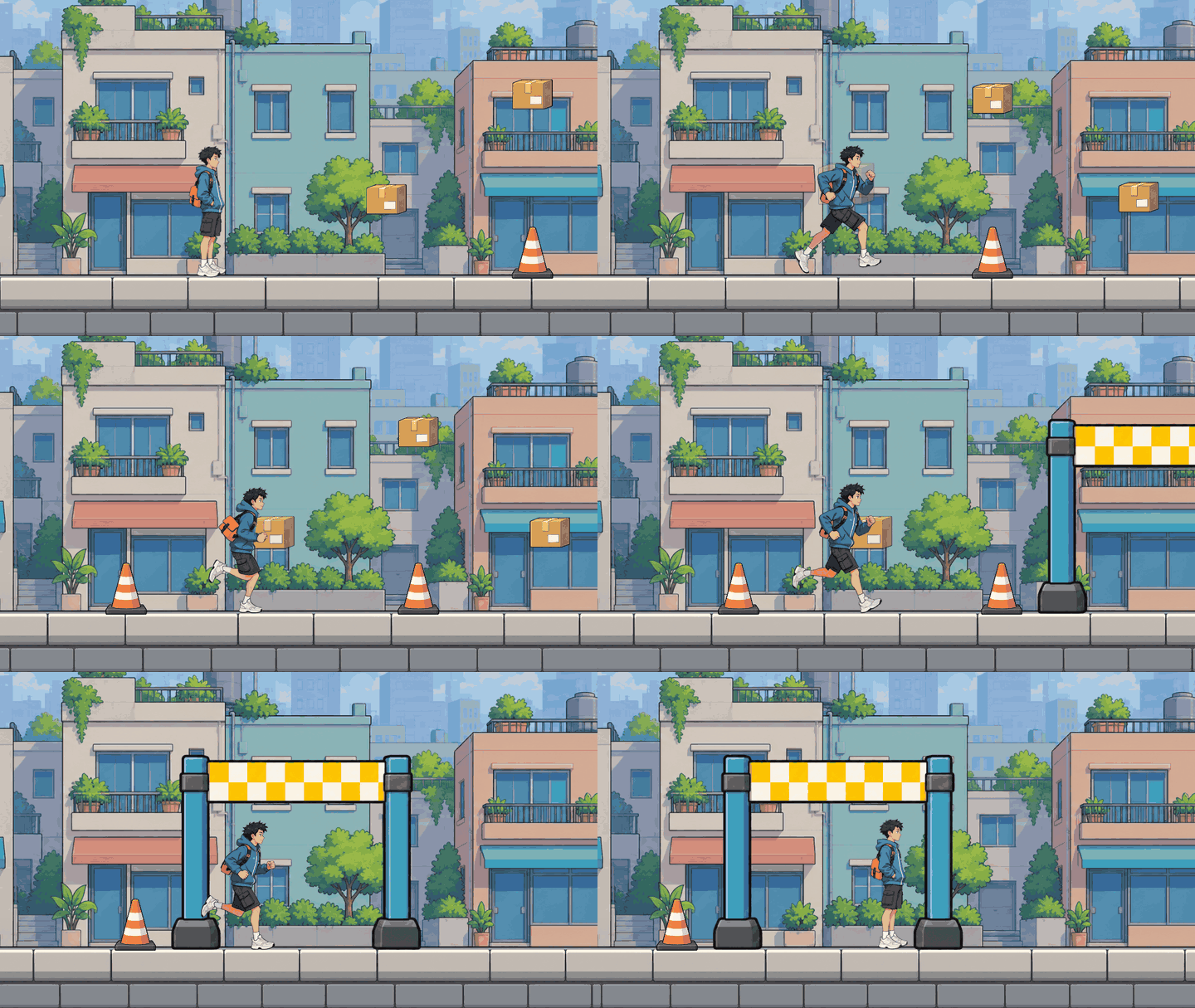
The same sprites in Unity 6: the runner jumps every cone, collects every parcel and runs through the gate.
codex-visual →comfyui-asset-generation →sprite-from-video →unity-2d-sprites →unity-2d-controller
From a dull generated texture to one that matches the concept
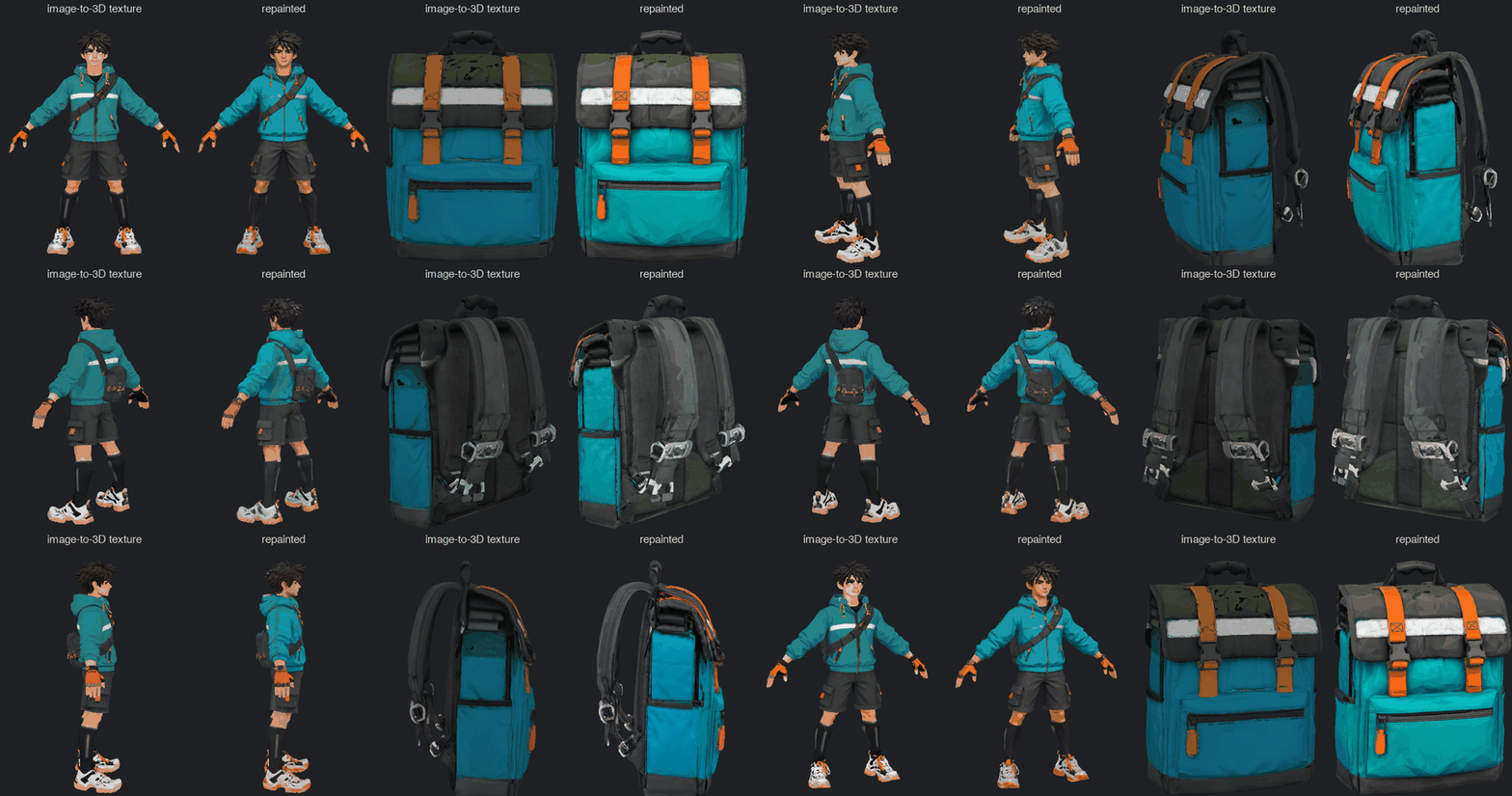
Same meshes, same UVs. In each pair, left is the texture image-to-3D baked; right is the texture repainted from the concept art.
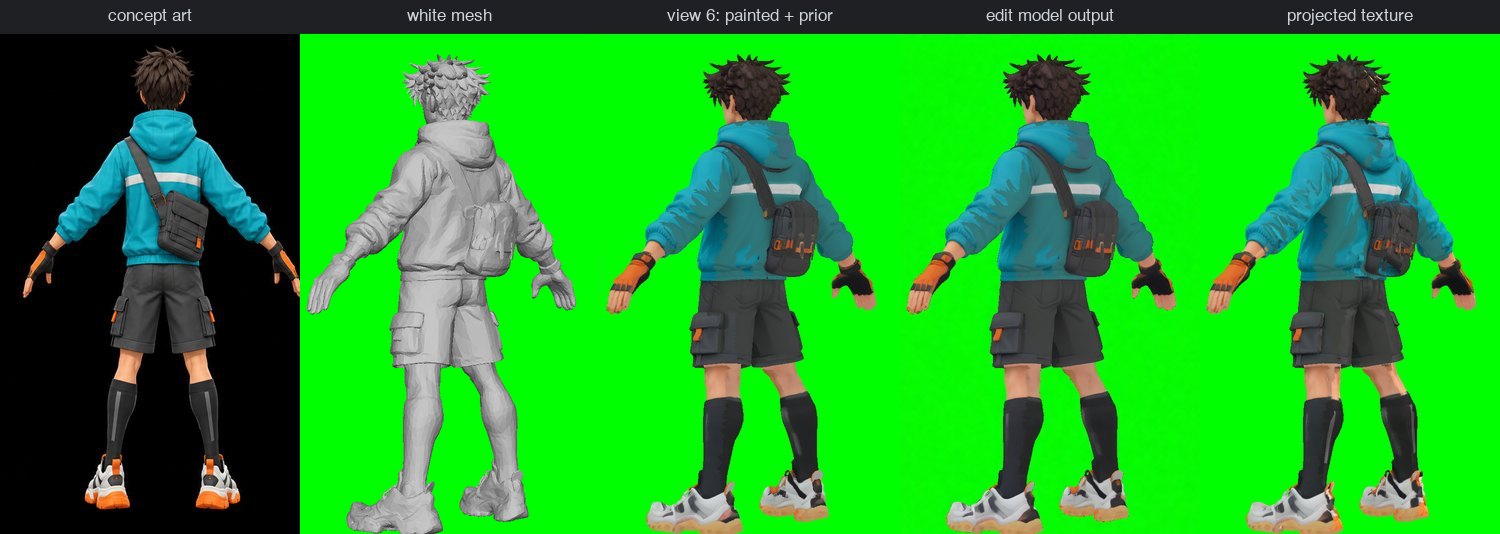
One step of the loop: render what is painted so far, have a local edit model repaint that view against the concept art, gate it, project it into the UV texture, then pick the next camera.
codex-visual →comfyui-asset-generation →mesh-texture-paint
Image-to-3D gets the shape right and the colours muddy. This keeps the mesh, its UVs and its baked
normal and occlusion maps, and repaints only the base colour, one camera at a time, on your own
ComfyUI. Every view is checked against the render before it touches the texture (outline, collage,
colour drift, a washed-out background), and a close-up pass on the head sharpens the face.
The default edit model is P-H3-Image, on MiniMax H3: its licence excludes the US, the EU, the UK and
Korea, outputs included. For a game sold there or worldwide, --backend qwen repaints with
Qwen-Image-Edit (Apache-2.0).
From one drawing to a moving, rigged character
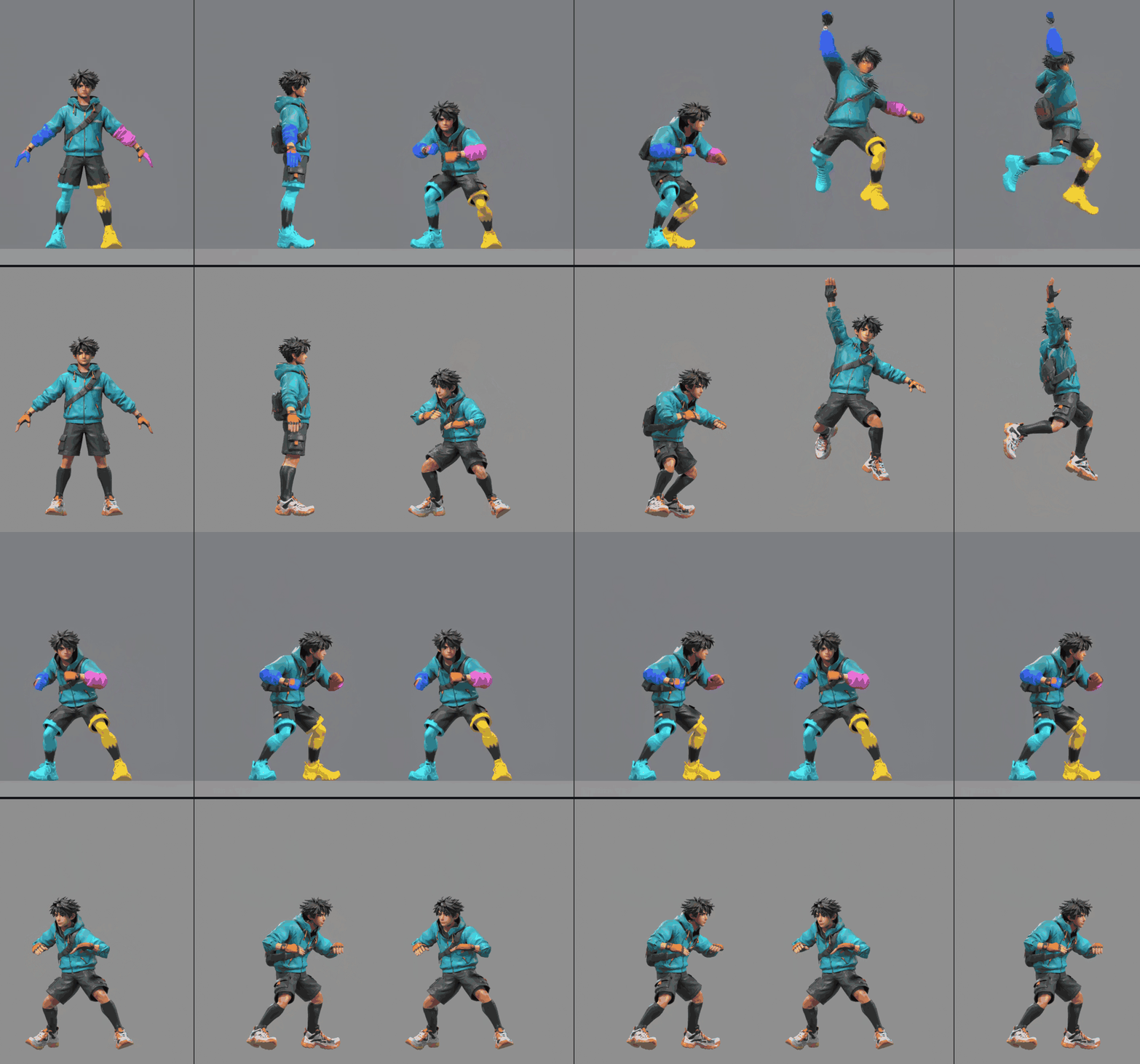
Top: a generated two-camera video. Bottom: the character's rig, driven by the motion solved from it.
codex-visual →comfyui-asset-generation →mesh-texture-paint →character-autorig →humanoid-motion →unity-rigged-character
The 3D model, the rig and the motion are made on your own machines; only the 2D art goes through
the codex CLI. The two-camera solve is ported from anymove (Apache-2.0;
see THIRD_PARTY_NOTICES.md).
The sprite clips and the motion video are machine-generated with MiniMax H3, run locally on its open
weights under the MiniMax H3 Community License Agreement.
A bag and hood that follow the run
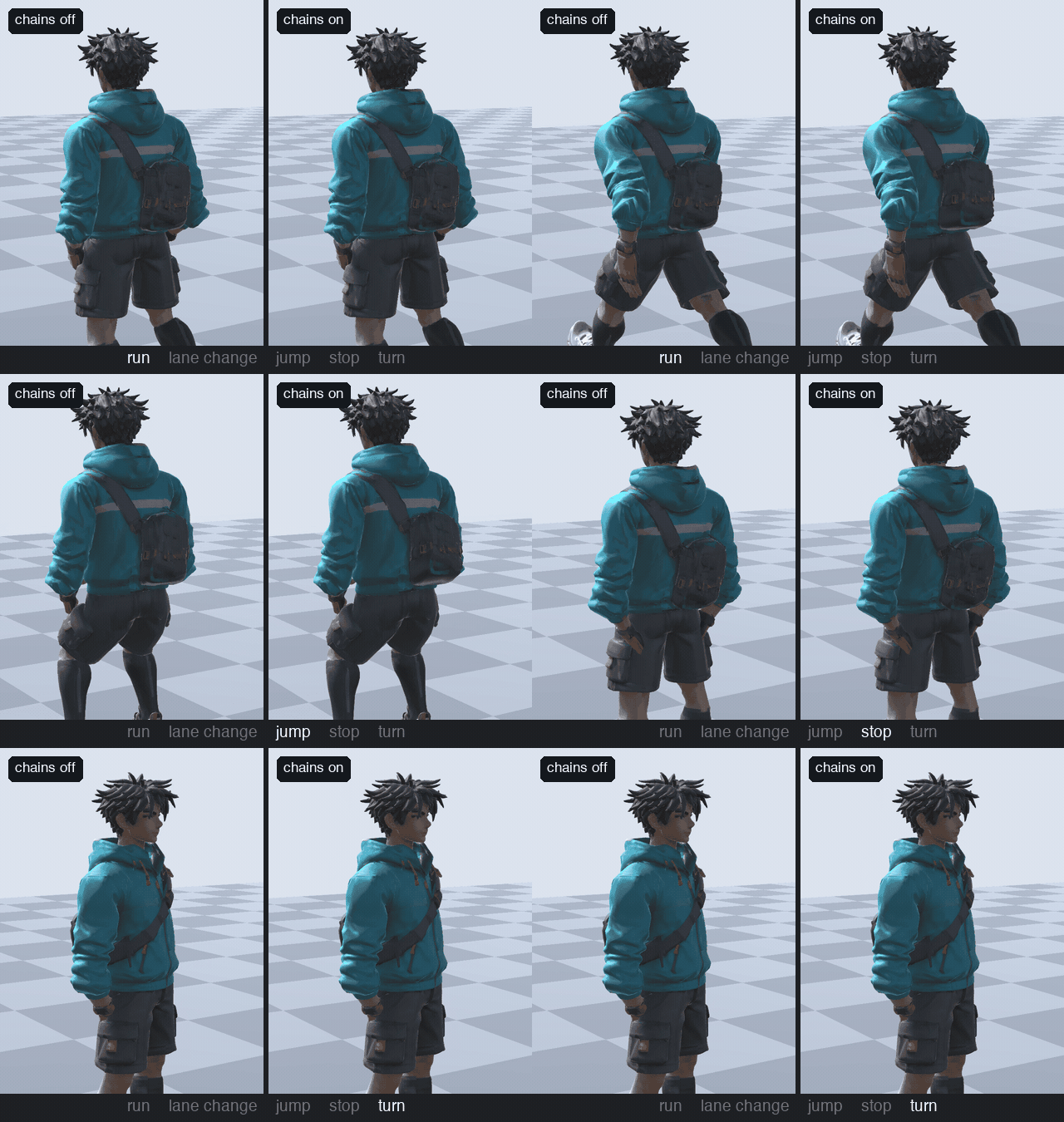
Same rig, same motion, in Unity. Left: chains off. Right: the spring chains on.
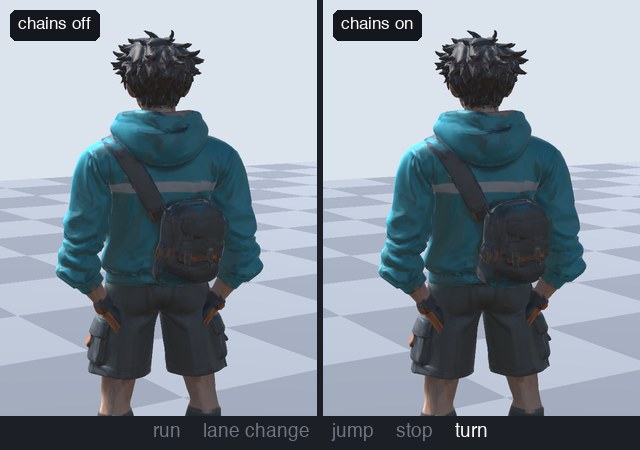
The first frames of the turn: with the chains on, the bag lags behind the body.
character-autorig →unity-rigged-character
The rig step adds bone chains for the bag, hood, hair, jacket hem and shorts (on other characters a
hip bag, a long coat's hem or a cape), and writes how stiff
each is and where the body is to <name>.secondary.json. In Unity one command turns them into
spring bones that keep their length and stay out of the body at any frame rate.
A face and hands that hold up close
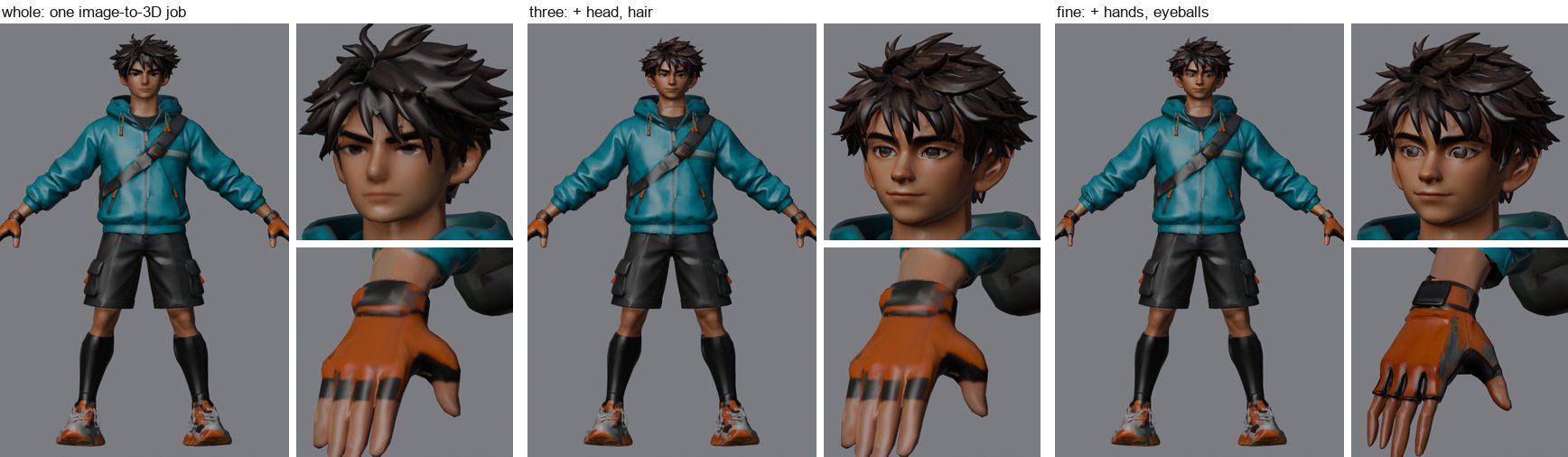
Left: the whole body from one job. Middle: its head made on its own. Right: its hands too, and eyeballs that turn.
comfyui-asset-generation →blender-character-rig →character-autorig
When the face matters, the head is redrawn from the concept at its own scale, generated as a part of its
own and put back on the whole-body mesh, which keeps the proportions. The hair becomes a third mesh, the
neck seam is hidden in the collar and matched in colour, and the rig step binds the hair to the head.
For hand close-ups each hand is generated on its own with gaps between the fingers and set into the
sleeve, so the rig finds every finger; eyeballs go behind the painted eyes and turn on the eye bones.
For a game build the parts merge into one mesh with one texture atlas, one draw call.
A long coat and a chibi body through the same rig
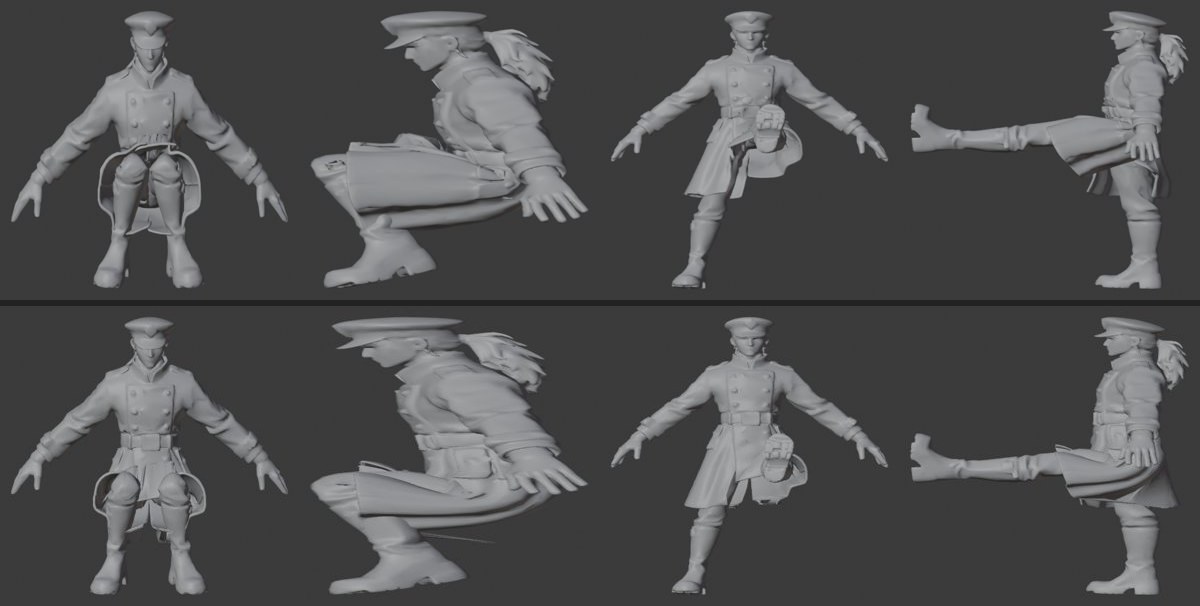
Top: the coat weighted like trousers tears between the thighs. Bottom: on the skirt route it stays whole and its hem follows each leg.
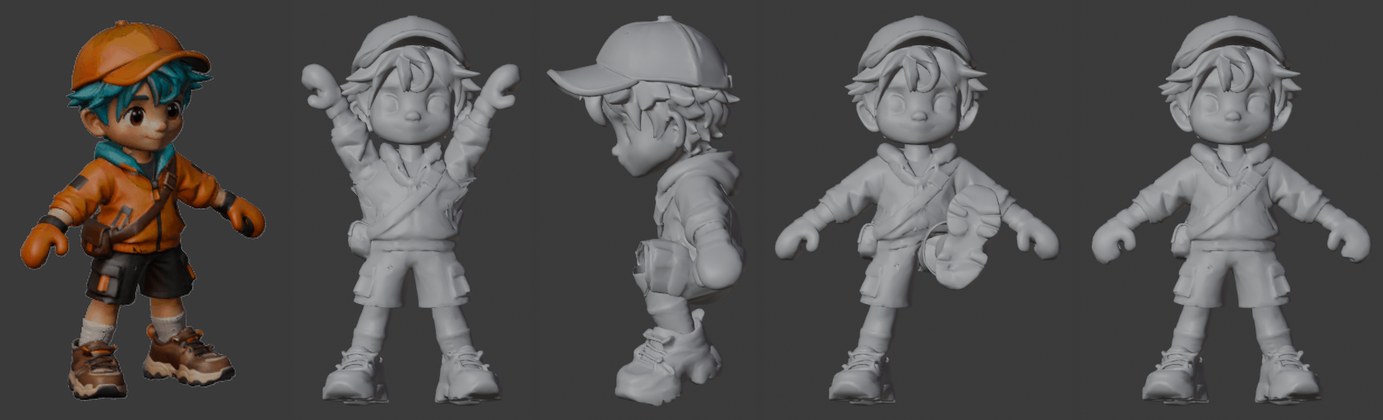
A chibi mascot whose head is a third of its height: arms up, a deep squat, a knee raised, and the mittens closed, each bending as one piece.
game-character-pipeline →character-autorig →unity-rigged-character
A person picks the body type at the start. A long coat or a skirt takes the skirt route
(--body skirt): the rig follows each leg inside the coat to the crotch, weights the coat over the
hips and both thighs, gives its hem spring chains of its own, and fails if the coat tears between
the legs. A chibi takes its own route (--body chibi), with bands and windows for a big head, a
short neck and thick limbs under the same limits, and a mitten is read and bent as one piece. Every
change to the rig is scored on a rig exam: seeded bodies with known joints, and planted faults that
each gate has to catch.
A layered 2D runner that rigs itself
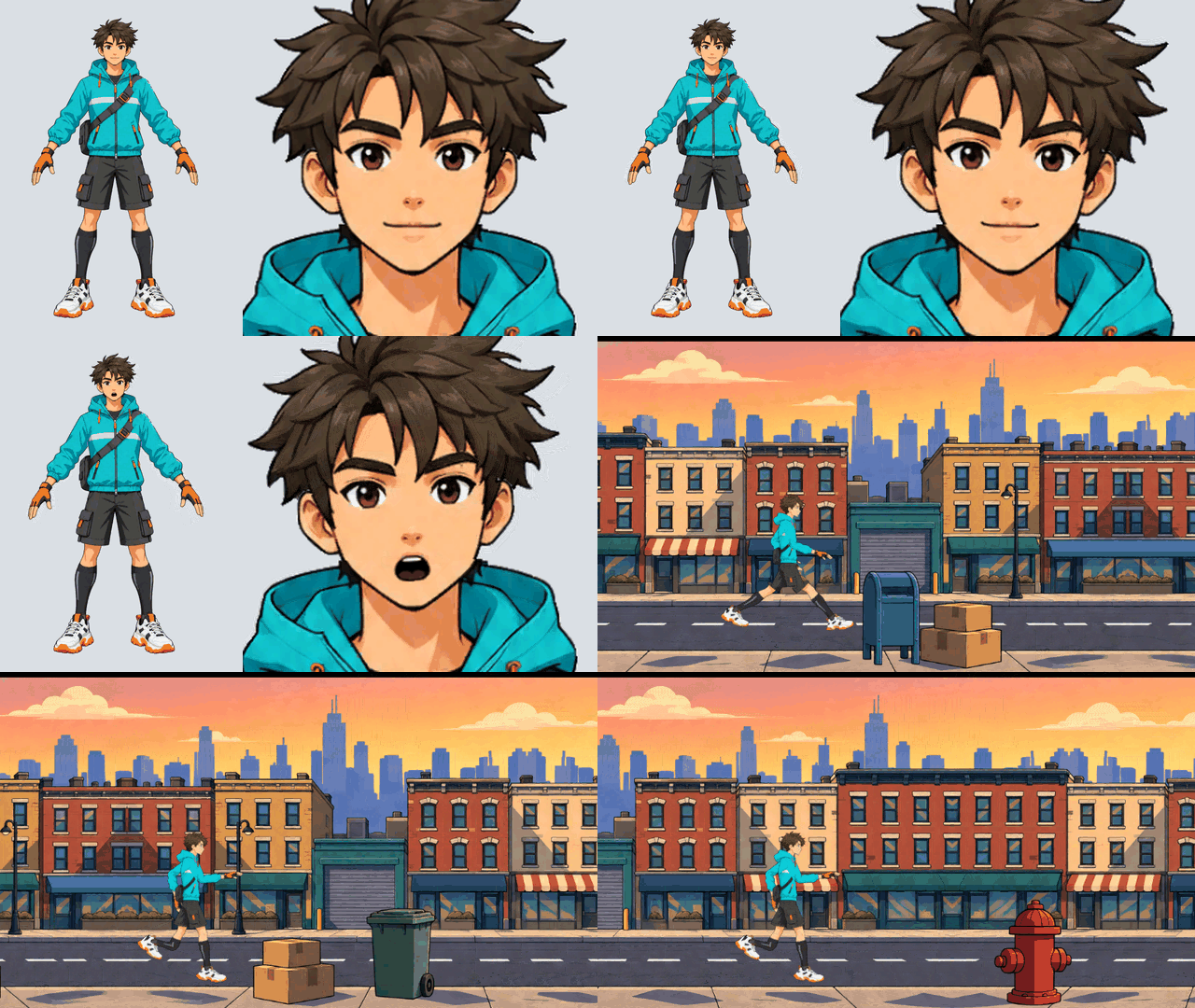
One front and one side drawing, cut into layers and rigged in Unity: blink and talk from the front, a run over the parallax street from the side.
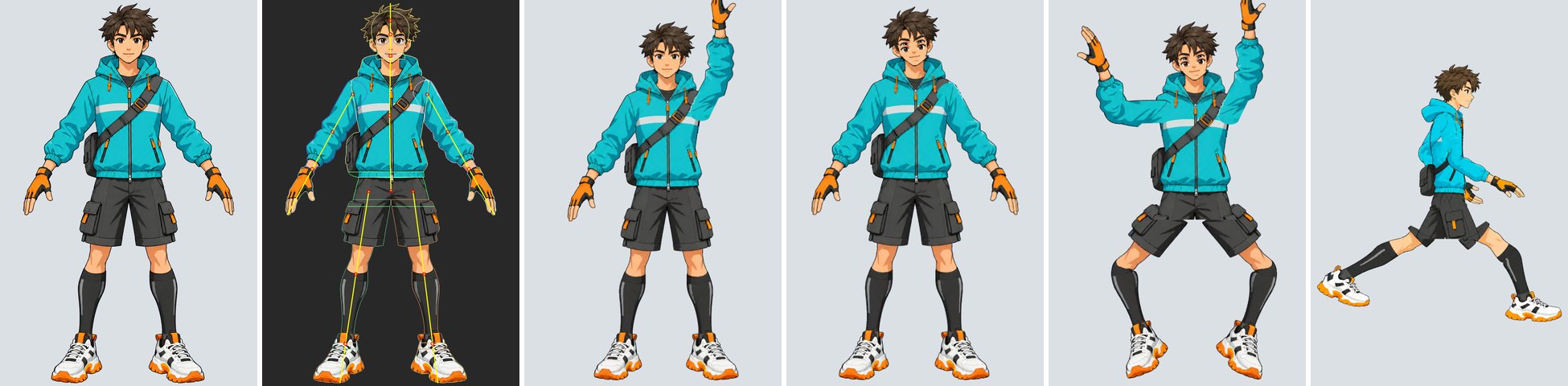
The drawing, its layers and bones, and the rig in Unity bent into poses the drawing never showed.
codex-visual →comfyui-asset-generation →unity-2d-animation →unity-2d-rendering
The drawing is cut into one layer per moving part on your own ComfyUI, with what the arms and hair hide filled in by Qwen-Image-Edit, and Unity gives the PSB its bones, meshes and weights without a Skinning Editor step; the street is split by depth with Qwen-Image-Layered (both Apache-2.0) and scrolls as parallax with no prop beside its own copy. The same layers also come as a PSD ready for Live2D Cubism, which a person rigs in Cubism Editor under Live2D's own licence. The face is driven by parameters in Cubism's ranges (head angle, eye open, gaze, mouth open) with blink, look-at and lip sync, the head turn shifted by Marigold v2 depth (Apache-2.0); the upper lids come down on a mesh before the drawn closed eye shows; a picture kept in its own pose becomes a standing portrait that breathes, blinks and talks, with a held prop cut out to sway on its own.
A face on parameters and a portrait that idles
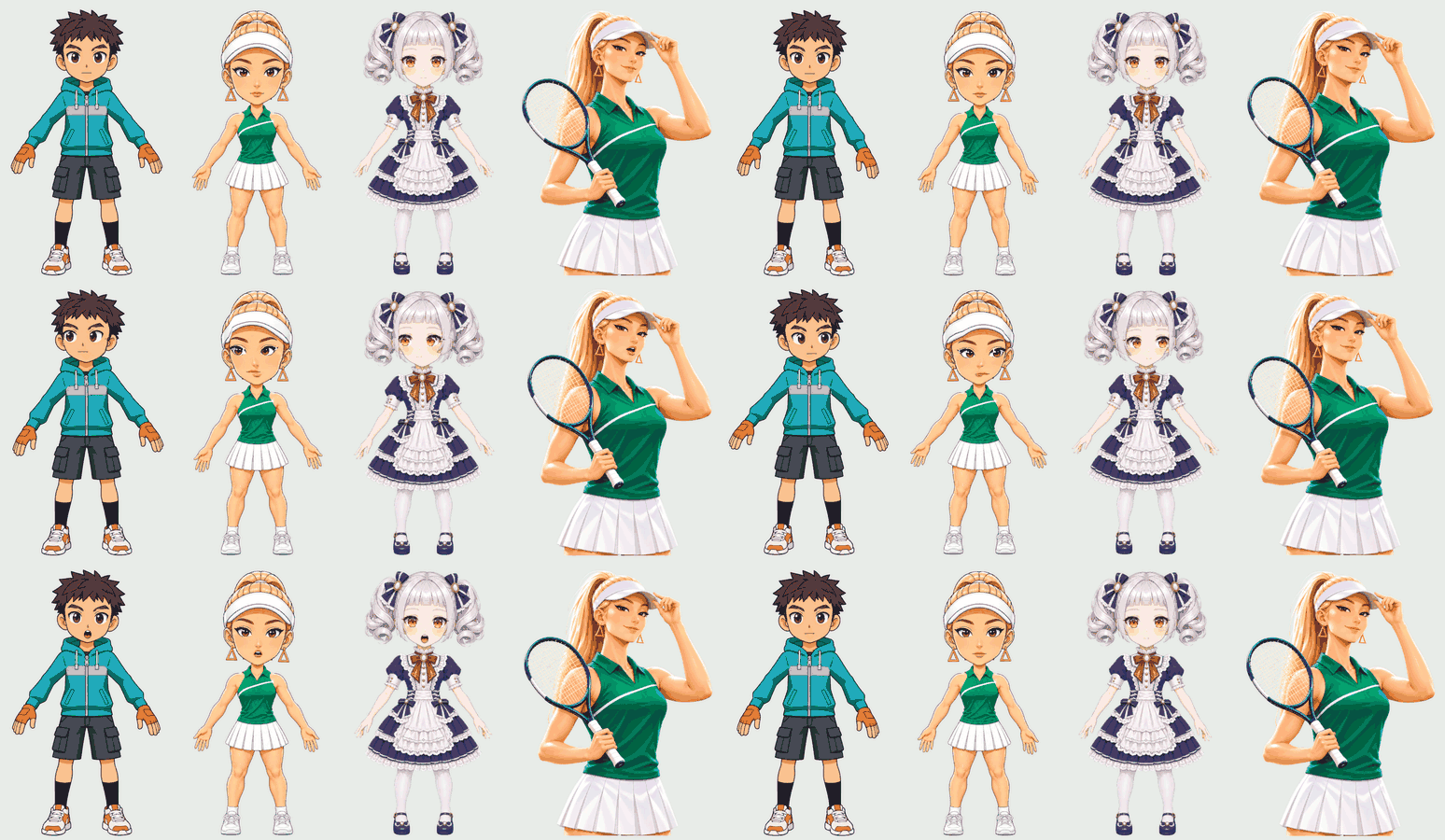
Three layered characters and one standing portrait, each from a single picture, driven by the same face parameters in Unity.
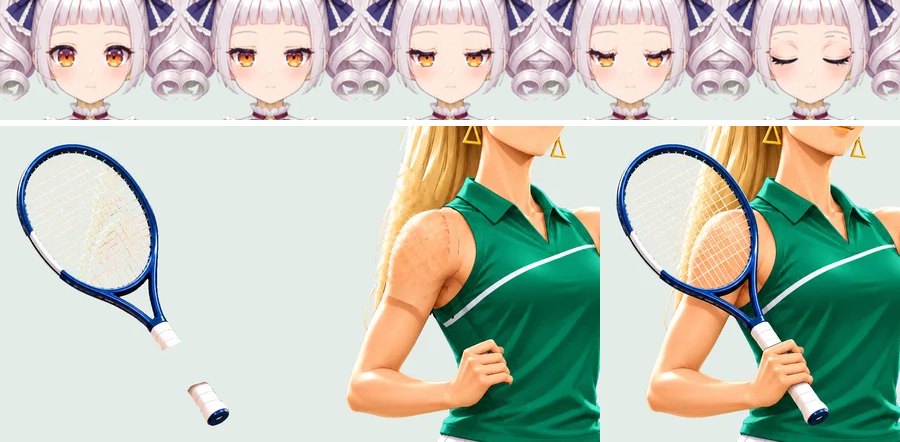
Top: `eyeOpen` from 1 to 0, the lid mesh coming down over one open eye before the drawn closed eye takes over. Bottom: the racket cut out, what it covered painted in, and the two together.
codex-visual →comfyui-asset-generation →unity-2d-animation
FaceDriver2D takes head angle, eye open, gaze and mouth open in Cubism's ranges, with blink, look-at, idle motion and lip sync on top. The upper lid is a layer of its own, a strip of skin and lashes that a bone pulls down over the open eye, so a blink closes smoothly and only its last step is a swapped drawing; a character whose lashes cannot be cut keeps the three-state swap. Eye and mouth layers hold only what they draw, with no ring of skin round them. A picture kept in its own pose becomes a standing portrait: one mesh that breathes and sways, eye and mouth patches, and named parts on top. A held prop is cut out on its own bone with the picture painted in under it, an arm or a ponytail leans on a bone of its own, and a part that cannot be cut cleanly sways inside the picture instead. Every cut is gated: the layers put back must match the picture, and a part turned to the end of its swing must not uncover itself.
Props and a skateboard on the 2D rig
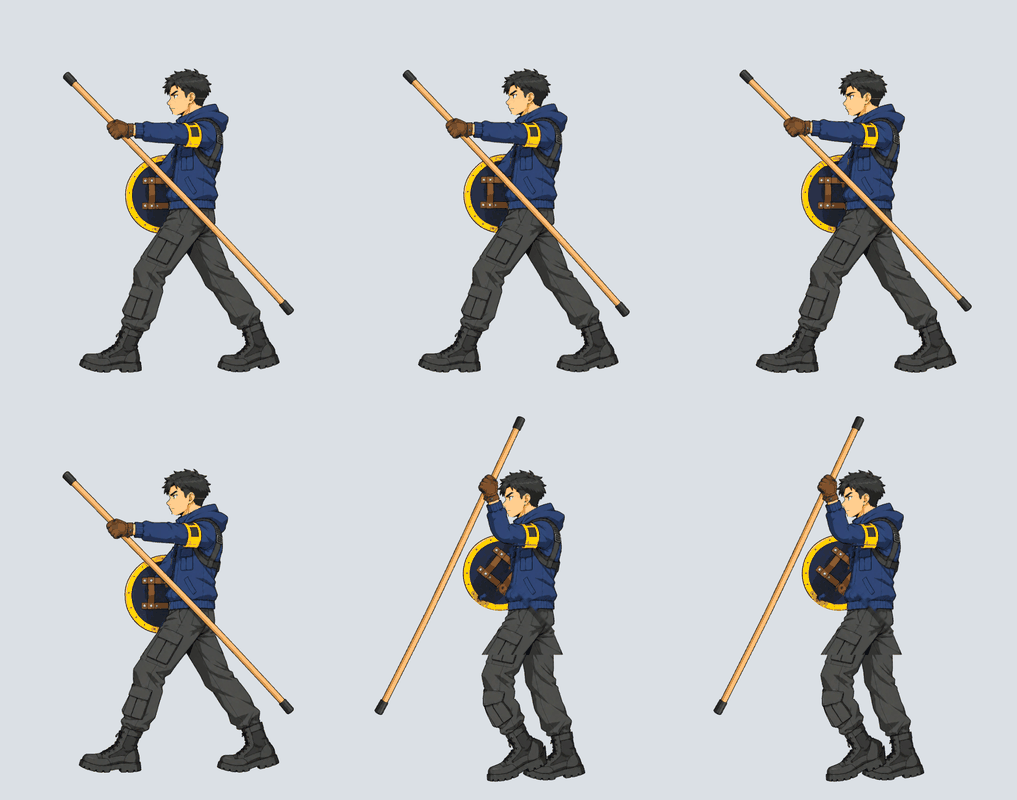
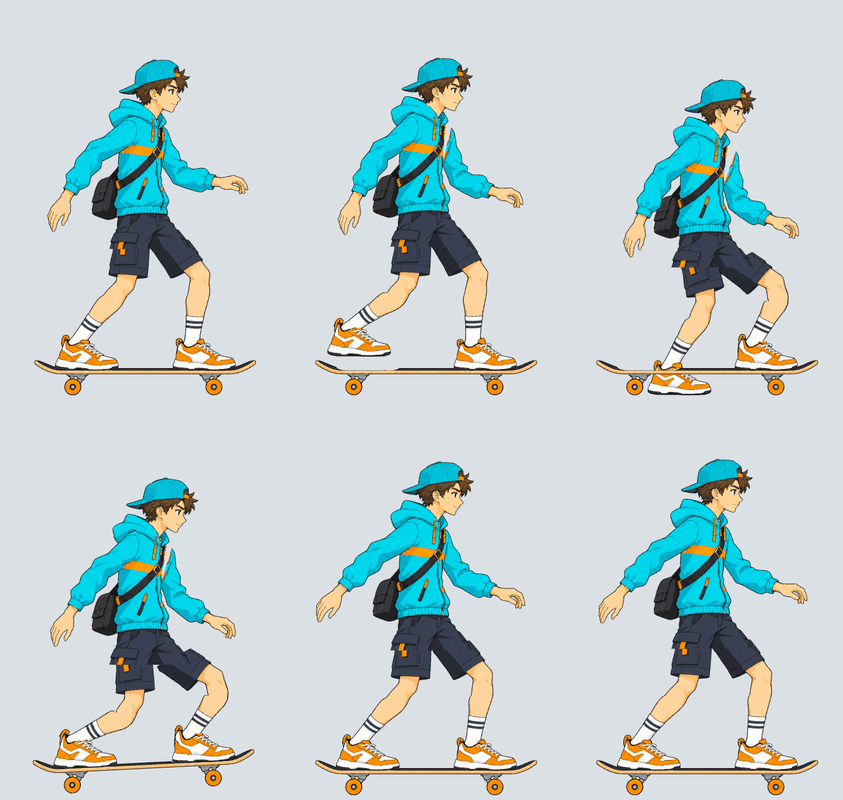
Left: a guard whose pole and shield are layers of their own, riding his hands. Right: a courier whose board has a bone of its own, with leg IK keeping both feet on it through a push and an ollie.
codex-visual →comfyui-asset-generation →unity-2d-animation
Props are named when the drawing is cut. A prop in a hand becomes its own layer on that hand, with
what the arm hides completed from its own shape (a round shield from its fitted ellipse); a board
under both feet gets a bone of its own, and two-bone leg IK keeps the feet on it. The cut is gated
(no prop left with a gap, a board under both soles), and so are the poses in Unity: no foot misses
the board or sinks into the ground.
How it works
flowchart LR
    A["Your request"] --> B["SKILL.md<br/>symptom table"]
    B --> C["reference/<br/>only the part needed"]
    C --> D["scripts/ · resources/ · templates/"]
    D --> E{"Gate<br/>exit code + evidence"}
    E -->|fails| C
    E -->|passes| F["Done, with proof"]
- Lands on the right method from your words. Each skill opens with a table of symptoms in
plain language, and four start-here skills route any gameplay, UI, character or backend request. - Runs code, not advice. 130+ Python scripts, 200+ C# files and 50+ templates you copy into
your project instead of retyping notes. - Proves it. Methods end in a check you can read: a probe snapshot, a journey test, a re-imported FBX,
a device log. - Light on context, and each plugin stands alone. A
SKILL.mdonly routes; depth loads when the
situation needs it. Skills hand off to each other through their Scope sections, andgame-assets
hands engine-neutral files to an engine plugin in aHand-off to an enginesection. Neither
plugin needs the other, and no code crosses from one to the other: the gates forbid it. A few
rigging and motion scripts call scripts in a sibling skill of the same plugin;tools/cross-skill-deps.txtlists them, so install that plugin whole.
Skills
[!TIP]
Not sure where to start? Useunity-gameplayfor any gameplay request,unity-game-uifor any
UI request,game-character-pipelinefor a rigged character made from an image, andunity-live-servicesfor any backend, online or monetisation request.
game-assets
Engine-neutral: the files these skills write (FBX, frames.json, rig and motion data) go to an engine plugin.
| Skill | Use it when |
|---|---|
game-character-pipeline |
Start here for a rigged character from an image: stages S0–S13, each gated |
codex-visual |
2D art through the codex image model, kept on-style by one art bible; a frame set's identity and motion numbers and a pre-review of each review sheet |
comfyui-asset-generation |
Music, SFX, video, 3D models and layered 2D art from your own ComfyUI, one job each |
mesh-texture-paint |
A generated 3D model's dull texture repainted from the concept art, view by view, mesh and UVs kept; how close a mesh is to its concept views |
sprite-from-video |
One character still turned into transparent sprite loops through a generated video |
blender-character-rig |
A rig built by hand in Blender when character-autorig does not fit, its FBX proven by re-import; a generated mesh's hidden inner shell cut off, and a gated low-poly game mesh rebaked from the showcase |
blender-retarget |
Stock clips onto your Blender rig, gated on slide, jitter and pops |
character-autorig |
A humanoid, long coat or chibi included, rigged locally with your own Auto-Rig Pro in one command, repeatable to show how steady the rig is; its optional AI step opens a Blender window |
humanoid-motion |
A move as a clip, solved from a two-camera video straight onto the skeleton |
art-asset-registry |
Which generated asset came from where, and what went stale: one append-only ledger |
unity-dev
Unity 6 development, from the first brief to a build on a phone.
Every stage — terminal & search — the Unity CLI, and finding anything in a project| Skill | Use it when |
|---|---|
unity-cli |
Unity from a terminal, with exit codes that say whether a retry is honest |
unity-search |
"Where is it, what references it?" answered as one Unity Search query |
| Skill | Use it when |
|---|---|
unity-game-brief |
An idea becomes a brief, a locked look, a gameplay preview, one playable interaction |
unity-new-project |
Day-one decisions that are costly to retrofit, plus tests that run without the Editor |
unity-gameplay |
Start here for any gameplay request: it fingerprints the project and routes the work |
| Skill | Use it when |
|---|---|
unity-input |
A jump that goes missing or fires twice; gameplay reads one input struct |
unity-camera |
A camera that jitters, shows outside the level or clips through walls |
unity-2d-controller |
A 2D character that slides down slopes or sticks to walls: one kinematic motor |
unity-3d-controller |
isGrounded flickers or jump height changes with frame rate: one 3D motor |
unity-animation |
An Animator stuck in a state or an attack that plays by itself |
unity-physics-2d |
A 2D collision or trigger that never fires, triaged in Box2D's own vocabulary |
unity-physics-3d |
A collision or trigger that never fires, or a ball your game integrates itself |
unity-play-harness |
Make the game drivable: a one-line probe snapshot and journey tests that assert invariants |
| Skill | Use it when |
|---|---|
unity-2d-level |
A 2D level as data, with seeded generation that checks every pickup is reachable |
unity-2d-grid |
Board logic for tactics and tile puzzles on square, isometric or hex grids |
unity-tilemap |
Tiles that won't connect as you paint: RuleTiles from your sheet, palettes per grid |
unity-2d-rendering |
A sprite drawn behind the wrong one, a Light2D that turns everything black, or a parallax background |
| Skill | Use it when |
|---|---|
unity-3d-level |
A 3D greybox built from a metrics sheet and proven by a walk journey |
unity-lighting |
A bake that did nothing, or a character black beside baked walls, on URP |
unity-navigation |
An agent that won't move or walks through walls: NavMesh, links, transform ownership |
| Skill | Use it when |
|---|---|
unity-interaction |
"Press E to open" that flickers or opens twice: one target, one prompt |
unity-combat |
A swing that hits twice or a shot through the sentry: one hit each |
unity-game-ai |
An enemy that sees through walls or never gives up: perception on a budget |
unity-scene-flow |
Duplicated managers or a corrupted save: a Boot scene and versioned atomic saves |
| Skill | Use it when |
|---|---|
unity-game-ui |
Start here for any UI request: it detects the UI system and routes |
unity-ui-ugui |
A Canvas UI that renders nothing: six checks, then anchors and Layout Groups |
unity-ui-toolkit |
A USS property that silently does nothing, plus UXML, flex layout and binding |
| Skill | Use it when |
|---|---|
unity-3d-models |
A 3D model into the game, at a budget picked under the game camera |
unity-rigged-character |
A rigged FBX that T-poses in Unity: import, Avatar, Animator and gameplay rig |
unity-2d-sprites |
Sprite sheets sliced from script, and frames turned into a playable clip |
unity-2d-animation |
Skeletal 2D characters from a PSB, rigged by script with props and leg IK; skins and equipment swapped at runtime |
unity-2d-pixel-perfect |
Pixel art that renders soft, shimmers as the camera moves or shows seams |
unity-sprite-atlas |
Sprites that should share a draw call, packed into V2 atlases from script |
unity-audio |
Audio memory and CPU cut without the game sounding worse; it reports before reimporting |
unity-localization |
Shipping in more than one language, including the CJK font pipeline where it breaks |
| Skill | Use it when |
|---|---|
unity-game-feel |
A hit with no impact: one feedback row per gameplay event, with a budget |
unity-render-urp |
Post-processing that will not appear, and Render Graph features reviewed before shipping |
unity-urp-migration |
Built-in to URP in five gated phases, or a half-moved project diagnosed |
unity-profiling |
What a slow or uneven frame is doing, as 90-frame windows you compare |
unity-scene-optimisation |
The fix once a counter names the cost, read back on the same counter |
unity-debug |
Verifying a change you cannot see — after proving the harness tells the truth |
| Skill | Use it when |
|---|---|
unity-device-testing |
Acceptance on a real phone: an agent drives, a person does the physical step |
unity-android-release |
A signed APK or AAB, proven by reading the artifact back |
unity-ios-build |
A Unity project to a running iPhone app, without opening Xcode |
unity-web-release |
A WebGL or WebGPU build small and fast enough that people wait for it |
| Skill | Use it when |
|---|---|
unity-live-services |
Start here for backend, online and monetisation: the offline path, multiplayer topology, the SDK-to-store seam |
unity-ugs |
A service that throws because nothing initialised: Gaming Services in the right order |
unity-iap |
Content granted twice or not at all: In-App Purchasing v5, call by call |
unity-ads-levelplay |
No ads, or a build broken by ad dependencies: LevelPlay, consent before init |
unity-multiplayer-services |
How players get into a game together, from join codes to host migration |
unity-vivox |
A voice join that succeeds while nobody hears: Vivox chat, sign-in to push-to-talk |
Contributing
Tooling, checks and repo rules: .github/CONTRIBUTING.md. What each release contains: CHANGELOG.md.
Licence
MIT — see LICENSE. Code ported from other projects keeps its own licence: THIRD_PARTY_NOTICES.md.
Reviews (0)
Sign in to leave a review.
Leave a reviewNo results found