Helix
Health Warn
- No license — Repository has no license file
- Description — Repository has a description
- Active repo — Last push 0 days ago
- Low visibility — Only 5 GitHub stars
Code Fail
- os.homedir — User home directory access in scripts/mcp-handshake.mjs
- process.env — Environment variable access in scripts/mcp-handshake.mjs
- rimraf — Recursive directory removal in skills-server/package-lock.json
- rimraf — Recursive directory removal in skills-server/package.json
- process.env — Environment variable access in skills-server/src/http.ts
- os.homedir — User home directory access in skills-server/src/plugin_manager.ts
- process.env — Environment variable access in skills-server/src/plugin_manager.ts
- network request — Outbound network request in skills-server/src/plugin_manager.ts
- network request — Outbound network request in skills-server/src/tools.ts
Permissions Pass
- Permissions — No dangerous permissions requested
No AI report is available for this listing yet.
HELIX Desktop — Local-first, 100% private AI chat shell. Run GGUF models on your hardware with native llama.cpp, Vulkan GPU acceleration, MCP plugin system, and HuggingFace model search. Tauri + Rust + Vue 3. Zero telemetry.
HELIX Desktop (v0.6.8)
Local-first, 100% private desktop AI chat shell built with Tauri 2, Rust, Vue 3, and native llama.cpp engine.
HELIX provides a standalone, private desktop chat environment. Run local GGUF models directly on your hardware without needing external cloud services, API keys, or third-party background daemons.
[!NOTE]
Release Notice: HELIX Desktop v0.6.8 is the latest stable release. If you encounter any bugs or feature requests, please report them on the GitHub Issues Page.
⚡ What's New in v0.6.8
🛡️ Process Lifecycle & OS Error 32 Resolution:
- Bound
llama-server.exeto TauriRunEvent::Exitlifecycle hooks so background engine processes exit cleanly when closing HELIX. - Implemented orphan process cleanup (
kill_orphan_llama_servers) and a handle-release delay on Windows to eliminate file lock errors (os error 32) during app restarts. - Hardened MCP bridge subprocess stream extractions against backend thread panics.
- Bound
🎨 Model Manager & HuggingFace UI Enhancements:
- Compacted card layout with dynamic grid column sizing (
minmax(185px, 1fr)) preventing card bleeding off the right border. - Fixed action button clipping on HuggingFace repository rows (
VIEW FILES ▼/HIDE FILES ▲). - Added horizontal scroll support (
overflow-x: auto) and word-wrapping (overflow-wrap: anywhere) so long GGUF model names and quant tags remain fully visible.
- Compacted card layout with dynamic grid column sizing (
💻 Professional Code & File Creation:
- Auto-generated language tags (
PYTHON,TYPESCRIPT,RUST,HTML,CSS,VUE,JSON,POWERSHELL,SQL,BASH) and file extension suggestions. - One-click Copy button on code blocks with animated feedback (
Copied ✓). - One-click Download / Save File button prompting native Windows File Save Dialog via Tauri (
save_text_file).
- Auto-generated language tags (
🔌 In-Chat
/mcpSlash Commands & Composer Menu:/mcp list: Live status overview of all configured MCP plugins, connection state (🟢 Connected / 🔴 Offline), and endpoints./mcp enable <id>&/mcp disable <id>: Activate or deactivate plugins directly inside chat prompts./mcp open: Instantly open the Plugin Manager modal.
🌐 Dual Stdio & SSE MCP Plugin Support:
- Command-based (
stdio) and URL-based (SSE) MCP plugin forms with live toggle tabs in the Plugin Manager. - Real-time Connected / Offline status badges linked directly to active sidecar processes.
- Command-based (
⚡ Standalone Native
llama-serverEngine:- Built-in
llama.cppintegration with Vulkan GPU acceleration and FlashAttention (-fa auto) for fast prompt processing.
- Built-in
📦 HuggingFace GGUF Search & Parallel Chunk Downloads:
- Direct search for open-source GGUF models on HuggingFace.
- Multi-threaded 8-stream parallel downloads with resume support and accurate file size metadata.
📦 Latest Stable Release
- Current Stable: v0.6.8
- Windows Installer (NSIS):
HELIX-Setup.exe - Windows Installer (MSI):
HELIX_0.6.8_x64_en-US.msi - Checksums:
SHA256SUMS.txt
📥 Installation
Download & Install
Download the latest installer (HELIX-Setup.exe or HELIX_0.6.8_x64_en-US.msi) directly from the GitHub Releases page.
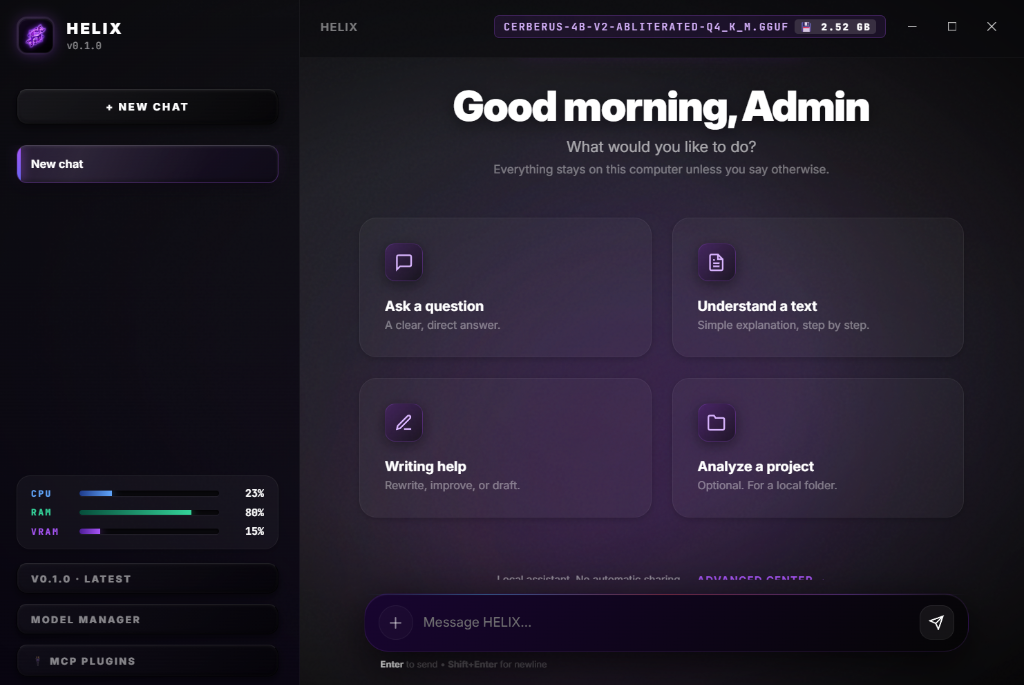
🖼️ Interface Showcase
Chat Dashboard
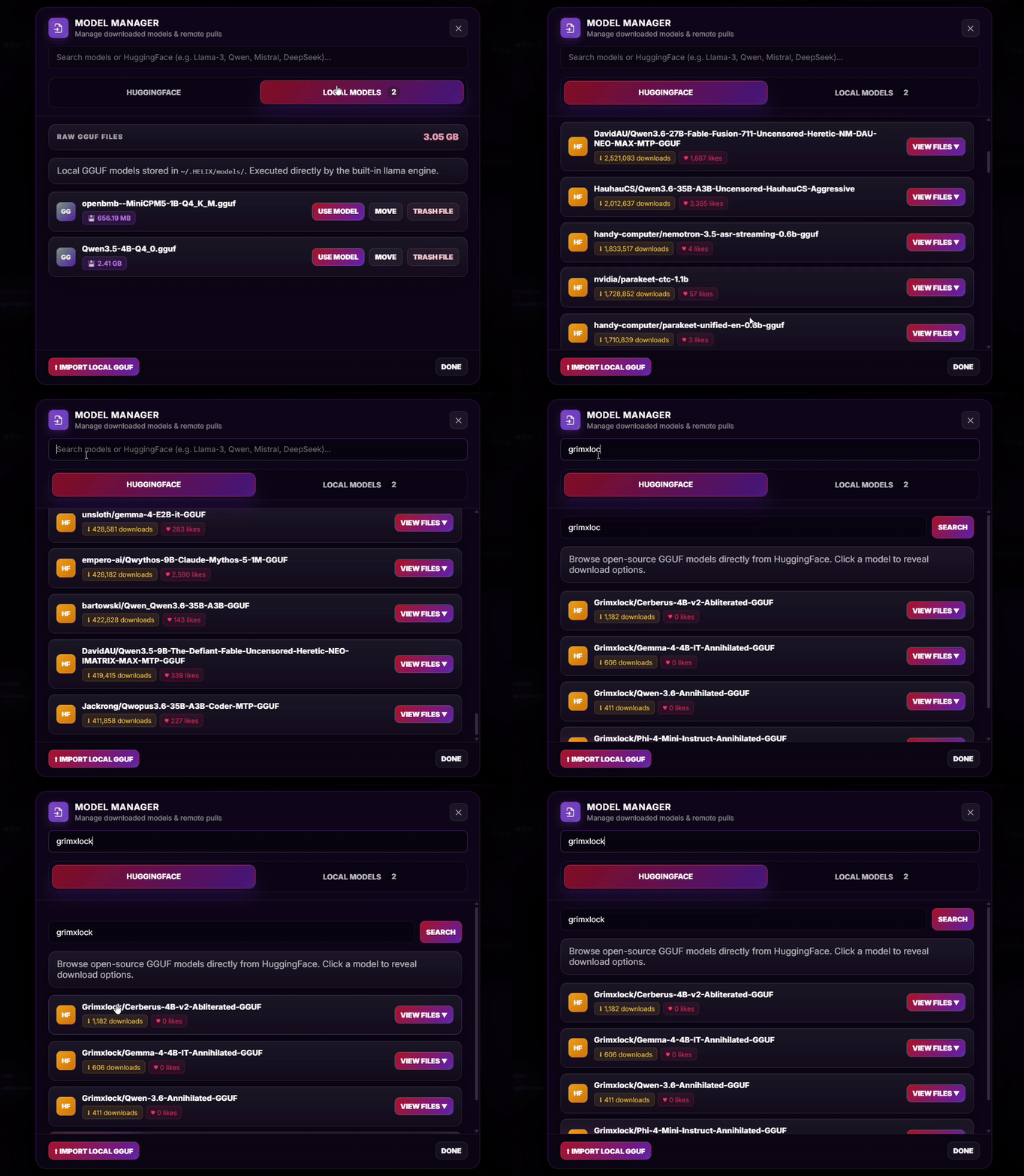
Model Manager & HuggingFace Pulls
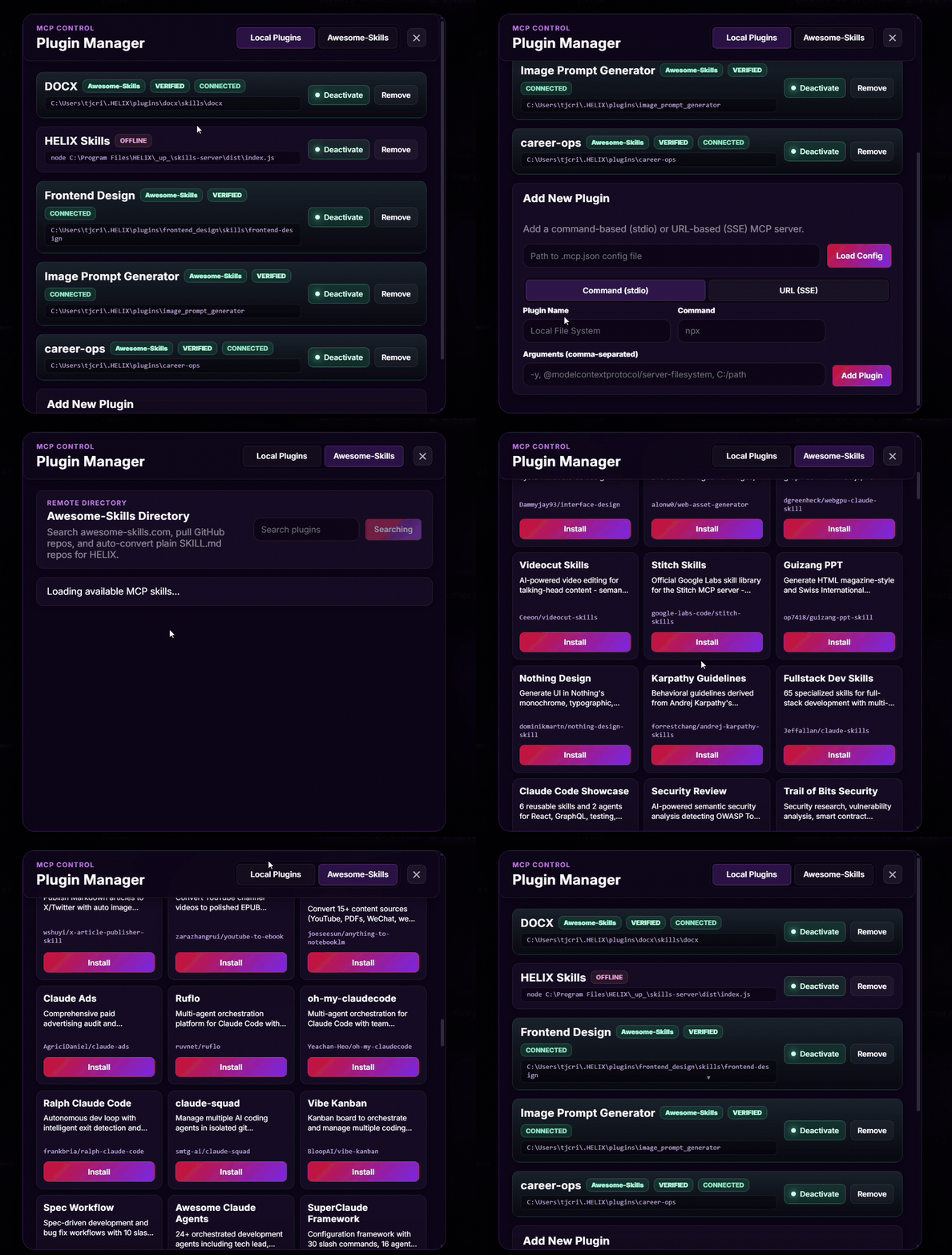
MCP Plugin Manager
✨ Core Features
🖥️ 100% Local & Private
- Native desktop shell powered by Rust & Tauri 2.
- Direct execution via built-in
llama-serverengine. - Hardware monitoring displaying real-time CPU, RAM, and VRAM usage.
- All prompts, chats, and models stay 100% on your machine.
📦 GGUF Model Management
- Browse & search HuggingFace open-source GGUF models.
- Parallel multi-threaded chunked downloads with resume support.
- One-click import for custom local
.gguffiles. - Active model switching and real-time disk usage analytics.
🔌 Model Context Protocol (MCP)
- Built-in MCP Plugin Manager supporting stdio binaries & SSE URLs.
- In-chat
/mcpslash commands for instant plugin management. - Connect filesystem tools, Web APIs, and custom agent skills.
- Automatic tool calling loop with reasoning trace.
🚀 How to Activate & Manage MCP Plugins
Activating Built-in HELIX Skills:
- Open the Plugin Manager by clicking MCP Plugins in the sidebar or entering
/mcp openin chat. - Locate the pre-configured HELIX Skills card (bundled MCP server providing local file manipulation and tool execution).
- Click Activate (toggle power button). The status badge will turn 🟢 Connected.
- Open the Plugin Manager by clicking MCP Plugins in the sidebar or entering
In-Chat
/mcpSlash Commands:/mcp list: View all configured plugins and connection status./mcp enable <name|id>: Activate an MCP plugin directly in chat (e.g.,/mcp enable helix-skills)./mcp disable <name|id>: Deactivate an active MCP plugin./mcp open: Instantly open the MCP Plugin Manager UI.
Adding Custom MCP Servers:
- Command (stdio): Add local executable/script servers (e.g.
npx,python) with custom CLI arguments. - URL (SSE): Connect to remote Server-Sent Events endpoints (e.g.,
https://example.com/mcp/sse). - Config Import: Load existing configuration files by providing the path to a
.mcp.jsonfile. - Awesome-Skills Directory: Search and install community skills from
awesome-skills.comunder the Awesome-Skills tab.
- Command (stdio): Add local executable/script servers (e.g.
💻 Development
Prerequisites
- Node.js (v18+)
- Rust (v1.77+)
- Tauri CLI (
npm install -g @tauri-apps/cli)
Run Locally
# Install dependencies
npm install

# Launch app in development mode
npm run tauri:dev
Production Build
# Build desktop installer executable
npm run tauri:build
🛠️ Technology Stack
- Desktop Framework: Tauri 2 (Rust)
- Frontend Logic: Vue 3, Vite, TypeScript
- Local Engine:
llama-server(Vulkan GPU offload + FlashAttention) - Design System: Windows 11 Fluent Glassmorphism (CSS Tokens)
- Distribution: GitHub Releases & Actions Automation
📜 License & Releases
Stable releases and changelogs are published automatically at:
github.com/tjcrims0nx/Helix/releases
Reviews (0)
Sign in to leave a review.
Leave a reviewNo results found