rn-launch-harness
Health Warn
- License — License: MIT
- Description — Repository has a description
- Active repo — Last push 0 days ago
- Low visibility — Only 5 GitHub stars
Code Warn
- process.env — Environment variable access in templates/publish.js
- fs module — File system access in templates/publish.js
Permissions Pass
- Permissions — No dangerous permissions requested
This is a Claude Code plugin that automates the entire lifecycle of a React Native application. It handles everything from initial market research and project scaffolding to automating the final builds and app store submissions.
Security Assessment
Overall risk: Medium. The tool interacts heavily with your local environment and external services. Code scans reveal file system access and environment variable usage within its publishing templates. While this is expected for a tool designed to compile code, generate screenshots, and deploy apps to the Apple App Store and Google Play, it inherently requires handling sensitive API credentials. The automated nature of these shell executions and network requests means a single misconfigured environment variable could expose critical developer accounts. No hardcoded secrets were detected.
Quality Assessment
The project is very new and currently has extremely low visibility, evidenced by only 5 GitHub stars. However, it is actively maintained, with recent updates pushed as recently as today. The codebase is covered by the permissive and standard MIT license. Due to its extremely low community adoption, it should be considered experimental, meaning bugs or undocumented behaviors are highly possible in production workflows.
Verdict
Use with caution — it is a newly released, low-visibility automation tool that requires you to expose highly sensitive developer API keys and app store credentials to its automated workflows.
Claude Code plugin that automates the entire React Native app lifecycle — from market research to App Store & Google Play submission. Harness engineering with Generator-Evaluator separation, file-based handoff, and contract negotiation.
RN Launch Harness
A Claude Code plugin that automates the entire React Native mobile app lifecycle — from market research to App Store & Google Play submission.
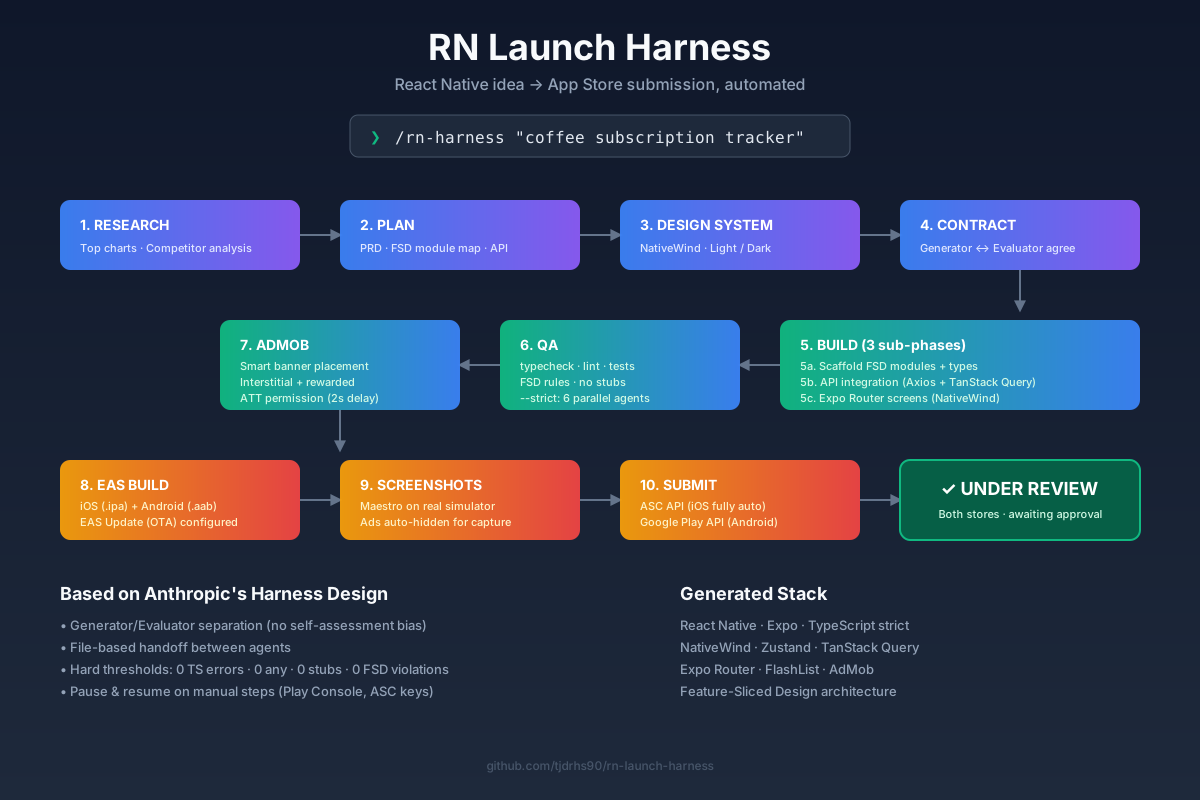
One command takes you from idea to store review. Market research, planning, design system, development, AdMob integration, EAS build, store screenshots, and submission — all automated.
No idea yet? Run without arguments — the harness researches App Store/Google Play top charts and recommends solo-developer-friendly apps that need no backend.
Inspired by Anthropic's Harness Design for Long-Running Apps.
flowchart LR
    A["💡 Idea<br/>/rn-harness 'app'"] --> B[🔍 Research]
    B --> C[📋 Plan<br/>PRD + FSD]
    C --> D[🎨 Design System<br/>NativeWind]
    D --> E[🤝 Contract<br/>Gen↔Eval]
    E --> F[🛠 Build<br/>3 sub-phases]
    F --> G{QA}
    G -->|FAIL| F
    G -->|PASS| H[💰 AdMob]
    H --> I[📦 EAS Build<br/>iOS + Android]
    I --> J[📸 Screenshots<br/>Maestro]
    J --> K[🚀 Submit<br/>ASC + Play API]
    K --> L([✓ Under Review])

    style A fill:#1e293b,color:#fff,stroke:#3b82f6
    style L fill:#065f46,color:#fff,stroke:#10b981
    style G fill:#f59e0b,color:#fff,stroke:#f59e0b
Install
claude plugins marketplace add tjdrhs90/rn-launch-harness
claude plugins install rn-launch-harness@rn-launch-harness
Quick Start
# With an idea
/rn-harness "daily coffee subscription tracker"

# No idea — discover from store top charts
/rn-harness

# With a reference site/image
/rn-harness "calendar app" --ref https://cal.com

# Check progress
/rn-harness --status

# Resume after rate limit
/rn-harness --resume
Pipeline
Default Mode (~$30-60, Claude Max friendly)
/rn-harness "app idea"
    |
    v
 Phase 1: Market Research → competitor analysis, monetization
 Phase 2: Planning → PRD, user stories, FSD module map
 Phase 3: Design System → NativeWind theme, components
 Phase 4: Contract → 1-pass criteria (no multi-round negotiation)
 Phase 5: Build (3 sub-phases)
    |  5a: Feature/Entity scaffolding → Quick QA
    |  5b: API integration → Quick QA
    |  5c: Screen/UI development → Quick QA
 Phase 6: QA — Functional only (typecheck, lint, FSD, contract)
    |  FAIL → fix → re-evaluate (max 3 rounds)
 Phase 7: AdMob → smart placement + code injection
 Phase 8: EAS Build → iOS + Android
 Phase 9: Screenshots → Maestro + metadata
 Phase 10: Store Submission → ASC API + Google Play API
--strict Mode (~$100-160, thorough)
/rn-harness "app idea" --strict
    |
 + Phase 2.5: Spec Planning → file-level task checklists
 + Phase 4: Contract → multi-round Generator↔Evaluator negotiation
 + Phase 6: 3-Phase Progressive QA
    |  6.1 Functional — Does it WORK?
    |  6.2 Quality — Is it GOOD? (design 4-axis scoring)
    |  6.3 Edge Cases — Can it SURVIVE? (6 Agent Team + simulator)
 + Phase 11: Retrospective → Anthropic principles evaluation
Requirements
- Claude Code (latest)
- Node.js 20+
- EAS CLI (
npm install -g eas-cli) - Maestro (screenshots, optional) —
curl -Ls "https://get.maestro.mobile.dev" | bash - gh CLI (GitHub integration)
Setup — Keys & Environment Variables
Project Directory Structure
my-app/
├── credentials/              # Key files (NOT committed to git)
│   ├── asc-api-key.p8        # App Store Connect API Key
│   └── google-play-sa.json   # Google Play Service Account
├── .env                      # Environment variables (NOT committed)
├── .env.example              # Template (committed)
└── .gitignore                # Excludes credentials/, .env
Environment Variables (.env)
# ── App Store Connect API (iOS submission) ──
ASC_KEY_ID=XXXXXXXXXX
ASC_ISSUER_ID=xxxxxxxx-xxxx-xxxx-xxxx-xxxxxxxxxxxx
ASC_PRIVATE_KEY_PATH=./credentials/asc-api-key.p8

# ── Google Play Developer API (Android submission) ──
GOOGLE_PLAY_SA_JSON=./credentials/google-play-sa.json

# ── AdMob ──
ADMOB_IOS_APP_ID=ca-app-pub-XXXX~YYYY
ADMOB_ANDROID_APP_ID=ca-app-pub-XXXX~ZZZZ

# ── AI Image Generation (optional, for store assets) ──
GEMINI_API_KEY=

# ── EAS (optional, for CI) ──
EXPO_TOKEN=
Key Provisioning Guide
App Store Connect API Key (.p8)
- Go to App Store Connect
- Users and Access → Integrations → App Store Connect API
- Team Keys tab → Generate API Key
- Set name, role: Admin or App Manager
- Download
.p8file → save tocredentials/asc-api-key.p8 - Record Key ID and Issuer ID in
.env
The .p8 file can only be downloaded once. If lost, you must generate a new key.
Google Play Service Account (.json)
- Go to Google Play Console
- Settings → API access
- Create a service account (or via Google Cloud Console)
- Role: Release Manager
- Generate a JSON key → save to
credentials/google-play-sa.json
Google Gemini API Key (optional — AI image generation)
- Go to Google AI Studio
- Create API Key
- Copy to
.envGEMINI_API_KEY - Used for app icon, Feature Graphic, promotional images
AdMob App ID
- Go to AdMob
- Apps → Add App (iOS + Android separately)
- Record App ID (
ca-app-pub-XXXX~YYYY) in.env - Ad units are created manually in Phase 6 (guided by the pipeline)
Required vs Optional
| Item | Required? | Without it? |
|---|---|---|
| ASC API Key (.p8) | Phase 9 | No auto iOS submission → manual EAS Submit |
| Google Play SA (.json) | Phase 9 | No Android API calls → manual Play Console |
| AdMob App ID | Phase 6 | Skip with --skip-admob |
| Gemini API Key | Optional | Prepare images manually (Figma, Canva, etc.) |
| EAS Token | Optional (CI) | Use eas login interactive login instead |
Phases 1–5 (research through QA) work without any keys. You can develop first, add keys later.
Architecture
Key Design Principles
| Principle | Description |
|---|---|
| Generator-Evaluator Separation | Separate build agent from evaluation agent to eliminate self-assessment bias |
| Agent Subprocess per Phase | Each phase runs as an isolated agent (context reset) |
| File-based Handoff | Inter-agent communication via docs/harness/ files |
| Hard Threshold | Subjective judgments converted to concrete PASS/FAIL criteria |
| Contract Negotiation | Generator↔Evaluator agree on completion criteria before any code is written |
| Pause & Resume | Pipeline pauses for manual steps, resumes after user confirmation |
Hard Gates
| Item | Threshold |
|---|---|
| TypeScript errors | 0 |
| ESLint errors | 0 |
any type usage |
0 |
| FSD layer violations | 0 |
| Missing SafeAreaView | 0 |
| Stubs/placeholders | 0 |
| Design 4-axis score | < 7/10 = FAIL |
Tech Stack
| Category | Technology |
|---|---|
| Framework | React Native + Expo |
| Language | TypeScript (strict) |
| Routing | Expo Router (file-based) |
| Styling | NativeWind (Tailwind CSS) |
| State | Zustand + TanStack Query |
| Forms | React Hook Form + Zod |
| Lists | FlashList |
| Ads | react-native-google-mobile-ads |
| ATT | expo-tracking-transparency |
| Build | EAS Build |
| Screenshots | Maestro |
| iOS Submit | App Store Connect API |
| Android Submit | Google Play Developer API |
FSD Architecture
app (routing) → widgets → features → entities → shared
Upper layers may only reference lower layers. No cross-layer imports at the same level.
Pipeline Output
docs/harness/
├── specs/           # Market research results
├── plans/           # PRD + design system
├── contract.md      # Generator↔Evaluator agreed criteria
├── handoff/         # Generator → Evaluator handoff per round
├── feedback/        # Evaluator feedback per round
├── store-assets/    # Store screenshots + metadata
├── screenshots/     # QA screenshots
├── references/      # Reference materials
├── config.md        # Pipeline configuration
├── state.md         # Pipeline state
├── build-log.md     # Round results
└── pipeline-log.md  # Event log
EAS Build Notes
Android GRADLE_OPTS (Required)
Android local builds frequently fail with OutOfMemoryError. The harness automatically sets this in eas.json:
{
  "build": {
    "production": {
      "env": {
        "GRADLE_OPTS": "-Dorg.gradle.jvmargs=-Xmx4g -XX:MaxMetaspaceSize=1g"
      }
    }
  }
}
Adjust -Xmx4g down to -Xmx2g if your machine has less than 8GB RAM.
EAS Update (OTA)
The harness configures EAS Update automatically. After store release, you can push JS-only fixes without store re-submission:
eas update --branch production --message "Fix: button color"
- No store review needed for JS/asset changes
- Native code changes still require a new build + store submission
- Configured with
runtimeVersion.policy: "appVersion"for safety
Common Build Failures
| Error | Platform | Fix |
|---|---|---|
OutOfMemoryError |
Android | Increase GRADLE_OPTS -Xmx value |
Metaspace |
Android | Increase -XX:MaxMetaspaceSize |
SDK location not found |
Android | Set ANDROID_HOME env var |
No signing certificate |
iOS | Use cloud build (EAS manages provisioning) |
Pod install failed |
iOS | cd ios && pod install --repo-update |
Store Submission Details
iOS (Fully Automated)
End-to-end automation via App Store Connect API:
- Register Bundle ID → Create app record
- Set metadata (Korean default locale)
- Upload screenshots
- Upload build via EAS Submit
- Link build → Submit for review
Auto-configured:
- Orientation: Portrait only
- iPad support: Removed
- Encryption: No (
ITSAppUsesNonExemptEncryption) - ATT permission request (for AdMob, with 2s delay)
- Accessibility Bundle Name auto-generated
Android (Partially Manual)
Manual steps required in Play Console:
- Create app
- IARC content rating questionnaire
- Data safety section
- Target audience + ads declaration
After manual steps, API automated:
- Store listing update
- AAB upload
- Track release
The pipeline pauses and guides you through manual steps, then resumes automatically.
AdMob (Manual Creation → Auto Integration)
AdMob API does not support ad unit creation:
- Pipeline lists required ad formats/placements
- User creates ad units manually in AdMob console
- Enter Ad Unit IDs → automatically injected into code
skipuses Google test ad IDs for development, replace before release
Skills Reference
| Skill | Type | Description |
|---|---|---|
/rn-harness |
user-invoked | Start pipeline / resume / status |
rn-harness-research |
role | Market research + idea discovery |
rn-harness-plan |
role | PRD generation |
rn-harness-spec |
role | Task breakdown into file-level checklists |
rn-harness-design |
role | Design system |
rn-harness-contract |
role | Completion criteria negotiation |
rn-harness-generator |
role | Build app (3 sub-phases: scaffold → API → UI) |
rn-harness-evaluator |
role | 3-phase QA (functional → quality → edge cases) |
rn-harness-admob |
role | Smart AdMob ad placement |
rn-harness-build |
role | EAS Build |
rn-harness-screenshot |
role | Maestro screenshots |
rn-harness-submit |
role | App Store + Google Play submission |
rn-harness-retro |
user-invoked | Pipeline retrospective (Anthropic principles) |
rn-harness-status |
utility | Pipeline status |
rn-harness-resume |
utility | Pipeline resume |
Configuration
Collected at pipeline start → saved to docs/harness/config.md:
app_idea: "coffee subscription app"
default_language: ko
bundle_id: com.company.appname    # Same for iOS/Android

developer:
  company_name: company
  email: [email protected]
  privacy_url: https://example.com/privacy
  homepage_url: https://example.com
  copyright: "Copyright 2026. Name all rights reserved."

ios_review:
  first_name: First
  last_name: Last
  phone: "+821012345678"

admob:
  enabled: true
  ios_app_id: ""
  android_app_id: ""
  ad_units: []
Arguments
/rn-harness "app description"      # New pipeline (default mode)
/rn-harness                         # Idea discovery mode
/rn-harness "app" --strict          # Full 3-phase QA + Agent Team
/rn-harness "app" --with-spec       # Enable spec task checklists
/rn-harness --resume                # Resume paused pipeline
/rn-harness --status                # Check status
/rn-harness --status --verbose      # Detailed status
/rn-harness --rounds 5              # Max QA rounds (default: 3)
/rn-harness --ref https://...       # Reference site
/rn-harness --ref ./mockup.png      # Reference image
/rn-harness --skip-research         # Skip market research
/rn-harness --skip-admob            # Skip AdMob
Auto-Resume
On rate limit:
hooks/stop-failure-handler.shdetects the errorstate.md→paused- macOS notification sent
- Auto-resume scheduled in 5 minutes
Credits
- Anthropic's Harness Engineering — Generator-Evaluator separation, file-based handoff, contract negotiation, hard thresholds
- super-hype-harness — Web app harness plugin architecture
- react-native-fsd-agent-template — FSD architecture, mobile agent design
License
MIT
Reviews (0)
Sign in to leave a review.
Leave a reviewNo results found