ant
Health Warn
- License — License: NOASSERTION
- Description — Repository has a description
- Active repo — Last push 0 days ago
- Low visibility — Only 5 GitHub stars
Code Warn
- process.env — Environment variable access in .github/workflows/ci.yml
- fs module — File system access in .github/workflows/ci.yml
Permissions Pass
- Permissions — No dangerous permissions requested
No AI report is available for this listing yet.
Self-hosted AI engineering platform — PRD → design → code → verification as a state machine. Declared, auditable context per job; bring your own LLM key.

Your agent's context is a declared list, not a search.
The same runtime builds your product — PRD → design → code, every code job verifying itself — and runs your process, on work agents you define in files and put on a schedule.
Self-hosted · Bring your own LLM key · Apache-2.0





One directive → decomposed tasks running in parallel, each writing a real file at a real path — read it, diff it, argue with it. Not just a commit.
⚠️ Status: pre-alpha, solo-developed. It works end-to-end, but the public
API and file layout may still move between releases, and building this
much breadth alone means some surfaces are thinner than others — see
Maturity for an honest per-feature breakdown. Issues and PRs
are welcome; Contributing says where help lands best.
Why Ant?
Most agent tools assemble the model's context by searching your files at run
time — whatever the search happens to find is what the model reads. So every
run reads slightly different context, costs a slightly different amount, and
fails in ways you can't reproduce.
Ant is built on the opposite premise: context is declared, not discovered.
- You see what enters the prompt, before the job runs. Every job executes
against a resolved set of artifacts — the PRD and system design handed to a
code job, the documents handed to a work agent — and a binding runtime rule
forbids wholesale-walking the project into that set. Anything the agent
explores beyond it goes through logged tool calls under hard token budgets. - Your chat is not the model's context. The UI transcript and the LLM
context are separate files by construction. A job receives a bounded
distillation of prior work (4–12k tokens) — never the scrollback — and
constraints you state in chat are carried forward verbatim in a ledger
instead of being re-summarized until they disappear. - Every stage is a durable file; every cost is itemized. The same declared
inputs produce the same prompt. Outputs land at real paths you can read,
diff, and revise, and every job ends with a per-model token / cost /
cache-hit breakdown.
Two wings, one runtime
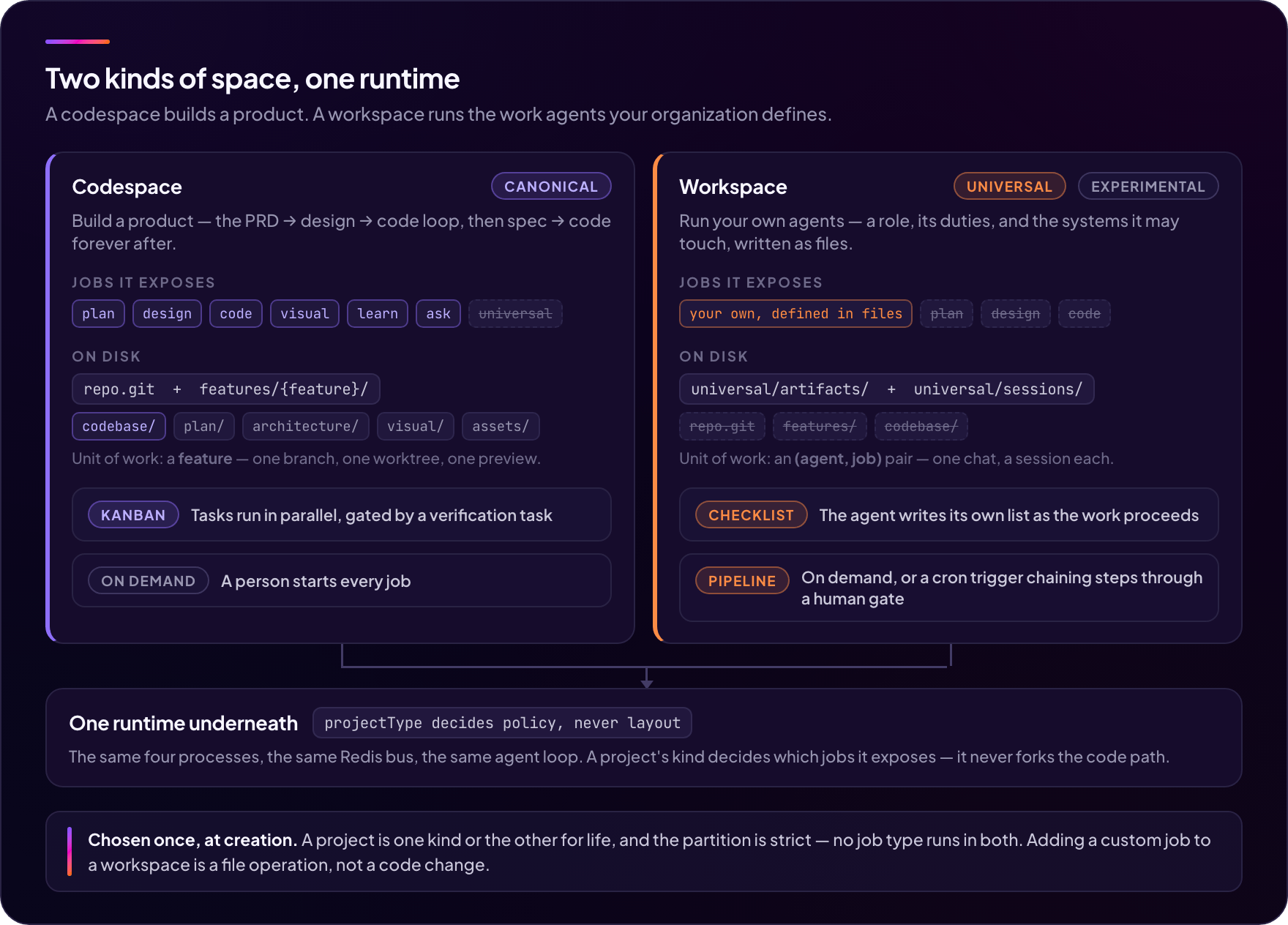
Ant runs two kinds of project, and they are not two products. A codespace
builds software: a PRD becomes a system design, a UI design, and code — each
stage a durable file, every code job gated by its own verification task. A
workspace runs your organization's work: you define an agent and its duties
in files, connect the systems it may reach over MCP, and run it on demand or on
a cron schedule.
Both wings sit on the same four processes, the same Redis bus, the same agent
loop, the same Handlebars prompt surface, and the same encrypted credential
store. That is the whole point: the thing that builds your product and the thing
that runs your process are one install, one set of keys, and one audit trail —
not two tools you have to keep in sync.
| Codespace | Workspace (experimental) | |
|---|---|---|
| You build | a product | your organization's work agents |
| Jobs it exposes | plan design code visual learn ask |
your own, defined in files |
| Unit of work | a feature — branch + worktree | an (agent, job) pair |
| Progress surface | Kanban tasks, gated by a verification task | a checklist the agent writes as it works |
| Runs when | you start a job | you start a job, or a pipeline fires on cron |
| Git, live preview, browser IDE | yes | no — a workspace has no codebase |
| On disk | repo.git + features/{feature}/… |
universal/{artifacts,sessions}/ |
The kind is chosen at creation and fixed for the project's life; it is stored asprojectType in config.json. The partition is strict in both directions —
there is no job type that runs in both kinds — which is why it is a creation-time
decision rather than a toggle.
What the flag is not is a fork: projectType decides which jobs a project
exposes, and never what the runtime does or how the disk is laid out.
Further down: the build loop for the
codespace, the work loop for the workspace, and
Maturity for how far each one honestly is. Read more:
docs/concepts/spaces.md.
The build loop and the iteration loop
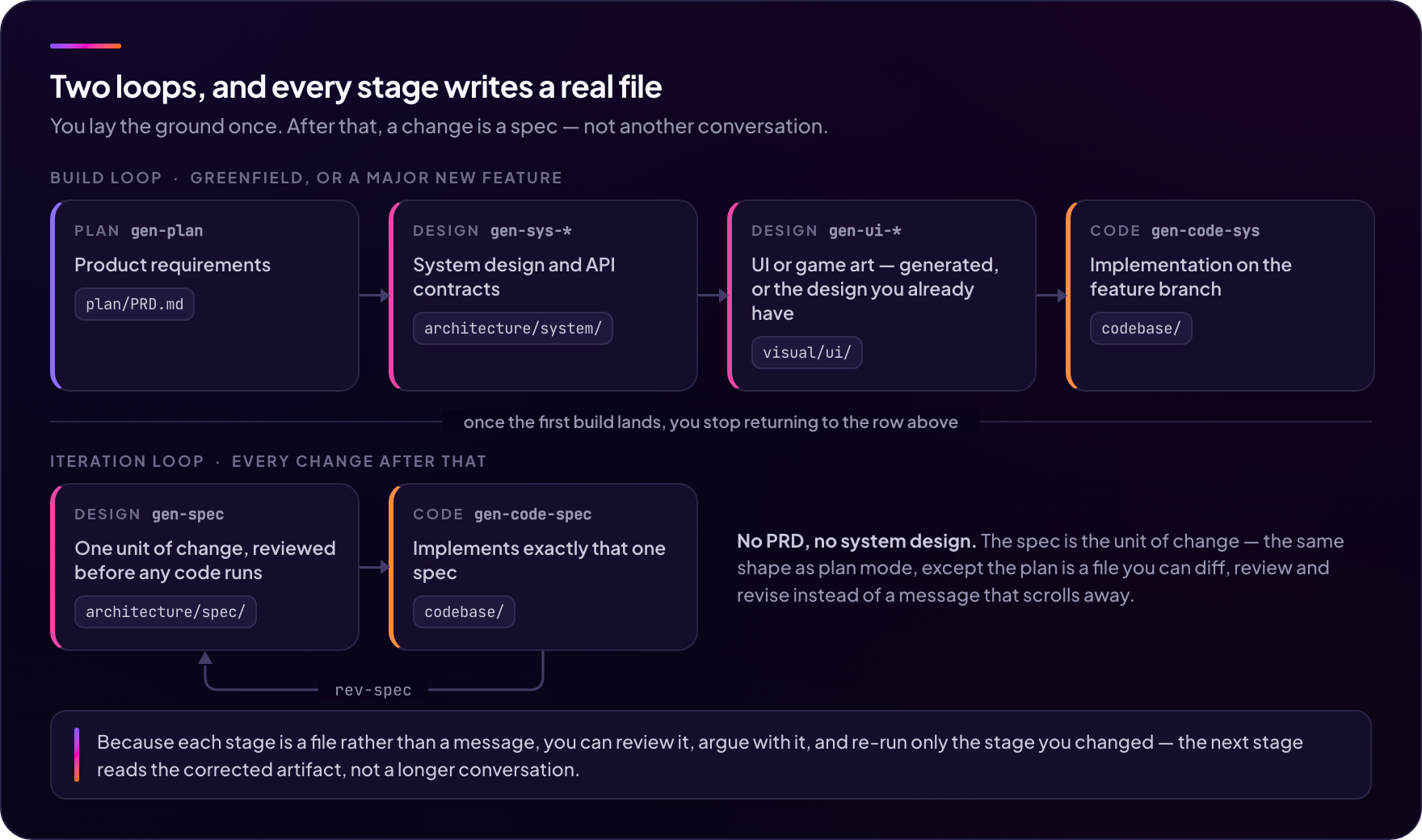
Inside a codespace, what runs on those rails is a pipeline shaped like
engineering, not like a chat. The build loop — greenfield, once per
project:
- Write the PRD. The
planneragent helps you clarify it. - Generate the system design (architecture, API contracts, system docs).
- Design the UI (or game art for the game domain) — generated from
the PRD, or drop in your own Figma / Claude artifact
(see Bring your own design). - Write code grounded in those designs.
The iteration loop — every change after that:
- Author a spec for the next unit of work, review it, and let a code
job implement exactly that one spec — the spec is a persistent document
you diff, revise, and keep
(gen-spec→gen-code-spec→rev-spec→ repeat).
Verification is not a stage you schedule — it is a property of every code
job: work decomposes into tasks that run in parallel, and a final
verification task gates completion. Failed gates spawn error tasks that fix
and re-verify.
Each step is a separate job with its own prompt surface, its own tools, and
its own durable artifacts. The result is a system you can audit, not a
black box that occasionally writes code.
Deciding between tools? docs/comparison.md is an
honest comparison table — including when to use spec-kit, OpenSpec, Claude
Code, or Lovable instead of Ant.
The work loop
A workspace has no PRD and no verification gate, because it isn't building
anything. Its loop is shorter than the one above, and it repeats on a calendar
rather than once per project:
- Write the agent: who it is, in prose, plus the systems it may reach.
- Write its jobs — one per duty — each with its own tool allowlist, and
its own intents for the situations it has to tell apart. - Run one from the composer, or activate a pipeline that fires it on
cron, chains it into other jobs, and stops for a human at an approval gate. - Read what it produced under
universal/artifacts/— real files at real
paths, announced with a manifest built from actual tool side-effects rather
than from what the model said it did.
Steps 1 and 2 are file operations: no code change, no new job type, no deploy.
Definitions are read fresh at every run, so editing one and re-running it is the
whole iteration cycle.
Detail: Custom agents & the universal runtime.
Quickstart
Requires Node.js >= 22.13 · pnpm 11.1.0 (corepack enable && corepack prepare [email protected] --activate) · Docker + Compose (for Redis) · an LLM provider key. macOS/Linux — Windows only via WSL2, untested.
git clone https://github.com/to-nexus/ant && cd ant
pnpm install

cp packages/ant-cli/.env.example.local packages/ant-cli/.env
# edit packages/ant-cli/.env — one value is mandatory:
#   ANTHROPIC_API_KEY=sk-ant-...
# (Redis URL and the encryption key have working defaults in local mode.)

pnpm dev:infra:redis      # Redis — the only required infra
pnpm dev:all              # API + Realtime + Worker + Preview + UI
pnpm doctor checks the install end-to-end (versions, Redis, process
health, provider keys) whenever something looks off.
Prefer containers? cp .env.example .env, set your key, anddocker compose up -d boots the whole stack (Redis included) behind
http://localhost:4200 — no Node or pnpm on the host.
Open http://localhost:4200 and write your first
directive — for example, "Build a TODO app with React and Tailwind".
Ant also has a second project kind — a Workspace, where you define your
own work agents in files and run them on the same runtime
(Custom agents). Create one in the
same wizard and chat with the shipped assistant agent — no extra setup.
pnpm dev:infra additionally starts ChromaDB and the visual-processor. Both
are optional: the vector DB is off unless you setANT_VECTOR_DB_ENABLED=true (RAG falls back to git-changes + keyword search),
and the visual-processor is only used by the visual job.
Full setup walkthrough: docs/local-mode/install.md.
Going to the cloud (managed or self-host)?
See docs/cloud-mode/install.md.
Maturity
Ant covers a lot of ground for a one-person project, and that breadth is
uneven. This table is the honest version. Nothing here is hidden in a changelog
footnote.
| Surface | Status | What that means in practice |
|---|---|---|
code / design / plan jobs — service domain |
Stable | The supported path. This is what gets used daily. |
| Live preview, browser IDE | Stable | Well covered by tests and exercised constantly. |
| Service connections & virtualization | Beta | Connection config, auto-detection, and mock adapters all ship and are tested. What's missing is a verification gate proving a generated adapter matches the real service — so test generated integration code against your actual backend before trusting it. |
creator agent / visual job |
Experimental | Google Gemini only — needs GEMINI_API_KEY no matter which provider you use elsewhere. Background removal needs an optional sidecar. No mid-graph resume: an interruption restarts the job. The graph nodes have no execution tests. |
| Game domain | Experimental | Greenfield only — the game-art tier is suppressed on existing codebases. Phaser only (3D is the enable3d extension, not a separate engine). The sprite-atlas hand-off between the design and visual jobs isn't closed, so production art is user-placed. |
Vector DB / RAG (learn job) |
Experimental | Wired end-to-end but off by default — and we recommend leaving it off (ANT_VECTOR_DB_ENABLED=false; needs a ChromaDB sidecar; hidden from the UI). The chunking / indexing strategy isn't tuned enough for indexing to pay off yet — the framework exists ahead of a future org-shared vector DB. Nothing degrades without it: retrieval is a 3-tier chain (vector → git-changes → keyword). The learn node itself still earns its keep with the DB off — it writes the LLM job summary and the session distillation every job ends with. |
Workspaces & custom agents (universal runtime) |
Experimental | The runtime, the definition loader, the MCP overlay with its encrypted credential store, and the checklist board all ship and are covered by tests. Read-only work against an HTTP MCP server is the proven path (verified end to end). The gap that bites first is interactive approval — a gated write tool is refused with guidance, so a job writes only under an explicit approval: never grant. Also: MCP image results are dropped (text only), and an interrupted run can lose one checklist turn. |
| Pipelines — scheduled agent chains | Experimental | Cron triggers and run-now, linear chains with on: success / failure / always, approval gates (chat card, inbox, or a timeout arm), clarify questions that park a run until you answer it, and per-project activation whose run history survives deactivation. Definitions can be promoted to an org scope. Not there yet: webhook and event triggers, Slack/email delivery, per-step retry, {{steps.*}} substitution between steps, and parallel branches. Workspace-only — the Codespace toggle in the UI is reserved, not wired. |
| Team / org sharing | Beta | Team organizations, the owner/admin/member ladder, invites, and domain claims all ship. Agent and pipeline definitions have a real org scope: promoting one moves it into the organization's directory, an ACL sidecar names the owner plus delegated editors, and authority is re-checked against live membership rather than a token claim. One sharp edge — MCP credentials are per-user, so every member running an org agent registers its ${secret:} keys in their own store. |
| Managed cloud (billing, credits, deploy quota, custom domains) | Not open | Inert no-op seams in a self-hosted deployment. |
If something in the Experimental rows blocks you, say so in an issue — knowing
what people actually hit is more useful than a roadmap guess.
Providers
Bring your own key. Configure one or more in packages/ant-cli/.env; models
are selectable per job and per node.
| Provider | Env var | Notes |
|---|---|---|
| Anthropic | ANTHROPIC_API_KEY |
Primary supported model |
| OpenAI | OPENAI_API_KEY |
|
GEMINI_API_KEY |
||
| DeepSeek | DEEPSEEK_API_KEY |
Third-party, China-hosted — consent-gated |
| GLM | GLM_API_KEY |
Third-party, China-hosted — consent-gated |
| Kimi | KIMI_API_KEY |
Third-party, China-hosted — consent-gated |
Consent-gated providers require an explicit in-app data-privacy acknowledgement
before they can be selected, because your prompts (which include your source
code) leave for a third-party jurisdiction.
Ant ships its own agent runtime, so there is no router in the middle.
Three adapter families — Anthropic, OpenAI-compatible, and Gemini — speak to
each vendor's API directly with your own key. You pay the provider's list
price: no per-token markup, no request metering, and your prompts never
transit a third party you didn't choose.
Two caveats worth knowing before you pick: DeepSeek, GLM, and Kimi are wired
through the OpenAI-compatible adapter rather than first-class clients, so
provider-specific features may lag. And image generation is Google-only —
the visual job needs GEMINI_API_KEY regardless of what you use elsewhere.
Local models (Ollama, llama.cpp, …) are not supported, and that is a
sizing fact rather than a policy: the code-job execute system prompt alone is
≈39k tokens, and the effective floor is ≈200K context plus reliable native
tool calling — a 32K local model fails on the system prompt before the
first tool call. What is supported: routing the registered DeepSeek / GLM /
Kimi model ids through your own OpenAI-compatible gateway (LiteLLM, vLLM,
OpenRouter) via ANT_{DEEPSEEK,GLM,KIMI}_BASE_URL — see
docs/reference/env-vars.md.
Bring your own design
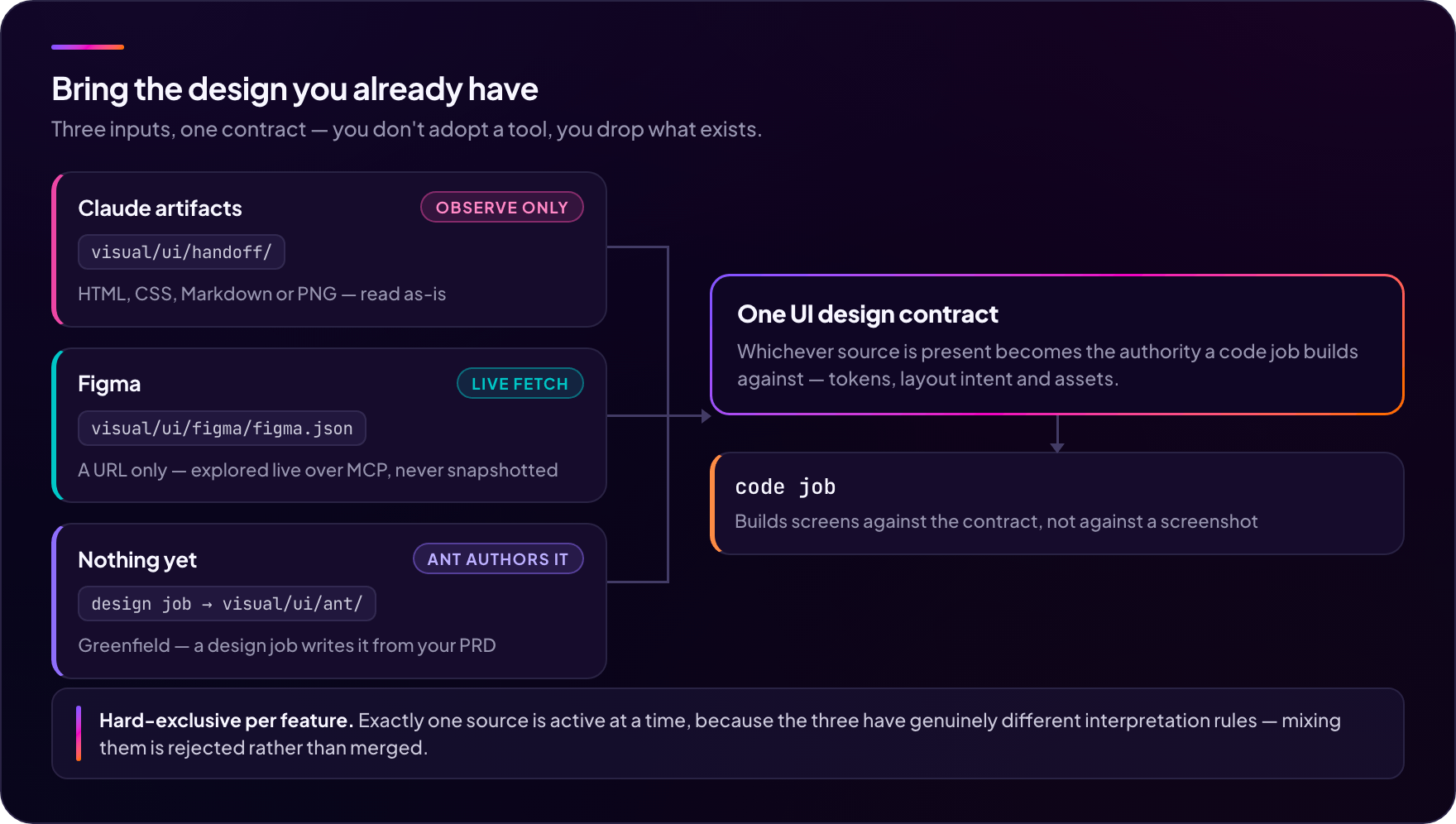
Ant accepts three kinds of design input as first-class citizens. You
don't pick a tool — you drop what you have. (This section, and the two that
follow it, are the codespace wing.)
| Source | What you drop | When to use |
|---|---|---|
| Claude artifacts | HTML/CSS/Markdown/PNG into visual/ui/handoff/ |
You've been iterating in Claude.ai. No license, no setup, no schema. |
| Figma | A Figma URL into visual/ui/figma/figma.json |
You have an existing Figma project. Live MCP exploration at prompt time. |
| Nothing yet | Run a design job on your PRD |
Greenfield. Ant authors the handoff bundle for you. |
The three sources are hard-exclusive per feature and have different
interpretation contracts (Claude handoff is observation-only / FPOP, Figma
is live-fetched, ant-native JSON is schema-based).
What a design job emits depends on where you started. From a PRD
(gen-ui-desc) it writes a DESIGN.md-anchored bundle into visual/ui/handoff/
(styles.css, tokens/, components/, screens/, assets/). Fromfigma.json (gen-ui-figma) it writes the canonical trio ui-tokens.json +ui-assets.json + ui-spec.json into visual/ui/ant/.
The full design-input guide is in
docs/guides/design-input/.
How it works
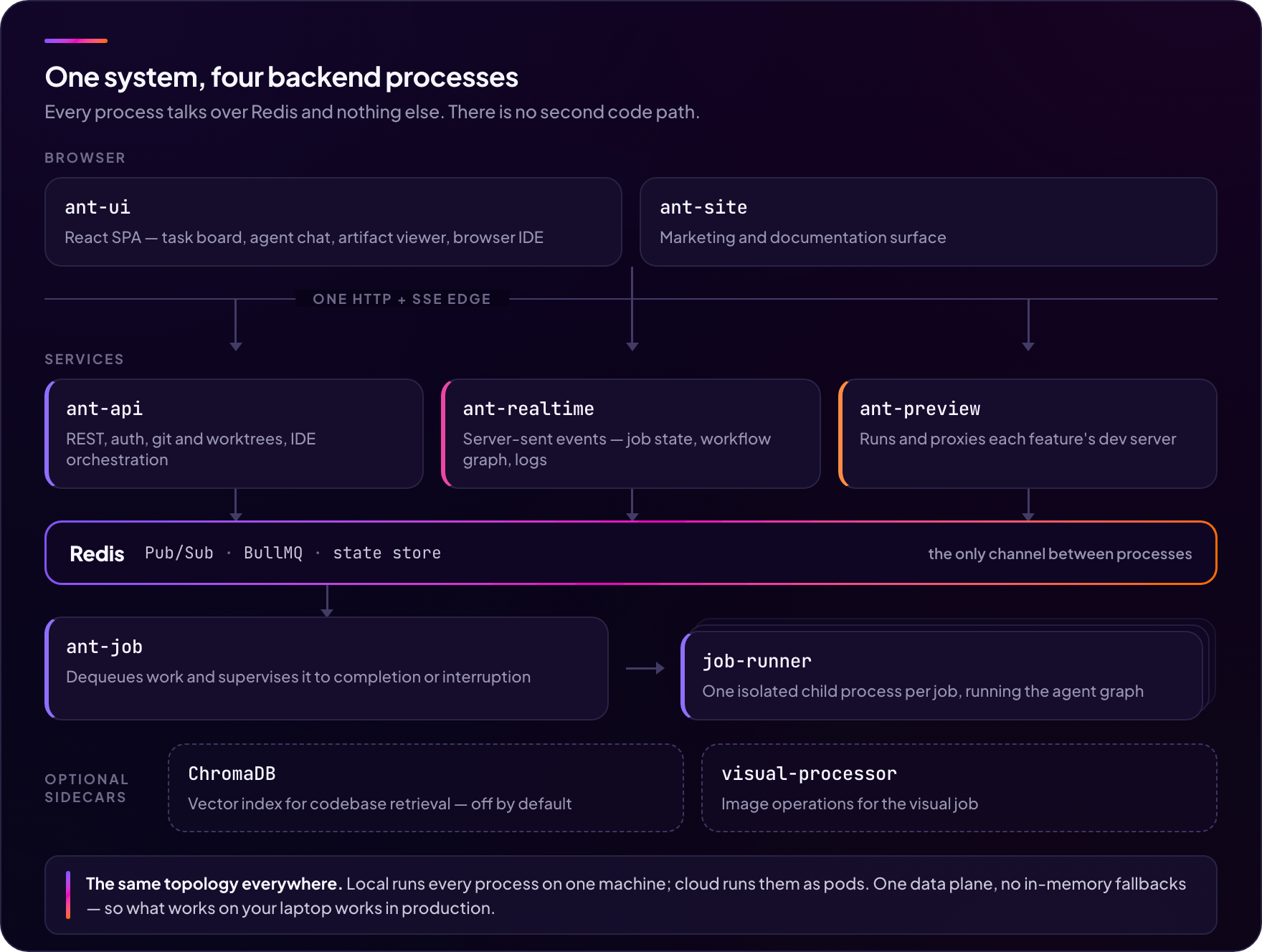
Four backend processes, one codebase, communicating over Redis only. Local mode
and cloud (Kubernetes) mode share the same data plane — local is just "all
processes on one machine".
Each job runs an agent LangGraph state machine: resolve → triage →
job-specific phases → learn. The UI draws that graph live, so you can watch
which node is executing and how many parallel workers it fanned out.
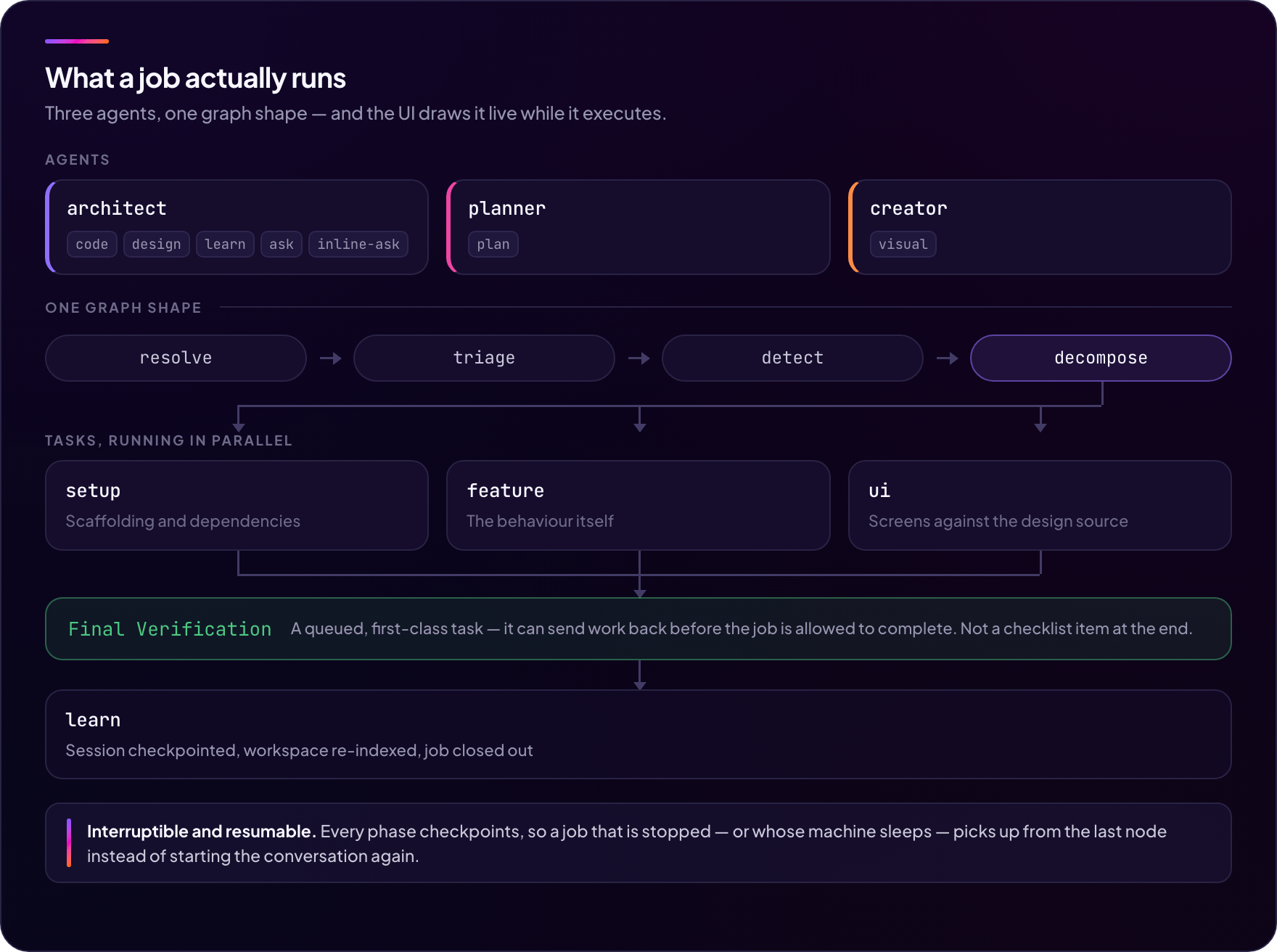
| Agent | Jobs it owns |
|---|---|
architect |
code, design, learn, ask, inline-ask |
planner |
plan |
creator |
visual |
universal |
every custom job — see Custom agents |
One design job, three surfaces — the intent picks one: system design
(gen-sys-*), UI / game-art design (gen-ui-* / gen-game-art-*), or spec
authoring (gen-spec / rev-spec).
Custom jobs take a deliberately shorter graph — resolve → agent ⇄ tool → respond, with no triage and no decomposition. There is nothing to classify
(you picked the job) and nothing to decompose into tasks, so both phases would
be latency without a decision behind them.
Read more: docs/concepts/architecture.md.
Codespace layout
A project has exactly one git repository: a hidden bare anchor at{project}/repo.git. Every feature is an equal linked worktree atfeatures/{feature}/codebase/, and the branch name is the feature name —
no prefix, no sanitising. Feature names may contain /, so feature/base andrelease/1.0 work as you would expect.
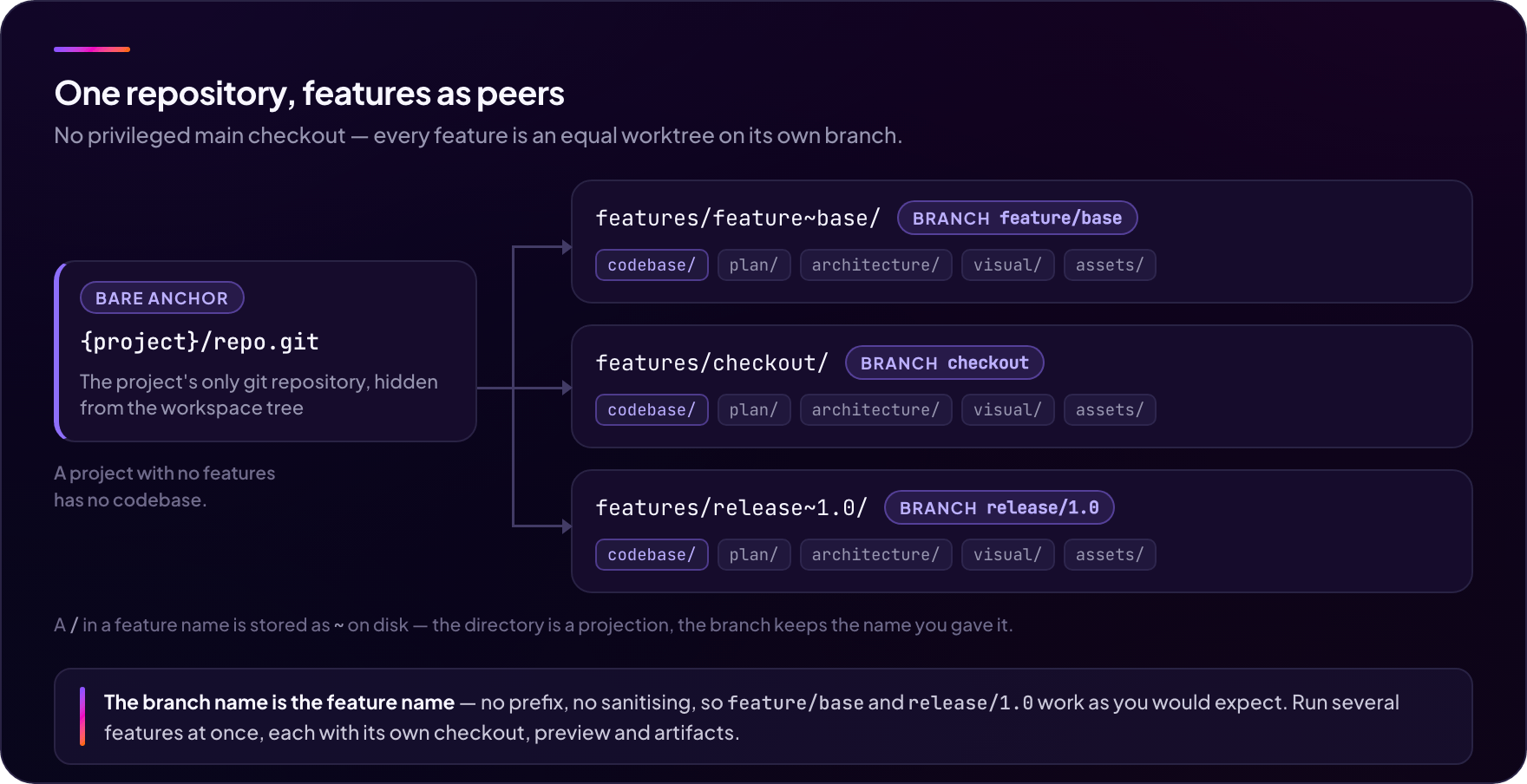
A project with no features has no codebase. There is no privileged "main"
worktree — features are peers.
Alongside codebase/, each feature holds the artifacts the agents produce:plan/ (PRD), architecture/ (system design + spec), visual/ (UI and
game-art design), assets/, plus agent-internal sessions/ and meta/.
Because features are equal worktrees, you can run several in parallel —
each with its own branch, its own checkout, its own preview server, and its
own artifact set — and merge them like any other branches.
What a codespace can build
| Domain | Status | Examples |
|---|---|---|
| Service (web/backend) | Stable | Full-stack SaaS, dashboards, REST APIs |
| Game | Experimental | Phaser/Web games with sprites + HUD + audio |
See Maturity for what "Experimental" means here in concrete terms.
The two domains share the same agents but ship different prompt overlays,
different design templates, and different visual-tier catalogs. Adding
new verticals is a domain-registry change — no fork required.
A domain is a codespace concept, and there is deliberately no equivalent knob
on the other side: workspaces are domain-less by construction — what they do is
decided by the agents you write, not by a registry entry.
Workspace layout
A workspace has no features, so none of the codespace axes apply: no repo.git,
no codebase/, no per-feature preview. Feature creation is refused outright —
a feature without git is a contradiction, not a degraded mode. Everything lives
under one container:
{project}/
  config.json                      projectType: 'universal'
  universal/
    artifacts/                   the shared working tree — read-write
      plan/{agentId}/{jobId}/    reserved; `@plan` turns write here
      …                          free-form; whatever your jobs produce
    sessions/                    per-(agent, job) checkpoints, chat, debug logs
Two ownership rules follow from that shape, and the asymmetry between them is
what trips people up:
- Definitions are account-owned. The agents and jobs live outside every
project, so oneops-teamagent serves every workspace you own — and can be
promoted into your organization so the whole team shares it. - Artifacts are project-owned. One shared
universal/artifacts/tree serves
every agent and job in the project, so you upload a folder once and every
custom job can read it.
Read more: docs/concepts/spaces.md.
Custom agents & the universal runtime
⚠️ Experimental, and a headline capability rather than a side feature —
"experimental" here describes maturity, not importance. The
Maturity table lists exactly what is and isn't there.
Every organization runs work that is repetitive, judgement-heavy, and nobody's
favourite part of the week: the incident write-up, the weekly ops report, the
release note, the vendor-invoice reconciliation. That work is a poor fit for a
coding agent and a poor fit for a chat window, because it is neither a codebase
nor a conversation — it is a role with duties.
So you write it down. An agent is a role; its jobs are that role's
duties; both are plain files:
.ant/agents/ops-team/
  agent.yaml               # identity + shared MCP connections
  base/role.md             # who this agent is — always in the prompt
  jobs/weekly-report/
    job.yaml               # the job contract: tools it may use, what needs approval
    base/system.md         # how this job runs — always in the prompt
    intents/report/        # one folder per situation (intent)
      infer.md             #   when it applies (prose criterion)
      prompt.md            #   what to do while it is active (optional)
      hooks.yaml           #   optional completion contract for its turns
Adding, editing, or removing a job is a file operation — no code change, no
new job type, no deploy. Definitions are read fresh at every run, and they live
at the account level, so one ops-team agent serves every workspace you own.
The shipped assistant agent is a read-only worked example you can study, andexamples/ has the ops-team agent above as runnable files
alongside the MCP server it talks to — pnpm build:example:mcp && MCP_AUTH_TOKEN=dev-token pnpm start:example:mcp starts that server, and
authoring a custom agent walks the two
halves end to end.
Think "Claude Projects / custom GPT, on infrastructure you control" — except
what sits underneath is not a chat endpoint. Every custom job gets:
- An agentic loop with tools, and context-window compaction so a long job
doesn't fall off its own history. The conversation persists per (agent, job). - A sandbox with two roots — the project's shared
universal/artifacts/
tree read-write, and the agent's own definition read-only. The codespace plane
is unreachable from a custom job under any configuration. - MCP connections declared in the definition, surfaced as
mcp__{server}__{tool}. Credentials are${secret:KEY}references into an
AES-256-GCM per-user store — rotate the value, never the file — and resolution
reads only that store, so a definition cannot name one of Ant's own
environment variables and exfiltrate it. A stdio server's child process sees
the variables it declared and nothing else. - Approval gates on anything mutating. Today's behaviour is fail-closed: a
gated call is refused with guidance rather than executed, so a job writes
only where its author grantedapproval: never. @intent:and@planin the composer. An intent pulls its situational
prose in verbatim, so rare-case rules arrive exactly when they apply.@planmakes the run produce a plan document instead of doing the work —
enforced, not advisory: writes are confined toplan/and execution tools are
rejected for the turn.- A checklist board the agent maintains itself when the work has several
deliverables, and a write manifest built from real file writes rather than
from what the model said it did.
The boundary that makes this hold up in practice:
Prompts specialize judgment; they cannot guarantee behavior.
Prose is the right home for "which incidents count as sev-1". It is the wrong
home for a refund ceiling or a bulk-send limit — those go in an MCP server the
definition merely connects to. The model decides when to callrefund_payment; the server decides whether this refund is allowed. Ant owns
the orchestration; each system owns its own guarantees.
Pipelines — put it on a schedule
A duty that runs every Monday shouldn't need someone to remember Monday. A
pipeline is one more file: a cron trigger plus a list of steps, where a step
is either a custom job or a gate that waits for a human.
version: 2
name: Weekly ops report
on:
  schedule:
    cron: "0 9 * * 1"                    # Mondays, 09:00
    tz: Asia/Seoul
steps:
  - id: draft
    customJobRef: ops-team/weekly-report
    intent: report
    directive: "Draft last week's report. Run date: {{trigger.fireDate}}."
  - id: sign-off
    type: approval
    prompt: "Publish the weekly report?"
    timeout: { after: 24h, onTimeout: reject }
  - id: publish
    customJobRef: ops-team/weekly-report
    directive: "Publish the approved report."
    on: success
A definition is a template — project-free, and promotable to your
organization. Binding it to a project is a separate act, so one pipeline can run
on several projects at once, each keeping its own history. While a binding is
live it owns that project: interactive jobs are refused, so a scheduled run and
a person can never fight over the same artifacts.
Two kinds of stop are first-class, and both are the reason this is a pipeline
rather than a cron entry. An approval gate waits on a chat card, in the
approvals inbox, or until its timeout arm fires. And a step that needs to ask
something parks the whole run — clarify waits open-ended, resumes exactly
where it stopped, and may ask again.
Concepts: docs/concepts/custom-agents.md ·
docs/concepts/pipelines.md ·
build one: docs/guides/custom-agent-authoring.md.
Features
- Spec-sized iteration. Author a spec, review it, and a code job
implements exactly that one spec — a persistent artifact you diff and
revise, not a transient plan. - Custom work agents. Define an agent, its jobs, and the systems it may
reach in files, and run them on the same runtime — no code change, no new job
type. MCP for capability, an encrypted credential store for its secrets, a
fail-closed approval gate for anything mutating. Promote a definition to your
organization and the team shares it
(custom agents, experimental). - Scheduled agent chains. Put a work agent on a cron trigger, chain it
across agents, and gate a step on a human — an approval card that waits, or a
clarifying question that parks the run until you answer
(pipelines, experimental). - Drop-in Claude designs. Paste your Claude.ai artifact (HTML/CSS/MD)
intovisual/ui/handoff/and Ant treats it as observable-only design
source. No conversion, no schema. Often the single biggest reason teams
switch from prompt-only tools. - Figma MCP. Live exploration via the Figma MCP server at prompt time —
nothing is snapshotted to disk. Design tokens are emitted into the canonicalvisual/ui/ant/trio. - Multi-agent build pipeline. Planner writes the PRD; architect generates
the system design, the UI design, and the code. Every code job ends with a
verification task that gates completion — failures spawn fix tasks and
re-verify. - 5 execution tiers. From one-shot Q&A to refs-grounded multi-task
projects, dispatched automatically based on the request. - Any stack. Frontend, backend, or fullstack — the target language and
framework are described by extensible tech tiers, not hard-coded into the
prompts. - Service connections & virtualization. Declare the external services
your app talks to and Ant generates toggleable mock adapters, so the app
runs and demos before the real backend exists. - Parallel features, live preview. Each feature is a git worktree with
its own branch and its own hot-reloading dev server — work several
features at once, merge them like branches. - Browser IDE. Launch VSCode with your codebase in one click — a Docker
container locally, a Kubernetes Pod whenANT_K8S_NAMESPACEis set. - Interruptible & resumable. Jobs checkpoint after every phase — stop
it, crash it, or close the lid, and the job resumes where it stopped. - Hackable prompt surface. Every agent prompt is a Handlebars template
on disk, auto-registered at startup — tune the agents for your codebase
(guide). - Self-hosted, cost-transparent. Bring your own LLM key from any of six
providers — the runtime speaks Anthropic, OpenAI-compatible, and Gemini
natively, straight to each vendor's endpoint with no router markup —
and see per-model token / cost / cache-hit breakdowns for every job. Secrets
for the services your agents reach live in a local AES-256-GCM store, not in
a config file.
What is cloud-only
The repository contains the seams for the managed service — billing/credits,
organizations, deploy, and custom domains. In a self-hosted deployment these
are inert: capability gates leave no-op implementations in place, and you
pay your LLM provider directly rather than buying credits. Nothing in the
self-host path phones home. CI enforces this — the build fails if a
cloud-only symbol reaches the open-source bundle.
Documentation
- Comparison — Ant vs spec-kit, OpenSpec, Claude Code, OpenHands, Lovable — including when to use them instead
- Local Mode — install + develop on your own machine (Persona A)
- Cloud Mode — install + develop for managed (Persona B) or self-host cloud (Persona C)
- Concepts — architecture, agents, jobs, execution tiers, the engineering-loop philosophy
- Codespace & workspace — the two project kinds and what each puts on disk
- Custom agents — the universal runtime, and authoring a custom agent
- Pipelines — cron triggers, chained steps, approval and clarify gates
- Guides — design input, custom prompts, observability
- Reference — CLI, env vars, API, shared types
- First feature — PRD → Design → Code walkthrough
- Troubleshooting — install-time and runtime hiccups
- 한국어 README — Korean readme (docs are English-only)
For contributors:
- CONTRIBUTING.md — dev setup, conventions, PR workflow
- AGENTS.md — binding architectural rules for human and AI contributors
- docs/internals/ — deep dives, SSOT policies, debug logging
Stack
Backend — Node.js 22+, TypeScript (strict), Express, LangGraph,
Anthropic / OpenAI / Google SDKs, BullMQ, ioredis, Handlebars, Zod.
Frontend — React 18, Vite, Zustand, Tailwind CSS, Radix UI, ReactFlow.
The marketing site (ant-site) is a statically-exported Next.js app.
Infrastructure — pnpm workspaces, Redis, Docker, Kubernetes, EFS for
shared workspace volumes in cloud mode.
Contributing
Ant is solo-developed. One person wrote the agents, the prompts, the
frontend, and the docs, which means reviews are best-effort rather than
same-day, and the roadmap is a judgement call rather than a committee decision.
If a PR or issue has had no reply after a week, bump it — that's helpful, not
rude.
It also means outside help is genuinely useful. These are the places where a
contribution lands with the least required context:
| Area | Why it's a good entry point |
|---|---|
| Docs | Reading a doc and fixing what confused you is the highest-value first PR there is. Docs are English-only — Korean exists only as the top-level README.ko.md. |
| LLM provider adapters | Three of the six providers run through an OpenAI-compatible shim. Promoting one to a first-class client is well-scoped and self-contained. |
Tests for the visual job |
The creator agent's graph has no execution tests. Anything here is net-new coverage. |
| Frontend tests | ant-ui is thinly covered relative to the backend. |
| Custom agent definitions | A definition is files, not code — writing a genuinely useful agent and reporting where the format got in your way needs no knowledge of the graph at all. |
| Bug reports with a reproduction | Reproductions are worth more than patches. A report that lets the bug be re-created is already most of the fix. |
Before a deep change to the agent graphs, open an issue first. The LangGraph
core carries invariants that aren't visible in a diff — a design conversation
up front saves a rewrite later.
Read CONTRIBUTING.md for setup and the PR workflow, and
AGENTS.md for the binding architectural rules. AGENTS.md matters
more than it looks: most of those rules have regression-guard tests behind
them, so violating one fails CI rather than review.
License
Apache-2.0 — see LICENSE. Third-party dependency notices are in
THIRD_PARTY_NOTICES.md.
Contributions are accepted under the same license (Apache-2.0 §5). There is no
CLA to sign and no DCO sign-off required.
Ant is an open-source project. Star to follow along, file issues to shape it, send PRs to ship it.
Reviews (0)
Sign in to leave a review.
Leave a reviewNo results found