wpa-mcp
Health Warn
- License — License: Apache-2.0
- Description — Repository has a description
- Active repo — Last push 0 days ago
- Low visibility — Only 5 GitHub stars
Code Pass
- Code scan — Scanned 5 files during light audit, no dangerous patterns found
Permissions Pass
- Permissions — No dangerous permissions requested
This is an MCP server that analyzes Windows ETW (.etl) trace files. It exposes 54 diagnostic tools for inspecting CPU stacks, file I/O, memory allocation, and network events, allowing AI clients like Claude Desktop or Cursor to debug performance issues in plain language.
Security Assessment
Overall Risk: Low. The code scan found no dangerous patterns, hardcoded secrets, or dangerous permission requests. The server analyzes local Windows trace files, so it inherently accesses system-level data like process trees, registry events, and driver stacks. However, this is strictly a read-only diagnostic tool rather than something that modifies system behavior. The primary risk factor is the installation method: the "one-liner" scripts fetch and execute remote code from GitHub. While standard for many open-source tools, it is always safer to clone the repository, audit the installation script, and build the DLL locally rather than piping curl/iex directly into a shell.
Quality Assessment
The project is actively maintained, with its most recent push happening today. It uses the permissive Apache-2.0 license and includes detailed documentation featuring real-world case studies. The main drawback is its low community visibility—it currently has only 5 GitHub stars, which means the codebase has not been extensively peer-reviewed by the broader developer community. It is currently labeled as a Proof of Concept (PoC).
Verdict
Use with caution — the code is clean and actively maintained, but given the extremely low community adoption and early PoC status, it is highly recommended to review the source code and installation scripts yourself before integrating it into your workflow.
MCP server analyzing Windows ETW (.etl) traces — 54 tools spanning CPU/wait stacks, image-load gaps, file/disk/mmap I/O, VirtualAlloc, network, registry, ALPC, DPC/ISR, CLR (GC/JIT/alloc/exception/contention), NT heap, and any user-mode ETW provider. Domain-neutral.
English | 简体中文
wpa-mcp
A C# MCP server that exposes Windows ETW (.etl) trace analyzers — CPU, wait, image-load, file / disk / mmap I/O — over any MCP-compatible client (Claude Code, Claude Desktop, Codex, Cursor). Domain-neutral: works on any Windows trace; commonly used to debug app startup, slow forks, AV-induced stalls, and disk-bound regressions.
Status — PoC. 54 tools live. Windows-only (TraceEvent kernel parsers are not portable). Apache-2.0.
See it in action: a real investigation — process creation 50× slower than baseline, root-caused via wpa-mcp's tools to multiple EDR stacks colliding on
PsSetCreateProcessNotifyRoutineEx. Reproduced independently by two different LLM agents on the same trace.
Quickstart
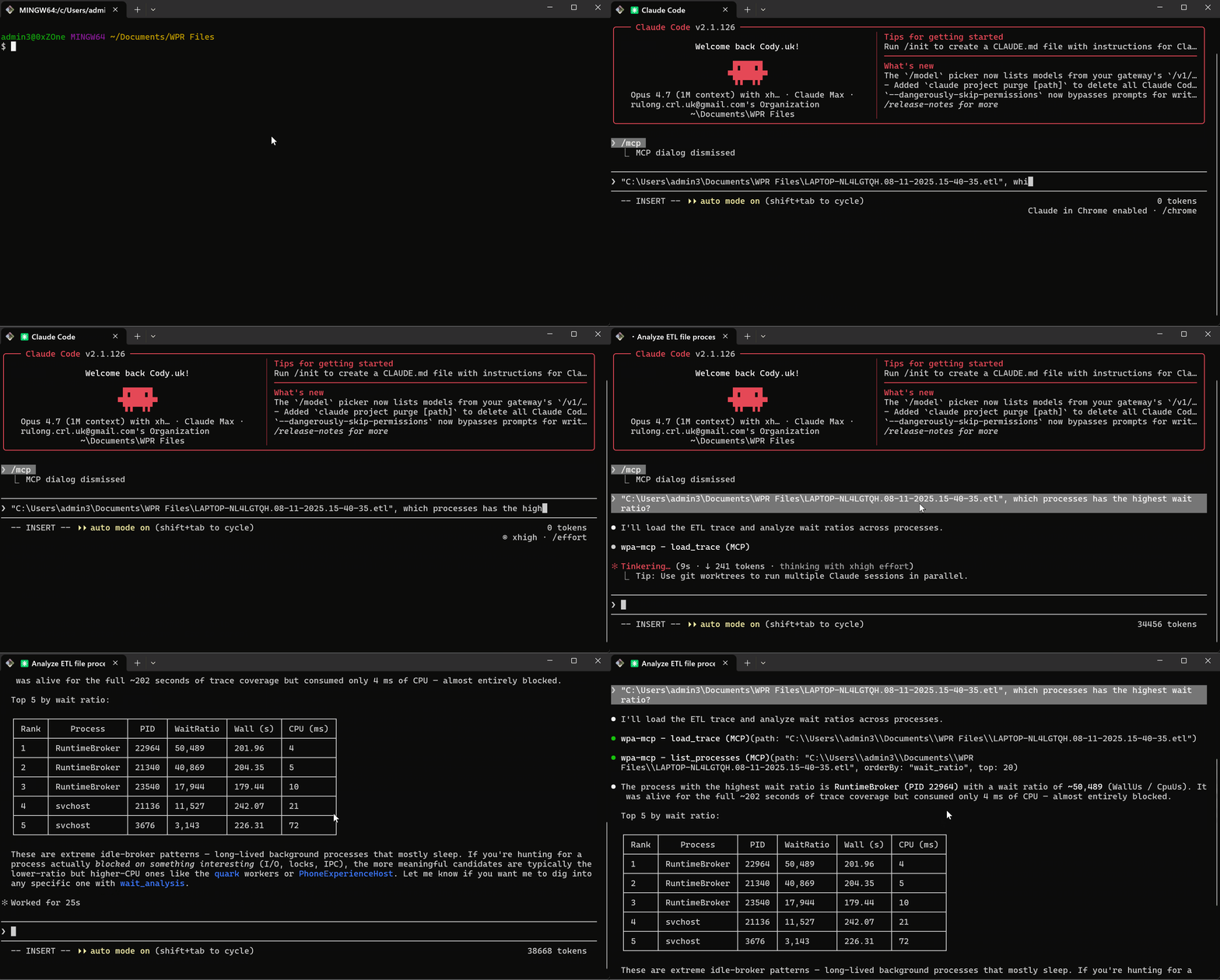
Once installed (one-liner below), ask the agent in plain language and it picks the matching tools:
> Load this trace: C:\path\to\trace.etl
(load_trace; first call 30 s – 3 min as .etlx index is built; subsequent are
 instant.  Response includes a Capabilities map so you know upfront which
 keywords are present in the trace.)

> Which processes have the highest wait ratio?
(list_processes orderBy=wait_ratio — trace-resident processes auto-filtered out)

> For parent PID <X>, what was each fork's kernel-side gap?
(process_create_timing — one call gives kernel-window distribution across all
 children of one parent)

> Top wait stacks for PID <X> between <t0> and <t1>, with 20-bucket histogram
(wait_top_stacks — shows the Filter Manager / driver chain blocking the thread)

> Drill into "<frame!?>": who calls it?
(wait_caller_callee — caller / callee neighbours of the focus frame)
The same pattern works for CPU (cpu_top_functions → cpu_caller_callee), file / disk / mmap I/O, image loads, etc. Each "top" view has a matching "caller-callee" drill-down that takes a focus frame.
For an end-to-end walkthrough — symptoms, tool chain, evidence, root cause, recommendations — see docs/CASE_STUDIES.md.
Install
One-liner (no clone, no build)
PowerShell:
iex "& { $(irm https://raw.githubusercontent.com/tooluse-labs/wpa-mcp/main/scripts/install.ps1) }"
Git Bash on Windows:
curl -fsSL https://raw.githubusercontent.com/tooluse-labs/wpa-mcp/main/scripts/install.sh | bash
Both routes do the same thing: download the latest GitHub Release zip (pre-built DLL), cache under %LOCALAPPDATA%\wpa-mcp\releases\<tag>\, and run the bundled setup.ps1. Auto-detects every MCP client on the machine (Claude Code / Codex / Claude Desktop) and registers wpa-mcp against each. .NET 8 runtime is auto-installed user-scope if missing. Subsequent runs are instant (cache hit).
Forward extra flags through the one-liner:
# PowerShell — pin tag, force a single client, set custom symbol path
iex "& { $(irm https://raw.githubusercontent.com/tooluse-labs/wpa-mcp/main/scripts/install.ps1) } -Tag v0.2.0 -InstallArgs @('-Client','claude-desktop','-SymbolPath','SRV*C:\Symbols*https://msdl.microsoft.com/download/symbols')"
# Bash — flags after `bash -s --` go to install.ps1
curl -fsSL https://raw.githubusercontent.com/tooluse-labs/wpa-mcp/main/scripts/install.sh | bash -s -- -Tag v0.2.0
Uninstall (one-liner, symmetric)
Web-invokable, edits the same client configs in reverse. No download / cache touched.
iex "& { $(irm https://raw.githubusercontent.com/tooluse-labs/wpa-mcp/main/scripts/uninstall.ps1) }"
curl -fsSL https://raw.githubusercontent.com/tooluse-labs/wpa-mcp/main/scripts/uninstall.sh | bash
This removes the wpa-mcp entry from every detected MCP client. The cached release zip and symbol cache stay (delete %LOCALAPPDATA%\wpa-mcp\ and %LocalAppData%\WprMcp\Symbols\ to remove those).
Requirements
- Windows 10 / 11 (TraceEvent kernel APIs are Windows-only)
- .NET 8 — auto-installed user-scope by the installer if missing (uses Microsoft's official
dotnet-install.ps1; no admin needed). Pass-SkipDotNetInstallto opt out. - For symbol resolution:
_NT_SYMBOL_PATHset, or use the symbol tools at runtime (see Configuration → Symbols).
git clone https://github.com/tooluse-labs/wpa-mcp
cd wpa-mcp
.\scripts\setup.ps1
git clone https://github.com/tooluse-labs/wpa-mcp
cd wpa-mcp
./scripts/setup.sh
Builds (Release) and registers wpa-mcp with every detected MCP client. Idempotent — re-run to update.
Common flags:
.\scripts\setup.ps1 -Client claude-desktop                    # force a specific client
.\scripts\setup.ps1 -SymbolPath "SRV*C:\Symbols*https://..." # custom _NT_SYMBOL_PATH
.\scripts\setup.ps1 -SkipBuild                                # use existing DLL
Uninstall from clone (also -CleanBuild to wipe bin/ obj/):
.\scripts\uninstall.ps1
.\scripts\uninstall.ps1 -CleanBuild
./scripts/uninstall.sh
./scripts/uninstall.sh -CleanBuild
Build:
git clone https://github.com/tooluse-labs/wpa-mcp
cd wpa-mcp
dotnet build -c Release
# DLL: src\WprMcp\bin\Release\net8.0\WprMcp.dll
Smoke-check:
dotnet src\WprMcp\bin\Release\net8.0\WprMcp.dll --version    # prints "WprMcp 0.1.0-poc"
dotnet test                                                   # runs the xUnit suite (needs fixtures, see CONTRIBUTING.md)
Then register with your MCP client. The DLL path must be absolute.
Claude Code — per-project (<project>/.mcp.json) or global (~/.claude.json):
{
  "mcpServers": {
    "wpa-mcp": {
      "command": "dotnet",
      "args": ["C:/Users/me/Dev/wpa-mcp/src/WprMcp/bin/Release/net8.0/WprMcp.dll"],
      "env": {
        "_NT_SYMBOL_PATH": "SRV*C:\\Symbols*https://msdl.microsoft.com/download/symbols",
        "WPRMCP_CACHE_SIZE": "2"
      }
    }
  }
}
Or via the CLI helper:
claude mcp add wpa-mcp --scope user -- dotnet C:/Users/me/Dev/wpa-mcp/src/WprMcp/bin/Release/net8.0/WprMcp.dll
(Add -e _NT_SYMBOL_PATH=... for env vars.)
Claude Desktop — %APPDATA%\Claude\claude_desktop_config.json, same shape as above.
Codex / Cursor / other MCP-compatible clients — the server speaks stdio MCP; any client that accepts a command + args config works. Use the same JSON snippet.
Verify — after restart, the client exposes the tools as mcp__wpa-mcp__load_trace, etc. First call to load_trace on a fresh .etl takes 30 s – 3 min while the .etlx index is built (logged to stderr).
Tools
54 tools across 15 groups. All built on the same Microsoft.Diagnostics.Tracing.TraceEvent library PerfView uses, so the underlying analysis quality is identical — what changes is the surface (stdio MCP + JSON instead of a Windows GUI) and the addition of composite tools that package multi-step PerfView workflows into one call.
What wpa-mcp adds vs PerfView
- Agent-driven, not UI-driven. PerfView is a Windows GUI you click through; wpa-mcp is a stdio MCP server you talk to in plain language. Same data, no UI fatigue, easy to compose into a CI / regression script.
- Composite tools.
diagnose_slow_startup,process_create_timing,image_load_top_gapspackage multi-step PerfView workflows into one call. - Capabilities-aware. Every tool's "won't return data" state maps to a single keyword bit in
load_trace'sCapabilitiesmap — no more "why is this view empty" detective work in PerfView. - Per-trace symbol recommendations.
load_traceinspects modules in the trace and recommends which symbol servers to add. PerfView leaves symbol setup to the user.
Pattern
Always call load_trace first. It opens the .etl, builds (or reuses) the .etlx index, and returns a Capabilities map — a per-keyword presence check (HasCpuSamples, HasCSwitch, HasFileIo, HasDiskIo, HasImageLoad, HasHardFaults, HasStackWalks, HasVirtualAlloc, HasNetIo, HasRegistry, HasReadyThread, HasInterrupt, HasAlpc, HasThreadEvents, HasClrGc, HasClrJit, HasClrAlloc, HasClrException, HasClrContention, HasNtHeap). Every other tool's behaviour depends on those keywords.
Most groups follow the same three-tool shape: a summary (top-N flat rows), a stacks view (top-N call stacks weighted by the metric), and a caller-callee drill-down (given a focus frame, returns its caller / callee neighbours weighted by the same metric — same shape as PerfView's "Callers" / "Callees" tabs).
In the tables below, "PerfView equivalent" is the matching view in PerfView's GUI; entries tagged [Composite] combine multiple PerfView views into one call, [Manual filter] use raw events that PerfView's Events view exposes but doesn't pre-aggregate, and [Programmatic] replace a GUI dialog with structured JSON. The other ~45 tools are 1:1 mappings of PerfView views.
Meta
| Tool | What it does | PerfView equivalent |
|---|---|---|
load_trace |
Opens / caches a .etl. Returns trace metadata, the Capabilities keyword presence map, and per-trace symbol-server recommendations. First call 30 s – 3 min while .etlx builds; subsequent are instant. |
Open a trace file (no Capabilities equivalent) |
list_processes |
Lists processes (sortable by cpu / wall / wait_ratio). WaitRatio = WallUs / CpuUs surfaces "high wall, low CPU" processes (blocked on minifilter / IPC / etc.). PID 0 (Idle) and PID 4 (System) hidden by default. |
Processes view |
process_create_timing |
Per-fork timing for a parent PID. FirstImageLoadOffsetUs = the kernel-side window between ProcessStart and the first DLL load — exactly where AV / EDR process-create callbacks burn time invisibly. Median / p95 / max aggregates across all children. |
[Composite] — Processes + Events + Excel; see docs/CASE_STUDIES.md |
thread_lifetime |
Per-PID chronological thread lifecycle: every ThreadStart / ThreadStop with StartTimeUs, EndTimeUs, LifetimeUs, and PeakConcurrentThreads. Catches thread-pool thrash and fork-bomb patterns. TraceResidentStart/End flags threads bounded by trace capture rather than real spawn / exit. |
[Manual filter] — Events view, filter on Thread/Start + Thread/Stop, pair by hand |
CPU stacks
| Tool | What it does | PerfView equivalent |
|---|---|---|
cpu_top_functions |
Top-N hot functions by exclusive CPU samples in a window / for a PID. Optional excludeEtwSelfOverhead folds EtwpLogKernelEvent etc. into a single [ETW Overhead] bucket. |
CPU Stacks → ByName |
cpu_top_functions_batch |
Same as above for multiple PIDs in a single trace load. Each PID gets an independent CallTree (its inclusive-% column normalises to that PID's samples). | [Composite] — batch variant, saves N round-trips through CPU Stacks → ByName |
cpu_caller_callee |
Drill into a focus frame: callers (frames calling INTO it) and callees (frames it calls OUT to), each ranked by inclusive CPU samples. Recursion-safe. | CPU Stacks → Callers / Callees tabs |
Wait / blocked time (CSwitch-derived)
Requires the CSwitch kernel keyword (default WPR CPU profiles include it).
| Tool | What it does | PerfView equivalent |
|---|---|---|
wait_analysis |
Per-thread blocked time + dominant wait reasons. The canonical answer to "why was this slow?" when CPU is low. Reasons like WrFilterContext (blocked in a Filter Manager minifilter callback) directly identify the kernel state. |
Thread Time → blocked-time per thread |
wait_top_stacks |
Top-N call stacks ranked by blocked μs, built from the resume-point stack walk on each ThreadCSwitch event. Answers "where in the code is the wait happening" (vs wait_analysis which answers "which thread / which reason"). |
Thread Time / Wait Time → BlockedTime metric (ThreadTimeStackComputer) |
wait_caller_callee |
Drill into a focus frame; metric is blocked μs. | Thread Time → Callers / Callees tabs |
Image / DLL load
| Tool | What it does | PerfView equivalent |
|---|---|---|
image_load_timing |
Per-process chronological list of every ImageLoad event with offset from ProcessStart. Spot late-loading DLLs or per-load minifilter / sig-scan delays between loads. |
[Manual filter] — Events view, filter on ImageLoad, compute offsets by hand |
image_load_top_gaps |
Top-N largest gaps between consecutive image loads. Pairs with the chronological view; same data, ranked by gap. Response also carries FirstLoadOffsetUs (kernel-side fork tax before any DLL loads). |
[Manual filter] — same ImageLoad filter as above, sort by inter-event delta |
image_load_top_stacks |
Top-N call stacks ranked by ImageLoad event count. Distinguishes eager loads (LoadLibraryEx in a main initialiser) from lazy / cascading loads (CoCreateInstance, AmsiOpenSession, EDR-injected providers). |
Image Load Stacks |
image_load_caller_callee |
Drill into a focus frame; metric is image-load count. | Image Load Stacks → Callers / Callees tabs |
File / disk / mmap I/O
The three layers cover different parts of the I/O stack — diff them to localise where time actually goes.
| Tool | What it does | PerfView equivalent |
|---|---|---|
file_io_top_files |
Top-N files by total read + write bytes. |
File I/O view → ByFile |
file_io_top_stacks |
Top-N stacks by file-IO bytes. Captures all syscalls including cache-served reads — diff with disk_io_top_stacks to find cache hits. Requires the FileIO keyword (default CPU.light omits it). |
File I/O Stacks |
file_io_caller_callee |
Drill on a focus frame; metric is file-IO bytes. | File I/O Stacks → Callers / Callees tabs |
disk_io_top_stacks |
Top-N stacks by physical disk-IO bytes — only events that hit physical media (no cache). Requires the DiskIO keyword. |
Disk I/O Stacks |
disk_io_caller_callee |
Drill on a focus frame; metric is physical disk bytes. | Disk I/O Stacks → Callers / Callees tabs |
hard_fault_by_file |
Top-N files by hard page-in bytes. Most hard faults are mmap'd files being touched for the first time (DLLs, data files, network-share content); some also come from paged-out heap/stack pages and the page file. Identifies which file caused the page-in load. Requires the HardFaults keyword (NOT in default WPR profiles — see docs/WPR_PROFILE.md). |
Memory Hard Fault → ByFile |
hard_fault_top_stacks |
Top-N stacks by hard-fault page-in bytes. Distinguishes eager loader-driven page-in from lazy / scanner-induced page-in. | Memory Hard Fault Stacks |
hard_fault_caller_callee |
Drill on a focus frame; metric is page-in bytes. | Memory Hard Fault Stacks → Callers / Callees tabs |
Virtual memory
| Tool | What it does | PerfView equivalent |
|---|---|---|
virtual_alloc_top_stacks |
Top-N stacks by VirtualMemAlloc + VirtualMemFree bytes. Distinct from physical residence (hard_fault_*) — answers "who's reserving 4 GB of address space" / "who's leaking VirtualAllocs". Each row carries both Bytes and OpCount. Requires the VirtualAlloc kernel keyword (NOT in default WPR CPU profiles). |
VirtualAlloc Stacks |
virtual_alloc_caller_callee |
Drill on a focus frame; metric is virtual-memory bytes. | VirtualAlloc Stacks → Callers / Callees tabs |
heap_alloc_top_stacks |
Top-N stacks by NT-heap allocation bytes (RtlAllocateHeap / HeapAlloc / malloc / new — anything that lands in the user-mode heap). Native-leak finder. Distinct from VirtualAlloc: VirtualAlloc reserves page-granular address space, the heap allocator sub-allocates from it. Splits AllocBytes / ReallocBytes. Free events carry no size on the wire and are not counted. Requires the Heap provider enabled per-process (default WPR profiles do NOT enable it; use PerfView's /HeapTrace flag or a custom .wprp <Heap> element). |
HeapAllocStacks |
heap_alloc_caller_callee |
Drill on a focus frame; metric is NT-heap bytes. | HeapAllocStacks → Callers / Callees tabs |
Network I/O
| Tool | What it does | PerfView equivalent |
|---|---|---|
net_top_stacks |
Top-N stacks by network bytes — TCP + UDP, IPv4 + IPv6 send/recv merged. Splits TcpBytes / UdpBytes in the response. Pairs well with wait_analysis for "high wall, low CPU" cases where the wait is on a network round-trip. Connect / Accept / Disconnect events have no byte metric — use find_marker for those. Requires the NetworkTrace keyword (NOT in default CPU profiles). |
TCP/IP Stacks + UDP/IP Stacks (merged) |
net_caller_callee |
Drill on a focus frame; metric is network bytes. | TCP/IP Stacks → Callers / Callees tabs |
net_connections |
Per-connection lifecycle list — Connect/Accept paired with Disconnect/Reconnect by connid to give "connection X opened at T1, closed at T2, lasted T2−T1". Useful for "connect-to-disconnect latency outliers" / "is RPC slow because of connection setup". IPv4 + IPv6 merged with an IsIPv6 flag. Connections still open at trace end have TraceResidentEnd=true. |
[Manual filter] — Events view, pair TcpIp/Connect with TcpIp/Disconnect by connid by hand |
Registry
| Tool | What it does | PerfView equivalent |
|---|---|---|
registry_top_stacks |
Top-N stacks by registry-operation count (Query / Open / Create / SetValue / EnumerateKey / etc.). Useful for "who's pounding the registry on every hot-path call". Metric is op count (no natural byte cost for registry). Requires the Registry keyword (NOT in default CPU profiles). |
Registry Stacks |
registry_caller_callee |
Drill on a focus frame; metric is registry op count. | Registry Stacks → Callers / Callees tabs |
ReadyThread (causality)
| Tool | What it does | PerfView equivalent |
|---|---|---|
ready_thread_top_stacks |
Top-N readier stacks (the code that did the SetEvent / lock release / IOCP completion that woke a blocked thread). Pair with wait_analysis: that one says "thread X blocked on Y for Z μs" — this one closes the loop with "and here's who finally unblocked it". Filter awakenedPid to focus on "who readied threads in this PID". Requires CSwitch / ReadyThread keywords (in default kernel profiles). |
ReadyThread Stacks |
ready_thread_caller_callee |
Drill on a focus frame; metric is ready-event count. | ReadyThread Stacks → Callers / Callees tabs |
Interrupts (DPC / ISR)
| Tool | What it does | PerfView equivalent |
|---|---|---|
interrupt_top_stacks |
Top-N stacks by kernel interrupt time (DPC + ISR microseconds). Surfaces hot driver routines burning CPU at high IRQL — frequent offenders are consumer-grade GPU drivers, network drivers under load, AV mini-filter callbacks. On a healthy system this should show <5% of trace CPU. Splits DpcUs / IsrUs. Requires Interrupt + DPC keywords (default CPU profiles enable both). |
DPC/ISR Stacks |
interrupt_caller_callee |
Drill on a focus frame; metric is interrupt μs. | DPC/ISR Stacks → Callers / Callees tabs |
ALPC (cross-process IPC)
| Tool | What it does | PerfView equivalent |
|---|---|---|
alpc_top_stacks |
Top-N stacks by ALPC message count (Send + Receive). ALPC is the kernel IPC primitive used by RPC, COM, AppContainer broker calls, lsass, the SCM, and most of the Windows service surface — useful for "is this slow because of an LPC round-trip" / "which call chain is doing all the cross-process IPC". Requires the ALPC keyword (NOT in default CPU profiles). |
ALPC Stacks |
alpc_caller_callee |
Drill on a focus frame; metric is ALPC message count. | ALPC Stacks → Callers / Callees tabs |
CLR (.NET runtime)
Requires the Microsoft-Windows-DotNETRuntime ETW provider in the capture profile (WPR .wprp files need an explicit <EventCollectorId> for it).
| Tool | What it does | PerfView equivalent |
|---|---|---|
clr_gc_analysis |
Per-GC list with wall duration AND stop-the-world pause time. GCStart→GCStop brackets the wall interval; GCSuspendEEStart→GCRestartEEStop is the actual mutator pause (matters for background / concurrent GC, where the wall covers far more than the pause). Reports per-row Generation / Reason / PauseUs plus aggregate TotalGcCount / Gen0Count / Gen1Count / Gen2Count / TotalPauseUs. |
GCStats |
clr_jit_analysis |
Top-N methods by JIT compilation duration. Matches MethodJittingStarted→MethodLoadVerbose on (PID, MethodID). R2R / NGen / pre-jitted methods don't fire JittingStarted, so they're invisible — which is correct for "what's the JIT cost in this trace". |
JIT Stats |
clr_alloc_top_stacks |
Top-N stacks by managed-heap allocation bytes, driven by GCAllocationTick events (one per ~100 KB allocated per (heap, generation, type) — sampled, low-overhead, on every CLR ≥ 4.0). Response includes TopTypes (top type names by total bytes). The canonical "who's allocating all the strings on the request hot path" tool. Requires the GC keyword. |
GC Heap Alloc Stacks |
clr_alloc_caller_callee |
Drill on a focus frame; metric is allocation bytes. | GC Heap Alloc Stacks → Callers / Callees tabs |
clr_exception_top_stacks |
Top-N stacks by .NET exception throw count (ExceptionStart events). Useful for "is this code path throwing 1000 exceptions per second" / "where is FormatException being swallowed in a retry loop". Response includes TopTypes (top exception type names by count). Requires the Exception keyword. |
Exceptions Stacks |
clr_exception_caller_callee |
Drill on a focus frame; metric is exception count. | Exceptions Stacks → Callers / Callees tabs |
clr_contention_top_stacks |
Top-N stacks by managed-monitor blocked μs — lock / Monitor.Enter waits. Matches ContentionStart→ContentionStop by ThreadID. Filters to ContentionFlags.Managed (native lock contention from the same provider is excluded). The canonical lock-hotspot tool for managed code. Requires the Contention keyword. |
Monitor Contention Stacks |
clr_contention_caller_callee |
Drill on a focus frame; metric is blocked μs. | Monitor Contention Stacks → Callers / Callees tabs |
clr_gc_heap_stats |
Managed-heap snapshot timeline — one row per GCHeapStats event (CLR fires it at the end of each GC) with TotalHeapBytes, Gen0/1/2/LOH/POH sizes, PinnedObjectCount, GcHandleCount. Use to answer "is the heap leaking" / "are pinned objects climbing" without orchestrating multiple calls. Pairs with clr_gc_analysis. |
GCStats per-GC snapshot table |
clr_finalizer_analysis |
Top types finalized + finalizer-thread pause batches. Aggregates GCFinalizeObject events by TypeName for the TopTypes table and pairs GCFinalizersStart→GCFinalizersStop for the per-batch list (each carries the count of finalizers run). Useful for "why are GCs slow" (finalizer queue can hold up the next GC) and "what's allocating finalizable objects". |
[Composite] — GCStats fields + Events view filtering combined into one call |
Markers / generic ETW events
| Tool | What it does | PerfView equivalent |
|---|---|---|
find_marker |
Search all ETW events whose name or task contains a substring. Default mode count_by_event returns a histogram (avoids token blow-up); also count_by_process and rows (full event detail). Useful for surfacing first-party Defender / EDR provider telemetry — e.g., the Microsoft-Antimalware-AMFilter provider's AMFilter_FileScan rows directly show what the scanner is doing. |
Events view |
generic_event_top_stacks |
Top-N stacks by event count for any user-mode ETW provider — AspNetCore, Kestrel, EFCore, Antimalware-AMFilter, Sense (Defender for Endpoint), Microsoft-Windows-DxgKrnl (GPU), Microsoft-Windows-Kernel-Power (CPU frequency / C-state), or any custom EventSource. Use find_marker first to identify which providers are in the trace, then plug the exact ProviderName here. Optional eventNameSubstring narrows to a specific event class. Stack quality depends on whether stack-walks were enabled for the provider in the .wprp. |
Any Stacks (single-provider) |
generic_event_caller_callee |
Drill on a focus frame; metric is event count. | Any Stacks → Callers / Callees tabs |
Composite diagnostics
| Tool | What it does | PerfView equivalent |
|---|---|---|
diagnose_slow_startup |
Picks slowest-by-wait-ratio processes (or matches nameSubstring), then runs wait_analysis + image_load_timing + cpu_top_functions for each in the startup window — one call instead of orchestrating four. |
[Composite] — wraps four PerfView views in one call |
Symbols
| Tool | What it does | PerfView equivalent |
|---|---|---|
set_symbol_path |
Sets _NT_SYMBOL_PATH for the running server (replaces or appends). |
File → Set Symbol Path… |
add_symbol_server |
Appends a symbol server URL with optional local cache (defaults to %LocalAppData%\WprMcp\Symbols). |
File → Set Symbol Path… (single entry) |
diagnose_symbols |
Reports per-module symbol status for a loaded trace and suggests fixes (which servers to add) for unresolved modules. | [Programmatic] — replaces Modules tab + Set Symbol Path dialog with structured JSON + auto-recommendations |
Configuration
Trace cache
LRU, default capacity 2 traces. Override with WPRMCP_CACHE_SIZE=N. First load builds .etlx (slow); cached calls are instant. Capabilities and TraceLog are both cached per (path, mtime) — re-loading the same .etl is free.
Capturing your own traces
See docs/WPR_PROFILE.md for a recommended .wprp that captures CPU + CSwitch + FileIO + DiskIO + HardFaults + Loader stacks. Quick canonical capture:
wpr.exe -start tests\WprMcp.Tests\fixtures\MmapCapture.wprp -filemode
# … reproduce the slow case …
wpr.exe -stop C:\path\to\my_capture.etl
Symbols
If
cpu_top_functionsshowsmodule!?everywhere andStats.ResolutionRate < 0.8, your symbols are not working. This is the single biggest source of "garbage output".
Where to set the path
_NT_SYMBOL_PATH accepts semicolon-separated entries: SRV*<cache>*<url> for symbol servers, bare folder paths for local PDBs, mix and match. Three setup paths (any one suffices — they all set the same env var):
- Pre-launch env var (cleanest, survives restarts):
[Environment]::SetEnvironmentVariable("_NT_SYMBOL_PATH", "SRV*C:\Symbols*https://msdl.microsoft.com/download/symbols", "User") - Per-MCP-server
envblock in the config JSON (see manual install above). Easiest to share between teammates. - Runtime via tool calls — ask the agent: "set the symbol path to SRV*C:\Symbols*https://msdl.microsoft.com/download/symbols, then run
diagnose_symbolson this trace."
Symbol cache defaults to %LocalAppData%\WprMcp\Symbols (separate from PerfView's C:\Symbols to avoid PDB-lock contention). Per-trace recommendations come back inside load_trace's SymbolStatus.Recommendations field, telling you which servers to add for the modules actually present in this trace.
Beyond Microsoft modules
The auto-recommendation in load_trace only knows the public servers it has patterns for (Microsoft, Chromium). For your own DLLs, third-party SDKs, or internal builds, append entries explicitly — common shapes:
| What you have | Entry to append |
|---|---|
| Internal team symbol server | SRV*C:\Symbols*https://internal-symsrv.example.com/symbols |
| Team shared drop on a UNC share | SRV*C:\Symbols*\\fileserver\symbols |
| Local dev build output (your own PDBs) | C:\src\myapp\out\Default (bare folder, no SRV*) |
Order matters — entries are tried left-to-right, first signature match wins. Put the local dev folder first when iterating on a build so your fresh PDB beats the public one.
Build prerequisites for your own DLLs
A symbol server doesn't help if the build never produced a PDB, or if PDB and deployed DLL are from different builds.
- .NET / C#:
<DebugType>portable</DebugType>+<DebugSymbols>true</DebugSymbols>. Check that Release configurations don't disable PDB output. - C++ (MSVC):
/Zi+/DEBUG:FULL, even in Release. Keep PDB next to DLL. - PDB and DLL must share the same signature (GUID + age) — re-link → new signature → old PDB no longer resolves.
Verifying it worked
> load_trace C:\my\trace.etl
> diagnose_symbols C:\my\trace.etl
> cpu_top_functions C:\my\trace.etl
diagnose_symbols lists per-module status with hints for unresolved ones; cpu_top_functions's Stats.ResolutionRate should be ≥ 0.8 for actionable output. After changing the symbol path mid-session, unload_trace + load_trace to force re-resolution — LookupWarmSymbols is cached per loaded trace.
For full recipes (UNC paths, private vendors, Chromium-family browsers, cache management, troubleshooting), see docs/SYMBOL_RECIPES.md (中文). Architecture overview and contribution invariants live in docs/ARCHITECTURE.md and CONTRIBUTING.md.
Reviews (0)
Sign in to leave a review.
Leave a reviewNo results found