Aether
Health Warn
- License — License: MIT
- Description — Repository has a description
- Active repo — Last push 0 days ago
- Low visibility — Only 5 GitHub stars
Code Warn
- process.env — Environment variable access in .github/workflows/ci.yml
- fs module — File system access in .github/workflows/npm-publish.yml
- fs module — File system access in .github/workflows/release.yml
Permissions Pass
- Permissions — No dangerous permissions requested
No AI report is available for this listing yet.
Local-first Agent Workbench with built-in Arena — an agent that asks before it acts, benchmarking that tells you which model fits your work.
Aether
Local-first Agent Workbench · built-in Arena · Safe by default
The agent workbench that refuses to surprise you — an agent that asks before it acts, an arena that shows which model actually fits your work, and routing that learns from your own votes. All on your device.
Electron + Node.js · React + TypeScript · MCP · Agent · Skills




English · 简体中文 · 繁體中文 · 文言文 · 日本語 · español · français · Deutsch · português · русский · українська · العربية · हिन्दी · 한국어
Translations may lag the English / simplified-Chinese versions.
Aether in 60 seconds
One real loop instead of a feature list — pick a model with evidence, hand over a real task, stay in control:
1 · Pick a model with your own benchmark. Open Arena, paste one prompt, and it fans out to every selected model concurrently. Vote the best answer; ELO rankings update per intent (coding / math / translation / ...). "Which model is best" becomes "which model is best for you".
2 · Hand the agent a real task in Ask mode. Point Aether at your project folder and ask "tests are failing after my last commit — find out why and fix it". The agent plans, reads code, runs commands — and asks before every risky step.
3 · Review before anything lands. Every proposed write shows a diff; every command shows its exact text before running. Approve once, for the session, always — or deny. Writes outside the workspace root and destructive shell patterns are refused outright.
4 · Commit when you say so. The agent uses git tools (git_status, git_diff, git_commit) only within what you approve — nothing is pushed without an explicit request.
Two Form Factors, One Unified Core
Aether ships with a dual-engine architecture, offering two first-class interfaces sharing the exact same agent core, local SQLite storage, and 3-tier security sandbox:
- 🖥️ Aether Desktop (GUI) — Electron + React interface with rich typography, drag-and-drop context, visual Model Arena, and visual configuration. Recommended for most everyday workflows and new users. (Download from GitHub Releases, works out of the box)
- ⌨️ Aether Terminal (CLI / TUI / SDK) — Lightweight Ink v5 terminal UI with instant startup, full-keyboard workflow, line-numbered diff reviews, and native support for SSH & headless CI/CD pipelines. Built for terminal-first developers and automation. (
npm i -g aetherai, see CLI Setup)
💡 Seamless Continuity: Both share
agentCore, built-in tools, SQLite memory, multi-model routing, MCP servers, and the same session store. Pick up any desktop conversation in the terminal withaether tui --session <id>, and vice versa.
Status: Beta. Aether is an independent, local-first workbench. It works, but expect rough edges. Bug reports and ideas are welcome — see CONTRIBUTING.md and SECURITY.md.
[!CAUTION]
Windows SmartScreen warning is expected. Aether is built by an independent developer without an expensive commercial code-signing certificate, so Windows 11 / Defender may show "Windows protected your PC" on first launch.
The app is safe and open source — review the code, then click "More info → Run anyway".
If your antivirus quarantines it, add the app folder to your AV exclusions (see Download for details). No data leaves your machine except to the LLM providers you configure.
Platform: Windows only. Official builds, testing, and support target Windows. macOS / Linux may build from source but are not officially supported, and code signing is not planned — expect a SmartScreen "unknown publisher" prompt on first launch (see Download).
Safe by default. The agent asks before it acts. Commands run through an allowlist sandbox rather than a blocklist an attacker can chain around; writes to sensitive paths (.git, .ssh, hooks) are refused; and content read from files or MCP is treated as untrusted before it reaches the model. A permission ladder — plan, read-only, ask, full-access — leaves you in control of every tool call.
Multi-model Arena. Stop trusting a single model. Send one prompt to several at once, vote on the best answer, and watch ELO rankings update live — a built-in peer-review bench for your own prompts.
Local-first by design. Keys, chats, and memory live in a local SQLite database and never leave your machine except to the providers you configure. No account, no cloud sync, no telemetry. The safest place for your data is on your device.
Where Aether stands — honestly. Self-scored against 20 leading terminal, IDE, and platform agent tools from public information (2026-09 latest assessment; estimates, not benchmarks). We publish the asymmetric shape as-is: strongest where local-first matters — multi-provider, privacy, 3-tier safety, and dual-mode UX — and not yet top-of-class at raw coding. That is the trade-off you are buying into. See docs/competitive-analysis.md for the in-depth comparative review.
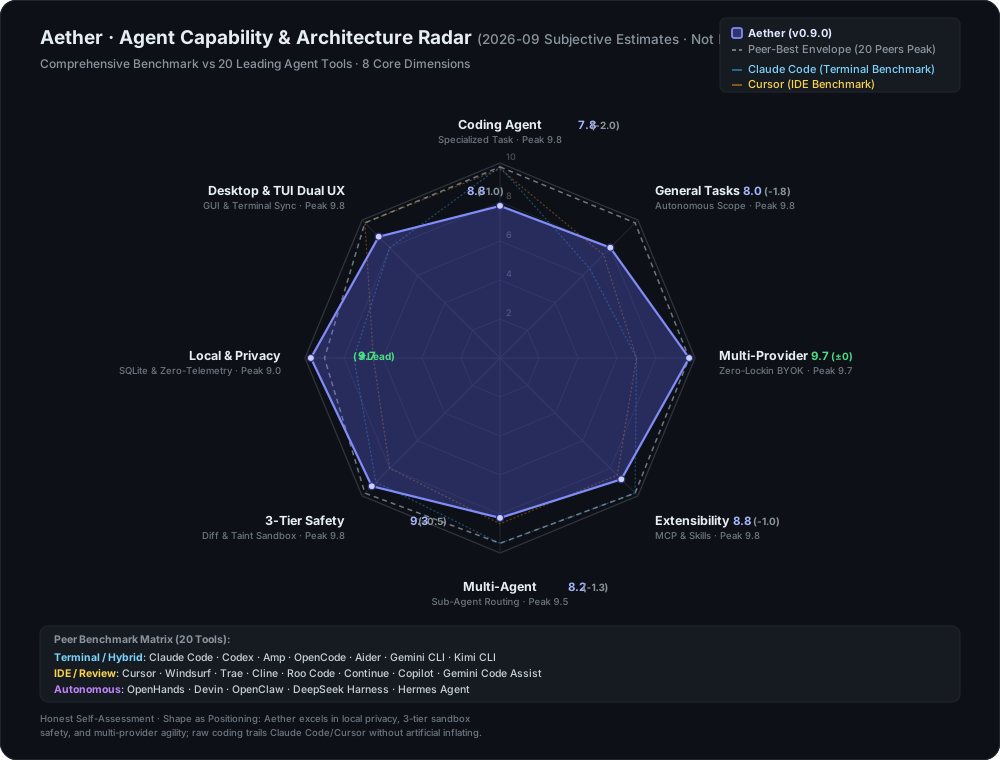
Radar chart generated by app/scripts/gen-radar.cjs — 20-peer scores embedded directly in script, reproducible via node app/scripts/gen-radar.cjs. See docs/competitive-analysis.md for detailed breakdowns.
What makes Aether different
Two things set Aether apart — a security-first agent that refuses to surprise you, and a multi-model arena that lets you test models instead of trusting one.
| Capability | Description | Maturity |
|---|---|---|
| Security-first sandbox | Allowlist command sandbox (multi-segment checked), sensitive-path write protection, external-content sanitization, and a plan → read-only → ask → full permission ladder. | Beta |
| Multi-model Arena | Send one prompt to many models at once, vote on the best, track live ELO rankings. | Beta |
| Multi-provider Chat | Switch between OpenAI, Claude, DeepSeek, and any OpenAI-compatible endpoint mid-conversation. | Stable |
| Agent Tool Loop | 42 built-in tools with a Plan-Act-Observe loop, loop detection, and context compaction. | Beta |
| Shadow Workspaces | Isolated Git worktrees (worktreeManager.js) and Docker sandboxes for speculative dry-run verification before touching main code. |
Beta |
| Autonomous Evolution | Silent background Hermes loop + GEP genetic reflection adapting strategies based on real task feedback. | Beta |
| UI/UX V2 (Desktop) | RAF-throttled real-time Markdown streaming, live thinking & tool call trace, 48px WCO titlebar alignment, 4-tab modern settings. | Stable |
| Skills & Extensibility | Drop-in SKILL.md files, MCP servers, 10-point hook system. |
Experimental |
| Structured Memory | Agent recalls preferences and past decisions across sessions in local SQLite. | Beta |
| Hierarchical Planning | Complex requests auto-decompose into parallel sub-tasks. | Experimental |
| Context Compaction | Long conversations auto-summarize without losing tool-call pairs. | Beta |
| Local-First Privacy | Conversations, keys, personas in local SQLite. Nothing leaves your machine. | Stable |
| 15 UI Languages | Including Classical Chinese and RTL Arabic. | Beta |
| Terminal TUI | Ink v5 interactive terminal: session streaming, tool cards, diff review/rollback, keyboard permission gate, /fork session tree, /memory, todo panel, @ file refs, ! shell, in-flight steering, session resume. |
Experimental |
| Headless CLI · RPC · SDK | Four-mode CLI (one-shot / NDJSON / JSONL RPC / pipe), Electron-free SDK (aetherai/sdk), machine-callable JSONL protocol. |
Experimental |
| MIT Licensed | Fully open source. | Stable |
Download
Pick one. Both products share the same agent runtime and session store.
- Just want a desktop chat app? → Aether Desktop
- Want a terminal agent / CI / SDK? → Aether CLI
Download — Desktop
Windows — Prebuilt Installer (Recommended for most users)
Download the latest Release:
| Build | Description |
|---|---|
aetherai-setup-x.y.z.exe |
NSIS installer. Per-user (no admin), auto-updates in-app. Recommended. |
aetherai-x.y.z.exe |
Portable single-exe. No install, no auto-update; just run it. |
The installer shows a SmartScreen "unknown publisher" warning on first launch — expected for an unsigned solo app. All data stays local.
⚠️ Some antivirus software may quarantine the unpacked
electron.exeduring packaging because the app is unsigned. If the installer is removed by your AV, add an exclusion or use the portable build.
Download — CLI / TUI / SDK
aetherai is the npm package. It bundles the headless CLI, the Ink v5 interactive TUI, and the Electron-free SDK in one binary.
# Install once (requires Node.js ≥ 22)
npm install -g aetherai
# or, no install:
npx aetherai "fix the failing test" --model deepseek

# Interactive terminal UI (best in Windows Terminal)
aether tui

# Single-shot prompt (CI / scripts)
aether "summarize README.md"

# JSONL RPC for external scripts
echo '{"type":"request","reqId":"c1","method":"listModels","params":{}}' | aether --mode rpc
aether and aetherai resolve to the same package. Pin a version with npm install -g [email protected] to match a desktop release.
Sharing data with the GUI — both products use the same SQLite database (
%APPDATA%/aetherai/aetherai.db). A session started in the desktop app can be resumed in the TUI and vice versa.
Run from source (developers / power users)
If you prefer to run from source, or want to modify the code, use start.bat (requires Node.js 22+):
git clone https://github.com/TQSY114514/Aether.git
cd Aether
start.bat        # Windows: installs deps, builds frontend, launches Electron
See Quick Start for the manual step-by-step.
Two products or one source tree — both products live in the same repo.
app/electron/holds the shared agent runtime,app/src/is the desktop renderer,app/cli.js+app/tui/are the CLI/TUI entry points. Releases are tagged by git tag (v*) and from a single tag you get both a desktop installer and an npm publish.
Quick Start
Prerequisites: Node.js 22+, npm 9+
cd app
npm install
npm run dev      # development (hot reload)
npm run build    # production frontend
npm start        # launch Electron
Or run start.bat at the repo root on Windows.
Try the terminal (no Electron window needed)
cd app && npm install
node cli.js tui              # interactive terminal UI (Node ≥ 22; best in Windows Terminal)
node cli.js "hi"             # one-shot prompt
echo "summarize this" | node cli.js  # piped stdin as prompt
node cli.js --mode json "x"  # NDJSON event stream (scripts/CI)
node cli.js tui --smoke      # headless state-machine smoke
Configure provider
- After launch, click Models in the sidebar.
- Add a provider (name / API URL / API Key).
- Click Fetch models to pull the available model list.
- Go back to chat and start talking.
Coming from Claude Code or OpenCode? The first-run wizard can import your
existing provider config — see docs/migration-guide.md.
Enable Ask mode
- Open Settings - Agent & Safety.
- Set agent permission mode to Ask.
- Confirm the workspace root is the folder you want the agent to read/write.
- Keep Yolo disabled unless you want unrestricted access.
Run your first agent task
- Open a new chat.
- Ask:
List the files in this project and summarize what the app does. - Review each proposed tool call. Approve safe reads; deny anything unexpected.
- Check the live reasoning trace and final answer.
Features
Status labels: Stable = daily-use ready, Beta = usable with known rough edges, Experimental = new/advanced behavior may change, Planned = documented roadmap item.
Chat
| Feature | Status | Description |
|---|---|---|
| UI/UX V2 & Streaming | Stable |
RAF-throttled smooth markdown rendering, thinking-effort indicator, live tool calls & inspector. |
| Multi-provider | Stable |
Single adapter layer; adding a provider = one file. Covers OpenRouter, Together, DeepSeek, Ollama, LM Studio, ... |
| Concurrent streaming | Stable |
One chat streams while you keep talking in another. |
| Thinking-effort slider | Beta |
Real params: OpenAI o-series / gpt-5 / Claude via relay. Only effective on reasoning models. |
| Attachments | Beta |
Text files as context; images for multimodal (needs a vision model). |
| Long-paste collapse | Stable |
Hundreds of lines auto-collapse into an expandable snippet (ChatGPT-style). |
| Message editing | Stable |
Overwrite + regenerate from any point. |
| Message search | Stable |
With highlighting across all messages. |
| Sidebar summaries | Beta |
Model-generated topic phrases, not copied text. |
Agent (Function Calling)
Beta42 built-in tools — file ops (read_file,list_dir,glob_find,grep_search,write_file,edit_file,apply_patch), web (web_search,web_fetch), shell (run_command), git & GitHub (git_status,git_diff,git_log,git_commit,git_push,git_create_branch,github_pr_create/list/merge/review,github_issue_create/list,github_release_create,github_actions_status), code intelligence (find_symbol,lsp_definition,lsp_references,lsp_diagnostics,lsp_code_actions,lsp_rename), agent meta (use_skill,ask_user,todo_write,delegate_task,task,memory_save/list/search,get_project_context,review_code,debug_loop,test_first) — with a Plan-Act-Observe loop, live reasoning trace + task checklist, loop detection, per-tool timeouts, configurable iteration budget (default 25 rounds), and context compaction.BetaGit worktree shadow workspaces — isolated dry-run execution in.aether/worktrees/to verify code changes before touching main project files.BetaRun Timeline inspection — full-screen modal (createPortal) showing real-time tool sequences, execution timestamps, token consumption, and audit trail without cluttering the chat stream.ExperimentalHierarchical planning — auto-generates task breakdown for complex requests.ExperimentalSub-agent delegation — independent sub-tasks run in parallel viadelegate_task.StablePermission modes — risk-ascending ladder:
| Mode | Description | Sandbox |
|---|---|---|
| Off | Plain chat, no tools | N/A |
| Plan | Read-only tools (investigate without changes) | - |
| Ask | Confirm each risky action (recommended) | - |
| Auto | Run everything, no confirms | Yes |
| Yolo | Full permission, no sandbox | No |
StableWorkspace sandbox —write_file/edit_fileare refused outside the configured workspace root;run_commandblocks destructive patterns. Configurable in Settings - Agent & Safety.BetaContext compaction — auto-summarizes older history (tool-call/result pairs kept intact; identifiers preserved verbatim).BetaTool call repair — auto-repairs malformed JSON, missing args, unquoted keys, and truncated calls.
Memory & Evolution
BetaAuto long-term memory — relevant memories injected before each turn; key facts extracted and saved automatically. Toggleable in Settings - Agent & Safety.BetaHermes silent evolution — background loop with GEP (Genome Evolution Protocol) genetic reflection adapting agent strategies based on task outcomes and Arena votes.ExperimentalHabit learner — detects recurring preferences (e.g. "always use Claude") and proposes auto-applied skills.BetaAudit log — per-turn agent execution trace for debugging.
Arena
BetaMulti-model arena — one prompt, multiple models answer concurrently; vote for the best and an ELO leaderboard updates automatically. Models are scored per intent (coding / math / translation / summary / general). No other local-first desktop chat app ships a built-in multi-model arena with ELO.
Skills & Extensibility
| Component | Format | Status | Details |
|---|---|---|---|
| Skills | SKILL.md |
Experimental |
Drop into <workspace>/.claude/skills/; ships with release-checklist and git-commit |
| Slash Commands | CMD.md |
Stable |
6 built-in: /code, /continue, /explain, /polish, /summarize, /translate |
| Hooks | Script | Experimental |
10 lifecycle points: PreToolUse, PostToolUse, ToolError, PreCompact, PostCompact, PreSend, PostResponse, SessionStart, SessionEnd, SubagentStop |
| MCP | stdio JSON-RPC 2.0 | Beta |
External MCP servers merge with built-in tools automatically |
Customization
| Setting | Status | Description |
|---|---|---|
| 4-tab modern settings | Stable |
Cleanly partitioned into General, Models & Providers, Agent & Safety, and Storage & Data |
| Advanced model settings | Stable |
Max tokens, temperature, top_p, custom system prefix, per-language auto-titles, thinking effort |
| Custom background | Stable |
Upload image with opacity / blur controls |
| Personas | Stable |
System-prompt presets, switchable per session |
| Themes | Stable |
Light / Dark / Blue / Glass / Retro |
| 15 UI languages | Beta |
English, Chinese (Simplified / Traditional / Classical), Japanese, Spanish, French, German, Portuguese, Russian, Ukrainian, Arabic (RTL), Hindi, Korean |
| Auto-update | Beta |
NSIS installer checks on launch; portable checks too (manual install) |
| Usage tracking | Beta |
Per-API-call log with tokens, cost, latency, cache hit rate |
Privacy
All data stays local. Aether collects nothing and uploads nothing about you. Your API keys, conversations, and personas live in a local SQLite database. The only outbound network requests go to the LLM providers you configure. How agent actions stay contained: docs/security-practices.md.
🗺️ Roadmap & Milestones
Aether's roadmap balances core stability with developer-grade autonomy. Full tracking and priorities are documented in docs/roadmap.md.
Shipped in v0.9.0
- ✅ UI/UX V2 (Anti-Slop Design): Strict aesthetic guidelines per
docs/ui-design.md, RAF-throttled real-time Markdown streaming, live thinking & tool call visualization, 48px WCO titlebar alignment, and full-screen Run Timeline (AgentRunTimeline). - ✅ Git Worktree Shadow Workspaces: Isolated dry-run execution backend (
worktreeManager.js) preventing unintended repository pollution during speculative agent edits. - ✅ Autonomous Evolution (Hermes Loop & GEP): Silent self-evolution background loop with Genome Evolution Protocol (GEP) genetic reflection, adapting strategy and tool choices based on actual task outcomes.
- ✅ 4-Tab Modern Settings: Clean separation into General, Models & Providers, Agent & Safety, and Storage & Data.
- ✅ Calibrated 20-Peer Honest Radar: Open-source, reproducible 20-peer benchmark scoring Aether across 8 capability axes against market alternatives.
Current & Upcoming Focus (P2 / P3)
- 🚀 Repo Map & Semantic Context Engine: Tree-sitter / AST project topology indexing to replace brute-force grep search and reduce token overhead.
- 🚀 MCP Server Marketplace: Built-in visual discovery and one-click installation for external Model Context Protocol servers.
- 🚀 Autonomous Browser Validation: Headless browser verification loop (render -> inspect console -> auto-fix) for full web app verification.
- 🎯 Ongoing Performance & Stability: Low-latency IPC pipelines, streaming optimizations, and zero-leak task lifecycle management.
Terminal TUI, RPC & SDK
Beyond the desktop app and the plain CLI, Aether ships an interactive terminal UI, a machine-callable JSONL RPC mode, and an Electron-free SDK. All three share the same agent core, memory, personas, MCP tools, and permission rules as the desktop.
Quick start — dual form
# Interactive terminal UI (Ink v5; requires Node ≥ 22)
node app/cli.js tui                # real terminal: type, approve tools, review diffs
node app/cli.js tui --smoke        # headless state-machine smoke (CI-safe, prints JSON)

# Single-shot prompt (same as before)
node app/cli.js "fix the failing test" --mode auto --max-iterations 30

# NDJSON event stream for scripts/CI (compat: --json-lines)
echo "summarize README.md" | node app/cli.js --mode json --model deepseek

# JSONL RPC loop over stdin/stdout
printf '{"type":"request","reqId":"c1","method":"listModels","params":{}}\n' \
  | node app/cli.js --mode rpc --db path\to\aetherai.db
Additional headless flags: --persona <id> (persona + memory injection), --memory-trace (report injected memory entries), --skills (skill proposals JSON), --setup-term (write Windows Terminal profile), --stdin (explicit piped input), --resume / --session <id> / --fork [<id>] (continue a session; context-only — this run's turns are not written back), -o / --output-last-message <file> (write the final answer to a file), --version, --list-models / --list-providers, and aether completion bash|zsh|powershell (shell completion scripts).
Defaults come from ~/.config/aether/config.json (model / mode / workspace / maxIterations) and the AETHER_MODEL / AETHER_MODE / AETHER_WORKSPACE / AETHER_MAX_ITERATIONS / AETHER_CONFIG environment variables. Precedence: CLI flag > env > config file > DB default. The JSON done frame carries estimatedCost (USD) when a pricing table is available.
TUI (aether tui)
Interactive terminal agent (Ink v5; Node ≥ 22; best experienced in Windows Terminal):
- Sessions: streaming message rendering, every turn persisted to SQLite (survives exit), resume with
--continue/--session <id>/--fork, auto-titles from the first prompt,/forksession tree (session.parent_session_id),/sessions,/use <id>history switching - One runtime, many clients: the desktop GUI and the TUI share the same SQLite sessions — a chat started in the GUI can be continued in the terminal with
aether tui --session <id>(list ids viaaether tui --continueor the GUI sidebar), and vice versa. Headless CLI (--resume/--fork) reads the same sessions. - Tools & permissions: tool-call cards (status color / latency / summary), diff review (
Alt+vexpand,Enteraccept /rrollback — pre-write snapshot restore, works outside git repos), keyboard permission gate (yallow once /aallow always /ndeny, or←→to select), read-only tools auto-approved - Approval modes:
Shift+Tabcyclesmanual → auto-edits → plan(plan = read-only planning; three options decide how to proceed when done);/approval-mode dontaskruns rule-only approvals (write tools need an allow rule) - Modes:
Alt+mcycles ask/plan/auto;/persona <id>switches persona (persona + memory prefix injection) - Leader keys:
Ctrl+Xthenmmodel picker /nnew session /lsession list /gtimeline /rrewind checkpoint /qquit /eexternal editor - Command palette:
Ctrl+Porx(New chat / Model / History (sessions) / Timeline / Export JSONL / Help / Quit) - Rebindable keys:
~/.config/aether/keybindings.json(e.g.{ "char:?": null }disables the?help key) - API key persistence:
/apikey <provider> <key>saves toauth.json(desktop safeStorage-encrypted keys cannot be decrypted headless — use this command or theAETHER_API_KEYenv var) - Memory & skill loop:
/memory <keyword>search,--memory-traceinjected entry count,/skills+/skill accept|dismiss <key>(habitLearner → skill proposals) - Todos & favorites:
Ctrl+Ttoggles the live agent todo checklist,Ctrl+Ffavorites/unfavorites the current model (persisted),F2cycles recent models @files &!shell: type@for a file picker (file content injected on submit, ≤50KB),!commandruns a shell command through the sandbox and feeds its output to the model- Session context commands:
/compact//compress-fast(compress history),/context(usage),/clear(new session),/undo(rollback the last turn + file snapshots),/recap(one-line summary),/rename//delete,/diff(uncommitted-changes viewer),/permissions add <name> <ruleKey> <allow|deny|ask>,/provider add|list - First-run bootstrap: no desktop run needed —
aether tuiauto-creates the database and points you to/provider addfor provider configuration - Steering:
Ctrl+Cwhile running → type next instruction → injected into the current loop (queue shown assteer:n);Tabwhile running queues the next message directly - Shortcuts: double-
Escquits (or/quit),Escclears input (draft kept in history),?help screen,PgUp/PgDnor mouse wheel scroll the message area line-by-line,Alt+↑/↓select messages,Shift+Enternewline in the input; status bar showsapproval/mode/model/tok/ctxlive; full keymap in docs/tui-keys.md
RPC (aether --mode rpc)
Machine-callable JSONL protocol over stdin/stdout: request frames in, event/result/error frames out — one JSON object per line, no human text. Methods: run (streams text/tool/plan/status events), listModels, listProviders, models.default, listSessions, session.load, session.fork, task.derive, task.status. Frame reference: docs/rpc.md.
SDK (require('aetherai/sdk'))
Electron-free aggregation of the agent core for external Node projects: runAgent, openDatabase, resolveProviderModel, taskDbAdapter, memory (prefetch/recall/search/…), classifyAgentMode, rpc frames, sessionContext (persona + memory injection). Type declarations included (app/electron/sdk/index.d.ts).
const { runAgent, openDatabase, resolveProviderModel, classifyAgentMode } = require('aetherai/sdk')
const db = openDatabase('./aetherai.db')
const { provider, model } = resolveProviderModel(db, { modelName: 'deepseek' })
console.log(classifyAgentMode({ prompt: 'delete the file' })) // { mode: 'ask', reason: ... }
Windows Native
| Feature | Description |
|---|---|
| Tray menu | Show/hide window, new session, new task (opens TaskPanel directly); tray click toggles visibility. |
| Global hotkey | Ctrl+Alt+A summons the main window (creates it if not running); registration result logged at startup. |
aetherai:// protocol |
aetherai://new / chat opens a new session; aetherai://tui hints the terminal form; aetherai://open/?path=<encoded> sets a folder as workspace and opens a new session (right-click "Open with Aether" flow). |
| Context-menu registration | app/resources/register-protocol.reg (replace <AETHER_EXE>, import as admin): .cs/.js/.ts/.tsx/.md/.json + folders → right-click "Open with Aether". |
| Terminal onboarding | app/resources/term/aether.ps1 (alias + launches aether tui); node app/cli.js --setup-term writes a Windows Terminal profile (dark/light palettes). |
| Sandbox hardening | Windows path defenses: \\?\ long paths, UNC \\server\share, reparse point/junction escapes, dangerous extensions (.lnk/.scr/.msi). |
Seeing "Windows protected your PC" on first launch? That is SmartScreen reacting to unsigned binaries — expected, explained, and one click to bypass: docs/smart-screen-faq.md.
Project Structure
app/
├── electron/              # Main process (Node.js / CommonJS)
│   ├── database.js        # better-sqlite3 data layer (WAL mode, 25+ tables)
│   ├── featureFlags.js    # Centralized capability gating registry
│   ├── worktreeManager.js # Git worktree shadow workspaces
│   ├── ipc/               # Domain-driven IPC handlers (chat, arena, session, mcp, ...)
│   │   ├── chat.handler.js    # Central chat & tool execution orchestrator
│   │   ├── arena.handler.js   # Multi-model arena with ELO
│   │   ├── agent.handler.js   # Workspace & capability management
│   │   └── ...
│   ├── llm/               # LLM abstraction layer (~60+ files)
│   │   ├── toolLoop.js        # Plan-Act-Observe loop with iteration budget
│   │   ├── providerAdapter.js # Multi-provider dispatch (OpenAI, Anthropic, DeepSeek, ...)
│   │   ├── compaction.js      # Context compaction preserving tool pairs
│   │   ├── autoMemory.js      # Structured long-term SQLite memory
│   │   ├── hermesLoop.js      # Silent self-evolution background loop
│   │   └── ...
│   ├── evolution/         # GEP genetic reflection & strategy mutation engine
│   ├── exec/              # Execution backends (local, docker, ssh, worktree)
│   ├── tools/             # Built-in tool registry (42 tools) & 3-tier sandbox
│   ├── mcp/               # External stdio MCP client & server manager
│   ├── sdk/               # Electron-free SDK (aetherai/sdk)
│   └── main.js / preload.js
├── src/                   # Desktop renderer (React 18 + TS + Zustand + Tailwind)
│   ├── store/index.ts     # Central reactive store
│   ├── components/        # UI (chat, sidebar, settings, timeline, modals)
│   ├── pages/             # Chat, Models, Persona, Settings, Arena scores
│   └── utils/             # Theme tokens, i18n (15 locales), markdown renderer
├── tui/                   # Ink v5 interactive terminal client (aether tui)
├── skills/                # Built-in SKILL.md bundles
└── commands/              # Built-in slash commands (/code, /explain, ...)
Tech Stack
| Layer | Technology |
|---|---|
| Desktop | Electron 43 |
| Frontend | React 18.3 + TypeScript 5.8 |
| State | Zustand 4.5 |
| Build | Vite 8 + electron-builder |
| Database | better-sqlite3 (native SQLite, WAL mode) |
| LLM | OpenAI-compatible + Anthropic Messages API |
| UI | Tailwind CSS 3.4, lucide-react, highlight.js |
| MCP | Custom stdio JSON-RPC 2.0 client |
| TUI | Ink 5 + React 18 (createElement, no JSX) |
| CLI/SDK | Node.js headless CLI (4 modes) + Electron-free SDK |
Acknowledgements
Aether stands on the shoulders of these projects — their ideas shaped the architecture and UX:
Agent frameworks
| Project | Inspiration |
|---|---|
| OpenClaw | Context compaction, tool-call loop detection, event-stream architecture |
| Hermes Agent | Iteration budget, structured long-term memory, autonomous skills, cron scheduler, FTS5 memory search |
| Evolver | Self-evolution engine, GEP (Genome Evolution Protocol) |
| Aider | LLM coding-assistant tool loop, git integration |
| Cline | IDE-embedded agent, MCP integration, permission UX |
| OpenCode | TUI keyboard/theme/permission UX, prompt cache-policy layer |
| OpenAI Codex | Sandbox process-tree isolation, elapsed-time/status indicator UX |
UI & UX
| Project | Inspiration |
|---|---|
| shadcn/ui | cn() copy-paste component methodology |
| Magic UI | Animation patterns (shimmer, blur-fade) |
| cc-switch | Usage-stats dashboard layout |
Infrastructure
| Project | Inspiration |
|---|---|
| MCP | The spec Aether's agent speaks |
| new-api | Reasoning-effort param shapes (relay conversion logic) |
Contributing
All contributions are welcome! Whether it's a bug fix, feature request, translation improvement, or documentation update — please open an issue or submit a PR.
- Fork the repo
- Create a feature branch (
git checkout -b feat/my-feature) - Commit your changes (
git commit -am 'Add feature') - Push to the branch (
git push origin feat/my-feature) - Open a Pull Request
See CONTRIBUTING.md for detailed guidelines.
License
MIT © 2025 Aether
Built with ❤️ using Electron + Node.js + React + TypeScript
Reviews (0)
Sign in to leave a review.
Leave a reviewNo results found