Aldine
Health Pass
- License — License: AGPL-3.0
- Description — Repository has a description
- Active repo — Last push 0 days ago
- Community trust — 31 GitHub stars
Code Fail
- rm -rf — Recursive force deletion command in .github/workflows/build-image.yml
- rm -rf — Recursive force deletion command in .github/workflows/release.yml
- child_process — Shell command execution capability in apps/compiler/catalog.js
- fs module — File system access in apps/compiler/catalog.js
Permissions Pass
- Permissions — No dangerous permissions requested
No AI report is available for this listing yet.
Aldine: self-hosted, open-source collaborative LaTeX editor (an Overleaf alternative). Real-time editing, git branches, GitHub/GitLab/Gitea sync, Zotero, MCP server for Claude. Two containers, AGPL-3.0.
Aldine
Write LaTeX together. Fast, versioned, yours.




Aldine is a self-hosted, open-source collaborative LaTeX editor and an
Overleaf alternative. It is slim and built for speed: real-time multi-cursor
editing, every project a real git repo with branches, native Zotero, ~2s warm
recompiles. Two containers and flat files by default: no database to migrate,
nothing to babysit.
Homepage ·
Try the live demo (resets nightly) ·
Quick start · How Aldine compares ·
Screenshots · Self-hosting ·
Contributing
Guides on aldine.dev:
Self-hosting Overleaf (Community Edition, Server Pro) compared with Aldine ·
Git with Overleaf and a git-native alternative ·
A LaTeX MCP server for Claude
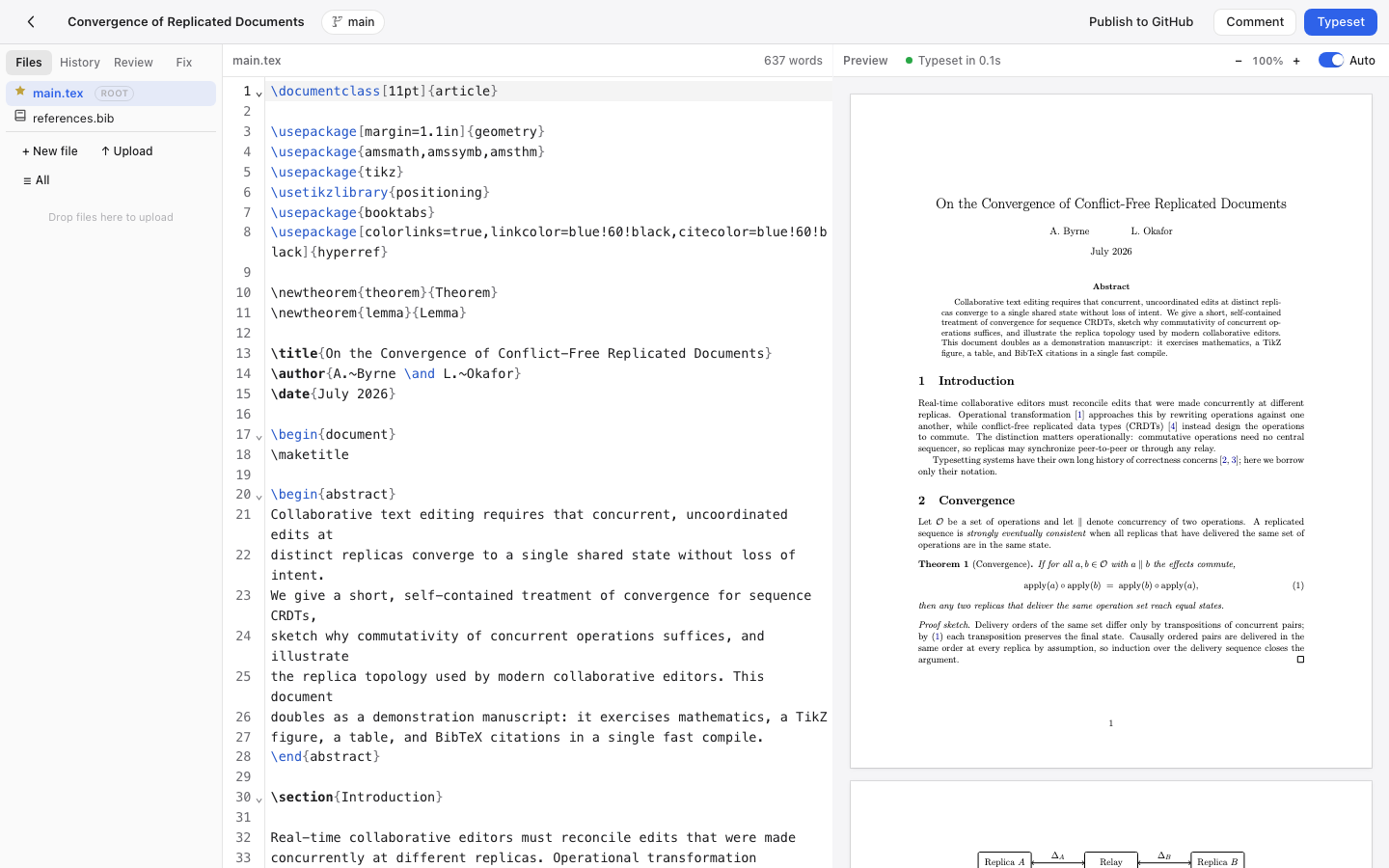
Live collaboration, a recompile, and a SyncTeX jump, in one real recording (compile wait trimmed):

Status: Aldine is young (v0.x). It compiles real papers daily and every
headline feature has a Playwright end-to-end test, but expect rough edges.
(CI runs typecheck, build, and the integration suites; the browser tests run
locally, since they need a TeX Live container.) File issues generously.
Features
Bring your Overleaf projects, and take them with you: download any Overleaf project as a ZIP,
drop it on the home screen, keep writing — root file detected, first typeset
automatic.Real-time collaboration: CRDT-based (Yjs), multi-cursor with live
presence, conflict-free by construction. Unlimited collaborators.Git-native with branches: every project is a real git repository.
Create branches, edit them independently, merge back from the UI. Publish a
project to GitHub, GitLab, Gitea or Forgejo and a co-author can clone it and
keep using VS Code; their commits come back with one Pull.Fast, sandboxed compiles: TeX Live + latexmk with persistent
incremental builds (~2s warm recompiles) in a no-egress container with
restricted shell-escape; errors surfaced with line numbers and
click-to-jump.GitHub/GitLab/Gitea/Forgejo sync: import from GitHub, GitLab, Gitea or
Forgejo as a project or publish a local project to a fresh repo, push/pull
with ahead/behind indicators, branches, conflict resolution, server-side
autopush, and open a pull or merge request, all from the editor. gitlab.com
and self-hosted GitLab, any Gitea or Forgejo instance (Codeberg included);
a personal access token needs no OAuth app. A team instance can create
every new project in a GitLab group automatically and push every autosave
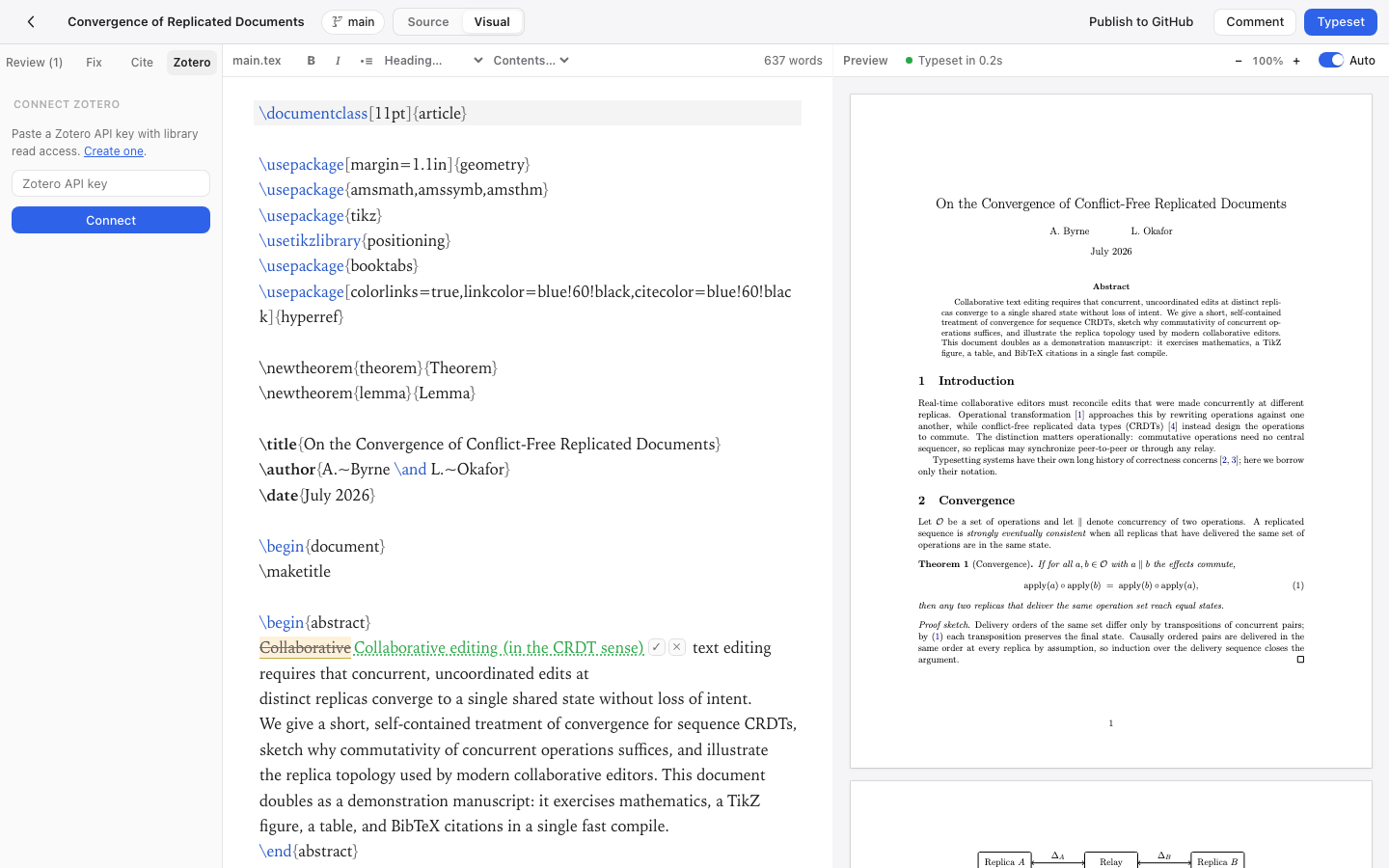
from the server.Native Zotero integration: link your whole Zotero library or a single
collection, from My Library or any of your group libraries, no premium
tier required; keep a.bibin sync with cheap
version-aware refresh, insert citations from a search panel or via\cite{
autocomplete.Claude as a collaborator (optional,
ALDINE_MCP=1): Aldine has a
built-in MCP server. Connect your
instance to claude.ai, Claude Desktop, Cowork or Claude Code over MCP and
Claude edits, typesets and shows the PDF in the chat (inline on claude.ai,
Claude Desktop and Cowork; a signed link elsewhere); every change is a git
commit authored "Claude" with a review-and-revert toast in the editor.
Setup, reachability and the security model: docs/AGENT_API.md.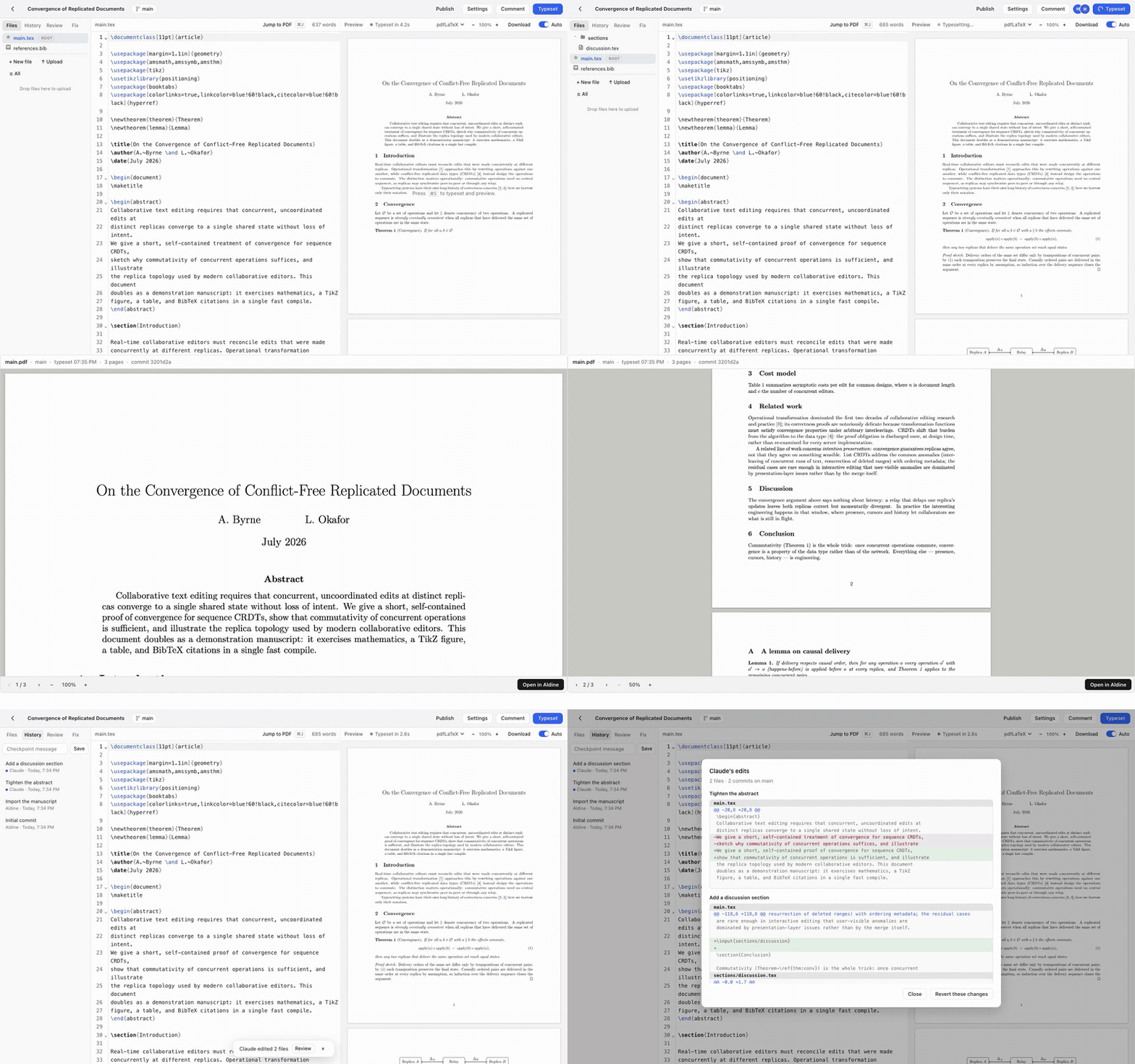
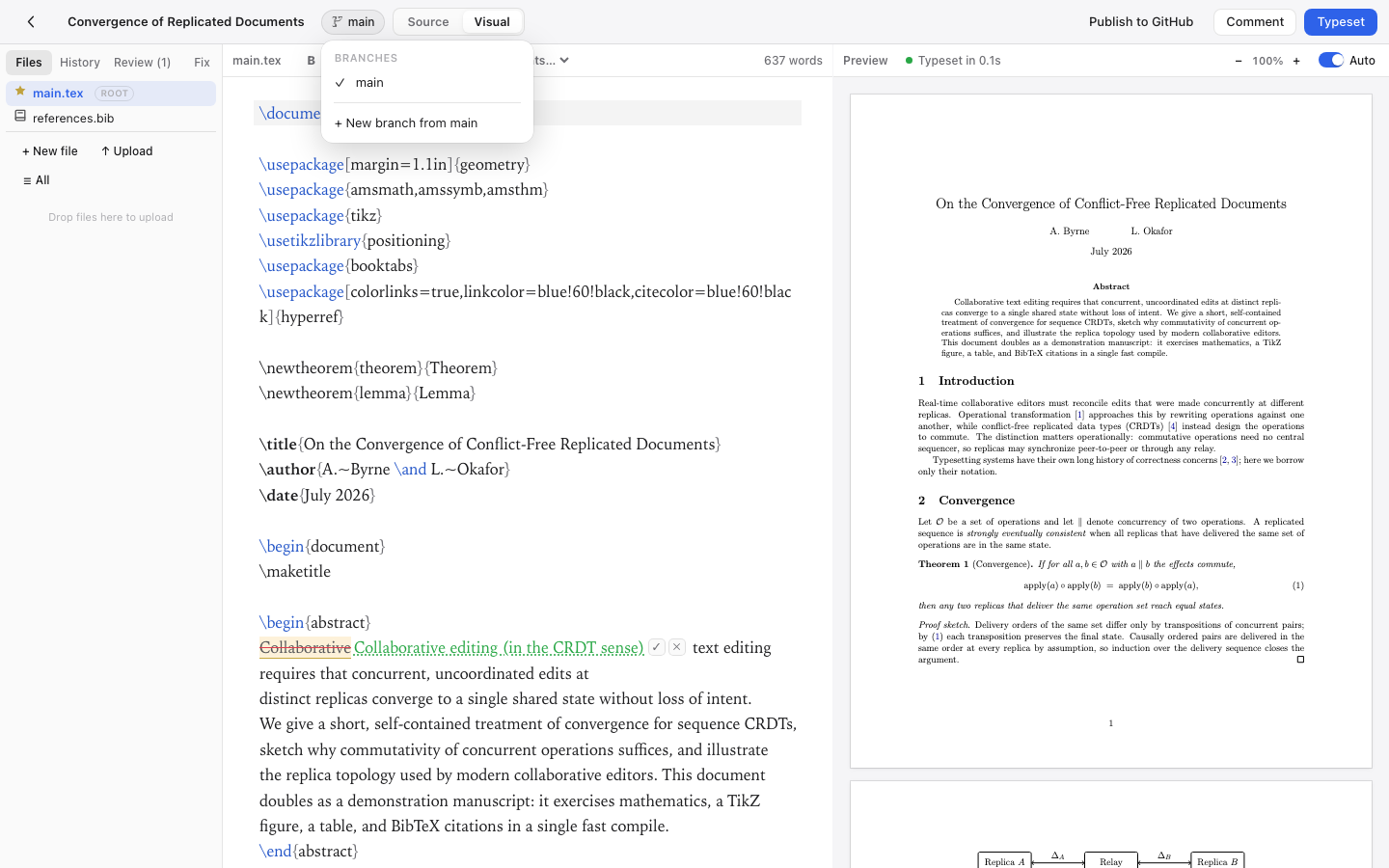
- Visual editing mode (experimental): LaTeX renders as formatted text
while the source stays authoritative and byte-stable (it never rewrites
source you didn't deliberately edit). WYSIWYG math (click an equation to edit
it in a MathLive popover), editable tables, inline tracked changes from review
suggestions, paste-rich-text-to-LaTeX, image-previewing figure chips, and an
outline. Cursor-reveal shows raw source under the caret, including a remote
collaborator's. Enable it in the command palette (⌘K), off by default. - Review mode: select text and leave an anchored, threaded comment;
optionally attach a suggested replacement the author accepts with one click.
Comments highlight in the editor, resolve/reopen, and track edits. - AI error fix (optional, BYO key): on a failed typeset, get a
plain-English diagnosis and one-click fixes. SetOPENROUTER_API_KEY,OPENAI_API_KEY, orANTHROPIC_API_KEYon the server to enable (that
precedence order if several are set;ALDINE_AI_MODELoverrides the model).
The key stays server-side and never reaches the browser. Unset the key and
Aldine is a 100% AI-free editor. - Find and cite papers without leaving the editor: search the literature
by title or author (OpenAlex), or paste a DOI / arXiv id — one click appends
the BibTeX and inserts the\cite(no account, free public APIs). - SyncTeX both ways: double-click the PDF to jump to source; ⌘J to jump
the PDF to your cursor, with a highlight flash. - Plugin system: manifest + ES module plugins add sidebar panels and
write into the editor. Zotero, references, and AI-fix ship as plugins;
write your own. - Templates & import: article, IAC conference paper, beamer,
report/thesis, plus your group's own templates from any git repository
(TEMPLATE_REPOS); or import an existing project from an Overleaf ZIP. - Editor niceties: auto-typeset on idle, live whole-document word count,
spellcheck, PDF zoom + download, drag-drop figure upload, plain-English
error hints + raw log, command palette (⌘K / Ctrl+K). - Multi-user auth (optional): set
AUTH_ENABLED=1for login, per-project
ownership, and sharing (invite-only or link). Google, GitHub & ORCID SSO,
your own OpenID Connect provider (Keycloak, Authentik, Authelia, Pocket ID;
docs/OIDC.md), or email/password (scrypt-hashed, revocable HTTP-only-cookie sessions);ALDINE_SSO_ONLY=1disables passwords entirely. Off by default
(single-tenant); the collab socket is access-checked.[email protected]opens/admin: accounts, active
users (7 / 30 days, editing now), projects, compile time. Metadata only.
No compose file passes this variable through; add it underenvironment:
of theappservice. - Scales when you need it: flat-file storage by default; set
DATABASE_URLfor Postgres andREDIS_URLfor shared rate limits and
cross-node collab events. One app node is still the supported topology;
docs/SCALING.md says exactly what is and isn't built. - Apple-style UI: system fonts, hairline borders, light & dark mode,
keyboard-first (⌘S typeset, ⌘J jump, ⌘K command palette).
Quick start
No clone, no build: save this as docker-compose.yml and run docker compose up -d:
name: aldine

services:
  app:
    image: ghcr.io/trahloff/aldine-app:${ALDINE_VERSION:-0.11.0}
    ports:
      - "8080:3000"
    volumes:
      - aldine-data:/data
      - aldine-secrets:/secrets
    networks: [frontend, backend]
    init: true
    restart: unless-stopped

  compiler:
    image: ghcr.io/trahloff/aldine-compiler:${ALDINE_VERSION:-0.11.0}${ALDINE_TEXLIVE:-}
    volumes:
      - aldine-data:/data
    # The compiler runs untrusted LaTeX. Keep this block.
    networks: [backend]
    mem_limit: 2g
    pids_limit: 256
    cap_drop: [ALL]
    security_opt: [no-new-privileges]
    init: true
    restart: unless-stopped

networks:
  frontend: {}
  backend:
    internal: true # no route to the internet

volumes:
  aldine-data:
  aldine-secrets:
Open http://localhost:8080. That's it. Projects live in the aldine-data
volume, and everything else (auth, SSO, AI fix, email) is opt-in via
environment variables when you want it.
That is equivalent to the repo-root docker-compose.yml (same services,
images and sandbox settings), so a clone works identically: git clone https://github.com/trahloff/Aldine && cd Aldine && docker compose up -d. Keep the name: aldine line wherever you save it: it
fixes the volume names, which is what lets you switch compose files later and
what deploy/backup.sh looks for.
You are pinned to a version. The block above says
${ALDINE_VERSION:-0.11.0}, so a fresh copy installs the current release and
nothing under a running install changes on its own. To upgrade, read the
CHANGELOG, back up (deploy/backup.sh), then:ALDINE_VERSION=<new version> docker compose pull && docker compose up -dTo roll back, set
ALDINE_VERSIONto the previous release and run the same
command. Your projects live in thealdine-dataandaldine-secrets
volumes and an image swap does not touch them.:lateststill exists and
points at the newest release; pinning is what lets you choose when to move.Pre-1.0 stability. Versions follow SemVer with one caveat: before 1.0
a minor bump (0.3 to 0.4) may change behaviour or on-disk layout, a patch
bump (0.4.0 to 0.4.1) will not. Every release is built from a commit that
passed CI, and its images are booted and made to typeset a real document
before:latestmoves to them. Upgrades across a minor are not yet tested
against existing data, so back up first. Watch the repo's Releases for
security fixes: per SECURITY.md, only the latest release
gets them.The first pull is big. TeX Live lives in the compiler image: about
1.1 GB compressed, 4.3 GB on disk. It carries TeX Live's medium scheme plus
the pictures, latexextra and bibtexextra collections (pgfplots, tikz-cd,
cleveref, todonotes, minted, biblatex, …), the publisher classes, and the
Arabic, Persian, Cyrillic and Greek scripts; the one family it leaves out
is CJK. After the first pull, starts take
seconds. Ready whencurl localhost:8080/api/healthreturns{"ok":true,"name":"aldine"}.Need a package it does not have? The missing-package error in the
editor names it. Two ways to get it, and project settings show which
image you are on:- Add just that package. Put a
docker-compose.override.ymlnext todocker-compose.ymlthat builds a derived compiler image, thendocker compose up -d --build.tlmgrinstalls from the same dated
TeX Live snapshot the release was built from, so this keeps working
after the release ages:
Bump theservices: compiler: image: aldine-compiler-local build: dockerfile_inline: | FROM ghcr.io/trahloff/aldine-compiler:0.11.0 RUN tlmgr install pgfplots tikz-cdFROMtag when you bumpALDINE_VERSION. Compose builds the
image on your machine, so this works forarm64servers as well. - Get everything. Every release from 0.4.0 also ships all of TeX Live as
-full(about 2.8 GB compressed, 9 GB on disk; CJK is only here). AddALDINE_TEXLIVE=-fullnext toALDINE_VERSIONand pull again.
- Add just that package. Put a
Port 8080 taken? Change the left side of
ports:; withdocker-compose.full.yml, setALDINE_PORT=8081in.envinstead.Everything beyond the minimum: building from source (latest
main,
not a release), auth/SSO/AI/email options, TLS, Postgres/Redis. All of it
lives indocker-compose.full.yml, which carries
the same compiler sandbox and the same volumes, so you can switch without
losing data:docker compose -f docker-compose.full.yml up -d --build.
The first build installs TeX Live into the compiler image; expect 20–60
minutes (thetlmgr installstep is most of it), then seconds per start.ALDINE_TEXLIVE_SCHEME=fullbuilds the all-of-TeX-Live variant instead.
How Aldine compares
| Aldine | Overleaf CE (self-hosted) | git + VS Code + LaTeX Workshop | |
|---|---|---|---|
| Deploy | 2 containers, docker compose up |
Overleaf Toolkit; sharelatex, mongo and redis containers (source) |
n/a (local) |
| Real-time collaboration | ✅ CRDT, unlimited collaborators | ✅ (source) | ❌ (async via git) |
| Review comments / suggested edits | ✅ | ❌ commenting and track changes are Server Pro only (source) | PR reviews |
| Git branches from the UI | ✅ projects are git repos | ❌ git integration is Server Pro only (source) | ✅ (it is git) |
| GitHub/GitLab/Gitea sync + PRs/MRs from the editor | ✅ | Overleaf documents GitHub synchronization as "a premium feature for Overleaf Cloud users" (source); absent from its on-premises comparison (source) | ✅ natively |
| Zotero | Whole library or one collection | Overleaf lists Zotero among the third-party integrations of its cloud platform (source); absent from its on-premises comparison (source) | Via Better BibTeX auto-export |
| Warm recompile | ~2s (persistent latexmk cache) | Not measured | Local |
| Templates gallery | 4 built-in, plus your own from git repositories | ❌ private template management is Server Pro only (source) | CTAN / your own |
| Package coverage | TeX Live medium + pictures, latexextra, bibtexextra, publisher classes, most scripts by default (~4.3 GB); any extra with one tlmgr install line; all of TeX Live with ALDINE_TEXLIVE=-full |
Minimal TeX Live in the image; full with tlmgr install scheme-full (source) |
Whatever you install |
| Rich-text / visual editing | ✅ experimental: byte-stable, WYSIWYG math, editable tables, review suggestions shown inline (accept/dismiss) | ✅ Visual Editor; its code is in the open-source repository (source) | ❌ |
| Maturity | Young (v0.x, 2026) | Overleaf dates from 2011 (source) | Very mature |
| License | AGPL-3.0 | AGPL-3.0 (source) | MIT/varies |
If Overleaf CE fits you, use it; it's good software. Aldine exists for people
who want review comments with suggested edits, git and Zotero without paid
tiers, in a deployment they can hold in their head.
Every Overleaf CE cell except "Not measured" links to the Overleaf page it
was checked against on 2026-10-12. For GitHub synchronization and Zotero we
found no Overleaf page that states them for the on-premises editions, so
those cells quote what Overleaf does say. A longer, dated version of this
comparison is at
aldine.dev/self-hosted-overleaf.
Screenshots
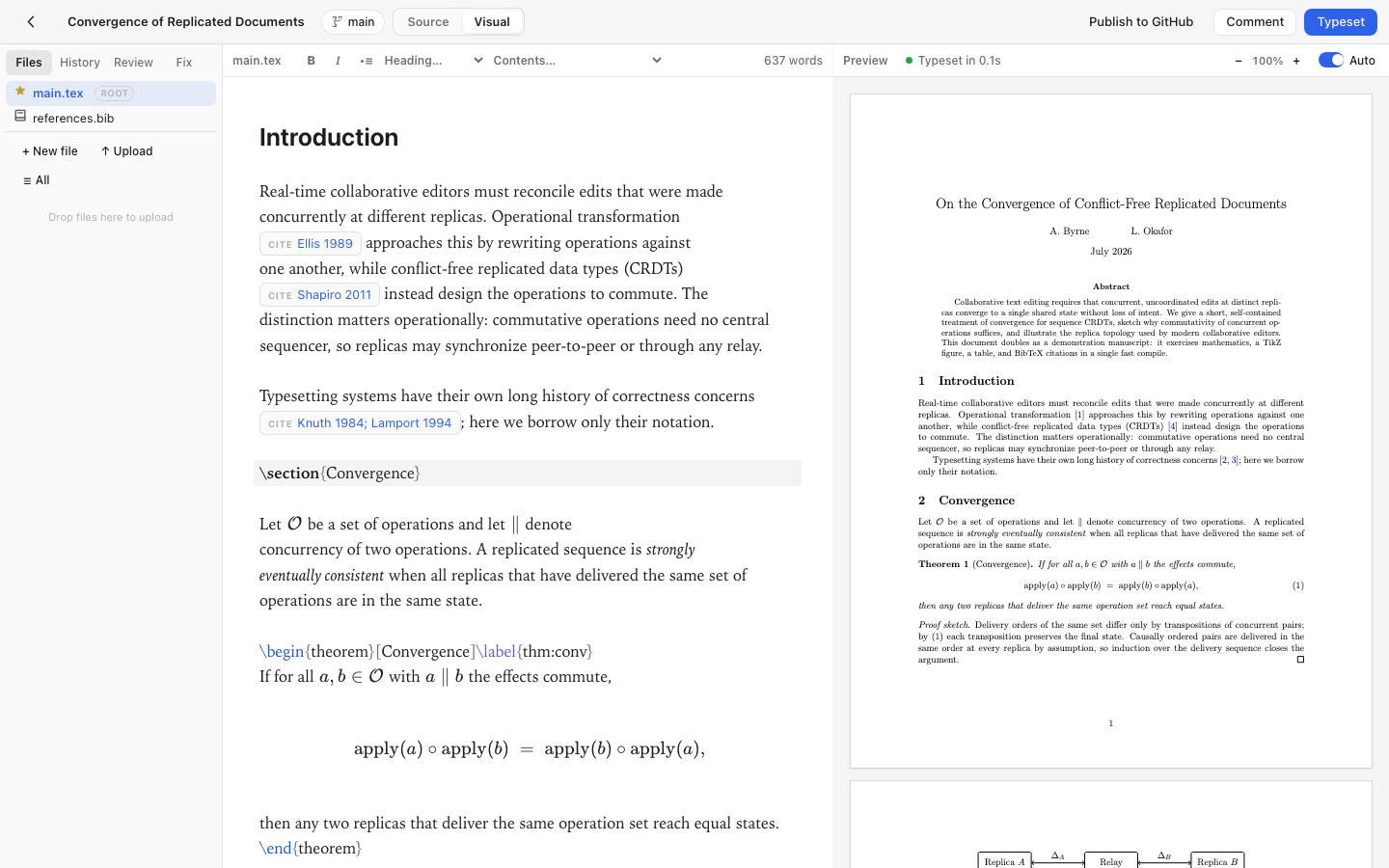
Visual editing (experimental): the source rendered as formatted text, byte-stable, with math and tables editable in place. Enable via ⌘K.
 |
 |
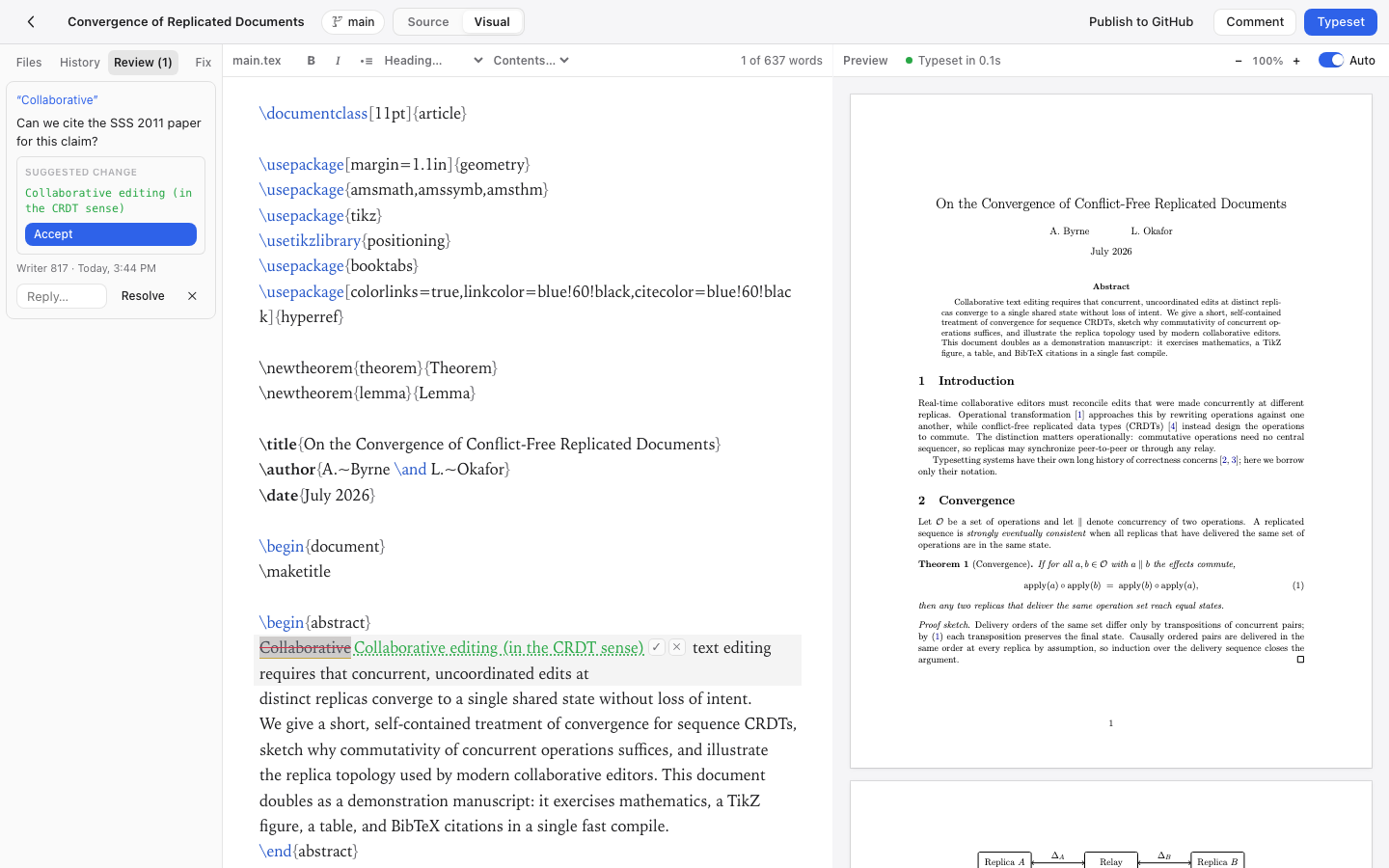
| Review mode: threads + one-click suggestions | Branches: create, switch, merge from the UI |
 |
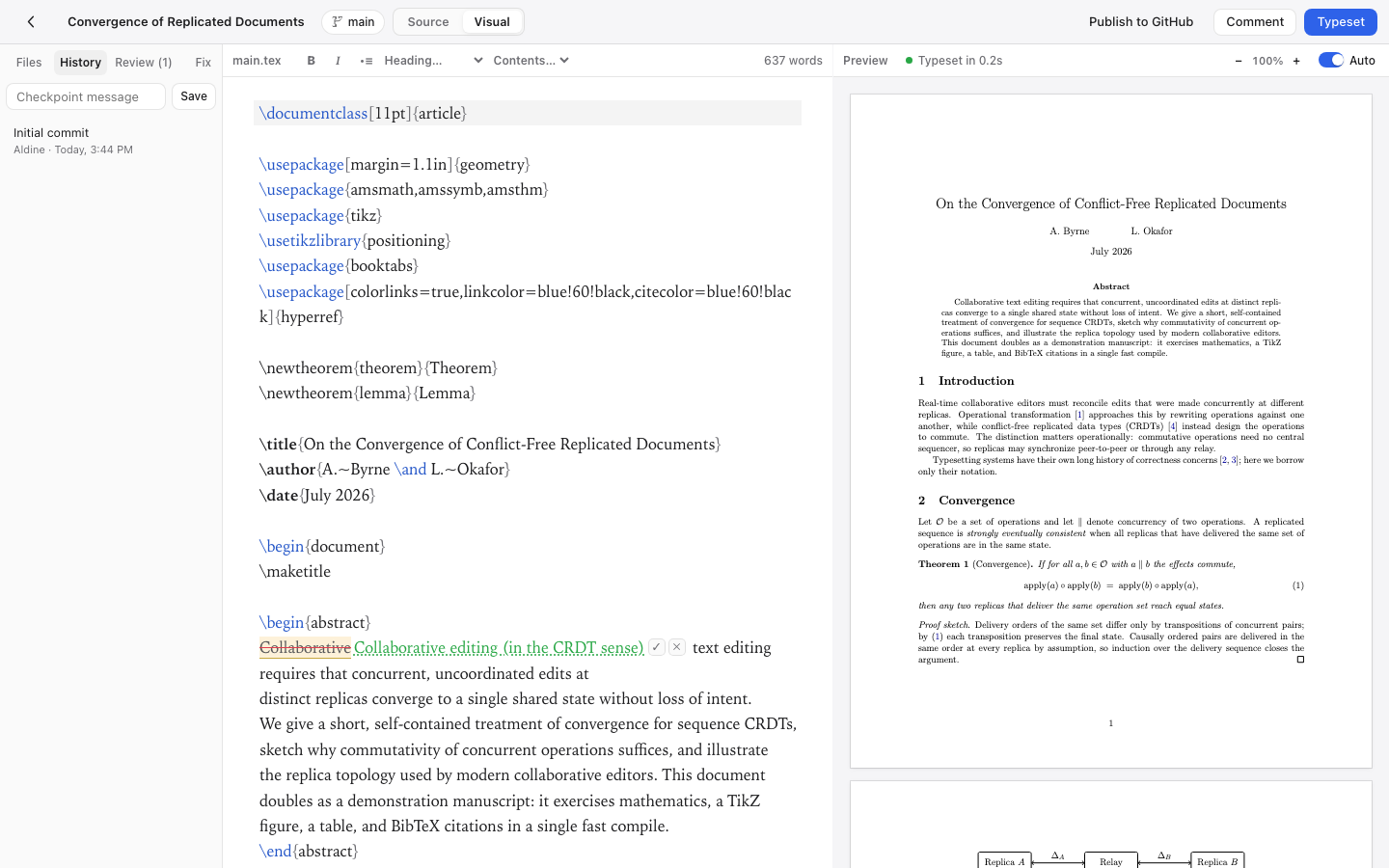 |
| Zotero: cite from your library or collection | History: auto-checkpoints, named checkpoints, diffs |
Development
npm install
npm run dev:server     # API + collab on :3000
npm run dev:web        # Vite on :5173 (proxies to :3000)
docker build -t aldine-compiler apps/compiler
docker run -d -p 4020:4020 -v $PWD/.data:/data aldine-compiler
Tests
npm run typecheck -w apps/web && npm run test -w apps/web   # tsc + vitest
npm run test:github -w apps/server                          # GitHub-sync integration
npm run test:gitlab -w apps/server                          # GitLab-sync integration
npm run test:gitea -w apps/server                           # Gitea/Forgejo-sync integration
npm run test:db -w apps/server                              # datastore conformance
End-to-end (Playwright; covers compile, collab, branches, plugins, Zotero). The
suite starts its own app on :3100 but not the compiler, and it runs against.data-e2e, so the compiler has to point at that directory or every compile
test fails against a healthy-looking compiler:
npx playwright install chromium
DATA_DIR=$(pwd)/.data-e2e PORT=4020 node apps/compiler/server.js &   # or a container on the same dir
npm run test:e2e
ALDINE_URL=http://localhost:8080 npm run test:e2e   # against a running compose stack instead
Production deploy
Settings live in a .env file next to the compose files, so every laterdocker compose call picks them up. Give each comment its own line: anything
after a value becomes part of the value, and AUTH_ENABLED=1 multi-user login
is not 1, so auth silently stays off.
# app on loopback only; your reverse proxy fronts it
ALDINE_APP_BIND=127.0.0.1
# absolute URL of the app, used in OAuth callbacks, password-reset links and
# the PDF links the MCP connector hands out. Give it a path to serve Aldine
# under a prefix (https://server/internal/aldine); the Claude connector URL
# is <ALDINE_PUBLIC_URL>/mcp
ALDINE_PUBLIC_URL=https://aldine.example.com
# signs the connector's 15-minute PDF links; generated into META_DIR when
# unset — set it explicitly when several nodes do not share that volume.
# At least 32 characters (`openssl rand -base64 32`); shorter values refuse to boot
ALDINE_SIGNING_SECRET=
# MCP endpoint for Claude (docs/AGENT_API.md); needs AUTH_ENABLED=1 or ALDINE_MCP_TOKEN
ALDINE_MCP=
# static bearer for /mcp with auth off (single-tenant); ignored when AUTH_ENABLED=1
ALDINE_MCP_TOKEN=

# Everything below is optional and off unless set.
# multi-user login, ownership and sharing (unset = single-tenant)
AUTH_ENABLED=1
# Google SSO
GOOGLE_OAUTH_CLIENT_ID=
GOOGLE_OAUTH_CLIENT_SECRET=
# GitHub SSO
GITHUB_LOGIN_CLIENT_ID=
GITHUB_LOGIN_CLIENT_SECRET=
# ORCID SSO: a Public API client (orcid.org/developer-tools, HTTPS callback
# <ALDINE_PUBLIC_URL>/api/auth/oauth/orcid/callback); ORCID_SANDBOX=1 for sandbox.orcid.org
ORCID_CLIENT_ID=
ORCID_CLIENT_SECRET=
# OpenID Connect SSO (Keycloak, Authentik, Authelia, Pocket ID, …): redirect URI
# <ALDINE_PUBLIC_URL>/api/auth/oauth/oidc/callback; every option in docs/OIDC.md
OIDC_ISSUER=
OIDC_CLIENT_ID=
OIDC_CLIENT_SECRET=
OIDC_LABEL=
OIDC_ALLOWED_GROUPS=
# GitHub repo sync: a separate OAuth app with repo scope
GITHUB_CLIENT_ID=
GITHUB_CLIENT_SECRET=
# GitLab sync (gitlab.com or self-hosted); PAT connect works without these
GITLAB_URL=https://gitlab.com
GITLAB_CLIENT_ID=
GITLAB_CLIENT_SECRET=
# Gitea / Forgejo sync needs nothing here: users paste a token and their instance URL
# REMOTE_PROVIDERS=github,gitlab,gitea   # hide a provider by leaving it out
# Optional: every new project is also created on GitLab in this group (service
# account PAT with scope api and Owner on the group). Off unless both are set.
GITLAB_TOKEN=
GITLAB_DEFAULT_GROUP=
# GITLAB_DEFAULT_VISIBILITY=private   # or internal | public
# AUTOPUSH_DEBOUNCE_MS=30000
# AI error fix, bring your own key
OPENROUTER_API_KEY=
# password-reset email: SMTP, or SES_FROM + AWS_REGION instead
SMTP_HOST=
SMTP_PORT=587
SMTP_USER=
SMTP_PASS=
SMTP_FROM=
# error tracking, and which instance the errors came from
SENTRY_DSN=
SENTRY_ENVIRONMENT=production
# Templates from your own git repositories (see templates/README.md)
# TEMPLATE_REPOS='[{"id":"lab","label":"Lab templates","url":"https://gitlab.example.org/latex/templates.git","tokenEnv":"TEMPLATE_REPO_LAB_TOKEN"}]'
# TEMPLATE_REPO_LAB_TOKEN=
# Behind your existing reverse proxy (nginx, Traefik, …), the usual setup. The
# prod overlay trusts proxy headers, sets secure cookies, and rotates logs;
# point your proxy at 127.0.0.1:8080.
# Sample nginx vhost (WebSocket + body-size gotchas handled): deploy/nginx.conf
docker compose -f docker-compose.full.yml -f deploy/docker-compose.prod.yml \
  up -d --build

# …or, if nothing else owns ports 80/443, add the bundled Caddy for
# zero-config HTTPS: append `--profile tls` and set ALDINE_DOMAIN in .env.

# Back up the data + secrets volumes:
deploy/backup.sh aldine-backup.tar.gz
# Restore, after stopping the stack with `docker compose down`:
#   deploy/restore.sh aldine-backup.tar.gz
Every variable Aldine reads is listed in
deploy/README.md.
Isolation & limits. The compiler runs on an internal-only Docker network
(no internet egress), drops all Linux capabilities, and is bounded on CPU /
memory / PIDs; LaTeX compiles with restricted shell-escape (whitelist
only) and openin_any=p. Per-client rate limits guard login, AI, and
reference lookups; compiles are concurrency-capped, with optional per-user
compile quotas (ALDINE_COMPILE_QUOTA_MIN) if you host for a group.
See deploy/README.md for the full single-VPS runbook
(nginx/Traefik/Caddy ingress, backups, SSO setup, Postgres/Redis, every
config variable),
deploy/aws for a Terraform/Fargate deployment, and
SECURITY.md for the threat model and how to report
vulnerabilities.
Architecture
┌────────────┐   HTTP/WS    ┌──────────────────────────────┐
│  Browser   │ ───────────► │  app (Node 22)               │
│  React +   │              │  Fastify API + Hocuspocus    │
│  CM6 + Yjs │              │  git repos + worktrees       │
└────────────┘              └──────────┬───────────────────┘
                                       │ shared volume /data
                            ┌──────────▼───────────────────┐
                            │  compiler (TeX Live medium)  │
                            │  latexmk wrapper, sandboxed  │
                            └──────────────────────────────┘
- One Yjs document per file per branch (
project::branch::path), persisted
straight to the git worktree with debounced writes and auto-commits. - Branches are git worktrees, so every branch is editable concurrently.
- Compile output stays inside the project tree (
.aldine-out/, kept out of
git history) which keeps latexmk's incremental cache warm.
Data & storage
Two separate concerns, behind two seams:
- Project files: real git repos + worktrees on disk (
store.ts). This is
what gives you branches and history. - Relational/metadata: users, sessions, project metadata, review comments,
and usage go through theDataStoreinterface (db/). Two backends:- JSON files (default, zero-dependency): the slim single-node self-host.
- Postgres (set
DATABASE_URL): the horizontally-scalable backend, and
the prerequisite for ever running multiple app nodes.pgis an optional
dependency; the same conformance suite runs against both.
For how this scales past one box (and what the remaining walls are), see
docs/SCALING.md.
Plugins
A plugin is a folder in plugins/:
plugins/hello/
├── manifest.json   # { "id": "hello", "name": "Hello", "version": "1.0.0", "entry": "index.js" }
└── index.js        # export default { activate(aldine) { ... } }
The aldine API exposes ui.registerSidebarPanel, editor.insertAtCursor,project context, compile(), toast(), and fetch(). Seeplugins/zotero for a complete example.
Templates
A template is a folder with a template.json and the files to start from;
the shipped ones live in templates/. A group that keeps its own thesis,
poster or report templates puts the same layout in any git repository
(GitHub, GitLab, Gitea, a bare repo over https), lists it inTEMPLATE_REPOS, and the templates appear in the gallery under the
repository's name, refreshed on an interval or with "Refresh templates", with{{PROJECT_NAME}}, {{AUTHOR}} and {{DATE}} filled in on create. Layout,
manifest fields, placeholders and private-repository tokens:
templates/README.md.
License
Copyright (C) 2026 Tobias Rahloff.
AGPL-3.0: self-host freely; if you offer a modified Aldine as a
service, share your changes. Third-party plugins interact with Aldine over its
plugin API and may use any license. Each folder under templates/ carries its
own LICENSE and states it in template.json (the gallery shows it on the
tile): the generic templates are MIT, and templates/iac-paper is LPPL-1.3c,
the customary license for a LaTeX class file. Venue templates are generated
from the classes installed in the compiler image, with the license tlmgr
reports; no publisher file is stored in this repository. Overleaf is a
trademark of its owner. Claude, Zotero, GitHub, GitLab and other names are
trademarks of their respective owners. Aldine is an independent project, not
affiliated with or endorsed by any of them.
Two things stated plainly, because finding them out later feels like a
bait-and-switch. A hosted Aldine service is planned, and contributions are
accepted under a CLA that permits relicensing, so a commercially
licensed edition is possible in future. What will not change: the self-hosted
edition stays AGPL-3.0, and no feature that works today moves behind a paid
tier. The name is handled separately in TRADEMARK.md.
Reviews (0)
Sign in to leave a review.
Leave a reviewNo results found