skill-sync
Health Warn
- License — License: MIT
- Description — Repository has a description
- Active repo — Last push 0 days ago
- Low visibility — Only 7 GitHub stars
Code Pass
- Code scan — Scanned 12 files during light audit, no dangerous patterns found
Permissions Pass
- Permissions — No dangerous permissions requested
No AI report is available for this listing yet.
❯ Open-source desktop app to sync Claude Code, Codex, and AI agent skills across computers through a private GitHub repository.
🌐 The Only Official Website: treattrick.github.io/skill-sync
Skill Sync
Keep your Claude Code, Codex, and AI agent Skills in sync across machines through your own private GitHub repository.



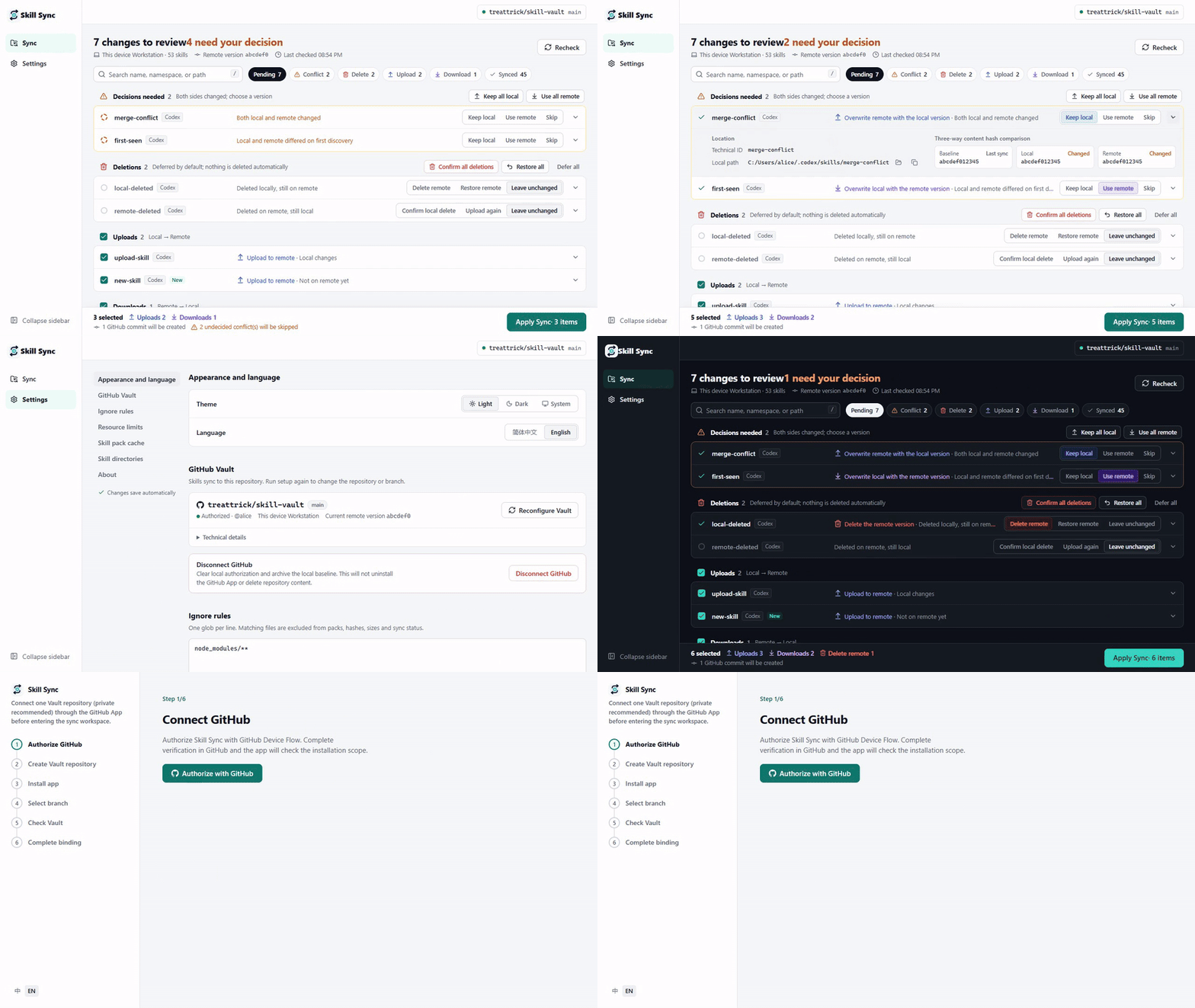
The interface demo uses sample data.
Download
Installers for the latest 1.1.0 release, direct from GitHub:
| Platform | Download | Type |
|---|---|---|
| Windows x64 | Skill.Sync_1.1.0_x64-setup.exe | EXE installer |
| Windows x64 | Skill.Sync_1.1.0_x64_en-US.msi | MSI installer |
| Apple Silicon | Skill.Sync_1.1.0_aarch64.dmg | macOS DMG |
Windows may show a security warning because the current installer is unsigned. For other builds and older versions, see the releases page.
See Skill Sync in action
Your Skills stay in their existing tool directories. Skill Sync gives you a clear, local workflow for moving them through a GitHub repository you control.
Your Vault, your repository
Create a dedicated GitHub repository as the Vault. A private repository is recommended so your Skill files remain visible only to you.
Only the repository you select
Install the GitHub App for the Vault repository only. Skill Sync needs read and write access to repository contents plus read-only metadata, not access to every repository you own.
Review every change before it happens
Review a grouped change list for conflicts, deletes, uploads, and downloads. Resolve conflicts and deletes inline, inspect each Skill's path and base/local/remote hashes, then check the upload, download, delete, and commit summary before applying.
Continue on another machine without losing edits
Connect the same Vault on another computer to download remote Skills. Local and remote changes stay visible, and conflicts require an explicit choice instead of silently overwriting work.
Why Skill Sync
Copying Skills by hand between computers is slow and makes it easy to overwrite a newer edit. Skill Sync gives Codex, Claude Code, and general agent Skills one GitHub Vault (a private repository is recommended), while keeping scanning, comparison, and apply operations on your machine.
There is no SaaS account or custom sync server, no Git, PAT, or SSH setup, and no telemetry.
Highlights
- Local-first: your Skills stay in their normal tool directories and sync through a repository you control (a private one is recommended).
- A clear change list: review conflicts, deletes, uploads, downloads, and blocked items in that order; synced Skills are collapsed by default.
- Inline decisions: when both sides changed, choose whether to keep local content, use remote content, or skip directly in the row and see the outcome immediately.
- Predictable apply: the persistent footer summarizes selected items, uploads, downloads, deletes, commit creation, and unresolved conflicts before apply.
- Safer deletes: each deletion starts at “defer”; deleting more than the configured threshold requires an additional confirmation in the footer, and accepted local deletes go to a local trash directory.
- Content-based comparison: a three-way
base/local/remotecontent-hash comparison detects real changes without relying on timestamps. - Recovery-aware apply: interrupted applies retain recovery state so the app can resume instead of blindly repeating completed work.
How it works
- Follow the six-step in-app Onboarding flow and authorize with the GitHub App Device Flow.
- Install the GitHub App for selected repositories and bind exactly one repository (private recommended) as the Vault.
- Open Sync, make inline conflict and delete choices, review the action summary, and apply the selected changes.
The workspace is available only after the Vault is ready. Ongoing configuration lives in Settings.
Supported directories
V1 scans these fixed user-level roots:
| Namespace | Root |
|---|---|
agents |
~/.agents/skills |
codex |
~/.codex/skills |
claude-code |
~/.claude/skills |
Project-level directories and custom roots are outside V1. The reserved ~/.codex/skills/.system directory is excluded from scanning.
Vault and sync model
The Vault has exactly this content layout:
manifest.json
blobs/sha256/<sha256>.skill.zip
Each Skill is packed as a canonical ZIP whose content hash determines its content-addressed blob path. The manifest is the remote index. Skill Sync compares the last successfully synced base hash with current local and remote hashes to classify uploads, downloads, deletes, and conflicts.
The remote Vault does not contain credentials, local sync state, trash, or recovery data. See the GitHub Vault design for protocol and conflict details.
Privacy and safety
- The GitHub App requests only Contents: read and write and Metadata: read-only.
- Installation must use selected repositories and expose exactly one Vault repository to Skill Sync.
- A private repository is the recommended default. A public repository is allowed, but its Skill files and Git history are visible to everyone; Skill Sync asks you to confirm before binding a public Vault.
- Credentials are stored in the operating system keyring. The desktop app contains no GitHub App client secret or private key.
- Skill Sync has no telemetry and does not operate a SaaS account or custom sync server.
- Remote deletes remove manifest entries. Accepted local deletes move Skill directories into the local trash area instead of permanently deleting them.
- Once an apply has made persistent changes, failures are recorded for recovery and new sync work is held until recovery is resumed.
Getting started
- Download the Windows x64 or Apple Silicon installer from Download above.
- Install and launch Skill Sync. Windows may show a security warning because its current installer is unsigned.
- Complete authorization and Vault binding from the in-app Onboarding flow.
- Preview and apply your first plan from Sync.
Onboarding is the normal authorization path. If you do not yet have a repository, Onboarding can open GitHub's new-repository page for you; after creating one, install or adjust the GitHub App and re-check. If needed, you can also open the direct GitHub App installation page, select repositories, and grant the App access to exactly one Vault repository (private recommended).
Complete 7-step walkthrough1. Authorize GitHub
Choose Authorize with GitHub and complete the Device Flow verification in your browser. Skill Sync checks the GitHub App installation after authorization.
2. Create the Vault repository
Open GitHub's new-repository page from Onboarding and create the repository that will hold your Skills. Use a private repository unless you intentionally want the files and history to be public.
3. Start the GitHub App installation
Return to Onboarding, open the GitHub App installation, and use Check installation again after completing the GitHub step.
4. Grant access to the Vault only
On GitHub, choose Only select repositories, select the single Vault repository, review the requested permissions, and install the App.
5. Bind the ready Vault
When Skill Sync confirms that the repository is ready, verify the owner, repository, and branch, then choose Bind this Vault.
6. Preview and upload local Skills
Review the discovered Skills and the planned upload. Select the items you want, then apply the plan to create the first Vault commit.
7. Sync on another machine
Install Skill Sync on the other computer and connect the same Vault. Review downloads and any conflicts, choose the desired content for each conflict, and apply the selected changes.
Build from source
Prerequisites: Node.js 20+, the repository-managed Rust 1.88.0 toolchain, and the Tauri v2 system dependencies. The application itself does not require Git; Git is needed here only to clone the source repository.
git clone https://github.com/TreatTrick/skill-sync.git
cd skill-sync
npm install

npm run tauri dev
npm run tauri build
Development checks
Run the complete check suite before submitting a change:
npm run typecheck
npm run format:check
npm run lint
npm run build
npm run rust:fmt:check
npm run rust:clippy
npm run rust:test
Tech stack
- Tauri 2 desktop shell with a Rust 1.88.0 backend
- Svelte 5 and SvelteKit with TypeScript
- Tailwind CSS 4 and shadcn-svelte UI primitives
- TanStack Svelte Query for remote state and Zod for response validation
Project structure
src/
  routes/
  app/
  modules/
  shared/
src-tauri/
  src/
docs/
  github-base-refactor-design.md
Contributing
Discuss larger changes in GitHub Issues before implementation. Keep pull requests focused, run the complete development checks above, and submit them through GitHub Pull Requests.
License
MIT © 2026 TreatTrick
Reviews (0)
Sign in to leave a review.
Leave a reviewNo results found