cc-notifier
Health Warn
- No license — Repository has no license file
- Description — Repository has a description
- Active repo — Last push 0 days ago
- Community trust — 90 GitHub stars
Code Fail
- rm -rf — Recursive force deletion command in uninstall.sh
Permissions Pass
- Permissions — No dangerous permissions requested
No AI report is available for this listing yet.
🔔 Smart macOS + Push notifications for Claude Code
cc-notifier 🔔
Smart Notifications for Claude Code on Desktop and Mobile
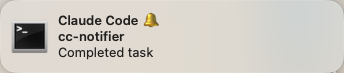
Click notifications to instantly restore your exact Claude Code window across macOS Spaces—not just the app, but your specific terminal or IDE window.
Also enables seamless 📱 mobile development via push notifications.
Features
- 🎯 Click-to-Focus - Restore exact window across Spaces, not just the app. When you have multiple terminal or IDE windows open, cc-notifier brings you back to the specific window where Claude Code is running.
- 🧠 Intelligent Detection - 💻 Desktop: notifies when you switch windows | 🌐 Remote: notifies when idle
- ⚡ Fast & Async - Runs in background, never blocks Claude Code
- 📲 Push Notifications - Desktop: optional idle alerts | Remote: primary notification method (Pushover)
- 📱 Mobile Handoff - (Optional) Desktop→phone workflow via Blink Shell
Quick Start
Desktop Mode
# Install dependencies
brew install --cask hammerspoon
brew install terminal-notifier

# Configure Hammerspoon (~/.hammerspoon/init.lua)
require("hs.ipc")
require("hs.window")
require("hs.window.filter")
require("hs.timer")

# Reload: hs -c "hs.timer.doAfter(0, hs.reload)"

# Install cc-notifier
git clone https://github.com/trentmcnitt/cc-notifier.git
cd cc-notifier
./install.sh
Add hooks to ~/.claude/settings.json (see Configuration below).
Configuration
Add to ~/.claude/settings.json:
{
  "hooks": {
    "SessionStart": [
      {
        "matcher": "*",
        "hooks": [
          {
            "type": "command",
            "command": "$HOME/.cc-notifier/cc-notifier init"
          }
        ]
      }
    ],
    "Stop": [
      {
        "matcher": "*",
        "hooks": [
          {
            "type": "command",
            "command": "$HOME/.cc-notifier/cc-notifier notify"
          }
        ]
      }
    ],
    "Notification": [
      {
        "matcher": "permission_prompt|elicitation_dialog",
        "hooks": [
          {
            "type": "command",
            "command": "$HOME/.cc-notifier/cc-notifier notify"
          }
        ]
      }
    ],
    "SessionEnd": [
      {
        "matcher": "*",
        "hooks": [
          {
            "type": "command",
            "command": "$HOME/.cc-notifier/cc-notifier cleanup"
          }
        ]
      }
    ]
  },
  // Optional: Push notifications (requires Pushover account)
  "env": {
    "PUSHOVER_API_TOKEN": "your_pushover_app_token",
    "PUSHOVER_USER_KEY": "your_pushover_user_key"
  }
}
How It Works
💻 Desktop Mode
- Session Start → Captures your focused window ID
- Task Completion → Compares current window vs original window
- Smart Notification:
- 🪟 Switched windows? → Local notification with click-to-focus
- 💤 Idle at desk? → Optional push notification via Pushover
- Click Notification → Hammerspoon instantly restores your exact window across Spaces
🌐 Remote Mode (SSH)
- Auto-Detection → Detects SSH via
SSH_CONNECTIONenvironment variable - Session Start → Skips window tracking (uses placeholder)
- Task Completion → Checks TTY idle time (st_atime)
- Smart Notification:
- 💤 User idle? → Push notification with resume URL
- ⚡ User active? → No notification
- Tap Notification → Pushover opens → Tap URL → Blink Shell auto-resumes session
🔧 Tested Stack: Tailscale + mosh + tmux + Blink Shell

📱 Mobile Development
Start coding on your desktop, continue seamlessly on your phone.
When Claude Code completes a task and you're away from your desk, you'll get a push notification. Tap it to instantly resume your exact conversation in Blink Shell.
Workflow
- 💻 Start coding task on desktop
- 🚶 Walk away from computer
- 📲 Push notification arrives on your phone
- 👆 Tap notification → Pushover opens
- 🔗 Tap URL → Blink Shell opens
- ⚡ Auto-resumes exact Claude Code session
📖 Complete Setup Guide: Mobile workflow documentation →
Configuration Example
Add to ~/.claude/settings.json (extends the Configuration section above):
{
  "env": {
    "PUSHOVER_API_TOKEN": "your_token",
    "PUSHOVER_USER_KEY": "your_key",
    "CC_NOTIFIER_PUSH_URL": "blinkshell://run?key=YOUR_KEY&cmd=mosh mbp -- ~/bin/mosh-cc-resume.sh {session_id} {cwd}"
  }
}
Placeholders (auto-replaced at runtime):
{session_id}→ Claude Code session ID{cwd}→ Current working directory
Troubleshooting
Debug Mode:
Enable detailed logging for troubleshooting:
{
  "hooks": {
    "SessionStart": [{
      "matcher": "*",
      "hooks": [{
        "type": "command",
        "command": "$HOME/.cc-notifier/cc-notifier --debug init"
      }]
    }]
    // Add --debug to all other hooks (notify, cleanup)
  }
}
Debug mode features:
- File logging with timestamps:
~/.cc-notifier/cc-notifier.log - Desktop: "[DEBUG]" prefix on notifications
- Remote: Precise timestamps on push notifications
- Logs: Hook events, window IDs, idle checks, notification sends
View logs:
tail -f ~/.cc-notifier/cc-notifier.log  # Follow in real-time
cat ~/.cc-notifier/cc-notifier.log      # View entire log
Disable: Remove --debug flag from hook commands in settings.json
Wrong window focused:
- Window ID captured at session start
- Solution: Restart Claude Code or clear/resume session
- Prevention: Keep Claude focused when starting sessions
Mac sleep interrupts tasks:
sudo pmset -g                # Check settings
sudo pmset -c sleep 0        # Disable while plugged in
caffeinate -i                # Temporary prevention
Hammerspoon window discovery:
- Visit Spaces and click windows after Hammerspoon restart
- Auto-populates during normal use
Window focus issues:
- Try closing and re-opening the terminal/IDE window
- Apps can get into states where Hammerspoon can't focus them
Known Limitations
Tmux "attached" does not mean "viewing": When Hammerspoon is unavailable (e.g., remote mode without window tracking), cc-notifier uses tmux session attachment status as a proxy for whether you're looking at Claude Code output. However, a tmux session being attached only means a terminal client is connected—you could be looking at a completely different tmux window or pane. This can lead to false notification suppression if you have complex multi-window tmux setups.
Development
python3 -m venv .venv
source .venv/bin/activate
make install
pre-commit install
make check  # format, lint, typecheck, test
Contributing: Fork, make check, test, PR.
Project structure:
~/.cc-notifier/         # Installation
├── cc-notifier         # Entry point
└── cc_notifier.py      # Implementation

mobile/                 # Mobile workflow
├── README.md
├── mosh-cc-resume.sh
└── tmux-idle-cleanup.sh
License
MIT
Reviews (0)
Sign in to leave a review.
Leave a reviewNo results found