mcp-database-query-app
Health Warn
- License — License: MIT
- Description — Repository has a description
- Active repo — Last push 0 days ago
- Low visibility — Only 6 GitHub stars
Code Fail
- rm -rf — Recursive force deletion command in scripts/_publish-common.sh
Permissions Pass
- Permissions — No dangerous permissions requested
This tool is a Model Context Protocol (MCP) application that allows AI clients to directly query, manage, and visualize data from PostgreSQL and SQL Server databases. It features an interactive UI that renders directly within compatible AI clients like Claude Desktop.
Security Assessment
Overall Risk: Medium
The application inherently accesses highly sensitive data because it acts as a bridge between your database and an AI model. It requires direct database credentials, which the README claims are secured locally using AES-256-GCM encryption. It supports HTTP/SSE transports, indicating potential network request capabilities. While the automated scan found no hardcoded secrets, it did flag a recursive force deletion command (`rm -rf`) inside a publisher script (`_publish-common.sh`). This `rm -rf` is almost certainly a standard cleanup step for the developer's local release workflow, not a malicious payload against the user, but it triggers automated security warnings.
Quality Assessment
The project is very new and currently has low visibility, sitting at only 6 GitHub stars, meaning it has not been extensively vetted by a large community. However, it is under active development, with the most recent push occurring today. The codebase is protected by a standard MIT license. Furthermore, the tool demonstrates good security design principles in its documentation, such as enforcing read-only defaults, blocking destructive DDL commands unless explicitly opted-in, and enforcing hard row caps with pagination.
Verdict
Use with caution—it has strong documented security features for handling database credentials, but its low community adoption means it lacks widespread peer auditing.
MCP App for Querying and Managing Databases (with UI support in e.g. Claude Desktop!)
MCP Database Query App
A mature Model Context Protocol app — not just a server — written in C# /
.NET 10 that lets LLM clients manage PostgreSQL and SQL Server databases
through Dapper, with a full interactive UI rendered directly inside the
client.
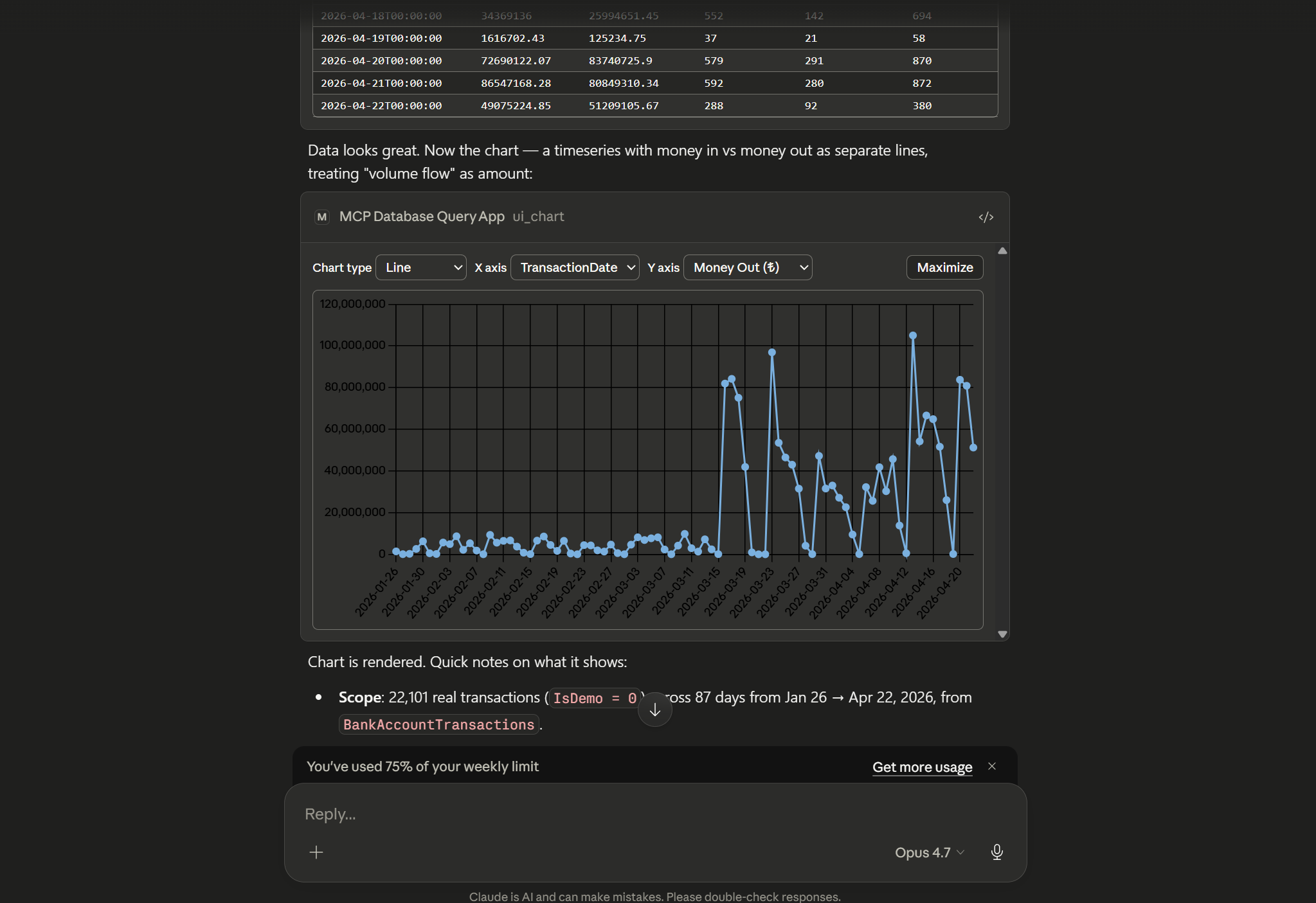
Ask the model for a query. It runs the SQL, streams back results, and opens
a live, sortable grid / filterable schema viewer / Chart.js visualisation
inside your MCP client via the MCP Apps protocol — no separate window, no
screenshots, no context loss.
Highlights
- MCP App, not just an MCP server — ships a results grid, SQL
builder, schema explorer, and Chart.js charting as MCP UI resources
that hosts with MCP UI support (e.g. Claude Desktop) render inline. - Read-only by default — writes and DDL are blocked unless a session
explicitly opts in. Destructive tools ask for confirmation before
running. - Encrypted credential storage — saved database passwords are
encrypted with AES-256-GCM using a master key you control. - Pagination & limits — every query has a hard row cap with
cursor-based paging for large result sets. - Both transports — stdio (default) or HTTP/SSE.
Quick install
Option 1 — Drop-in .mcpb extension (Claude Desktop)
Grab the bundle for your platform and open it in Claude Desktop. The.mcpb is a self-contained single-file package of the server, its .NET
runtime, and the UI assets — no dotnet or Node install on the host..mcpb is a Claude Desktop format; Claude Code and other hosts should
use Option 2.
| Platform | Download |
|---|---|
| Windows x64 | mcp-database-query-app-win-x64-jit.mcpb |
| Windows ARM64 | mcp-database-query-app-win-arm64-jit.mcpb |
| macOS (Apple Silicon) | mcp-database-query-app-osx-arm64-jit.mcpb |
| Linux x64 | mcp-database-query-app-linux-x64-jit.mcpb |
| Linux ARM64 | mcp-database-query-app-linux-arm64-jit.mcpb |
Double-click the .mcpb, or drag it into Claude Desktop's
Settings → Extensions. On first install, Claude Desktop will prompt
for the user-config values declared in manifest.json (master key,
read-only toggle, max result limit, UI toggle). Read-only is on by
default.
Option 2 — mcpServers JSON config
For Claude Code, Cursor, Windsurf, or any other host that reads anmcpServers block, point command at the extracted server binary (from
a .mcpb or a dotnet publish output):
{
  "mcpServers": {
    "database": {
      "command": "/absolute/path/to/mcp-database-query-app",
      "env": {
        "McpDatabaseQueryApp__Transport__Stdio__Enabled": "true",
        "McpDatabaseQueryApp__Transport__Http__Enabled": "false",
        "McpDatabaseQueryApp__ReadOnlyByDefault": "true",
        "McpDatabaseQueryApp__MaxResultLimit": "5000",
        "McpDatabaseQueryApp__Ui__Enabled": "true",
        "McpDatabaseQueryApp__Secrets__KeyRef": "ENV:MCP_DATABASE_QUERY_APP_MASTER_KEY",
        "MCP_DATABASE_QUERY_APP_MASTER_KEY": "<base64-encoded 32+ byte secret>"
      }
    }
  }
}
On Windows, point command at mcp-database-query-app.exe. Generate a
master key with openssl rand -base64 32.
Claude Code also accepts the same server via CLI — the flags below
produce an equivalent entry in your project's .mcp.json:
claude mcp add database \
  --env McpDatabaseQueryApp__ReadOnlyByDefault=true \
  --env McpDatabaseQueryApp__Ui__Enabled=true \
  --env McpDatabaseQueryApp__Secrets__KeyRef=ENV:MCP_DATABASE_QUERY_APP_MASTER_KEY \
  --env MCP_DATABASE_QUERY_APP_MASTER_KEY="$(openssl rand -base64 32)" \
  -- /absolute/path/to/mcp-database-query-app
Features
- Connection management — open, ping, disconnect, and save
pre-defined connection profiles. - Querying — parameterised SELECTs, paged results, non-query
execution, and EXPLAIN plans. - Schema introspection — list schemas, tables, columns, keys,
indexes, roles, and databases, with batched describe calls. - Saved scripts & notes — store SQL snippets and attach notes to
database objects. - Interactive UI — sortable/filterable results grid, SQL builder,
schema viewer, and charting, all rendered inside the MCP host. - Guided prompts —
explore-database,safe-write,migrate-script,explain-slow-queryseed the model with a
workflow. - Auto-completion — resource and prompt-argument completion backed
by a per-connection metadata cache. - Confirmations — destructive operations are gated behind MCP
elicitation prompts.
Configuration
appsettings.json controls process-wide behaviour. Runtime metadata
(pre-defined connections, saved scripts, cached result sets) is stored in
a SQLite database under %APPDATA%/McpDatabaseQueryApp/mcp-database-query-app.db. Passwords are
encrypted with AES-256-GCM using a key resolved fromMcpDatabaseQueryApp:Secrets:KeyRef (UserSecrets:…, Env:…, File:…, orLiteral:…).
{
  "McpDatabaseQueryApp": {
    "MetadataDbPath": "%APPDATA%/McpDatabaseQueryApp/mcp-database-query-app.db",
    "DefaultResultLimit": 500,
    "MaxResultLimit": 50000,
    "AllowDisableLimit": true,
    "ReadOnlyByDefault": true,
    "Transport": {
      "Stdio": { "Enabled": true },
      "Http":  { "Enabled": false, "Urls": "http://127.0.0.1:5218" }
    },
    "Ui": { "Enabled": true },
    "Secrets": { "KeyRef": "UserSecrets:McpDatabaseQueryApp:MasterKey" }
  }
}
Every setting above is overridable via environment variable using the
double-underscore convention (McpDatabaseQueryApp__ReadOnlyByDefault=true).
Build from source
Requires the .NET 10 SDK (10.0.201+) and Node.js 18+.
dotnet build
dotnet test

# stdio (default)
dotnet run --project src/McpDatabaseQueryApp.Server

# HTTP/SSE
McpDatabaseQueryApp__Transport__Http__Enabled=true dotnet run --project src/McpDatabaseQueryApp.Server
License
Reviews (0)
Sign in to leave a review.
Leave a reviewNo results found