metis
Health Warn
- License — License: AGPL-3.0
- Description — Repository has a description
- Active repo — Last push 0 days ago
- Low visibility — Only 5 GitHub stars
Code Pass
- Code scan — Scanned 12 files during light audit, no dangerous patterns found
Permissions Pass
- Permissions — No dangerous permissions requested
No AI report is available for this listing yet.
Self-hosted mail, calendar and drive client with an AI agent and workflows.

Metis Suite
Your mail, calendars and files in one place, on a server you control.
Website · User guide · Self-hosting guide · Metis Cloud

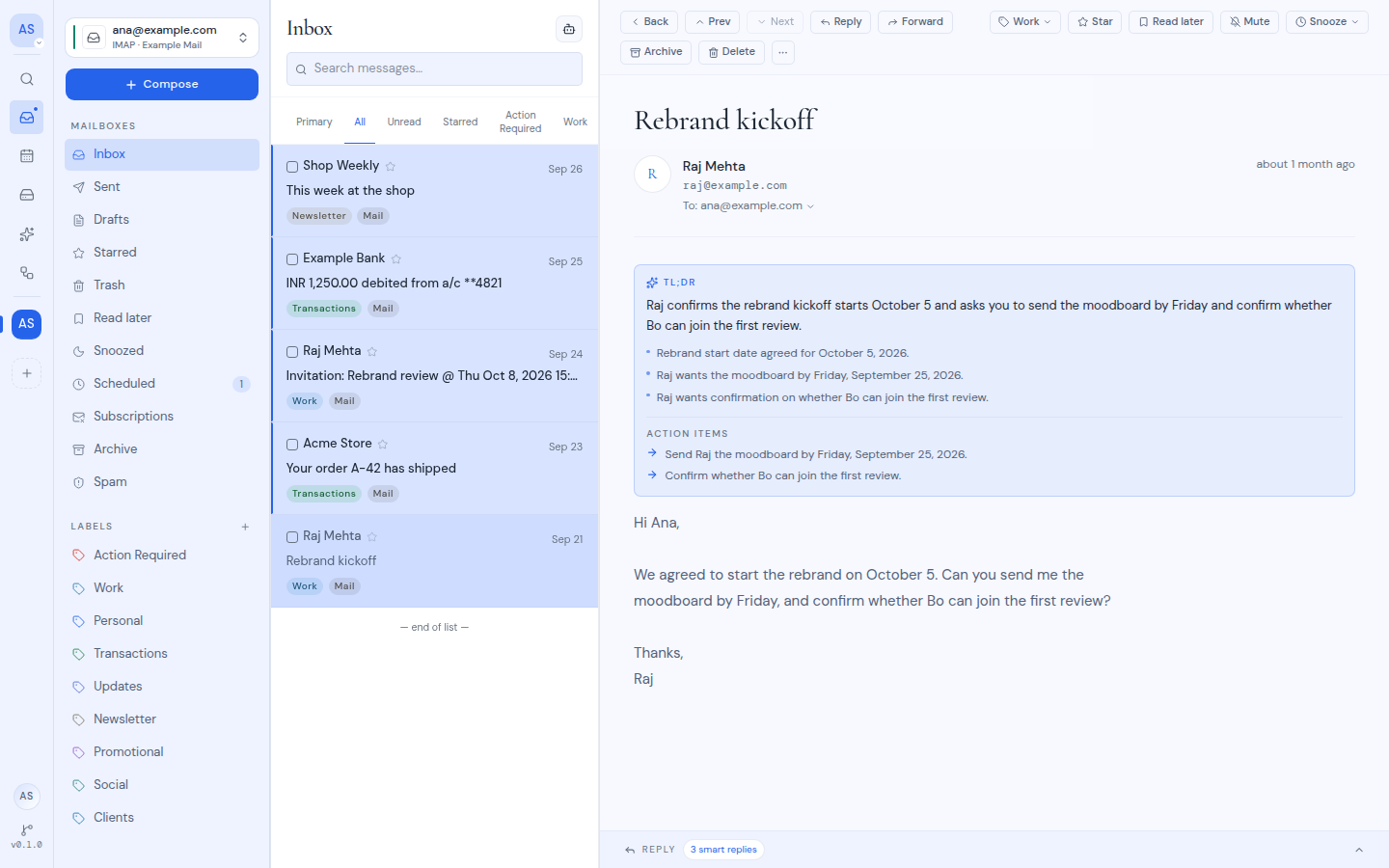
Metis Suite is an open-source mail, calendar and drive client. It connects to the accounts you already have (Gmail, Outlook, Zoho, IMAP, CalDAV and more) and puts them in one app, with an AI assistant, automations and phishing warnings on top. You run it on your own server, or we run it for you.
Why Metis
- One app for every account. Several Gmail, Outlook, Zoho and IMAP inboxes in one merged list, with their calendars and drives beside them.
- AI on your terms. Bring your own model from OpenAI, Anthropic, or anything with an OpenAI-compatible API, including one you host. AI is off until you turn it on, and the assistant asks before it sends or deletes anything.
- Private by default. Remote images and trackers are blocked, stored passwords and tokens are encrypted, and everyone signs in with two-factor authentication.
- Yours to run. One script installs it, a dashboard configures it, and updates roll back on their own if something fails.
Get started
Metis Cloud. We run a private instance for you, on your own domain or a trymetis.email subdomain. Get started.
Self-host. Free under the AGPL. You need an Ubuntu server with root access; the script installs Docker and everything else:
curl -fsSL https://sh.trymetis.email/bootstrap -o bootstrap.sh
sudo -E bash bootstrap.sh --interactive
The script generates every secret, starts the latest release and prints a setup code. Then:
- Back up
METIS_ENCRYPTION_KEYfrom/opt/metis-suite/.env. If you lose it, every user has to reconnect every account. - Point a domain at the server and run
sudo bash bootstrap.sh domain example.comto get HTTPS. - Open
https://example.com/setup, enter the setup code and create your account. - In Dashboard → System, add at least one provider (a Google, Microsoft or Zoho app, or your own mail and file servers), then connect your accounts.
Everything after the install, from AI models to updates and rollbacks, happens in the owner dashboard. The self-hosting guide covers requirements, installing with plain Docker Compose, every setting, backups and troubleshooting.
Features
- Mail. One inbox for every account, threads, labels, snooze, read later, scheduled and undoable sends, unsubscribe in one click, and warnings on likely phishing.
- Calendar. Day, week, month, year and schedule views, event editing and invitations, across Google, Outlook, Zoho and CalDAV calendars.
- Drive. Browse, upload, search and preview files on Google Drive, OneDrive, S3, WebDAV, FTP and SFTP, and save mail attachments straight to a drive.
- Assistant. Ask about anything across your mailboxes, calendars and drives in one chat. Changes wait for your approval.
- Workflows. Build automations on a canvas that run when mail arrives, on a schedule or before a send, with an AI question where a plain rule is not enough.
- MCP. Use your mail, calendars and drives from Claude, Cursor, VS Code or any other MCP client, limited to the workspaces you approve.
- Workspaces. Separate spaces for you, a team or a client, each with its own accounts, members and AI settings.
- Apps. Works in any browser, with a desktop app and an Android app that sign in to your own instance.
Supported providers
| Provider | Calendar | Drive | |
|---|---|---|---|
| ✅ | ✅ | ✅ | |
| Microsoft 365 / Outlook | ✅ | ✅ | ✅ |
| Zoho | ✅ | ✅ | |
| IMAP / SMTP | ✅ | ||
| CalDAV | ✅ | ||
| S3, WebDAV, FTP, SFTP | ✅ | ||
| Cloudflare Email, Resend (mail gateways) | ✅ |
The instance owner decides which of these are offered. Supported providers lists how they differ.
How a self-hosted instance fits together
flowchart LR
    users["Browser, desktop<br/>and Android apps"] --> caddy["Caddy<br/>(HTTPS)"]
    caddy --> app["Metis Suite"]
    app --> db[("Database<br/>(sqld)")]
    preflight["Preflight<br/>(checks each deploy)"] --> db
    updater["Updater"] -. "upgrades and<br/>rolls back" .-> app
    app --> providers["Your mail, calendar<br/>and drive providers"]
    app -. "only when AI is on" .-> llm["Your AI model"]
Everything runs in Docker Compose on one server. Scheduled sends, snooze and workflows run inside the app by default, so the server has to stay on; on serverless hosts, use an external scheduler or a separate worker instead (Background work).
Develop locally
You need Bun. The dev database is a local SQLite file, so there is nothing else to install.
bun install
cp apps/web/.env.example apps/web/.env.local
In apps/web/.env.local, fill BETTER_AUTH_SECRET and METIS_ENCRYPTION_KEY with the output of openssl rand -base64 32, and set METIS_SETUP_CODE (plus METIS_OWNER_EMAIL if you want the owner dashboard). Then:
bun run db:push
bun run dev
Open http://localhost:3000/setup and enter your setup code. The local SQLite file is only for one dev server on your own machine; anything shared uses sqld or Turso.
This is a Bun workspace with Turborepo, and every command runs from the repository root.
| Path | What it is |
|---|---|
apps/web |
The Metis Suite app (Next.js) |
apps/desktop, apps/mobile |
Desktop (Electron) and mobile (Expo) apps |
apps/docs |
The documentation site |
apps/gateway-cloudflare, apps/gateway-resend |
Mail gateways for Cloudflare Email and Resend |
apps/updater |
The updater service (Go) |
packages/ui |
Shared components and theme |
e2e |
End-to-end tests |
AGENTS.md and agent-docs/ explain the architecture and the rules every change follows.
Get help
- Using Metis: the user guide.
- Running an instance: the self-hosting guide, including troubleshooting.
- Bugs and ideas: GitHub issues.
- Security issues: report them privately as described in SECURITY.md, never as a public issue.
Contributing
Pull requests are welcome. Read CONTRIBUTING.md first: every commit needs a DCO sign-off (git commit -s), and bigger features should start as an issue so we can agree on scope. Run bun run typecheck and bun run lint before you push; CI runs the same checks.
License
Metis Suite is free software under the GNU Affero General Public License v3.0 or later, built by AstraQ Cyber Defence.
You can run, change and share it. If you let other people use a modified version over a network, the AGPL requires you to offer them your modified source. Every page has a "Source code" link for this; point it at your fork with METIS_SOURCE_URL.
Third-party licenses go in THIRD_PARTY_LICENSES.txt, which bun run --cwd apps/web licenses writes and the Docker image ships. Source copied into this repository is credited in NOTICE. For licensing on other terms, email [email protected].
Reviews (0)
Sign in to leave a review.
Leave a reviewNo results found