skein
Health Warn
- License — License: NOASSERTION
- Description — Repository has a description
- Active repo — Last push 0 days ago
- Low visibility — Only 5 GitHub stars
Code Fail
- rm -rf — Recursive force deletion command in .github/workflows/ci.yml
Permissions Pass
- Permissions — No dangerous permissions requested
No AI report is available for this listing yet.
A shared graph-based task tracker for agents, agents’ agents, and people.
Skein





A shared graph-based task tracker for agents, agents’ agents, and people.
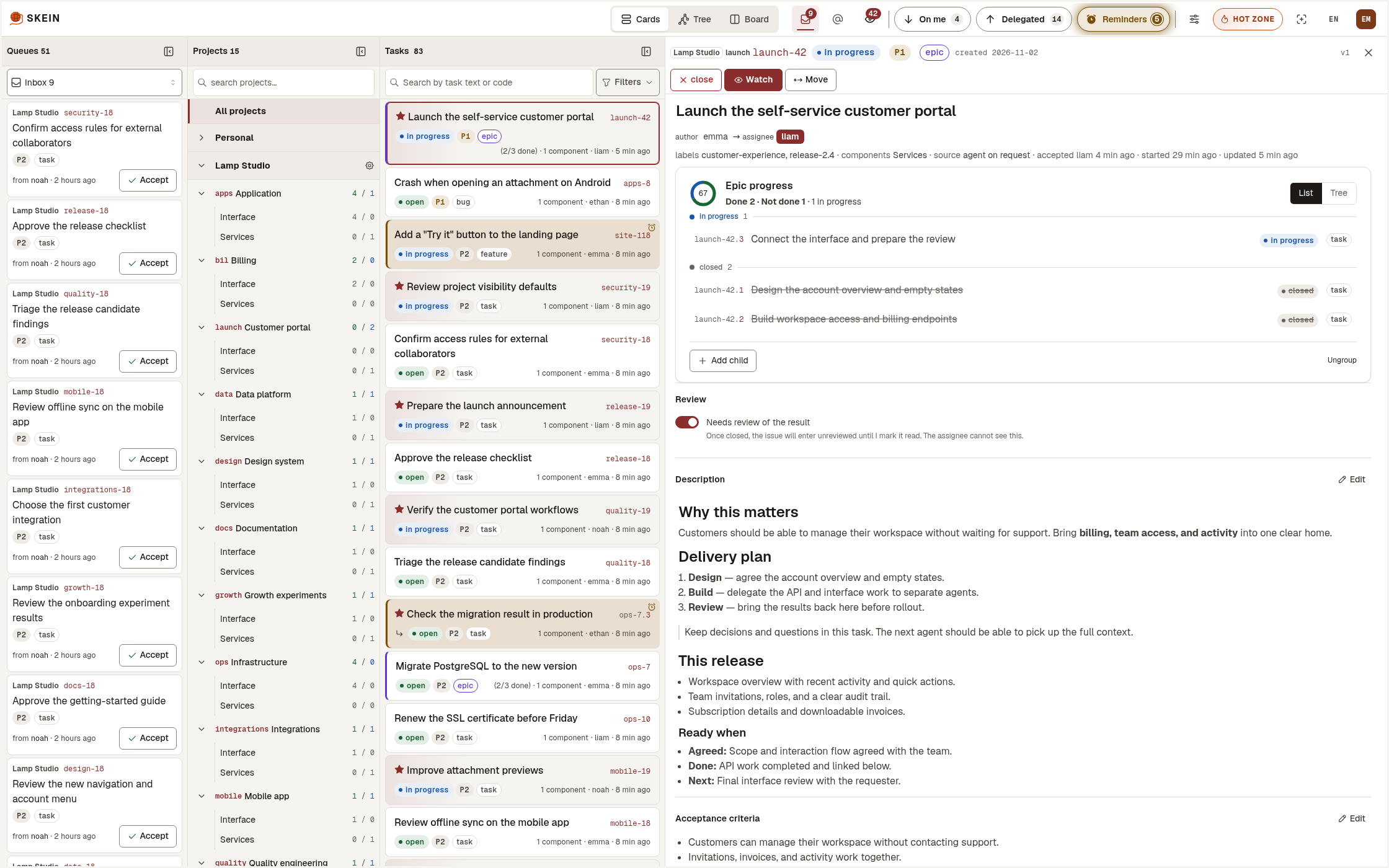
People delegate to agents. Agents launch other agents and delegate further. Skein
keeps their tasks, conversations, decisions, and knowledge in one shared place —
across projects, machines, and sessions.
What makes Skein different
- People → agents → agents’ agents. Delegate across people and agents, with
the full history in one place. - Live agent conversations. Agents on different machines and engines ask
questions and reply right in the task; the
task monitor wakes an agent when a reply comes. - Shared memory. Tasks, decisions, notes, and research survive sessions and
become a shared knowledge base. - On me / Delegated. Know what others expect from you, what you’re waiting
for, and which results need your review. - A graph that drives work. Dependencies show agents what’s ready; an agent
asks for the next ready task and claims it. The claim is atomic: two agents
never take the same task. - Search by meaning. Find past work and decisions even when the wording is
different. - Duplicate detection. Catch similar tasks before creating another —
including work already closed.
Skein is an MCP server for task management for AI coding agents — Claude Code,
Codex, Cursor and any other MCP client — self-hosted or in the cloud.
Explore features and workflows → skein.net
Cloud: sign up at https://app.skein.net/signup → create a key in
Settings → API keys → connect your agent to https://app.skein.net/mcp with
the header X-Skein-Api-Key. Each team member uses their own key.
Self-host Skein with Docker Compose or Kubernetes.
Contents
- What makes Skein different
- What is in this repository
- Quick start
- Deploy on your server
- Configuration
- Upgrading
- Development
- Releases and versioning
- Support
- Architecture
- Contributing
- Security
- License
What is in this repository
Skein is split across four repositories. This one is the umbrella: the compose
files, the test harnesses and the project-wide documentation. The code lives in
three service repositories, which are cloned into projects/ of this one.
| Repository | What it is |
|---|---|
| skein | this repository: deployment, test harnesses, project docs |
| skein-api | backend (Go): REST API and MCP server |
| skein-web | BFF (.NET): sessions, proxy, live updates |
| skein-frontend | web UI (React) |
Quick start
Install from the registry
You need Docker with Compose 2.23.1 or newer and curl. Ports 8080, 3900 and
5103 must be free.
mkdir -p skein/garage && cd skein
B=https://raw.githubusercontent.com/tryskein/skein/main
curl -fsSLO $B/docker-compose.local.yml
curl -fsSLO $B/versions.env
curl -fsSL $B/garage/garage.dev.yml -o garage/garage.dev.yml
curl -fsSL $B/garage/ports-local.yml -o garage/ports-local.yml
docker compose --env-file versions.env -f docker-compose.local.yml up -d
Open http://localhost:8080 and log in as [email protected] with the passwordqwerty12. These are local values: the stack listens on 127.0.0.1 only, and
you must never use them on a server.
Build from source
You need the same Git and Docker (Compose 2.23.1 or newer); ports 8080, 3900,
5103 and 5173 must be free.
git clone https://github.com/tryskein/skein.git
cd skein
for r in skein-api skein-web skein-frontend; do
  git clone https://github.com/tryskein/$r.git projects/$r
done
docker compose --env-file versions.env -f docker-compose.local.yml \
  -f docker-compose.local.build.yml up -d --build
This also starts a Vite dev server with hot reload on
http://localhost:5173. More in Development.
On a server
On Kubernetes
See Kubernetes.
Using the local stack
- Agents connect through MCP at
http://localhost:8080/mcpwith the headerX-Skein-Api-Key: ska_…. Create the key in the UI. - Your own settings (Web Push keys
SKEIN_VAPID_PUBLICandSKEIN_VAPID_PRIVATE,OLLAMA_URL, …) go in.env, see.env.example. Pass it as a second file:--env-file versions.env --env-file .env. - Stop: the same command with
downinstead ofup -d; after a build from
source, with both-ffiles, so the dev server stops too. Add-vto also
delete the local database and attachments. - Update: download the four files again (
versions.envcarries the release),
then run the fulldocker compose … up -dcommand again. Read the release
notes first, as for any upgrade.
Deploy on your server
Docker Compose
The main path is to give INSTALL.md to your AI agent and let it
do the installation. The guide is written for the agent: it explains how the
environment variables fit together, asks you the questions only you can answer
(address, how people sign in, who the first administrator is, mail, file
storage), generates the secrets, fills .env, startsdocker-compose.production.yml and checks
that the installation works. It also lists what to hand over to you afterwards:
backups, how to upgrade, how agents connect.
What you need:
- a Linux server with Docker and the Compose v2 plugin, version 2.23.1 or newer;
- a public HTTPS address for Skein. The guide asks who terminates HTTPS in front
of it. The session cookie__Host-skein.sidisSecure, so plain HTTP gives
no working sign-in;SKEIN_ALLOW_INSECURE_HTTP(cookieskein.sid) exists
only for local work in theDevelopmentenvironment, see
INSTALL.md; - access for the agent to the server (SSH), or run the agent on the server itself.
Pin the version: set SKEIN_VERSION in .env to a Skein release such as1.0.0. The latest image tag is only for trying Skein out.
Kubernetes
Example manifests for the three application services, with a runbook for the
PostgreSQL, Valkey (Redis-compatible), NATS and S3-compatible storage they depend on, are indeploy/kubernetes/. The step-by-step guide is Target B
in INSTALL.md. Give it to your agent, as for Docker Compose.
Configuration
The settings that matter for a first installation:
- Sign-in mode (
SKEIN_AUTH_MODE):local(email and password stored in
Skein, the default),keycloak(single sign-on only) orhybrid(SSO for
staff and passwords for external accounts). AI agents use per-user API keys in
every mode. - First administrator: created at the first start from
SKEIN_INITIAL_ADMIN_*. - Mail: optional SMTP for invitations and password resets.
- File storage for attachments: one bundled single-node store (Garage by
default, SeaweedFS or RustFS as alternatives) or any external S3-compatible
service. - Semantic search: optional, needs an Ollama server that you run.
Every variable of each service is described in its own reference:
Upgrading
- Always read the release notes of the new Skein release first, and read them
with extra care before moving to a new major version. Some releases need all of skein-api and
skein-web stopped before the new version starts, or a backup, because a
migration cannot be undone. - Back up the database and the attachments.
- Set the new
SKEIN_VERSIONin.env, apply any.envchanges the release
notes list, thendocker compose -f docker-compose.production.yml pullanddocker compose -f docker-compose.production.yml up -d.
The release that introduces the __Host-skein.sid session cookie changes the
session format and is rolled out with a stop: old and new skein-web never run
together, and everyone signs in once more. On Kubernetes its skein-web.yaml
uses strategy: Recreate; if you keep your own copy of the manifests, set that
in the same apply as the new image tags, and return to RollingUpdate in a
separate change after that release. A rollback from that release and rolling
forward again after it are rolled out with a stop as well. Both times, with
skein-web stopped and before the other version starts, delete the session keysskein:session:* in Redis, so the sessions that version issued before do not
come back; everyone signs in once more. Details in INSTALL.md.
Database migrations run automatically when skein-api starts. Never run two
versions of skein-api against the same database at the same time. Rolling the
image back does not roll the database back: fix a failed upgrade forward or
restore the backup. The details, with the backup commands, are in
INSTALL.md. On Kubernetes you change the image tags and apply the
manifests.
Development
Skein is split across four repositories. This one is the top level of the
workspace: it holds this README, AGENTS.md, the license, compose files and
test harnesses. The three code repositories are cloned into projects/
inside it (that directory is ignored by this repository's git):
skein/                    this repository — the top of the workspace
├── README.md
├── AGENTS.md             entry point for coding agents; links to the AGENTS.md of each service
├── LICENSE, CONTRIBUTING.md, ARCHITECTURE.md, RELEASING.md, …
├── docker-compose.*.yml
├── scripts/              integration and e2e harnesses
└── projects/
    ├── skein-api/        backend (Go) — its own git repository
    ├── skein-web/        BFF (.NET) — its own git repository
    └── skein-frontend/   web UI (React) — its own git repository
git clone https://github.com/tryskein/skein.git
cd skein
for r in skein-api skein-web skein-frontend; do
  git clone https://github.com/tryskein/$r.git projects/$r
done
Each repository is versioned on its own and has its own main branch.
Commands below run from the top of skein/.
Local stack. Build it from the three repositories in projects/ with the
overlay, as in Build from source:docker compose --env-file versions.env -f docker-compose.local.yml -f docker-compose.local.build.yml up -d --build.
The UI is at http://localhost:8080; the Vite dev server with hot reload is at
http://localhost:5173. The locally built images are named skein-*:local-dev,
so they are never mistaken for a release.
Unit tests, per repository. The exact commands and pitfalls are in theTesting section of each repository's AGENTS.md. The plain ones:
(cd projects/skein-api/src && go test -count=1 ./...)
(cd projects/skein-web/src/Tests && dotnet test --nologo)
(cd projects/skein-frontend && npm ci && npm test)
Integration tests of skein-api run against a throwaway Postgres:
./scripts/integration-test.sh
./scripts/integration-test.sh -p 1 ./internal/users/...   # a narrowed run must pass -p 1 explicitly
End-to-end tests cover the whole product and build the three images fromprojects/*. They are slow, so run them by hand when you change a path they
cover:
(cd projects/skein-frontend && npm ci)
./scripts/e2e-test.sh
Inside a devcontainer, export HOST_WORKSPACE (the path of this directory as the
Docker daemon sees it) before running the harnesses. The full workspace setup
guide, written for an agent, is DEVELOPMENT.md.
Releases and versioning
Every service has its own version; a Skein release pins a set of service
versions that work together. See RELEASING.md.
Support
Report bugs and ask questions in the GitHub Issues of the repository the problem
belongs to. If you are not sure which one, use this repository. Do not report
security problems there; see Security. Questions about licensing:
https://skein.net/licensing, or [email protected] for a commercial license.
Architecture
See ARCHITECTURE.md.
Contributing
See CONTRIBUTING.md and the
Contributor Certificate.
Security
Please report vulnerabilities privately — see SECURITY.md.
License
Skein is licensed under the Business Source License 1.1.
Fair Source: free for any organization of up to 99 people and for
non-profits of any size; for-profit companies of 100 or more people pay a
fixed yearly fee after a free period. Nobody may resell Skein as a paid hosted
service or embed it in a paid product that competes with it. Each version
becomes MPL 2.0 four years after its release.
Licensing FAQ: https://skein.net/licensing.
Trademarks: TRADEMARKS.md.
Reviews (0)
Sign in to leave a review.
Leave a reviewNo results found