napkin-to-blueprint
Health Warn
- License — License: MIT
- Description — Repository has a description
- Active repo — Last push 0 days ago
- Low visibility — Only 7 GitHub stars
Code Fail
- exec() — Shell command execution in bin/install.js
- fs.rmSync — Destructive file system operation in bin/install.js
- fs module — File system access in bin/install.js
- child_process — Shell command execution capability in test/install.test.js
- exec() — Shell command execution in test/install.test.js
- spawnSync — Synchronous process spawning in test/install.test.js
- fs.rmSync — Destructive file system operation in test/install.test.js
- fs module — File system access in test/install.test.js
Permissions Pass
- Permissions — No dangerous permissions requested
No AI report is available for this listing yet.
Turn a raw idea into a build-ready product blueprint inside your AI coding agent.
Napkin to Blueprint (n2b)
Turn a raw product idea into an investment-ready product blueprint — before you write any code.




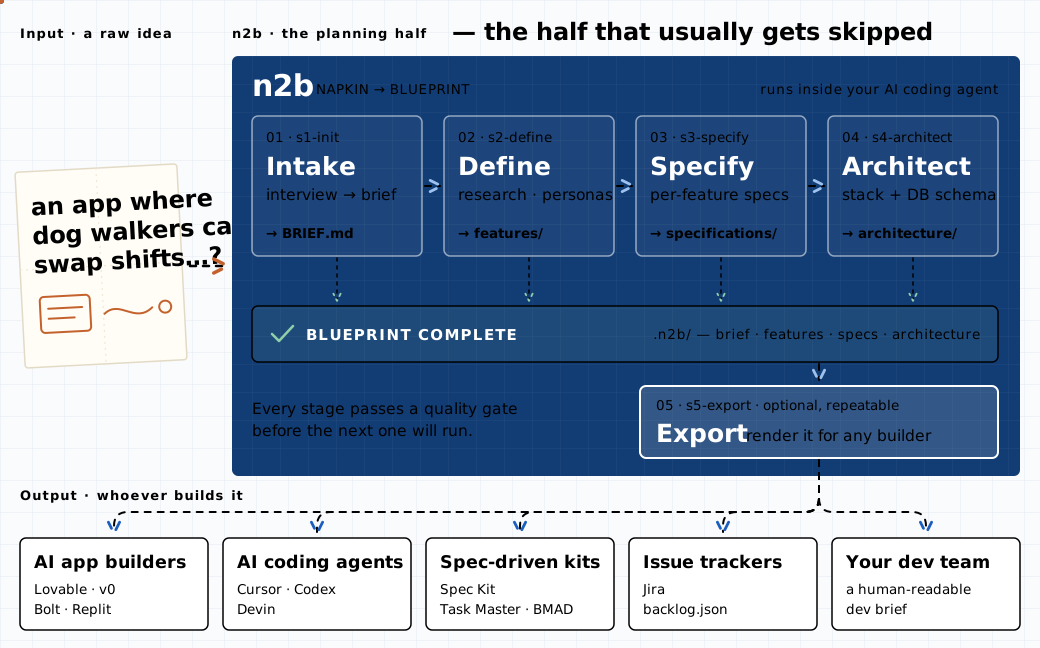
n2b runs inside your AI coding agent — Claude Code, Codex, OpenCode, or Cursor. You describe the idea; a pipeline of specialized agents interviews you, researches the market, matures the idea into a complete product definition with implementation-ready feature specs, and pairs it with a recommended technical architecture. The result is a structured handoff package that any development team or AI coding tool can build from directly.
n2b deliberately does not build the product. The blueprint is the deliverable — the input to a build, not the build.
Quickstart
Run in your project folder (an empty folder works — n2b creates everything it needs):
npx napkin-to-blueprint@latest
A picker asks which runtime(s) to install for. Or skip the picker with a flag:
npx napkin-to-blueprint@latest --claude      # Claude Code  → ./.claude/
npx napkin-to-blueprint@latest --codex       # Codex        → ./.codex/
npx napkin-to-blueprint@latest --opencode    # OpenCode     → ./.opencode/
npx napkin-to-blueprint@latest --cursor      # Cursor       → ./.cursor/
npx napkin-to-blueprint@latest --all         # all four
Flags combine (--claude --cursor). Installs are project-local: n2b's commands, agents, workflows, and templates land in the chosen runtime's directory inside your project, translated to that runtime's command format. Then open the folder in your runtime and start:
| Runtime | Installed to | Start here | Next stages |
|---|---|---|---|
| Claude Code | ./.claude/ |
/n2b:s1-init |
/n2b:s2-define … /n2b:status |
| Codex | ./.codex/ |
$n2b-s1-init |
$n2b-s2-define … $n2b-status |
| OpenCode | ./.opencode/ (commands + agents/n2b-*.md) |
/n2b-s1-init |
/n2b-s2-define … /n2b-status |
| Cursor | ./.cursor/ |
/n2b-s1-init (or mention n2b-s1-init) |
/n2b-s2-define … /n2b-status |
From there, each stage tells you the exact next command when it finishes. To update n2b later, re-run the same npx command. Restart the runtime (or start a new session) after installing so it discovers the new commands.
Testing the pipeline? Start with /n2b:s1-init --smoke (or --smoke 5). It caps Stage 2 at 3 features (or N), so every stage, gate, checkpoint, and export still runs end-to-end — in a fraction of the time and quota. Everything past the cap is listed under Deferred by feature cap in scope-boundaries.md, every banner says the run is capped, and /n2b:status shows the cap. Change or clear it with /n2b:config --max-features <N|none> before Stage 2 runs. Don't use it for a real blueprint — a capped run is a rehearsal, not a product definition.
Commands in the rest of this README are written in Claude Code form (
/n2b:<name>). On Codex use$n2b-<name>; on OpenCode and Cursor use/n2b-<name>.
How it works
Five slash commands, run in order, inside your project — the pipeline pictured at the top of this page.
Stages 1–3 mature the product: what it is, who it's for, and every feature specified in depth. Stage 4 rides on top of the finished features and answers "how could this be built?" — a recommended architecture plus documented alternatives, chosen on merit from the full landscape of modern cloud, SaaS, and API options. Stage 5 renders the finished blueprint for whichever tool or team will consume it.
Examples
Want to see the output before you install? The showcase repo holds real product ideas run end to end through n2b and published exactly as the pipeline wrote them: napkin, brief, features, specs, architecture, and the export packs to build from.
| Run | The idea | Build it with |
|---|---|---|
| Chairtime | Booking link + card deposits for solo beauty pros | lovable-pack |
| Plateful | Family meal planner with AI suggestions | agent-workspace |
| Clientroom | Client portal + invoicing for freelancers | speckit |
New runs are added over time: other ideas, other runtimes, other model profiles.
Why blueprint first?
Everyone with an idea now jumps straight into an AI build tool. It works — until it doesn't: AI gets you 70% of the way fast, and then the missing groundwork surfaces. No research, no feature definition, no data model, no acceptance criteria — the front half of the software development lifecycle got skipped, and the build drifts.
n2b fills exactly that gap:
- Before you vibe code. Run n2b first, then hand Lovable, v0, Bolt, or Cursor a blueprint instead of a vibe. Stage 5 even exports a per-feature prompt pack for your tool of choice. Vibe code the build — not the product decisions.
- When you're one person with an idea. No team, no PM, no architect? The pipeline plays those roles: interviewer, market researcher, spec writer, architect. One idea in → full feature list, per-feature specs, architecture, and database schema — before dev kickoff.
- Before drift can start. Spec tools that also build accumulate drift: specs and code slowly contradict each other mid-project. n2b ends at the handoff, so the blueprint you approve is the blueprint your builder receives.
When to use n2b vs the others
n2b sits upstream of the popular spec-driven tools — it works with them, not against them:
| Tool | What it does | Use it when… |
|---|---|---|
| n2b | Idea → interview → research → specs → architecture → export | You have a raw idea and want a complete, tool-agnostic blueprint before any build starts |
| GitHub Spec Kit | Spec → plan → tasks → implements inside your coding agent | You already know what to build and want spec-guided implementation. n2b exports Spec Kit format (s5-export speckit) |
| Task Master | Parses an existing PRD into tasks and subtasks | You already have a PRD. n2b generates one for it (s5-export prd) |
| BMAD-Method | Full agile lifecycle with role-play agents, planning through build | You want end-to-end inside one framework. n2b's PRD export feeds its build phase |
| ChatPRD | SaaS PRD writer for product managers | You want polished documents only, and SaaS is fine |
Step-by-step walkthrough
Stage 1 — Intake · /n2b:s1-init
What you do: have a conversation. n2b interviews you about your idea — vision, problem, target users, the experience you imagine, business context, scale expectations, integrations, constraints. It asks until it's confident, not until a form is filled; vague answers get follow-ups, and it tells you what it still doesn't understand. Hard boundaries — timeline, budget, regulations, systems it must work with, hosting or technology commitments — are captured here as constraints; this is the only stage that asks about them, and Stage 4 designs against them later. Already have notes or a brief? Paste them or point n2b at the file — it reads them first, only asks about what's missing, and keeps the original under .n2b/inputs/source/ so nothing you wrote is lost.
What you get: .n2b/BRIEF.md — a validated, structured project brief — plus .n2b/config.json (the pipeline settings, changeable later with /n2b:config) and pipeline tracking in .n2b/tracking/.
Your effort: this is the stage where you do the talking. Everything after it is largely autonomous.
Stage 2 — Define · /n2b:s2-define
What you do: run the command and let it work.
What happens: researcher, visionary, and synthesizer agents expand the brief into a full product definition — market research, user personas, user journeys, a prioritized feature list, scope boundaries, success metrics, and assumptions/constraints.
What you get: .n2b/features/ — a seven-document product definition set, cross-checked by a completeness audit before the stage will pass.
Stage 3 — Specify · /n2b:s3-specify
What you do: run the command — usually several times.
What happens: every feature is specified in implementation-ready depth: screens, automations, logic rules, integrations, and notifications, each with verbatim acceptance criteria. To fit provider limits, Stage 3 runs in batches: each invocation processes one pass (analysis → specification → review) for a handful of features, then stops at a clean checkpoint.
/n2b:s3-specify              # first run
/n2b:s3-specify --continue   # keep going after each checkpoint (repeat until done)
/n2b:s3-specify --batch 8    # optional: bigger batches
/n2b:s3-specify --batch all  # optional: a whole pass per run, if your quota allows
At the default batch size expect roughly three runs per four features plus one final run (two per four when spec_review is self-only); each checkpoint tells you exactly where you are and how many runs remain.
The final run reconciles every cross-reference and ID, then holds the output to a hard quality gate.
What you get: .n2b/specifications/ — per-feature specs, a feature dependency map, and a reconciliation log; plus a platform-parameters registry when any spec flags one, and your design system carried in verbatim if you supplied one.
Stage 4 — Architect · /n2b:s4-architect
What you do: run the command. There is nothing to answer — Stage 4 is fully autonomous. The technical posture it designs against comes from the constraints you gave in Stage 1 and from the specs themselves.
What happens: a profile analyst extracts a quantified technical profile from the Stage 3 specs; a technical researcher surveys the current technology landscape (web-first, with any knowledge-based fallback marked as such); then feasibility-planner, architect, and schema-designer agents produce a per-feature feasibility analysis, a recommended architecture with documented alternatives and trade-offs (stack, services, databases, APIs, hosting, auth — nothing artificially constrained), and a production-grade database schema.
What you get: .n2b/architecture/ — five architecture documents. When the stage passes its gate, the pipeline reports blueprint complete: your .n2b/ folder now is the handoff package.
Stage 5 — Export (optional) · /n2b:s5-export
What you do: pick who the export is for. The command opens a two-level picker ("Who will use this export?" → variant), or you can name a target directly:
/n2b:s5-export                    # open the picker
/n2b:s5-export dev-brief          # or name a target
One format per invocation — run it as many times as you need. Every export is verified against the blueprint by a fidelity gate before it's accepted (counts reconciled, acceptance criteria carried verbatim).
What you get: .n2b/exports/<target>/ — one of:
| Target | For | Contents |
|---|---|---|
dev-brief |
A development team | Human-readable build brief, parts A–H + combined doc |
jira |
Jira | Epics + stories CSV (ACs verbatim) + import guide |
backlog |
Any tracker | Tool-neutral backlog.json + backlog.csv |
agent-workspace |
Coding agents (Devin, Cursor, Codex…) | Repo-shaped bundle: AGENTS.md, build order, operating rules |
speckit |
GitHub Spec Kit | .specify/ constitution + per-feature spec folders |
prd |
Task Master / BMAD | PRD.md + architecture.md pair |
lovable-pack v0-pack bolt-pack replit-pack |
Vibe-coding tools | Distilled knowledge doc + one build prompt per feature + per-tool wrapper files |
All targets except dev-brief also embed a byte-identical copy of the full blueprint under docs/blueprint/.
Anytime — /n2b:status
Reports pipeline state, per-stage progress, integrity checks, export freshness, the current model settings, and the exact next command to run. If you're ever unsure where you are, run this.
Anytime — /n2b:config
Shows or changes the pipeline settings Stage 1 collected, without re-running intake: /n2b:config --show prints the model every agent role would get right now; --profile <quality|balanced|budget|inherit>, --provider <name>, --set <tier>=<model-id>, --spec-review <independent|self-only>, --design-system <none|user>, and --max-features <N|none> (the smoke-run feature cap — locked once Stage 2 is complete) change one setting each; no flags asks the same questions Stage 1 did. Changes take effect on the next stage command.
Bring your own design system
n2b never generates a design system. If you have one, drop it into .n2b/inputs/design-system/ (Markdown, design-token JSON, PDF, or a SOURCES.md of URLs) before Stage 3 — it's carried into the blueprint verbatim and the architecture maps to it as-is. If you don't, the package ships design-agnostic and the downstream builder owns visual design.
What n2b is not
- It does not write application code, scaffold projects, or set up databases.
- It is not a replacement for a build tool — it produces the input to one.
- It is not a document generator you fill in — the pipeline interviews, researches, and holds its own output to quality gates before a stage will pass.
Requirements
- One of: Claude Code, Codex (CLI ≥ 0.130.0 — earlier versions can list skills twice; skills install to
.codex/skills/— if your Codex build looks for.agents/skills/instead and$n2b-*does not appear,mv .codex/skills .agents/skillsand report it), OpenCode, or Cursor - Node.js ≥ 16 (used only by the installer — zero npm dependencies)
Model profiles per runtime. Stage 1 asks once which model profile to use — balanced, quality, budget, or inherit (no routing; every agent uses the session model) — and each profile assigns one of four tiers (frontier, heavy, standard, light) to each of n2b's 16 agent roles. Tiers become real models through a provider whose IDs are written into .n2b/config.json from n2b/references/model-catalog.json:
| Runtime | Asked at Stage 1 | Providers | Applied at spawn |
|---|---|---|---|
| Claude Code | profile | claude-aliases (fable / opus / sonnet / haiku tier aliases — never stale) |
yes — the Agent tool's model parameter |
| Codex | notice, profile (Inherit recommended if unsure), provider | openai (gpt-5.6 sol / terra / luna with reasoning effort) or custom IDs |
only when the host's spawn_agent exposes a model field; otherwise agents run on the session model |
| OpenCode | notice, profile, provider | anthropic, openai, or custom IDs |
yes — the installer emits one native agent file per n2b role (.opencode/agents/n2b-<role>.md) and Stage 1 / /n2b-config write each role's model into its model: line, which reinstalls preserve |
| Cursor | not asked | — | never — Cursor's configured model applies to every agent |
/n2b:config changes any of this later. /n2b:status shows the current setting.
Working on n2b itself
Source lives at this repository's root and is authored once, in Claude Code native format; the installer syncs it into the chosen runtime's directory (.claude/, .codex/, .opencode/, .cursor/), rewriting paths, command names, includes, and tool names for that host on the way — and, on OpenCode, emitting one native subagent file per model-catalog role so per-agent models can be applied through frontmatter. Runtime artifacts go to the target's .n2b/, never back into source.
| Path | Purpose |
|---|---|
bin/install.js |
Installer — syncs source into a project's runtime directory, translating per runtime |
test/install.test.js |
Installer tests (npm test, zero dependencies) |
commands/n2b/ |
Slash-command definitions |
n2b/agents/ |
Stage subagent definitions |
n2b/workflows/ |
Per-stage orchestration |
n2b/references/ |
Methodologies, rules, and schemas (incl. model-catalog.json, the model-routing data) |
n2b/templates/ |
Output document + tracking templates |
node bin/install.js --claude --target /path/to/test/project   # install a local checkout (any runtime flag, or --all)
npm test                                                       # installer tests, incl. Claude Code byte-identity
Everything is Markdown — commands, workflows, agents, and templates are all .md files — apart from two JSON data files, n2b/references/model-catalog.json (model routing) and n2b/templates/config.json (the settings template). After editing source, re-run the installer before testing; to exercise every stage end-to-end without a full-size run, start the test project with /n2b:s1-init --smoke (see Quickstart). Claude Code output is a verbatim copy of source and is pinned by test/fixtures/claude-baseline.json; after an intentional source change, refresh it with node test/install.test.js --update-baseline.
See CONTRIBUTING.md for the full development loop and PR checklist, CHANGELOG.md for release notes, and SECURITY.md for how to report a vulnerability.
License
MIT © Tapas Mukherjee — see LICENSE.
Reviews (0)
Sign in to leave a review.
Leave a reviewNo results found