openproxy
skill
Warn
Health Warn
- No license — Repository has no license file
- Description — Repository has a description
- Active repo — Last push 0 days ago
- Low visibility — Only 5 GitHub stars
Code Warn
- process.env — Environment variable access in src/app/http-app.ts
Permissions Pass
- Permissions — No dangerous permissions requested
No AI report is available for this listing yet.
OpenProxy — zero-config proxy for Claude Code & Gemini CLI
README.md
OpenProxy
[!NOTE]
Complete rewrite with semantic IR architecture, supporting multi-provider bidirectional conversion.
OpenProxy is an API translation gateway that converts between different AI providers (Anthropic, Gemini, OpenAI). Use any client to call any provider.
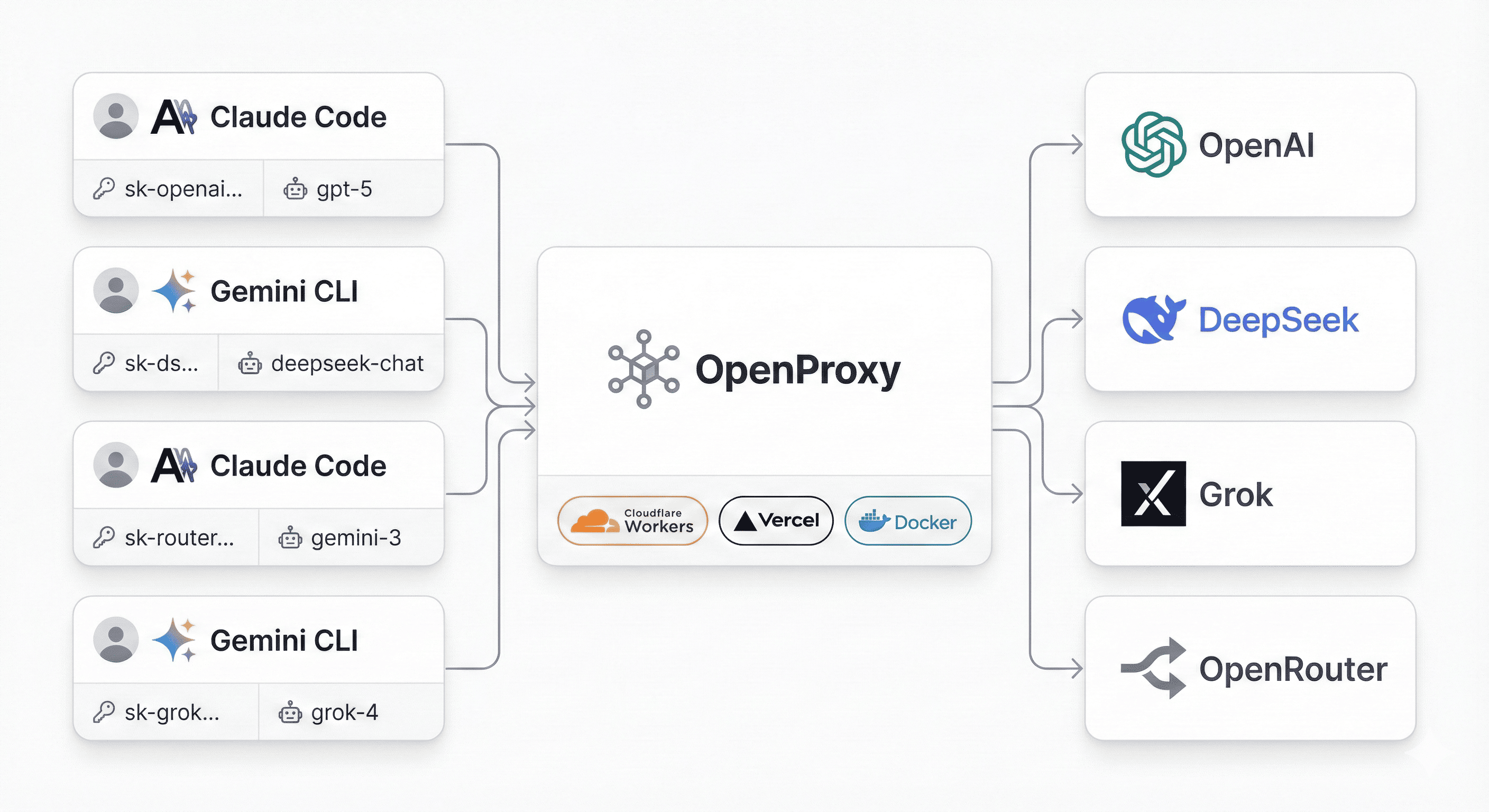
Features
- Multi-Provider Support: Anthropic, OpenAI (Chat/Responses), Google Gemini
- Bidirectional Conversion: Use Claude client to call GPT, or OpenAI client to call Claude
- Semantic IR: Internal abstraction layer for clean protocol conversion
- Streaming Support: Real-time streaming for all providers
- Tool Calling: Function calling across providers
- Vision Support: Image input for compatible models
- Built-in Tools: Support for
web_search,file_search, etc. - Zero Config: Client-driven configuration via Authorization header
- Official SDKs: Uses official provider SDKs for reliability
Quick Start
Installation
# Clone repository
git clone https://github.com/yourusername/openproxy.git
cd openproxy

# Install dependencies
npm install

# Run in development mode
npm run dev

# Or build and run
npm run build
npm start
Service runs at http://localhost:3000
Web Config Generator
Open http://localhost:3000 in your browser to use the interactive configuration generator:
- Select your target provider (OpenAI, Anthropic, Gemini)
- Enter your API credentials
- Copy the generated configuration for your CLI tool
Basic Usage
Using Claude CLI with OpenAI
# Set up environment
export ANTHROPIC_BASE_URL="http://localhost:3000"
export ANTHROPIC_AUTH_TOKEN='{"key":"sk-your-openai-key","url":"https://api.openai.com/v1","target":"openai-chat"}'
export ANTHROPIC_MODEL="gpt-4o"

# Use Claude CLI
claude
Using Codex CLI with OpenAI Responses API
export OPENAI_API_KEY='{"key":"sk-your-openai-key","url":"https://api.openai.com/v1","model":"gpt-4o","target":"openai-responses"}'
codex --yolo -c model_providers.openproxy.base_url="http://localhost:3000" \
      -c model_provider="openproxy" \
      -c model="gpt-4o"
Using Gemini CLI with Anthropic
export GOOGLE_GEMINI_BASE_URL="http://localhost:3000"
export GEMINI_API_KEY='{"key":"sk-ant-your-key","url":"https://api.anthropic.com/v1","model":"claude-3-5-sonnet-20241022","target":"anthropic"}'
gemini -y "Hello!"
Documentation
- 📚 Docs Index - Central documentation entry
- 👤 User Guide - Quick start and examples
- 🧑💻 Developer Guide - Development workflow
- 🏗️ Architecture - Technical architecture
- 🧪 Testing Guide - Testing overview and commands
Supported Matrix
Clients → Targets
| Client | Anthropic | OpenAI Chat | OpenAI Responses | Gemini |
|---|---|---|---|---|
| Claude CLI | ✅ | ✅ | ✅ | ✅ |
| Codex CLI | ✅ | ✅ | ✅ | ✅ |
| Gemini CLI | ✅ | ✅ | ✅ | ✅ |
| OpenAI SDK | ✅ | ✅ | ✅ | ✅ |
| Anthropic SDK | ✅ | ✅ | ✅ | ✅ |
| Gemini SDK | ✅ | ✅ | ✅ | ✅ |
Features
| Provider | Streaming | Tools | Vision | JSON Mode | Built-in Tools |
|---|---|---|---|---|---|
| Anthropic | ✅ | ✅ | ✅ | ❌ | ❌ |
| OpenAI Chat | ✅ | ✅ | ✅ | ✅ | ❌ |
| OpenAI Responses | ✅ | ✅ | ✅ | ✅ | ✅ |
| Gemini | ✅ | ✅ | ✅ | ✅ | ❌ |
Configuration Format
API Keys are provided by clients via HTTP Headers as JSON:
{
  "key": "your-actual-api-key",
  "url": "https://api.openai.com/v1",
  "model": "gpt-4o",
  "target": "openai-chat"
}
Pass this JSON as:
Authorization: Bearer <json>for OpenAI/Anthropic clientsx-goog-api-key: <json>for Gemini clients
URL Format
http://localhost:3000/<source-api-path>
Examples:
/v1/messages- Anthropic request format/v1/chat/completions- OpenAI Chat request format/v1beta/models/gemini-pro:generateContent- Gemini request format
Target provider is specified via the target field in the header config.
Testing
# L0-L2
npm test

# L3 SDK tests (auto-starts server)
npm run test:3

# L4 CLI tests (auto-starts server; requires CLIs installed)
npm run test:4

# All (L0-L4)
npm run test:all

# Selective run
npx tsx src/test/test-runner.ts --level=4 --cli=claude --target=anthropic
L4_TASK=file-write npx tsx src/test/test-runner.ts --level=4
Project Structure
src/
  core/              # IR types and proxy logic
    ir.ts            # Semantic IR definitions
    proxy.ts         # Main proxy logic
    provider.ts      # Provider interface
  providers/         # Provider implementations
    anthropic/       # Anthropic provider
    gemini/          # Gemini provider
    openai-chat/     # OpenAI Chat Completions
    openai-responses/# OpenAI Responses API
  routing/           # URL routing and config parsing
    router-v2.ts     # Request router
    config.ts        # Configuration parsing
  test/              # Test suites
    0-provider/      # L0: Provider health checks
    1-converter/     # L1: Format converters
    2-api/           # L2: API integration tests
    3-lib/           # L3: SDK tests
    4-cli/           # L4: CLI end-to-end tests
Docker
docker build -t openproxy .
docker run -p 3000:3000 openproxy
License
CC-BY-NC-4.0
Reviews (0)
Sign in to leave a review.
Leave a reviewNo results found