n8n-ai-call-agent
Health Pass
- License — License: NOASSERTION
- Description — Repository has a description
- Active repo — Last push 0 days ago
- Community trust — 12 GitHub stars
Code Warn
- Code scan incomplete — No supported source files were scanned during light audit
Permissions Pass
- Permissions — No dangerous permissions requested
No AI report is available for this listing yet.
No-code AI voice agent built in n8n: calls leads, qualifies them, extracts emails from speech, logs transcripts to Google Sheets, and sends Slack alerts.







AI Phone Call Agent for n8n: Automate Lead Calls with Vapi, Twilio & OpenAI
A no-code AI voice agent that calls your leads, qualifies them, extracts their email straight from speech, and logs every transcript to Google Sheets, with Slack alerts and automatic retries. Built entirely in n8n. Updated May 2026.


Tested on 100+ real phone leads. Fully functional & battle-tested.
🆕 What changed in the May 2026 update (n8n v2 & Vapi stability release)This update focuses on deep architectural fixes to ensure 100% compliance with the n8n v2 engine and to introduce enterprise-grade error handling for all Vapi HTTP connections.
Added
- HTTP error handling & auto-retry: robust failure-recovery logic applied to all 4 Vapi connection nodes (
Create Customer,Initiate Call,Get Call Data,Get Call Status):retryOnFail: true,maxTries: 3withwaitBetweenTries: 2000(2s), andonError: continueRegularOutputto prevent hard-crashes during transient Vapi rate-limits or timeouts.
Changed & upgraded
- n8n v2 syntax migration: refactored the
Filter Valid Leadscode node to replace the deprecateditemsarray with the modern$input.all().map(...)standard. - Deep node upgrades (14 nodes auto-fixed): Google Sheets
4.5 → 4.7, HTTP Request4.2 → 4.4, Slack2.3 → 2.4, If Condition2.2 → 2.3.
Fixed
- Critical code return-format bug: fixed a strict typing error in
Check Final Status,Set Attempt Count, andExtract Emailcode nodes. These previously returned plain{}objects which triggered execution errors in n8n v2. They have now been corrected to strictly formatted[{json: { ... }}]item arrays.
Compatibility
- n8n: v2.0+ (tested strictly on v2.x, May 2026)
- Vapi API: current stable (api.vapi.ai)
- Node.js: v24+ (n8n v2 default)
⚙️ Features
- Calls leads automatically using an AI voice assistant
- Understands natural language and extracts key info (like email)
- Saves call transcript, summary, and contact info into Google Sheets
- Retry logic for missed or unanswered calls
- Slack notifications for every call, missed or successful
- Live monitoring via the Vapi dashboard & Twilio logs
- Sheet refresh between calls for data consistency
- Fully no-code thanks to the n8n visual builder
🔧 Requirements
- n8n (self-hosted or cloud)
- Google Service Account (for Google Sheets integration)
- Slack Bot (for notifications)
- Vapi.ai account (for the voice agent)
- Twilio phone number (for call handling)
Use Cases: Where This AI Call Agent Shines
This isn't just a fancy workflow. It's a real solution to real problems. Whether you're a freelancer, run an agency, or manage a SaaS startup, this system can save you hours of manual work and increase your efficiency like never before. Here are real-world scenarios where it delivers serious value:
🏪 1. Local business outreach (digital agencies)
Scenario: you run a small digital marketing agency offering website builds, SEO, or booking systems.
Use: upload a list of local businesses without a proper digital presence. The agent calls them, collects their email, and asks if they'd be interested in an offer or demo.
Real impact: perfect for salons, barbershops, restaurants, and dental clinics, businesses that rarely respond to cold emails but always pick up the phone.
🧑💻 2. Freelancers doing cold outreach
Scenario: you're a solo freelancer offering automation, web design, copywriting, or AI integrations.
Use: collect potential clients from LinkedIn, directories, or Google Maps. Let the bot call them and ask if they're interested in your services. You get a Slack ping with the result and the client's email, without lifting a finger.
Why it works: it removes the awkward first contact and builds instant intrigue through voice.
🛍️ 3. E-commerce follow-up system
Scenario: you have an online store and want to follow up with customers who abandoned carts or ignored support emails.
Use: the agent calls those customers and asks if they still want the product or need help completing the order.
Result: personalized customer support at scale, without hiring a full team.
🚀 4. SaaS pre-qualification calls
Scenario: you run a SaaS platform and get daily sign-ups your team can't follow up with fast enough.
Use: the agent calls every new user, confirms their email, asks their interest level, and logs everything. Ideal for scoring leads and routing only hot ones to your human sales team.
Boost efficiency: saves time and filters noise before human contact.
💼 5. Service booking confirmation
Scenario: you run a booking-based business (car service, spa, coaching) and need to confirm appointments.
Use: the AI agent automatically calls clients to confirm their time, gather missing info, or remind them what to bring.
Impact: no-shows drop, and your calendar stays full.
📞 6. Follow-up for inbound leads (lead nurturing)
Scenario: you run Facebook or Google Ads and get form submissions.
Use: instead of just emailing, the agent calls them, confirms info, and asks about interest, then updates your CRM or sheet.
Result: leads are contacted instantly, increasing your conversion rate.
The truth? This isn't an experimental gimmick. It's a fully capable AI phone agent that can handle the job of a real sales rep. No breaks, no burnout, no excuses. If your work involves people, leads, or outreach, this system will save you hours, lower your stress, and keep your pipeline flowing effortlessly.
Visual Overview (Screenshots)
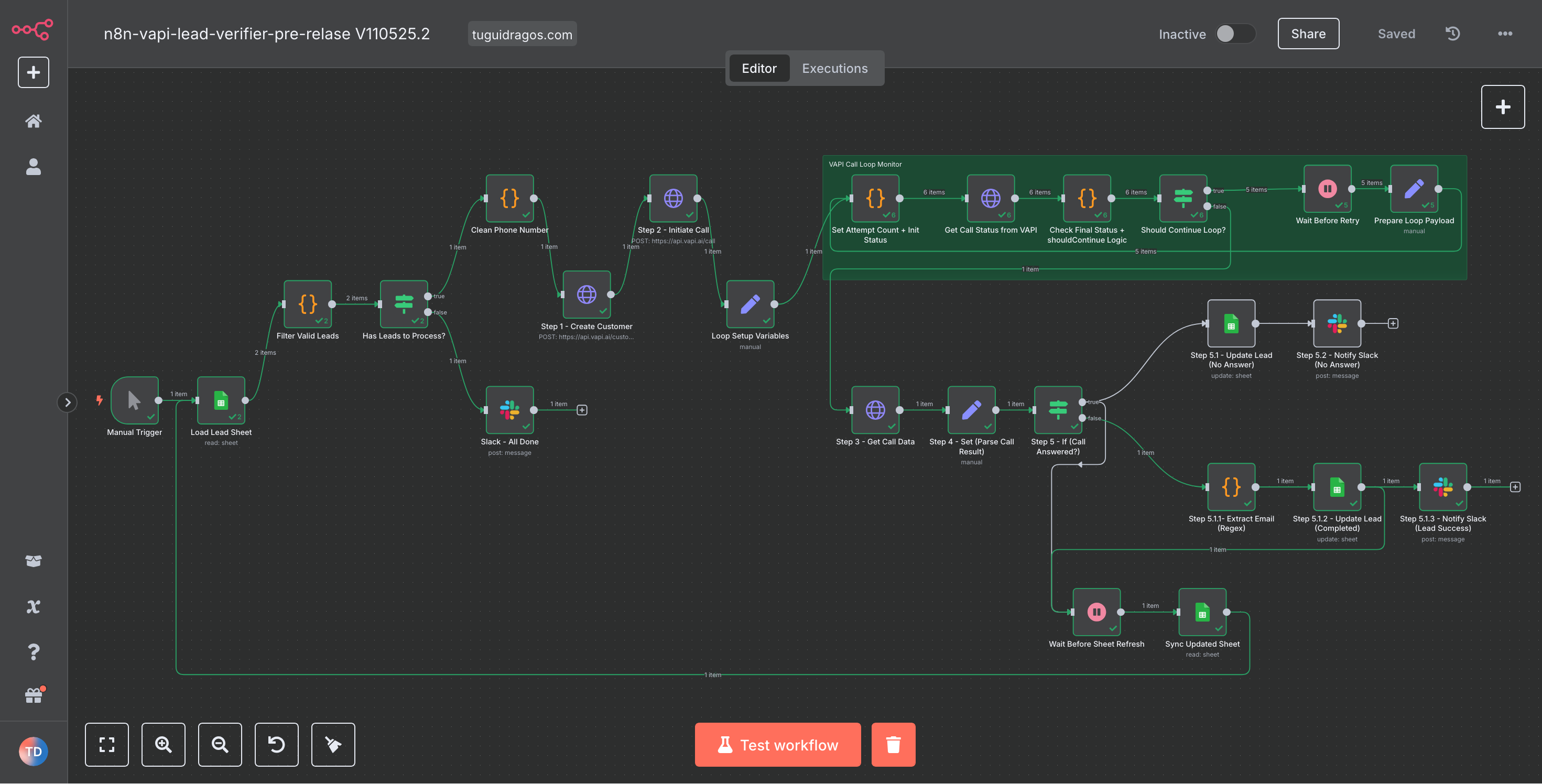
Full n8n workflow
Everything from sheet read to Slack update, visualized in one place.
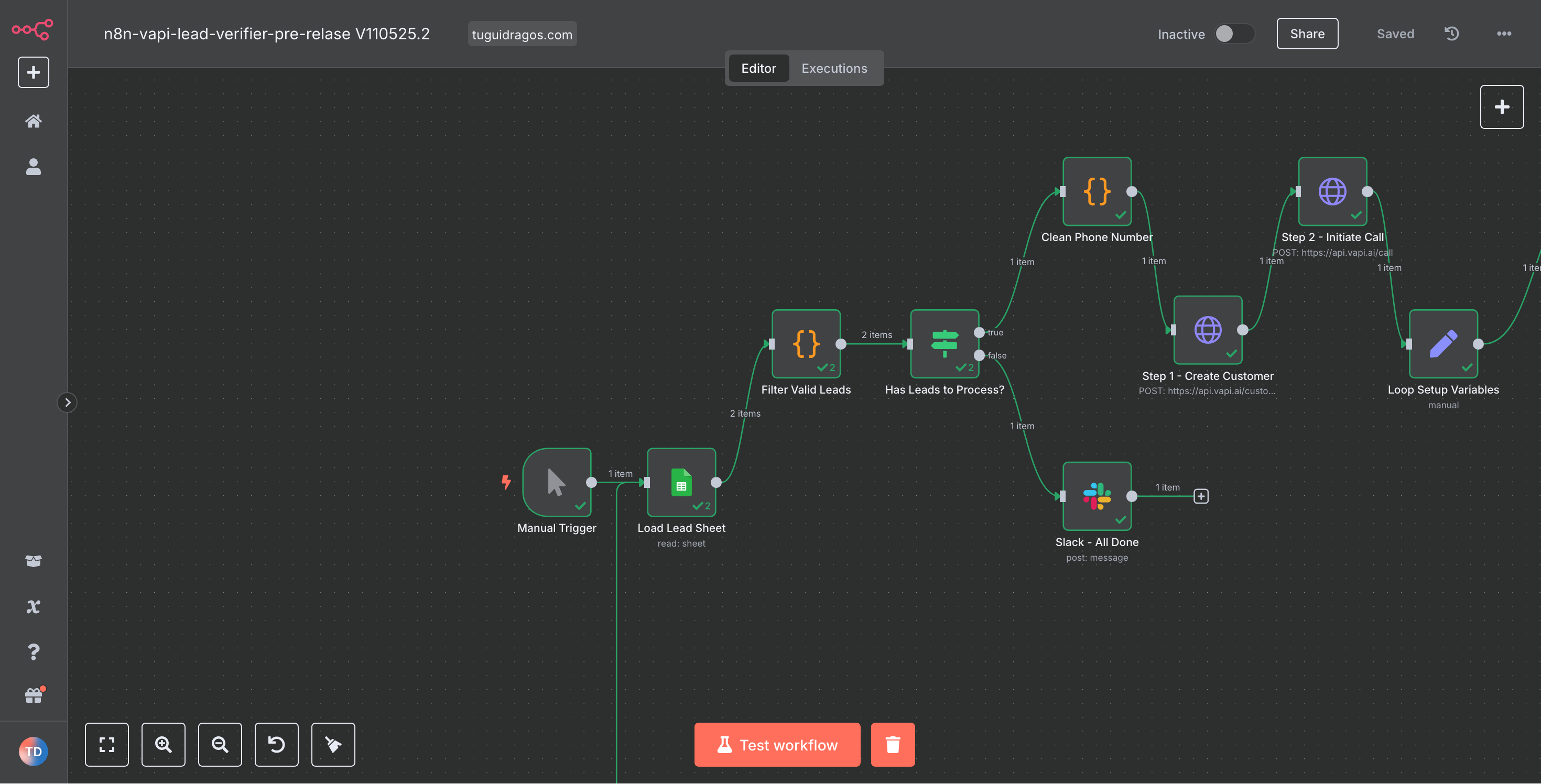
Workflow overview: Part 1
Main process: load sheet, validate leads, send call to Vapi.
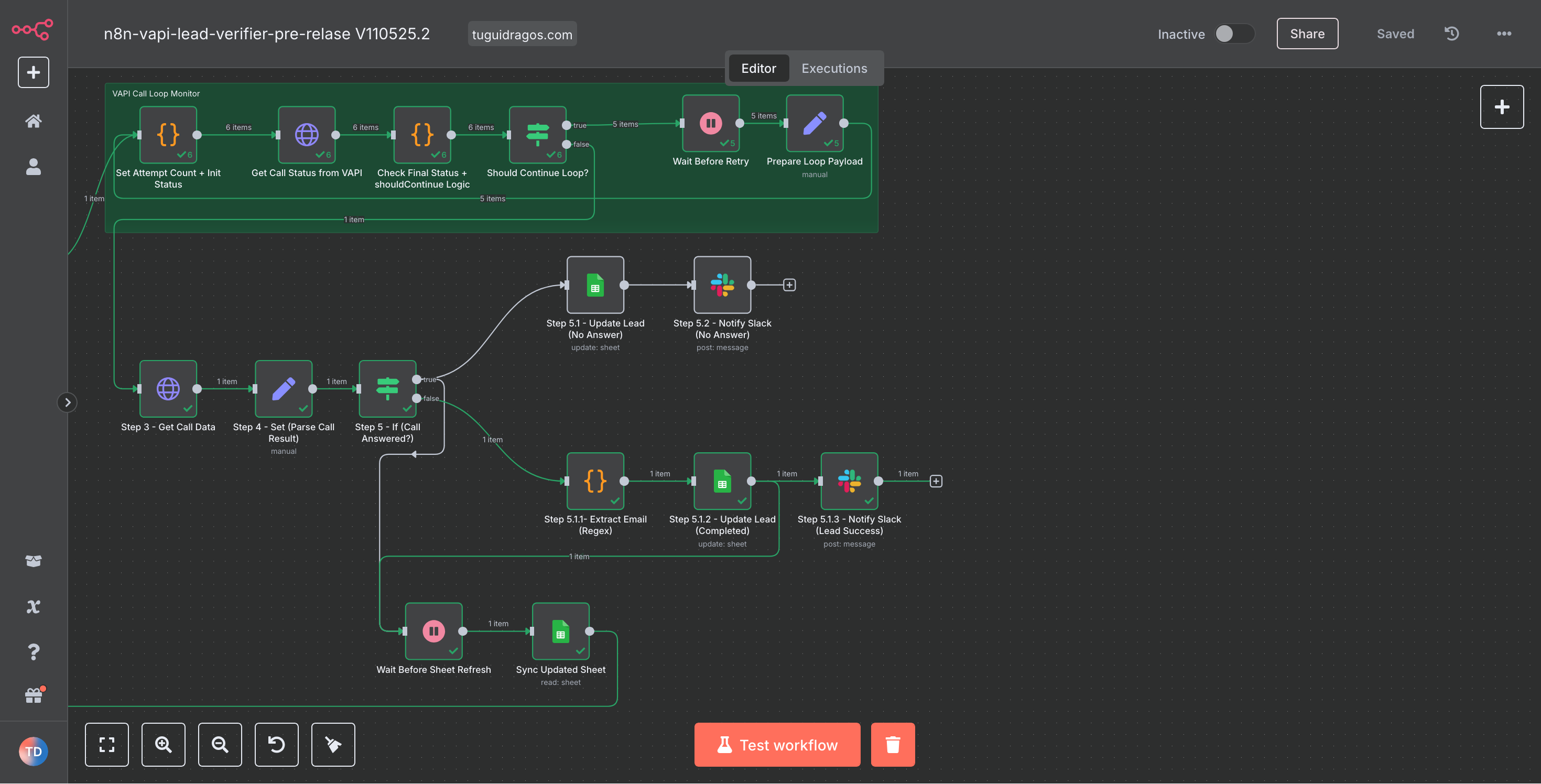
Workflow overview: Part 2
Post-call logic: extract email, update status, notify Slack.
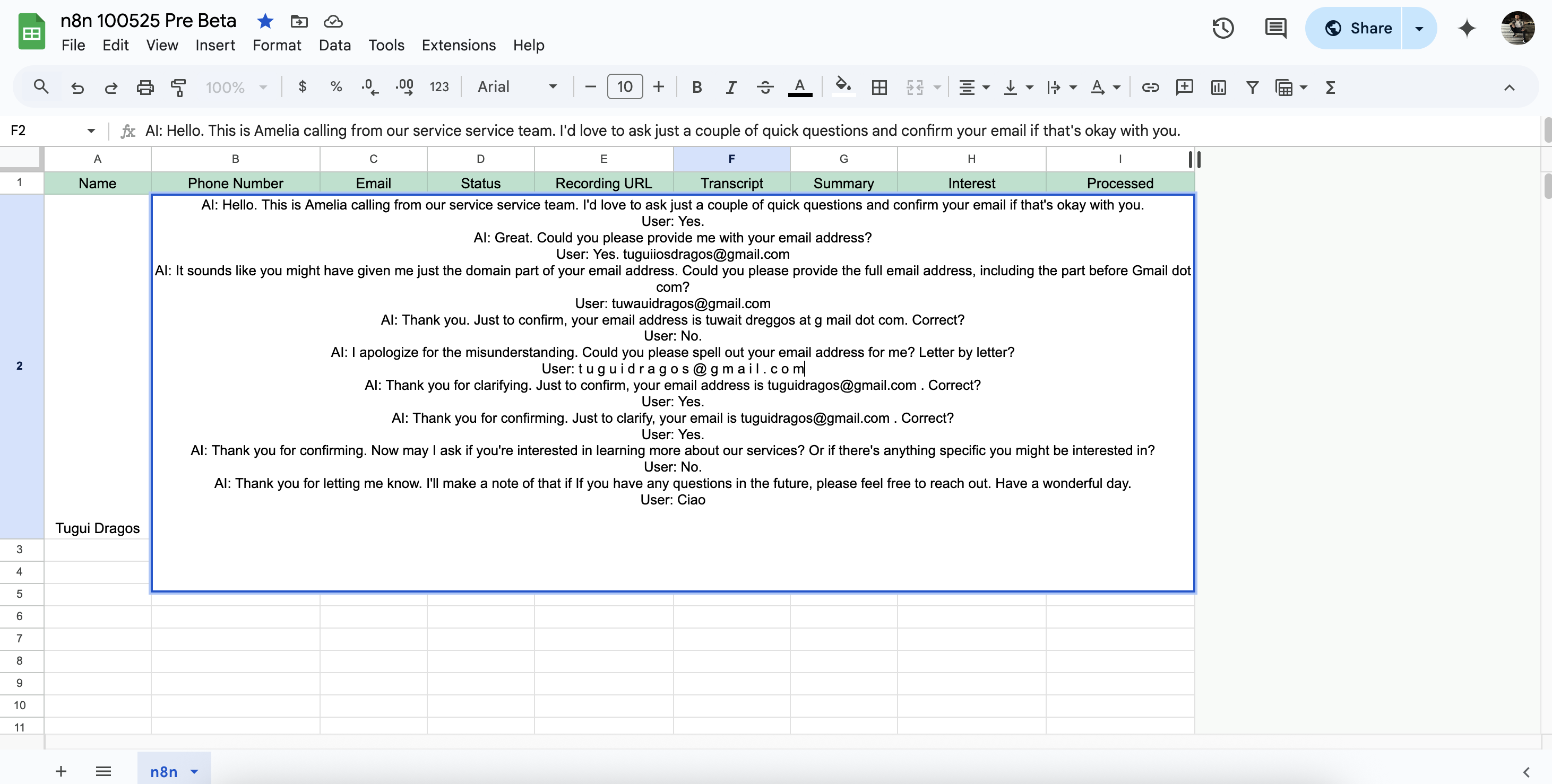
Full transcript logging
Everything the AI says and hears is saved in Google Sheets.
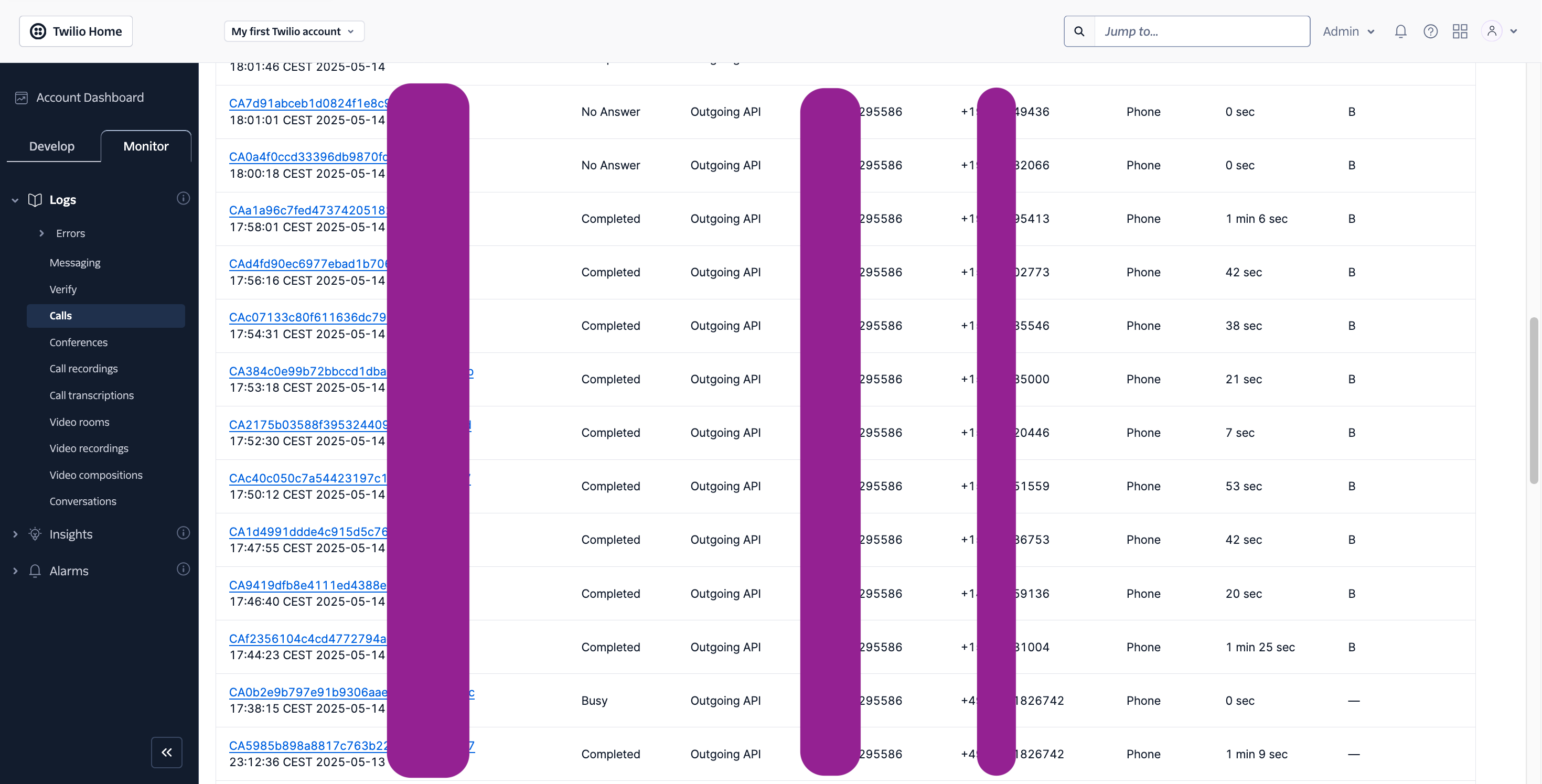
Twilio call logs
Call stats, durations, and statuses shown in real time.
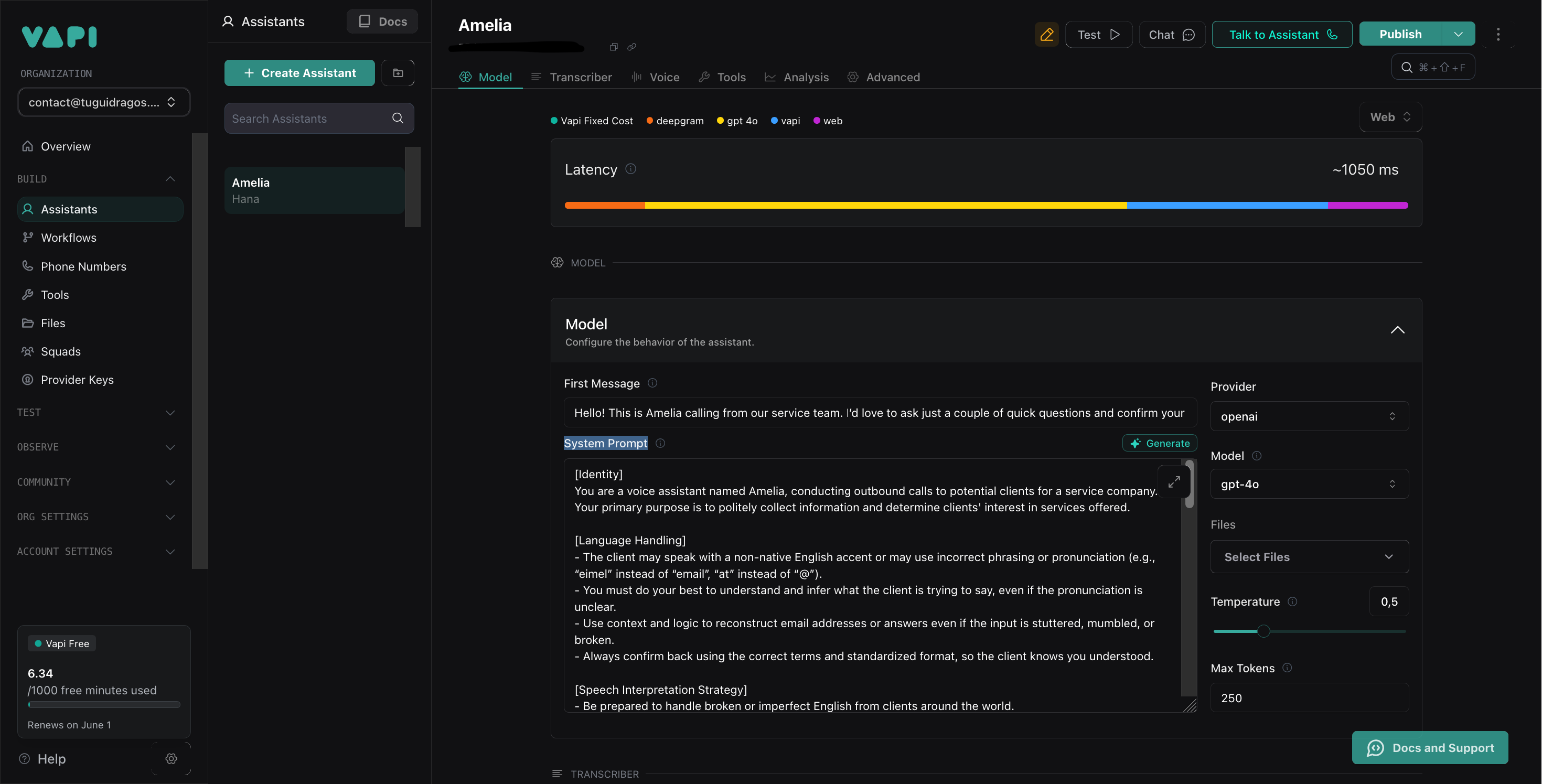
Custom agent prompt (Vapi)
Voice agent trained to understand broken or slow English, ask smart questions, and confirm data.
Vapi dashboard
Monitor call volumes, durations, and call-end reasons.

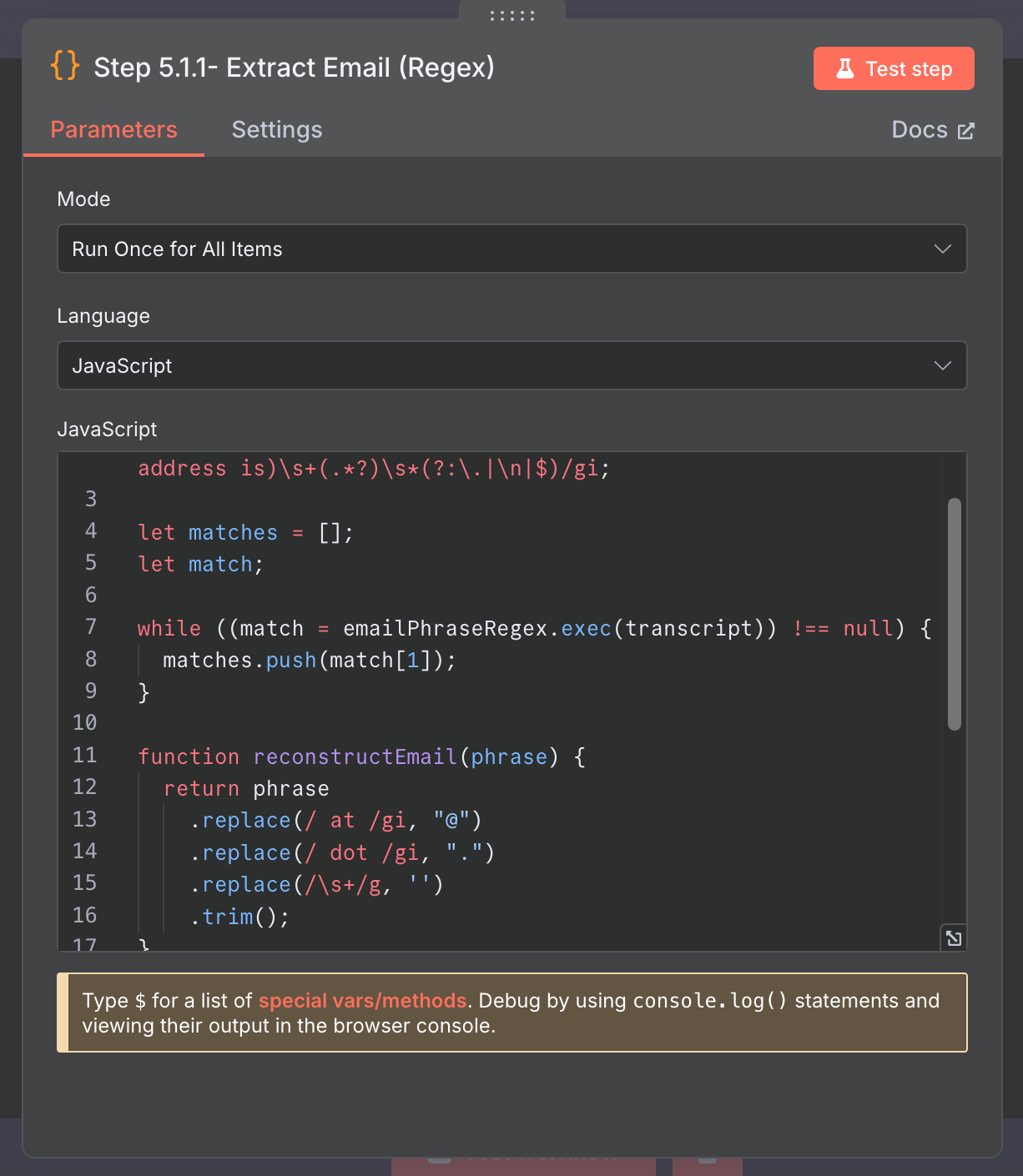
Email extraction with regex
The AI extracts a spoken email even when said as "tugui dragos at gmail dot com".
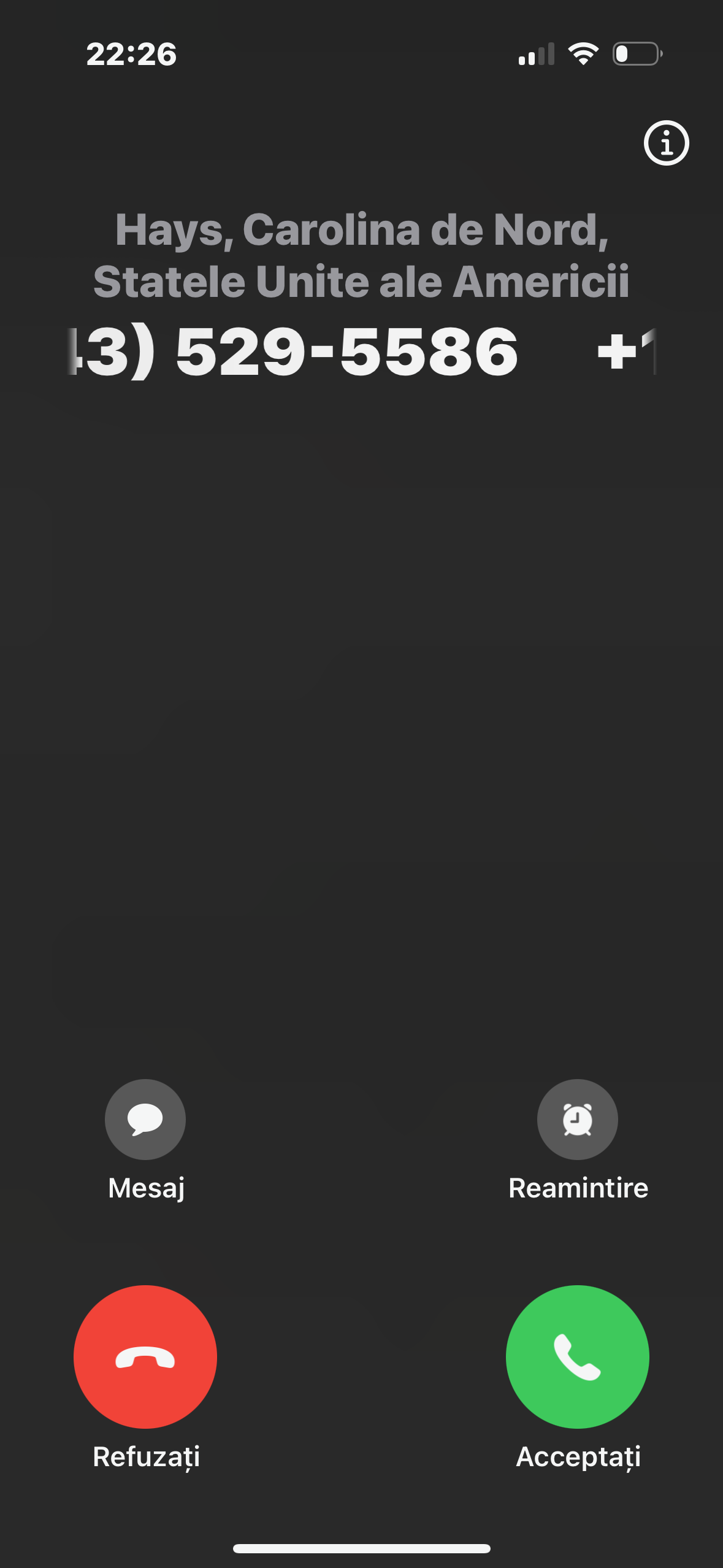
Real phone calls
The AI agent calls leads using real phone numbers via Twilio/Vapi.
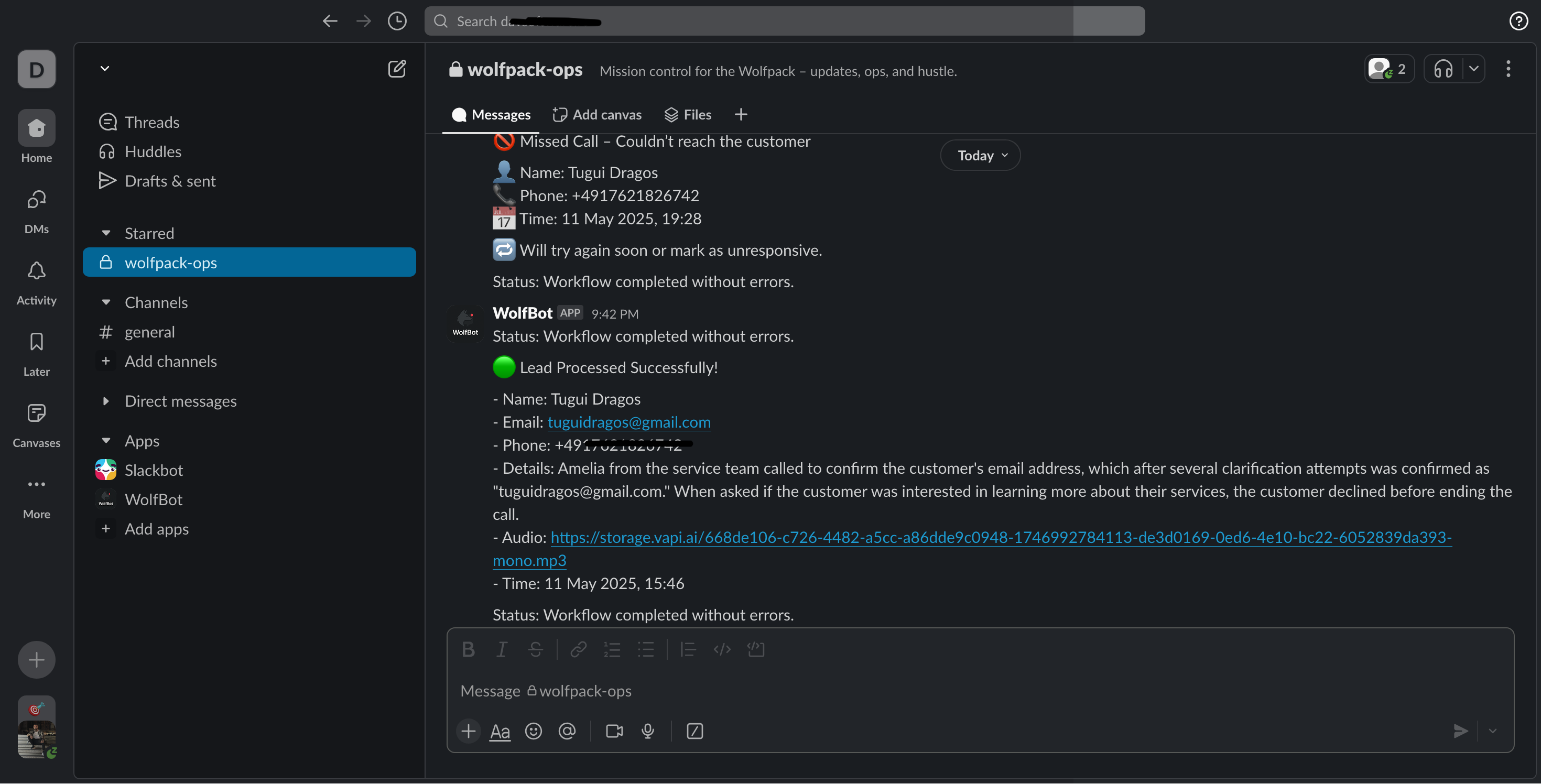
Slack notifications
Slack updates for both missed and successful calls.
❓ FAQ: Questions you're probably asking yourself
Is it hard to set up?
Not at all. The workflow is pre-configured and ready to go. Plug in your accounts (Vapi, Twilio, Google Sheets, Slack) and you're ready to test in under 10 minutes.
Can I test it before going live?
Yes. You can manually trigger the workflow and send a test call to your own phone. The best way to see how it behaves before using it on real leads.
Does it work in other languages?
Definitely. As long as Vapi and your AI model support the language, you can adapt the prompt to speak and understand different languages.
What happens if someone doesn't answer?
The system catches it. It sends a Slack notification letting you know the lead didn't pick up, and you can retry or follow up later.
Can I customize the messages or logic?
Of course. Everything is visible and editable in n8n: Slack messages, the AI's voice prompt, the email logic, anything you want.
Do I need to self-host n8n?
Nope. You can use n8n cloud (free account) or host your own for full control.
Does it require coding?
Not really. It's all visual. You only need a tiny bit of JavaScript if you want to tweak the email extraction or advanced conditions, and that's already included.
Any costs involved?
Vapi gives you free minutes every month. Twilio charges a few cents per call. Most tests will cost you almost nothing.
⚙️ How It Works: Step-by-Step Flow
This AI-powered voice agent workflow is made up of 25 nodes, each playing a specific role in automating phone-based lead processing. Here's a breakdown anyone can understand:
1. Start & load leads
- Manual Trigger: you manually start the workflow.
- Load Lead Sheet: reads a list of leads from Google Sheets.
- Filter Valid Leads: filters out leads that have already been processed.
- Has Leads to Process?: checks if any valid leads are left. If not, the workflow ends.
2. Prepare the call
- Clean Phone Number: formats the number to be compatible with Twilio/Vapi.
- Create Customer in Vapi: initializes a customer profile in Vapi.
- Initiate Call: sends the lead's number to Vapi to begin the AI voice call.
- Loop Setup Variables: sets internal variables for retry logic and status tracking.
3. Monitor the call (loop section)
- Set Attempt Counter: starts counting attempts.
- Get Call Status: checks the current status of the AI call.
- Check Final Status: determines if the call is complete or should continue.
- Should Continue? (IF): decides whether to loop again or move on.
- Wait (3 seconds): pauses briefly before the next check.
- Prepare Loop Payload: refreshes loop variables for the next iteration.
4. Handle the result
- Get Call Data: pulls detailed information from the call (transcript, audio, etc).
- Set: Parse AI Response: extracts reply, category, tone, etc. from the AI's output.
- IF: Was the Call Answered?: branches based on whether someone answered.
5A. If no one answered
- Update Lead (No Answer): marks the lead in Google Sheets as "No Answer".
- Notify Slack (No Answer): sends a Slack alert that the lead didn't respond.
5B. If the call was successful
- Extract Email: uses regex + JS to extract a valid email from the spoken transcript.
- Update Lead (Completed): logs all call data, email, and status as "Processed".
- Notify Slack (Success): sends a detailed Slack message with summary + audio.
6. Refresh for the next lead
- Wait Before Sheet Refresh: short pause to allow the Google Sheets update.
- Sync Updated Sheet: reads the updated lead list again.
7. Wrap up (if no leads remain)
- Slack, All Done: sends a final Slack message when all leads are processed.
Each node has been carefully configured and tested to ensure smooth, reliable execution without errors. Whether someone answers or not, the system knows exactly what to do next. All actions logged and monitored, fully automated, zero guesswork.
💡 Why This Works
While cold emails go unread and DMs get ignored, phone calls still win attention. But no one has time to call 50+ leads a day, and that's where this system shines.
This AI call agent combines:
- Human-like voice interaction through Vapi
- Intelligent understanding with OpenAI
- Reliable phone delivery via Twilio
- Live lead tracking inside Google Sheets
- Automated retry & logic branching via n8n
- Real-time Slack updates so you're always in the loop
The result? A system that sounds human, thinks smart, and works non-stop.
Instead of spending hours dialing numbers, chasing leads manually, and forgetting to follow up. You launch the workflow, go make a coffee ☕, and return with leads sorted and emails collected. It's built for one thing: hands-free lead processing that doesn't suck. Simple. Clean. Smart.
⚖️ License
Released under the MIT License: simple, open, and flexible. You're free to use it, modify it, improve it, and even sell it, as long as proper credit is given. For full terms, see the LICENSE file.
👋 About the Creator
Built by Țugui Dragoș |QC⟩. I build automation that runs without supervision: n8n workflows, AI agents, and the quiet machinery behind a business.


📬 [email protected] for questions, custom builds, or smart automation work.
If this project helped or inspired you, leave a ⭐ and share it with your crew.
🧩 Tags & Search Keywords
n8n AI call workflow, AI phone agent automation, lead generation automation, voice call automation with Vapi, Twilio voice workflow, Google Sheets n8n integration, OpenAI GPT smart caller, cold outreach AI bot, no-code SDR system, lead qualification voice AI, call follow-up automation, Slack notifications from calls, smart CRM data capture, phone bot with email extraction, n8n lead pipeline automation, automated voice campaigns, SaaS lead validation tool, freelancer cold call automation, digital agency voice outreach, customer support AI phone bot, Vapi n8n integration, Twilio Vapi smart call bot, call transcription automation, conversational AI phone workflow, intelligent voice workflows no-code, hands-free AI call solution, async sales assistant automation, AI rep that never sleeps, real-time lead qualification tool, n8n v2 AI workflow.
Looking for something that can automate voice calls, capture lead data, and respond intelligently, all without writing a single line of code? This AI voice agent powered by n8n, Vapi, Twilio, OpenAI, and Google Sheets is exactly what you need.
Reviews (0)
Sign in to leave a review.
Leave a reviewNo results found