macbox
Health Pass
- License — License: NOASSERTION
- Description — Repository has a description
- Active repo — Last push 0 days ago
- Community trust — 14 GitHub stars
Code Fail
- rm -rf — Recursive force deletion command in bench/build.sh
- rm -rf — Recursive force deletion command in container/build-reims.sh
- rm -rf — Recursive force deletion command in guest/bin/build-serve-sim-x86.sh
Permissions Pass
- Permissions — No dangerous permissions requested
No AI report is available for this listing yet.
iOS Simulator on Linux: a full macOS VM in Docker with GPU acceleration (Metal via Reims vGPU), Xcode and a pool of iOS Simulators for AI coding agents (Claude Code, Codex, T3 Code). Build and test Expo / React Native iOS apps without a Mac or a cloud service.
macbox
The real iOS Simulator and Xcode on your Linux machine. GPU-accelerated. No Mac.
macbox runs a full macOS VM in Docker that draws with Metal on your Linux GPU, so Xcode and
the iOS Simulator run on hardware you already have. An iPhone 17 Pro simulator at full 3x
resolution, in a heavy Liquid Glass scene, runs at 117 fps on an Intel integrated GPU. Before
macbox's patches the same GPU managed 17. It's built for AI coding agents: Claude Code, Codex and
T3 Code each get their own simulator to build, run, tap, screenshot and record iOS apps on their own.
One command, macbox, builds it and runs it.
| 117 fps | iPhone 17 Pro simulator at 3x (1206×2622), Liquid Glass, on an Arrow Lake iGPU; 17.2 before |
| 3 at once | three 3x simulators side by side, ~32 fps each |
| No Mac, no cloud | a Linux host with KVM and Docker; nothing billed per minute |
| Agent-ready | mac-sim gives every checkout its own simulator; sim-fps checks 60 fps; T3 Code's Device panel streams it live |
Website and guides: tuna-nope.github.io/macbox: macOS, Xcode and
the iOS Simulator on Linux, Expo apps, the GPU path, and AI coding agents with T3 Code.
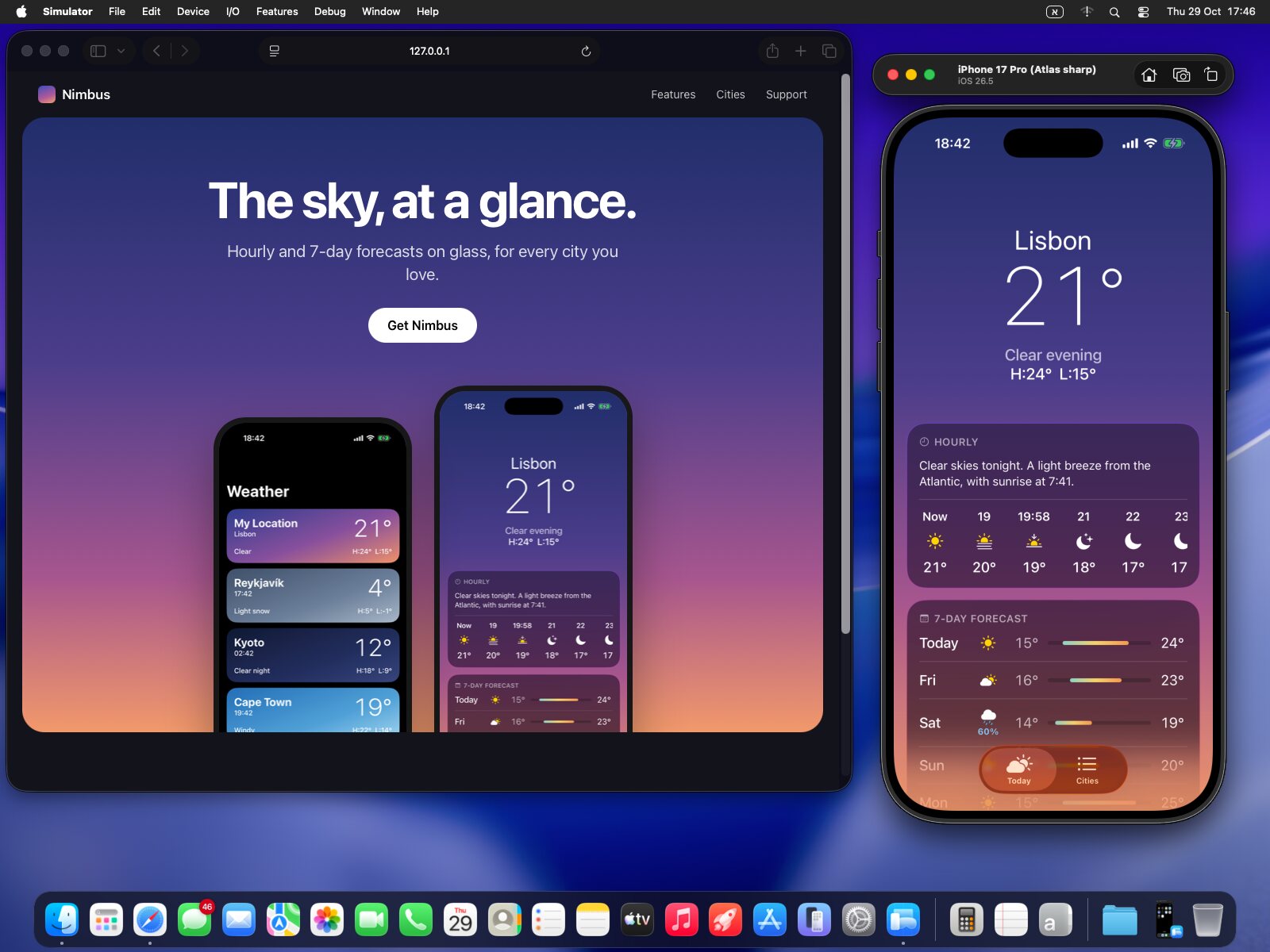
macOS 26 Tahoe's desktop in macbox on an Intel iGPU, captured as it is: Simulator.app with an
iPhone 17 Pro on iOS 26.5 running Nimbus, a weather app, beside its website in Safari.
Linux host (KVM + a Vulkan GPU + Docker)
└─ container macbox
   └─ QEMU with Reims vGPU ──► metal2vulkan ──► Vulkan (Mesa) on your GPU
      └─ macOS 26 Tahoe (x86-64), drawn with Metal
         ├─ Xcode, CocoaPods, Node
         ├─ iOS Simulators: a pool, one per agent checkout (mac-sim)
         └─ T3 Code's device hub (Intel build)  ──► the Device panel, live
- macOS draws on your GPU. Reims vGPU gives QEMU
Apple's paravirtual GPU, and macOS's own driver talks to it, so Metal works with no guest
driver. metal2vulkan runs Metal's work on Vulkan.
macbox builds both, with patches that took a 3x iOS Simulator from 17 to 117 fps on the GPU it
was measured on (see Performance). - The screen opens in a window on your Linux desktop, or in a browser tab (Selkies: H.264 on
the GPU, its bitrate following the link). Agents can see it and click and type into it
(macbox screenshot,click,type), so an agent can drive the macOS installer too. - iOS Simulators for agents.
mac-simgives each checkout its own simulator from a pool:
slim ones for most work, a full one for widgets, Live Activities and the Dynamic Island, a
sharp one for real-iPhone pixels. It builds the app on the Mac, runs Metro on the host,
taps, types, takes lossless screenshots and records video.sim-fpschecks that a recording
held 60 fps with no dropped frames. A skill (skills/simulators) teaches Claude Code and Codex
to use it after every UI change. - T3 Code.
macbox t3 registeradds the VM to T3 Code's Device panel, andmacbox t3 fix-hub
rebuilds T3's device hub for Intel, so the panel streams the simulator live and takes taps. - Android too, optionally:
android-simruns a pool of Android emulators on the host itself.
What you need
| CPU | x86-64 with VT-x or AMD-V, and AVX2 |
| GPU | one with a Mesa Vulkan driver: Intel (measured: Arrow Lake iGPU) or AMD (supported by Reims, untested here). NVIDIA works with Reims but macbox's image doesn't ship NVIDIA's driver yet |
| RAM | 16 GB or more (the VM takes 8 to 16) |
| Disk | about 150 GB free, on an SSD or NVMe |
| OS | Linux with KVM (/dev/kvm), a render node (/dev/dri/renderD*), Docker (rootless is fine) or Podman |
macOS for Intel ends with macOS 26 Tahoe, and Apple ships iOS 27's simulators for Apple silicon
only. So macbox runs macOS 26, Xcode 26 and iOS 26 simulators, and that is the ceiling on x86-64.
Quick start
git clone <this repo> macbox && cd macbox
./macbox init         # config in ~/.config/macbox/macbox.env, an SSH key, the ssh alias "macbox"
./macbox doctor       # checks KVM, the GPU, vm.max_map_count, Docker, disk space
./macbox build        # the image, then Reims vGPU + metal2vulkan + QEMU (20 to 60 minutes)
./macbox create       # a VM; macOS downloads from Apple
./macbox up           # then open http://127.0.0.1:6081/ (or: ./macbox view local)
./macbox next         # what's done and the next step, until everything is ticked
Installing macOS takes a few steps inside the VM: erase the disk and install, set Metal's error
mode once from Recovery, create a user, turn on SSH. macbox next prints each one, and
docs/setup.md walks through all of it. After that it's commands again:
./macbox provision                    # passwordless sudo, no sleep, Node, Ruby + CocoaPods, simslim...
./macbox xcode ~/Downloads/Xcode_26.6.xip   # Xcode and the iOS Simulator runtime
./macbox disk nvme                    # the system disk on NVMe (faster)
./macbox pool                         # the iOS Simulator pool
./macbox t3 register                  # T3 Code's Device panel (then: macbox t3 fix-hub)
./macbox agents install               # mac-sim, sim-fps, android-sim, the skills
Setting up with an agent: point it at AGENTS.md.
Performance
Measured on an Intel Core Ultra 7 265 (its Arrow Lake iGPU), Mesa 26.2.4, macOS 26.7.1,
iOS 26.5, 8 vCPUs and 12 GB. GlassBench is a table scrolling under Liquid Glass bars and a
floating glass toolbar, counted at the simulator's own screen (frames per second; two runs).
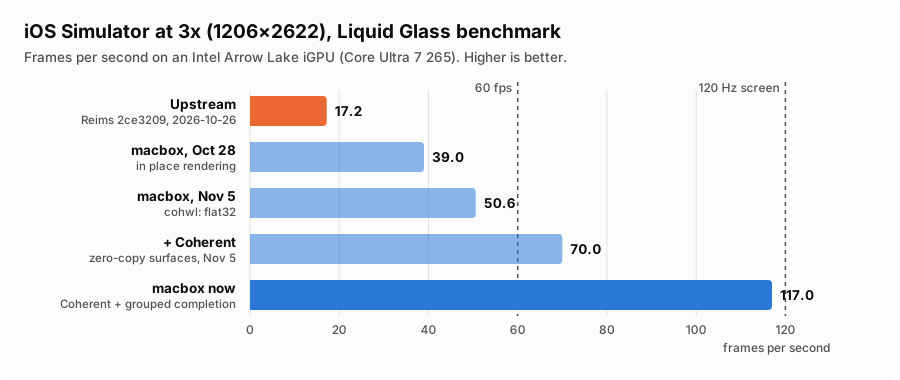
| iOS Simulator at 3x (1206x2622, an iPhone's pixels), glass | fps |
|---|---|
| Reims 2ce3209, as upstream shipped it on 2026-10-26 | 17.2 |
| macbox, 2026-10-28: rendering guest-RAM textures in place | 38.5 / 39.5 |
| macbox, 2026-11-05: flat32 | 50.6 |
| macbox, 2026-11-05: + Coherent, zero-copy surfaces | 70.0 |
| macbox now (2026-11-09): + grouped completion, staged page-ups, inline checks | 117 (114–121; the screen's limit is 120) |
| The build macbox makes now | |
|---|---|
| two 3x simulators at once | 51–54 fps each |
| three 3x simulators at once | 31–32 fps each |
| macOS desktop (3440x1440), dragging a window | 240 display-link ticks a second alone; 126 with a simulator running |
| copying frames back to guest RAM | 0.2% of what eager copies would cost: about 5 µs a frame |
Coherent keeps the GPU's image of the simulator's and the desktop's surfaces ahead of guest RAM and
syncs a page only when the guest's CPU touches it, so the copies between them are gone. The rest
removed per-page mappings, per-batch completions and a scheduling round per batch. It's on by
default with an Arrow Lake iGPU, where it runs every day, and a crash guard falls back to the plain
path after a bad run. One rare GPU hang under repeated boots of three simulators is still open.
docs/performance.md has the details.
The GPU is the limit: one 3x simulator takes about 7.7 ms of this iGPU's time per frame, and several
simulators share about 105 frames a second. On a faster GPU every number moves up.
docs/performance.md breaks a frame down (what is real rendering and what the
translation adds), lists what didn't help, and the known limits (an idle macOS display gets no
vblank from its driver, so an animation starts about 0.1 s late:
reims-vgpu#141).
Questions people ask
Can I run the iOS Simulator on Linux? Not by itself: it's part of Xcode, which needs macOS. macbox
runs macOS in a VM on Linux with the GPU attached, so the real Simulator runs on your own machine,
with no Mac, no cloud account and no per-minute bill.
How do I give Claude Code or Codex an iOS Simulator on a Linux server? Set up macbox, thenmacbox agents install. Agents get mac-sim (a simulator per checkout: build, run, tap, screenshot,
record), sim-fps (did that animation hold 60 fps?), and a skill that tells them when and how to use
them. docs/agents.md.
Docker-OSX or OSX-KVM, but with GPU acceleration? Those boot macOS in QEMU too, but macOS gets
Metal only when you pass a GPU it has drivers for through to the VM (VFIO), which takes that GPU
away from the host. Otherwise the desktop and the Simulator draw in software. macbox uses Reims vGPU
instead: Apple's own paravirtual GPU device, run on the host's Vulkan driver. The host keeps its GPU,
macOS gets Metal, and an integrated GPU is enough.
Can I build and run an Expo or React Native iOS app on Linux? Yes. mac-sim run copies the
checkout into macOS, builds it with Xcode and CocoaPods, and installs it in the simulator. Metro runs
on Linux, so JavaScript edits arrive by Fast Refresh. MODE=release gives a Release build, andMODE=go opens the app in Expo Go.
Does it work with T3 Code's Device panel? Yes: the simulators stream live into the panel and take
taps (docs/t3-code.md).
Real iPhones and TestFlight? phone-build makes .ipa builds (EAS's free cloud builds first,
then locally in the VM) and uploads to TestFlight. Signing for devices needs Apple's paid Developer
Program (skills/phone-builds).
What can't it do? Run macOS 27, Xcode 27 or iOS 27's simulators, which Apple ships for Apple
silicon only. It also can't run macOS legally on non-Apple hardware (see below).
How it compares
| macbox | Docker-OSX, OSX-KVM | Cloud simulators | A Mac, or a remote Mac | |
|---|---|---|---|---|
| Runs on | your Linux host | your Linux host | the provider's Macs | a Mac |
| Metal in macOS | yes, on the host's GPU through Vulkan | only with a GPU passed through to the VM | yes | yes |
| Cost | your hardware | your hardware | usually per minute or a plan | the Mac |
| Built for agents (a simulator per checkout, screenshots, recordings, a 60 fps check, a skill) | yes | no | varies | with tools such as agent-device |
| Newest iOS Simulator | 26.x (the x86-64 ceiling) | 26.x | the newest | the newest |
| Apple's macOS license | not on non-Apple hardware | not on non-Apple hardware | yes | yes |
Contributions welcome
macbox is open to ideas, fixes, and improvements of every kind. If you're using it and
find a bug, have a feature request, add support for something new, make it faster, improve
the docs, or build your own enhancement, please share it. Big changes, small fixes,
experimental solutions, and reports of what didn't work are all valuable.
Open an issue to report a problem,
suggest an idea, or share your findings. If you've already built a solution,
open a pull request so we can review it
for inclusion. You don't need a finished implementation to start a conversation.
Using an AI coding agent? Contributions from agent-assisted workflows are welcome too.
If your agent finds a problem or creates a useful improvement, ask it to prepare an
issue or PR. See CONTRIBUTING.md for a few simple guidelines.
Docs
| docs/setup.md | a new install, step by step |
| docs/architecture.md | how the parts fit: container, QEMU, display, network, guest, simulators, T3 |
| docs/performance.md | the GPU patches, measurements, tuning, limits |
| docs/t3-code.md | T3 Code's Device panel for iOS and Android |
| docs/agents.md | the agent tools, the skill, the instructions to give agents |
| docs/troubleshooting.md | when something doesn't work |
| guest/README.md | what runs inside macOS |
| patches/README.md | the patch series on Reims vGPU, metal2vulkan and QEMU |
| site/ | the website's source: the guides at https://tuna-nope.github.io/macbox/guides/ |
Credits
macbox is glue and tuning around other people's work, above all Reims vGPU, metal2vulkan,
reims-util and their QEMU fork by Anees Iqbal (steelbrain).
CREDITS.md lists every project macbox builds, runs or downloads, and its license.
License
macbox's own code and documents are under the
PolyForm Noncommercial License 1.0.0. Use it, change it and share it for any noncommercial
purpose: yourself, a hobby, research, teaching, a school, a charity, a public body. Commercial use
needs the author's permission: open an issue to ask.
The patches in patches/ modify Reims vGPU and metal2vulkan, and stay under those projects' terms,GPL-2.0-or-later OR LGPL-3.0-or-later; those in patches/qemu modify QEMU and areGPL-2.0-or-later (patches/README.md). Everything macbox
builds or downloads keeps its own license (CREDITS.md).
Disclaimer
macbox comes as is, with no warranty of any kind, and its authors accept no liability for anything
that comes of using it (the license's "No Liability" section). It runs a virtual machine with
direct access to your GPU, and can lose the VM's data, for example with MACBOX_DISK_CACHE=unsafe
and a crash of the host.
macbox ships no Apple software. macOS, Xcode and the simulator runtimes download from Apple, under
Apple's terms, and you alone are responsible for complying with them. Apple's software license
agreement for macOS allows it to run only on Apple-branded hardware; running it in a VM on other
hardware breaches that agreement. macbox is not affiliated with, sponsored or endorsed by Apple Inc.
macOS, iOS, Xcode and Metal are trademarks of Apple Inc.
Reviews (0)
Sign in to leave a review.
Leave a reviewNo results found