ChatBI
Health Pass
- License — License: MIT
- Description — Repository has a description
- Active repo — Last push 0 days ago
- Community trust — 34 GitHub stars
Code Warn
- network request — Outbound network request in frontend/package.json
Permissions Pass
- Permissions — No dangerous permissions requested
This is a conversational business intelligence agent that translates natural language queries into SQL, executes them against a local SQLite database, and visualizes the results automatically.
Security Assessment
Risk: Medium. The application dynamically generates and executes SQL queries. While it targets a local SQLite database, dynamic SQL generation always carries an inherent risk of injection or unintended data exposure if connected to production databases. Regarding network activity, the automated scanner flagged an outbound network request in the frontend package configuration. This is a standard and expected dependency for a React web application. The tool does not request any dangerous system-level permissions, and there are no hardcoded secrets detected. However, the project relies on external AI APIs (specifically OpenAI and Alibaba Cloud Qwen), meaning your prompts, database schemas, and query results will be transmitted over the internet to third-party LLM providers.
Quality Assessment
The project is in very active development, with its most recent code pushed within the last day. It is distributed under the highly permissive and standard MIT license. It features a solid technology stack (React, TypeScript, FastAPI, LangGraph) and has detailed documentation. Community trust is currently in its early stages, demonstrated by a modest 34 GitHub stars.
Verdict
Use with caution: It is a well-maintained and legitimately structured project, but you should evaluate the risks of sending proprietary database schemas and data to third-party AI providers before integrating it.
对话式商业智能分析Agent应用
ChatBI 智能数据对话助手
—— 来自 Hello Agent 团队
ChatBI (Chat Business Intelligence) 是一个基于 LangGraph 的智能数据对话 Agent,支持自然语言与本地 SQLite 数据库交互,自动生成 SQL 查询并可视化结果。适用于数据分析、报表生成、业务洞察等场景,无需手写 SQL,轻松获取数据洞察。
项目预览
演示视频:ChatBI 项目演示视频 - Nvidia Hackathon 2025
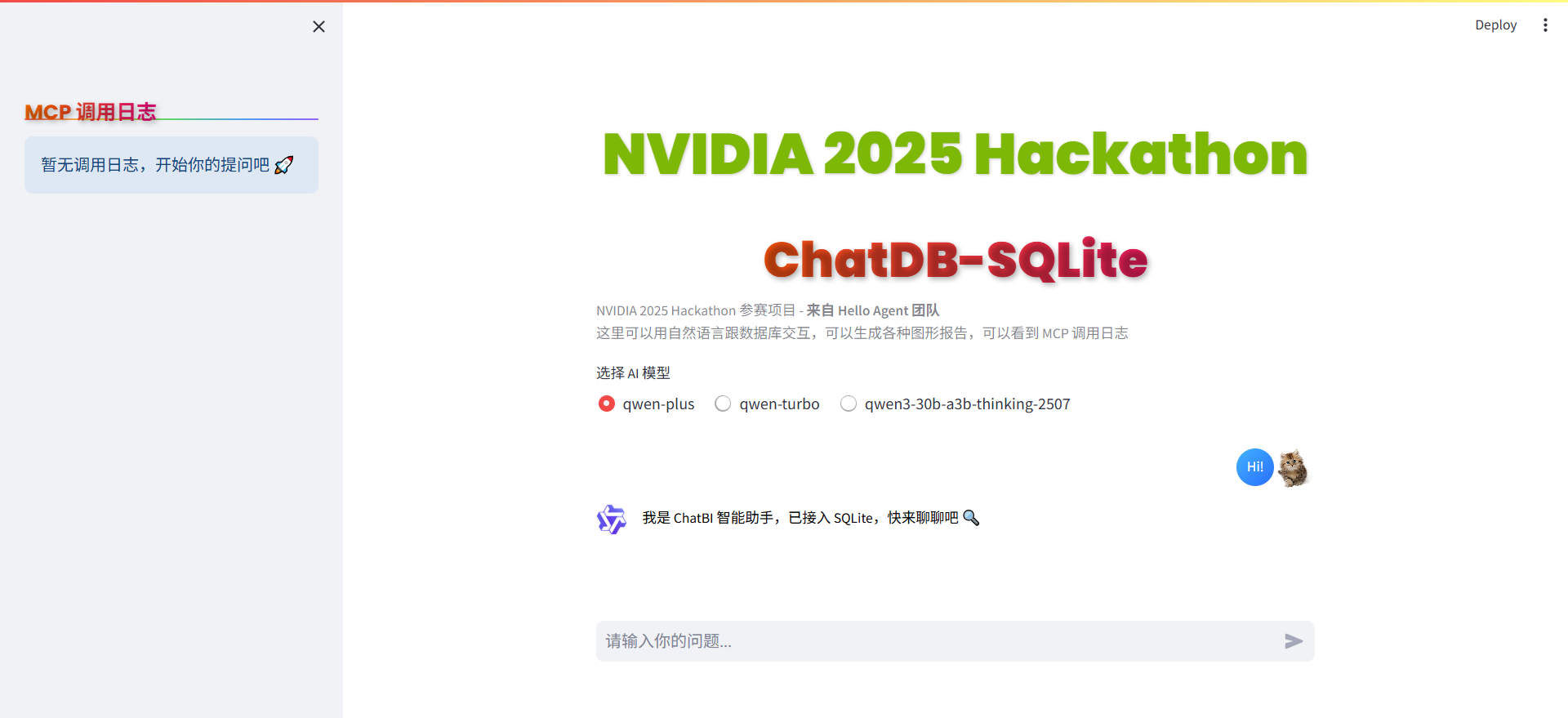
界面介绍:
- 现代化 React 前端:基于 React 19 + TypeScript + Ant Design,提供流畅的用户体验
- 实时流式输出:通过 SSE 实现 AI 响应的实时流式展示
- 工具调用日志:可视化展示 MCP 工具调用过程,便于调试和观察
- 图表可视化:自动生成 ECharts 图表,支持多种图表类型
主要功能
- 自然语言转 SQL:输入中文或英文问题,自动生成并执行 SQL 查询
- 数据可视化:支持表格和图表展示查询结果,自动识别图表需求并生成
- MCP 工具集成:已支持工具: RAG、生成SQL语句、执行SQL语句、统计图可视化
- 执行可观测性:提供 MCP 工具调用日志展示,tool 调用可观测
- 会话记忆功能:上下文记忆,支持多轮对话
- 错误诊断自愈:自动识别 SQL 错误并给出修复建议
- 流式输出:实时显示 AI 响应过程,提升用户体验
示例
示例1
提问:我有多少个产品类别,每个类别有多少产品,用柱状图和环形图呈现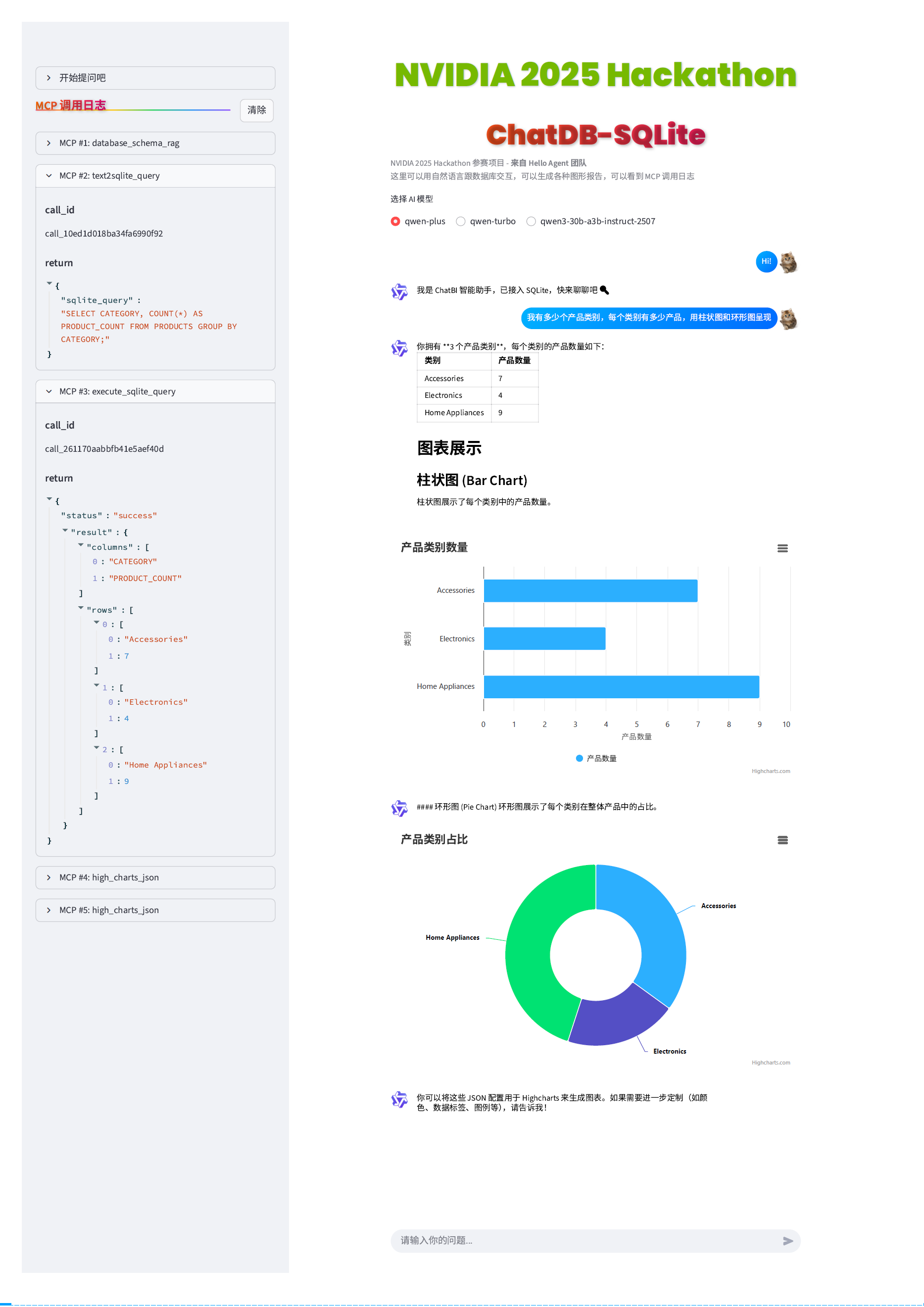
示例2
提问:画出订单的面积堆积图,按时间线排列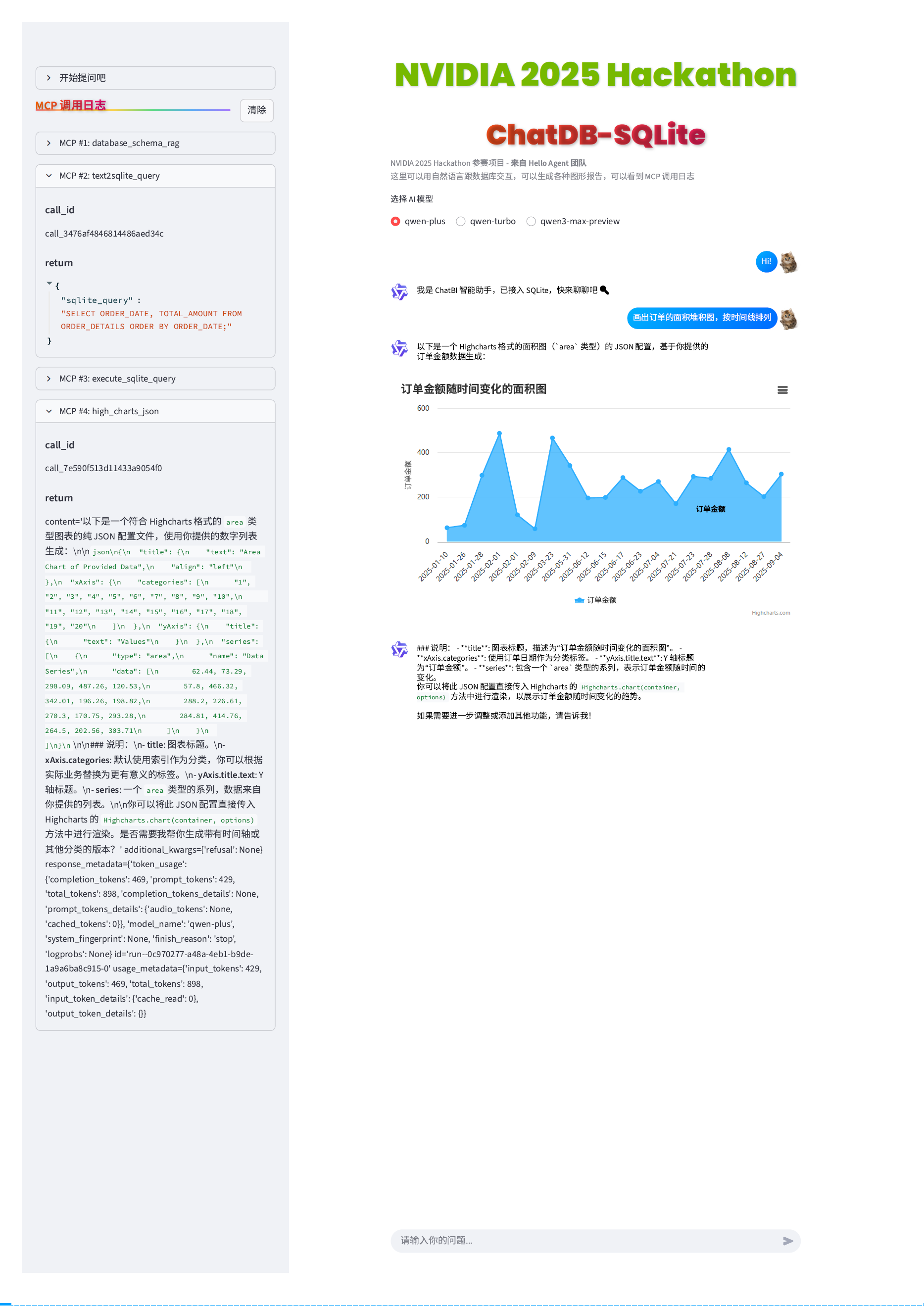
架构图
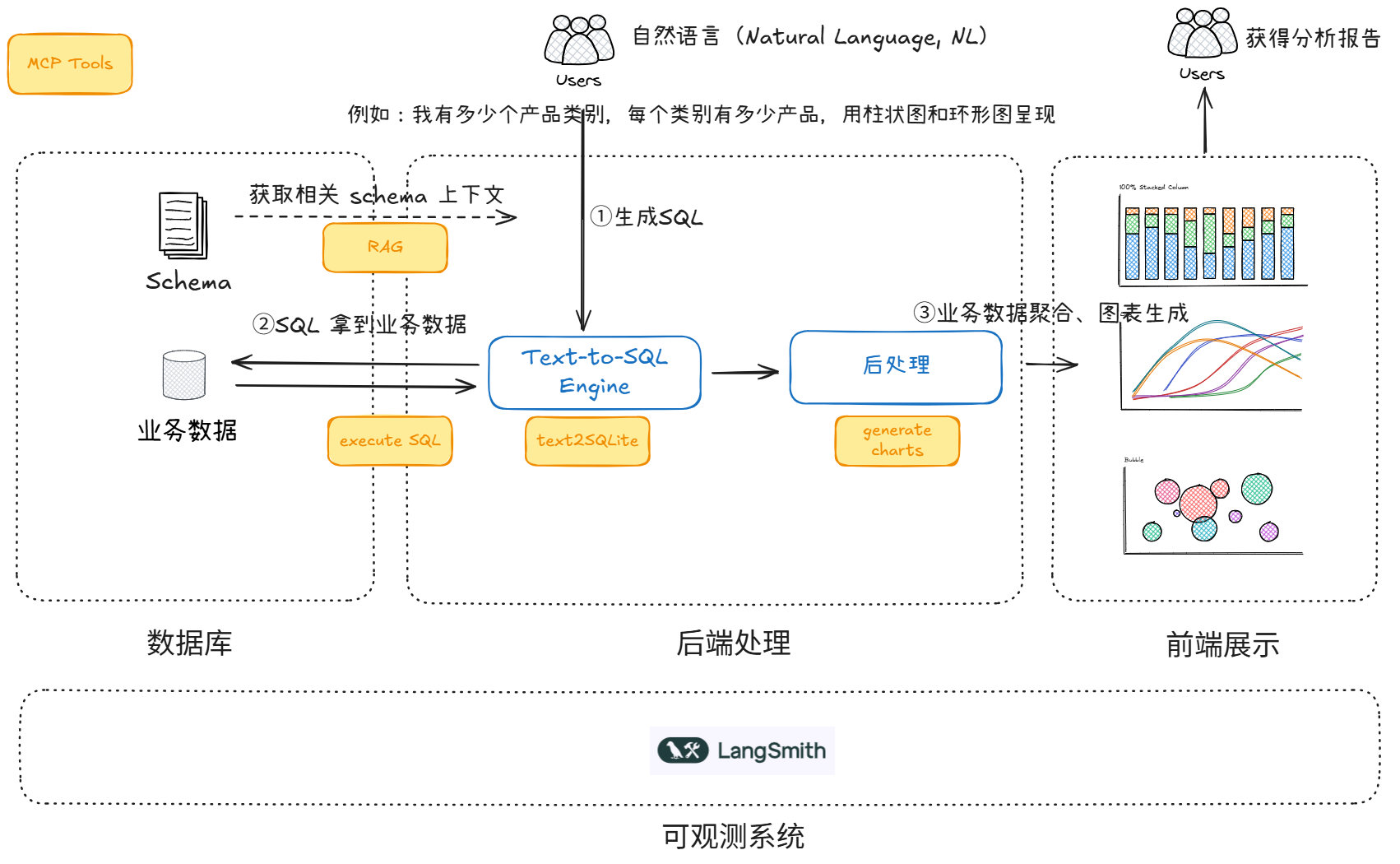
橙色框代表了我们开发的 MCP tools,流程如下,下面用一个场景为例说明:
- Agent router 解析问题,决定要调用 RAG,获取与问题相关的数据库表 Schema
- Agent router 下一步调用 tools,根据 Schema 生成 SQL
- Agent router 下一步调用 tools,执行 SQL
- Agent router 下一步调用 tools,生成各种图,整个流程上下文(Context)是共享的
主要技术
- Agent 框架:LangChain / LangGraph
- AI 模型:阿里百炼 Qwen 系列
- 前端框架:React 19 + TypeScript + Vite + Ant Design + ECharts
- 后端框架:FastAPI + Python 3.12+
- 向量数据库:ChromaDB
- 通信方式:REST API + SSE (Server-Sent Events)
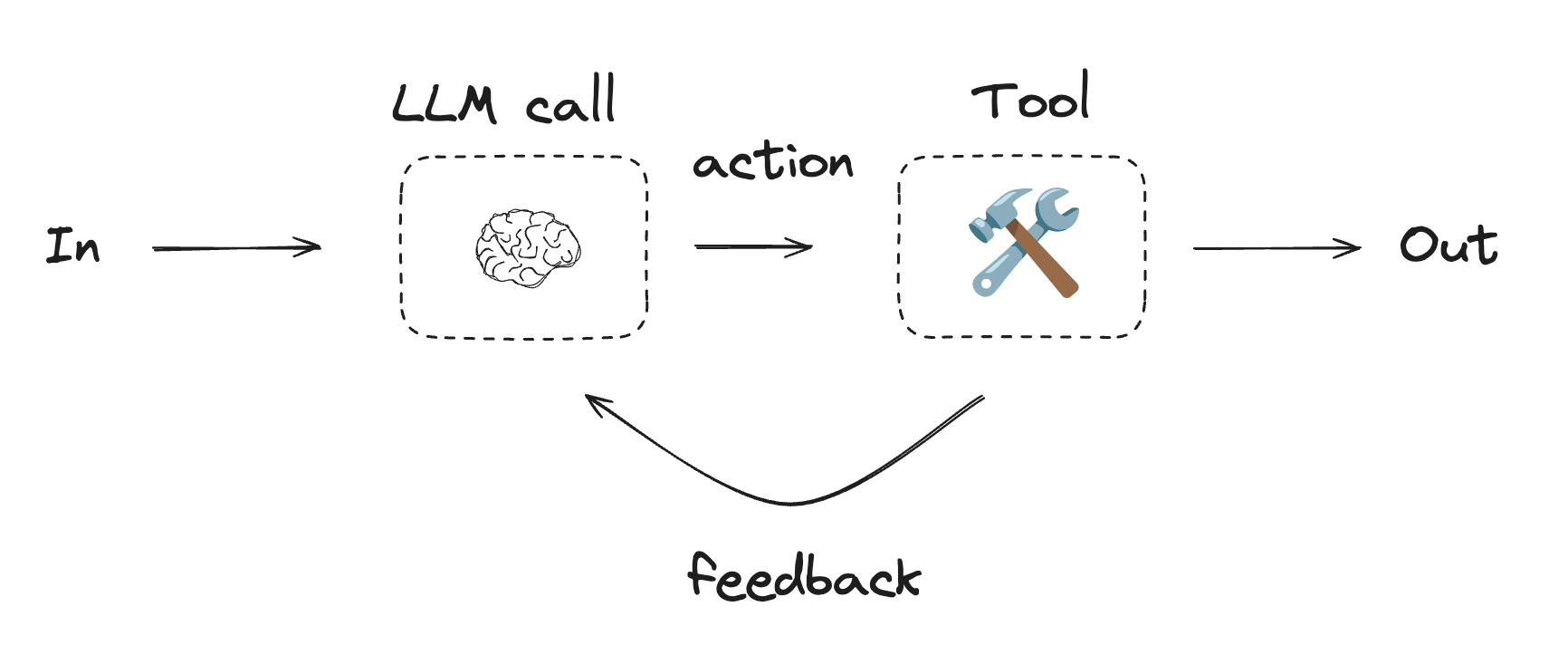
Agent 架构图
项目结构
ChatBI/
├── backend/                 # FastAPI 后端
│   ├── api/                # API 路由
│   │   ├── chat.py         # 聊天 API(SSE 流式输出)
│   │   └── callback.py     # 流式输出回调处理器
│   └── server.py           # FastAPI 服务器入口
├── frontend/               # React 前端
│   ├── src/
│   │   ├── components/    # React 组件
│   │   ├── services/      # API 服务
│   │   └── utils/         # 工具函数
│   └── package.json
├── agent.py                # Agent 核心逻辑
├── tools/                  # 工具模块目录
│   ├── tools_execute_sqlite.py    # SQLite 查询工具
│   ├── tools_text2sqlite.py   # 自然语言转 SQL 工具
│   ├── tools_rag.py              # 数据库 schema 检索工具
│   ├── tools_charts.py            # 图表生成工具
│   ├── mcp_time.py               # MCP 时间工具服务端
│   ├── generate_sqlite_data.py   # 生成示例数据库和数据
│   └── ingest_chromadb.py        # 生成 embedding 并写入 chromadb
├── docs/                   # 数据库表结构说明
├── sql/                    # 数据库建表 SQL 文件
├── chroma_langchain_db/    # 向量数据库存储目录
├── assets/                 # 项目图片资源文件夹
├── main.py                 # Streamlit 应用入口(已弃用,保留用于兼容)
└── ui/                     # Streamlit UI 组件(已弃用,保留用于兼容)
安装与运行
前置要求
- Python 3.12+ (推荐使用 conda 环境)
- Node.js 18+ 和 npm/yarn/pnpm
- 已配置 OPENAI_API_KEY 环境变量
快速启动
1. 克隆项目
git clone https://github.com/yourusername/ChatBI.git
cd ChatBI
2. 安装后端依赖
方式 A:使用 Conda(推荐)
# 如果 nlp 环境已存在,更新它
conda activate nlp
conda env update -n nlp -f environment.yml --prune

# 如果 nlp 环境不存在,创建新环境
conda env create -n nlp -f environment.yml
conda activate nlp
详细说明请参考 CONDA_SETUP.md
方式 B:使用 uv
uv sync
方式 C:使用 pip
pip install -r requirements.txt
3. 安装前端依赖
cd frontend
npm install
# 或使用 yarn/pnpm
# yarn install
# pnpm install
cd ..
4. 配置环境变量
后端配置(项目根目录创建 .env 文件):
OPENAI_API_KEY=your_qwen_api_key_here
OPENAI_API_BASE_URL=https://dashscope.aliyuncs.com/compatible-mode/v1
HOST=0.0.0.0
PORT=8000
ENV=local
前端配置(frontend/.env 文件):
VITE_API_BASE_URL=http://localhost:8000
详细说明请参考 ENV_CONFIG.md
5. 初始化向量数据库
生成 Embedding 并写入向量数据库:
cd tools
python ingest_chromadb.py
cd ..
6. 生成示例数据库(可选)
cd tools
python generate_sqlite_data.py
cd ..
7. 启动应用
方式一:使用启动脚本(推荐)
./start.sh
方式二:手动启动
终端 1 - 启动后端:
conda activate nlp  # 如果使用 conda
cd backend
python server.py
终端 2 - 启动前端:
cd frontend
npm run dev
8. 访问应用
- 前端界面: http://localhost:5173
- 后端 API: http://localhost:8000
- API 文档: http://localhost:8000/docs (Swagger UI)
数据库结构示例
- 客户表(CUSTOMER_DETAILS):客户信息
- 订单表(ORDER_DETAILS):订单信息
- 产品表(PRODUCTS):产品信息
- 支付表(PAYMENTS):支付记录
- 交易表(TRANSACTIONS):交易流水
- 用户交互表(USER_INTERACTIONS):用户交互数据
详细字段见 docs/ 文件夹。
开发指南
后端开发
cd backend
python server.py
# 默认启用热重载(ENV=local 时)
前端开发
cd frontend
npm run dev
# Vite 自动热重载
API 文档
启动后端后,访问 http://localhost:8000/docs 查看 Swagger API 文档。
详细 API 接口说明请参考 API_INTERFACE.md
传统架构(Streamlit,已弃用)
注意:项目已迁移到 React + FastAPI 架构。Streamlit 相关代码仍保留在项目中,但不再推荐使用。
如需使用 Streamlit 版本:
streamlit run main.py
相关文档
- QUICK_START.md - 快速启动指南
- API_INTERFACE.md - API 接口文档
- ENV_CONFIG.md - 环境变量配置说明
- CONDA_SETUP.md - Conda 环境配置指南
- MIGRATION_GUIDE.md - 架构迁移指南
贡献方式
欢迎提交 PR 或 Issue,完善功能、修复 Bug 或优化体验。
鸣谢
本项目受到该开源项目启发:https://github.com/kaarthik108/snowChat
许可证
MIT License
Reviews (0)
Sign in to leave a review.
Leave a reviewNo results found