ub-agents
Health Warn
- License — License: MIT
- Description — Repository has a description
- Active repo — Last push 0 days ago
- Low visibility — Only 5 GitHub stars
Code Fail
- rm -rf — Recursive force deletion command in bin/ci.sh
- network request — Outbound network request in bin/release.py
Permissions Pass
- Permissions — No dangerous permissions requested
No AI report is available for this listing yet.
An autonomous coding loop for GitHub. Any agent, no server.
ub-agents

ub-agents runs an implementation and review loop for your GitHub issues in the
background, on your own machine or server.
Why this exists
We still work in Claude Code or Codex to decide what to build: we talk the
change through, settle the approach and agree on what done means. Once the work
is that clear, it doesn't need us sitting beside it, whether it's a bug, a
dependency update or a small fix. So we hand it to a background loop on a
machine we operate, and get back to deciding the next thing. The
motivation page has the
longer version.
The loop is deliberately small. GitHub holds the workflow state as labels and
comments, the roles and their instructions live in your repository, and there
is no separate orchestration server. Each role runs the agent you pick: Claude
Code, Codex or any command.
How it works
- Work out the change in Claude Code or Codex.
- Ask your agent to file the agreed work for the loop. There's no special
command: it opens a GitHub issue withghand adds the label that starts the
loop. - Keep working. Come back to review the result, or to answer a question
when an agent needs a decision.
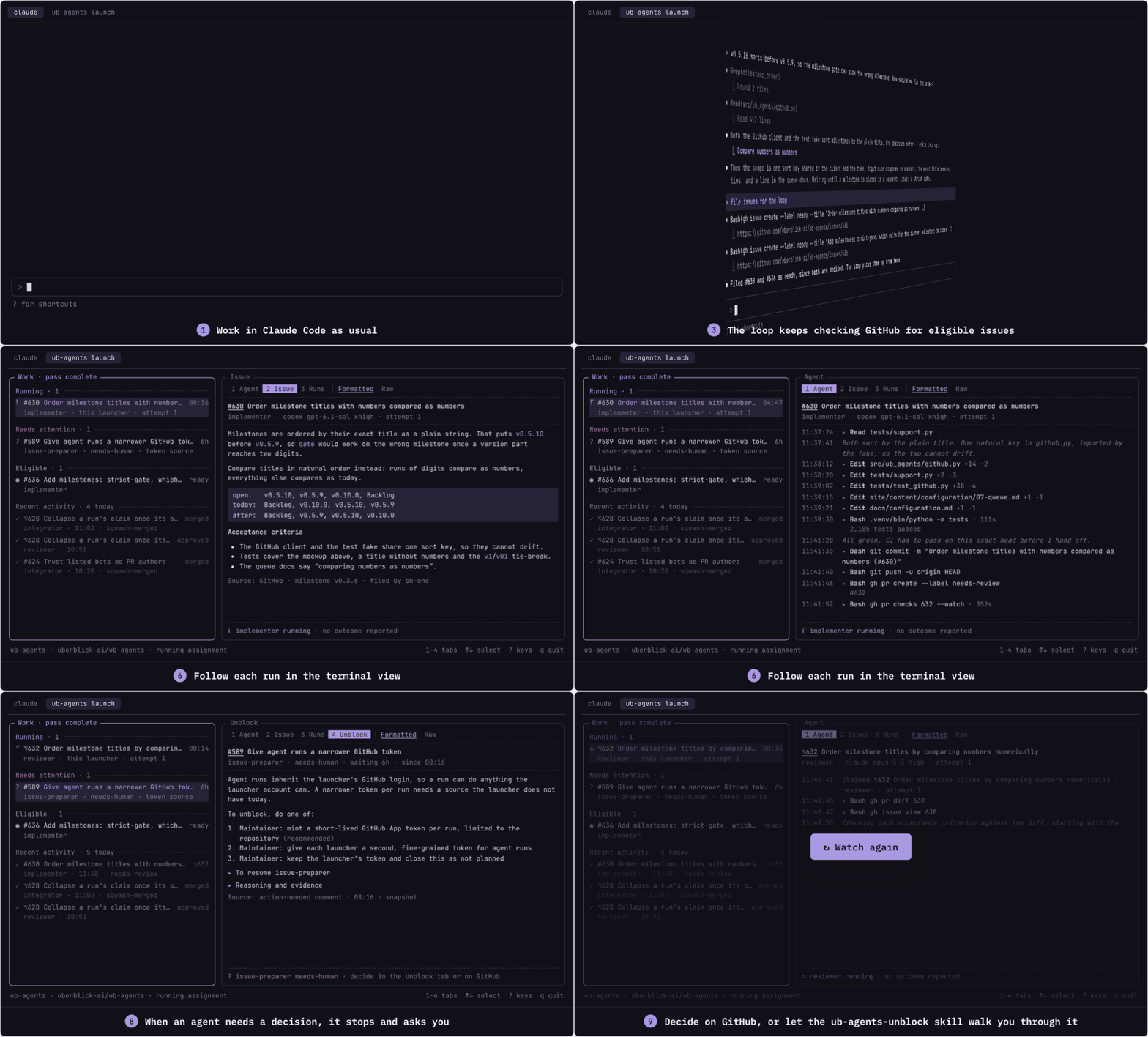
The animation is an example session, shortened; the full one is on
our website. Here is what really happened to #630, the
issue it is based on. It was filed from a Claude Code session withneeds-preparation. The preparer checked it and marked it ready, and the
implementer opened
#632. The reviewer
sent it back:
the code was fine, but three pages in our Uberblick workspace named in the
acceptance criteria were still unchanged. The implementer updated two. The third
was an approved decision that only a maintainer may change, so it stopped withneeds-human and asked. The PR waited three days until a maintainer
answered
from a Codex session and handed it back; then the reviewer approved and the
integrator merged.
A launcher watches your repository for the labels in ub-agents.yaml, takes
the next eligible item by priority and milestone, and uses claim comments to
coordinate with other launchers. In the starter workflow a preparer checks the
issue against the code, an implementer opens a pull request, a reviewer
(ideally on another model) approves it or sends it back, and an integrator
merges when your checks and merge policy allow. Otherwise a maintainer merges.
When an agent needs a decision, the item gets needs-human and a comment
saying what to decide.
You, in Claude Code or Codex
  discuss → decide → "file issues for the loop"
                                    │
The loop, on your machine or server ▼
  issue-preparer  checks the issue against the code ─┐
  implementer     opens a pull request               │   a decision is needed,
  reviewer        approves, or sends it back ↺       ├─► or a person must merge:
  integrator      merges if checks and policy allow ─┘   needs-human, you decide
                                    │                    and hand it back
                                    ▼
                          you review the result
Your agent files with needs-preparation, or ready when the issue is already
clear enough to build. Whose label starts work depends on your start policy: in
a private repository, anyone who can add labels; in a public one, by default,
someone with the maintain or admin role. Labels, roles and outcomes are lines inub-agents.yaml, so you can drop a role, add one or change where a person steps
in. See how the loop works
and, for answering agents, unstick an item.
Try it
A dedicated machine, VM or low-privilege user for the launcher.
A worktree isolates the checkout, not the machine; see the
security model.
On macOS or Linux, with git, gh logged in to an account with write access,
and claude or codex installed and signed in:
brew install uberblick-ai/tap/ub-agents
cd your-project              # a clean checkout of your default branch
ub-agents init
init asks a few questions, shows every change and opens a setup pull request
with ub-agents.yaml and the role instructions in .agents/. Review it before
you merge: check the agent permissions and the merge policy, which decides what
the loop may merge on its own. Init's
next steps
list what to look at.
Give the launcher a checkout of its own, so you can keep working in yours.
After merging the setup PR, clone a second one and start it there:
git clone https://github.com/you/your-project your-project-loop
cd your-project-loop
ub-agents launch
Then file an issue with needs-preparation. The
installation guide has the
full steps.
Other things we hand it
A feature, shaped first. We wanted the loop to be able to notify Slack.
Before filing #664 we
settled the config, the event fields and what a failing hook must never break,
so the issue holds those decisions. The loop prepared it, implemented it in
#666, reviewed it and
merged it, with nothing left to ask.
Dependency updates from Dependabot. These arrive as pull requests, not
issues, and take a shorter path. In the repository that builds
Uberblick, Dependabot is a trusted pull request author
and its dependencies label sends the pull request straight to the integrator.
That project's merge policy lets the integrator merge minor and patch updates
that touch only manifests and lockfiles once CI is green, gives a failing build
one repair attempt, and sends major versions, pinned packages and changes to
sensitive areas to a person. The starter workflow does none of this; it is
three settings and a few lines of policy. See
Letting agents auto-merge Dependabot pull requests.
Controls and boundaries
- People decide. Add
needs-humanto any issue or pull request and the loop
leaves it alone until you remove it. Your merge policy in.agents/ub_agents.mdsays what waits for a maintainer, and without an
integrator every merge is yours. - By default, untrusted outside input waits for a maintainer. On public
repositories, outside issues and pull requests reach an agent only after a
maintainer starts them, unless you list a bot such as Dependabot as trusted.
Fork pull requests are reviewed as a diff without running their code. See
approvals. - The models are still hosted and paid. ub-agents is free, but agents run
on your Claude Code or Codex seat or API key, and every run counts against it.
Check your provider's terms for unattended use. - A separate worktree isolates the checkout, not the machine. Agents run as
the launcher user with the permissions you grant their CLI. Use a dedicated
GitHub account and machine for launchers; see the
security model. - Uberblick is optional. We use our Uberblick
workspace for product pages the agents read; ub-agents doesn't need it. - Rough edges. GitHub only, and launchers run on macOS or Linux. Agents run
through Claude Code, Codex or a command you configure. Runs fail and get
retried, and an item waits as long as nobody answers it.
Docs
- Motivation and the FAQ
- Installation and upgrading
- How the loop works
- Security model
- Commands and configuration
- Add more launchers, unstick an item, add a step, run on a public repository and run a command on loop events
Contributing
This repository runs its own loop, configured in ub-agents.yaml
and .agents/.
- Open an issue for a bug or a change. A maintainer labels it to start the
loop, which prepares it, implements it, reviews the PR and merges it. Small,
single-change issues work best. - Pull requests are welcome. Agents review fork PRs as a diff and rely on CI;
they can't push to your fork. See approvals for how outside
input is handled. - Found a vulnerability? Report it privately as SECURITY.md
describes, not in an issue.
AGENTS.md indexes the checks, conventions, changelog and release rules
that people and agents both follow. The roadmap is in the
milestones.
Local development
With mise activated in your shell:
git clone https://github.com/uberblick-ai/ub-agents && cd ub-agents
mise trust                  # once; entering the checkout installs it into .venv
ub-agents --version         # runs this checkout's code, not an installed release
.venv/bin/python -m tests   # the suite; fakes GitHub and never calls a model
ub-agents doctor --offline  # validates this repository's own loop setup
mise run ci                 # optional: CI's checks on HEAD in a fresh worktree
Without mise, python3 -m venv .venv && .venv/bin/pip install -e . sets up the
same .venv.
See development checks for the pinned type and complexity
checks used locally and in CI, plus the directory welcome card and
remote loop shortcuts.
The test runner uses every core by default. Pass test names to run a subset,-j N to set the worker count, --durations N to list the slowest tests and--timeout SECONDS to change the five-minute limit per test.
The website builds from site/content/ into site/out/ with.venv/bin/python site/build.py. To preview it from disk, build with--preview, which keeps .html links, and open site/out/index.html.
Every docs and workflow page also gets a Markdown copy for agents, listed inllms.txt.
Workflow diagrams have their own README.
Reference for contributors: coordination contract,
approvals, polling,
init wizard,
session snapshots and releases.
License
Reviews (0)
Sign in to leave a review.
Leave a reviewNo results found