codex-chef
Health Warn
- License — License: MIT
- Description — Repository has a description
- Active repo — Last push 0 days ago
- Low visibility — Only 6 GitHub stars
Code Pass
- Code scan — Scanned 12 files during light audit, no dangerous patterns found
Permissions Pass
- Permissions — No dangerous permissions requested
No AI report is available for this listing yet.
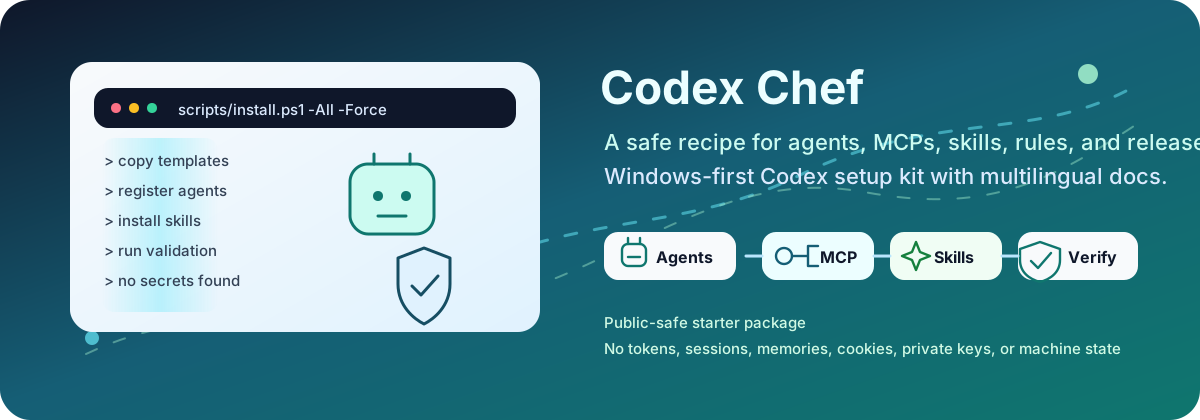
Codex Chef: Windows-first Codex setup kit with agents, skills, MCP connectors, safe installers, validation gates, and multilingual docs.
Codex Chef




 Docs:
Docs:
 |
|
 |
|
 |
|
 |
|
 |
|

|
|
This is an unofficial community starter, not an OpenAI product. It is mapped to current official Codex documentation and keeps destructive, credentialed, publishing, deployment, database, and broad filesystem actions approval-gated.
The multilingual README entry points, six-language deep docs coverage, and bilingual knowledge base are part of the release surface. English and Turkish keep the most complete operator flow; Deutsch, Español, Português (Brasil), and Français provide concise local entry points and links into the same deep docs.
 Copy-Paste Install
Before you paste, confirm the local prerequisites so setup failures point to the
right layer:
Get-Command git
Get-Command node
Get-Command npx
Get-Command codex
node -v
Node.js 18 or newer is required. If one of these commands is missing, use
Troubleshooting before treating the repository as
broken.
Preview first:
git clone https://github.com/ucsahinn/codex-chef.git
cd codex-chef
powershell.exe -NoProfile -ExecutionPolicy Bypass -File .\scripts\install.ps1 -All -WhatIf
node scripts/plan-install.mjs --all --json --redact-paths
Install after reviewing the preview:
powershell.exe -NoProfile -ExecutionPolicy Bypass -File .\scripts\install.ps1 -All -Interactive
Bash or WSL:
git clone https://github.com/ucsahinn/codex-chef.git
cd codex-chef
chmod +x scripts/install.sh
./scripts/install.sh --all --interactive
Repair an existing Codex Chef setup without deleting user skills:
powershell.exe -NoProfile -ExecutionPolicy Bypass -File .\scripts\install.ps1 -Repair -WhatIf
powershell.exe -NoProfile -ExecutionPolicy Bypass -File .\scripts\install.ps1 -Repair
 CLI Without The Noise
Use npm run chef for the menu. Keep these commands handy:
| Need | Command |
|---|---|
| Fast local health check | npm run chef -- --status --repo-only --no-log |
| Full status board | npm run codex:status |
| Install preview | npm run chef -- --preview |
| Routing profile map | npm run chef -- --routing --profile starter-health |
| Diagnostics hub | npm run chef -- --diagnostics --no-log |
| Process audit only | npm run chef -- --processes --no-log |
| Repair preview/apply | npm run chef -- --repair then npm run chef -- --repair --apply |
Rules of thumb:
--status,--preview,--skills,--mcp,--routing,--diagnostics,--processes,--auth, and--logsare inspection-first surfaces.- Write paths require
--applyor typed confirmation. The menu labels the write boundary before doing anything risky. - Add
--no-logwhen you want a strict no-log audit. Normal CLI logs are repo-local, ignored, and redacted. - Do not use
npx run; usenpm run chefornpm --prefix <repo> run chef.
Detailed CLI behavior lives in Install, Expected output, and Troubleshooting.
 What You Get
Codex Chef installs a reviewed Codex baseline, not a hidden copy of someone else's machine.
| Surface | What lands on your machine |
|---|---|
 Agent team Agent team |
21 Codex subagent role files under ~/.codex/agents/*.toml, including readable nickname_candidates. They are role definitions, not always-on services. |
 Durable guidance Durable guidance |
Global ~/.codex/AGENTS.md with routing, verification, safety, and approval rules. |
 MCP defaults MCP defaults |
8 useful MCP entries enabled for docs, code navigation, browser evidence, reasoning, non-secret memory, and local codebase graph reads; mutating tools are prompt-gated or disabled, and 8 account/database/high-risk connectors stay disabled. |
 Plugin + skills Plugin + skills |
Local codex-chef-workflows plugin, three bundled skills, and sixteen reviewed optional global skills. |
 Safety gates Safety gates |
Dry runs, backups, validation, secret scanning, and approval gates before risky actions. |
Installed skills do not execute by themselves. They enter context when named by the user or when a task clearly matches their description. Codex subagents also do not spawn from every prompt, but this starter records standing permission for bounded, reversible local specialist delegation whenever the current Codex runtime permits it.
Installed Agent Team
These are the visible specialist names Codex Chef installs. They are role files for explicit, visible delegation; they are not always-on background services.
| Map and plan | Build and review | Verify and ship |
|---|---|---|
 Code Mapper ( Code Mapper (code_mapper) |
 Design Reviewer ( Design Reviewer (design_reviewer) |
 QA Lead ( QA Lead (qa_lead) |
 Docs Researcher ( Docs Researcher (docs_researcher) |
 DevEx Auditor ( DevEx Auditor (devex_auditor) |
Performance Auditor (performance_auditor) |
 Context Architect ( Context Architect (context_architect) |
 Root-Cause Debugger ( Root-Cause Debugger (root_cause_debugger) |
 Google SEO Auditor ( Google SEO Auditor (google_seo_auditor) |
 Prompt Architect ( Prompt Architect (prompt_architect) |
 Docs Author ( Docs Author (docs_author) |
Security Auditor (security_auditor) |
MCP Integrator (mcp_integrator) |
 Spec Author ( Spec Author (spec_author) |
 Test Verifier ( Test Verifier (test_verifier) |
 Product Strategist ( Product Strategist (product_strategist) |
 Code Reviewer ( Code Reviewer (code_reviewer) |
 Release Verifier ( Release Verifier (release_verifier) |
 Engineering Planner ( Engineering Planner (engineering_planner) |
 Frontend Verifier ( Frontend Verifier (frontend_verifier) |
 Codex Doctor ( Codex Doctor (codex_doctor) |
Skills Included
| Set | Skills |
|---|---|
| Local plugin |
codex-chef-operator, offline-diagram-triplet, context-budget-planner |
| Reviewed global catalog |
dependency-upgrade, gh-fix-ci, systematic-debugging, request-refactor-plan, security-best-practices, frontend-skill, webapp-testing, web-quality-audit, seo, accessibility, test-driven-development, documentation-and-adrs, mcp-builder, ai-project-starter, prompt-architect, ai-skill-create |
MCP Defaults
| Status | MCPs | Boundary |
|---|---|---|
| Default-enabled narrowed tools |
OpenAI Docs · Context7 · Sequential Thinking · Playwright · Chrome DevTools · Serena · Memory · codebase-memory |
Docs and reasoning run smoothly; browser evidence, semantic navigation, local memory reads, and local graph reads are allowlisted, while interaction, symbol edits, graph indexing, and writes stay prompt-gated or disabled. |
 Disabled until opt-in Disabled until opt-in |
 Filesystem · Filesystem ·  GitHub · Figma · GitHub · Figma ·  Linear · Linear ·  Notion · Notion ·  Sentry · ▲ Vercel · Sentry · ▲ Vercel ·  Supabase Supabase |
These can expose private files, accounts, deployments, telemetry, or databases. |
Run npm run codex:status after install to see MCP setup notes, effective controls, routing profiles, and installed-runtime drift without mutating global Codex state.
 What It Does Not Do
- It does not store secrets, copy private memory state, or import existing sessions; Memory MCP is only for non-secret local context when you use it deliberately.
- It does not enable authenticated account, database, production, or broad filesystem MCP connectors by default.
- It does not commit, push, tag, release, publish packages, deploy, rotate secrets, or change GitHub settings.
- It does not delete user data as a cleanup shortcut; repair and force flows are previewed and backup-backed.
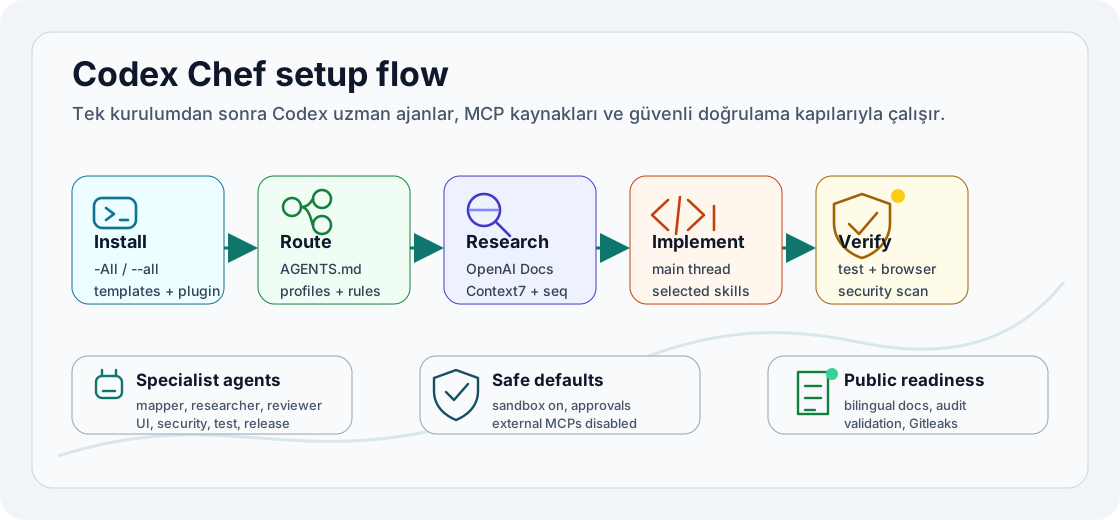
 Visual Overview
Trust Signals
| Signal | Evidence |
|---|---|
| Real validation |
npm run check runs repo, docs, install-plan, installer smoke, agent drift, MCP drift, token-surface, skill-source, supply-chain, package-surface, release-readiness, and security checks. |
| Multilingual surface |
Six root READMEs plus six-language deep docs are validated. |
 Operator KB Operator KB |
kb/ keeps short English and Turkish task articles for install preview, runtime verification, routing, and release hygiene. |
| Conservative connectors |
Account, database, production, and broad filesystem connectors stay disabled until a task explicitly needs them. |
 Install plan Install plan |
manifests/install-plan.json and schemas/install-plan.schema.json define the managed write surface. |
 Context budget Context budget |
npm run token:audit reports the largest context surfaces; token-safe.config.toml lowers verbosity and tool-output budgets without disabling skills, MCPs, memory, hooks, or automatic agent model/reasoning selection. |
| Agent-readable index | llms.txt gives agents a compact map of install targets, docs, safety boundaries, and comparison sources. |
Repository Layout
.github/                 CI workflow plus issue and PR templates
assets/                  Public-safe README visuals
catalog/                 Agent, skill, MCP, and routing metadata
README*.md               Multilingual public entry points
docs/                    Six-language setup and verification guides
kb/                      English and Turkish task-focused knowledge base
manifests/               No-write install plan metadata
plugins/                 Bundled local Codex plugin and skills
schemas/                 Lightweight validation schemas
scripts/                 Install, doctor, status, CLI, and validation scripts
templates/codex/         Files copied into ~/.codex
templates/git/           Optional global Git hygiene files
Verify Locally
npm run check
git diff --check
gitleaks detect --redact --no-banner --no-git --verbose
Optional online skill-source check:
npm run verify:skills:online
Documentation
Use the README for orientation; use the docs for operator detail:
- Install
- How to run the setup
- Expected output
- Troubleshooting
- Upgrade guide
- Codex capability map
- Workflow surface map
- Codex surfaces
- Codex flags
- Skills and agents
- MCP catalog
- Security model
- Verification
- Public readiness
- ECC compatibility
- SEO and discoverability
- Research notes
- Advisory sources
- Publishing
- Knowledge base
- Turkish knowledge base
- Agent-readable index
Official Codex References
- Codex manual: https://developers.openai.com/codex/codex-manual.md
- Skills: https://developers.openai.com/codex/skills
- Plugins: https://developers.openai.com/codex/plugins
- MCP and connectors: https://developers.openai.com/api/docs/guides/tools-connectors-mcp
- Windows: https://developers.openai.com/codex/windows
- Config, permissions, rules, hooks, and
AGENTS.mdmapping: Research notes
Publishing Boundary
This repo is built to be public-ready after validation, but the installer is local-only. Commit, push, tag, release, package publishing, deployments, and GitHub settings changes must be explicit human decisions after local verification.
Reviews (0)
Sign in to leave a review.
Leave a reviewNo results found