zerus
Health Warn
- License — License: MIT
- Description — Repository has a description
- Active repo — Last push 0 days ago
- Low visibility — Only 6 GitHub stars
Code Fail
- rm -rf — Recursive force deletion command in .github/workflows/checks.yml
- rm -rf — Recursive force deletion command in .github/workflows/dev-android.yml
Permissions Pass
- Permissions — No dangerous permissions requested
No AI report is available for this listing yet.
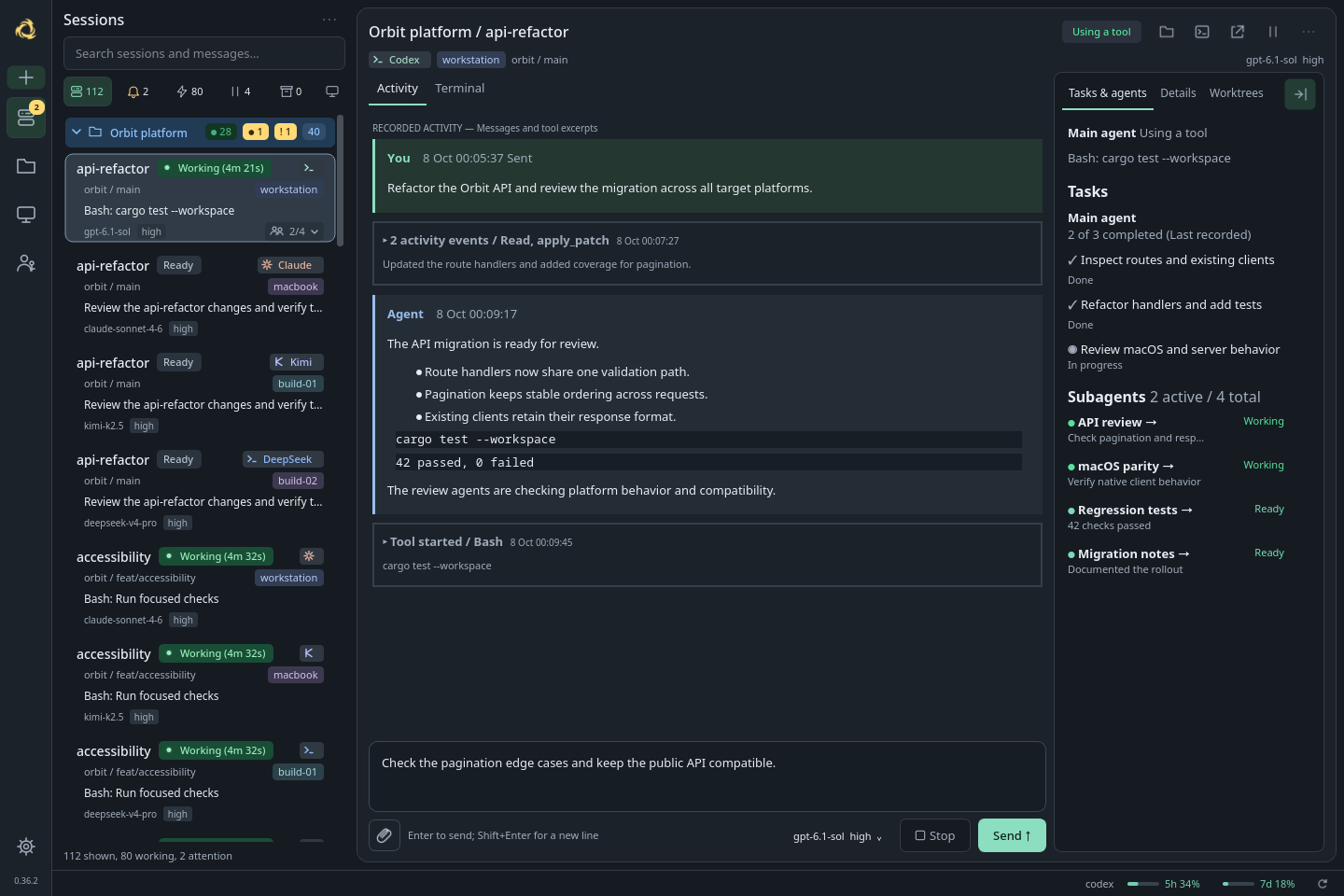
Zerus is an ADE for working with a fleet of AI coding agents across your machines. Bring your own agents and subscriptions. Follow conversations, get notified and keep projects in sync over P2P, all from one workspace.
 Zerus
Zerus
Your agents. Your machines. One workspace.
One interface for native agent harnesses, with their tools, hooks and workflows.
Projects, session assignments and shared settings sync directly between peers.
Install |
Features |
Android |
Reference
Linux and macOS | Android | Windows (preview) | P2P | MIT
Claude Code
Codex
Kimi Code
DeepSeek Harness
Zerus is an Agent Development Environment (ADE) where your machines are peers
in one shared workspace. A project can include folders and agent sessions on
several hosts. The project catalog, session assignments and shared recovery
settings sync directly between machines, with no permanent main machine.
Work from your laptop or workstation using the SSH access configured there.
Bring your own agents and subscriptions.
Claude Code, Codex, Kimi Code and DeepSeek Harness run in their own native
runtimes. Zerus brings their Activity, messages, questions, approvals and session
controls together, while their original tools, hooks, permissions and history
remain with the native harness. Agents from different providers can discover
sessions, read progress and exchange messages through the built-in hgs CLI,
locally or over SSH. Available controls depend on the agent and its version.
You can run any terminal command through hgs; full ADE features need an
adapter.
Missing your agent or a feature?
Send a PR or
let us know.
Features
Your whole fleet at a glanceSee machines, running sessions and requests for attention in one overview. Search, filters and project groups help you work with dozens or hundreds of agents. Machine load and account limits are right alongside them. |

|
One shared workspace across your machinesA project brings together folders and agents on your laptop, workstation and servers. The project catalog, session assignments and shared recovery settings sync peer to peer over SSH. Each machine keeps a copy, with no permanent main machine. Switch to another connected computer and keep the same project organization. Offline peers catch up when they reconnect; SSH access, credentials and appearance stay local. |

|
Notifications that lead to the right sessionKnow when an agent finishes, asks a question, requests approval or hits an error. A click takes you to that session's Activity, including remote sessions. Read replies, send messages and images, and follow subagents and tasks alongside the conversation. |

|
Native harnesses, working together
Use each provider's agent in its own environment, with its native tools and
workflows. Zerus preserves existing hooks while adding session tracking and
connects native events to the shared workspace. The original Terminal or Native
UI stays available for provider-specific features.
Agent-to-agent communication is built in. For example, let Codex implement a
change and Claude review it. Agents with shell access can use hgs ls to find
sessions, hgs inspect to read their progress and hgs send to exchange tasks
and results, including on another machine through hgs @host. Each recipient
continues in its own native conversation. The same inspection and message
interfaces serve the desktop and other clients.
CLI protocol and delivery guarantees.
Voice control across agents and devices
Speak a task to Claude Code, Codex, Kimi Code or DeepSeek Harness from the
desktop or Android app. Record, review and send: Zerus transcribes the recording
and delivers the text to the selected agent's native conversation, including on
another connected computer. Your message stays in Activity as a playable voice
message with a waveform and expandable transcript, so you can compare what you
said with what the agent received.
Choose the processing computer and manage its recognition profiles in
Settings → Voice input. Use local GigaAM v3 for Russian, including GPU
inference, or an OpenAI-compatible transcription server at your own URL.
Your phone reaches the processing computer through the relay; it does not need
to run the model. Agent choice and speech provider choice are independent.
Set up a speech provider |
Voice messages and delivery
Your fleet from your phone
The Android app brings your projects and agents to your phone:
- Conversations and tasks. Read replies, follow goals, task lists and subagents,
answer questions and approvals, and send messages with files and images. - Voice control. Send recorded tasks to any supported agent, play your voice
messages back and view their transcripts. Choose recognition profiles on a
connected computer, including local models and remote transcription servers. - Remote controls. Create sessions with the computer's native agent and account;
change models, clear or compact context, inspect processes and open the native
terminal where supported. - Your workspace. Filter sessions across machines, browse project folders and
check account limits. Private drafts and cached conversations stay available offline.
Pair your phone with a computer to reach it and its directly connected Zerus peers
through a self-hostable HTTPS relay. Notifications use Firebase Cloud Messaging,
with a foreground live connection for phones without it. iOS is planned.
Download the Android APK |
Connect your phone |
Architecture and trust model
| Your sessions | Talk to your agents | Accounts and limits |
|---|---|---|
 |
 |
 |
Persistent sessions, your choice of client
Terminal agents run in tmux. Closing Zerus, losing SSH or putting your laptop
to sleep leaves sessions on a running host intact. Attach from the built-in
Terminal, a regular terminal over SSH or another client, even one without Zerus.
Supported agents also have pause/resume with an exact conversation binding.
DeepSeek Harness uses the official native engine and an embedded
Native UI alongside Activity. Its host also keeps working after you close
the window. Integration details.
Yet another ADE
One project, agents on several machines. I wanted to work from the laptop or
workstation with the same projects and session assignments available on both.That is the reason for the P2P workspace. Each machine keeps the shared catalog
and exchanges changes directly with its peers, with no permanent main machine.
The folders and agents stay on their hosts; the project organization and shared
settings follow you between connected computers.Terminal agents run in ordinary tmux sessions. Work through Zerus or connect to
the same session from any SSH client, using the SSH access configured on that
computer.
Quick start
On Arch Linux x86_64, install the stable bundle with yay -S zerus-ade-bin, then
run zerus-setup as your normal user.
Source and development packages are also available.
On macOS and other Linux distributions, build from source;
see other platforms.
Install Zerus and the CLI, then use New session to
choose an agent, machine, project and folder. Ordinary folders without Git work
too. Add other machines through SSH in Machines.
The same sessions are available from your terminal:
hgs codex /workspace/orbit -n api       # local agent in tmux
hgs @build-01 claude /workspace/orbit   # agent on another machine
hgs ls                                # sessions here and on connected machines
hgs status                            # versions and running services here and there
hgs a codex/orbit/api                  # attach from any terminal
On Android: download the APK,
then pair your phone.
Try demo lets you explore the interface before connecting a computer.
Other platforms
Prebuilt Linux packages currently exist only for Arch Linux x86_64. Other Linux
distributions build from source with
the same installer. Zerus is open source: apt, dnf and other packages are welcome
as pull requests.
macOS builds from source with the same installer. A signed and notarized
Apple Silicon app will be distributed through the
Homebrew tap once the first signed build
is published.
Windows has a preview: nightly releases include a portable x86_64
control console that manages agents on your
Linux and macOS machines over SSH. Agents do not run on Windows itself yet; a
native session host on ConPTY, without WSL, is the next phase. Stable and Dev
releases have no Windows build. Contributions that follow the plan are welcome.
Reviews (0)
Sign in to leave a review.
Leave a reviewNo results found