mcp-gateway
Health Pass
- License — License: MIT
- Description — Repository has a description
- Active repo — Last push 0 days ago
- Community trust — 18 GitHub stars
Code Pass
- Code scan — Scanned 12 files during light audit, no dangerous patterns found
Permissions Pass
- Permissions — No dangerous permissions requested
No AI report is available for this listing yet.
Transform any HTTP endpoint into an MCP server. Aggregate multiple MCP servers, manage configuration profiles, and serve them through a unified gateway with multi-tenant isolation.
MCP Gateway by unrelated.ai
MCP infrastructure for turning existing systems into MCP servers and serving them safely at scale.


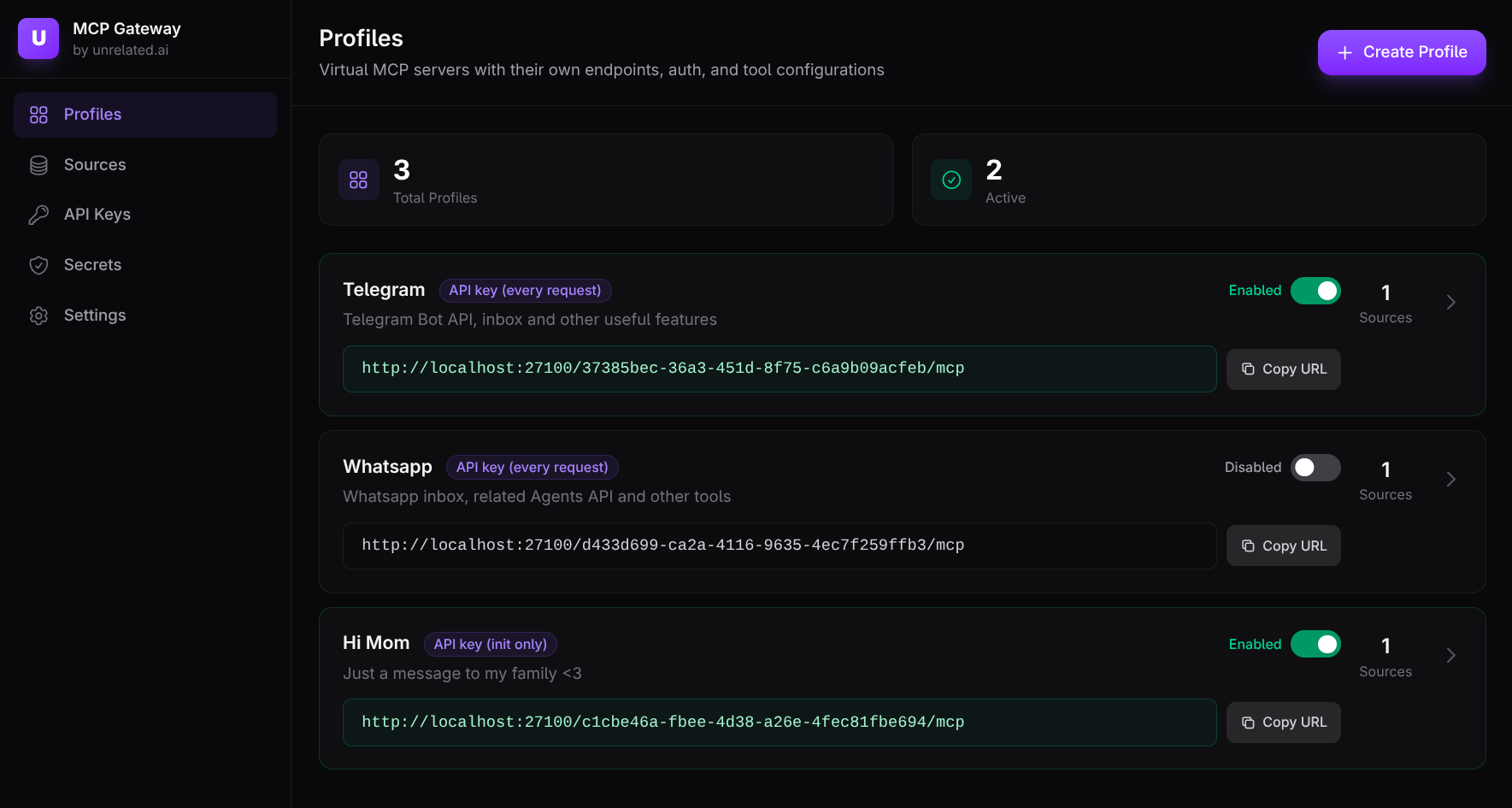
Quick Start (recommended): Docker (published images) + Web UI
If you just want to try the product experience, this is the fastest path (no repo clone needed).
This example pins component versions (adjust as desired):
- Gateway + migrator:
0.12.0 - Web UI:
0.8.1
- Download a Compose file that uses published images:
curl -fsSL -o mcp-gateway-compose.yml \
  https://raw.githubusercontent.com/unrelated-ai/mcp-gateway/main/docker-compose.quickstart.yml
- Start the stack:
GATEWAY_VERSION=0.12.0 UI_VERSION=0.8.1 \
  docker compose -f mcp-gateway-compose.yml up -d
- Open the Web UI:
http://127.0.0.1:27102
On a fresh install (bootstrap enabled + empty DB), onboarding will guide you through creating the first tenant and profile.
- Connect your MCP client to the profile endpoint you created in the UI:
http://127.0.0.1:27100/<PROFILE_ID>/mcp
Useful commands:
docker compose -f mcp-gateway-compose.yml down(stop the stack)docker compose -f mcp-gateway-compose.yml down -v(also wipe the DB volume)
Quick Start (from source): Docker Compose + Web UI
If you're developing this repo locally, the Makefile-driven workflow is convenient:
make up
Useful commands:
make down(stop the stack)make up-reset(wipe the demo DB; deletes all tenants/config; then runmake upagain to re-trigger onboarding)
Tip: this repo uses a Makefile heavily—run make help to see all targets.
Why this exists
MCP clients need to call tools, but most real systems already exist as:
- HTTP APIs
- existing stdio MCP servers (node/python/etc)
- multiple internal services that need to be aggregated into one tool surface
This workspace makes those systems consumable via streamable HTTP MCP without rewriting them into a bespoke MCP server.
What this ships
- Adapter (
unrelated-mcp-adapter): expose HTTP/OpenAPI/stdio MCP as one MCP server at/mcp - Gateway (
unrelated-mcp-gateway): tenant/profile-based MCP proxy at/{profile_id}/mcpwith auth and policy - Admin tooling:
- CLI (
unrelated-gateway-admin) - Tenant-level Web UI (beta)
- CLI (
Key concepts
| Concept | What it is | Why it’s useful |
|---|---|---|
| Adapter | One MCP server at /mcp that aggregates stdio MCP, OpenAPI, and manual HTTP tools |
Turn “many backends” into one MCP endpoint (runs well inside a trusted network) |
| Gateway | Public-facing MCP endpoint /{profile_id}/mcp that proxies/aggregates upstream MCP sources and applies auth/policy |
Run multi-tenant, policy-driven “virtual MCP servers” without exposing upstreams |
| Tenant | Isolation boundary in Mode 3 (Postgres) | Separate teams/projects/environments with isolated secrets and API keys |
| Profile | One “virtual MCP server” exposed as /{profile_id}/mcp |
Create focused tool surfaces per use case (dev vs prod, read-only vs write, etc.) |
What you can build with it
- Expose a REST API as MCP tools:
- OpenAPI → tools, or
- manual HTTP tools DSL → tools
- Publish stdio MCP servers over HTTP by spawning them as child processes and re-exposing the tool surface at
/mcp. - Aggregate multiple tool sources into one MCP endpoint (and keep names stable by collision prefixing when needed).
- Operate a tenant-scoped gateway:
- API keys and optional OIDC/JWT for data-plane auth
- per-profile tool allowlists, transforms (rename/defaults/parameter tuning), and tool-call limits (timeouts/retries/quotas)
- HA-friendly session routing via Gateway session tokens (
Mcp-Session-Id)
Deployment configurations
1. Solo developer
Just the Gateway, no Adapters needed.
Use the Gateway with gateway-native HTTP/OpenAPI sources and connect your MCP client to a single profile endpoint.
flowchart LR
  Client["MCP client"] -->|"streamable HTTP '/{profile_id}/mcp'"| Gateway["Gateway"]
  Gateway -->|"gateway-native HTTP tools"| HttpApi["Your HTTP API"]
  Gateway -->|"gateway-native OpenAPI tools"| OpenApi["OpenAPI (spec or API)"]
2. Team with multiple projects
Gateway with Tenants and Profiles.
Each tenant owns multiple profiles, where each profile is a focused “virtual MCP server” with its own tool surface and data-plane auth/policy.
flowchart LR
  TeamA["Team A MCP clients"] -->|"profile A"| Gateway["Gateway"]
  TeamB["Team B MCP clients"] -->|"profile B"| Gateway

  Gateway --> TenantA["Tenant: team-a"]
  Gateway --> TenantB["Tenant: team-b"]

  TenantA --> ProfileDev["Profile: dev-tools"]
  TenantA --> ProfileProd["Profile: prod-readonly"]
  TenantB --> ProfileDS["Profile: data-science"]

  ProfileDev --> InternalApis["Internal APIs"]
  ProfileProd --> ProdApis["Prod APIs (GET only)"]
  ProfileDS --> MlApis["ML APIs + data tools"]
3. Complex / company-wide
Gateway + Adapters for aggregation and splitting.
Use Adapters to bundle related systems into upstream MCP endpoints (typically inside a private network), then use Gateway profiles to expose focused tool surfaces to clients.
flowchart LR
  Client2["MCP client"] -->|"streamable HTTP '/{profile_id}/mcp'"| Gateway2["Gateway"]

  Gateway2 -->|"proxy to upstream MCP"| AdapterA["Adapter A (/mcp)"]
  Gateway2 -->|"proxy to upstream MCP"| AdapterB["Adapter B (/mcp)"]

  AdapterA -->|"aggregates"| Billing["Billing API"]
  AdapterA -->|"aggregates"| Inventory["Inventory API"]
  AdapterA -->|"aggregates"| AuthSvc["Auth service"]

  AdapterB -->|"aggregates"| Mlflow["MLflow"]
  AdapterB -->|"aggregates"| Jupyter["Jupyter"]
Adapter: what it exposes
The Adapter exposes one MCP server over streamable HTTP:
- MCP endpoint:
/mcp - Operational endpoints:
/health,/health/any,/health/all,/ready,/status,/map
Documentation
- Start here (workspace docs index):
docs/INDEX.md - Component docs:
- Adapter:
docs/adapter/INDEX.md - Gateway:
docs/gateway/INDEX.md - Gateway CLI:
docs/gateway-cli/INDEX.md - Web UI:
docs/ui/INDEX.md
- Adapter:
- CI/CD + releases:
docs/CICD.md - Workspace layout:
docs/WORKSPACE.md
Other ways to run (local dev)
This section shows a few common ways to run pieces locally. Many commands have convenient Make targets (see make help).
Local (cargo)
- Build + run the adapter with the example config (recommended):
make adapter-run
- Or build a static release binary:
make build-release-adapter
Equivalent raw cargo commands:
cargo build --release -p unrelated-mcp-adaptercargo run -p unrelated-mcp-adapter --bin unrelated-mcp-adapter -- --config ./tests/fixtures/test-config.yaml --bind 127.0.0.1:8080More example configs (and a handy playground) live under
tests/fixtures/— these are used by the demo stack and integration tests, and some are intentionally invalid to demonstrate validation errors.
Docker
- Build the adapter image:
make docker-build-adapter
- Run the adapter container (standalone, without compose):
make docker-run-adapter
Docker Compose (Gateway + multiple Adapters)
The default docker-compose.yml now spins up:
- Postgres for Mode 3 (
gateway_db) + a migrator job (gateway_db_migrate) - a Mode 3 Gateway (
gateway) exposing:- data plane:
http://127.0.0.1:27100 - admin/control plane:
http://127.0.0.1:27101(token:dev-admin-tokenin compose)
- data plane:
- a Web UI (
gateway_ui) onhttp://127.0.0.1:27102 - 3 adapters (
adapter_http_tools,adapter_openapi,adapter_stdio_aggregation) plus example backends (httpbin,petstore)
Run:
make up
Then create a tenant + profile (preferably via the Web UI) and connect your MCP client to:
- Gateway data plane:
http://127.0.0.1:27100/<PROFILE_ID>/mcp
Notes:
- The compose stack sets a dev-only default
UNRELATED_GATEWAY_SECRET_KEYSso Mode 3 tenant secrets can be encrypted at rest (override this in real deployments). - Adapters are still exposed individually on their mapped ports for debugging.
Gateway admin CLI:
- Run:
make cli-dev CLI_ARGS="--help"(docs:docs/gateway-cli/INDEX.md)
Web UI:
- Open
http://127.0.0.1:27102 - On a fresh install (bootstrap enabled + empty DB), onboarding will guide creating the first tenant.
Install options
- Docker image:
ghcr.io/unrelated-ai/mcp-adapter- Stable tags publish
:latest+:X.Y.Z - Pre-release tags publish
:X.Y.Z-rc.N
- Stable tags publish
- GitHub Release binaries: static Linux build (
x86_64-unknown-linux-musl)
If your stdio MCP servers require extra runtimes (node/python/etc), build your own image and copy the adapter binary from the published image:
FROM alpine:3.20
RUN apk add --no-cache ca-certificates nodejs npm
COPY --from=ghcr.io/unrelated-ai/mcp-adapter:latest /app/unrelated-mcp-adapter /app/unrelated-mcp-adapter
ENTRYPOINT ["/app/unrelated-mcp-adapter"]
The published adapter image is a minimal image containing a static adapter binary, so it can be copied into Alpine/Debian/etc (same CPU architecture).
Examples
Each example below is a complete YAML config file (you can also use JSON). The key part is the servers: map.
Once running, the adapter serves the resulting MCP tools over streamable HTTP (/mcp). Tool names are usually the tool key (like create_invoice); if two servers define the same tool name, the adapter prefixes on collision (serverName:toolName).
HTTP tools (manual HTTP DSL)
servers:
  billing_api:
    type: http
    baseUrl: http://billing-api:8080
    tools:
      create_invoice:
        method: POST
        path: /v1/invoices/{customerId}
        description: Create an invoice for a customer and return the created invoice JSON.
        params:
          customerId:
            in: path
            required: true
            schema:
              type: string
          dryRun:
            in: query
            schema:
              type: boolean
          body:
            in: body
            required: true
            schema:
              type: object
              properties:
                amountCents:
                  type: integer
                currency:
                  type: string
              required:
                - amountCents
                - currency
Result: exposes an MCP tool named create_invoice (or billing_api:create_invoice on collision). It takes customerId (string, path), dryRun (boolean, query), and body (JSON object).
OpenAPI (auto-discover tools from a spec)
servers:
  orders_api:
    type: openapi
    spec: ./openapi/orders.yaml
    baseUrl: https://api.example.com
    autoDiscover:
      include:
        - "GET *"
      exclude:
        - "DELETE *"
Result: exposes one MCP tool per discovered OpenAPI operation (here: all GET operations except DELETE). Tool names come from operationId when present; tool parameters come from the OpenAPI schema (path/query/header/body).
MCP stdio (spawn a local MCP server process)
servers:
  local_mcp:
    type: stdio
    command: /usr/local/bin/my-mcp-server
    args:
      - "--mode"
      - "prod"
    env:
      API_TOKEN: "${API_TOKEN}"
Result: spawns the process and re-exposes whatever tools/prompts/resources that MCP server provides (through the adapter’s MCP endpoint, /mcp). env values support ${VAR} expansion.
Project meta
- Changelog:
CHANGELOG.md - Contributing:
CONTRIBUTING.md - Security policy:
SECURITY.md
Reviews (0)
Sign in to leave a review.
Leave a reviewNo results found