yorishiro-proxy
Health Warn
- License — License: Apache-2.0
- Description — Repository has a description
- Active repo — Last push 0 days ago
- Low visibility — Only 5 GitHub stars
Code Fail
- rm -rf — Recursive force deletion command in .claude/settings.json
Permissions Pass
- Permissions — No dangerous permissions requested
No AI report is available for this listing yet.
AI-native MITM proxy — MCP server for traffic interception, recording & replay

AI-First MITM Proxy Tool
A network proxy for AI agents — intercept, record, and replay traffic through MCP.


Beta — yorishiro-proxy is under active development. APIs, configuration formats, and protocol behavior may change between minor versions. Non-HTTP/HTTPS protocols (gRPC, WebSocket, Raw TCP, SOCKS5) are at an earlier stage of maturity and may have known limitations.
Yorishiro Proxy runs as an MCP (Model Context Protocol) server, giving AI agents full control over proxy operations through eleven MCP tools. Designed for use with Claude Code and other MCP-compatible agents, it enables automated security testing workflows without manual UI interaction. An embedded Web UI is also available for visual inspection and interactive use.
Features
- Traffic Interception & Recording -- MITM proxy with automatic CA certificate management
- Resender -- Replay requests with header/body/URL overrides, JSON patches, and raw HTTP editing
- Fuzzer -- Automated payload injection with sequential/parallel modes and async execution
- Macro -- Multi-step request sequences with variable extraction and template substitution
- Intercept -- Hold and inspect requests/responses in real time, then release, modify, or drop
- Auto-Transform -- Automatic request/response modification rules for matching traffic
- Target Scope -- Two-layer security boundary (Policy + Agent) to restrict reachable hosts
- Multi-Protocol -- HTTP/1.x, HTTPS (MITM), HTTP/2 (h2c/h2), gRPC, WebSocket, Raw TCP, SOCKS5
- Multi-Listener -- Multiple proxy listeners on different ports simultaneously
- mTLS Client Certificates -- Per-host client certificate support for mutual TLS authentication
- TLS Verification Control -- Per-host TLS verification and custom CA configuration
- Flow Timing -- Per-phase timing recording (DNS, connect, TLS handshake, request, response) on each flow
- Flow Export/Import -- JSONL, HAR 1.2, and cURL export formats
- SOCKS5 Listener -- SOCKS5 proxy with optional username/password authentication for proxychains integration
- Upstream Proxy -- Chain through HTTP or SOCKS5 proxies
- Streamable HTTP MCP -- Multi-agent shared access with Bearer token authentication
- Comparer -- Structural diff between two flows (status code, headers, body length, timing, JSON key-level diff)
- AI Safety -- SafetyFilter blocks destructive payloads (DROP TABLE, rm -rf, etc.) at the Input Filter before they reach the target; Output Filter masks PII (credit card numbers, email addresses, phone numbers, etc.) in responses before returning to AI agents while preserving raw data in the flow store; rate limiting (global/per-host RPS) and diagnostic budgets (request count/duration limits) with two-layer Policy+Agent architecture
- Plugin System -- Extend proxy behavior with Starlark scripts that hook into the request/response pipeline
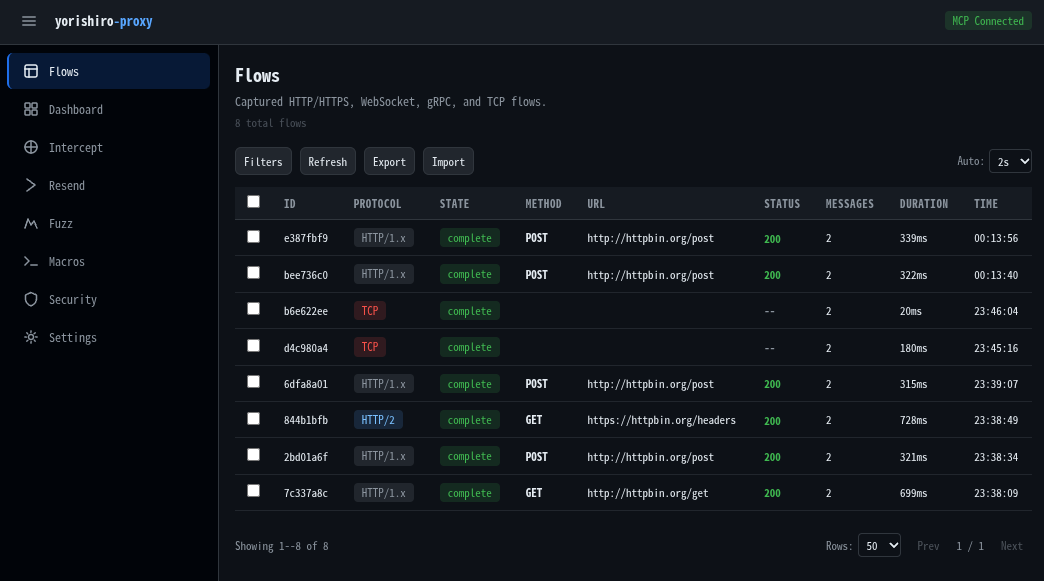
- Web UI -- Embedded React/Vite dashboard for visual inspection and interactive testing
Quick Start
1. Get the Binary
Download a prebuilt binary from the GitHub Releases page, or build from source:
git clone https://github.com/usk6666/yorishiro-proxy.git
cd yorishiro-proxy
make build    # outputs bin/yorishiro-proxy
2. Configure MCP
The easiest way to set up MCP integration is with the install subcommand:
# Configure MCP for the current project (writes .mcp.json)
yorishiro-proxy install mcp

# Or configure at the user level (~/.claude/settings.json)
yorishiro-proxy install mcp --user-scope
This generates the correct .mcp.json entry with stdio MCP transport enabled and log output redirected to a file -- the recommended configuration for MCP clients like Claude Code.
The CA certificate is automatically generated on first run and persisted to ~/.yorishiro-proxy/ca/.
3. Start the Server Standalone
You can also start the server directly. By default, it launches an HTTP MCP server on a random loopback port and writes the connection info to ~/.yorishiro-proxy/server.json:
# Start with default settings
yorishiro-proxy server

# Start on a fixed port with browser auto-open
yorishiro-proxy server -mcp-http-addr 127.0.0.1:3000 -open-browser
On startup, the log prints the Web UI URL:
WebUI available url=http://127.0.0.1:3000/
The authentication token is written to ~/.yorishiro-proxy/server.json and included in the URL at debug log level (-log-level debug).
4. First Capture
Once the MCP server is running, the AI agent can start capturing traffic:
1. Start the proxy       -> proxy_start with listen_addr "127.0.0.1:8080"
2. Set HTTP_PROXY        -> point your target application at the proxy
3. Install the CA cert   -> query ca_cert to get the certificate path
4. Browse / send traffic -> captured flows appear in query flows
5. Inspect & replay      -> use resend to replay with modifications
MCP Tools
All proxy operations are exposed through eleven MCP tools:
| Tool | Purpose |
|---|---|
proxy_start |
Start a proxy listener with capture scope, TLS passthrough, intercept rules, auto-transform, TCP forwarding, and protocol settings |
proxy_stop |
Graceful shutdown of one or all listeners |
configure |
Runtime configuration changes (upstream proxy, capture scope, TLS passthrough, intercept rules, auto-transform, connection limits) |
query |
Unified information retrieval: flows, flow details, messages, proxy status, config, CA certificate, intercept queue, macros, fuzz jobs/results |
resend |
Replay recorded requests with mutations (method/URL/header/body overrides, JSON patches, raw byte patches, dry-run) and compare two flows structurally |
fuzz |
Execute fuzz testing campaigns with payload sets, positions, concurrency control, and stop conditions |
macro |
Define and execute multi-step macro workflows with variable extraction, guards, and hooks |
intercept |
Act on intercepted requests: release, modify and forward, or drop |
manage |
Manage flow data (delete/export/import) and CA certificate regeneration |
security |
Configure target scope rules, rate limits, diagnostic budgets, and SafetyFilter inspection (Policy Layer + Agent Layer) |
plugin |
List, reload, enable, and disable Starlark plugins at runtime |
Web UI
The embedded Web UI is served on the HTTP MCP address (enabled by default).
| Page | Description |
|---|---|
| Flows | Flow list with filtering by protocol, method, status code, and URL pattern |
| Dashboard | Flow statistics overview with real-time traffic summary |
| Intercept | Real-time request/response interception with inline editing |
| Resender | Replay requests with overrides, JSON patches, raw HTTP editing, and dry-run preview |
| Fuzz | Create and manage fuzz campaigns with payload sets and result analysis |
| Macros | Multi-step request workflows with variable extraction |
| Security | Target scope configuration (Policy + Agent Layer) with URL testing |
| Settings | Proxy control, TLS passthrough, auto-transform rules, CA management, and more |
The Web UI communicates with the backend via Streamable HTTP MCP -- the same protocol used by AI agents.
Supported Protocols
| Protocol | Detection | Notes |
|---|---|---|
| HTTP/1.x | Automatic | Forward proxy mode |
| HTTPS | CONNECT | MITM with dynamic certificate issuance |
| HTTP/2 | h2c / ALPN | Both cleartext and TLS, with per-stream flow display |
| gRPC | HTTP/2 content-type | Service/method extraction, streaming support, structured metadata display |
| WebSocket | HTTP Upgrade | Message-level recording with per-message display |
| Raw TCP | Fallback | Captures any unrecognized protocol, with TCP forwarding mappings |
CLI
yorishiro-proxy provides the following subcommands:
| Subcommand | Description |
|---|---|
server |
Start the proxy server (default when no subcommand given) |
client |
Call MCP tools on a running server via CLI |
install |
Install and configure components (MCP, CA, Skills, Playwright) |
upgrade |
Check for and install updates from GitHub Releases |
version |
Print version information |
The client subcommand connects to a running server and calls MCP tools with key=value parameters, providing a lightweight interface for scripting and ad-hoc pentest workflows:
yorishiro-proxy client query resource=status
yorishiro-proxy client proxy_start listen_addr=127.0.0.1:8080
yorishiro-proxy client query resource=flows limit=10
For the full list of server flags, client options, and environment variables, run yorishiro-proxy server -help or yorishiro-proxy client -help, or see the documentation.
Architecture
Layer 4 TCP Listener
  -> Protocol Detection (peek bytes)
    -> Protocol Handler (HTTP/S, HTTP/2, gRPC, WebSocket, Raw TCP)
      -> Flow Recording (Request/Response)
        -> MCP Tool (Intercept / Replay / Search)
- Accepts connections at Layer 4 (TCP) and routes to modular protocol handlers
- No external proxy libraries -- built on Go standard library
- MCP-first: all operations are exposed exclusively as MCP tools
- Embedded Web UI built with React/Vite, served via Streamable HTTP
Documentation
Full documentation is available at usk6666.github.io/yorishiro-proxy-docs.
Contributing
Contributions are welcome! Please open an issue first to discuss what you'd like to change.
License
Licensed under the Apache License, Version 2.0. See LICENSE for the full license text.
Reviews (0)
Sign in to leave a review.
Leave a reviewNo results found