scubiee
Health Pass
- License — License: Apache-2.0
- Description — Repository has a description
- Active repo — Last push 0 days ago
- Community trust — 76 GitHub stars
Code Pass
- Code scan — Scanned 12 files during light audit, no dangerous patterns found
Permissions Pass
- Permissions — No dangerous permissions requested
No AI report is available for this listing yet.
Save up to 30% of your AI coding tokens. Scubiee turns any codebase into searchable context for your AI coding agent. A local context engine for Cursor, Claude Code, Copilot, Codex, and more: semantic search, code relationships, live sync, MCP integration, and code that never leaves your machine.







A local code-context engine for AI coding agents.
Index your repository on your own machine, and let agents find code by meaning —
so they read the few spans that matter instead of grepping blindly through files.
Quick start · What your agent gets · How it works · Docs
Run scubiee connect once and your AI assistant gets a local, always-fresh index of your
repo — ranked discovery and deep symbol focus — without uploading a single line of code.
- Local-first. Tree-sitter parsing + on-disk embeddings. Code never leaves your machine; the
only network step is a one-time model download (~270 MB) during setup. - Built for agents. Ships as an MCP server — works in
Cursor, Claude Code, Copilot, Kiro, and other MCP clients. - A real engine, not cloud RAG. A local daemon with live Merkle sync keeps the index current
as you edit and pull — index once, stay fresh.
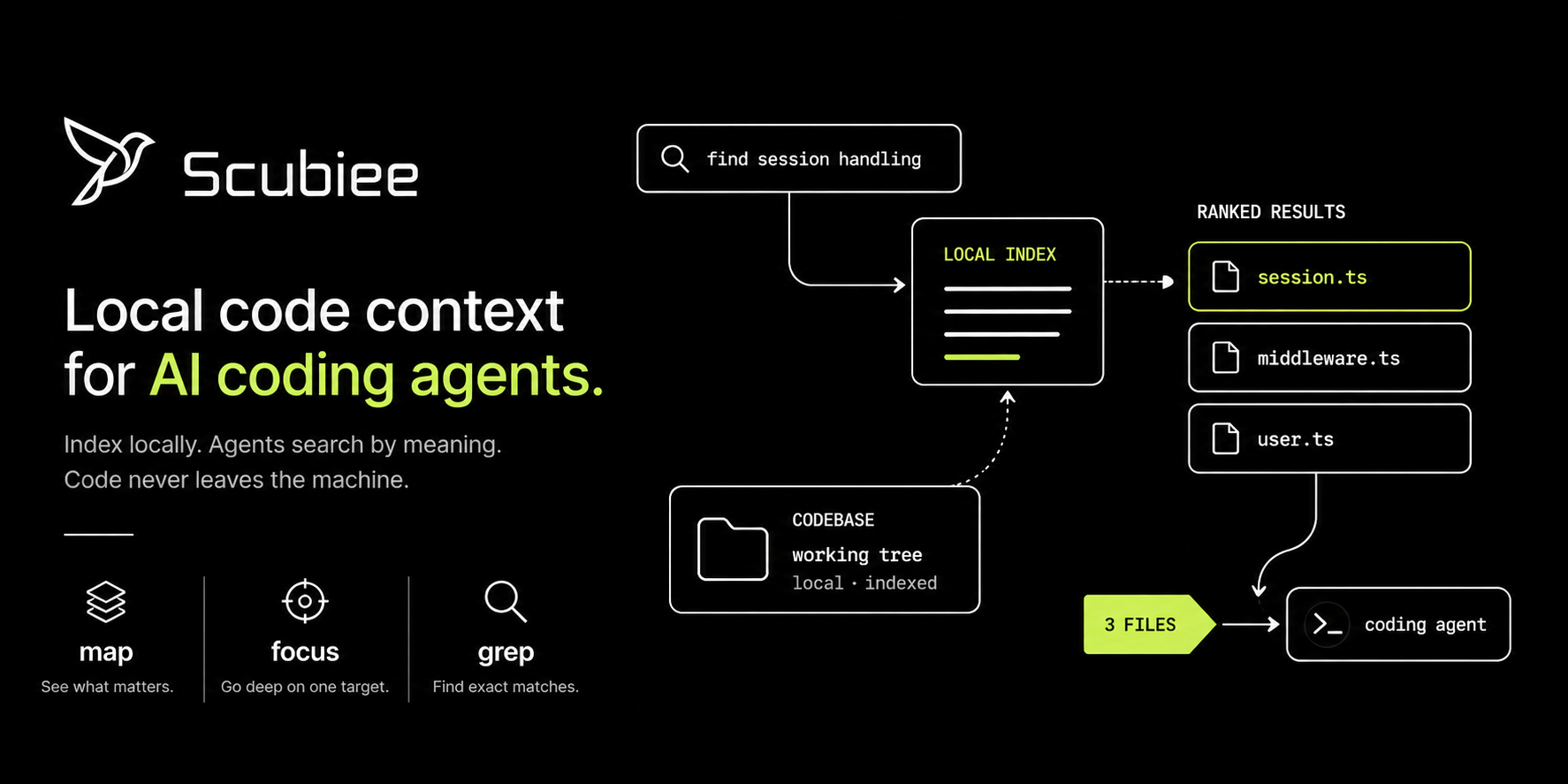
Ranked map find hits and focused symbol spans — all against a local index.
Quick start
Prerequisite: Python 3.11+. We recommend uv as the installer.
# 1. Install
uv tool install scubiee

# 2. Set up once per machine (downloads the model, picks CUDA / DirectML / MLX / CPU)
scubiee setup

# 3. Index a repo (run inside the repository)
cd /path/to/your/repo
scubiee init .

# 4. Connect your IDE, then reload MCP in the IDE
scubiee connect --cursor
Prefer pip?
initindexes the repo;connectwires up the assistant. You need both, then reload MCP
(Cursor: Settings → MCP → refresh). Other clients:--claude-code,--copilot,--kiro,--all. See getting started.
pip install -U scubiee
On Windows with a GPU, install so DirectML isn't clobbered on upgrade — see
Windows / DirectML install.
What your agent gets
One MCP tool — map — with two configs. The agent picks one by what it knows, acts on the
first good answer, and stops.
map config |
Use when | Returns |
|---|---|---|
find |
You don't know where the code lives | Ranked locations with the top result's code inline — usually no follow-up read |
focus |
You know the symbol name(s) | The symbol's full body + callers/callees + sibling names, in one unit |
gate / status |
At session start | A tiny managed-repo check + engine health |
Scubiee is a locate layer, not a replacement for your editor. Exact string / path lookups stay
on the host's native Grep / Glob / Read, and history stays on git — a one-line grep is
faster and more precise than a semantic search for a known string. The CLI mirrors the tool:scubiee map --config find|focus.
→ Full tool reference: MCP tools ·
the two configs, in depth
Benchmarks
Measured A/B runs, same agent and task with and without Scubiee: 30%+ fewer tokens on
average (median 32%, mean 39% per task).
| Agent | Tasks | Without Scubiee | With Scubiee | Saved |
|---|---|---|---|---|
| Claude Code | All multi-file dev tasks | 730,980 tokens | 287,629 tokens | 61% |
| Claude Code | Hard cross-module changes | 939,252 tokens | 316,681 tokens | 66% |
| Kiro CLI | Three dev tasks | 6.42 credits | 2.65 credits | 54% |
→ Per-task results and methodology: benchmarks/
How it works
  setup (once)   →   init (per repo)   →   connect (per IDE)
      │                   │                      │
      ▼                   ▼                      ▼
  download model     parse + embed          MCP + agent rules
                     → ~/.scubiee           → reload IDE


  AI coding tool  ──MCP──►  Scubiee daemon (localhost)  ──►  local index (~/.scubiee)
A small local daemon serves retrieval over three fused channels — a code graph
(calls/imports/defines), BM25 lexical match, and dense embeddings (CodeRankEmbed, FAISS).
Background sync keeps enrolled repos fresh with a Merkle diff, so edits show up in seconds without
a full reindex. Everything — indexing, embedding, retrieval — runs on your machine.
→ Architecture deep-dive: how everything works ·
system overview
Everyday commands
scubiee sync .            # refresh the index after a big pull or refactor
scubiee status .          # enrollment + engine health
scubiee search "auth middleware" .   # search from the terminal, no IDE needed
scubiee doctor .          # diagnose setup / accelerator issues
scubiee upgrade           # update the package and rebind MCP
Pause / stop / wipe and the full lifecycle are in repo lifecycle.
Every command and flag: commands reference.
Privacy
- Your code is parsed and embedded locally and stays on disk — nothing is sent anywhere for
search. - The model downloads once during
scubiee setup(~270 MB); after that, indexing works offline. - Data lives under
~/.scubiee(engine state) and<repo>/.scubiee(per-repo index).
Documentation
| Getting started | docs/web-info/getting-started.md |
| Install & debug | docs/web-info/install-and-debug.md |
| MCP tools reference | docs/web-info/mcp-tools-reference.md |
| Troubleshooting | docs/web-info/troubleshooting.md |
| System overview | docs/scubiee-overview.md |
| Full docs index | docs/README.md |
FAQ
Doesinit connect my IDE?
No. init indexes the repo; connect writes the MCP config and agent rules. Run both, then reload
MCP in the IDE.
No. Only the embedding model downloads (once, during setup). Parsing, embedding, and search all
run locally.
managed: false.
Run scubiee init . and scubiee connect inside that repo, then reload MCP. For Kiro / Copilot /
Cline / Roo, run connect inside each repo.
Run scubiee setup --repair. To prevent it recurring, install with the DirectML override — see
Windows / DirectML install.
Run scubiee unlock-tool, then retry. Quitting the IDE first helps.
scubiee diagnose --no-tests --desktop — attach the Desktop JSON plus a tail of~/.scubiee/engine.log.
Contributing
git clone https://github.com/Usmansayed/scubiee
cd scubiee
uv pip install -e .
scubiee setup
Issues and pull requests are welcome. Please run scubiee certify before opening a PR.
PyPI: scubiee · Latest release: 0.3.146
License
Copyright © 2026 Usman Sayed.
Licensed under the Apache License, Version 2.0.
Reviews (0)
Sign in to leave a review.
Leave a reviewNo results found