shopify-store-sync-mcp
Health Warn
- License — License: MIT
- Description — Repository has a description
- Active repo — Last push 0 days ago
- Low visibility — Only 6 GitHub stars
Code Warn
- process.env — Environment variable access in docs/video/render.mjs
- process.env — Environment variable access in docs/video/tts-elevenlabs.mjs
- network request — Outbound network request in docs/video/tts-elevenlabs.mjs
- fs module — File system access in package.json
- process.env — Environment variable access in scripts/demo-cli.ts
Permissions Pass
- Permissions — No dangerous permissions requested
No AI report is available for this listing yet.
Diff and sync Shopify stores from Claude, Cursor or any MCP client: metafield and metaobject definitions, metaobjects, collections, pages, menus, redirects, policies, metafield values and translations. Dry-run plans, cross-store ID remapping, never deletes. Connect with Shopify CLI, no app needed.
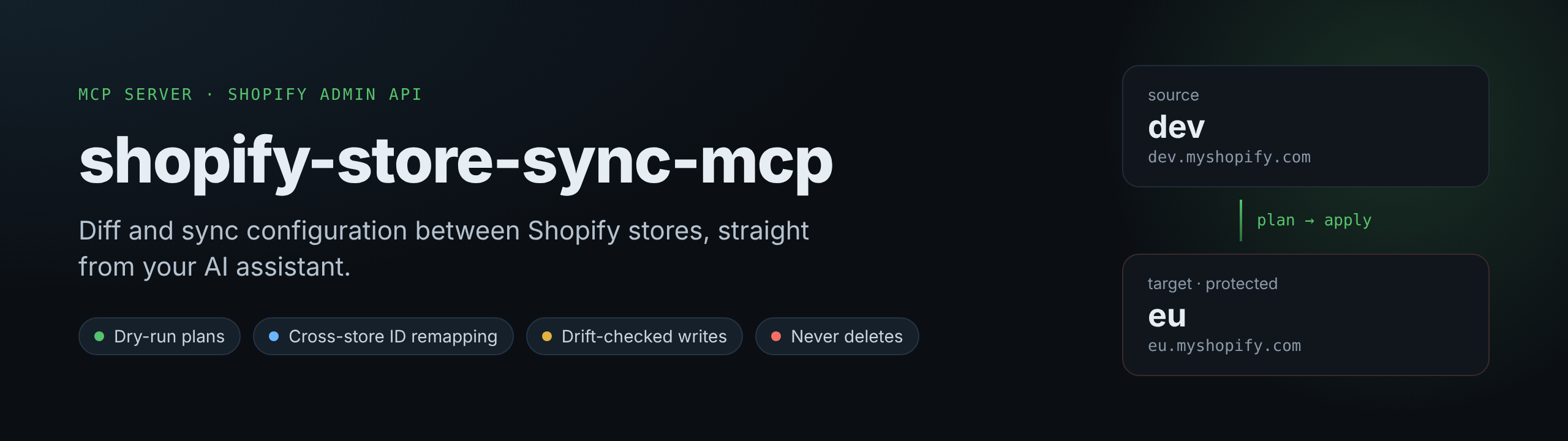




Keep your Shopify stores in sync by asking for it.
Compare a dev store with production, see every difference field by field, review a dry-run plan, then apply it.
From Claude, Cursor or any MCP client, or straight from the command line.
Get started · What it syncs · Why this tool · Safety · Tested · Roadmap
https://github.com/user-attachments/assets/66a2dfd0-5770-4403-992c-cfe133ea0e9c
Compare, plan, confirm, apply: the full walkthrough, with sound. Every output shown is real, from two sample stores.
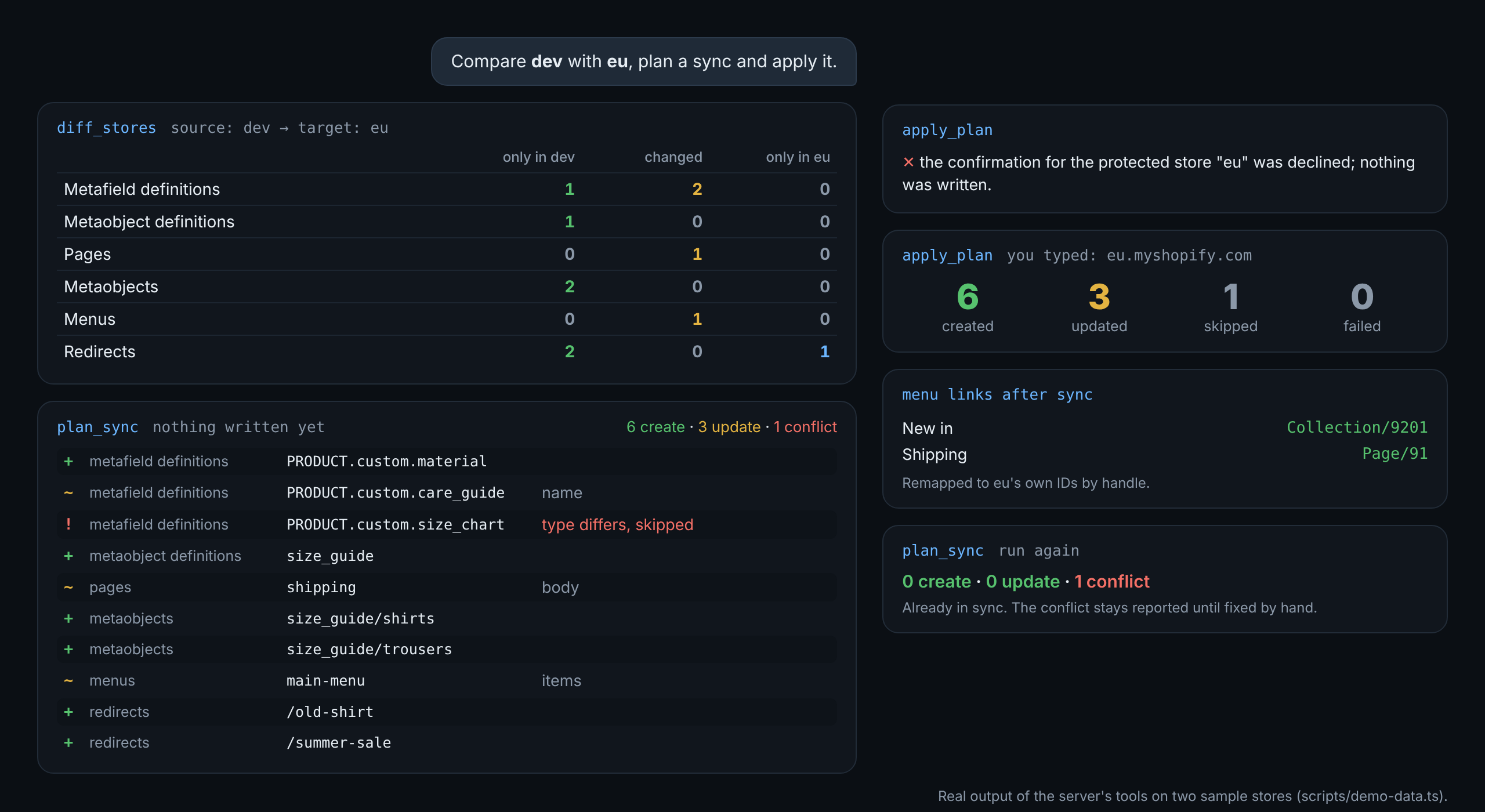
Real output of the server's tools on two sample stores.
What it syncs
The store setup that usually gets rebuilt by hand, plus the images it uses. References between items (a size guide pointing at a product, a menu linking to a page) are carried across by handle, so they land on the right item instead of a broken ID.
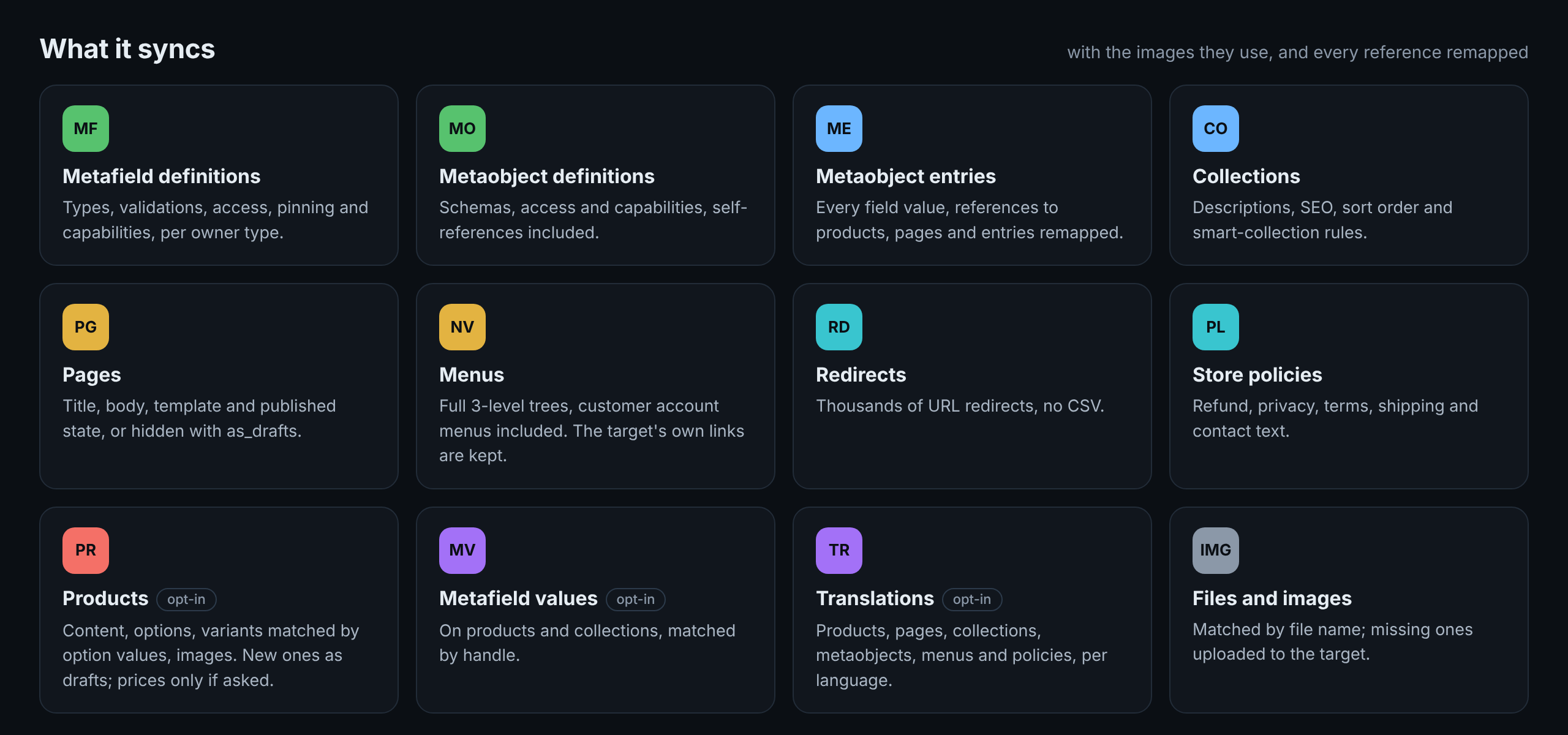
| Resource | Keyed by | Notes |
|---|---|---|
metafield_definitions |
OWNER_TYPE.namespace.key |
Name, description, pinning, storefront and customer account access, capabilities, validations. A type change is reported as a conflict, since Shopify can't change a definition's type in place. |
metaobject_definitions |
type |
Schema, access, capabilities. Fields are added or updated, never removed. Self-referencing definitions are handled. |
pages |
handle |
Title, body HTML, template, published state. With as_drafts (--as-drafts), new pages are created hidden and existing ones keep their state. |
metaobjects |
type/handle |
All field values, publish status. References to products, collections, pages and other metaobjects are remapped. A field the source leaves empty is never cleared in the target. With as_drafts, new entries are created as drafts. |
menus |
handle |
Full item tree (3 levels), including customer account menus. Links to resources are remapped; custom URLs are kept; links to things that can't be matched are left out and reported. Links that only the target menu has are kept, in place, and the plan names them. |
redirects |
path |
Thousands are fine. |
collections |
handle |
Title, description, sort order, template, SEO and smart-collection rules (rules on a metafield definition are remapped). Manual collections keep their own product list. A new collection is not published to any sales channel. Manual versus smart is reported as a conflict. |
shop_policies |
type |
Refund, privacy, terms, shipping and contact policy text. |
products (opt-in) |
handle |
Title, description, vendor, type, category, tags, template, SEO, options, variants (matched by option values; SKU, taxable flag and inventory policy are copied) and images. New products are created as drafts. Prices only with prices: true (--with-prices). On update, the tags, variants, option values and media (images, videos, 3D models) that only the target has are kept, and don't count as differences. Gift cards are skipped. See "What product sync leaves alone" below. |
metafields (opt-in) |
OWNER/handle/namespace.key |
Metafield values on products and collections, landed on the item with the same handle. Reference values are remapped. Filter with namespaces. |
translations (opt-in) |
locale:Type/handle |
Translations of products, pages, collections, metaobjects, menus and policies. Registered against the target's own text, after the content itself is synced. A translated field only the target has is kept. The plan warns when a language isn't added to the target. |
products, metafields and translations can be large, so they're read only when you ask for them (resources: ["products"]). Name what you want and only that is read: exact product handles or prefixes (include: ["linen-shirt", "linen-*"]) for products, and patterns that name their owner (include: ["PRODUCT/linen-shirt/*"]) for metafield values. App-owned (app--…) and Shopify-reserved (shopify--…) data is skipped and listed in the report.
Files and images referenced by any of the above are matched by file name in the target. When one is missing, the plan says so and apply_plan uploads it from the source store.
What product sync leaves alone. Never copied: inventory levels, sales-channel publishing, the status of existing products, barcodes, weight and shipping settings, the image assigned to a variant, videos and 3D models (the target keeps its own), and translations of option names and values. Nothing is ever removed from a target product: a tag, variant or image deleted in the source stays in the target until you remove it there.
Nothing goes live by surprise. New products are drafts and new collections aren't on any sales channel. Pages and metaobject entries copy the published state of the source unless you pass as_drafts; the plan tells you when new ones would be visible right away.
Use cases

Why this tool
Plenty of Shopify MCP servers read and write one store. This one is built for the job between stores, where every ID is different:
| Generic Admin MCP servers | shopify-store-sync-mcp | |
|---|---|---|
| Compare two stores | ❌ | ✅ field-level diff |
| Cross-store ID remapping | ❌ you copy raw IDs | ✅ products, collections, pages, blogs, metaobjects, definitions, customer account pages and shop policies |
| Dry run before writing | ❌ | ✅ every write goes through a reviewed plan |
| Detects changes made after planning | ❌ | ✅ re-reads the target and skips anything that drifted |
| Deletes | sometimes | never |
| Production guardrails | ❌ | ✅ writes are off by default; protected stores are confirmed by a person, not by the assistant |
| Audit trail | ❌ | ✅ JSONL log of every write |
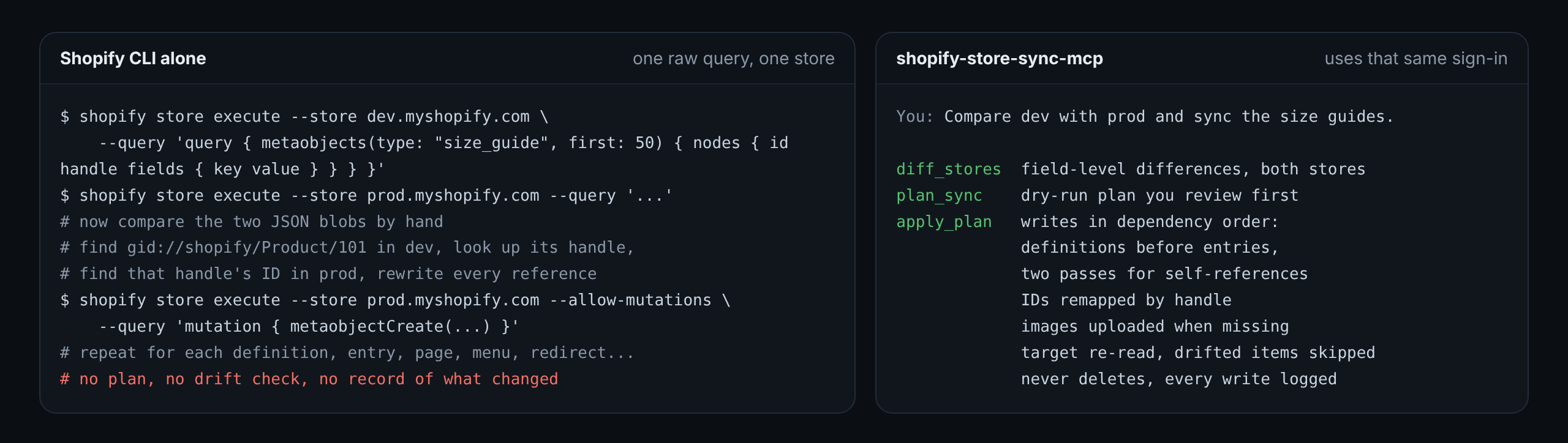
Why not just Shopify CLI? The CLI runs one query you wrote, on one store. This tool uses the CLI only to sign in, and does the comparing, ID remapping, ordering, uploads and safety checks for you.
Safe on production
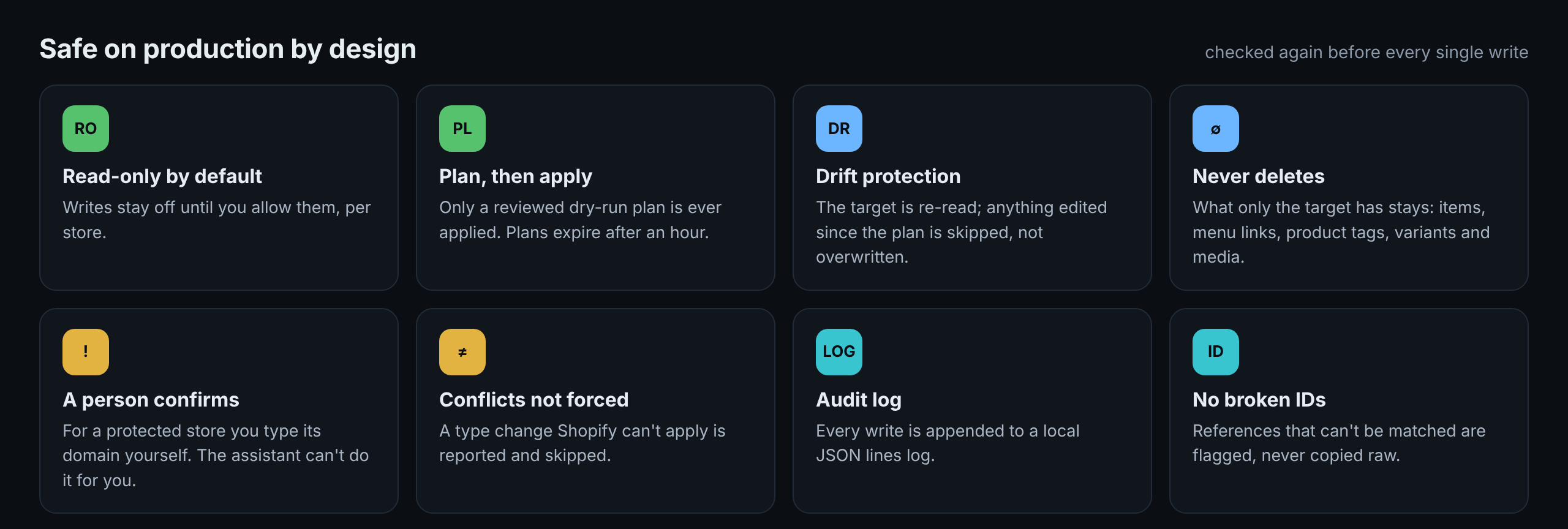
- Read-only by default.
allowWritesisfalseuntil you set it, per store. - Plan, then apply.
apply_planonly runs a plan produced byplan_sync. Plans expire after an hour and their files are removed after a week. - Drift protection. Before writing, the target is re-read. Any item that changed since planning is skipped, not overwritten.
- No deletes. Items that exist only in the target are listed, never removed. The same holds inside an item wherever Shopify's API replaces a whole list: menu links, product tags, variants and media that only the target has are read first and sent back with the update. One thing is not kept: when the source has a value for a field and the target has another, the source's value wins. That is what a sync is, and the plan shows each one before you apply.
- Protected stores are confirmed by a person. For a store marked
protected, the assistant can't supply the confirmation itself. Your client asks you to type the store's domain (MCP elicitation); in a client that can't ask, the plan is applied from the command line with--confirm <domain>. The assistant sees store content (page bodies, product descriptions), so this is what stands between a prompt hidden in that content and your production store. - Conflicts aren't forced. A metafield definition whose type differs is reported and skipped.
- Audit log. Every write is appended to
~/.shopify-store-sync/audit.log(override withSYNC_AUDIT_LOG). - Snapshot folders are treated as input. A folder used as a source (
dir:) is validated file by file, can only hold the known resource types, and files are only ever uploaded from Shopify's own file hosts. Over MCP, folders are read and written inside one base folder (SYNC_SNAPSHOT_DIR, or the folder the server runs in). - No silent shortcuts. A list too long to read fully stops with an error instead of coming back short, and a request that gets no answer is abandoned after a time limit; a write is never repeated blindly.
To report a vulnerability, see SECURITY.md.
Get started
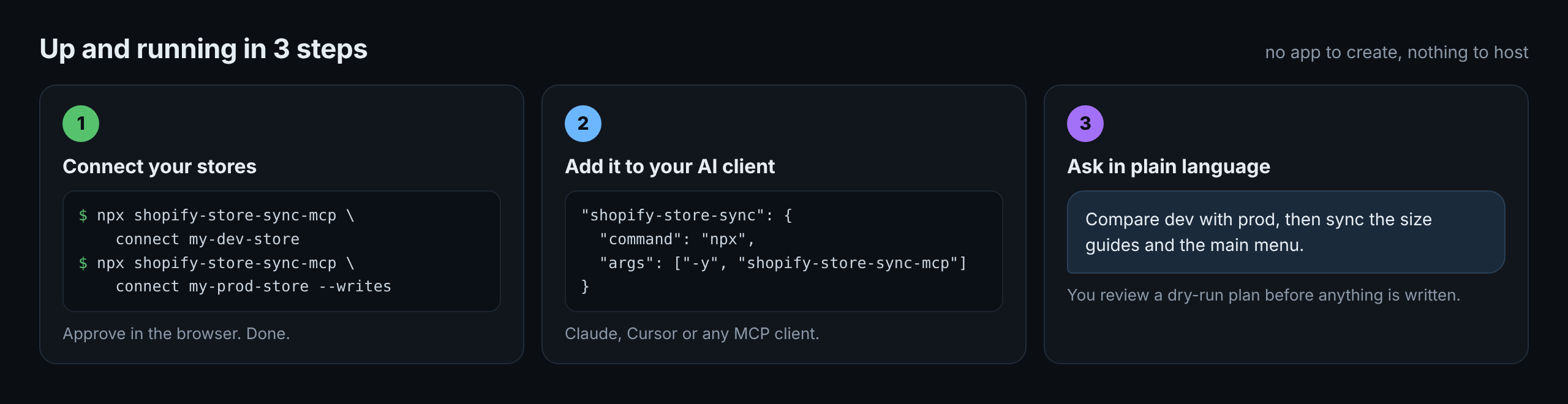
1. Connect your stores
Most people only need the first option: no app to create. The other two are for scheduled or unattended runs.
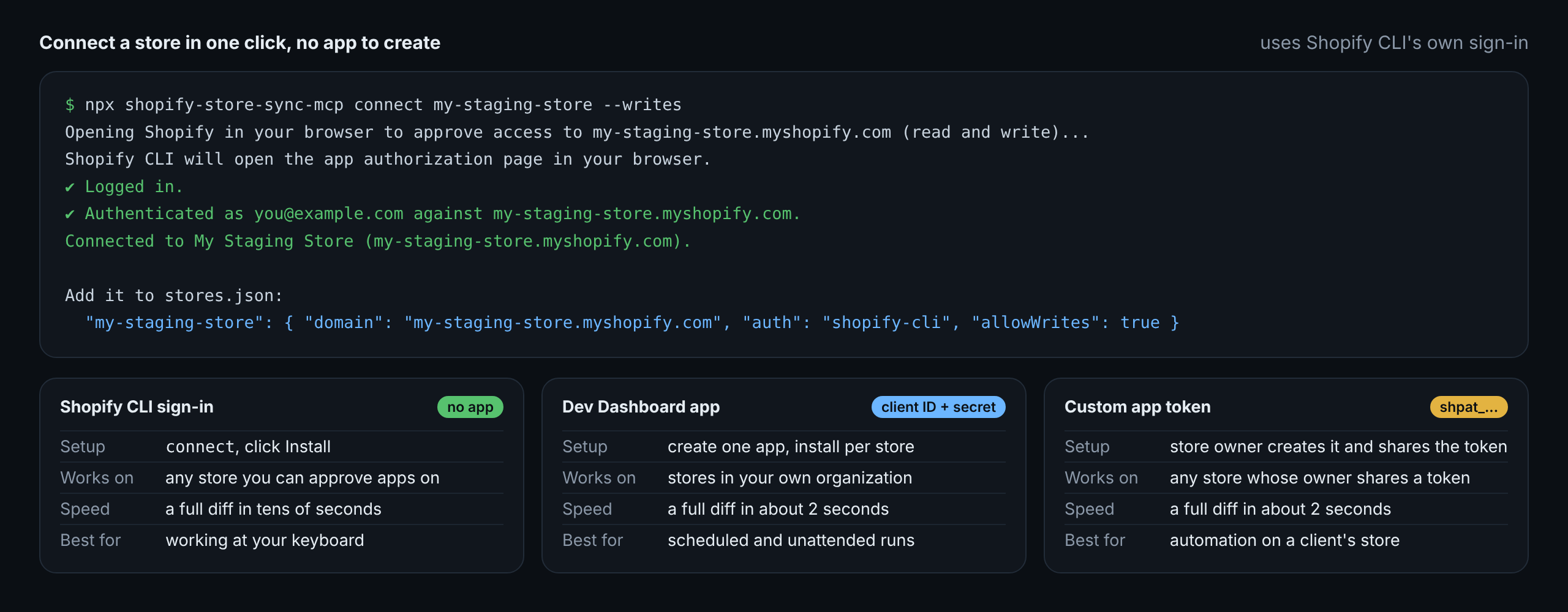
npm install -g @shopify/cli
npx shopify-store-sync-mcp connect my-dev-store            # read-only
npx shopify-store-sync-mcp connect my-staging-store --writes
Each connect opens Shopify in your browser; click Install to approve. It asks for read-only scopes unless you pass --writes (or the store is configured with "allowWrites": true), then prints the line to add to stores.json:
{ "stores": { "my-dev-store": { "domain": "my-dev-store.myshopify.com", "auth": "shopify-cli" } } }
Requests then run through shopify store execute, Shopify CLI's supported command, using the sign-in it saved. Each request starts Shopify CLI (about a second), so a full diff takes tens of seconds instead of one or two with an app. That sign-in belongs to you and expires after a while; when it does, the tool says so and you run connect again. Because of that, use option 2 or 3 for scheduled or unattended runs.
One app covers every store in the same Shopify organization, and tokens are fetched and refreshed for you.
- Open the Dev Dashboard, go to Apps, click Create app, then Create app manually.
- Give it a name, for example
Store Sync. Any URL works as the App URL (it's never opened); untick Embed app in Shopify admin. - In Scopes, paste the scopes from "Scopes needed per resource" below, then click Create app and Release.
- Install it on each store: open
https://admin.shopify.com/store/<store-handle>/oauth/install?client_id=<your client ID>and click Install. - Under the app's Settings, copy the Client ID and Client secret into environment variables (step 2 reads them from there).
Adding a scope later means releasing a new version and approving the update on each store (same install link).
Option 3: a store in someone else's organization (a client's store)An app's client credentials only work on stores owned by the same organization as the app; elsewhere Shopify answers shop_not_permitted. For a store you don't own there are two ways:
- Sign in with Shopify CLI (option 1) with your staff or collaborator account. Nothing to create; best for work you run yourself.
- For unattended runs, ask the store's owner to follow option 2 in their organization (create the app in their Dev Dashboard, install it on their store) and share the client ID and client secret with you.
An existing Admin API access token (shpat_...) from a custom app that was created in the store admin still works: use it as accessToken in step 2. New apps of that kind can no longer be created there (Shopify moved app creation to the Dev Dashboard on January 1, 2026), so don't plan new setups around it.
| Resource | Read scope | Write scope |
|---|---|---|
| metafield definitions | read_products (and the owner type's read scope) |
write_products (and the owner type's write scope) |
| metaobjects and definitions | read_metaobjects, read_metaobject_definitions |
write_metaobjects, write_metaobject_definitions |
| pages | read_online_store_pages |
write_online_store_pages |
| menus | read_online_store_navigation |
write_online_store_navigation |
| redirects | read_online_store_navigation |
write_online_store_navigation |
| collections | read_products |
write_products |
| products | read_products |
write_products (plus read_files/write_files for their images) |
| shop policies | read_legal_policies |
write_legal_policies |
| metafield values | read_products |
write_products |
| translations | read_translations, read_locales |
write_translations |
| files | read_files |
write_files (to upload missing files) |
| theme diff | read_themes |
none, never writes |
| ID remapping | read_products, read_content |
none |
Everything at once (the set used for the live tests), ready to paste:
read_products,write_products,read_metaobjects,write_metaobjects,read_metaobject_definitions,write_metaobject_definitions,read_online_store_pages,write_online_store_pages,read_online_store_navigation,write_online_store_navigation,read_legal_policies,write_legal_policies,read_translations,write_translations,read_locales,read_files,write_files,read_themes,read_content
Give source stores read-only scopes when you can.
2. Describe your stores
connect prints the line to add. A stores.json mixing all three ways to connect:
{
  "stores": {
    "dev":  { "domain": "my-brand-dev.myshopify.com", "auth": "shopify-cli" },
    "eu":   { "domain": "my-brand-eu.myshopify.com", "clientId": "env:EU_CLIENT_ID", "clientSecret": "env:EU_CLIENT_SECRET", "allowWrites": true, "protected": true },
    "uk":   { "domain": "my-brand-uk.myshopify.com", "accessToken": "env:UK_TOKEN" }
  }
}
Create stores.json. Secrets can come from environment variables with env:NAME:
{
  "stores": {
    "dev": {
      "domain": "my-brand-dev.myshopify.com",
      "accessToken": "env:DEV_TOKEN",
      "label": "Development"
    },
    "eu": {
      "domain": "my-brand-eu.myshopify.com",
      "clientId": "env:EU_CLIENT_ID",
      "clientSecret": "env:EU_CLIENT_SECRET",
      "allowWrites": true,
      "protected": true
    }
  }
}
| Option | Default | Meaning |
|---|---|---|
domain |
required | *.myshopify.com domain |
auth |
"shopify-cli": use the sign-in saved by connect (no token needed), or |
|
accessToken |
Static Admin API token from an existing custom app, or | |
clientId + clientSecret |
Dev Dashboard app; tokens are fetched and refreshed automatically | |
apiVersion |
2026-10 |
Admin API version |
allowWrites |
false |
Must be true for apply_plan to write to this store |
protected |
false |
Applying also needs a person to confirm with the store's domain: asked by your AI client, or --confirm <domain> on the command line |
You can also pass the whole config as JSON in SHOPIFY_STORES, or point SHOPIFY_STORES_FILE at a file elsewhere. For a single store, SHOPIFY_STORE_DOMAIN plus SHOPIFY_ACCESS_TOKEN works.
| Variable | Default | Meaning |
|---|---|---|
SHOPIFY_STORES_FILE |
./stores.json |
Where the store config lives |
SHOPIFY_STORES |
The whole store config as inline JSON | |
SHOPIFY_API_VERSION |
2026-10 |
Admin API version for stores that don't set apiVersion |
SHOPIFY_CLI_BIN |
shopify |
Path to Shopify CLI, when it isn't on the PATH |
SYNC_SNAPSHOT_DIR |
folder the server runs in | Over MCP, snapshot folders (export_snapshot, dir:) must be inside this folder |
SYNC_ALLOW_AGENT_CONFIRM |
off | true lets apply_plan take the protected-store confirmation as an argument. Only for unattended automation where no person can be asked |
SYNC_REQUEST_TIMEOUT_MS |
60000 |
How long one request to Shopify may take |
SYNC_CLI_TIMEOUT_MS |
120000 |
How long one Shopify CLI call may take before it is stopped |
SYNC_MAX_ITEMS |
50000 |
Longest list read from a store; a longer one is an error, never a silent cut |
SYNC_WRITE_CONCURRENCY |
4 |
How many independent writes run at once |
SYNC_AUDIT_LOG |
~/.shopify-store-sync/audit.log |
Where every write is logged |
SYNC_STATE_DIR |
~/.shopify-store-sync |
Where plans and the audit log are kept |
3. Add it to your AI client
{
  "mcpServers": {
    "shopify-store-sync": {
      "command": "npx",
      "args": ["-y", "shopify-store-sync-mcp"],
      "env": { "SHOPIFY_STORES_FILE": "/absolute/path/to/stores.json" }
    }
  }
}
Claude Desktop (claude_desktop_config.json):
{
  "mcpServers": {
    "shopify-store-sync": {
      "command": "npx",
      "args": ["-y", "shopify-store-sync-mcp"],
      "env": {
        "SHOPIFY_STORES_FILE": "/absolute/path/to/stores.json",
        "DEV_TOKEN": "shpat_...",
        "EU_CLIENT_ID": "...",
        "EU_CLIENT_SECRET": "..."
      }
    }
  }
}
Claude Code
claude mcp add shopify-store-sync \
  -e SHOPIFY_STORES_FILE=/absolute/path/to/stores.json \
  -e DEV_TOKEN=shpat_... \
  -- npx -y shopify-store-sync-mcp
Cursor (.cursor/mcp.json) takes the same command, args and env as Claude Desktop.
4. Ask
- "Compare dev and eu. Only metaobjects and menus."
- "Which product metafield definitions in namespace custom are missing from eu?" (uses
include: ["PRODUCT.custom.*"]) - "Plan a sync of the faq and size_guide metaobjects from dev to eu."
- "Apply only ops 1 to 4 of that plan."
- "Sync the pages from dev to eu, but keep new ones hidden." (uses
as_drafts: true) - "Copy the linen-shirt product to eu, with its prices." (uses
resources: ["products"], include: ["linen-shirt"], prices: true) - "Copy the French translations from dev to eu." (uses
resources: ["translations"], locales: ["fr"]) - "Export eu's configuration to ./store-config so I can commit it."
- "Has eu drifted from ./store-config?"
- "What's different in the theme settings between dev and eu?"
Tools
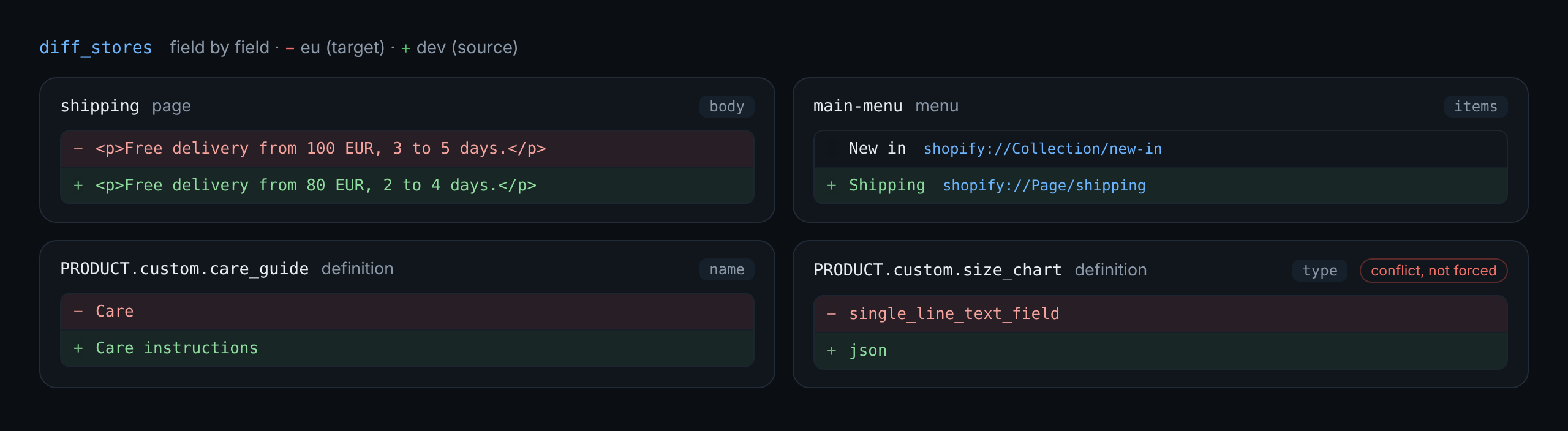
What diff_stores reports, field by field (real output):
| Tool | Writes? | What it does |
|---|---|---|
list_stores |
no | Configured stores and their write permissions. Secrets are never returned. |
list_resource_types |
no | What can be synced and how it's keyed. |
snapshot_store |
no | Read one store's configuration in portable form. |
diff_stores |
no | Only-in-source, changed (field by field), only-in-target. |
plan_sync |
no | Dry-run plan: creates, updates, conflicts, missing references. Returns a plan_id. |
get_plan |
no | Show a plan, or list recent ones. |
apply_plan |
yes | Execute a plan, with every safety check above. For a protected store your client asks you to confirm. |
export_snapshot |
local files only | Write a store's configuration to a folder for git (config as code). |
diff_themes |
no | Compare theme templates and settings between two stores (theme settings). |
Every tool except apply_plan is read-only toward Shopify and annotated as such, so clients can auto-approve them. Long calls report progress (what was read, which step was written) to clients that ask for it.
Command line
Everything also works without an AI client, and --exit-code turns diff into a scheduled drift check.
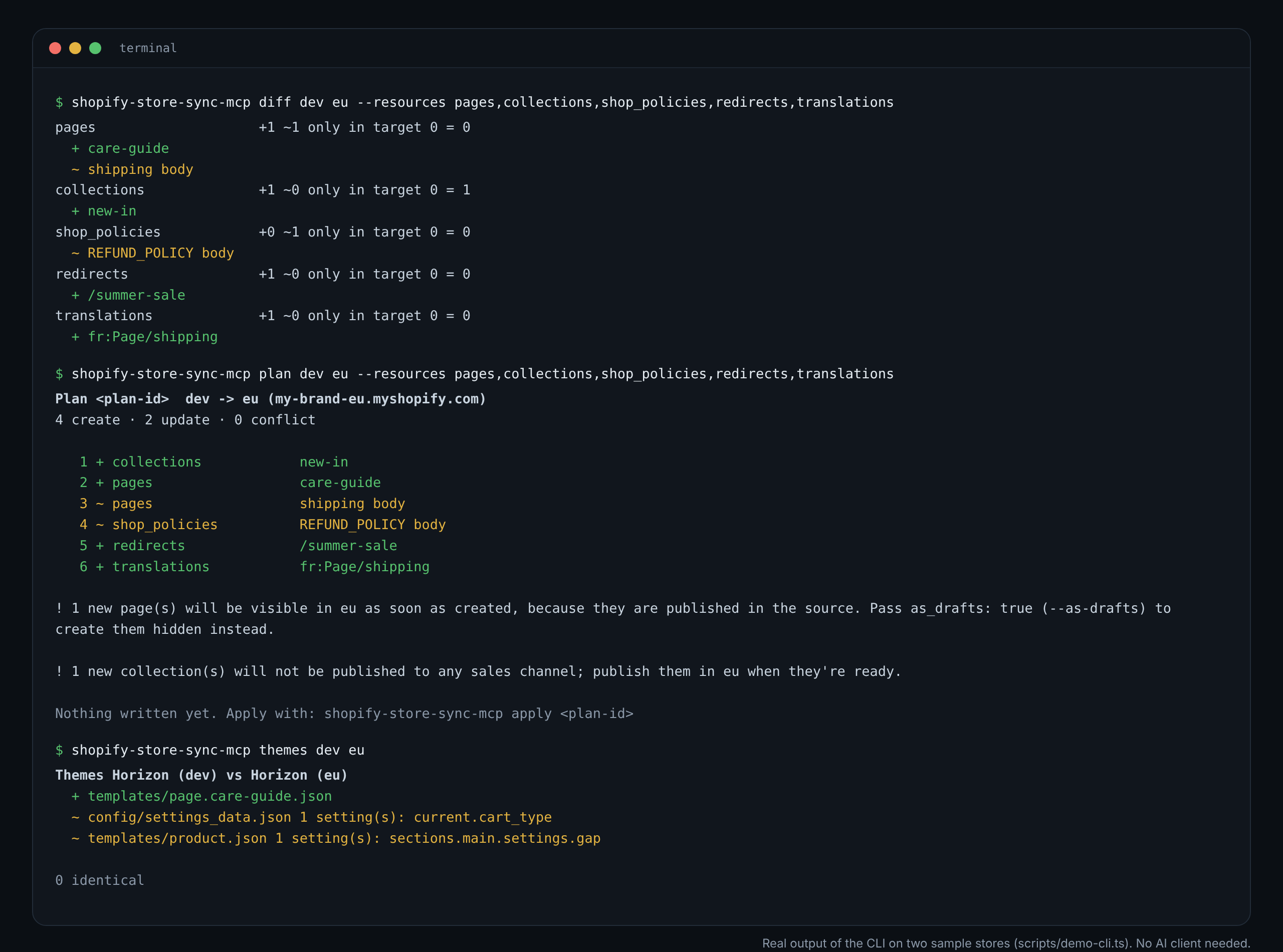
Everything also works without an AI client. Run a command instead of starting the server:
npx shopify-store-sync-mcp stores
npx shopify-store-sync-mcp diff dev eu --resources pages,menus
npx shopify-store-sync-mcp plan dev eu --as-drafts
npx shopify-store-sync-mcp apply <plan-id> --confirm my-brand-eu.myshopify.com
npx shopify-store-sync-mcp export eu ./store-config
npx shopify-store-sync-mcp themes dev eu
--json gives machine-readable output and --exit-code makes diff and themes exit with 2 when they find differences, handy for a scheduled drift check. Run npx shopify-store-sync-mcp help for every option.
Config as code
Export a store's setup as small, sorted JSON files, commit it, and use the folder as a source anywhere (dir:./store-config) to spot drift, review changes as a pull request, or restore.
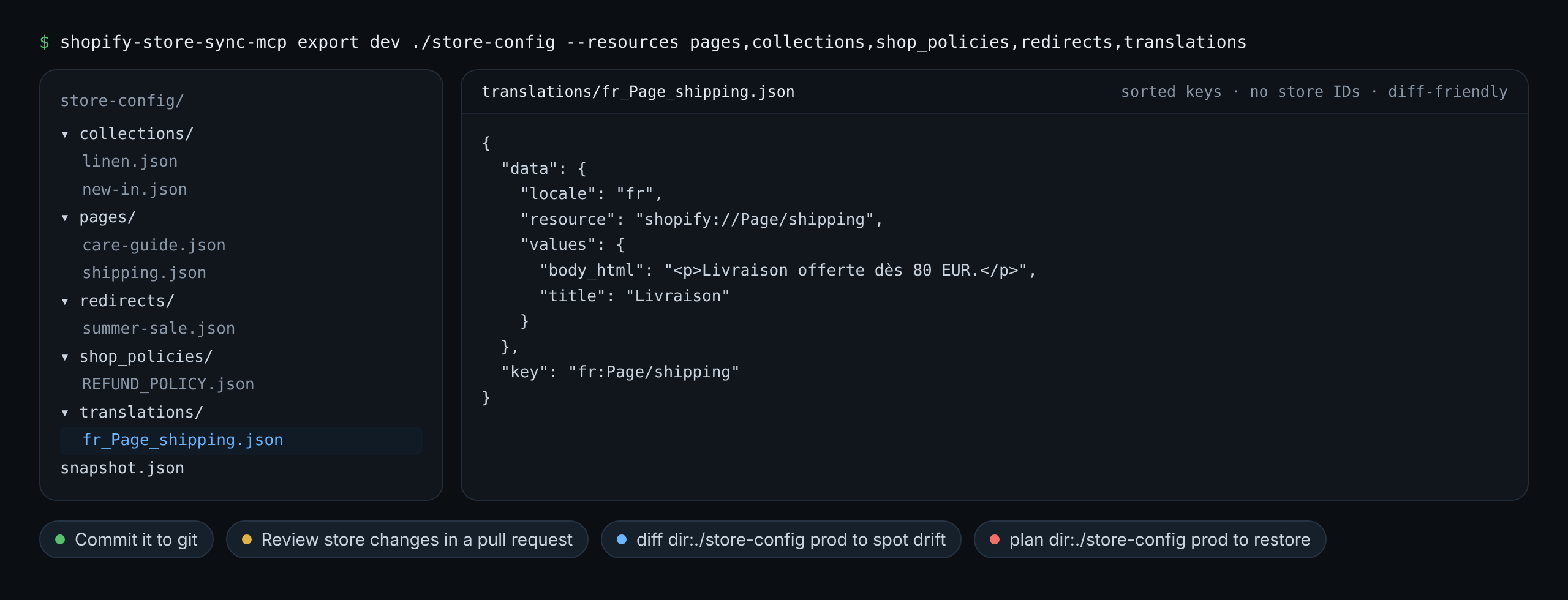
Export a store's configuration as one small JSON file per item, with sorted keys and no store-specific IDs, then commit it:
npx shopify-store-sync-mcp export prod ./store-config
git add store-config && git commit -m "Snapshot prod configuration"
Any command or tool that takes a source also takes dir:<path>:
- Spot drift:
diff dir:./store-config prodshows what changed in production since the commit. - Review changes: edit the files or re-export from staging, and review the change as a pull request.
- Restore or promote:
plan dir:./store-config prod, thenapply, with all the usual safety checks.
diff_themes (or themes on the command line) compares the published themes of two stores: JSON templates, section groups and config/settings_data.json, setting by setting. Pass theme ids to compare other themes, and files to narrow it down (for example templates/product*.json). It is read-only: themes are never written to.
How it works
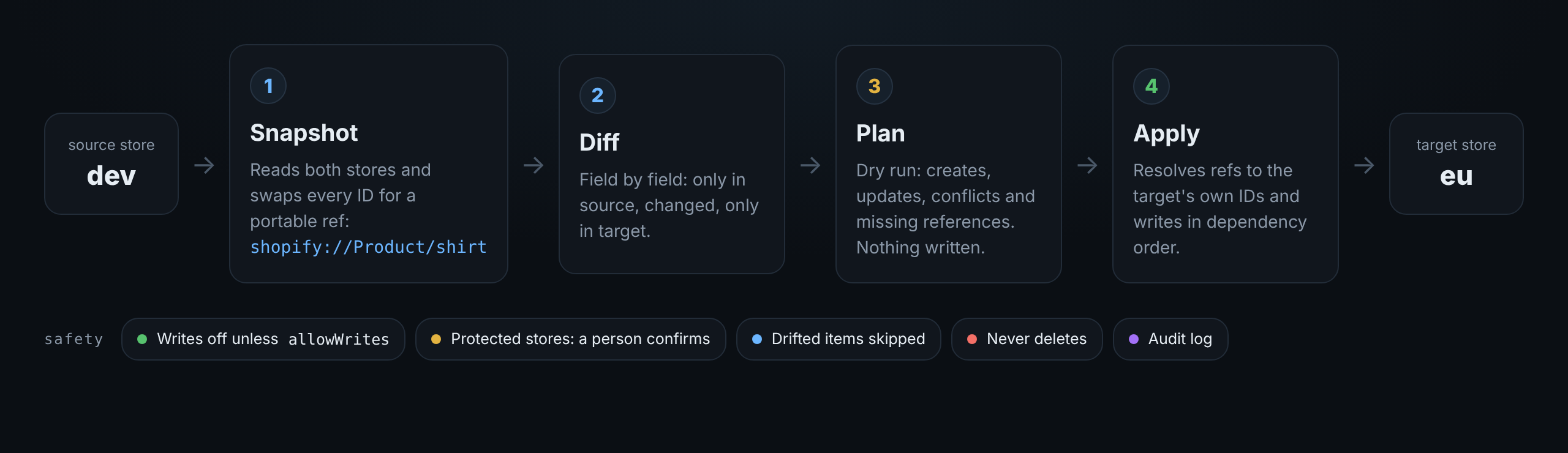
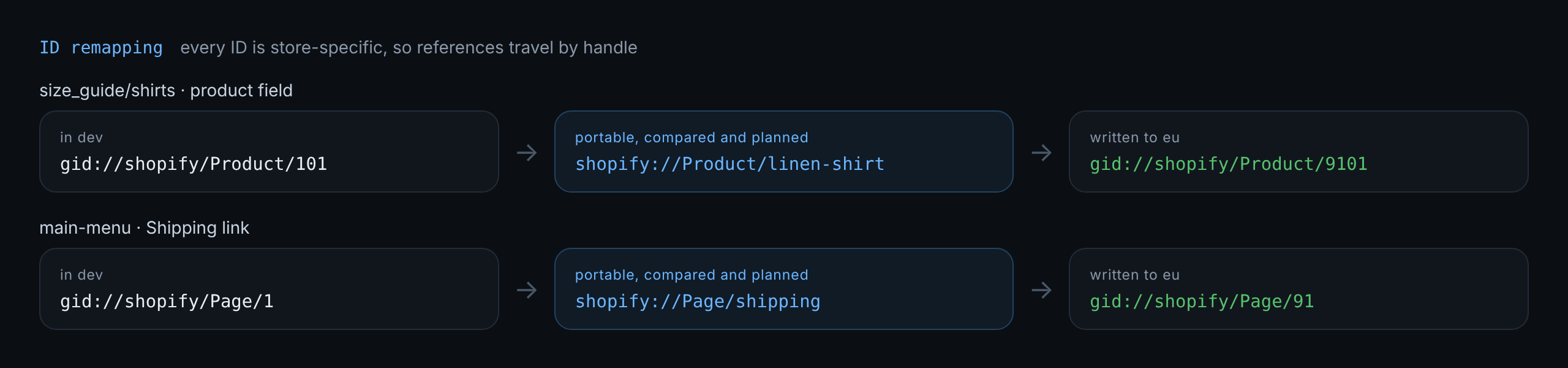
Every Shopify ID is store-specific, so the server never compares or copies raw IDs. When it reads a store, each gid://shopify/... value is rewritten into a portable reference:
gid://shopify/Product/8123456          →  shopify://Product/linen-shirt
gid://shopify/Metaobject/2918          →  shopify://Metaobject/faq/returns
gid://shopify/MetaobjectDefinition/77  →  shopify://MetaobjectDefinition/faq
gid://shopify/CustomerAccountPage/12   →  shopify://CustomerAccountPage/orders
gid://shopify/ShopPolicy/5             →  shopify://ShopPolicy/PRIVACY_POLICY
gid://shopify/Menu/41                  →  shopify://Menu/main-menu
gid://shopify/MetafieldDefinition/9    →  shopify://MetafieldDefinition/PRODUCT.custom.fabric
gid://shopify/MediaImage/730           →  shopify://File/size-chart.png
This covers JSON list values (list.product_reference) and definition validations (metaobject_definition_id). When it writes, references are resolved by handle in the target. A reference that doesn't exist there is flagged in the plan before anything is written.
Things in the same plan can depend on each other, for example a metaobject pointing at another one being created, or a definition that references itself. These are written in two passes: first without the pending references, then complete.
Files (images, generic files and videos) are matched by file name and uploaded to the target when missing. Collection rules that filter on a metafield are remapped to the target's definition.
Not remapped yet: product variants and articles. Their values are left out of the sync and listed as warnings, never copied as broken IDs.
Two references followed from the source store to the target, as the sample sync above wrote them:
Tested on real stores
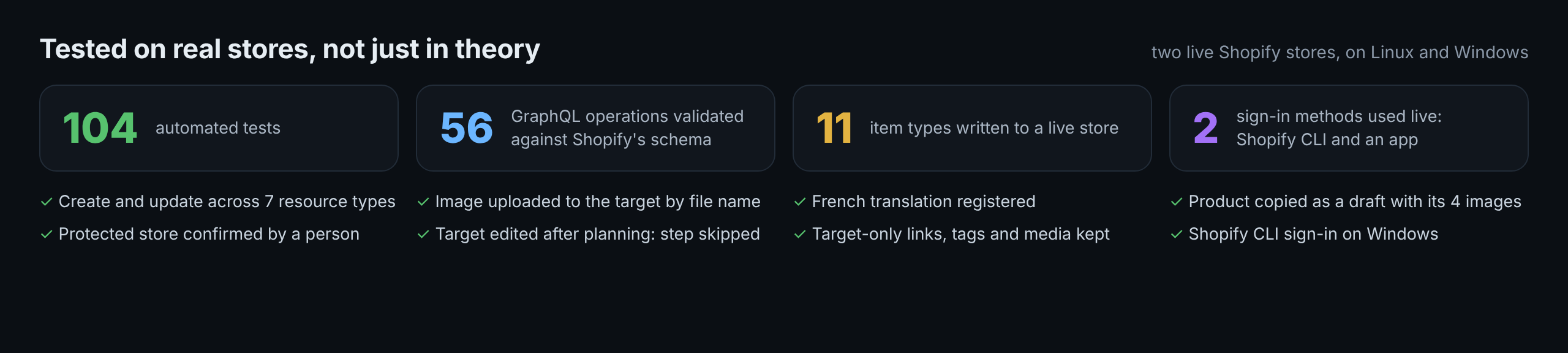
| Feature | Live result |
|---|---|
| Diff of all default resource types | both stores read in about 2 seconds with an app, about 30 through the Shopify CLI sign-in |
| Create: metafield and metaobject definitions, metaobjects, smart collection, page, redirect, French translation | applied, second diff empty |
| File reference on a metaobject | image uploaded to the target by file name and linked |
| Update: page title and body, collection description | applied, second diff empty |
| Shop policies | synced; a policy Shopify manages automatically is reported with how to unblock it |
Metafield values, including a product_reference |
applied, reference remapped to the target's own product |
| Values on products missing from the target | skipped up front with the reason |
| Export to a folder, then diff that folder against the store | no differences |
| Theme settings diff | read-only, 15 files compared in about 1 second |
| Products (Shopify CLI sign-in, Windows) | a real product copied as a draft with its 4 images and alt text; after editing the copy and adding a variant and an image there, the update restored the title and kept both; the next diff was identical |
| Products: reading only named handles | planning one product went from 97 to 6 seconds |
| Menus (0.5.0) | a link added only in the target stayed in place through an update that added a link from the source; the plan named it; the next plan was empty |
| Products: what only the target has (0.5.0) | a tag and a YouTube video added only in the target were both still there after an update that renamed the product and added a tag |
| Protected store over MCP (0.5.0, stdio, Windows) | refused when the assistant passed the domain itself; applied after the person typed it when the client asked |
| Snapshot folders over MCP (0.5.0) | a folder outside the base folder was refused |
| Safety: write to a read-only store | refused |
| Safety: target edited after the plan was made | step skipped, nothing overwritten |
| Shopify CLI sign-in on Windows (CLI 4.9.4), both stores | connect read-only and --writes; plan, apply (7 creates incl. file upload and translation), update and re-diff all exact; also through the MCP server over stdio |
Behaviours of the live API found this way are covered by tests: nodes returns null for customer account pages (they're looked up by listing instead), ShopPolicy.type has to be aliased next to Metaobject.type, Shopify refuses edits to auto-managed policies, and a failed token request carries its reason (such as app_not_installed) in an HTML page.
Roadmap
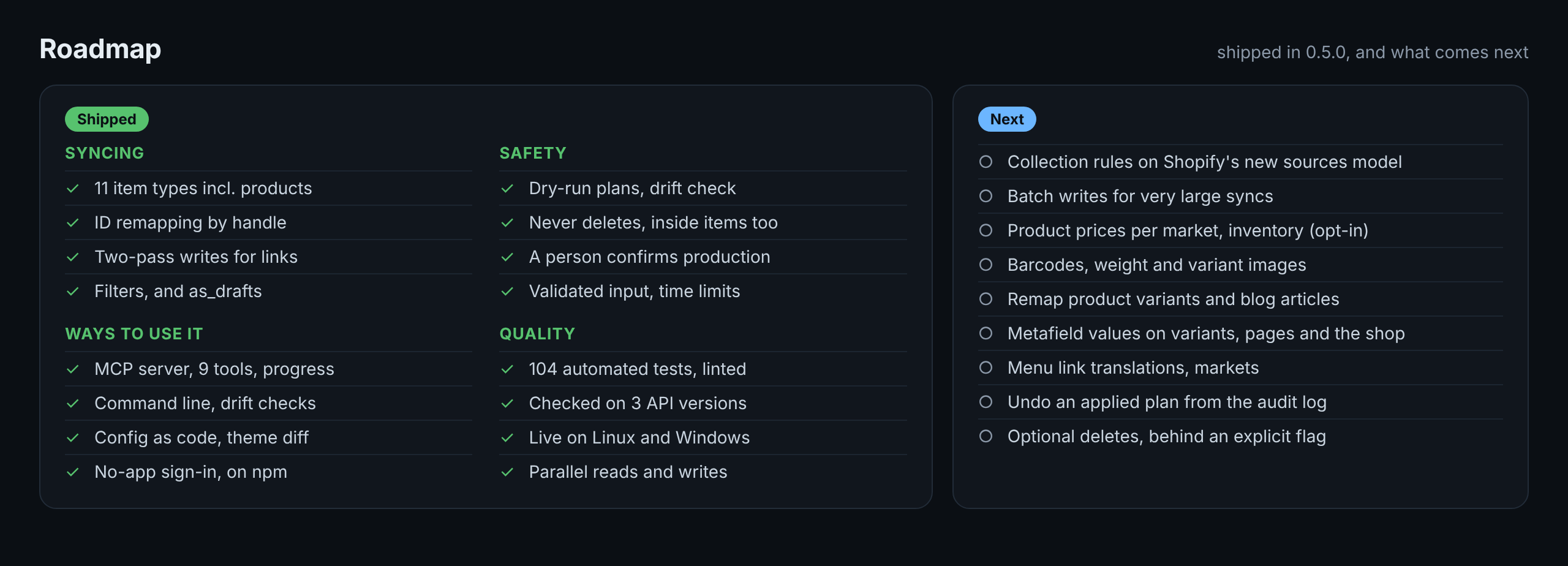
Shipped
Syncing
- Metafield definitions, metaobject definitions and metaobject entries
- Products: content, category, options, variants matched by option values (SKU, taxable flag, inventory policy), images; new ones as drafts, prices only when asked
- Collections with smart-collection rules, pages, menus (3 levels, customer account menus too), redirects, store policies
- Metafield values on products and collections, translations per language, products included (opt-in)
- Images and files matched by file name, uploaded to the target when missing
- Cross-store ID remapping by handle, including list references and rules on metafield definitions
- Two-pass writes for items that point at each other or at themselves
- Filters: resource types, include and exclude patterns, namespaces, metaobject types, owner types, languages
-
as_drafts: new pages hidden, new metaobject entries as drafts, published state of existing ones left alone
Safety
- Dry-run plans that expire after an hour, applied in full or step by step (
--only) - Drift check before every write, read-only by default
- Never deletes, also inside an item: menu links, product tags, variants and media that only the target has are kept
- Protected stores are confirmed by a person (asked by the client, or
--confirmon the command line), never by the assistant - Conflicts reported instead of forced (type changes, manual versus smart collections, values on items missing from the target)
- Snapshot folders validated, files uploaded only from Shopify's hosts, folders kept inside a base folder over MCP
- Time limits on every request, and an error instead of a shortened list
- Audit log of every write
Ways to use it
- MCP server with 9 tools, read-only tools annotated for auto-approval, progress reported on long calls
- Command line with
--jsonoutput and--exit-codefor scheduled drift checks - Config as code: export a store to files and use the folder as a source (
dir:) - Read-only theme settings diff
- Connect without creating an app (Shopify CLI sign-in), or with a Dev Dashboard app or an access token
- Published on npm, runs with
npx
Quality
- 104 automated tests against an in-memory Shopify, plus MCP protocol tests
- Every GraphQL operation validated against Shopify's schema for 2026-04, 2026-10 and 2027-01
- Tested live between two stores on Linux and Windows, Shopify CLI 4.9 and 5
- Parallel reads and writes with throttle-aware retries; clear errors for missing installs, expired sign-ins and auto-managed policies
- Linted, no known vulnerabilities in any dependency, release checklist for Shopify's quarterly API versions
Next
- Move collection rules to Shopify's new
sourcesmodel.ruleSetis deprecated but supported through 2027-01; the new model only exists from 2026-07, so this waits until 2026-04 can be dropped - Batch writes for very large syncs (
urlRedirectImport, bulk operations): writes run 4 at a time today - Product prices per market and inventory levels, as explicit opt-ins
- Barcodes, weight and variant images on products; translations of option names and values
- Remap product variants and blog articles, so references to them sync too
- Metafield values on variants, pages, blogs and the shop; metafield definition constraints
- Menu item (link) translations
- Markets and market web presences
- Undo: restore the previous values of an applied plan from the audit log
- Optional deletes, behind an explicit flag
Ideas and PRs are welcome. Issues tagged good first issue are a good place to start.
npm install           # Node 22 or newer
npm test              # vitest: unit, sync engine against an in-memory Shopify, and MCP protocol tests
npm run typecheck
npm run lint
npm run build

# Validate every GraphQL operation against Shopify's real Admin schema
npm run validate:graphql            # defaults to 2026-10
npm run validate:graphql -- 2027-01

npm run check         # typecheck, lint, tests and schema validation in one go
Layout:
src/
  index.ts            entrypoint: MCP server on stdio, or the CLI when given a command
  engine.ts           everything the tools and the CLI do, in one place
  server.ts           MCP tools
  cli.ts              command line
  snapshotFiles.ts    export and read snapshot folders (config as code)
  themes.ts           read-only theme settings diff
  config.ts           store config loading and validation
  shopify/client.ts   Admin GraphQL client (token refresh, throttling, retries)
  shopify/cliClient.ts  the same requests through Shopify CLI's sign-in (`shopify store execute`)
  refs.ts             GID <-> portable reference mapping
  snapshot.ts         read a store into portable form
  drafts.ts           the "as drafts" view: published state left out
  diff.ts             field-level diff
  plan.ts             dry-run plans and plan storage
  apply.ts            guarded, drift-checked, two-pass writes
  resources/          one adapter per resource type
test/
  fakeShop.ts         in-memory Admin API used by the tests
Adding a resource type means writing one adapter (fetch, create, update) in src/resources/. See CONTRIBUTING.md, which also has the release checklist.
Syncing definitions between stores isn't a new idea, and these tools are worth knowing:
| Project | Type | What it covers |
|---|---|---|
| groupthought/metasync | CLI | Metafield and metaobject definitions plus resource data; dry run by default; has a delete mode |
| TeamDijon/meta-sync | CLI | Metafield and metaobject definitions and entries; manifest-based copy; bulk mode deletes the target first |
| shopify-metadata-migrator | CLI | Copies metafield and metaobject definitions |
| MetaMaintain, Metora, Rewind Staging | Shopify apps (paid or freemium) | Definition and entry sync through an embedded app |
What this project adds: it runs inside your AI client as an MCP server (or as a CLI) on your own machine, signed in as you through Shopify CLI or with your own private app, so there's no third-party app from the App Store and no data goes anywhere except Shopify. You can ask for a diff in plain language; it also covers products, pages, menus, redirects, collections, policies, metafield values and translations, remaps references and files across stores, keeps store configuration in git, checks for drift before writing and never deletes. If you only need a scripted one-shot copy of definitions, one of the CLIs above may be all you need.
Disclaimer
Not affiliated with, endorsed by or sponsored by Shopify Inc. "Shopify" is a trademark of Shopify Inc. Test on development stores first; you are responsible for what you apply to production.
License
MIT © Youssef Idder
Reviews (0)
Sign in to leave a review.
Leave a reviewNo results found