yaf
Health Pass
- License — License: AGPL-3.0
- Description — Repository has a description
- Active repo — Last push 0 days ago
- Community trust — 12 GitHub stars
Code Fail
- exec() — Shell command execution in packages/cli/src/index.ts
- process.env — Environment variable access in packages/cli/src/index.ts
- network request — Outbound network request in packages/cli/src/index.ts
- spawnSync — Synchronous process spawning in scripts/preflight.mjs
- process.env — Environment variable access in scripts/preflight.mjs
- network request — Outbound network request in src/api.ts
Permissions Pass
- Permissions — No dangerous permissions requested
No AI report is available for this listing yet.
Open-source, self-hosted flomo alternative on Cloudflare Workers (free plan). AI-native: semantic search, insights with citations, MCP, CLI. 开源、可自部署的 flomo 平替。
yaf — Yet Another Flomo
English · 中文
yaf is an open-source, self-hosted clone of flomo, the quick-capture memo app. It runs on Cloudflare, works on the free plan, and is designed to be AI-native from the start.
Work in progress. Features and APIs may still change; read CHANGELOG.md before upgrading. If you prefer the original, simple version without AI, use the
v0.1.0tag.
- Open source: the code is licensed under AGPL-3.0. Modify and fork it freely; see TRADEMARKS.md for use of the name.
- Self-hosted: your data stays in your own Cloudflare account. One Worker serves both the API and the web app.
- Runs on the Cloudflare free plan: Workers, D1, Vectorize, Workers AI, Workflows, Durable Objects and AI Gateway all have free tiers. Only R2, used to store WeChat images and voice messages, must be enabled in the dashboard (it has a free tier but requires a payment method). Everything else works without it.
- AI-native:
- Search matches both keywords and meaning, so it finds memos that say the same thing in different words. Every memo can show related notes.
- Insights review your memos on a schedule and summarize recurring themes and open questions, with every point linked back to the source memos.
- A built-in MCP server lets AI assistants such as Claude Code search and write memos directly.
- Scoped API tokens, the
yafcommand-line tool and export make it easy to hand your notes to any AI.
Contents
- Screenshots
- Tech stack
- Features
- Local development
- Install on Cloudflare
- MCP
- CLI
- Project layout
- API
- Upgrading
- Versions
- License
Screenshots
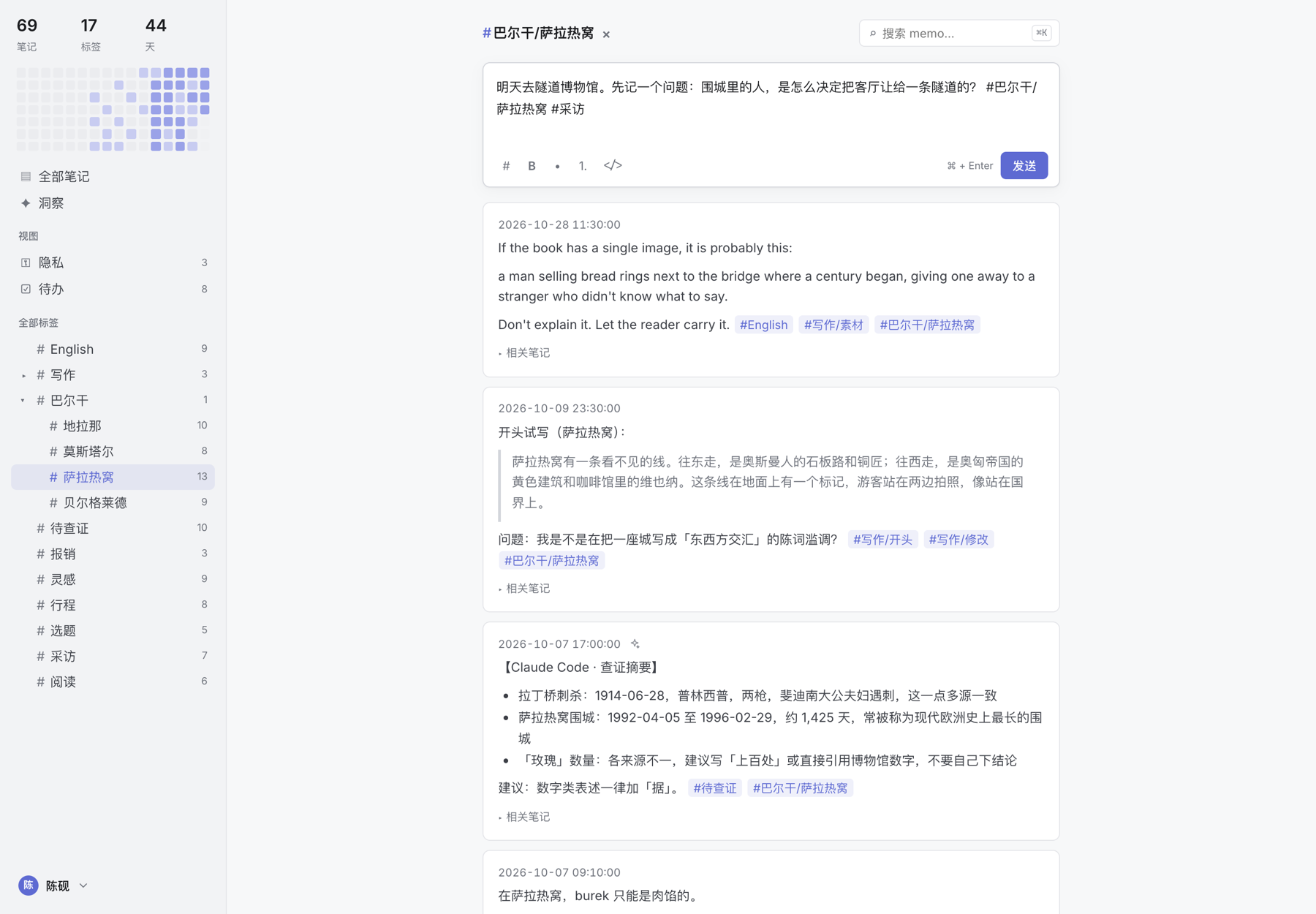
Every screenshot is a real, locally running yaf with demo data: the notes of a travel writer researching a book on the Balkans (Belgrade, Sarajevo, Mostar, Tirana), written in Chinese and English.
Capture from anywhere
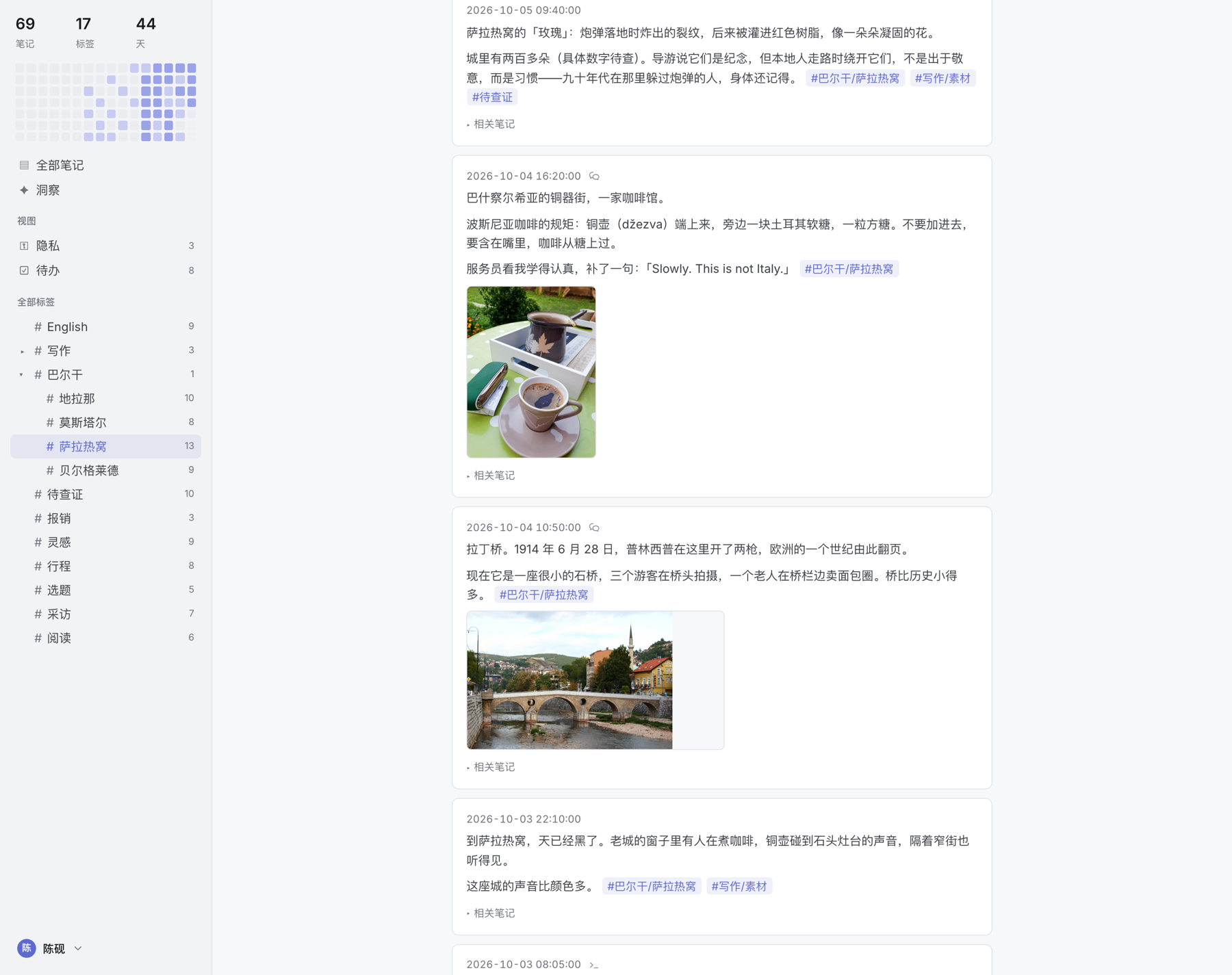
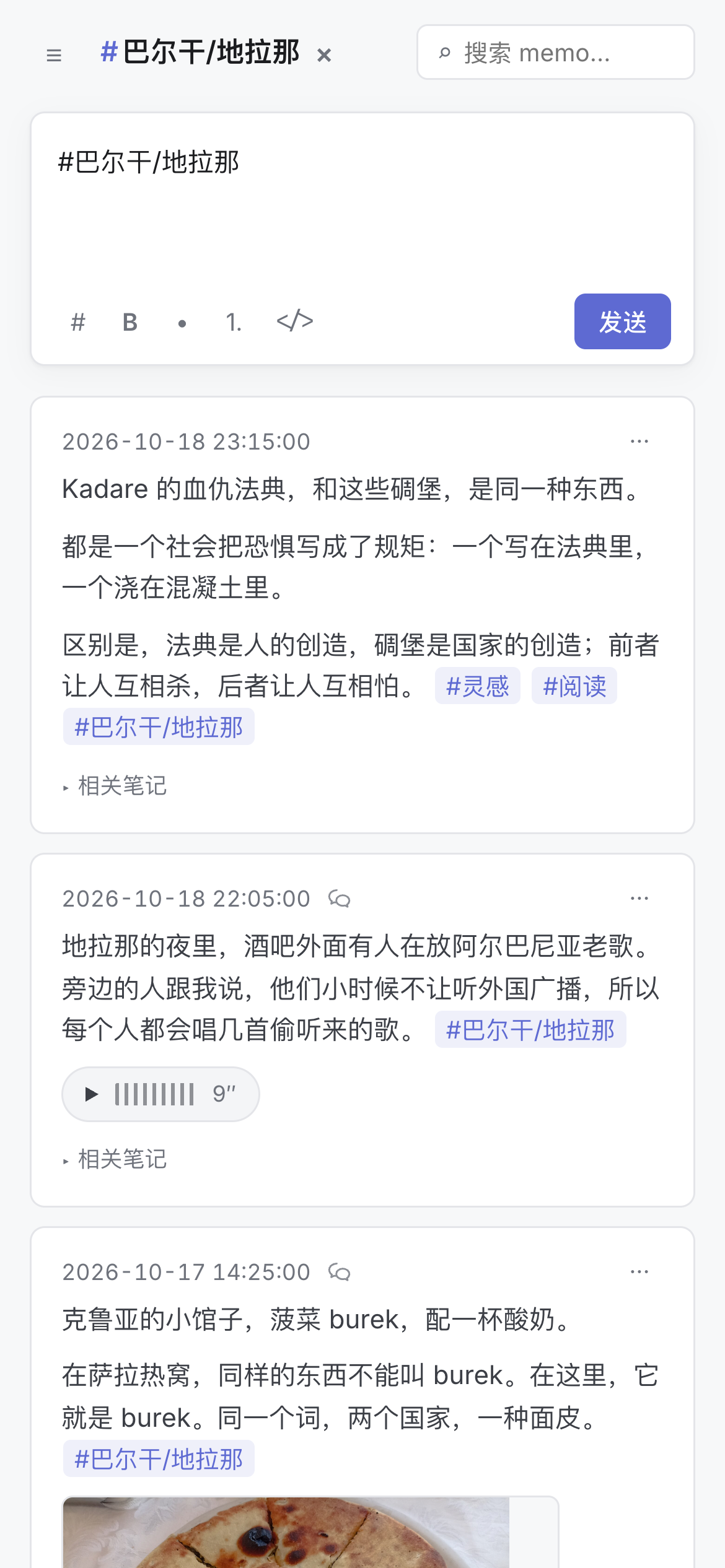
Photos you send to WeChat become memos. The small icon marks the source.
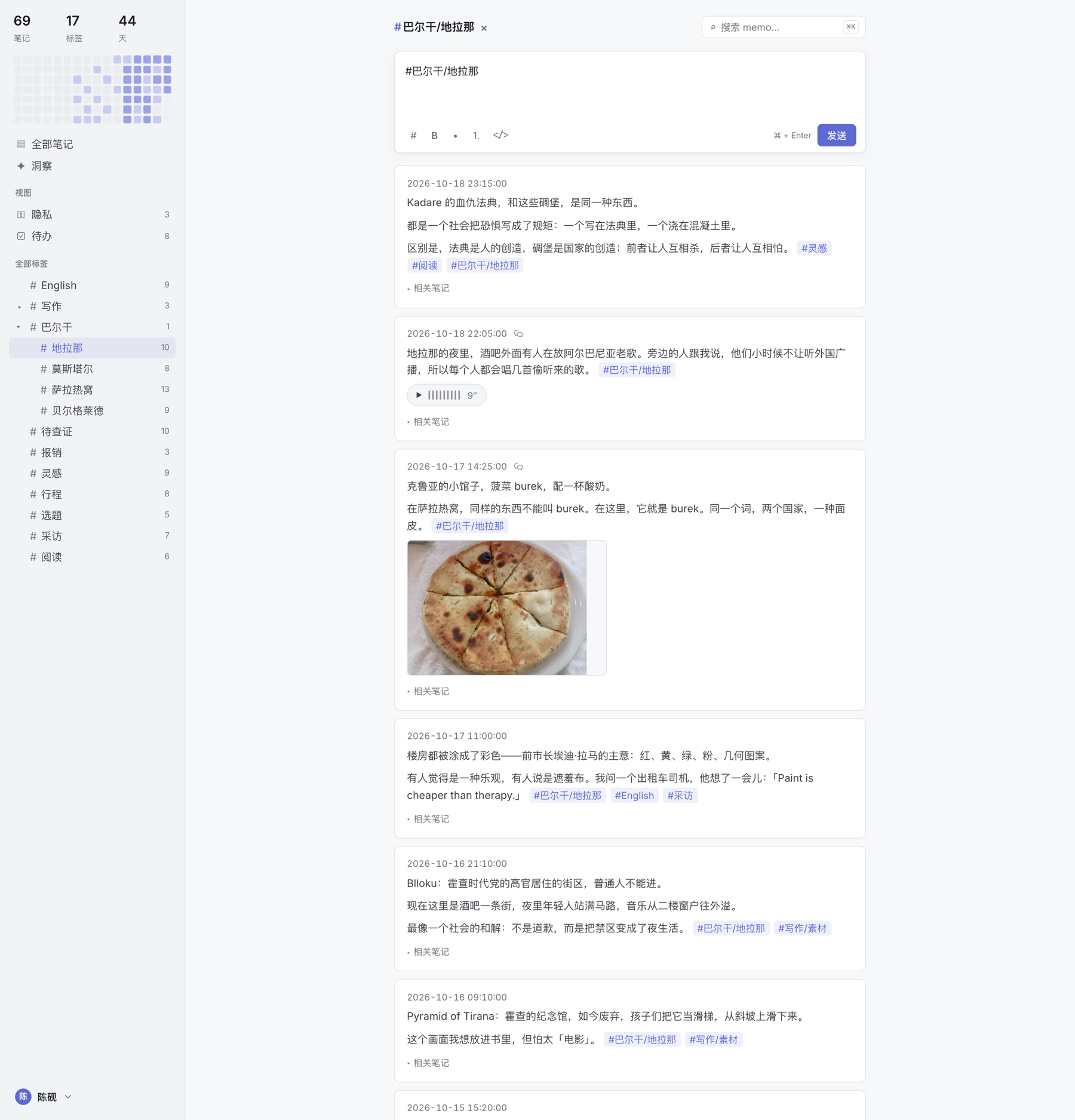
Voice messages keep their transcript and play in the browser.
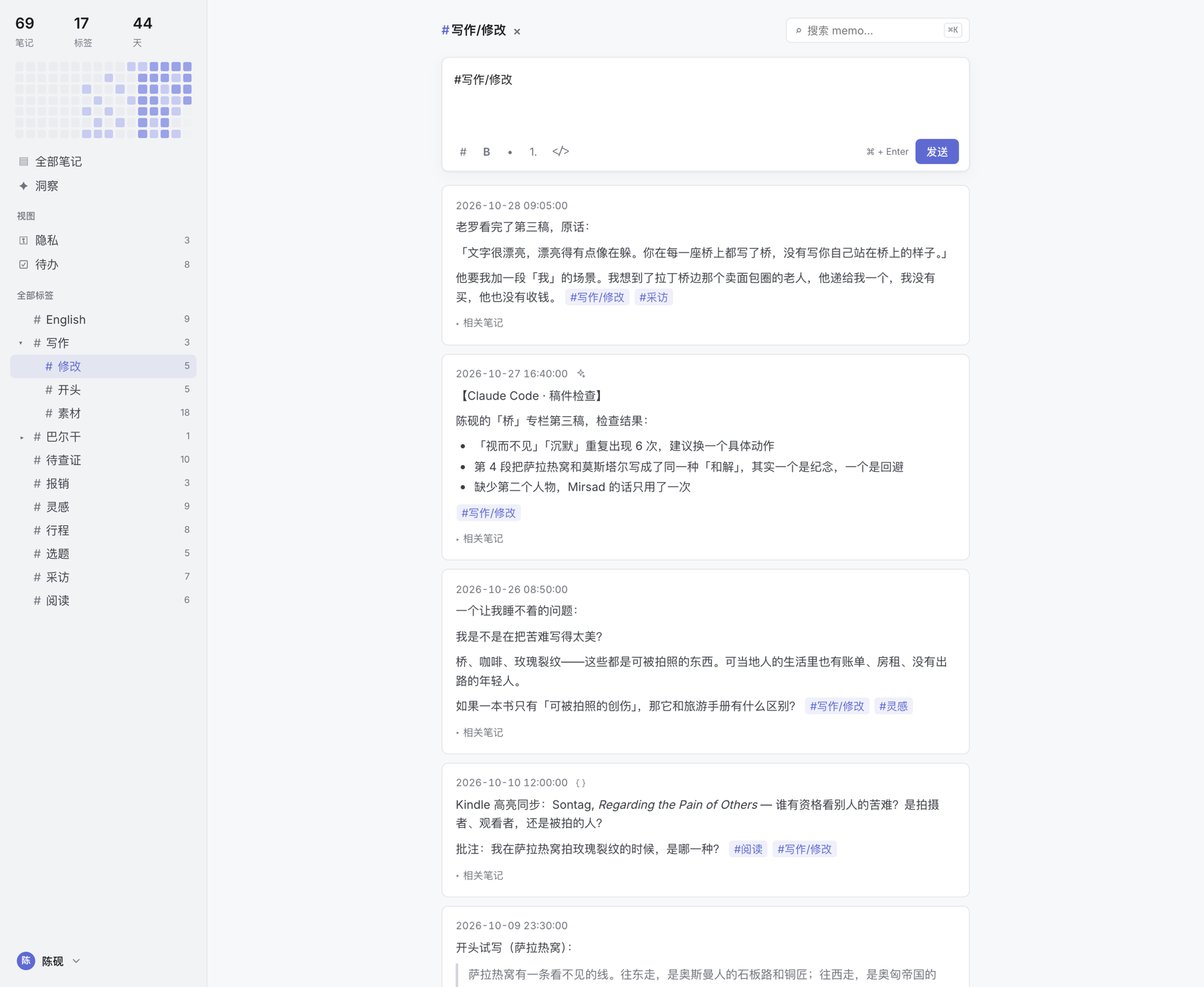
Memos can also come from Claude Code over MCP, from scripts through a scoped API token, or from the yaf CLI.
Find it again
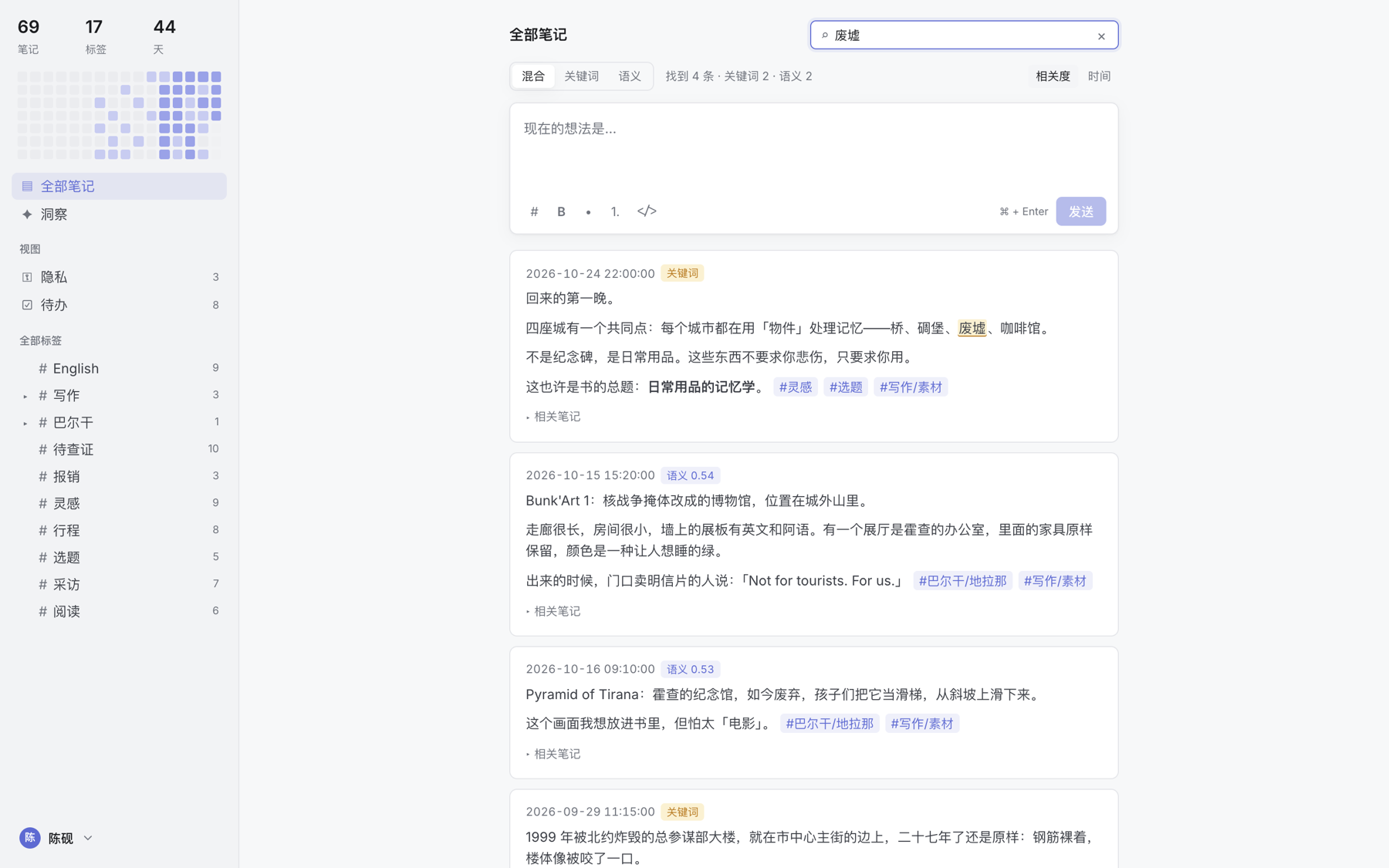
Searching "废墟" (ruins) finds two memos that contain the word (highlighted) and two that never use it but mean the same thing (semantic score).
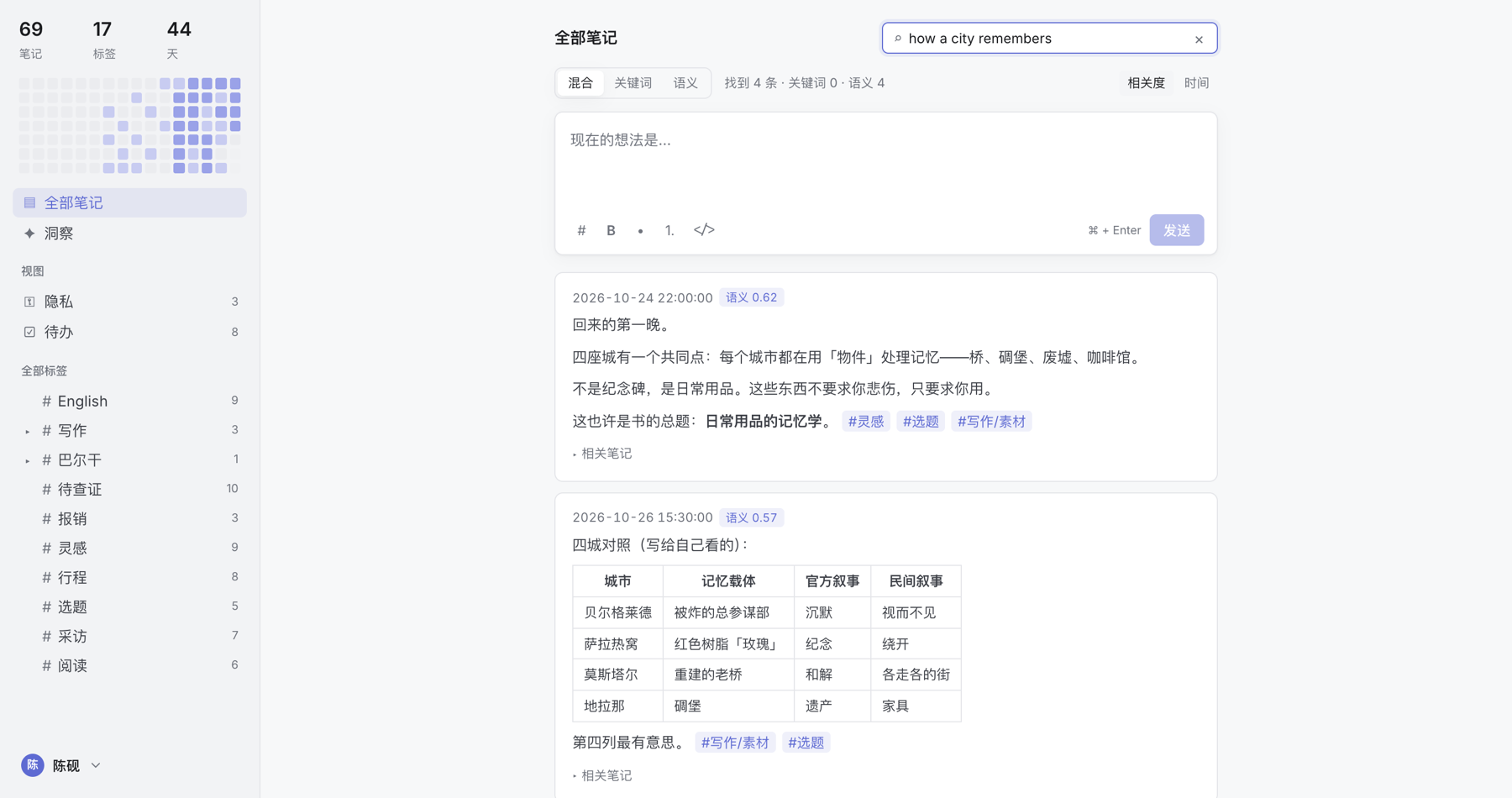
The embedding model is multilingual: an English question finds the Chinese memos that answer it.
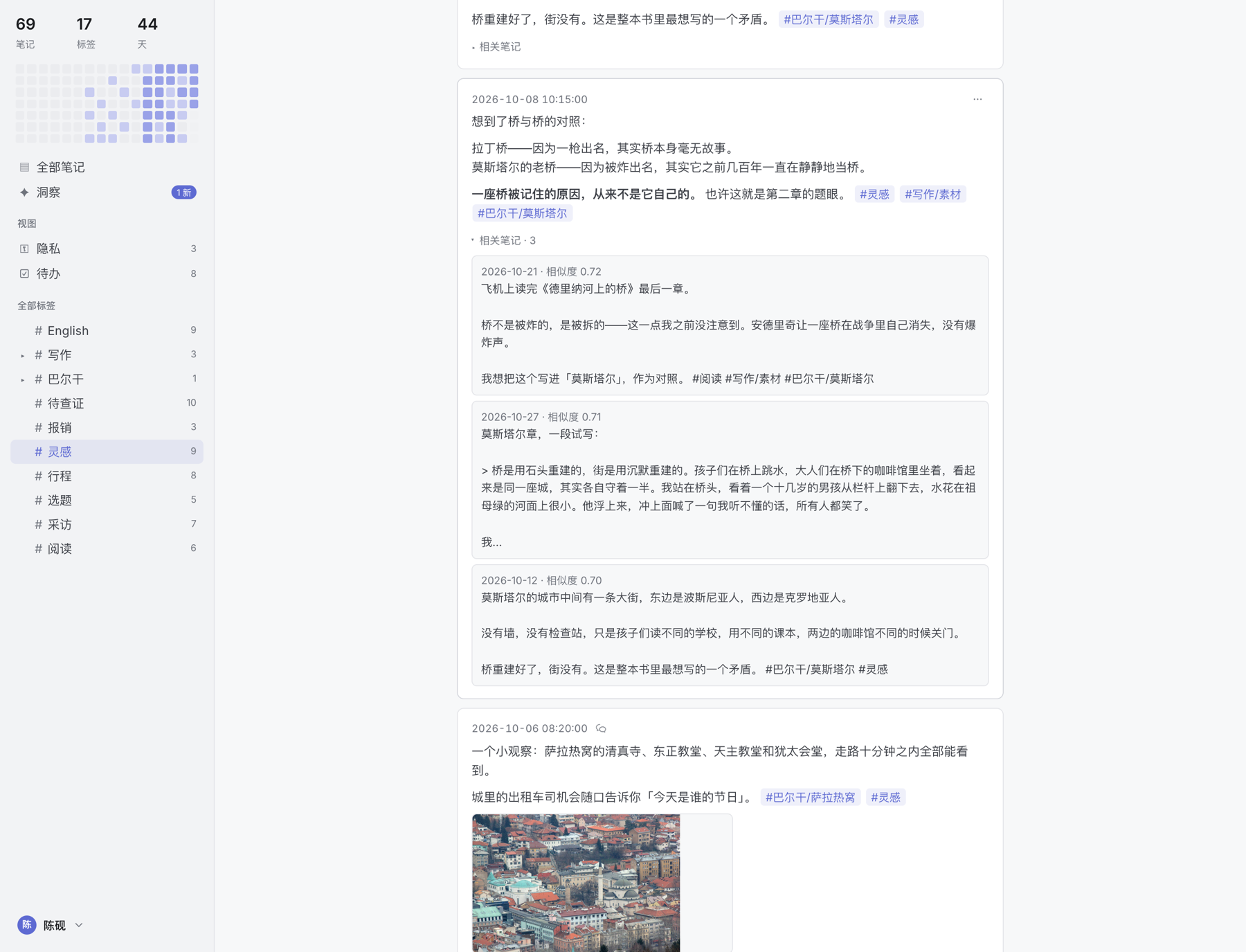
Every memo can show related notes, ranked by similarity. Here the Latin Bridge and the Mostar bridge find each other.
Insights
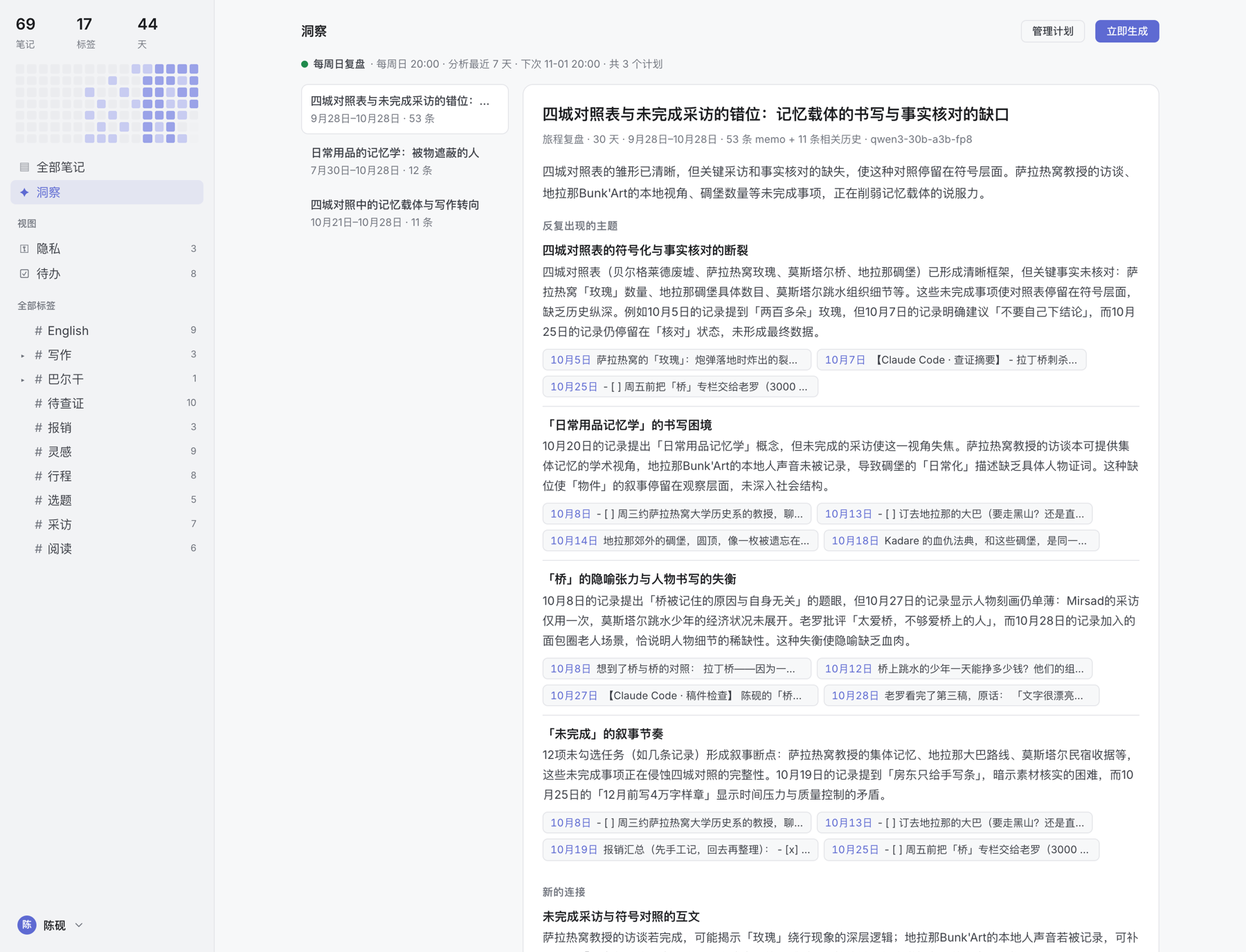
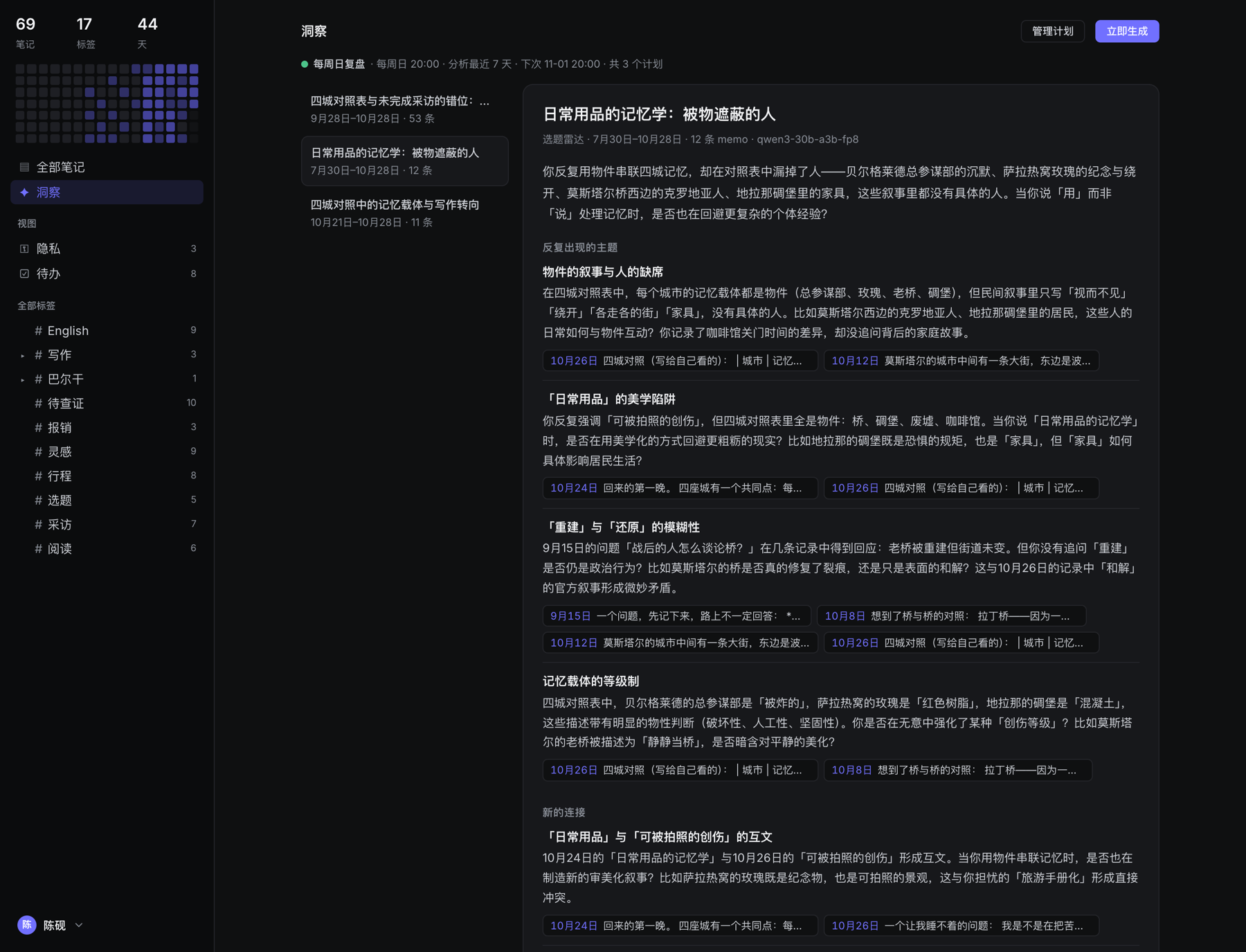
A scheduled review of your memos. Each point is a claim backed by evidence, with dated citations that link to the source memos. Reports are written in Markdown (quotes, lists, code); objective numbers (tag counts, unchecked tasks) are computed in code and handed to the model.
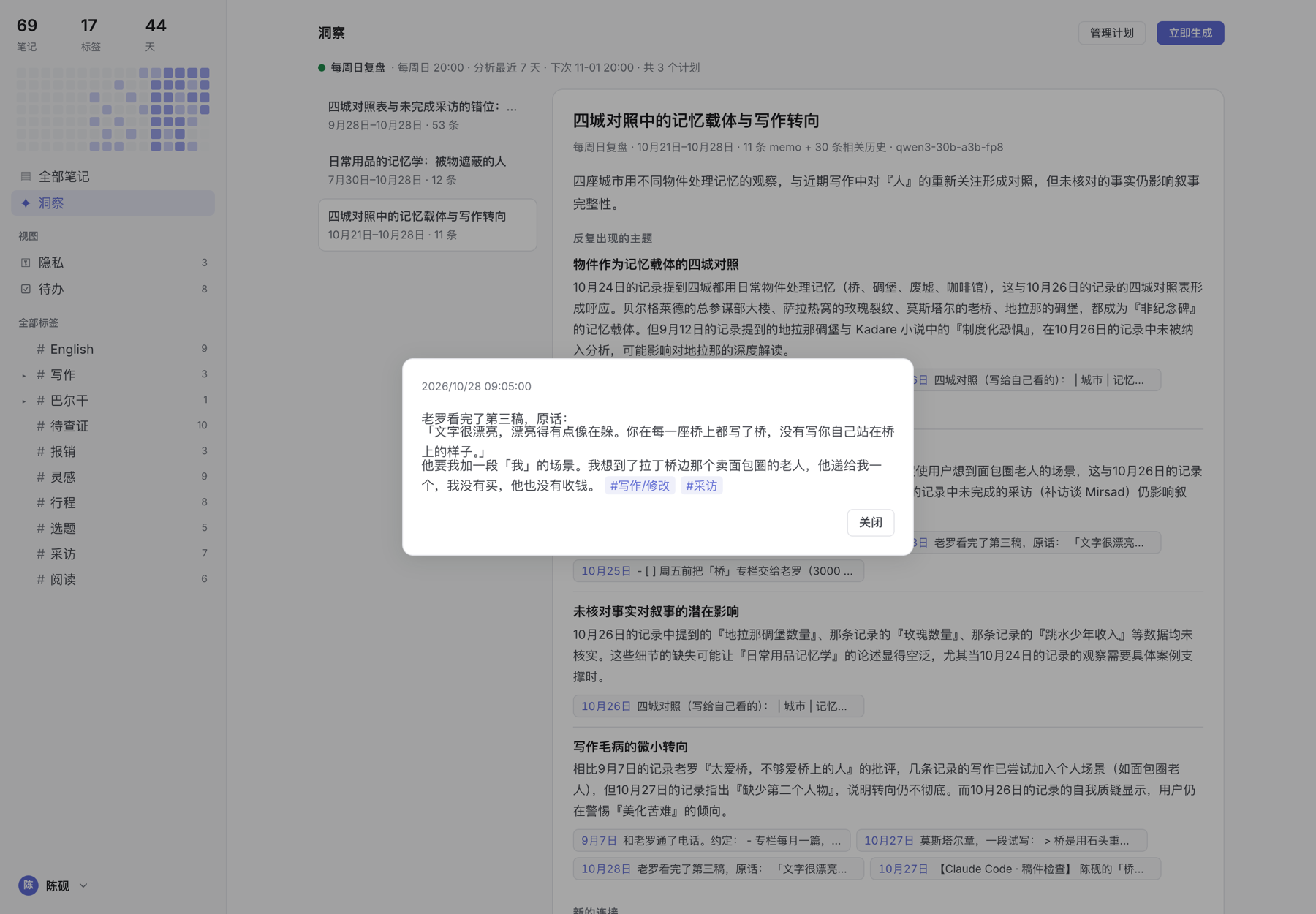
Click a citation to read the original memo.
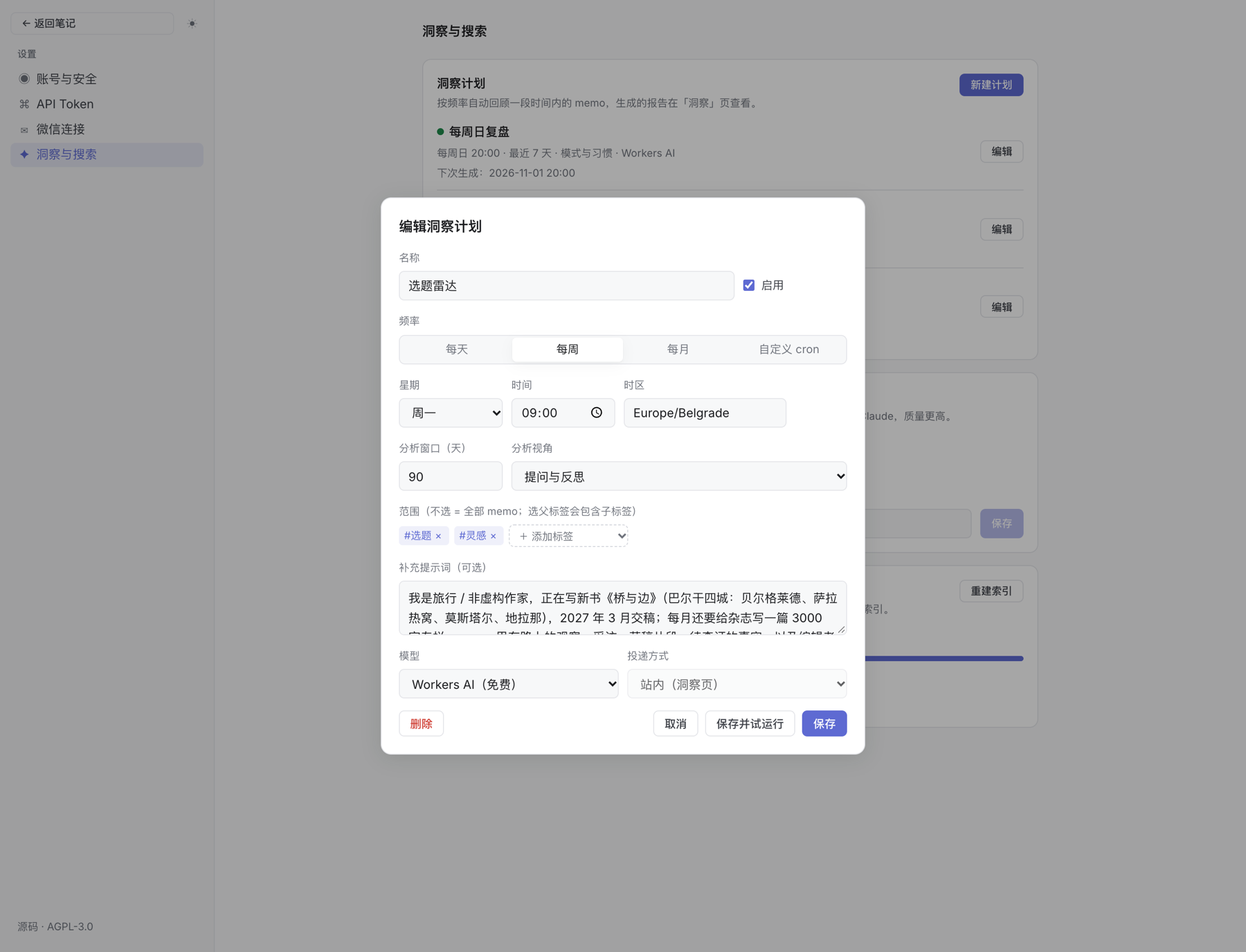
A plan sets the schedule, time window, tag scope, perspective and model. The extra prompt tells the model who you are and what to look for.
Lenses, themes, mobile
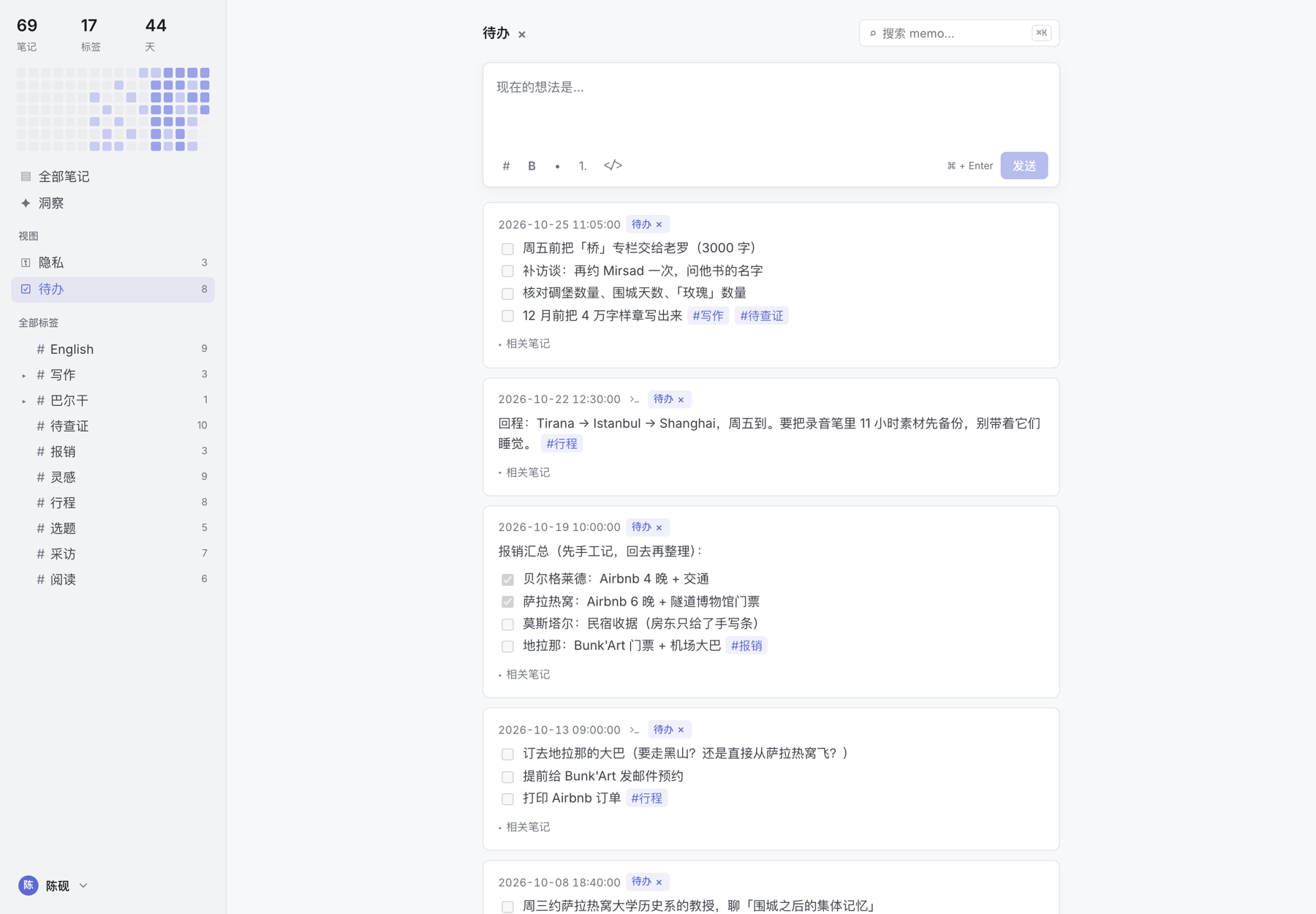 |
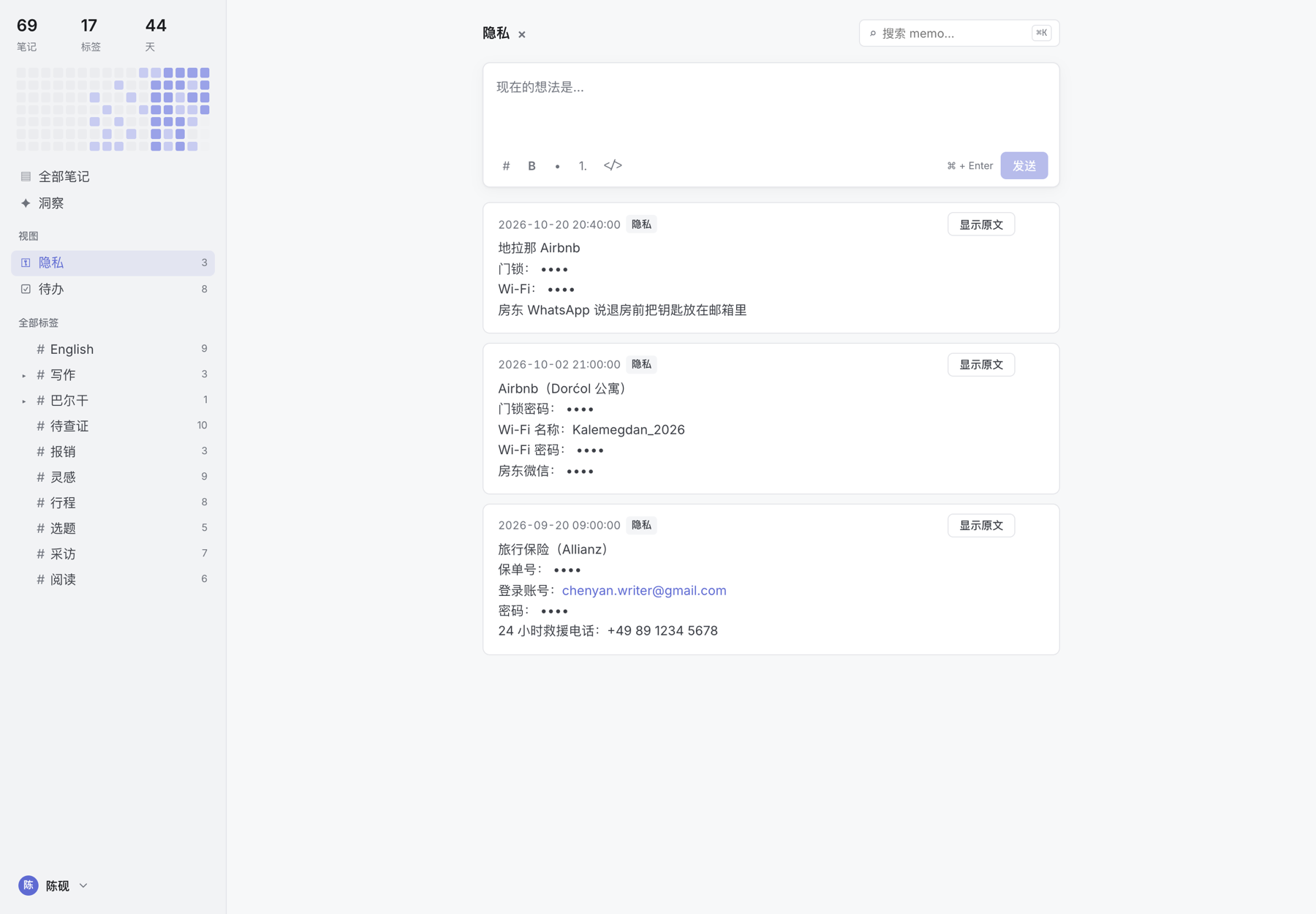 |
| Lens: todo. Memos that record something you have to do are picked out automatically. | Lens: private. Passwords and codes are masked, and kept out of search, tokens and exports. |
 |
 |
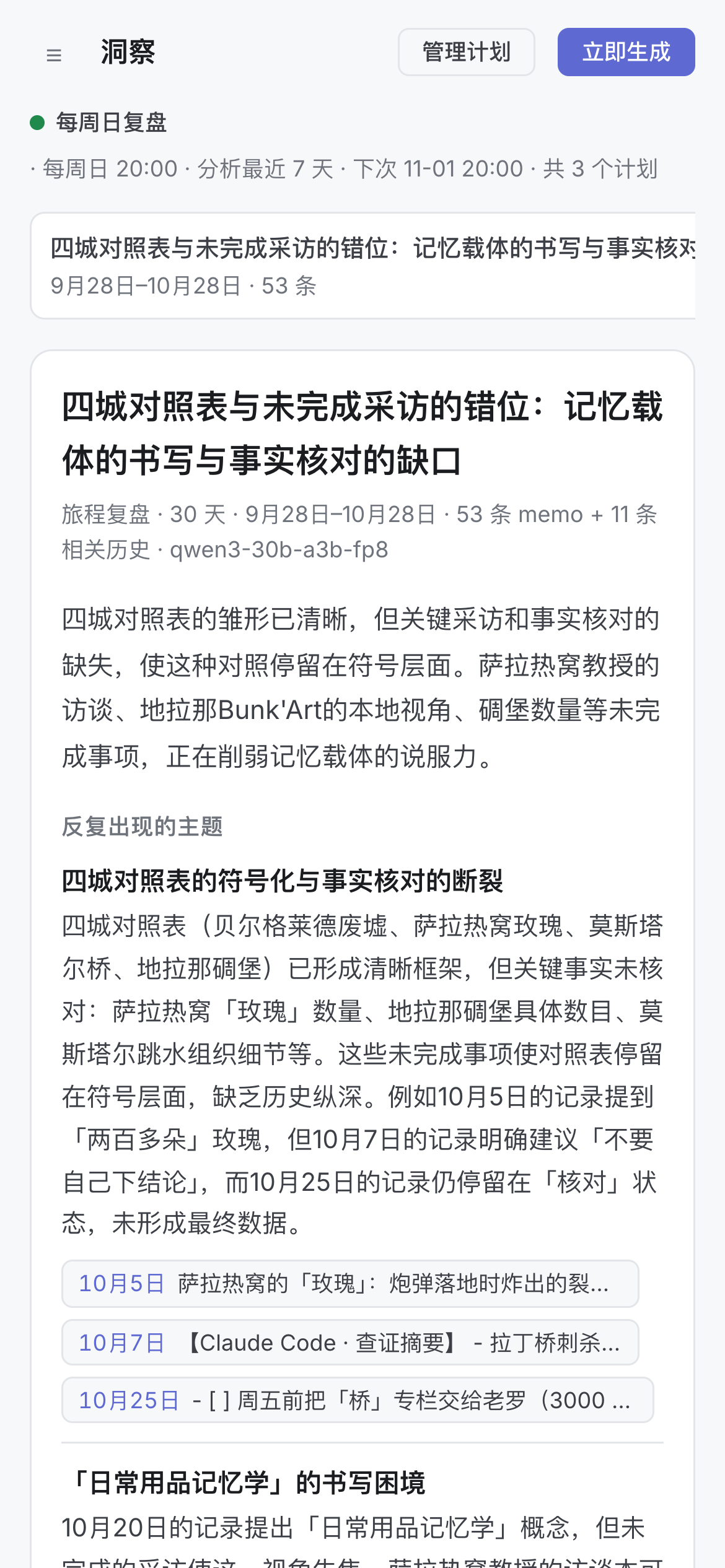 |
Light, dark or system theme, and a layout that works on a phone.
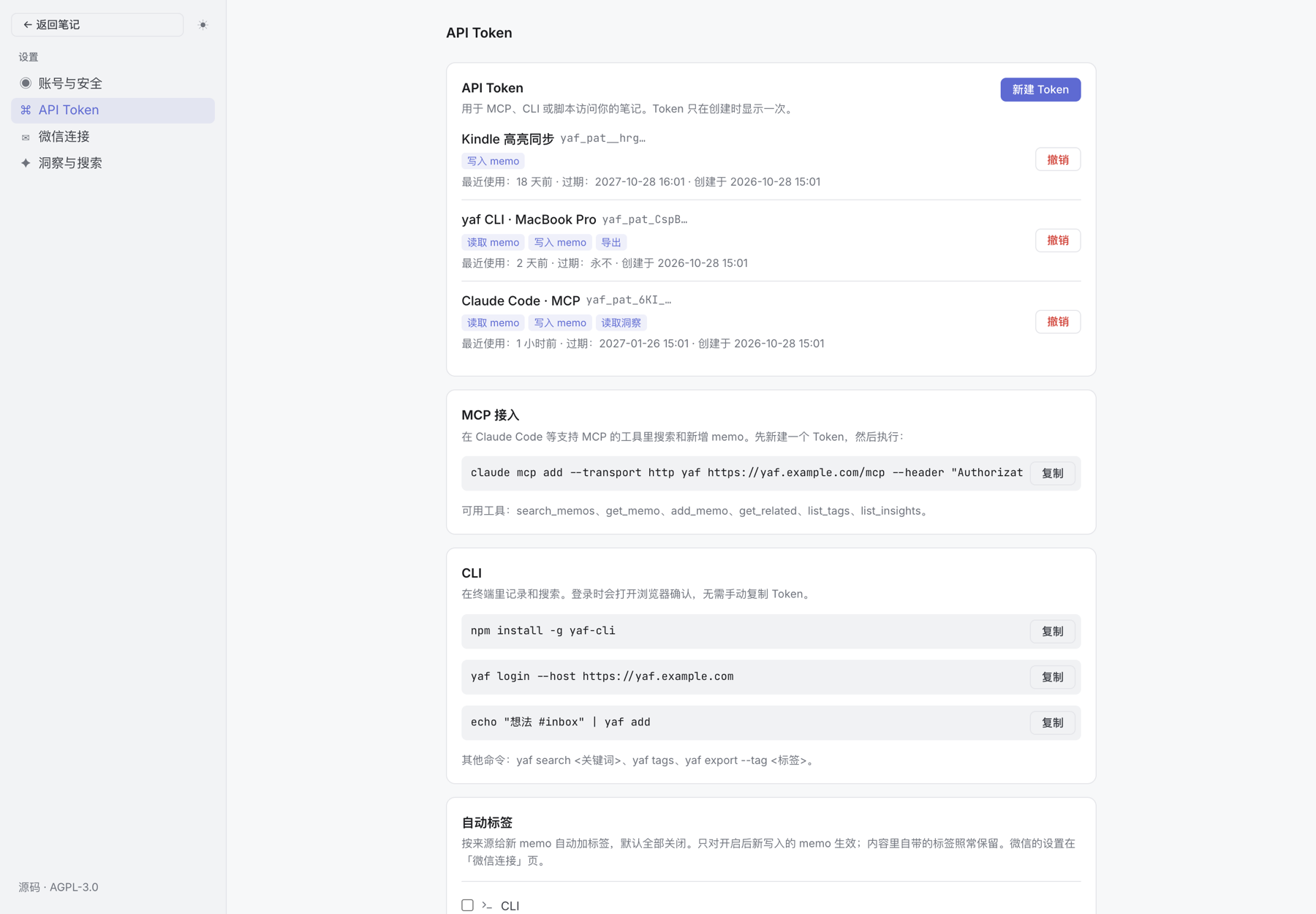
Scoped, revocable API tokens, with copy-paste setup for MCP and the CLI.
Photos in the screenshots are from Wikimedia Commons: Bosnian coffee by Minja Klarić (CC BY-SA 4.0), Latin Bridge and Baščaršija by Julian Nyča (CC BY-SA 3.0), Spinach burek in Kruja by Arianit (CC BY-SA 4.0). The screenshots themselves are not part of the AGPL-licensed code.
Tech stack
- Runtime: Cloudflare Workers (Hono) + Static Assets (React SPA), deployed as a single Worker
- Storage: D1 (SQLite), Vectorize (embeddings), R2 (attachments, optional), Durable Objects (WeChat long polling)
- AI: Workers AI (
@cf/baai/bge-m3embeddings,qwen3.8-27b/ selectable model for insights,qwen3.8-27bimage descriptions,clef-flashlenses) or Claude (bring your own key), through AI Gateway. Workflows handle re-indexing and insight generation; a Cron trigger runs every 15 minutes for due plans and missing embeddings - Frontend: React + Vite (
@cloudflare/vite-plugin, so local dev runs inside workerd) - Markdown: marked (GFM) + DOMPurify
Features
- Write, edit and delete memos in Markdown (headings, lists, task lists, quotes, code, tables, links…)
#tagsare extracted automatically, including nested#a/b/c. A#inside code, or a# heading, is not a tag- Filter by tag (a parent tag includes its children)
- Hybrid search: keywords (D1 FTS5 + Chinese word segmentation) + semantics (Workers AI
bge-m3+ Vectorize), merged with RRF; match badges, keyword highlighting, ⌘K; related notes for every memo - Email + password login; the first visit creates the admin account
- Export to Markdown / JSON, optionally by tag
- Light / dark / system themes
- Sidebar stats and a 16-week heatmap
- API tokens (scoped, revocable, optional expiry), an MCP server (
/mcp) and theyafCLI - Insights: scheduled reviews (daily / weekly / monthly / custom cron) covering recurring themes, new connections, things you meant to do and questions worth asking, each with memo citations; give feedback or save a report as a memo
- WeChat capture (experimental, unofficial protocol): scan a QR code to connect WeChat ClawBot; text, images and voice messages you send it become memos, and it replies "已记录" (saved). Images show as thumbnails; voice messages show the transcript and play in the browser
- Each memo shows a source icon (WeChat / CLI / API / MCP); optional automatic tags per source (off by default)
- Settings: account and security (change password, sign out other devices), API tokens and auto tags, WeChat, insight plans and models, search index
Local development
npm install
npm run db:migrate:local   # set up the local D1 database
echo "ENCRYPTION_KEY=$(openssl rand -base64 32)" >> .dev.vars
# Workers AI and Vectorize have no local emulation; local dev calls the real services (requires wrangler login)
npm run dev                # http://localhost:5173
The first visit opens the "create admin account" page.
Install on Cloudflare
Let an AI agent do it (Claude Code, Codex, …). Open an empty folder in the agent and say:
Read https://raw.githubusercontent.com/uxgnod/yaf/main/docs/AGENT-INSTALL.md and install yaf for me.
The agent checks your environment, walks you through the Cloudflare login, creates the database and search index, sets the secrets, deploys, and hands you the URL. You only click "Allow" in the browser and choose an admin password. See docs/AGENT-INSTALL.md.
Or by hand. Work on your own deploy branch so upgrades stay clean (the database id is the only personal value in the repo; never commit it to main):
git checkout -b deploy $(git tag --sort=-v:refname | head -1)   # the latest release
npx wrangler login
npx wrangler d1 create yaf-db          # put the returned database_id into wrangler.jsonc, then commit on deploy
npx wrangler vectorize create yaf-memos --dimensions=1024 --metric=cosine
npx wrangler vectorize create-metadata-index yaf-memos --propertyName=userId --type=string
npx wrangler secret put SETUP_TOKEN    # recommended: stops anyone else from claiming the admin account first
openssl rand -base64 32 | npx wrangler secret put ENCRYPTION_KEY   # encrypts the Claude API key and WeChat bot token
npx wrangler r2 bucket create yaf-media   # WeChat images / voice (enable R2 in the dashboard first; or remove r2_buckets from wrangler.jsonc)
npm run db:migrate:remote
npm run deploy                         # refuses to run without database_id or with pending migrations
With SETUP_TOKEN set, the setup page asks for it. Once the admin exists, /api/auth/setup is permanently disabled.
AI usage ring (optional)
The bottom-right of the sidebar shows today's (UTC) Workers AI neuron usage for the whole account (10,000 free per day). It is visible to the admin only, and is hidden until configured.
Find your account ID (a 32-character hex string), any of:
- run
npx wrangler whoami; it is the Account ID column; - in the Cloudflare dashboard home (Account Home), click "⋯" next to your account name → Copy account ID;
- open Workers & Pages; Account ID is under Account details in the right sidebar.
If you are on a paid plan, also run
npx wrangler secret put AI_PLANand enterpaid; this only changes the label on the card.- run
Create an API token with only the Account Analytics: Read permission. This link pre-fills the permission and name; select your account under "Account Resources", then create the token:
https://dash.cloudflare.com/profile/api-tokens?permissionGroupKeys=%5B%7B%22key%22%3A%22account_analytics%22%2C%22type%22%3A%22read%22%7D%5D&name=yaf-analytics
If nothing is pre-filled: on the API Tokens page, go to Create Token → Create Custom Token and pick Account / Account Analytics / Read.Store both the account ID and the token as secrets, then redeploy:
npx wrangler secret put CF_ACCOUNT_ID
npx wrangler secret put CF_ANALYTICS_TOKEN
npm run deploy
For local development, add
CF_ACCOUNT_ID=...andCF_ANALYTICS_TOKEN=...to.dev.vars(git-ignored).Do not put the account ID in
wrangler.jsonc: it would be published with the repo.
Usage is grouped by modelId into embeddings / image descriptions / insights / classification; all other models count as "other". Results are cached for 5 minutes.
MCP
Create a token in Settings › API Token, then:
claude mcp add --transport http yaf https://<your-domain>/mcp --header "Authorization: Bearer <token>"
Tools: search_memos (hybrid search), get_memo, add_memo, get_related, list_tags, list_insights.
CLI
npm install -g yaf-cli          # or from the repo: npm run cli:build && node packages/cli/dist/index.js (see packages/cli/README.md)
yaf login --host https://<your-domain>   # confirm in the browser; the token is saved to ~/.config/yaf/. Asks for the address if --host is omitted
echo "idea #inbox" | yaf add
yaf search keyword --tag inbox
yaf tags
yaf export --tag inbox --format md -o inbox.md
Project layout
worker/          # API (Hono)
  index.ts       # entry: /api/* goes to Hono, /mcp to the MCP handler
  auth.ts        # admin setup, login, sessions, password; auth middleware (cookie or Bearer token + scope)
  memos.ts       # memo REST API, stats, export
  memo-service.ts# memo read/write logic shared by REST and MCP
  tokens.ts      # API tokens, device-code login
  auto-tags.ts   # per-source automatic tags
  mcp.ts         # MCP server
  search.ts      # hybrid search, related notes, index status
  index-workflow.ts # Workflow that backfills embeddings
  insights.ts    # insight plans, report API, cron scheduling
  insight-engine.ts / insight-workflow.ts # insight generation (gather, cluster, summarize, verify citations)
  wechat/        # WeChat: protocol.ts (protocol adapter), bridge.ts (WechatBridge DO), media.ts, routes.ts
shared/          # shared by frontend and backend: tags.ts (tag extraction), segment.ts (Chinese segmentation)
packages/cli/    # the yaf command-line tool (MIT)
src/             # React frontend
migrations/      # D1 schema
API
| Method | Path | Description |
|---|---|---|
| GET | /api/auth/status |
Whether setup is needed |
| POST | /api/auth/setup |
Create the admin (only when there are no users) |
| POST | /api/auth/login / /api/auth/logout |
Log in / out |
| GET | /api/auth/me |
Current user |
| GET | /api/memos?q=&tag=&cursor=&mode=&sort= |
List / filter by tag (cursor pagination). With q it runs hybrid search: mode=hybrid|keyword|semantic, sort=relevance|time; returns match and stats |
| GET | /api/memos/:id |
A single memo |
| GET | /api/memos/:id/related |
Related notes |
| POST / PATCH / DELETE | /api/memos[/:id] |
Create / update / delete |
| GET / POST | /api/search/status, /api/search/reindex |
Index status / backfill ({full:true} rebuilds) |
| GET | /api/tags |
Tags with counts |
| GET | /api/stats?tz= |
Stats and heatmap |
| GET | /api/usage/ai |
Today's Workers AI neuron usage (admin; usage: null when not configured) |
| GET | /api/export?tag=&format=md|json |
Export |
| POST | /api/auth/password |
Change password (web session only) |
| GET / POST | /api/auth/sessions, /api/auth/sessions/revoke-others |
Session count / sign out other devices |
| GET / POST / DELETE | /api/tokens[/:id] |
List / create (plaintext shown once) / revoke API tokens (web session only) |
| POST | /api/device/code, /api/device/token |
CLI device-code login: start / poll |
| GET / POST | /api/device/:userCode |
View / approve a device login in the web app |
| GET / POST / PATCH / DELETE | /api/insights/plans[/:id] |
Insight plans |
| POST | /api/insights/plans/:id/run |
Generate now |
| GET | /api/insights, /api/insights/:id |
Reports (with unread count) / detail |
| POST | /api/insights/:id/feedback, /api/insights/:id/save |
Feedback / save as memo |
| GET / PUT | /api/settings/ai |
Workers AI insight model and Claude API key settings |
| GET / PUT | /api/settings/auto-tags |
Automatic tags per source (CLI / API / MCP) |
| GET / DELETE | /api/wechat |
WeChat connection status / unbind |
| POST / GET | /api/wechat/qrcode, /api/wechat/qrcode/status |
Get a QR code / poll scan status (long polling) |
| POST / PATCH | /api/wechat/qrcode/verify, /api/wechat/rules |
Submit the verification code / capture rules |
| GET | /api/attachments/:id |
Attachment file (ownership checked) |
| POST | /mcp |
MCP (Streamable HTTP), Bearer token required |
Except for token management and password changes, /api/* also accepts Authorization: Bearer yaf_pat_…, checked against scopes: memos:read, memos:write, export, insights:read.
Upgrading
Tell your agent: "Read docs/AGENT-UPGRADE.md in the yaf folder and upgrade me to the latest release." It reads CHANGELOG.md, records a database restore point (D1 Time Travel) and the current Worker version, merges the new release into your deploy branch, creates anything new that is needed, applies the migrations, deploys, and checks the result. Every step can be undone. Migrations only ever add; the previous version's code keeps working on the new schema, so rolling back the code is always safe. See docs/AGENT-UPGRADE.md.
Versions
| Tag | Contents |
|---|---|
v0.1.0 |
The original simple version: memos, Markdown, tags, keyword search, export, themes, heatmap. No AI, API or WeChat |
v0.2.0 |
AI-native: hybrid search, related notes, insights, MCP, API tokens, CLI, WeChat capture |
v0.3.0 |
Lenses (todo / private) and private-memo masking |
v0.4.0 |
AI usage ring, deploy preflight, agent install / upgrade guides |
v0.4.1 |
Selectable Workers AI insight model & deprecation warning, Markdown insights, excerpt quotes |
Per-version upgrade notes: CHANGELOG.md.
Community
yaf is shared and discussed on the LINUX DO community.
License
- The project is licensed under the GNU AGPL-3.0. This applies to every version in this repository, including early commits that predate the LICENSE file.
- You may use, modify, fork and self-host it, including for commercial purposes.
- If you distribute a modified version, or let others use a modified version over a network, you must publish its complete source under the same license and state what you changed.
- Keep the original copyright notice and the project source (https://github.com/uxgnod/yaf). Keep the "Source" link in the UI, or point it to your own source.
- The name and icons are not licensed with the code. Modified versions and hosted services must not be called yaf; see TRADEMARKS.md.
- The command-line tool in
packages/cli/is licensed under MIT. - Third-party code and dependencies: see THIRD_PARTY_NOTICES.md.
- Contributing: see CONTRIBUTING.md.
Copyright © 2026 uxgnod
Reviews (0)
Sign in to leave a review.
Leave a reviewNo results found