rust-mcp-server
Health Warn
- No license — Repository has no license file
- Description — Repository has a description
- Active repo — Last push 0 days ago
- Community trust — 27 GitHub stars
Code Pass
- Code scan — Scanned 10 files during light audit, no dangerous patterns found
Permissions Pass
- Permissions — No dangerous permissions requested
This server bridges a large language model (such as GitHub Copilot) with your local Rust development environment. It allows the AI to execute Cargo commands on your behalf to build, test, lint, and manage your Rust projects.
Security Assessment
The overall risk is Medium. The tool inherently executes local shell commands (like cargo build, cargo test, and cargo add) based on prompts from the AI. This means the LLM is granted the ability to modify your local files, download external dependencies, and run arbitrary code on your machine. A light code scan found no hardcoded secrets, dangerous permission requests, or malicious patterns. However, because it acts as a bridge allowing an external model to execute code locally, users should monitor exactly which commands the AI is attempting to run.
Quality Assessment
The project is active and in good health, with its most recent repository push occurring today. It has a solid foundation of community trust, currently backed by 27 GitHub stars. The codebase passed a standard automated audit without triggering any red flags. The only notable drawback is the complete lack of a license file, which means strict intellectual property rights apply and may restrict usage for some commercial or open-source projects.
Verdict
Use with caution: the codebase is clean and actively maintained, but users must remain aware that it intentionally grants an AI the ability to execute commands and modify files on their local system.
MCP server for development in Rust
Rust MCP Server
rust-mcp-server is a server that implements the Model Context Protocol (MCP). It acts as a bridge between a large language model (LLM) like GitHub Copilot and your local Rust development environment.
By exposing local tools and project context to the LLM, rust-mcp-server allows the model to perform actions on your behalf, such as building, testing, and analyzing your Rust code.
Table of Contents
- Why use
rust-mcp-server? - Features
- Command Line Arguments
- Configuring with VS Code
- GitHub Copilot Coding Agent Integration
Why use rust-mcp-server?
Integrating an LLM with your local development environment via rust-mcp-server can significantly enhance your productivity. The LLM can:
- Automate common tasks: Run
cargo check,cargo build,cargo test, andcargo fmtdirectly. - Manage dependencies: Add new dependencies with
cargo add, find unused dependencies withcargo-machete - Apply Rust best practices: Use
cargo clippyto lint your code and catch common mistakes, ensuring adherence to Rust guidelines. The LLM can also leverage other tools to help you write idiomatic and robust Rust code.
Essentially, it turns your AI assistant into an active participant in your development workflow, capable of executing commands and helping you manage your project.
Features
rust-mcp-server exposes a comprehensive set of Rust development tools to the LLM:
Core Cargo Commands
cargo-build: Compile your packagecargo-check: Analyze the current package and report errors, but don't build itcargo-test: Run the testscargo-doc: Build documentation for your package (recommended with--no-depsand specific--packagefor faster builds)cargo-fmt: Format the code according to the project's stylecargo-clippy: Check for common mistakes and improve code quality using Clippycargo-clean: Clean the target directory
Project Management
cargo-new: Create a new cargo packagecargo-generate_lockfile: Generate or update the Cargo.lock filecargo-package: Assemble the local package into a distributable tarballcargo-list: List installed cargo commands
Dependency Management
cargo-add: Add dependencies to yourCargo.tomlcargo-remove: Remove dependencies from yourCargo.tomlcargo-update: Update dependencies to newer versionscargo-metadata: Output project metadata in machine-readable format (JSON)cargo-search: Search for packages in the registrycargo-info: Display information about a package
Code Quality & Security
cargo-deny-check: Check for security advisories, license compliance, and banned cratescargo-deny-init: Create a cargo-deny config from a templatecargo-deny-list: List all licenses and the crates that use themcargo-deny-install: Install cargo-deny toolcargo-insta-update-snapshots: Generate and update insta snapshots in one commandcargo-machete: Find unused dependenciescargo-machete-install: Install cargo-machete toolcargo-hack: Advanced testing and feature validation with powerset testing, version compatibility checks, and CI optimizationcargo-hack-install: Install cargo-hack tool
Rust Toolchain Management
rustc-explain: Provide detailed explanations of Rust compiler error codesrustup-show: Show the active and installed toolchainsrustup-toolchain-add: Install or update toolchainsrustup-update: Update Rust toolchains and rustup
For a complete list with detailed descriptions and parameters, see tools.md.
Command Line Arguments
The rust-mcp-server supports several command line arguments to customize its behavior:
--log-level <LOG_LEVEL>
Sets the logging level for the server
Options: error, warn, info, debug, trace
Default: info
Example: --log-level debug
--log-file <LOG_FILE>
Specifies a file path for logging output. If not provided, logs are written to stderr
Default: None (logs to stderr)
Example: --log-file /var/log/rust-mcp-server.log
--disable-tool <TOOL_NAME>
Disables a specific tool by name. Can be specified multiple times to disable multiple tools
Default: None (all tools enabled)
Example: --disable-tool cargo-test --disable-tool cargo-clippy
--workspace <WORKSPACE>
Specifies the Rust project workspace path for the server to operate in
Default: Current directory
Example: --workspace /path/to/rust/project
--registry <REGISTRY>
Sets the default cargo registry for commands that support registry options (e.g., cargo-search, cargo-info, cargo-add). This allows you to use a custom registry defined in your .cargo/config.toml without specifying it for each command
Default: None (uses crates.io)
Example: --registry my-private-registry
--generate-docs <OUTPUT_FILE>
Generates markdown documentation file and exits without starting the server
Default: None
Example: --generate-docs tools.md
--no-recommendations
Disables experimental recommendations for agents in tool responses
Default: Recommendations are enabled
-h, --help
Displays help information about available command line arguments
-V, --version
Displays the version information of the server
Configuring with VS Code
To make GitHub Copilot in VS Code use this MCP server, you need to update your VS Code settings.
Install
rust-mcp-servercargo install rust-mcp-serverEnable MCP server in VS Code settings - ⚙️chat.mcp.enabled
Add new MCP server into
.vscode/mcp.json.{ "servers": { "rust-mcp-server": { "type": "stdio", "command": "C:/path/to/your/rust-mcp-server.exe", "args": ["--log-file", "log/folder/rust-mcp-server.log"], } } }Start the server
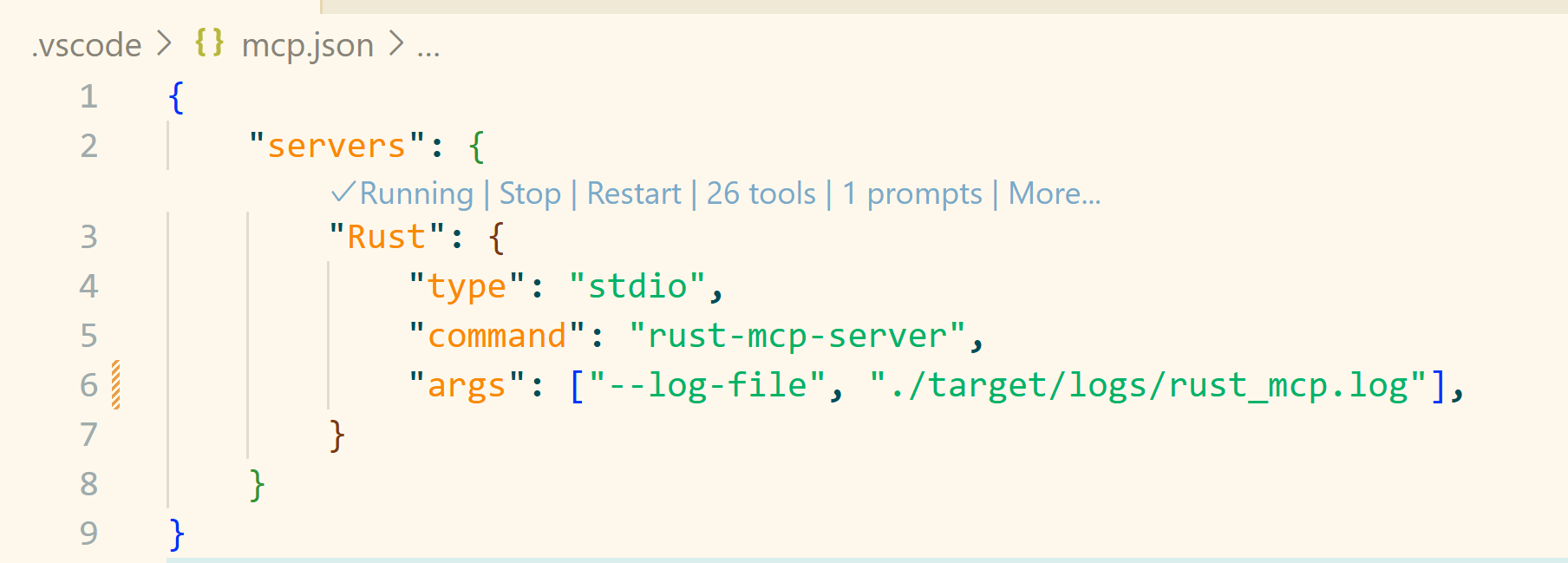
More information you can find by this link.
GitHub Copilot Coding Agent Integration
The Rust MCP Server can be integrated with GitHub Copilot's coding agent to create a powerful autonomous development workflow. For detailed setup instructions for using the Rust MCP Server with GitHub Copilot's coding agent, see copilot-coding-agent.md.
Reviews (0)
Sign in to leave a review.
Leave a reviewNo results found