shodh-memory
Health Pass
- License — License: Apache-2.0
- Description — Repository has a description
- Active repo — Last push 0 days ago
- Community trust — 183 GitHub stars
Code Fail
- rm -rf — Recursive force deletion command in .github/workflows/pypi.yml
Permissions Pass
- Permissions — No dangerous permissions requested
No AI report is available for this listing yet.
Cognitive memory for AI agents — learns from use, forgets what's irrelevant, strengthens what matters. Single binary, fully offline.

Shodh-Memory
Persistent cognitive memory for AI agents and robots. Remembers what matters, forgets what doesn't, gets smarter with use.









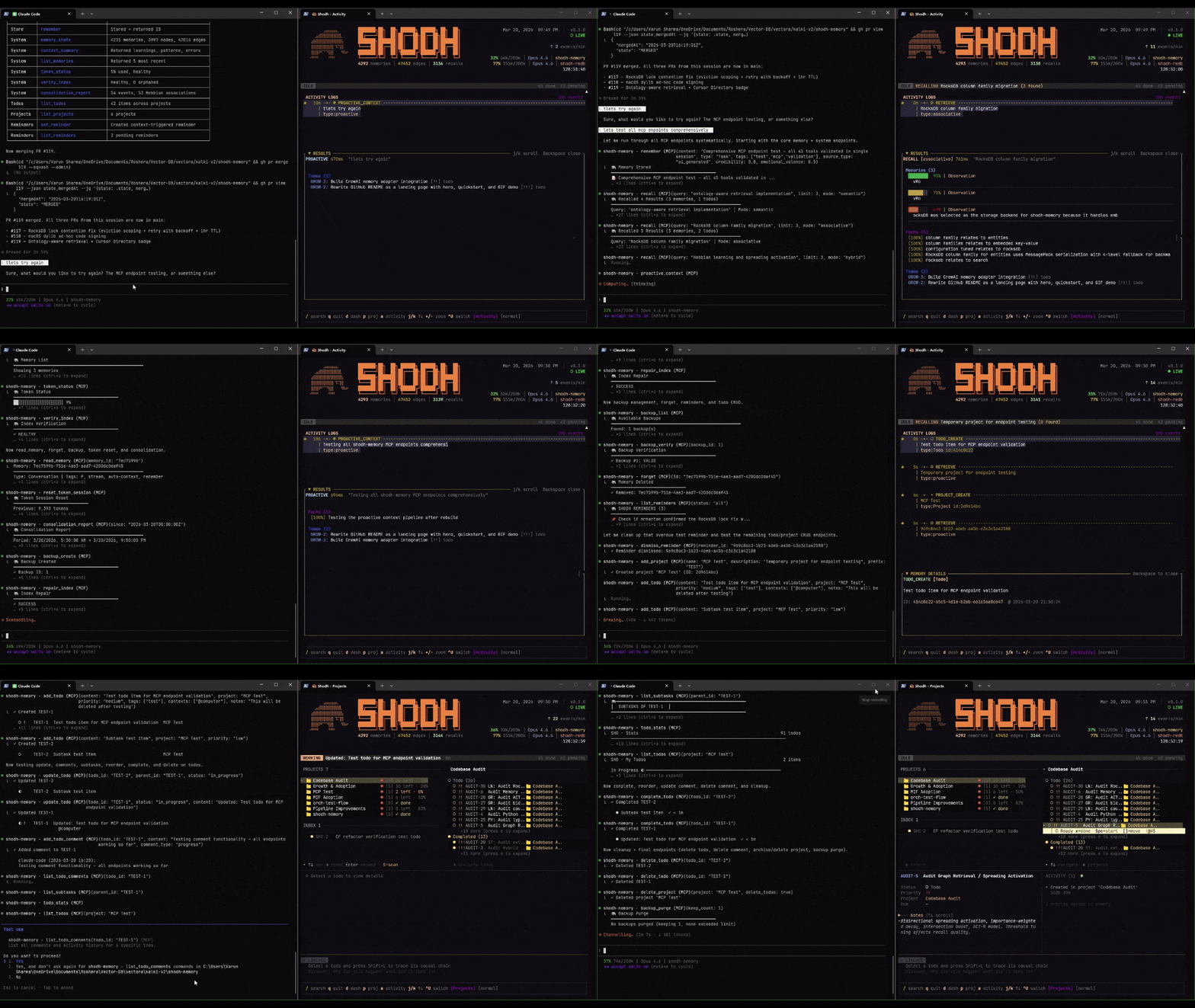
AI agents forget everything between sessions. Robots lose context between missions. They repeat mistakes, miss patterns, and treat every interaction like the first one.
Shodh-Memory fixes this. It's persistent memory that actually learns — memories you use often become easier to find, old irrelevant context fades automatically, and recalling one thing brings back related things. Works for chat agents (MCP/HTTP), robots (Zenoh/ROS2), and edge devices. No API keys. No cloud. No external databases. One binary.
Why Not Just Use mem0 / Cognee / Zep?
| Shodh | mem0 | Cognee | Zep | |
|---|---|---|---|---|
| LLM calls to store a memory | 0 | 2+ per add | 3+ per cognify | 2+ per episode |
| External services needed | None | OpenAI + vector DB | OpenAI + Neo4j + vector DB | OpenAI + Neo4j |
| Time to store a memory | 55ms | ~20 seconds | seconds | seconds |
| Learns from usage | Yes (Hebbian) | No | No | No |
| Forgets irrelevant data | Yes (decay) | No | No | Temporal only |
| Runs fully offline | Yes | No | No | No |
| Robotics / ROS2 native | Yes (Zenoh) | No | No | No |
| Binary size | ~17MB | pip install + API keys | pip install + API keys + Neo4j | Cloud only |
Every other memory system delegates intelligence to LLM API calls — that's why they're slow, expensive, and can't work offline. Shodh uses algorithmic intelligence: local embeddings, mathematical decay, learned associations. No LLM in the loop.
Get Started
Unified CLI
# Download from GitHub Releases (or brew tap varun29ankuS/shodh-memory && brew install shodh-memory)
shodh init       # First-time setup — creates config, generates API key, downloads AI model
shodh server     # Start the memory server on :3030
shodh tui        # Launch the TUI dashboard
shodh status     # Check server health
shodh doctor     # Diagnose issues
One binary, all functionality. No Docker, no API keys, no external dependencies.
Claude Code (one command)
claude mcp add shodh-memory -- npx -y @shodh/memory-mcp
That's it. The MCP server auto-downloads the backend binary and starts it. No Docker, no API keys, no configuration. Claude now has persistent memory across sessions.
Or with Docker (for production / shared servers)# 1. Start the server
docker run -d -p 3030:3030 -v shodh-data:/data varunshodh/shodh-memory
# 2. Add to Claude Code
claude mcp add shodh-memory -- npx -y @shodh/memory-mcp
{
  "mcpServers": {
    "shodh-memory": {
      "command": "npx",
      "args": ["-y", "@shodh/memory-mcp"]
    }
  }
}
For local use, no API key is needed — one is generated automatically. For remote servers, add "env": { "SHODH_API_KEY": "your-key" }.
Python
pip install shodh-memory
from shodh_memory import Memory

memory = Memory(storage_path="./my_data")
memory.remember("User prefers dark mode", memory_type="Decision")
results = memory.recall("user preferences", limit=5)
Rust
[dependencies]
shodh-memory = "0.1"
use shodh_memory::{MemorySystem, MemoryConfig};

let memory = MemorySystem::new(MemoryConfig::default())?;
memory.remember("user-1", "User prefers dark mode", MemoryType::Decision, vec![])?;
let results = memory.recall("user-1", "user preferences", 5)?;
Docker
docker run -d -p 3030:3030 -v shodh-data:/data varunshodh/shodh-memory
What It Does
You use a memory often  →  it becomes easier to find (Hebbian learning)
You stop using a memory →  it fades over time (activation decay)
You recall one memory   →  related memories surface too (spreading activation)
A connection is used    →  it becomes permanent (long-term potentiation)
Under the hood, memories flow through three tiers:
Working Memory ──overflow──▶ Session Memory ──importance──▶ Long-Term Memory
   (100 items)                  (100 MB)                      (RocksDB)
This is based on Cowan's working memory model and Wixted's memory decay research. The neuroscience isn't a gimmick — it's why the system gets better with use instead of just accumulating data.
Performance
| Operation | Latency |
|---|---|
| Store memory (API response) | <200ms |
| Store memory (core) | 55-60ms |
| Semantic search | 34-58ms |
| Tag search | ~1ms |
| Entity lookup | 763ns |
| Graph traversal (3-hop) | 30µs |
Single binary. No GPU required. Content-hash dedup ensures identical memories are never stored twice.
TUI Dashboard
shodh tui
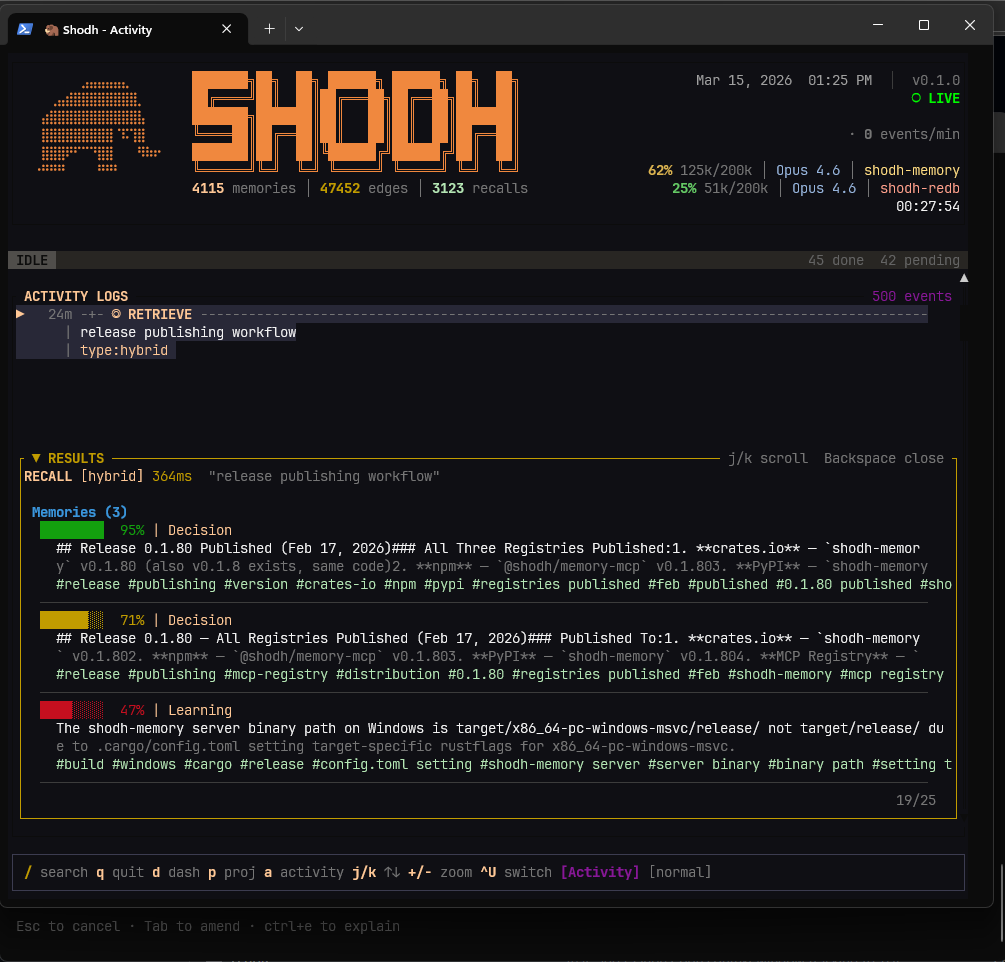
Semantic recall with hybrid search — relevance scores, memory tiers, and activity feed
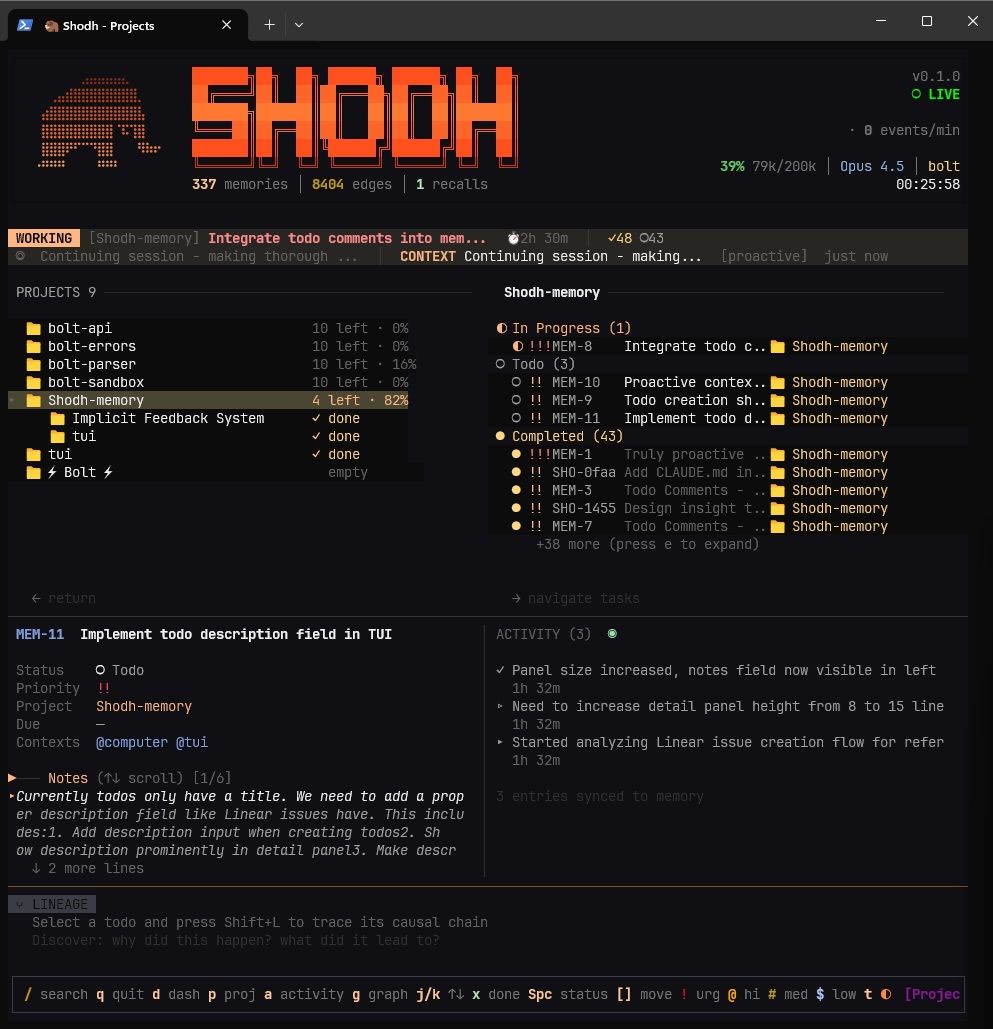
GTD task management — projects, todos, comments, and causal lineage
37 MCP Tools
Full list of tools available to Claude, Cursor, and other MCP clients:
Memoryremember · recall · proactive_context · context_summary · list_memories · read_memory · forget
add_todo · list_todos · update_todo · complete_todo · delete_todo · reorder_todo · list_subtasks · add_todo_comment · list_todo_comments · update_todo_comment · delete_todo_comment · todo_stats
add_project · list_projects · archive_project · delete_project
set_reminder · list_reminders · dismiss_reminder
memory_stats · verify_index · repair_index · token_status · reset_token_session · consolidation_report · backup_create · backup_list · backup_verify · backup_restore · backup_purge
REST API
160+ endpoints on http://localhost:3030. All /api/* endpoints require X-API-Key header.
# Store a memory
curl -X POST http://localhost:3030/api/remember \
  -H "Content-Type: application/json" \
  -H "X-API-Key: your-key" \
  -d '{"user_id": "user-1", "content": "User prefers dark mode", "memory_type": "Decision"}'

# Search memories
curl -X POST http://localhost:3030/api/recall \
  -H "Content-Type: application/json" \
  -H "X-API-Key: your-key" \
  -d '{"user_id": "user-1", "query": "user preferences", "limit": 5}'
Robotics & ROS2
Shodh-Memory isn't just for chat agents. It's persistent memory for robots — Spot, drones, humanoids, any system running ROS2 or Zenoh.
# Enable Zenoh transport (compile with --features zenoh)
SHODH_ZENOH_ENABLED=true SHODH_ZENOH_LISTEN=tcp/0.0.0.0:7447 shodh server

# ROS2 robots connect via zenoh-bridge-ros2dds or rmw_zenoh — zero code changes
ros2 run zenoh_bridge_ros2dds zenoh_bridge_ros2dds
What robots can do over Zenoh:
| Operation | Key Expression | Description |
|---|---|---|
| Remember | shodh/{user_id}/remember |
Store with GPS, local position, heading, sensor data, mission context |
| Recall | shodh/{user_id}/recall |
Spatial search (haversine), mission replay, action-outcome filtering |
| Stream | shodh/{user_id}/stream/sensor |
Auto-remember high-frequency sensor data via extraction pipeline |
| Mission | shodh/{user_id}/mission/start |
Track mission boundaries, searchable across missions |
| Fleet | shodh/fleet/** |
Automatic peer discovery via Zenoh liveliness tokens |
Each robot uses its own user_id as the key segment (e.g., shodh/spot-1/remember). The robot_id is an optional payload field for fleet grouping.
Every Experience carries 26 robotics-specific fields: geo_location, local_position, heading, sensor_data, robot_id, mission_id, action_type, reward, terrain_type, nearby_agents, decision_context, action_params, outcome_type, confidence, failure/anomaly tracking, recovery actions, and prediction learning.
{
  "user_id": "spot-1",
  "content": "Detected crack in concrete at waypoint alpha",
  "robot_id": "spot_v2",
  "mission_id": "building_inspection_2026",
  "geo_location": [37.7749, -122.4194, 10.0],
  "local_position": [12.5, 3.2, 0.0],
  "heading": 90.0,
  "sensor_data": {"battery": 72.5, "temperature": 28.3},
  "action_type": "inspect",
  "reward": 0.9,
  "terrain_type": "indoor",
  "tags": ["crack", "concrete", "structural"]
}
{
  "user_id": "spot-1",
  "query": "structural damage near entrance",
  "mode": "spatial",
  "lat": 37.7749,
  "lon": -122.4194,
  "radius_meters": 50.0,
  "mission_id": "building_inspection_2026"
}
SHODH_ZENOH_ENABLED=true                # Enable Zenoh transport
SHODH_ZENOH_MODE=peer                   # peer | client | router
SHODH_ZENOH_LISTEN=tcp/0.0.0.0:7447    # Listen endpoints
SHODH_ZENOH_CONNECT=tcp/1.2.3.4:7447   # Connect endpoints
SHODH_ZENOH_PREFIX=shodh               # Key expression prefix

# Auto-subscribe to ROS2 topics (via zenoh-bridge-ros2dds)
SHODH_ZENOH_AUTO_TOPICS='[
  {"key_expr": "rt/spot1/status", "user_id": "spot-1", "mode": "sensor"},
  {"key_expr": "rt/nav/events", "user_id": "spot-1", "mode": "event"}
]'
Works with ROS2 Kilted (rmw_zenoh), PX4 drones, Boston Dynamics Spot, humanoids — anything that speaks Zenoh or ROS2 DDS.
Platform Support
Linux x86_64 · Linux ARM64 · macOS Apple Silicon · macOS Intel · Windows x86_64
Production Deployment
Environment variablesSHODH_ENV=production # Production mode
SHODH_API_KEYS=key1,key2,key3 # Comma-separated API keys
SHODH_HOST=127.0.0.1 # Bind address (default: localhost)
SHODH_PORT=3030 # Port (default: 3030)
SHODH_MEMORY_PATH=/var/lib/shodh # Data directory
SHODH_REQUEST_TIMEOUT=60 # Request timeout in seconds
SHODH_MAX_CONCURRENT=200 # Max concurrent requests
SHODH_CORS_ORIGINS=https://app.example.com
services:
  shodh-memory:
    image: varunshodh/shodh-memory:latest
    environment:
      - SHODH_ENV=production
      - SHODH_HOST=0.0.0.0
      - SHODH_API_KEYS=${SHODH_API_KEYS}
    volumes:
      - shodh-data:/data
    networks:
      - internal

  caddy:
    image: caddy:latest
    ports:
      - "443:443"
    volumes:
      - ./Caddyfile:/etc/caddy/Caddyfile
    networks:
      - internal

volumes:
  shodh-data:

networks:
  internal:
The server binds to 127.0.0.1 by default. For network deployments, place behind a reverse proxy:
memory.example.com {
    reverse_proxy localhost:3030
}
Community
| Project | Description | Author |
|---|---|---|
| SHODH on Cloudflare | Edge-native implementation on Cloudflare Workers | @doobidoo |
References
[1] Cowan, N. (2010). The Magical Mystery Four. Current Directions in Psychological Science. [2] Magee & Grienberger (2020). Synaptic Plasticity Forms and Functions. Annual Review of Neuroscience. [3] Subramanya et al. (2019). DiskANN. NeurIPS 2019.
License
Apache 2.0
MCP Registry · Docker Hub · PyPI · npm · crates.io · Docs
Reviews (0)
Sign in to leave a review.
Leave a reviewNo results found