dim0
Health Warn
- License — License: MIT
- Description — Repository has a description
- Active repo — Last push 0 days ago
- Low visibility — Only 6 GitHub stars
Code Pass
- Code scan — Scanned 12 files during light audit, no dangerous patterns found
Permissions Pass
- Permissions — No dangerous permissions requested
No AI report is available for this listing yet.
Agent-native thinking canvas for notes, docs, code, widgets, and board-aware AI on one canvas.

Dim0 - The Thinking Canvas
An agent-native canvas where notes, documents, code, widgets, and AI work together on one board.
Website · Live App · MIT License
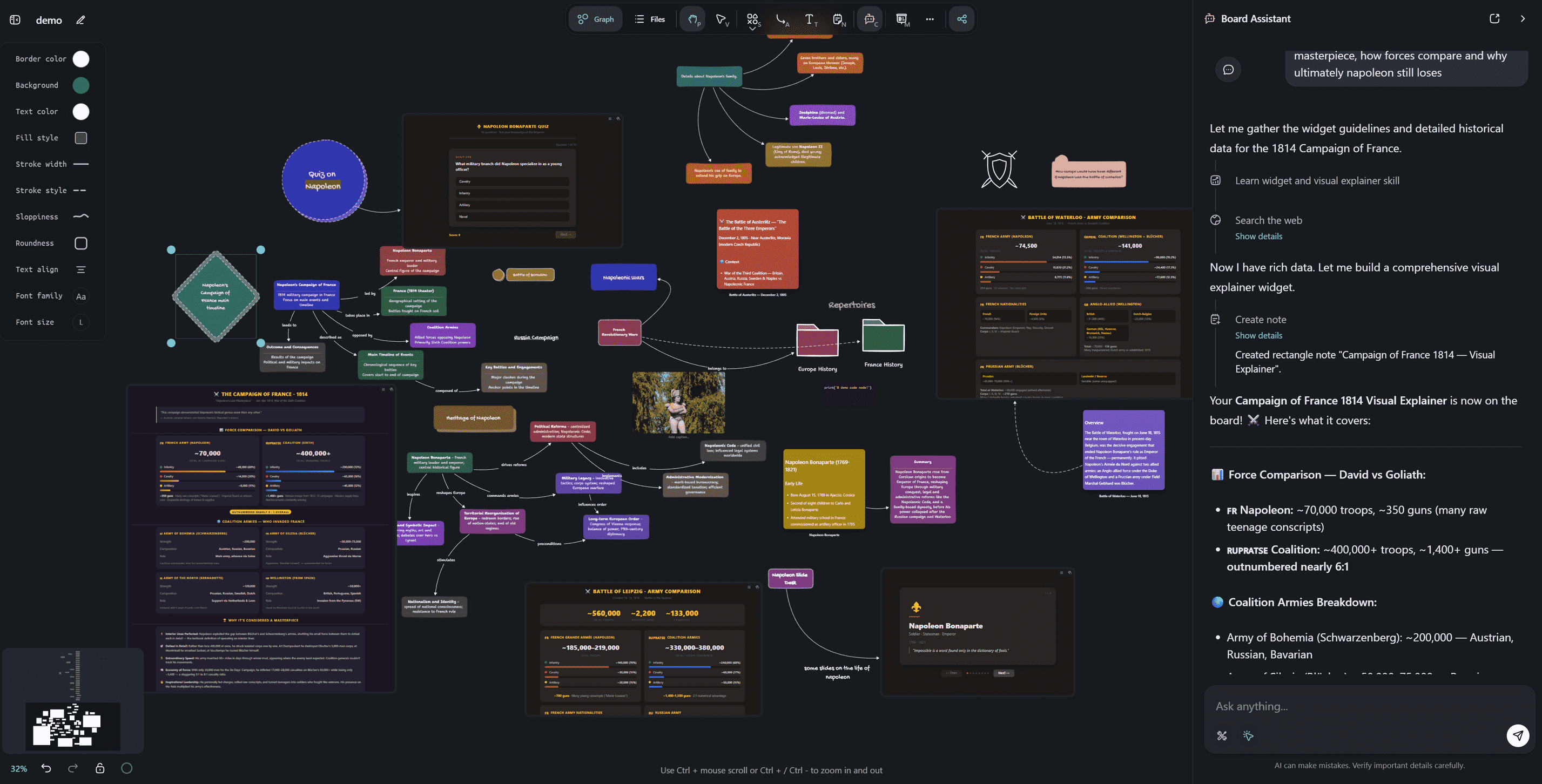
Canvas workspace: notes, agent outputs, and structure on the same board.
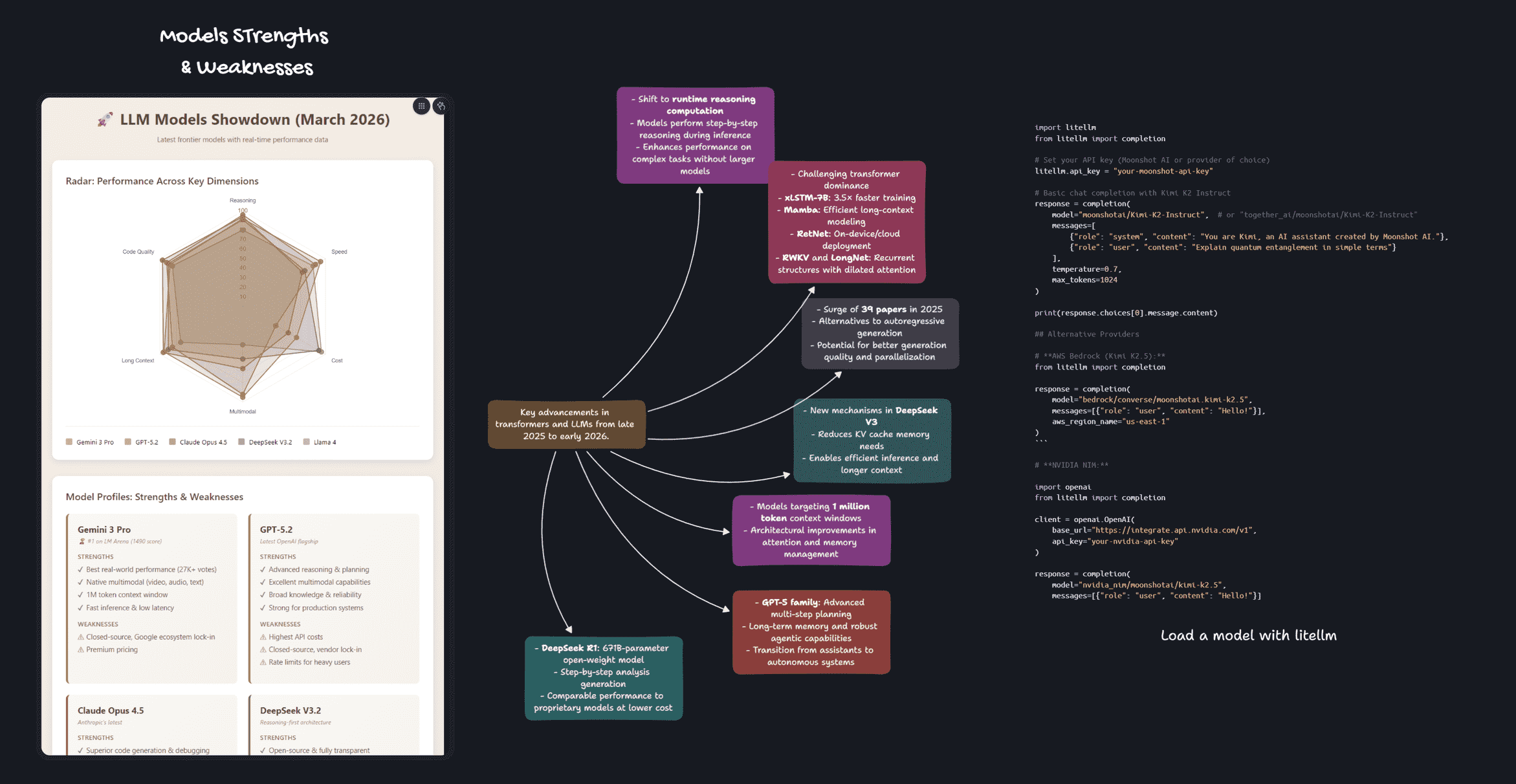
Generated artifacts: code, widgets, and mind maps created directly inside the canvas.
What Dim0 Is
Dim0 is built around one architectural bet: the canvas, not the chat, should be the primary interface for thinking with AI.
Most tools bolt AI onto an existing product as a sidebar. Dim0 is built the other way around: the board is designed for an agent that can read context, use tools, and write results directly back into the workspace.
The agent is not just a chatbot. It can:
- Read live board context and selected nodes
- Reason across multiple steps with tool use
- Search the web and execute code
- Create and edit notes directly on the board
- Generate widgets and visual outputs inside the canvas
Node Types
Everything on the board is a node. Dim0 supports:
- Shape nodes for diagrams and spatial structure
- Rich text notes for writing and editing inside the board
- Code sandbox nodes for writing and running code
- Widget nodes for embedded HTML/JS outputs
- Document nodes for uploaded files and retrieval context
- Nested boards for hierarchical organization
- Frame-based presentation directly from the canvas
Agent Layer
The assistant layer is built on the OpenAI Agents SDK and board-aware tools. It can work with:
- Board context from the current graph and selected nodes
- Note creation and editing tools
- Web search and fetch tools
- Code execution via Daytona-backed sandboxes
- Widget and visual output generation
- Semantic storage and retrieval backed by Qdrant
Model support includes OpenAI, Anthropic, Google Gemini, Mistral, Moonshot, DeepSeek, Qwen, and Z.ai.
Try It
- Hosted app: https://app.dim0.net
- Website: https://dim0.net
- Self-host: follow the setup below
Monorepo Structure
This repository contains the full Dim0 product stack:
backend/: API, agent logic, prompts, model integrations, persistencewebui/: React frontend for the canvas, chat, and board UXbuild/: Docker Compose and build-related assets
Getting Started
Prerequisites
- Node.js (LTS recommended)
uvfor Python dependency management- Docker + Docker Compose (optional, recommended for local services)
Environment Setup
Before running Dim0, create a root .env from .env.sample and review the variables there:
cp .env.sample .env
At minimum, set:
OPENAI_API_KEYMISTRAL_API_KEYOPENROUTER_API_KEYLINKUP_API_KEY
Additional providers and tools can be enabled through the rest of .env.sample.
Important notes:
- Both backend and frontend read the root
.env - Only variables prefixed with
VITE_are exposed to the frontend
Run Published Images
Pull and start the published stack:
make pull
make run
Open http://localhost:3000.
Stop it:
make down-run
Stop it and remove volumes:
make kill-run
Local Development
If you want to run the source code locally instead of the published images, use the steps below.
Start Local Databases
make up-db
Run the Backend
cd backend
uv sync
uv run python -m topix.api.app
The backend uses API_PORT from .env and defaults to 8081.
Run the Frontend
cd webui
npm install
npm run dev
The frontend uses APP_PORT from .env and defaults to 5175.
Environment Variables
The root .env.sample is the source of truth for available configuration.
It includes app ports and origins, model provider keys, search and image provider keys, local service settings, and backend auth and tracing options.
Use it as a checklist when setting up your local environment.
Docker and Deployment
Deployment and local services are managed through Docker Compose with Makefile shortcuts.
Core Commands
| Command | What it does |
|---|---|
make up |
Build if needed and start all services |
make up-build |
Rebuild images, then start all services |
make build |
Build images only |
make rebuild |
Rebuild images without cache |
make down |
Stop and remove containers |
make kill |
Stop and remove containers, images, and volumes |
Service and Debug Commands
| Command | What it does |
|---|---|
make ps |
Show service status |
make logs |
Tail logs for all services |
make logs-s SERVICE=backend-dev |
Tail logs for one service |
make up-s SERVICE=backend-dev |
Start one service |
make build-s SERVICE=webui-dev |
Build one service |
make restart-s SERVICE=backend-dev |
Rebuild and restart one service |
make exec SERVICE=backend-dev CMD="bash" |
Open a shell in a service |
Database Shortcuts
| Command | What it does |
|---|---|
make up-db |
Start only database services |
make down-db |
Stop only database services |
Useful Overrides
You can override the compose profile and env file at invocation time:
make up PROFILE=local ENVFILE=.env
You can also override ports and origins for quick tests:
make up PROFILE=dev API_PORT=9090 API_HOST_PORT=9090 API_ORIGIN=http://localhost:9090
Docker Images
This repo can publish public Docker Hub images for self-hosting:
winlp4ever/dim0-backendwinlp4ever/dim0-webui
Example:
docker pull winlp4ever/dim0-backend:0.1.5
docker pull winlp4ever/dim0-webui:0.1.5
You can also run the published images locally:
make pull
make run
make down-run
make kill-run
Versioning
Dim0 uses one shared semantic version for the whole product. The source of truth is the repo-root VERSION file, and release tooling syncs that version into:
backend/pyproject.tomlwebui/package.jsonwebui/src-tauri/Cargo.toml
Version bumps use Commitizen with Conventional Commits.
Useful commands:
make version-check
make version-sync
make version-bump
The repository also includes GitHub Actions workflows for version checks, releases, and Docker publishing.
Troubleshooting
- If the frontend cannot reach the API, check
VITE_API_URLin.env - If ports are already in use, change
API_PORTorAPP_PORT - If env changes are not applied, restart the backend and frontend after editing
.env - Use
make configto inspect the fully resolved Compose configuration
License
This repository is available under the MIT License.
If Dim0 is useful to you, a GitHub star helps others find it.
Reviews (0)
Sign in to leave a review.
Leave a reviewNo results found