mako
Health Warn
- License — License: NOASSERTION
- Description — Repository has a description
- Active repo — Last push 0 days ago
- Low visibility — Only 5 GitHub stars
Code Pass
- Code scan — Scanned 12 files during light audit, no dangerous patterns found
Permissions Pass
- Permissions — No dangerous permissions requested
No AI report is available for this listing yet.
Local workspace for every coding agent. Run, follow, resume, and move conversations across Claude Code, Codex, Cursor, Grok, Devin, and OpenCode.

Mako
One desktop app for Claude Code, Codex, Cursor, Grok, Devin, and OpenCode.




Alpha. Mako is under active daily development. Expect breaking changes
between releases, features that move or disappear, and rough edges. If
something breaks or confuses you, please
open an issue; every report is
read and helps decide what gets fixed next.
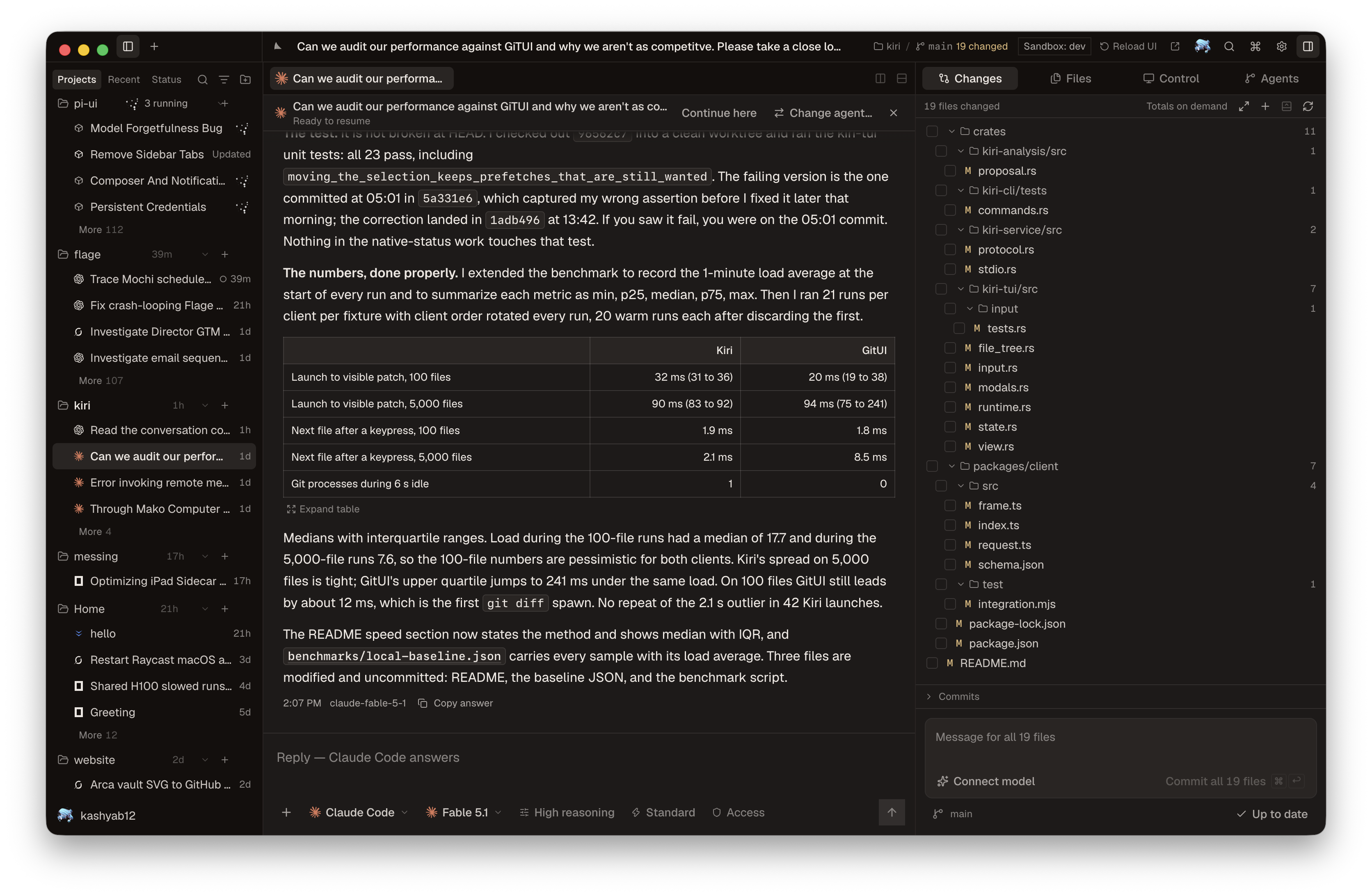
Mako is a macOS workspace for AI coding agents. It finds the sessions your
agent CLIs already created, opens them live, and lets you resume each one with
the tool that made it or hand it to a different agent. Several agents run at
once, each in its own thread, beside the git diff and the files they touch.
Every agent you launch from Mako can also drive your browser and your Mac.
If you keep six terminal tabs open for six different agents, this is the one
window that replaces them.
What it does
- Runs every supported agent side by side. Each thread keeps its own provider,
model, reasoning effort, and access tier. - Lists sessions from Mako, your terminal, and any ACP client such as Zed,
grouped by project and ordered by activity. The list keeps syncing in the
background, so a cold start reads a warm cache instead of scanning disk. - Streams text, reasoning, tool calls, plans, permission prompts, and subagent
work as they happen. An Agents surface shows the subagents a provider spawns. - Resumes a session through its original tool, or continues it with a
different agent. - Gives every launched agent browser and computer control on your machine.
A Control surface shows what the agent last observed. - Keeps related work together as sessions in one thread. Fork after any
answer into a new tab, or continue in a worktree of its own: the thread's
uncommitted changes move with it, and the branch merges back into main when
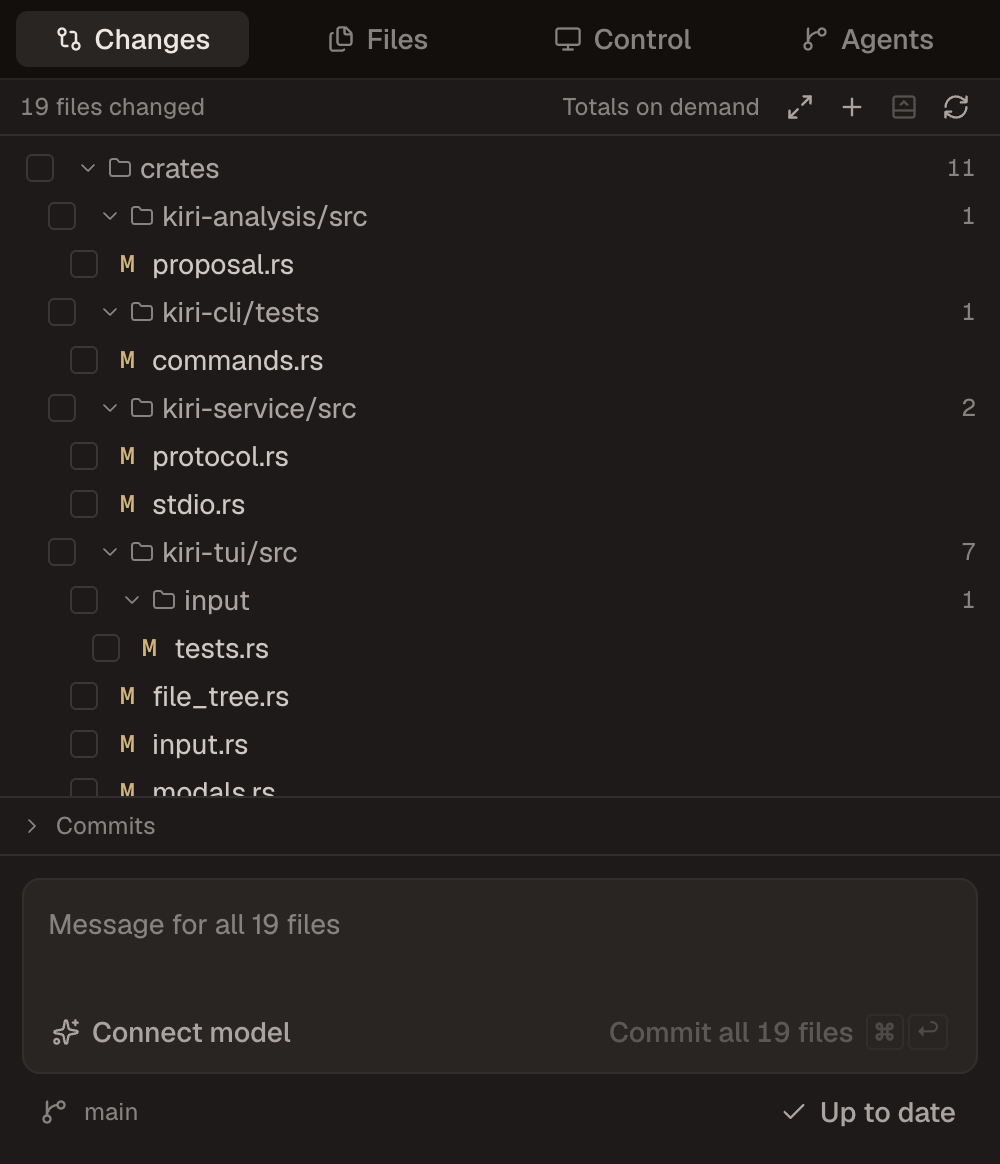
that's safe. - Shows the working tree next to the conversation: changed files, diffs,
history, a commit-message drafter with Fast and Deep modes, and push. - Turns every prompt into a rewind point. Rewinding restores the files as they
were, from snapshots that never touch your repository's object database. - Opens files in tabs beside the chat, with split panes and a terminal dock
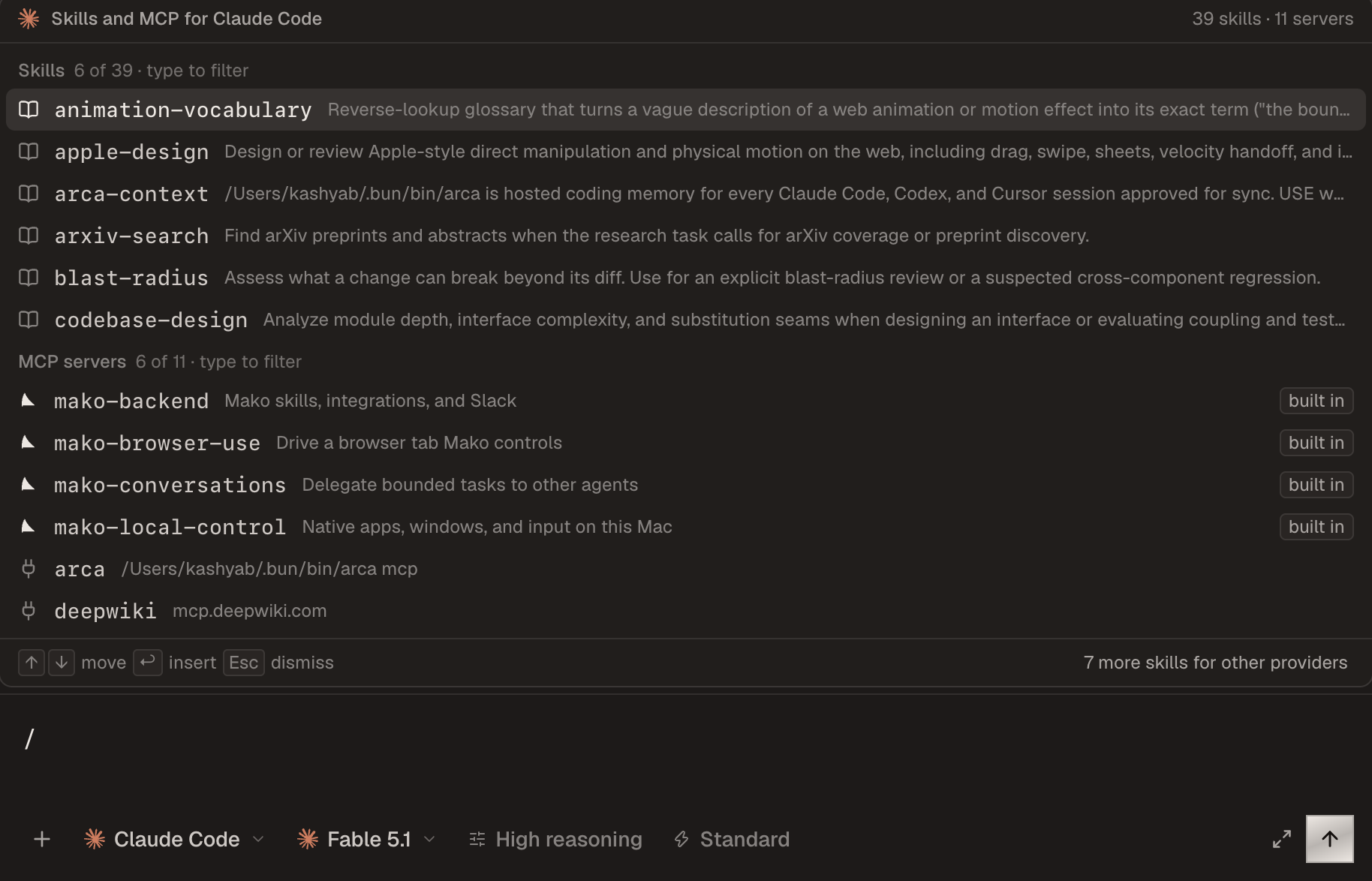
whose shells survive window closes and app restarts. - Lists the selected agent's skills and MCP servers when you type
/or$. - Keeps a Usage page with spend by day, source, and model.
- Runs saved prompts as automations from a committable file in the project,
triggered by hand, file changes, commits, Slack, mail, calendar events, or a
webhook. Every automation arrives switched off on a new machine. - Extends itself. Single-file UI extensions hot-load from your data directory
and can add commands, panels, and slots without a reload.
 |
 |
Sessions from other tools
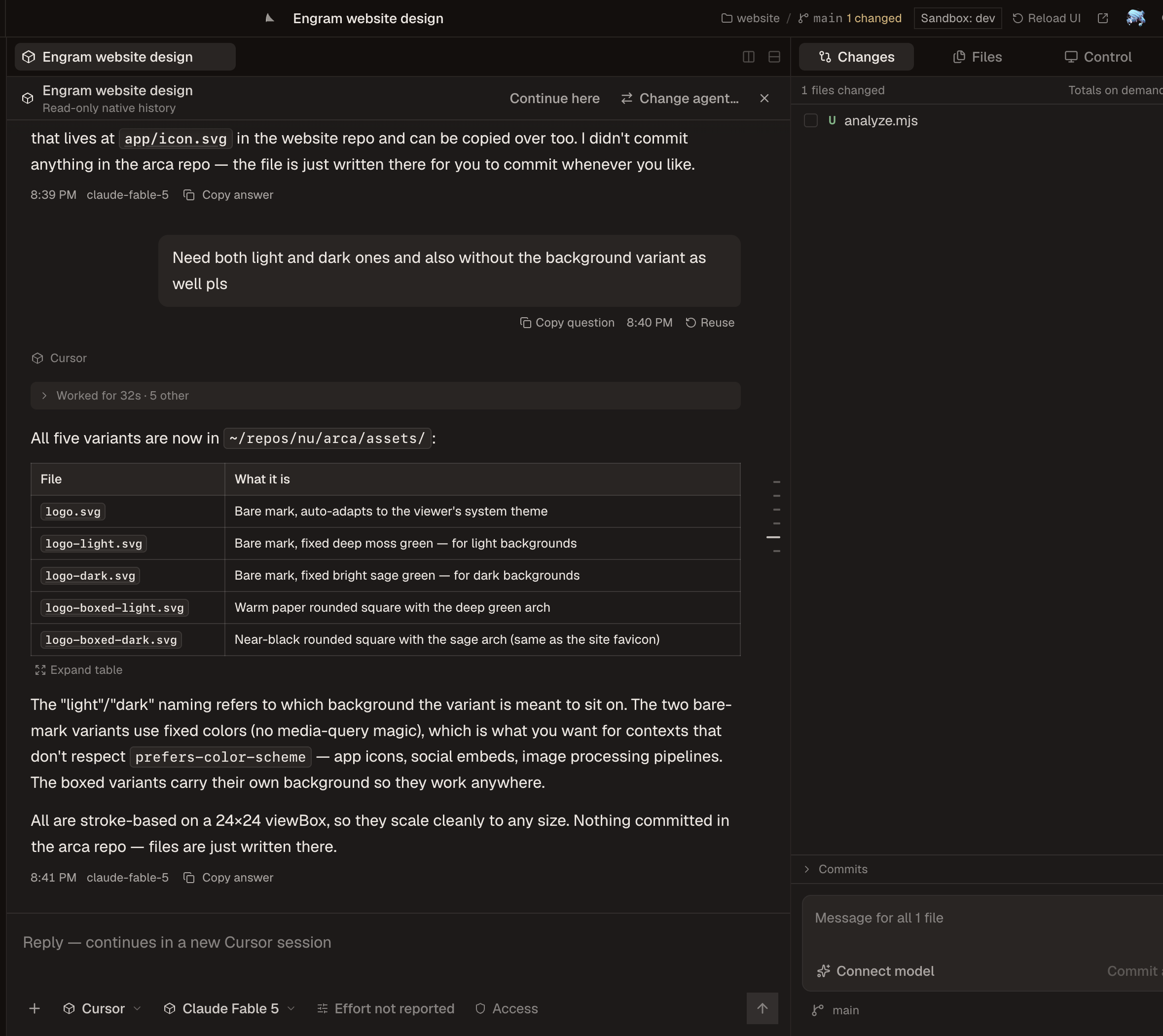
Mako reads each tool's own session store. Credentials stay with the tool that
owns them, and the interface only ever sees a redacted, provider-neutral view.
| Provider | Discover | Follow live | Resume | Transport |
|---|---|---|---|---|
| Claude Code | yes | yes | yes | Agent SDK |
| Codex | yes | yes | yes | app-server |
| Cursor | yes | yes | CLI sessions | ACP |
| Grok | yes | yes | yes | ACP |
| Devin | yes | yes | yes | ACP |
| OpenCode | yes | yes | yes | ACP |
Cursor CLI sessions resume through cursor-agent. Cursor Desktop chats open
read-only and continue by copying the conversation into a new session.
Continuing a thread with a different agent writes a native session into that
agent's own store for Claude Code, Codex, Cursor, and Grok, so its ordinary
resume loads the full history. Devin and OpenCode receive the conversation as
a transcript file that the new session reads first.
Completed tool calls fold into a work log under the answer they produced.
A running turn stays open with live activity. An interrupted turn is marked
interrupted, not presented as finished work.
Access tiers are one ladder across providers: plan, chat, ask, edits, auto,
and full. The picker shows each provider's own name beside the tier, and Mako
never offers a tier nobody enforces. While a turn runs, Enter steers it on
providers that support steering and Cmd+Enter queues the message.
Browser and computer control
Mako attaches its own tools to every session it launches, for every provider,
without editing that provider's MCP configuration. Everything runs on your
Mac over loopback connections.
Browser. The Mako Browser extension for Chrome, Edge, Brave, and Chromium
talks to Mako over native messaging, so no remote-debugging port is ever
opened. Agents open and observe tabs, click, type, press keys, scroll, upload,
handle dialogs, download files, print to PDF, read cookies without values
unless asked, and run scripted sequences. Settings > MCP > Browser access
prepares the extension folder; you load it unpacked and connect each profile.
Mako also exposes itself as a browser target, so an agent can inspect or
screenshot the desk in a hidden window without touching the one you are in.
Computer. Native applications are driven through the CUA driver, an
external install at /Applications/CuaDriver.app or on your PATH. It runs
under Mako's identity, so macOS Accessibility and Screen Recording are granted
to Mako once, from Settings > MCP. Agents list apps and windows, read
accessibility trees, click and type into a window in the background without
taking your pointer, drive menus, and manage the clipboard. Settings shows the
driver version Mako was verified against and offers the driver's own update.
Integrations. Settings > Integrations lists what each agent can reach:
local capabilities such as Browser Use, Computer use, Apple Mail, and Apple
Messages; Google Workspace through your signed-in local browser; GitHub
through the GitHub CLI; and Linear, Notion, Sentry, Atlassian, Slack, and
Microsoft Teams through their own sign-in.
Install
Mako ships for Apple-silicon Macs and is not signed or notarized by Apple.
Read the installer first, then run:
curl -fsSL https://github.com/Verbiflow/mako/releases/latest/download/install-macos.sh | bash
The script downloads the DMG and its published checksum, verifies the DMG
before mounting it, copies only Mako into Applications, and removes quarantine
from that one app. It does not change Gatekeeper or any other macOS policy.
Unsigned builds cannot verify automatic updates, so re-run the same command to
update. See macOS distribution for the full
disclosure and manual DMG steps.
Browser control needs the extension loaded once per Chrome profile. Computer
control needs the CUA driver installed and two macOS permissions granted to
Mako. Both are optional; agents work without them.
Run from source
Requires Node.js 24, Git, and at least one supported agent CLI.
git clone https://github.com/Verbiflow/mako.git
cd mako
npm install
npm run desktop
npm run dev serves the same interface in a browser against your real
sessions. Reload UI picks up renderer edits without restarting agents, andnpm run dev:hot makes that automatic. A source checkout keeps its own data
directory and its own host, so it runs beside the installed app. Opening a
thread never starts an agent. Sending a prompt does.
A source checkout can also produce a locally signed build withnpm run update:local, which builds, waits for running agents to finish,
installs, and reopens Mako. Locally signed installs can rebuild and reinstall
themselves from Settings > Updates. Both fetch origin first: a checkout on
the branch that tracks it, behind it and without uncommitted changes, is
fast-forwarded before building; anything else is built as it is, and Mako
says why. When the installed app already carries that revision, nothing is
rebuilt.
Keyboard
| Keys | Action |
|---|---|
⌘K |
Command palette |
⌘N |
New session |
⌘T / ⌘W |
Attach another session / close the active tab |
⌘⇧[ / ⌘⇧] |
Previous / next attached session |
⌘L |
Focus the composer |
⌘⎋ |
Stop the current turn |
⌘O |
Open folder |
⌘P |
Open a file |
⌘⇧E |
Show the project files |
⌘⇧F |
Search files and conversations |
⌘⇧L |
Search sessions |
⌘⇧G |
Draft a commit message |
⌘⇧D |
Toggle the diff pane |
⌘⇧M |
Switch model |
⌘. |
Cycle reasoning effort |
⌘J |
Terminal dock |
⌘B / ⌘⌥B |
Session list / right sidebar |
⌘1, ⌘2 … |
Chat, then each right-sidebar surface in order |
⌘R |
Reload the interface without stopping agents |
⌘, |
Settings |
⌘/ |
What is where |
Every shortcut can be rebound in Settings > Keyboard shortcuts.
How it is built
Claude Code · Codex · Cursor · Grok · Devin · OpenCode
                        │
                        ▼
      Electron host + @mako/sessions + @mako/git
   provider processes · session stores · git · control tools
                        │
                        ▼
                 React renderer
The host owns provider processes, native session formats, credentials, and
Git. Every Git process runs through @mako/git, which keeps each repository's
status in memory and rereads only the paths that changed. The renderer speaks
one wire contract. Streaming sends only the message in flight,
long lists are virtualized, and unchanged sessions are never reread. Every
provider is installed from one module and no provider gets a privileged path.
Two small processes outlive the host on purpose: a terminal daemon that keeps
your shells alive, and a session sync daemon that watches provider stores.
Both are replaced automatically by the build that starts them. Session sync
runs inside the app by default; "keep syncing when closed" in Settings >
Agents turns it into a user-level login item. AGENTS.md has the
full set of rules.
Security
- Provider credentials stay in provider storage or the macOS Keychain. Keys
for commit drafting are encrypted with Electron's safeStorage. - The host strips secrets before anything reaches the interface. MCP server
listings are redacted, and secret values never cross IPC or logs. - Browser and computer control run on your machine over loopback. There is
no cloud browser mode. The extension talks only to Mako, and the driver
acts under Mako's own macOS permissions. - UI extensions are trusted local code. They run inside Mako's renderer with
full access to its state, so only load files you wrote or read. - Crash reports are kept on disk. With error reports on, each is also sent
once, scrubbed, as described under Telemetry.
Telemetry
Mako sends anonymous usage analytics and error reports to the Mako cloud, so
we can see which harnesses, models and features people use and fix what
breaks. Both are on by default. Turn either off in Settings > Privacy; what
was waiting to be sent is dropped and nothing more goes. DO_NOT_TRACK=1 orMAKO_TELEMETRY=off in Mako's environment turns both off, and then nothing,
not even an install ID, is written.
- Usage analytics: a random install ID, a computer ID, the app version
and OS, which harnesses are installed, and for each turn its harness,
model, reasoning setting, mode, outcome, duration and token counts. Plus a
few feature counts: forks, rewinds, harness switches, automations and cloud
sign-in. - Error reports: crash reports, the kinds of harness records Mako
couldn't read, and each call to the Mako cloud: which kind of call it was,
how long it took, how it ended, and a random ID that matches it to the
cloud's own log of it. Paths, emails, URLs, secrets and quoted text are
scrubbed on your Mac and again by the cloud. - Never sent: prompts, replies, file contents, file and folder names,
Thread titles, repository and branch names, and session IDs.
The computer ID is a salted SHA-256 hash of the ID your OS gives the
computer (on macOS, the hardware UUID), so every install and profile on one
Mac counts once, and a reinstall isn't a new person. Error reports carry it
too. The hash can't be turned back into the hardware ID. While you're signed
in to the Mako cloud, events count for your account, and the first time a
computer signs in to an account, its earlier anonymous events are joined to
that account. Events wait up to 30 seconds and go in one request, sooner once
50 are waiting. The code is in electron/telemetry.ts andelectron/machine-id.ts, and the full list of events is inpackages/host/src/contracts/telemetry.ts.
Development
npm run lint
npm run typecheck
npm test --workspace @mako/sessions
Read AGENTS.md before touching provider or host code.
License
Mako is source-available under the Elastic License 2.0,
© 2026 Verbiflow. Use it, modify it, fork it, and run it for yourself or
your company at any size, free. The license forbids one thing: offering Mako itself to third parties
as a hosted or managed service. Versions up to v0.1.37 were released under
MIT and stay that way.
Third-party components and trademarks are listed in NOTICE.
Contributions are accepted under the terms in
CONTRIBUTING.md. Provider names and marks belong to their
respective owners.
Reviews (0)
Sign in to leave a review.
Leave a reviewNo results found