claude-caption-styles
Health Pass
- License — License: NOASSERTION
- Description — Repository has a description
- Active repo — Last push 0 days ago
- Community trust — 37 GitHub stars
Code Fail
- child_process — Shell command execution capability in scripts/render.js
- fs.rmSync — Destructive file system operation in scripts/render.js
- process.env — Environment variable access in scripts/render.js
- fs module — File system access in scripts/render.js
Permissions Pass
- Permissions — No dangerous permissions requested
No AI report is available for this listing yet.
7 free animated caption styles for Claude Code: Instagram Reels, TikTok and Shorts captions timed to your voice. Type /captions pop-sticker. From Hop Studio by @vibha.in.progress
7 Free Caption Styles for Claude
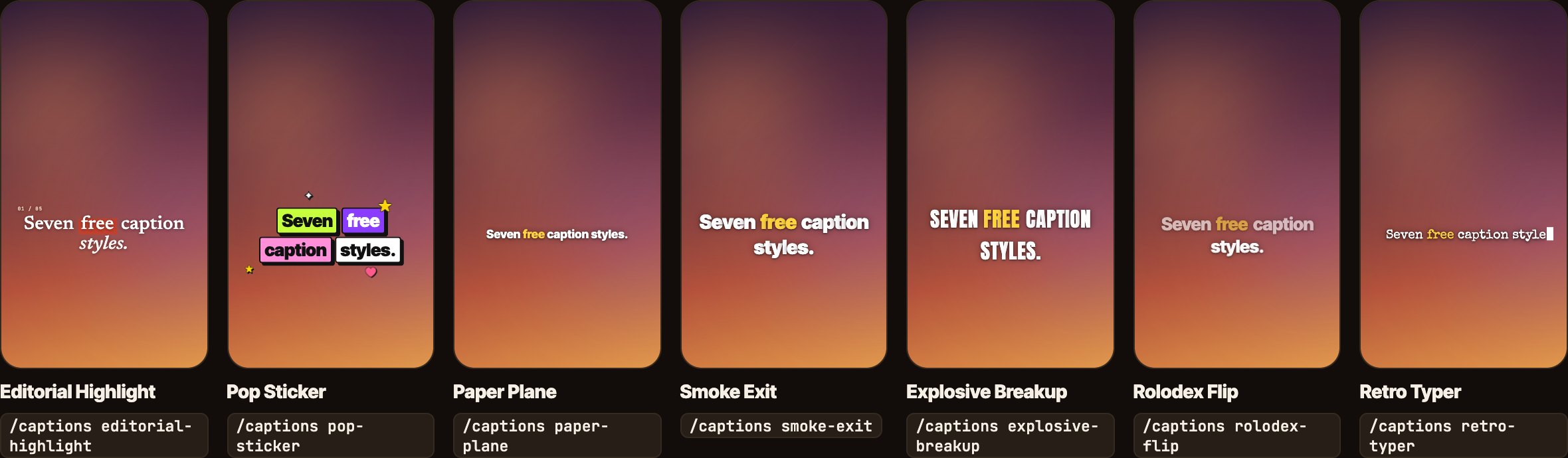
Free animated captions for Instagram Reels, TikTok and YouTube Shorts, made inside Claude Code. Drop your video into Claude, type /captions and a style. You get your video back with animated captions, timed to your voice.
Made by @vibha.in.progress 💛
Want the full set? These 7 are the free starter pack from Hop Studio, my AI video editing studio inside Claude: 47 caption styles (words behind your head, liquid glass, captions on the walls of your room), 220+ video effects and 190+ sound effects. It runs on the Claude plan you already have.
Install (one line)
Open the Terminal app (or the terminal inside Claude Code) and paste:
git clone https://github.com/Vibha-Ramprakash/claude-caption-styles ~/.claude/skills/captions
On Windows (PowerShell), use $HOME\.claude\skills\captions instead of ~/.claude/skills/captions.
Then restart Claude Code.
Not sure how? Open Claude Code and paste: "Install the skill from github.com/Vibha-Ramprakash/claude-caption-styles into ~/.claude/skills/captions". Claude will do it for you.
Use it
- Open Claude Code.
- Drag your video into the chat.
- Type the style you want:
/captions pop-sticker
/captions smoke-exit with coral highlights
/captions retro-typer, a bit higher on screen
Claude finds every word you say, picks one key word per line to highlight, shows you a few check frames, then saves yourvideo_pop-sticker.mp4 next to your original. Your video and audio stay exactly as they were.
The first time, Claude sets itself up (a couple of minutes). It needs ffmpeg, Node, Python and Google Chrome, and it installs what's missing.
The 7 styles
| Type this | What happens |
|---|---|
editorial-highlight |
Magazine serif, the key word lands on a red paper strip |
pop-sticker |
Bold colour blocks with stickers popping around them |
paper-plane |
A paper plane flies across and pulls your words in |
smoke-exit |
Chunky words that dissolve into smoke at the end of each line |
explosive-breakup |
Big caps that blast apart, the key word in sparks |
rolodex-flip |
Each new word flips down like a rolodex card |
retro-typer |
Typewriter letters typed in time with your voice |
See them on your own video first
Open index.html in Chrome. All 7 play side by side. Click Choose video and Choose words file to try each style on you before you render. (No words file yet? Type /captions words my-video.mp4 in Claude.)
Good to know
- This is the starter pack: captions sit on top of your video. Words behind your head, liquid glass, text on the walls of your room and 40 more caption styles are in Hop Studio, the AI video editing studio that runs inside Claude.
- iPhone HDR videos can look washed out. Export as SDR first, or set Settings > Camera > Formats > Most Compatible.
- Free to use in your own videos, including paid client work. Not for resale (see Licence below). A tag when you post is always appreciated 💛
Edit videos with Claude: the Hop Studio family
Hop Studio, the AI video editor that lives inside Claude: 220+ video effects, 47 caption styles, 190+ sound effects and creator-style templates for Instagram Reels, TikTok and YouTube Shorts, in one plugin. One payment, live setup with me.
Free tools:
- 51 free video effects for Claude: orbit, spotlight, glass widgets and more. Type
/effects orbit - 7 motion style prompts for Claude Code: copy-paste starters for motion graphics
- The Claude video editor setup: the exact 7 steps and 4 prompts
- Free masterclass guide: edit your videos with Claude, step by step
- Fable 5.2 video editing prompts: the 4 prompts from the reel
- Remotion cinematic product video skill: kinetic product videos in code
- Free video editing masterclass: set up your editing studio in Claude with me
New effects every week on Instagram: @vibha.in.progress
Licence: free to use, not to resell
- ✅ Use the caption styles in your own videos, including paid client and brand work
- ✅ Change them for your own edits
- ❌ Don't sell them, repackage them, or build them into a product, course, template pack, plugin or app that competes with this pack or with Hop Studio
This covers every caption style in this repo, including the ones published before 28 November 2026. None of them are for resale.
Licence: PolyForm Shield 1.0.0, full text in LICENSE. Want to use the styles inside something you sell? Message me on Instagram first: @vibha.in.progress
Reviews (0)
Sign in to leave a review.
Leave a reviewNo results found