agent-radar
Health Warn
- No license — Repository has no license file
- Description — Repository has a description
- Active repo — Last push 0 days ago
- Community trust — 29 GitHub stars
Code Pass
- Code scan — Scanned 1 files during light audit, no dangerous patterns found
Permissions Pass
- Permissions — No dangerous permissions requested
No AI report is available for this listing yet.
See every coding agent in tmux, know when it stops, jump right to it.
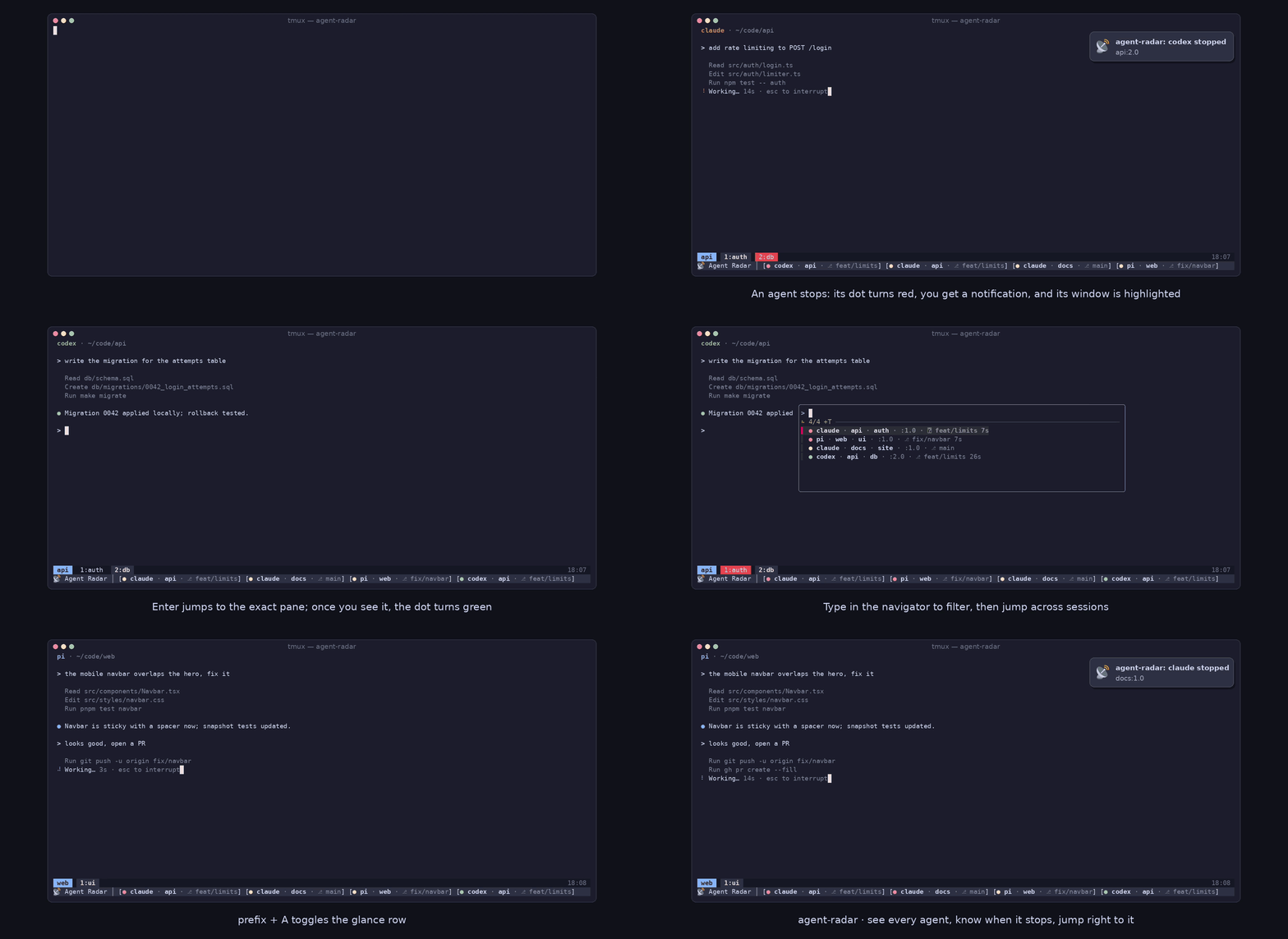
agent-radar
A self-contained tmux plugin that gives you the one herdr feature worth having
without leaving tmux: see every running coding agent, jump straight to the pane
it lives in, and get told the moment any agent stops needing you, for any
harness, not just the ones with hooks.
What it does
- Detects agent panes: any tmux pane whose foreground process matches the
allowlist (pi,claude,codex,opencode,hermes,aider,cursorby default). - Notices when an agent stops: polls each agent pane and looks for the
harness's live working indicator. A pane isworkingwhile that indicator
is on screen and flips tostoppedwhen it's gone for N seconds. - Notifies you: an OS notification fires once per stop transition (via
osascripton macOS,notify-sendon Linux). A tmux window containing an unseen stopped agent stays highlighted until you focus the exact agent pane. - Shows agent panes at a glance: a tinted second status row labeled
📡 Agent Radar │displays bracketed panes with red/yellow/green dots (unseen-stopped, working, seen-stopped) and configurable fields. It does not replace your existing first-row status format. - Navigates:
prefix + aopens an fzf popup listing all agent panes,
stopped ones first, with a red/yellow/green status dot (unseen-stopped,
running, seen-stopped). Each row is harness, session, window name,:window.pane,
then the pane's git branch (⎇ <branch>;-when none), separated by·.
Harness, session, and window name are bold. The address, the branch glyph, and a
stopped age are dim. The list refreshes while open. Pick one and it jumps to that
exactsession:window.pane. Example:● pi · zeta · my-agent-win · :1.0 · ⎇ feat/spam-stop 30s.
Requirements
tmuxfzf(for the navigator popup)- OS notifications use
osascripton macOS andnotify-sendon Linux; if neither is present, the glance row and window highlighting still work. Everything else is cross-platform.
Install
Clone the repo:
git clone https://github.com/vieitesss/agent-radar.git ~/.tmux/plugins/agent-radar
Then add to ~/.tmux.conf. For a one-row baseline and a glance showing only the status dot, session name, and Git branch, put the options before loading the plugin:
set -g status on
set -g @agent-radar-glance-fields 'dot,session,branch'
run-shell ~/.tmux/plugins/agent-radar/agent-radar.tmux
status on gives tmux one row when the glance is off; with the default row setting, agent-radar raises it to two while the glance is on. If you already use custom status rows, keep your chosen base count instead. With TPM, skip the clone and run-shell: put the options before set -g @plugin 'vieitesss/agent-radar', then load TPM as usual with run '~/.tmux/plugins/tpm/tpm'. Do not load the plugin twice. Reload with tmux source-file ~/.tmux.conf.
The glance tint defaults to the theme's @thm_surface_0 when available (for example, Catppuccin), otherwise terminal palette color colour8. To choose a different shade, add set -g @agent-radar-glance-tint '@thm_mantle' before loading the plugin, or use a tmux color such as #303446. Set it to default to inherit the original status background. Palette option names resolve when the row renders, so a theme can load after this setting.
Usage
prefix + a: open the navigator popup, select an agent, jump to its pane.prefix + A: toggle the glance row for the live tmux server. This does not change@agent-radar-glancein your config; sourcing the config restores that setting.- The default fields
dot,targetrender📡 Agent Radar │ [● zeta:1.0] [● other:2.1]. The installation example usesdot,session,branchand renders📡 Agent Radar │ [● karakuri · ⎇ main] [● mentormatic · ⎇ feat/spam-stop]; a missing branch appears as-. Panes are separated by a space, while fields within a pane use·where applicable. The label remains when fewer panes fit on a narrow row. - Windows containing unseen stopped agents stay highlighted until you focus the exact pane. With the glance off, highlights and seen marks refresh when you switch windows rather than on every status interval. The plugin does not add to
status-left.
Options
Set with tmux set-option -g <name> <value> (or set -g in ~/.tmux.conf):
| Option | Default | Meaning |
|---|---|---|
@agent-radar-processes |
pi,claude,codex,opencode,hermes,aider,cursor |
Comma-separated agent executable names to detect; script/launcher-based agents (hermes, opencode via uvx, …) are matched by their command-line arguments too |
@agent-radar-idle-seconds |
3 |
Seconds with no working indicator before a pane is "stopped" (the one calibration knob) |
@agent-radar-poll-interval |
2 |
Seconds between poll cycles |
@agent-radar-sound |
off |
Play a short sound cue when an agent stops (in addition to the OS notification); on to enable. At most one sound per 3-second window across all panes. Requires afplay (macOS) or canberra-gtk-play/paplay (Linux); silent no-op if no player is found. |
@agent-radar-notify |
on |
Emit an OS notification when an agent pane stops; off to silence. Independent of @agent-radar-sound. |
@agent-radar-glance |
on |
Desired glance state when the plugin loads or config is sourced; off disables it by default. prefix + A changes only the live state. |
@agent-radar-glance-fields |
dot,target |
Comma-separated fields in display order: dot, target (session:window.pane), harness, session, window, branch (⎇ name from Git in the pane directory, or - if unavailable), age (stopped panes only). Unknown fields are skipped. |
@agent-radar-glance-tint |
@thm_surface_0 if present, else colour8 |
Background tint for only the glance row. Accepts a tmux color (#RRGGBB, colourN, named color), a global palette option (such as @thm_mantle), or default to inherit the theme's status background. |
@agent-radar-glance-row |
2 |
One-based status row to use; row 2 is status-format[1]. An occupied custom row is not overwritten; choose an unused row only if the earlier rows also belong on screen. |
@agent-radar-working-pattern |
braille + square-bar glyphs + msg=interrupt |
ERE for an agent's live working indicator, matched byte-wise; defaults to the braille glyph (pi/claude/codex), opencode's square progress bar, or hermes' prompt-line running hint. Override for agents that use a different indicator |
@agent-radar-key |
a |
Prefix key that opens the navigator popup |
@agent-radar-popup-width |
40% |
Popup width |
@agent-radar-popup-height |
30% |
Popup height |
@agent-radar-popup-position |
C |
Popup position: C, x,y, or corner shorthand (tl/tr/bl/br) |
@agent-radar-window-color |
red |
Background color for windows containing unseen stopped agents |
Releasing
To release, create and push an annotated vX.Y.Z tag on main with a message
like Release vX.Y.Z: <summary>. The tag push runs the test suite and, if it
passes, publishes a GitHub release with notes generated from conventional
commits since the previous tag.
Reviews (0)
Sign in to leave a review.
Leave a reviewNo results found