claudescope
Health Warn
- License — License: MIT
- Description — Repository has a description
- Active repo — Last push 0 days ago
- Low visibility — Only 5 GitHub stars
Code Warn
- process.env — Environment variable access in packages/server/perf/compare.ts
- process.env — Environment variable access in packages/server/perf/run.ts
Permissions Pass
- Permissions — No dangerous permissions requested
No AI report is available for this listing yet.
A scope for your Ai coding-agent sessions
Claudescope


A scope for your AI coding-agent sessions.
Claudescope is a local, read-only viewer that brings every AI coding-agent
transcript on your machine into one place — to browse, read, search, and analyze.
Sessions from every agent that worked in a directory are merged under one
project, each tagged with the agent that produced it. It runs entirely on your
machine and only ever reads your transcripts.
Supported agents
| Agent | Transcripts read from |
|---|---|
| Claude Code | ~/.claude/projects/**/*.jsonl |
| OpenAI Codex | ~/.codex/sessions/**/rollout-*.jsonl |
| JetBrains Junie | ~/.junie/sessions/session-*/events.jsonl |
Each source is optional — a directory that doesn't exist is simply skipped, so
Claudescope works whether you use one agent or all three. Adding another is just
adding another connector.
What it can do
- Multi-agent — Claude Code, Codex, and Junie sessions side by side, each labeled with an agent badge. A project that several agents touched shows one card with all its agent tags; drill in and filter the session list by agent.
- Browse every session grouped by project — titles, dates, message/tool counts, token totals, cost, git branch, PR links.
- Read a session as a clean threaded conversation: markdown, syntax-highlighted code, collapsible thinking, paired tool calls + results, syntax-highlighted red/green diffs for edits, attachments, and sidechain/subagent turns. A built-in find-in-session bar (⌘/Ctrl+F) searches the whole transcript — including collapsed thinking, tool, and subagent content — auto-expanding and highlighting matches, with a user/assistant filter.
- Review changes via a Files changed tab that aggregates every edit/write in the session by file, with per-file diffs and +/− counts (diffs load lazily per file).
- Export / share a session to Markdown — download or copy it, with an optional toggle to redact home-dir paths and likely secrets.
- Search full-text across all sessions, all agents (DuckDB BM25), with highlighted snippets that deep-link to the exact message.
- Analyze token usage and cost over time, by project, by model, and by agent — including cache-hit ratio.
- Light & dark themes — follows your system appearance, with a manual toggle.
Privacy: Everything runs locally on
127.0.0.1. The app never writes to~/.claude,~/.codex, or~/.junie— all are read-only sources. Its only persistent
state lives in~/.claudescope/— a DuckDB index, a copy of the pricing file, and
a cached pricing snapshot (pricing.fetched.json), all safe to delete anytime. The
sole outbound requests are an optional daily check for a newer published version
(claudescope update) and an optional daily pricing refresh (claudescope pricing update); nothing about your transcripts ever leaves your machine.
Screenshots
The screenshots below use synthetic demo data — every project name, path,
and message is fabricated (acme-webis a multi-agent project: Claude Code +
Codex). They render light or dark to match your system. Regenerate them withnpm run screenshots(seeds the demo data, boots the app, and captures
every view in both themes via Playwright).
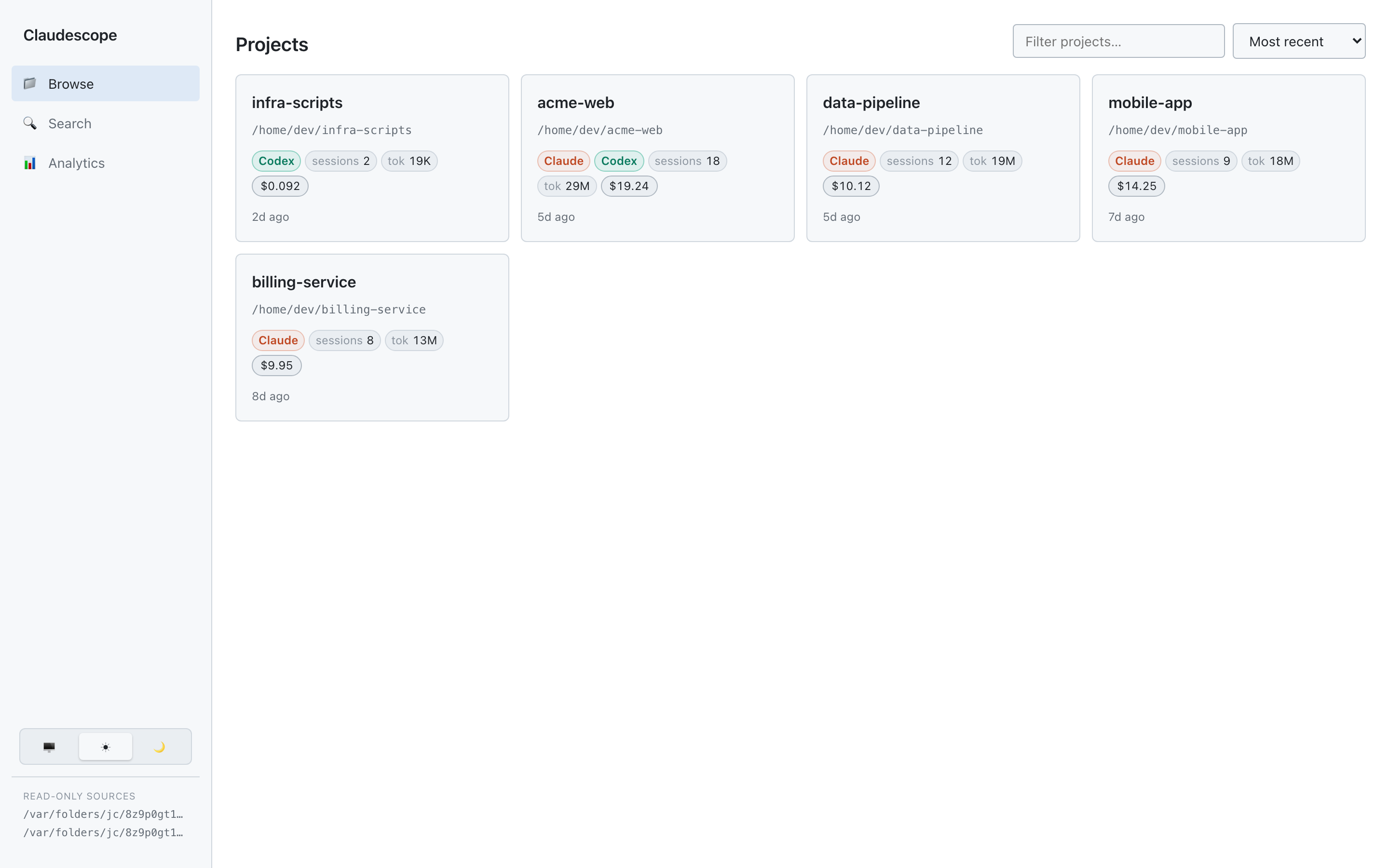
Browse — every project and its sessions at a glance, each tagged with the
agents that worked in it: titles, dates, message & tool counts, token totals,
cost, git branch, and PR links.
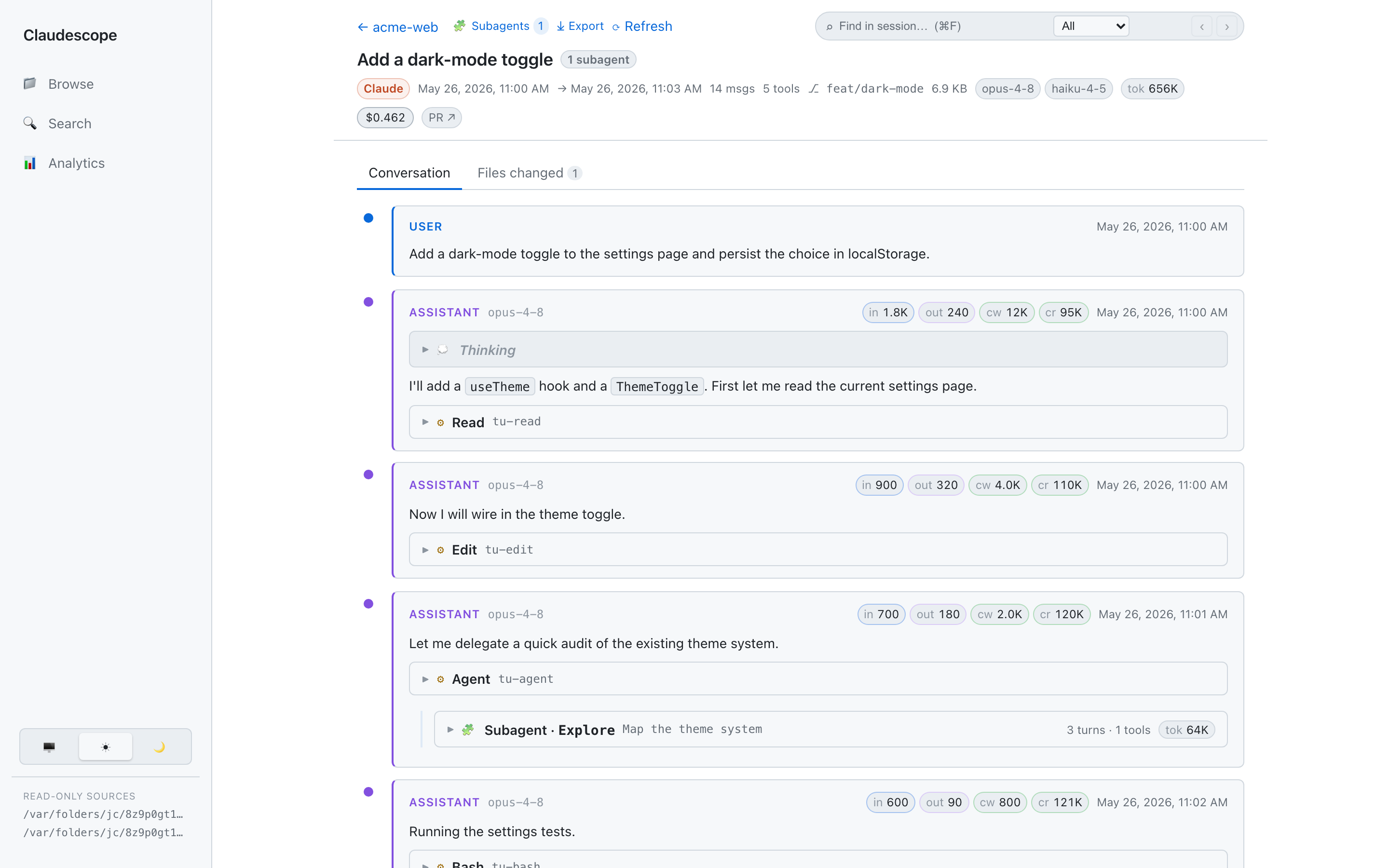
Read — a session as a clean threaded conversation: markdown, collapsible
thinking, syntax-highlighted red/green diffs for edits, nested subagent
runs, per-message token chips, and a find-in-session bar (⌘/Ctrl+F) that
auto-expands and highlights matches. The breadcrumb links back to the project's
session list; Conversation / Files-changed tabs and an ⤓ Export (Markdown,
optional redaction) sit in the header.
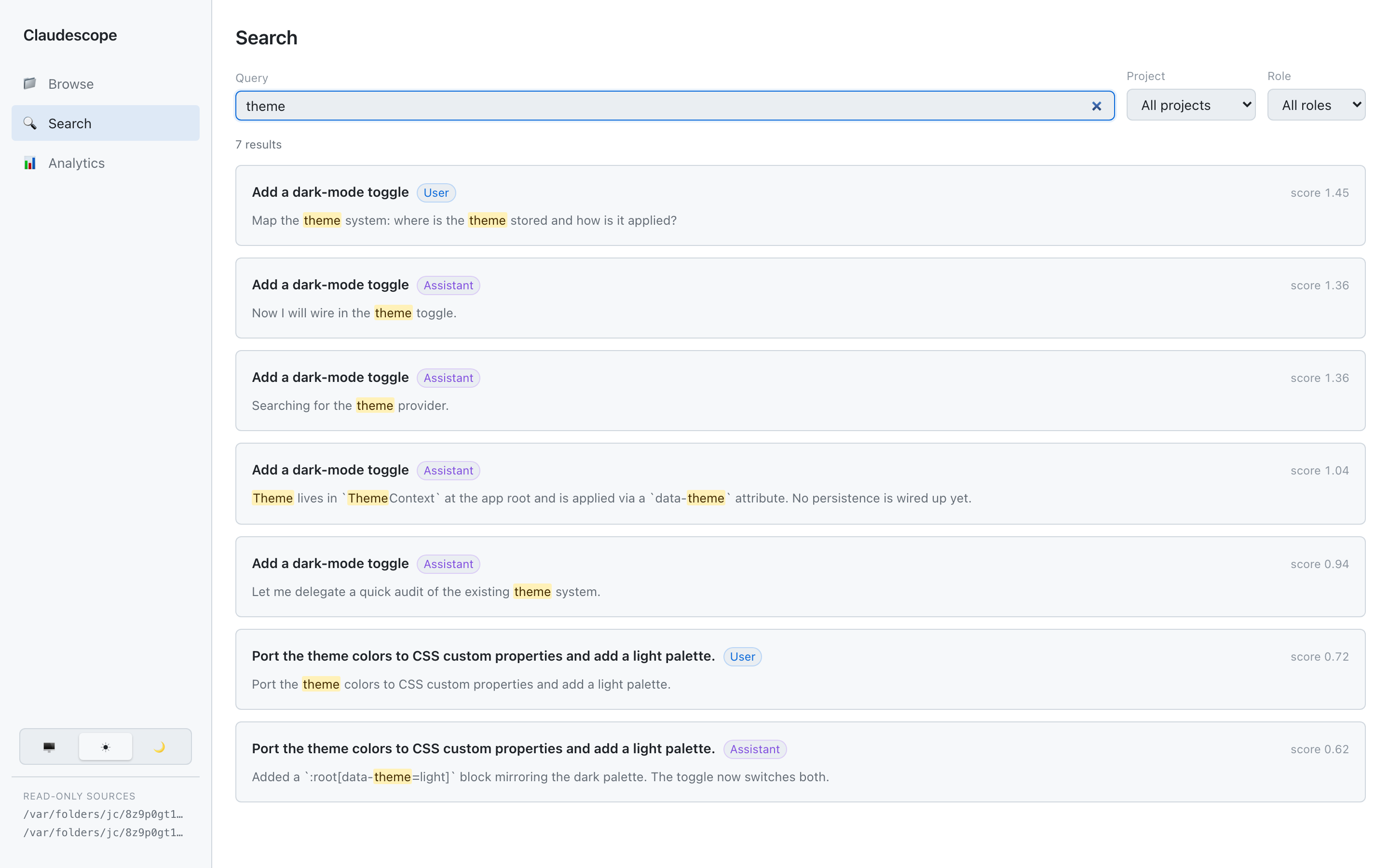
Search — full-text across every session and agent (DuckDB BM25) with
highlighted snippets and user/assistant filters; each result deep-links to the
exact message.
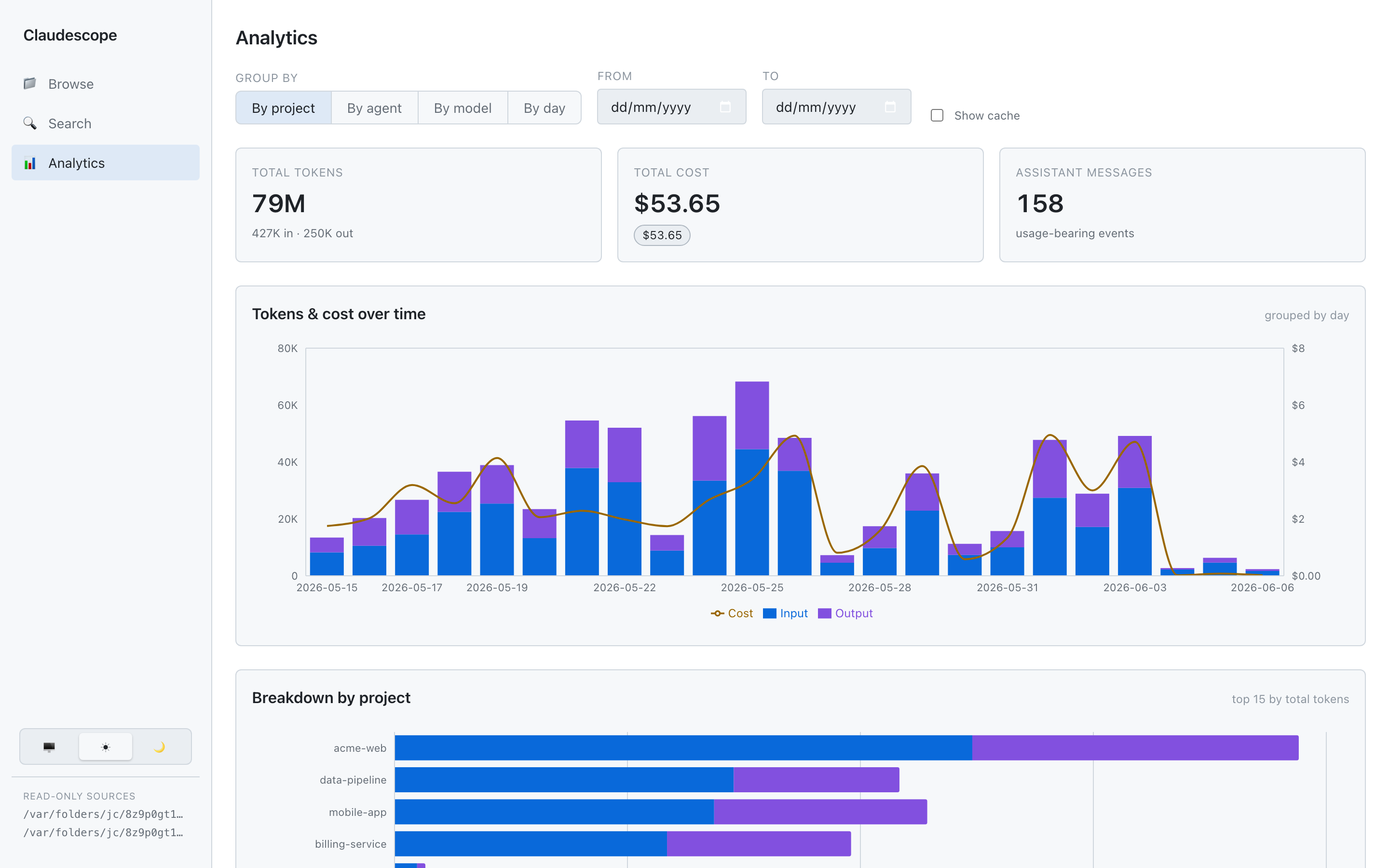
Analyze — token & cost analytics over time, by project, by model, and by
agent, with a cache-read breakdown. Click a chart legend to toggle a series.
Quick start
Prerequisite: Node.js 22 or newer (node -v).
Install (recommended)
npm install -g @vladar107/claudescope
claudescope            # starts the app in the background and opens your browser
claudescope serves the whole app (UI + API) from a single port
(http://localhost:4317 by default), runs in the background, and opens
your browser. Run it once and forget it; new sessions appear automatically.
Try it without installing:
npx @vladar107/claudescope
Other install methods
# Homebrew (macOS / Linux)
brew tap vladar107/tap
brew install claudescope

# Nix (any platform) — run without installing, or add to a profile
nix run github:vladar107/claudescope
nix profile install github:vladar107/claudescope
All channels wrap the same package; claudescope update detects how you
installed it and points you at the right upgrade command.
Commands
claudescope            # = claudescope start
claudescope start      # start in the background (idempotent), open the browser
claudescope stop       # stop the background server
claudescope restart    # restart it
claudescope status     # is it running? is an update available?
claudescope open       # open the running app in your browser
claudescope logs -f    # tail the server log
claudescope update          # upgrade to the latest published version and restart
claudescope pricing update  # fetch current model prices (LiteLLM) into the local rate table
claudescope help            # full usage

# options: --port <n>   (default 4317, or $PORT)
#          --no-open    (don't open the browser on start)
Updating later is just claudescope update (or npm i -g @vladar107/claudescope@latest).
Run from source
git clone https://github.com/vladar107/claudescope && cd claudescope
npm install      # installs all workspace dependencies
npm start        # builds on first run, then serves the app in the foreground
npm start runs in the foreground (Ctrl-C to stop) — handy for development.
Configuration
All optional — set via environment variables.
| Variable | Default | Description |
|---|---|---|
PORT |
4317 |
Port the app listens on (or --port <n>). |
CLAUDE_PROJECTS_DIR |
~/.claude/projects |
Where to read Claude Code transcripts from. A leading ~ is expanded. |
CODEX_SESSIONS_DIR |
~/.codex/sessions |
Where to read OpenAI Codex transcripts from. A leading ~ is expanded. |
JUNIE_SESSIONS_DIR |
~/.junie/sessions |
Where to read JetBrains Junie transcripts from. A leading ~ is expanded. |
CLAUDESCOPE_HOME |
~/.claudescope |
Where the app keeps its own state (index, pricing copy, logs, PID). |
REINDEX_INTERVAL_MS |
15000 |
How often to auto-pick-up new/updated sessions. Set 0 to disable. |
Each agent source is optional — if a directory doesn't exist it's simply skipped,
so the app works whether you use one agent or all three.
Examples:
claudescope --port 8080                                  # custom port
CLAUDE_PROJECTS_DIR=/path/to/exported/projects claudescope  # view someone else's transcripts
CODEX_SESSIONS_DIR=/path/to/codex/sessions claudescope   # point at Codex sessions elsewhere
JUNIE_SESSIONS_DIR=/path/to/junie/sessions claudescope   # point at Junie sessions elsewhere
claudescope --no-open                                    # don't pop a browser tab
The startup banner prints the resolved URL and the source directories in use, so
you can always confirm what it's reading.
Cost methodology
Cost is an estimate computed locally from token usage — Claudescope has no
access to your real billing. For every assistant event (the events that carryusage), it sums each token type times its per-million-token rate:
cost = ( input_tokens          × input_rate
       + output_tokens         × output_rate
       + cache_creation_tokens × cache_write_rate
       + cache_read_tokens     × cache_read_rate ) ÷ 1,000,000
The per-event cost is computed once at index time and stored, so analytics is
just a SUM over events; a project/session total is the sum of its events.
Rates are resolved in a layered lookup:
- Fetched exact id —
~/.claudescope/pricing.fetched.json(auto-refreshed
daily from LiteLLM's community price table,
covering Anthropic, OpenAI, Gemini, xAI, Mistral, and DeepSeek models). - Local exact id —
~/.claudescope/pricing.json(seeded on first run from
the shipped default; user-editable; takes precedence over the fetched snapshot
for any id it defines explicitly). - Family match —
opus/sonnet/haiku/gemini/gptsubstring in
the model id → the matching family rate frompricing.json. - Default — the
defaultentry inpricing.json.
The family step means version- or date-suffixed ids (e.g. claude-haiku-4-5-20251001,gpt-5.x-codex, gemini-2.5-flash) still price correctly. pricing.json is the
user-editable fallback and override layer for families and the default rate; the
fetched snapshot provides exact per-model rates for all known models.
Shipped fallback rates (USD per 1M tokens):
| family / model | input | output | cache write (5m) | cache read |
|---|---|---|---|---|
| Opus 4.5–4.8 | $5 | $25 | $6.25 | $0.50 |
| Opus 4.1 / 4 | $15 | $75 | $18.75 | $1.50 |
| Sonnet 4.x | $3 | $15 | $3.75 | $0.30 |
| Haiku 4.5 | $1 | $5 | $1.25 | $0.10 |
| Gemini 2.5 Pro-class | $1.25 | $10 | — | $0.31 |
| GPT-5 | $0.63 | $5 | — | $0.13 |
| GPT-5.4 | $2.50 | $15 | — | $0.50 |
| GPT-5.5 | $5 | $30 | — | $0.50 |
<synthetic> |
$0 | $0 | $0 | $0 |
- Rates auto-refresh daily in the background while the server runs. Run
claudescope pricing updateto force a refresh at any time. New rates apply
to newly indexed events; existing indexed costs are unchanged. - Edit
~/.claudescope/pricing.jsonto override families, the default rate, or
pin specific model prices. Re-index (POST /api/reindexorclaudescope restart) to recompute stored costs at the new rates. - The
opus/sonnet/haiku/gemini/gptfamily rules use current
pricing; the deprecated Opus 4 / 4.1 ($15/$75) and specific GPT-5 versions are
pinned via exactmodelsentries. Add an exact entry to override any model.
Caveat: these are list-price estimates — they ignore any discounts,
service tier, or batch pricing, and the cache-write rate assumes the 5-minute
TTL. Treat totals as approximate and best for relative comparison
(project vs project, day vs day), not as an invoice.
The "Input from cache" stat is a separate metric:cache_read ÷ (cache_read + cache_creation + input) — the share of prompt tokens
served from cache (legitimately high for Claude Code, which re-reads cached context each turn).
Usage notes
- First launch builds the app and indexes your transcripts in the background
(a few seconds). The browse/search/analytics views populate once indexing
finishes —/api/healthreports{"ready":true}when it's done. - New sessions appear automatically. The app re-scans on an interval
(REINDEX_INTERVAL_MS, default 15s) and incrementally picks up new or updated
transcripts — including the session you're currently running — without a
restart. In an open session, hit ⟳ Refresh (or ⌘R / Ctrl+R) to pull the
latest messages in place without losing your scroll position. Each scan is
near-free when nothing changed; you can also force one withPOST /api/reindex. - Thinking blocks appear empty because Claude Code stores only a signature
(and Codex only encrypted reasoning), not the plaintext — the app notes this
explicitly. (Not a bug.) - Codex sessions have no stored title, so the title falls back to the first
user message. - Junie sessions render differently. Junie records an event-sourced UI stream
rather than a chat log, so a session reads as tool / terminal / file blocks plus
a final result — there's no assistant prose or thinking to show. Pasted
screenshots are surfaced inline. Older Junie sessions don't record a working
directory and group under an "(unknown — Junie)" project.
How it works
npm-workspaces monorepo:
| Package | Role |
|---|---|
packages/shared |
TypeScript types — the API + data contract shared by server and web. |
packages/server |
Fastify API + DuckDB index (@duckdb/node-api). Serves the built UI. |
packages/web |
Vite + React UI (react-markdown, Shiki, Recharts). |
DuckDB reads the JSONL natively (read_ndjson) for indexing, full-text search,
and analytics; a small TypeScript parser assembles the threaded view for a single
session. The index is a derived cache — if it's ever corrupted (e.g. the process
is killed mid-write) the app discards and rebuilds it automatically.
Each agent is a connector (packages/server/src/connectors/). Claude Code
JSONL is projected per-row; Codex spreads a session across record types and Junie
records an event-sourced UI stream, so those connectors normalize a session to
canonical NDJSON first — after that the indexing, search, cost, and threading
paths are shared. Adding another agent is adding another connector.
Development
npm run dev        # server (watch) on :4317 + Vite dev server on :5317 with HMR
npm run typecheck  # tsc -b across all packages
npm run build      # production build (shared → web → server)
npm run serve      # run the built server without rebuilding
npm test           # run the test suite (Vitest)
npm run test:watch # watch mode
Tests use Vitest. Unit tests cover the thread/subagent
parser and pure helpers; the integration suite builds a real DuckDB index
from synthetic fixtures (in a temp dir / temp DB — your real ~/.claude is never
touched) and exercises every API endpoint end-to-end via Fastify inject().
In dev, open the Vite URL (http://localhost:5317); it proxies /api to the
server.
Releasing
The published package is a single bundle assembled by npm run bundle (esbuild
inlines the server + shared lib; the web build and a default pricing file are
copied alongside; only @duckdb/node-api stays an external native dependency).
Releases are tag-only — never published from a laptop:
npm version patch        # bumps package.json + creates the vX.Y.Z tag
git push --follow-tags   # the tag triggers .github/workflows/release.yml → npm publish
The release workflow verifies the tag matches package.json, runs the tests,
bundles, and publishes. Auth uses npm Trusted Publishing (OIDC) — noNPM_TOKEN secret — and provenance is attached automatically.
Security & privacy
Claudescope runs entirely on your machine. It treats ~/.claude, ~/.codex, and~/.junie as read-only, binds to 127.0.0.1 only, and sends no telemetry. Its only
outbound requests are a cached npm-registry version check for the update notice
and a daily fetch of public model pricing rates from LiteLLM (disable withPRICING_REFRESH_INTERVAL_MS=0). SeeSECURITY.md for the full breakdown of filesystem, network,
shell, and self-update behavior — and how to report a vulnerability.
Troubleshooting
- App is empty / "sessions directory not found" — none of
CLAUDE_PROJECTS_DIR,CODEX_SESSIONS_DIR, orJUNIE_SESSIONS_DIRpoints at real transcripts. Check
the banner and set them correctly. Any source can be absent; only the present
ones are indexed. Error: listen EADDRINUSE :4317— the port is taken; runclaudescope --port <n>.- Node version errors — you need Node ≥ 22 (
node -v). - Stale or wrong data — delete
~/.claudescope/index.duckdb*andclaudescope restartto rebuild the index from scratch. @duckdb/node-apiinstall issues — it ships prebuilt native binaries;
re-runnpm installon a supported platform (macOS, Linux, Windows x64/arm64).
License
MIT © Vladislav Ramazaev
Reviews (0)
Sign in to leave a review.
Leave a reviewNo results found