kraal
Health Warn
- License — License: Apache-2.0
- Description — Repository has a description
- Active repo — Last push 0 days ago
- Low visibility — Only 5 GitHub stars
Code Pass
- Code scan — Scanned 12 files during light audit, no dangerous patterns found
Permissions Pass
- Permissions — No dangerous permissions requested
No AI report is available for this listing yet.
Your coding agents and your servers, in one terminal: a multiplexer that knows which agent needs you, which server is production, and asks before an agent acts on it.
kraal
Your coding agents and your servers, in one terminal.
Install · Quick start · Docs · Releases




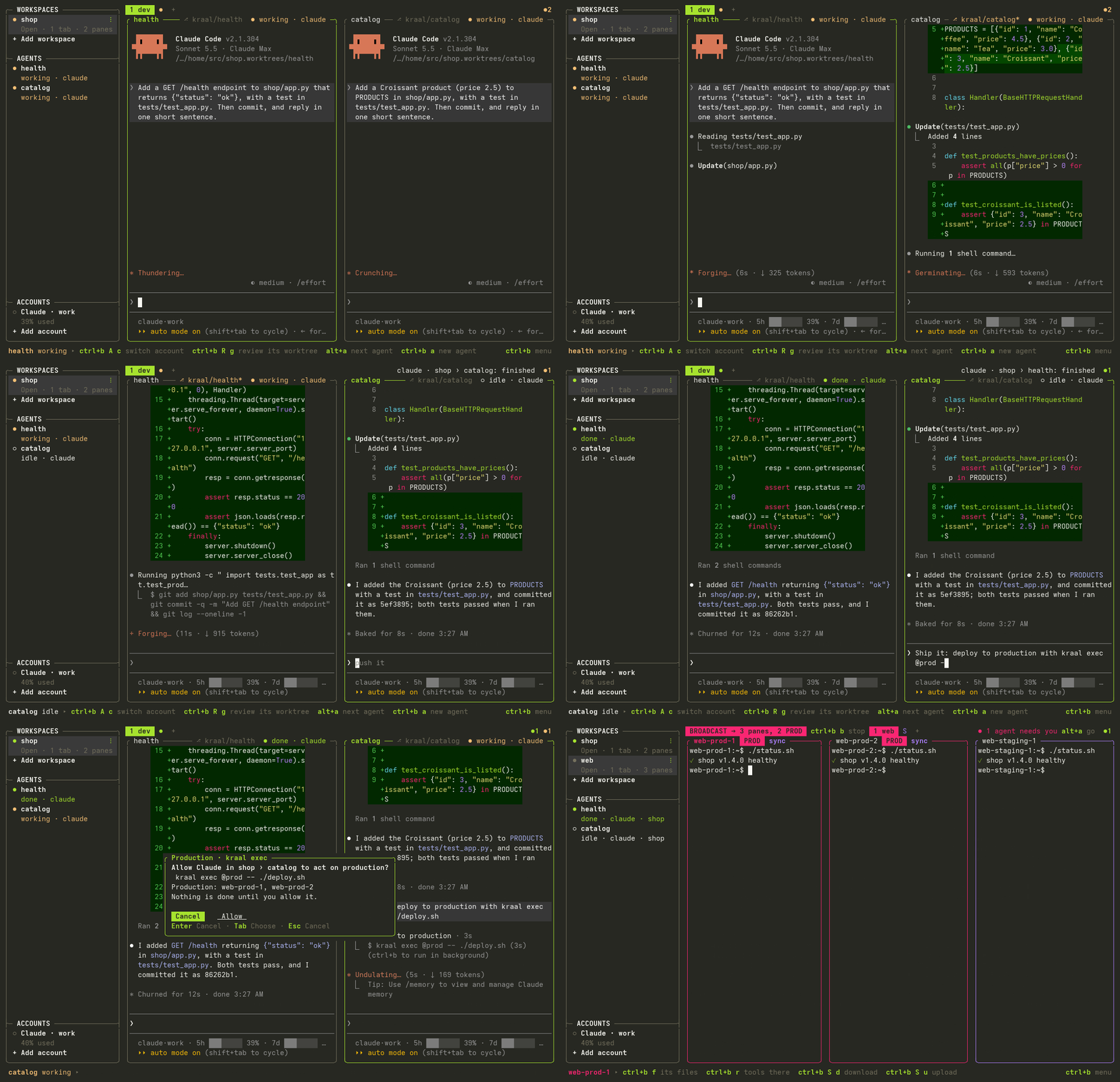
kraal is a terminal multiplexer for developers who run coding agents, and for the people who look
after servers: often the same person. Each pane knows the agent working there and the account it
uses, the server it is on, and whether that server is production.
For your coding agents
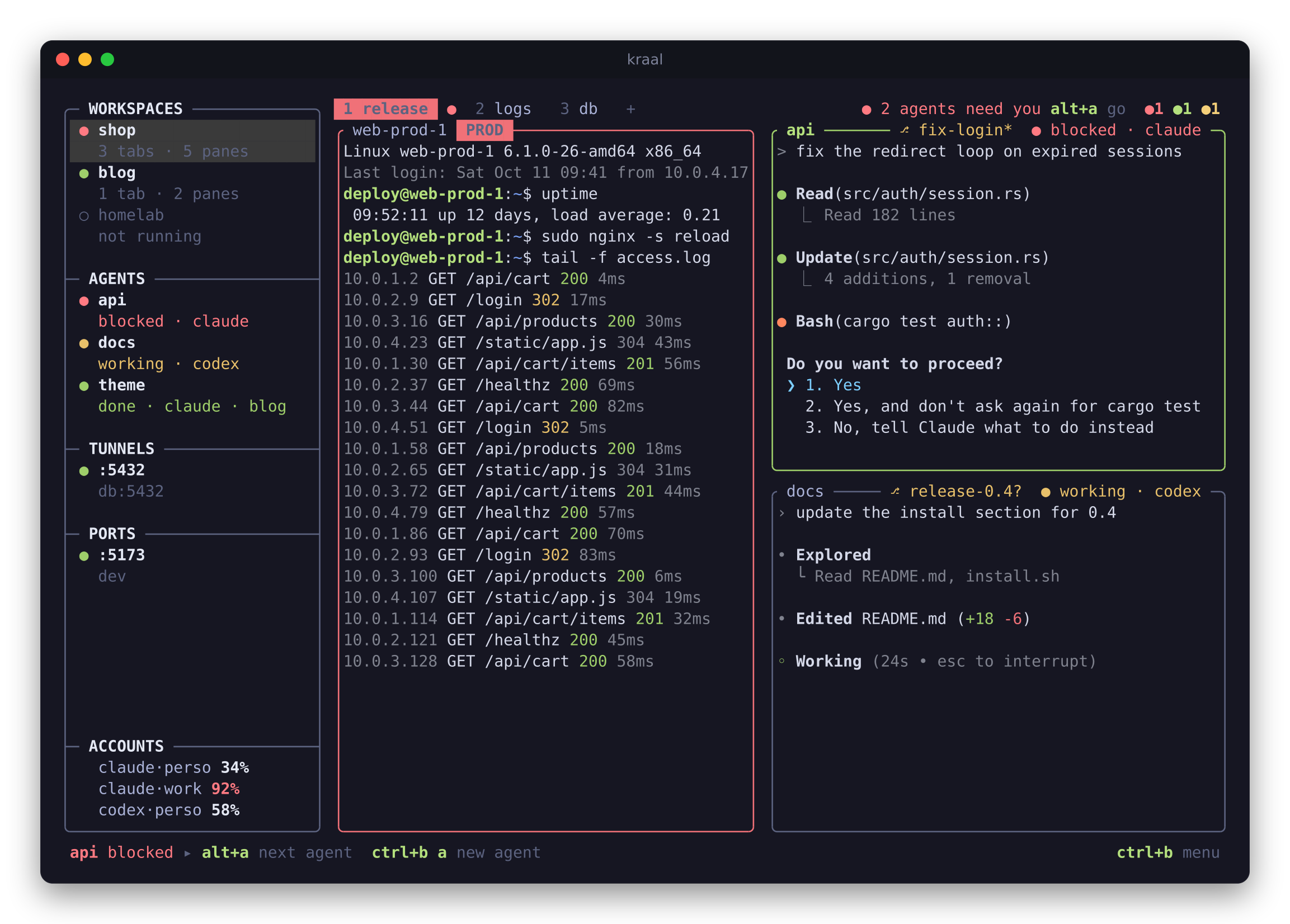
- See which agent needs you. Claude Code, Codex, OpenCode, Gemini and 26 others are marked
working, blocked or done, in the sidebar and on their pane, with a desktop notification. Those
running in kraal on your servers are listed too.alt+ajumps to the next one that needs you. - Several agents on one repository. Start an agent in its own worktree and branch, then
review, commit, open a pull request or merge without leaving kraal. - Named Claude and Codex accounts. See each account's 5-hour and weekly usage, choose
accounts per project, and change an agent pane's account with an Undo action. Claude can
continue a verified conversation; changing Codex accounts starts a new one.
Accounts and limits
For your servers
- Your servers, one key away. Add a server explicitly, or review a discovered connection
before saving it. Open one, or a whole group in a grid; type in all of them at once; copy files
between any two; keep tunnels open. kraal uses your ownsshand installs nothing on servers. - Production looks like production. A pane on a production server, cluster, Terraform
workspace or AWS profile gets a red frame. kraal asks before broadcast typing or a multi-line
paste lands there. When an agent acts on production through kraal (kraal exec,cp,rm,ssh,send…), you see the exact plan and approve it first, and it is logged.
Production - Runbooks that stop at the first failure. Procedures kept as files run server by server
after showing their plan, and log everything. Your Markdown docs run block by block.
Everywhere
- Close the terminal, keep working. Sessions keep running when the window closes or the
connection drops. Workspaces keep their layout automatically, including after Close, and
Delete offers recovery. After a reboot, kraal restores saved layouts and available scrollback;
resume rules determine which programs restart. - Tools where you are. lazygit, k9s, htop or the logs open on the focused pane's server or in
its directory.ctrl+b olabels every link, path, commit or pod on screen, to copy or open it. - One binary, any modern terminal. Linux and macOS. The kitty keyboard protocol (Shift+Enter
reaches Claude Code), images in panes (kitty graphics and sixel), shell integration, the mouse.
Install
curl -fsSL https://raw.githubusercontent.com/vodhash/kraal/main/install.sh | sh
Or, with Rust 1.88 or later:
cargo install kraal
The script takes the prebuilt archive for your
machine (Linux and macOS, x86_64 and arm64), checks its checksum and installs into~/.local/bin. To update later, kraal update for the script's install, cargo install kraal
again for Cargo's. More ways
Quick start
kraal
This starts a session, or attaches to the one already running. Press ctrl+b and let go: a menu
shows what each next key does. ctrl+b w opens Workspaces, ctrl+b s opens Servers,ctrl+b a starts an installed agent, with named accounts for Claude and Codex. Use ctrl+b A l for Accounts
and + Add account if none is listed. Each management list has + Add; search only filters.
The bar at the bottom shows what can be done in the focused pane, and its keys.
To leave, ctrl+b d detaches: programs keep running, and kraal brings you back where you were.ctrl+b q quits: programs stop, and the layout is saved for the next kraal.
kraal reads each agent's state from its screen. To get exact states from the agent itself, install
its hooks once (here Claude Code; kraal integration status lists the others):
kraal integration install claude
Why not tmux, Ansible or plain ssh?
Keep them: kraal runs your own ssh, and its panes run whatever you ran in tmux. What it adds is
the layer between them:
| tmux | Ansible, pdsh | kraal | |
|---|---|---|---|
| Layouts and scrollback restored after a reboot | with plugins | — | built in |
| Which agent is working, blocked or done, and on which account | — | — | ✔ |
| One command on a whole group of servers | — | ✔ | ✔ kraal exec @group |
| A live grid of servers, typing in all of them at once | by hand | — | ✔ |
| Production framed in red, confirmations before it is reached | — | — | ✔ |
| An agent's production actions through kraal wait for your approval | — | — | ✔ |
| Runbooks that show their plan and stop at the first failure | — | playbooks | ✔ |
Local-first
No account and no telemetry. kraal reaches the network only for what you ask: your ssh
connections, git and gh for pull requests, and kraal update. Nothing is installed on your
servers unless you ask for it (kraal remote-install). Apache-2.0.
Keys you can guess
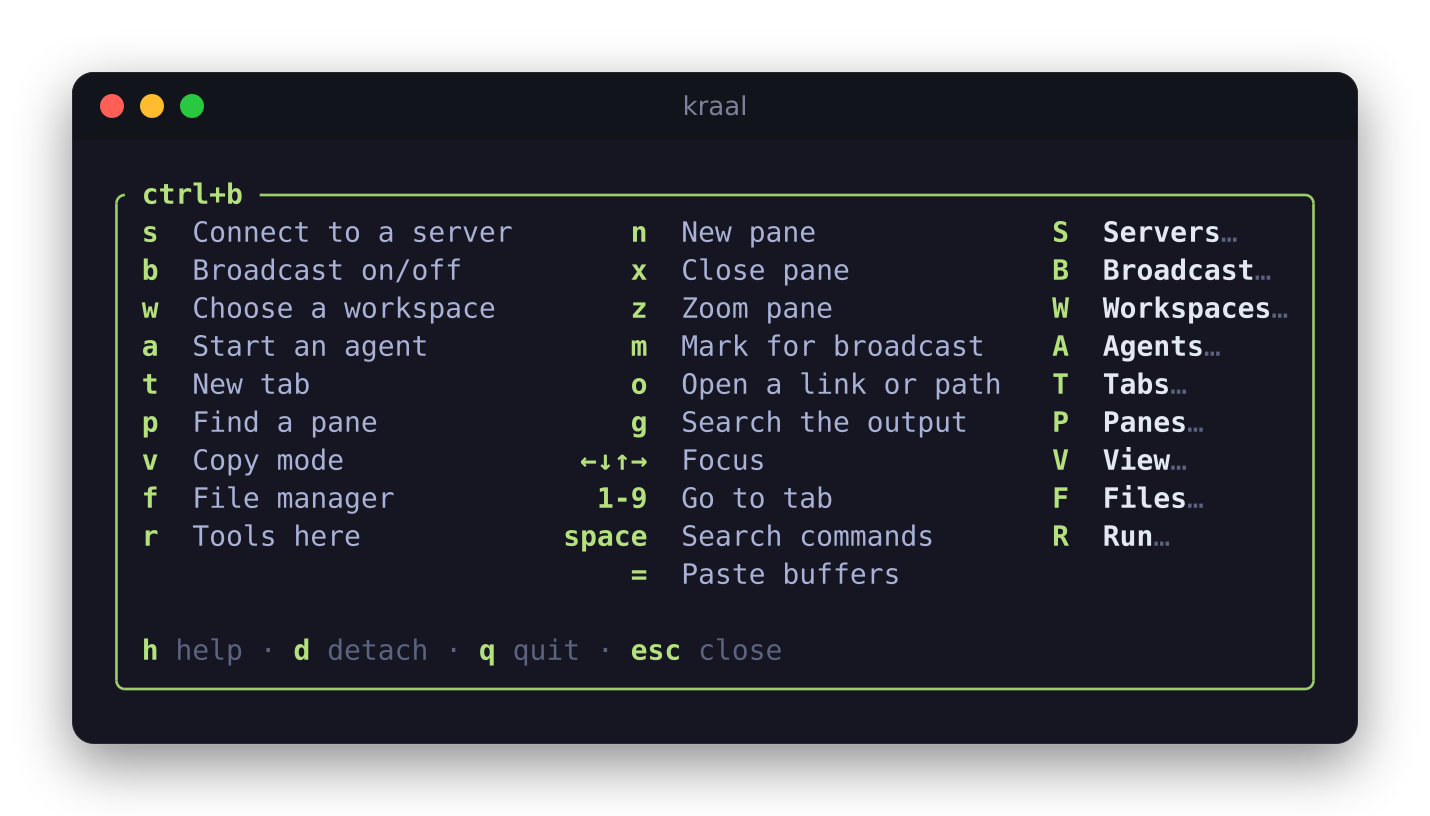
After ctrl+b, a theme's letter runs its main action and the capital opens its menu: s
connects to a server, S shows everything about servers. The same letters mean the same thing in
every menu (n new, x close, e rename). Shortcuts work on any keyboard layout, and every command
and every menu can move to the keys you want.
Keys
Workspaces kept automatically
Open Workspaces (ctrl+b w), choose + Add workspace, give it a name and select Add.
Arrange tabs and panes as you work. Close keeps the layout as Closed; Open brings it
back. Rename changes its name in kraal, never a file. Delete moves it to Deleted
workspaces, where Restore brings it back closed, even after a restart.
KDL files are reusable startup layouts. Save the following as shop.kdl, then usekraal import ./shop.kdl to preview and add it. Shells can start; imported commands and agents
wait for Enter. Export a copy with kraal export ./shop-copy.kdl --workspace shop.
Neither operation is needed to keep your workspace, and exports contain no conversations.
layout {
    cwd "~/src/shop"
    tab name="release" {
        pane split_direction="vertical" {
            pane command="ssh" { args "deploy@web-prod-1"; }
            pane split_direction="horizontal" {
                pane agent="claude"              // Claude Code, on the account the rules pick
                pane preview="CHANGELOG.md"      // a live Markdown preview
            }
        }
    }
}
Sessions and workspaces · this file,
among the examples to copy
Made to be scripted
Every pane knows its session, so scripts and agents drive kraal from inside it:
| Command | |
|---|---|
kraal run --right --name tests -- cargo test |
a new pane; prints its id |
kraal wait -p api --until blocked,done |
until the agent in "api" needs you |
kraal exec @prod -- uptime |
on every server of a group, in parallel |
kraal events agent.blocked pane.failed |
what happens, as JSON lines |
[hooks] runs a command on any event: ping your phone when an agent is blocked, log every SSH
connection to production. Scripting, events and hooks
Documentation
Install ·
Keys ·
Sessions and workspaces ·
Servers ·
Coding agents ·
Tools, contexts and hints ·
Production ·
Runbooks ·
Shell integration and images ·
Scripting, events and hooks ·
Configuration ·
Compatibility
Examples: workspaces, configurations, an inventory, account rules, runbooks
and scripts to copy, each one tested with the program.
The name
A kraal is an enclosure for cattle, in southern Africa. Servers are cattle, not pets, and now
agents are too.
Status
kraal is young. Linux is used every day; macOS passes the whole test suite on every release but
nobody uses it daily yet; Windows is not supported. Known gaps:
- Images in panes and previews need a terminal that draws kitty graphics with Unicode
placeholders (Ghostty, kitty) or sixel (foot, WezTerm, Konsole, Windows Terminal…); elsewhere
their cells stay blank, and previews use half blocks. Over sixel, an image that output scrolls
shows again once it stays put, and never on the window's last row. - Agent states come from hooks for Claude Code and eight other agents, and for what Gemini CLI's,
Codex's, Cursor's and Augment's hooks tell; otherwise they are read from the screen and can lag. - The production guard is a safety net based on names, not a permission system: an agent that
runssshor a cloud CLI itself does not go through kraal.
Bug reports and ideas are welcome in the issues.
Development
The unit and end-to-end tests, which also check these pages against the program (every command
line, key, setting and example they quote):
cargo test
On Linux, the idle-worker tests count thread context switches to detect polling. The measured
workers block signals so unrelated process activity cannot look like polling. These tests send
SIGCHLD during the measurement and check that real work still wakes the workers afterwards.
License
Copyright 2026 vodhash and the kraal contributors.
Licensed under the Apache License, Version 2.0.
Unless you explicitly state otherwise, any contribution intentionally submitted for inclusion in
kraal by you, as defined in the Apache-2.0 license, shall be licensed as above, without any
additional terms or conditions.
Reviews (0)
Sign in to leave a review.
Leave a reviewNo results found