dscode
Health Warn
- License — License: MIT
- Description — Repository has a description
- Active repo — Last push 0 days ago
- Low visibility — Only 6 GitHub stars
Code Warn
- process.env — Environment variable access in .github/workflows/publish.yml
- fs module — File system access in .github/workflows/publish.yml
- process.env — Environment variable access in examples/scenario-modeler/server.ts
Permissions Pass
- Permissions — No dangerous permissions requested
No AI report is available for this listing yet.
Enpowering Digital&Knowledge work by digital studio coding agent.

MCP-first coding agent for digital studios.
Powering creative work across Blender, game engines, and production tools.




See it in action
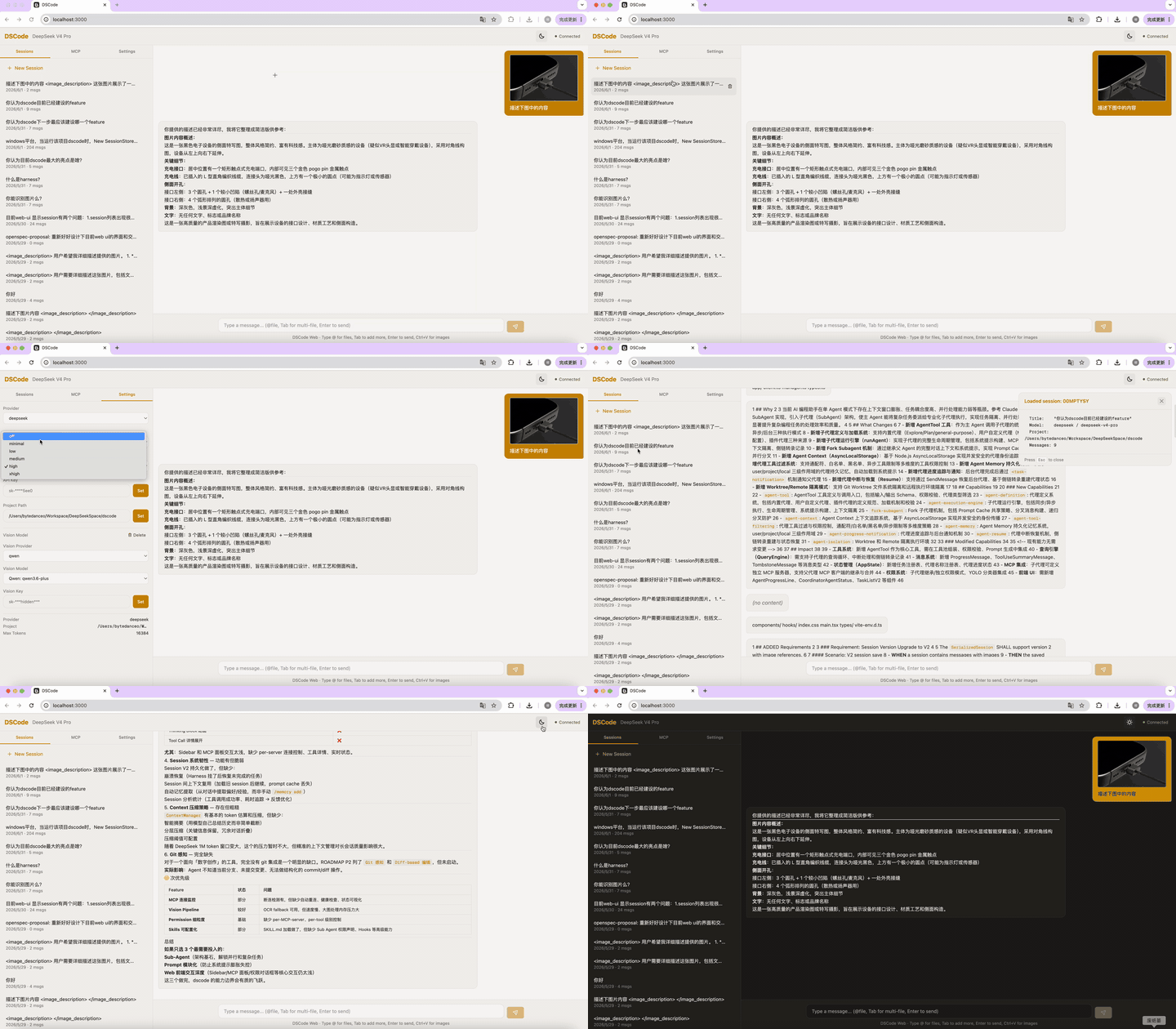
Web UI — streaming chat, tool calls, permission dialogs |
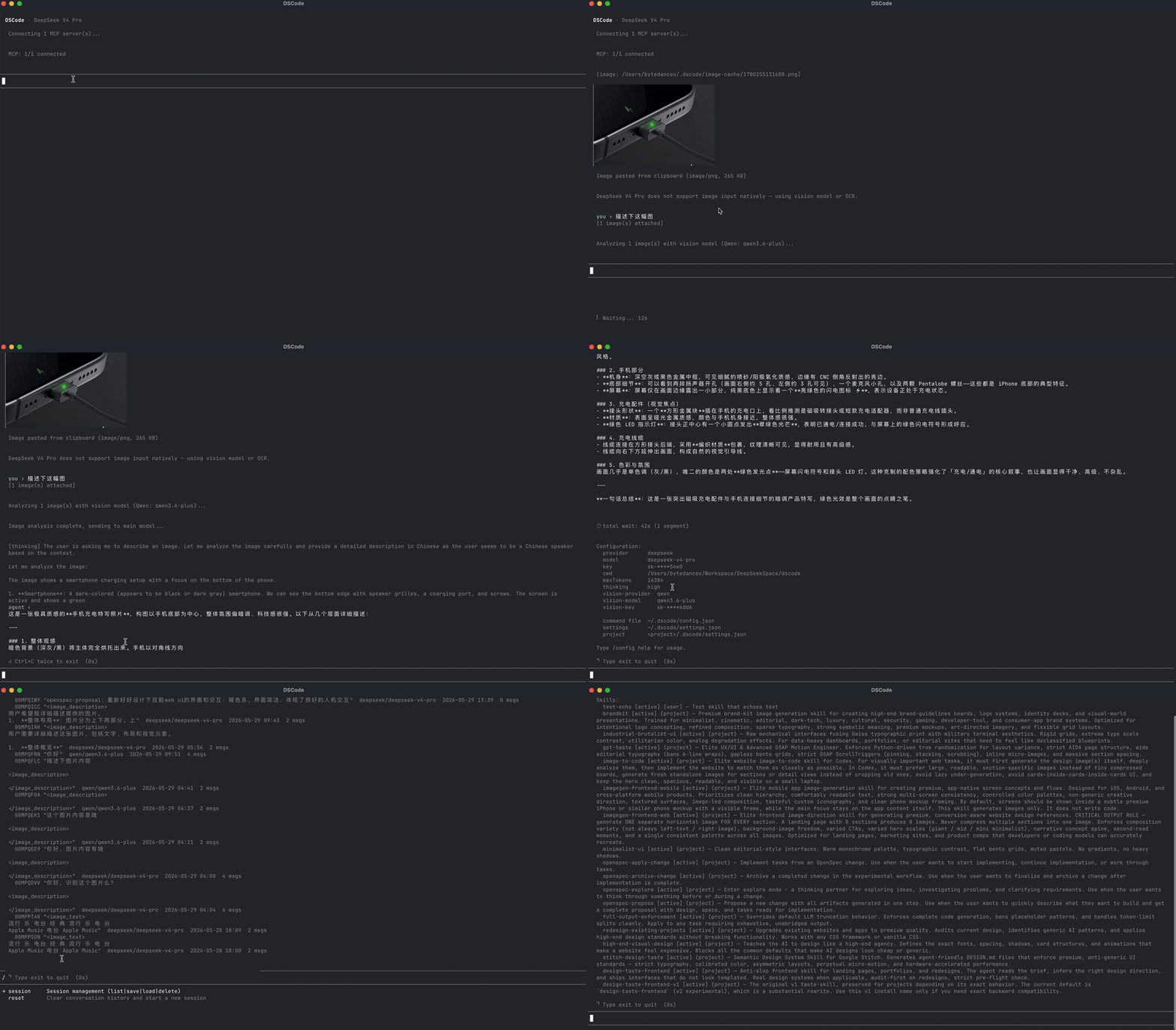
Terminal UI — real-time streaming, slash commands, inline rendering |
Tip: GIFs auto-play in GitHub. Click any image for full-size view.
What makes dscode different
🔌 MCP-FirstDigital studios don't use one tool. They use ten. MCP turns every tool into an API — dscode is the agent that orchestrates them. Blender for 3D modeling, PlayCanvas for real-time graphics, browser automation for testing, documents for specs, spreadsheets for data. If your production tool has an MCP server, dscode brings it into the workflow. Your toolchain. One agent. All through MCP. |
🧬 Spec-Driven Developmentdscode is built entirely through spec coding with OpenSpec. Every feature begins as a formal spec — Code is the implementation of specs — not the other way around. |
🔍 MCP Tool SearchToo many MCP servers? Context explosion is a real problem when every tool schema competes for token budget. dscode ships with a built-in All the tools. None of the bloat. |
🐋 DeepSeek V4 Pro — Recommendeddscode is purpose-built for DeepSeek V4 Pro — our recommended model for digital creation. Its reasoning depth handles complex multi-tool workflows ("model this in Blender, render in PlayCanvas, document the result") without losing context. A vision model fallback pipeline transparently routes screenshots and reference images to vision-capable models. Prompt caching is tuned to maintain 97–99% cache hit rates via DeepSeek V4 Pro. For when your toolchain needs more than autocomplete. |
Capabilities
|
🖥 Terminal + Web Full TUI with streaming, thinking, tool calls. Modern React Web UI with identical feature parity via WebSocket. |
🔌 MCP Connector Stdio, Streamable HTTP (MCP 2025-11-25), legacy SSE fallback. Auto transport inference. MCP App sandbox for server-driven UI. |
🛡 Agent Harness Permission control, context compression (1M token window), session persistence, cross-session memory, retry with exponential backoff. |
|
📦 Skills System Declarative third-party extensions via SKILL.md. On-demand activation. User-level + project-level scopes. |
👁 Vision Pipeline Auto-routing to vision-capable models. tesseract OCR fallback (ENG + CHI). Drag, paste, or @-file images. |
🔧 Built-in Driversread_file, write_file, edit (hash-anchor), bash, grep, glob. MCP tools discovered on-demand via search_tools.
|
MCP in 30 seconds
// ~/.dscode/settings.json
{
  "mcpServers": {
    "blender": {
      "command": "uvx",
      "args": ["blender-mcp"]
    },
    "playwright": {
      "command": "npx",
      "args": ["@anthropic/mcp-playwright"]
    }
  }
}
dscode auto-connects on launch. Tools appear as mcp_blender_* and mcp_playwright_*. MCP servers can also serve sandboxed UI via the App Host — no boilerplate, no SDK, no glue code.
See what MCP can do
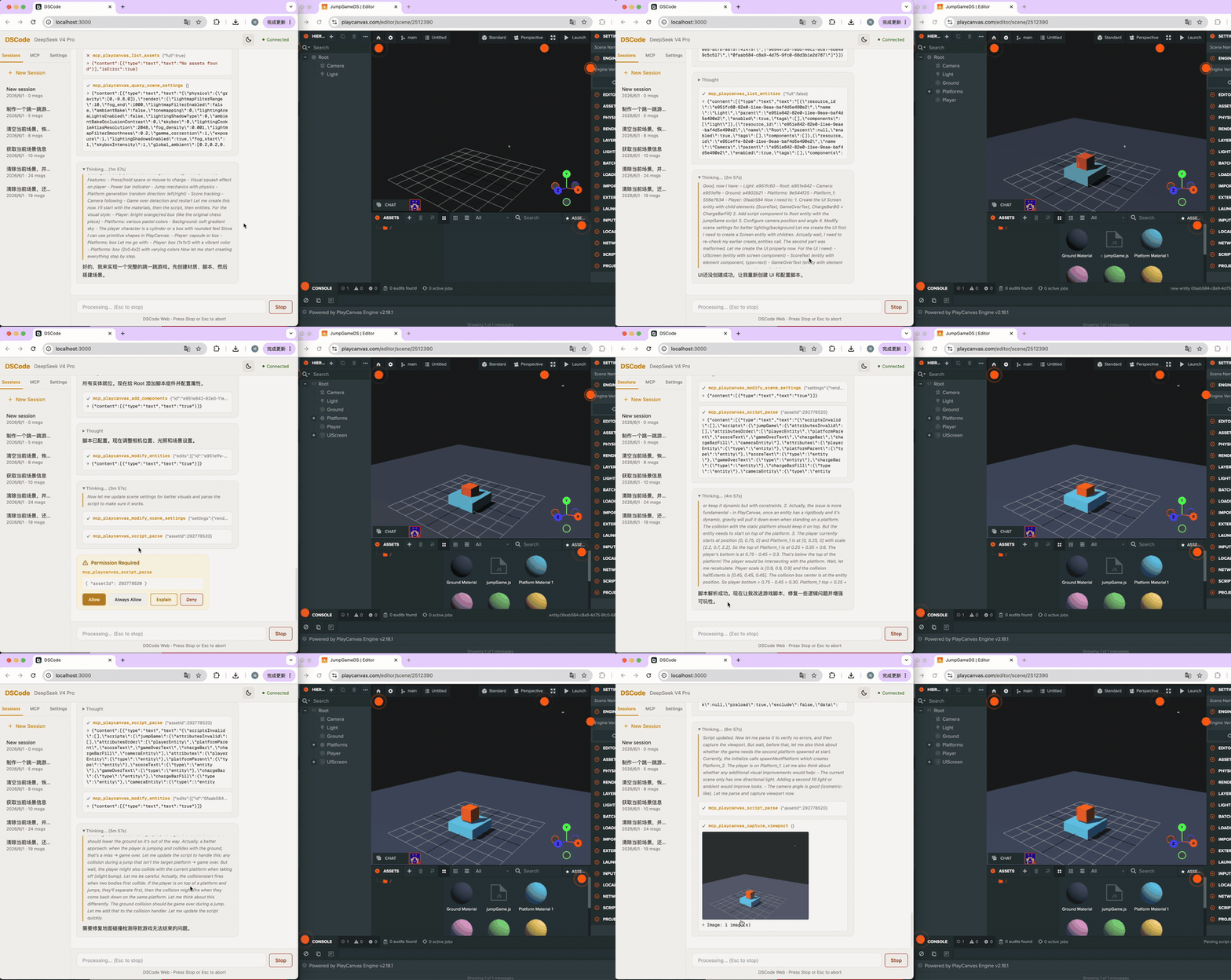
PlayCanvas + MCP — build a jump game entirely through natural language |
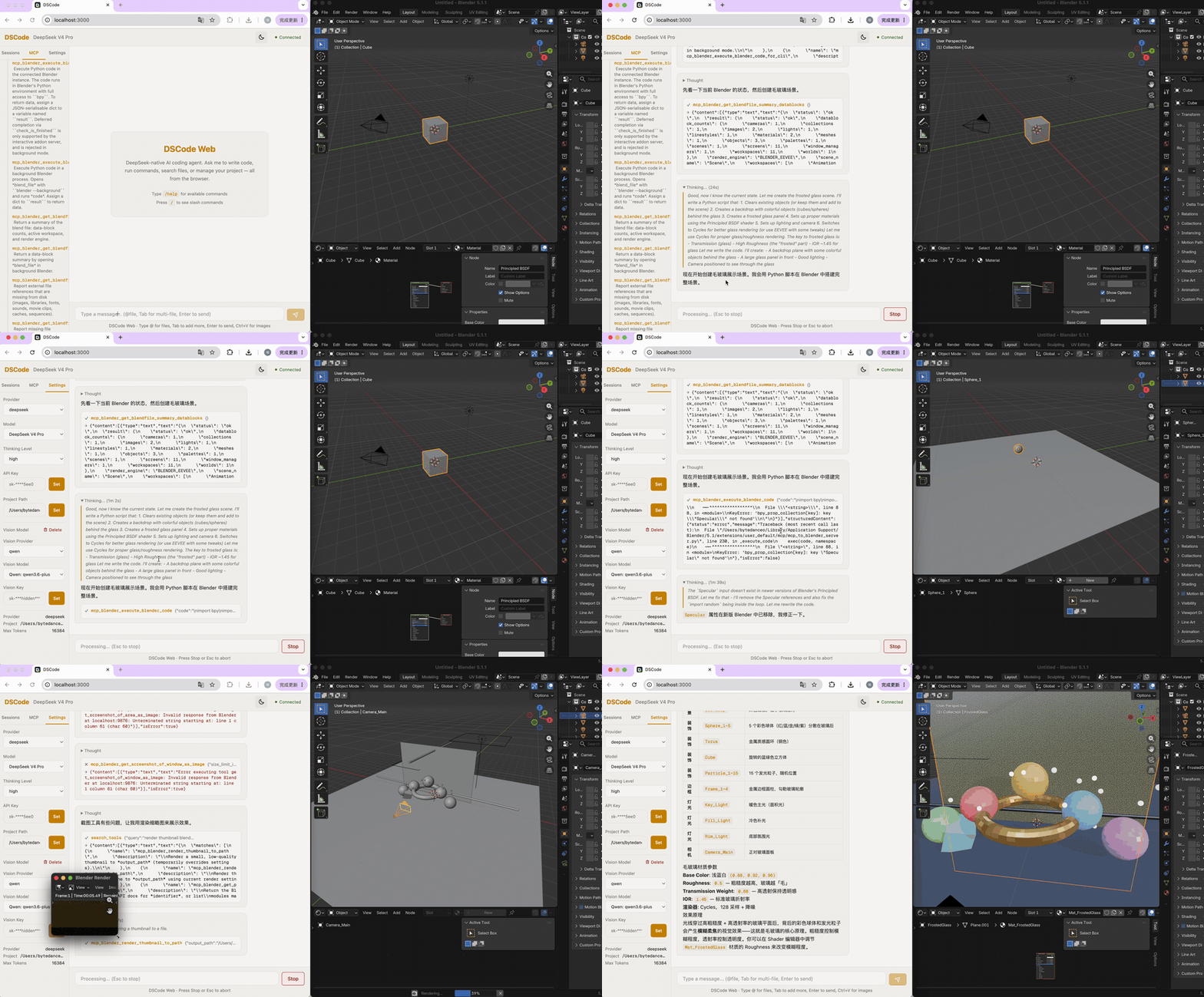
Blender + MCP — 3D modeling and scene composition through conversation |
Tip: These are real MCP workflows — dscode orchestrates PlayCanvas and Blender as if they were native APIs.
Install
npm install -g @wangcan26/dscode
dscode              # Terminal UI
dscode --web        # Web UI → http://localhost:3000
First launch? Run
/config key <your-api-key>and/config model deepseek-v4-proto get started. Type/helpfor the full guide.
Build from source:
git clone https://github.com/wangcan26/dscode.git
cd dscode && npm install && npm run build
node dist/dscode.mjs
Harness Philosophy
We follow Occam's razor in harness design. dscode does not pre-build intent understanding modules, plan modes, or elaborate agentic scaffolding until the system prompt proves insufficient. Most coding agents pile on pre-turn planning, reflection loops, and multi-agent orchestration upfront — we wait until the model demands it.
That doesn't mean the harness is bare. It means every piece earns its place.
One example where we went deeper: the edit tool. Based on @_can1357's hash-anchor protocol, our edit tool replaces fragile line-number and regex-based editing with a content-addressable anchor system (spec):
- Three-level adaptive resolution — ambiguous 6-char hashes are resolved silently through 8-char → context-augmented (3-line window) matching before rejection
- Occurrence + line-hint disambiguation —
occurrence: 3picks the Nth match;linefield auto-selects the closest candidate, rejecting only when equidistant - Proximity-based range resolution — for range endpoints, if one side is unique the other automatically resolves to the nearest candidate in the correct direction
- Low-entropy filtering — lines like
}are rejected as anchors; the tool returns up to 6 neighboring[high]anchors as alternatives - Atomic batch + overlap detection — 6 operation types in one call, all-or-nothing. Overlapping ranges within a batch are detected and rejected
- Checkpoint + safety rollback — file checkpointed before edit. Post-edit sanity checks (duplicate lines, delimiter balance, orphan
else) roll back suspicious changes - Structured invalidation scope —
anchors_valid_throughandmust_refresh_from_linetell the model exactly which anchors survive, enabling chained edits without re-reading - Localized diff with live anchors — successful edits return a diff with fresh 6-char hashes, so the model can continue editing immediately
dscode builds dscode. This edit tool — combined with our spec-driven workflow — is what enabled dscode to develop itself. Every feature, from the hash-anchor protocol to the checkpoint system, was implemented by dscode running on DeepSeek V4 Pro, editing its own source tree through MCP-driven tools. It's not a demo. It's how this project ships.
This is the kind of harness work we invest in: not adding more AI, but making the AI's tools dependable.
Learn more
| Document | What's inside |
|---|---|
| ARCHITECTURE.md | Full architecture: Agent as OS, 6-layer design, Driver/Skill model, source tree |
| ROADMAP.md | What's next: Sub-Agent system, System Prompt modularization, Diff-based editing |
| CONTRIBUTING.md | How to contribute: philosophy alignment, OpenSpec SDD workflow, coding conventions |
| STYLE.md | TypeScript coding style: naming, imports, module structure, error handling |
Acknowledgments
dscode stands on the shoulders of:
OpenSpec — the spec-driven development framework that shapes our entire workflow
pi-ai / pi-agent-core — Mario Zechner's agent loop and model abstraction foundation
taste-skill — Leonxlnx's design taste skill system, inspired our skills architecture
@_can1357 — hash-anchor editing protocol, the cornerstone of our
edittool
If you like this project, give it a ⭐ Star — your support keeps dscode evolving.
Reviews (0)
Sign in to leave a review.
Leave a reviewNo results found