herdr-hybrid
Health Warn
- License — License: MIT
- Description — Repository has a description
- Active repo — Last push 0 days ago
- Low visibility — Only 6 GitHub stars
Code Fail
- rm -rf — Recursive force deletion command in docs/assets/src/render.sh
- fs module — File system access in examples/parallel-review.sh
- rm -rf — Recursive force deletion command in install.sh
- fs module — File system access in install.sh
- spawnSync — Synchronous process spawning in lib/agents/claude.js
- spawnSync — Synchronous process spawning in lib/agents/codex.js
- child_process — Shell command execution capability in lib/api.js
- spawnSync — Synchronous process spawning in lib/api.js
- os.homedir — User home directory access in lib/api.js
- process.env — Environment variable access in lib/api.js
- fs module — File system access in lib/api.js
- Hardcoded secret — Potential hardcoded credential in lib/api.js
- process.env — Environment variable access in lib/cli.js
- fs module — File system access in lib/cli.js
- fs.rmSync — Destructive file system operation in lib/config.js
- process.env — Environment variable access in lib/config.js
- fs module — File system access in lib/config.js
Permissions Pass
- Permissions — No dangerous permissions requested
No AI report is available for this listing yet.
让最聪明的模型当 Leader,便宜的模型干活:Claude Code 混动编排。网关/key/模型一份配置,Leader 拆解·验收·review,worker 并行无头实现,每个 worker 在 herdr 里一个窗口。Hybrid orchestration for Claude Code on herdr.
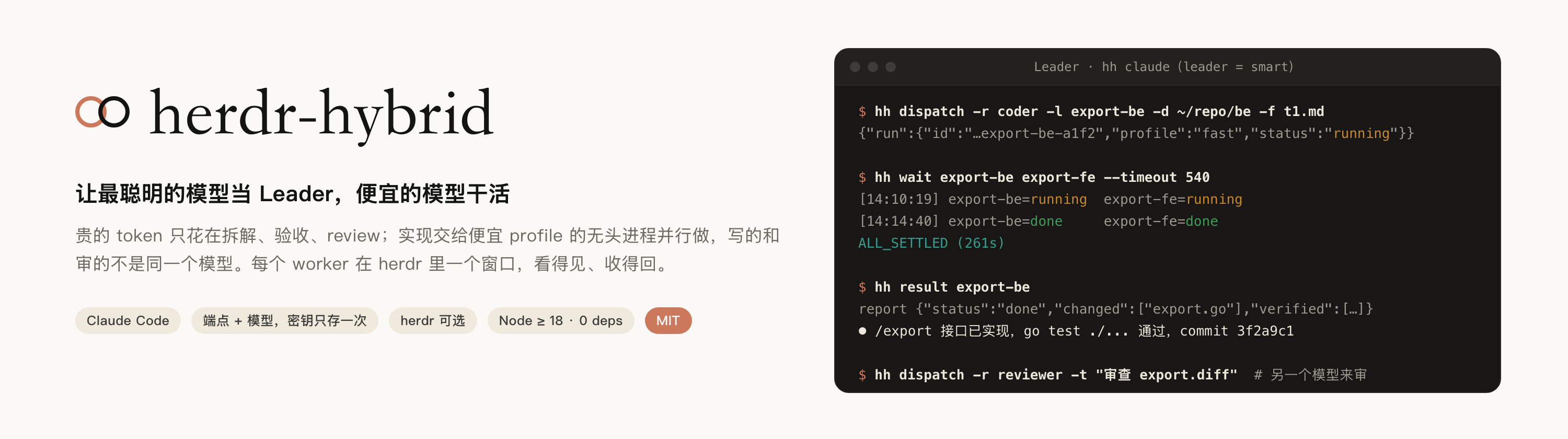
让你最聪明的模型当 Leader,便宜的模型干活。
Claude Code / Codex 的混动编排:多家订阅 / API key / 网关一份配置;不同模型交叉开发、交叉 review;Leader 拆解、验收、汇报,worker 并行实现;每个 worker 在 herdr 里一个窗口。
Hybrid orchestration for Claude Code and Codex: every subscription, API key and gateway in one config; different models write, review and research each other's work; a Leader that plans and verifies, workers that build in parallel; one herdr tab per worker.


为什么混动 · 怎么工作 · 加上 herdr · 上手 · Showcase · 提示语 · 配置 · English
双模式编排
现在支持 Claude Code / Codex Leader,以及两种执行方式:external 保留独立 CLI worker;native 使用项目内置路由与协议转换,让当前 CLI 的原生子代理选择不同厂商模型,并配置默认 worker、委派提示和请求回退。
hh run PROFILE --mode external
hh run PROFILE --mode native --dry-run
原生模式复用现有 gateways,声明网关协议并配置 worker 策略,详见 双模式配置与兼容边界。现有 profile 和调度流程不变。
为什么混动
手里有几家订阅、API key 或网关的人,大多是这么用 Claude Code 的:
| 以前 | 现在用 hh |
|---|---|
端点散在一堆 alias 里:fastcc smartcc geminicc……每条手抄一遍地址、密钥、模型,脚本读不到,编排不了 |
一份 config.json:端点、密钥、模型各写一次;hh claude fast 启动,hh dispatch -p fast 派发;旧 alias 一键导入 |
| 只能一直用一家:写代码、审代码、查资料是同一个模型,自己审自己看不出问题 | 交叉开发、交叉 review 是默认行为:coder 用便宜的 A 家,reviewer 用另一家只读审,researcher 用大上下文的 C 家 |
| 一次只做一件事:前端等后端,review 等实现 | 并行:每个子任务一个独立进程、独立会话、独立目录,Leader 只等结果 |
| 最贵的模型从头写到尾:规划和搬砖烧同一份 token | 贵的只做判断:Leader 拆解、验收、汇报;实现、跑脚本交给便宜的 |
| 换个模型试试 = 改 alias、重开终端、重讲一遍上下文 | hh send 接着同一会话返修;-p 换个 profile 重派同一任务对照 |
还是官方 CLI,不换工具链:Leader 是一个交互式 Claude Code,worker 是一批无头进程(claude -p 或 codex exec),各自带着自己 profile 的 agent、端点和模型。
它是怎么工作的
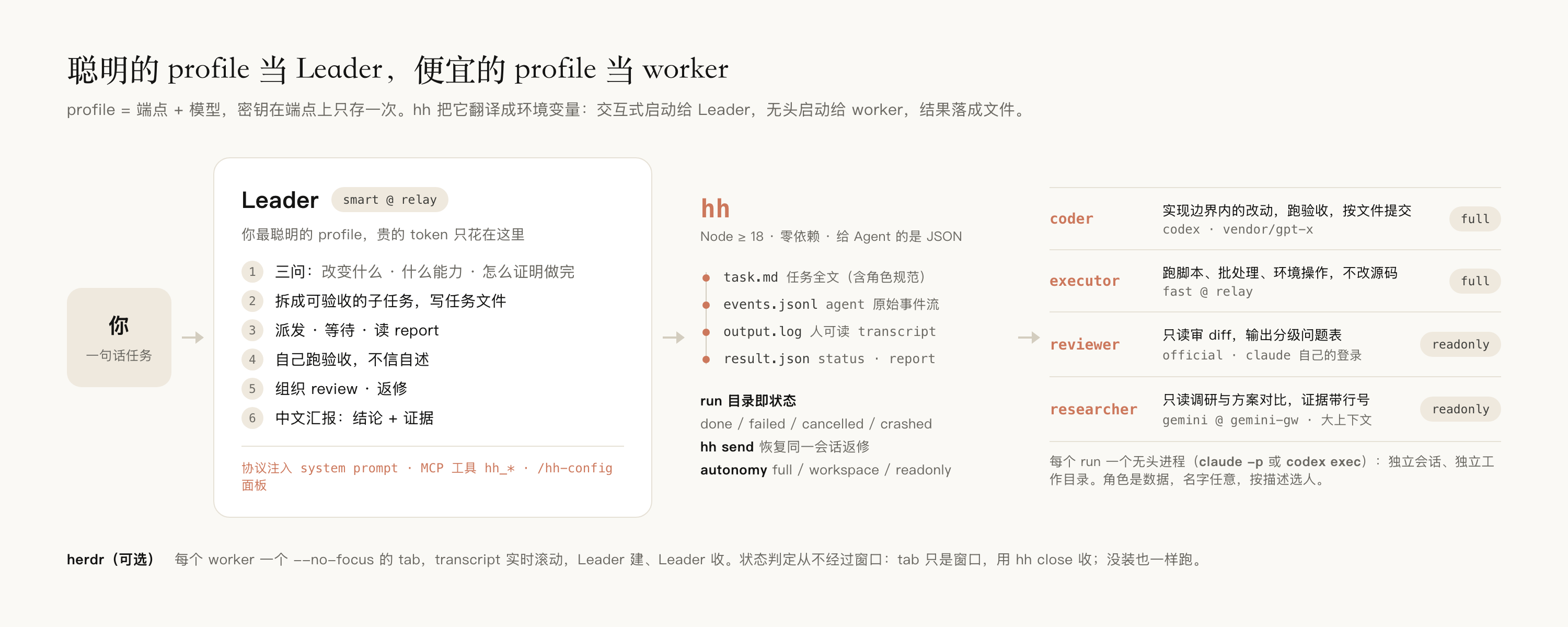
external 模式把 profile 翻译成 Claude Code / Codex 的启动配置,启动独立 worker,并将事件流整理为 transcript 与 result.json;run 状态来自文件和进程。native 模式则由 hh 的会话内路由器调用模型 API,让当前 CLI 的原生子代理选择不同厂商模型,支持默认 worker、委派提示与失败回退。
Leader 靠原则工作,不靠关键词:启动时把当前真实的角色表(谁擅长什么)和 profile 清单注入 prompt,它按「这件事改变什么 / 需要什么能力 / 怎么证明做完了」三问决定派给谁、给多大权限、怎么验收。worker 结束时按契约交一份 JSON 报告(改了什么、跑了什么验收、有什么假设),Leader 拿数据核对,返修直接接着同一会话继续。
和 Claude Code 自带的子代理(Agent 工具)比:
| 自带子代理 | herdr-hybrid | |
|---|---|---|
| 模型来源 | 同一个账号 / 端点,只能在 opus / sonnet / haiku 里选 | 任意端点、任意模型,每个角色一个 profile |
| 生命周期 | 跟着当前会话,会话结束就没了 | 独立进程,Leader 关了照跑;hh send 随时接着同一会话返修 |
| 可见性 | 折叠在对话里 | 每个 worker 一个 herdr tab,或 hh read |
| 验收 | 子代理自述 | JSON 报告 + Leader 自己复跑验收命令 |
只有一个端点的话,自带子代理多半够用;这个项目的前提是你手里有两个以上,想让贵的做判断、便宜的干活。
加上 herdr:看得见的团队
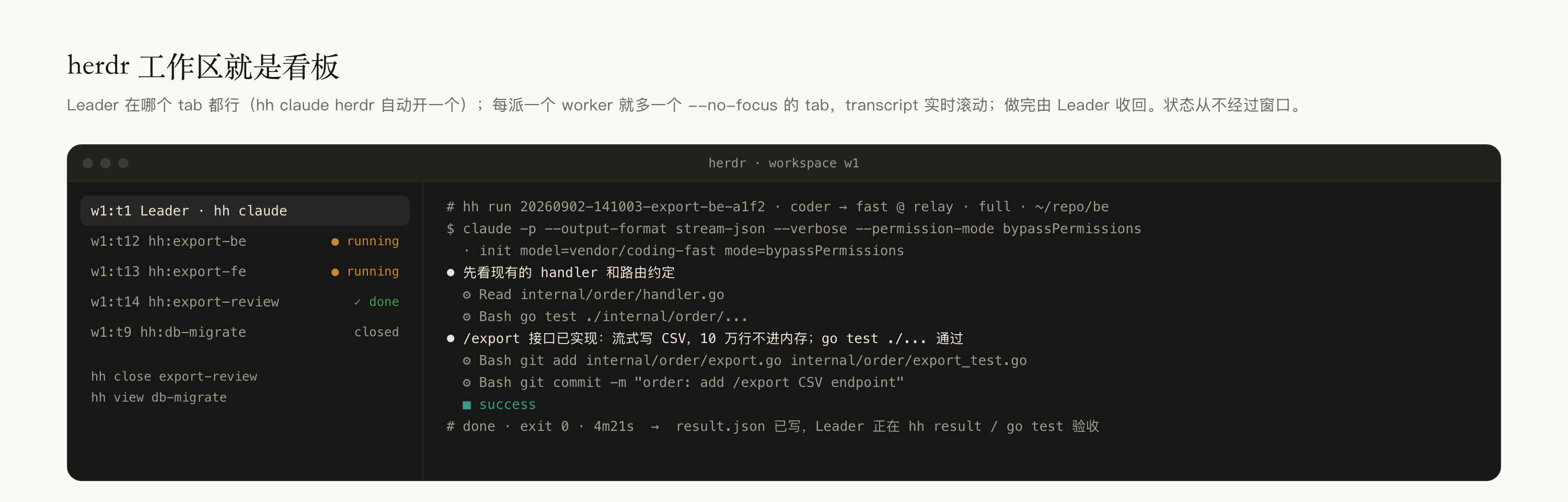
无头进程最大的问题是看不见。herdr 补上这一块,而且只做窗口,不做判断:
- 每个 worker 一个 tab,transcript 实时滚动:它在读什么文件、调什么工具、卡在哪。
--no-focus创建,不抢你的光标。 - 工作区就是看板。tab 1 是 Leader,其余 tab 由 Leader 建、由 Leader 收(
hh close)。想看细节点进去,不用在里面输入。 - 状态从不经过窗口。完成与否只看
result.json和进程;tab 只是窗口,用hh close收;没装 herdr 一切照跑,只是没有窗口。hh view随时给后台 run 补开一个。 - 一个词开进去。
hh claude herdr把 Leader 开进 herdr 的新 tab,server 没起会自动拉起,已经在 herdr 里就原地启动;没装 herdr 会问一句「装上并开进去?」,回车就用官方脚本装好接着开。平时hh claude仍在当前终端,herdr 在跑时 worker 照样各开一个 tab;hh claude --no-herdr连 worker 也不开窗口,hh viewer none永久关掉。
上手
三个词就够了:端点(gateway)= 一个 API 地址加它的密钥,只存一次;profile = 端点 + 模型,hh claude <profile> 就用它启动 Claude Code;角色(role)= 给 Leader 用的分工,每个角色指向一个 profile。official 是内置 profile,表示 claude 自己的登录。
依赖只有 Node ≥ 18。Claude Code 没装、herdr 没装,install.sh 都会问你要不要用官方脚本装上(herdr 可选,随时 hh install herdr)。
git clone https://github.com/wangfan1998-github/herdr-hybrid.git && cd herdr-hybrid
./install.sh          # hh → ~/.local/bin;Leader 技能 → ~/.claude/skills;缺 Claude Code / herdr 会问;自动 hh init
第一次配置:hh setup
在终端里跑 hh init,找不到任何端点时会直接进入 hh setup(随时也能单独跑):一问一答加一个端点,问你它是当 Leader 还是干活,最后真发一次 pong 测连通。加几个端点就跑几遍;同一个地址再跑一遍会复用端点、只加一个模型:
$ hh setup
API 地址(ANTHROPIC_BASE_URL,例 https://api.example.com): https://relay.example.com
端点名 [relay-example-com]: relay
鉴权方式 token|apikey(token → ANTHROPIC_AUTH_TOKEN,apikey → ANTHROPIC_API_KEY;不确定选 token) [token]:
密钥(不回显):
模型 id(留空用端点默认;例 claude-sonnet-4-5 / gemini-2.5-pro): vendor/coding-fast
profile 名 [relay]: fast
  ✓ 端点 relay · profile fast
这个 profile 用来做什么? 1=当 Leader(最聪明的那个) 2=干活(coder / executor,便宜快的) 3=先不分配 [1]: 2
  ✓ coder / executor → fast
现在真发一次 pong 测连通? Y/n [Y]:
  ✓ done 14s → pong
再加一个端点? y/N [N]: y
…
不想一问一答,三条命令等价(密钥可写 env:VAR_NAME,配置里不落明文):
hh gateways set relay --url https://relay.example.com --auth token --secret sk-xxx   # 端点 + 密钥
hh profiles set fast  --gateway relay --model vendor/coding-fast                     # 端点 + 模型 = profile
hh profiles set smart --gateway relay --model vendor/reasoning-max                   # 同一端点再加一个模型
已经用 shell alias 管着一批 key:一键迁移
很多人是这样切端点的:alias fastcc="ANTHROPIC_BASE_URL=… ANTHROPIC_AUTH_TOKEN=… ANTHROPIC_MODEL=… claude"。hh init 会扫 ~/.shell_aliases ~/.zshrc ~/.bashrc 把这类行自动导进来,不用重配:fastcc 变成 profile fast,同一地址同一密钥的 alias 归成一个端点。之后 eval "$(hh profiles aliases)" 能把 fastcc 这类快捷命令再生成回来。
分工、验证、启动
hh roles set coder --profile fast           # 便宜快的干活
hh roles set reviewer --profile official    # 官方登录的审:写的和审的不是同一个模型
hh leader smart                             # 最聪明的当 Leader
hh doctor --net                             # 角色用到的 profile 各发一次 pong
hh claude                                   # 启动 Leader,然后直接说需求(herdr 在跑时 worker 各开一个 tab)
hh claude herdr                             # 把 Leader 也开进 herdr 的新 tab;hh claude --no-herdr 连 worker 也不开窗口
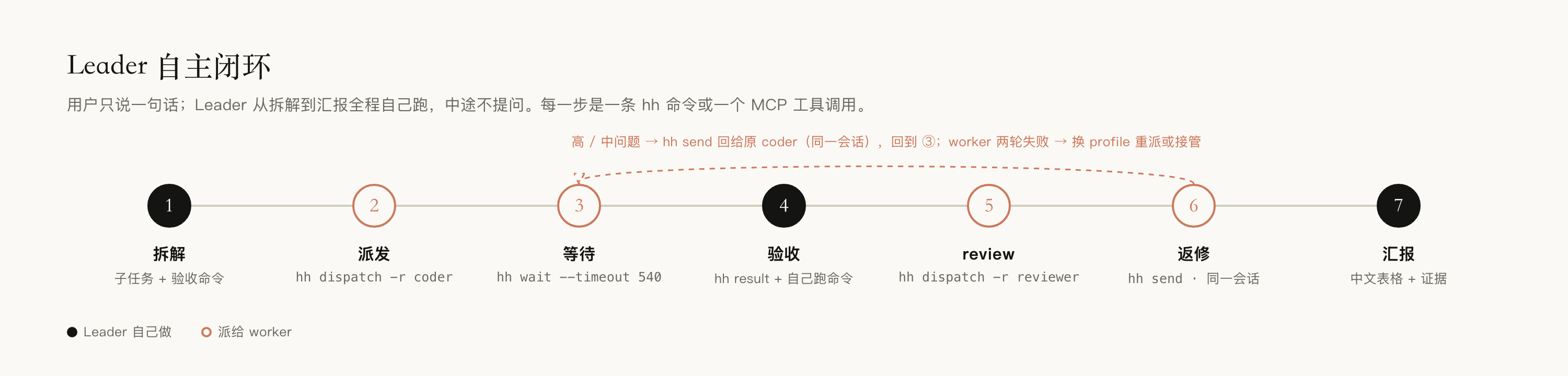
然后直接说需求。Leader 会自己拆解 → 派发 → 等待 → 验收 → review → 返修 → 中文汇报,中途不问你。
默认权限:
hh claude带--dangerously-skip-permissions;coder / executor 的full自主级别 =--permission-mode bypassPermissions。也就是 worker 拥有你账号的全部本地权限,只在信任的目录里派。要收紧改claude.interactiveArgs和角色的autonomy(workspace/readonly)。
跑起来是什么样
一次完整闭环在 Leader tab 里的样子(拆解 → 两个 coder 并行 → 等待 → 自己复跑验收 → 另一个模型 review → 同会话返修 → 汇报):
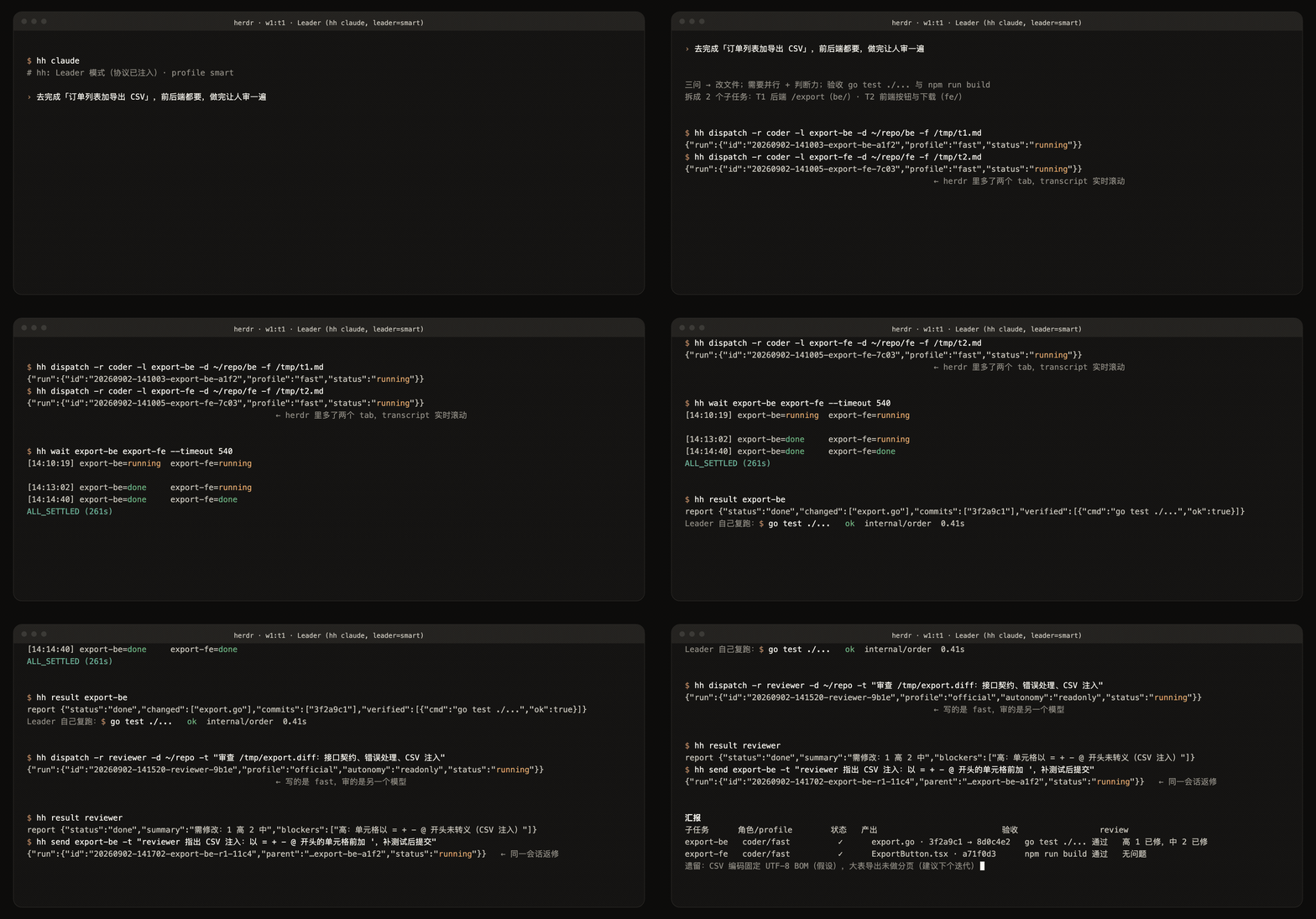
下面是逐条的真实输出(网关与模型名已替换为示例名)。
派一个活,立刻拿到 run id:
$ hh dispatch -r coder -l e2e -d ~/work -t "Create ok.txt containing: hybrid works. Then reply: done"
run      20260902-172446-e2e-9e5c
role     coder → fast@relay(vendor/coding-fast) · full
cwd      ~/work
task     ~/.local/state/hh/runs/20260902-172446-e2e-9e5c/task.md
launch   herdr tab w1:tT
status   ● running
next     hh wait 20260902-172446-e2e-9e5c   ·   hh read …   ·   hh result …
等它结束,只在状态变化时打印一行:
$ hh wait 20260902-172446-e2e-9e5c
[17:24:48] 20260902-172446-e2e-9e5c=running
[17:25:18] 20260902-172446-e2e-9e5c=done
ALL_SETTLED (30s)
(随后打印每个 run 的状态表,略)
worker 交的结构化报告,Leader 拿数据核对:
{ "status": "done", "summary": "已创建 ok.txt,内容为 hybrid works,验收通过",
  "changed": ["ok.txt"], "commits": [],
  "verified": [{ "cmd": "cat ok.txt", "ok": true }],
  "assumptions": ["工作目录非 git 仓库故未提交"], "blockers": [] }
herdr tab 里同一时刻看到的:
$ claude -p --output-format stream-json --verbose --permission-mode bypassPermissions --model vendor/coding-fast
  · init model=vendor/coding-fast mode=bypassPermissions
  ⚙ Write ok.txt
⏺ done
  ■ success
# done · exit 0 · 30s
返修接着同一会话:
$ hh send e2e -t "再追加一行 line two"
run      20260902-172530-e2e-r1-11c4
launch   herdr tab w1:tU   parent 20260902-172446-e2e-9e5c (resumed)
在 Agent 的 shell 里,以上每条命令返回的都是 JSON。
粒度提醒:一个 worker 从启动到交报告,再小的任务也要半分钟到两分钟(无头 claude 启动 + 至少两轮对话)。适合派出去的是几分钟到半小时的子任务;几行的改动 Leader 自己做更快,协议里也是这么要求的。
你可以这样说
对 Leader 说人话就行,它自己判断类型和派谁:
去完成「订单列表加导出 CSV」,前后端都要,做完让人审一遍
调研一下 ~/code/foo 这个项目是干嘛的,入口和核心流程给我文件行号
把 be/ 目录下所有 go test 跑一遍,失败的按包汇总
审一下 /tmp/export.diff,重点看接口契约和错误处理
看看现在谁在干活,卡住的催一下
让 reviewer 换成 smart;加一个 tester 角色用 fast,专门跑测试
配置
一个文件 ~/.config/hh/config.json(600 权限):
{
  "leader": "smart",
  "gateways": {
    "relay":     { "url": "https://relay.example.com",          "auth": "token", "secret": "sk-…", "env": { "ENABLE_TOOL_SEARCH": "false" } },
    "gemini-gw": { "url": "https://gemini-gateway.example.com", "auth": "token", "secret": "env:GEMINI_GW_KEY" }
  },
  "profiles": {
    "official": { "gateway": null },
    "fast":     { "gateway": "relay",     "model": "vendor/coding-fast" },
    "smart":    { "gateway": "relay",     "model": "vendor/reasoning-max" },
    "gemini":   { "gateway": "gemini-gw", "model": "gemini-2.5-pro" }
  },
  "roles": {
    "coder":      { "profile": "fast",     "autonomy": "full",     "desc": "实现明确边界内的改动,跑验收命令,按文件提交" },
    "reviewer":   { "profile": "official", "autonomy": "readonly", "desc": "只读审查 diff,输出严重度分级的问题表" },
    "researcher": { "profile": "gemini",   "autonomy": "readonly", "desc": "只读调研,给出带文件:行号证据的推荐" }
  }
}
- profile = 端点 + 模型。端点(gateway)= 地址 + 鉴权方式 + 密钥,只存一次,模型随便加;
official内置,不注入任何变量,用claude自己的登录。 - 角色是数据。名字任意,
desc告诉 Leader 它擅长什么;autonomy决定权限:full/workspace/readonly。 - 密钥只在这个文件里,可写成
env:VAR从环境取;所有输出打码。
改配置五种方式等价:hh setup 一问一答、Leader 里 /hh-config 可视化改、对 Leader 说、hh gateways/profiles/roles set、直接改文件。字段见 docs/config.md,env 注入顺序与汇报契约见 docs/profiles.md。
/hh-config:在 Leader 里可视化改配置
hh claude 启动 Leader 时会自动挂上 mod/(Claude Code 的 function hooks),在会话里敲 /hh-config 就能开出一个面板:三个标签页 profiles / gateways / roles,每行可以「改」「删」,也能「+ 新建」。
[profiles]  gateways   roles    + 新建   ⟳   ✕ 关闭
official        official     -                      改  删
fast            relay        vendor/coding-fast     改  删
cx              [codex] relay  vendor/gpt-x           改  删
编辑态里枚举字段是下拉,不用手敲:
新建 profiles
名字            ▎mycx
agent           ‹ codex ›            claude | codex
端点 (gateway)   ‹ relay ›            official + 现有端点,实时读
模型 (model)     ▎vendor/gpt-x        自由文本
编排 (mode)      ‹ external ›         external | native | plain
                [ 保存 ]  [ 取消 ]
- 能选的一律用下拉:
agent(claude / codex)、auth(token / apikey)、autonomy(full / workspace / readonly)、mode(external / native / plain)、网关的wire(responses / anthropic / chat)是固定枚举;gateway和profile的选项从hh gateways/profiles --json实时读,所以选出来的一定存在——「profile 引用的网关不存在」这类错误从源头没了。剩下url/secret/model/desc/ 名字是自由文本,仍是输入框。 - native 模式的前置条件面板帮你守着:
native要求它引用的每个网关都声明了wire,缺了保存前就拦住(不会写出一份跑不起来的配置);网关列表也会标出还没声明wire的端点。external不需要。 - 界面只负责画,所有读写都调
hh … --json,所以校验、引用保护(删被引用的端点会被拒)、0600 写盘全部和命令行完全一致,不存在两套逻辑。 - 密钥不回显:列表里显示的是
plat***cQ,编辑时密钥框默认留空 = 不改;要换才敲新值,也可以填env:VAR_NAME。 - 用
codex的 profile 在列表里标[codex](默认的claude不标,免得每行都是噪音)。 /hh-config是开关,再敲一次关掉;也可以按 Esc 或点面板上的✕ 关闭。- 面板默认贴在右边。
hh pane bottom换到底部(提示框上方),hh pane right换回来。位置本身由终端布局决定、插件改不了,这个开关实际是在切CLAUDE_CODE_NO_FLICKER:贴底要关掉它,代价是整屏可能有重绘闪烁,所以默认保持贴右。 - 只在 Leader 模式挂,且只挂在支持插件的 agent 上(
agent.capabilities.mod)。hh claude <profile>是「就想用这个模型」,不会被塞东西。 - 不往
~/.claude里装任何东西:--plugin-dir只在 Leader 这次会话生效,卸载 hh 就一起没了。
前置条件:Claude Code 要开 function hooks,在 ~/.claude/settings.json 的 env 里加
"CLAUDE_CODE_ENABLE_FUNCTION_HOOKS": "1"
没开的话 /hh-config 不会出现,其它功能不受影响。hh doctor 的 leader.mod 一项会直接告诉你缺哪一环。
function hooks 是 Claude Code 的 early access 接口(官方类型文件里写明「may change between releases without notice」),升级 Claude Code 后如果面板异常:在
mod/里跑/plugin-types重新生成类型,再claude plugin test mod/。面板逻辑由
mod/tests/pane.test.tsx覆盖(渲染合法性、下拉选项、密钥打码、保存参数、native 的 wire 前置校验、错误透出、命令注册、开关),跑claude plugin test mod/。交互式 TUI 里的实际观感需要你自己开一次hh claude确认。
更多
命令速查hh init [--force] [--no-setup] 生成配置;自动导入 claude 启动 alias;没有端点时进入 hh setup
hh setup 一问一答加一个端点 + profile,顺手分工、测连通
hh install claude|herdr [--yes] 官方安装脚本装缺的依赖
hh doctor [--net] [--all] 体检;--net 对角色用到的 profile 真发一次 pong
hh claude [herdr] [--leader] [profile] 不带 profile = Leader 模式;带 profile = 用该 profile 在当前终端启动;herdr = 开进 herdr 新 tab
--no-herdr 连 worker 也不开窗口
hh viewer [auto|herdr|none] worker 开不开 herdr 窗口;herdr = hh claude 也自动开进去
hh pane [right|bottom] /hh-config 面板贴右边(默认)还是贴底
hh env <profile> [--reveal] 看将注入的环境变量
hh dispatch -r ROLE [-p PROFILE] [-m MODEL] [-a full|workspace|readonly] [-l LABEL] [-d CWD] (-f FILE | -t "TASK")
hh wait ID... [--timeout 540] · hh status [--all] · hh read ID [-n 60] · hh result ID · hh task ID
hh send ID (-t "TEXT" | -f FILE) [--decision "…"] · hh decisions · hh cancel ID · hh close ID · hh view ID · hh log · hh clean
hh gateways [set NAME --url U --auth token|apikey --secret S | rm NAME]
hh profiles [show|set|rm|test NAME | aliases | import-aliases]
hh roles [set ROLE --profile P [--autonomy A] [--desc "…"] | rm ROLE] · hh leader [PROFILE]
hh install-mcp · hh mcp
mod/ 是一个 Claude Code function hooks 插件,hh claude 起 Leader 时用 --plugin-dir 挂进去。
claude plugin test mod/          # 跑面板的单测(23 个)
cd mod && claude -p "/plugin-types"   # 升级 Claude Code 后重新生成类型
mod/
  .claude-plugin/plugin.json   插件清单
  hooks/hooks.json             必须有,"modules" 指向 register.tsx(少了它整个插件不加载)
  hooks/register.tsx           界面本体
  tests/pane.test.tsx          单测
写的时候注意这几条(官方文档没写,都是实测出来的):
- 传
$的函数必须是本文件顶层的函数声明,不能是闭包里的,否则加载期就被静态检查拒掉。所以界面状态放模块作用域。 - 斜杠命令要在
session.start里调$.command.register主动注册;只写command.run的 hook 不会让/hh-config出现在 typeahead 里。 - pane 用
e.requestId认(=$.ui.open给的 id),e.props里没有id。认错了框会开出来但内容全空。 - 每个
Input必须有onSubmit、Button必须有onPress、Select必须有options(≥1 项、value 唯一)和onSelect,少一个引擎就拒绝整棵树 → 面板空白 +ui.render hook skipped: threw。 - 回调不会留在
props里,引擎把它们收成 handle 挂在节点的press字段上。所以测试里判「有没有回调」要看node.press.handle,查props.onSubmit永远是 undefined —— 那样写等于没校验。 - 测试 kit 的
$.ui只有render / scroll / focus / press:没有 select / input,所以「点下拉选一项」没法在单测里驱动,只能验证 options / value / 保存逻辑,真实交互得在 TUI 里手测。 - 单测里插件底下什么都没有,
ui.open/ui.render/ui.close/ui.invalidate/command.run/process.run都要给底座实现;这些返回{ value: … },但session.start是直接返回{ cwd }。按钮要先$.ui.render画出来才能$.ui.press。 mod/hooks/register.tsx里的下拉选项是写死的字面量(插件环境读不到lib/),smoke 有一条守卫比对它和lib/agents的NAMES、config.AUTONOMY、config.AUTH,加 agent 时别忘了同步。
hh init 自动导入;随时可以 hh profiles import-aliases [--dry-run] [FILE…] 再导一次(已存在的不覆盖)。只识别同一行里 alias NAME=… 且含 ANTHROPIC_BASE_URL= 和 claude 的行,多行 alias 和函数手写 hh profiles set。
| 以前 | 现在 |
|---|---|
fastcc |
hh claude fast;eval "$(hh profiles aliases)" 生成同名 alias |
alias 里的 ANTHROPIC_MODEL |
profile 的 model |
alias 里其它 K=V |
profile 的 env(与 commonEnv 相同的丢掉) |
| 同一地址同一密钥的多条 alias | 一个端点,多个 profile |
hh claude默认--dangerously-skip-permissions(claude.interactiveArgs可改);full自主级别等于把本地权限交给 worker:只在信任的目录派;review / 调研用readonly。- 网关地址、密钥、模型这几个变量按 worker 的 profile 重算,Leader 自己的不会漏给
officialworker;其它环境变量照常继承。 - 并发改同一仓库:角色模板要求只
git add <file>,禁止git add .。
文档:配置 · profile 与汇报契约 · 观测 · 排障 · Leader 协议 · 示例流水线
可选观察窗口基于 herdr · README 结构参考 agent-sprite-forge,视觉规范参考 impeccable 与 awesome-design-md · MIT
Reviews (0)
Sign in to leave a review.
Leave a reviewNo results found