agent-archive
Health Warn
- License — License: MIT
- Description — Repository has a description
- Active repo — Last push 0 days ago
- Low visibility — Only 6 GitHub stars
Code Pass
- Code scan — Scanned 12 files during light audit, no dangerous patterns found
Permissions Pass
- Permissions — No dangerous permissions requested
No AI report is available for this listing yet.
Archive your Claude Code, Codex, and Cursor sessions to your own S3/R2 bucket and hand them off between agents or machines.
agent-archive
Session handoffs and backups for Claude Code, Codex, and Cursor


Continue a Claude Code session in Codex, or vice-versa. You can pick a session and bring its conversation context into another coding agent. Add your own S3 or R2 bucket for automatic backups and access from other machines.
OpenAI and Anthropic are constantly one-upping each other for the best model and harness, but it's a pain to switch between their coding agents, especially if you have multiple computers and accounts. You lose your conversation history as you switch and then have to search in multiple places to figure out where you were working on something. You also can't introspect your sessions as easily.
agent-archive solves these problems, and can perform the following:
Continue across agents and computers. Run
agent-archive handoffto pick a session and continue with its context. After setup, you can also ask Claude Code or Codex to continue a previous session by name; the agent uses the CLI to find it and load its context. Useful when you hit rate limits or want to switch models (handoff guide).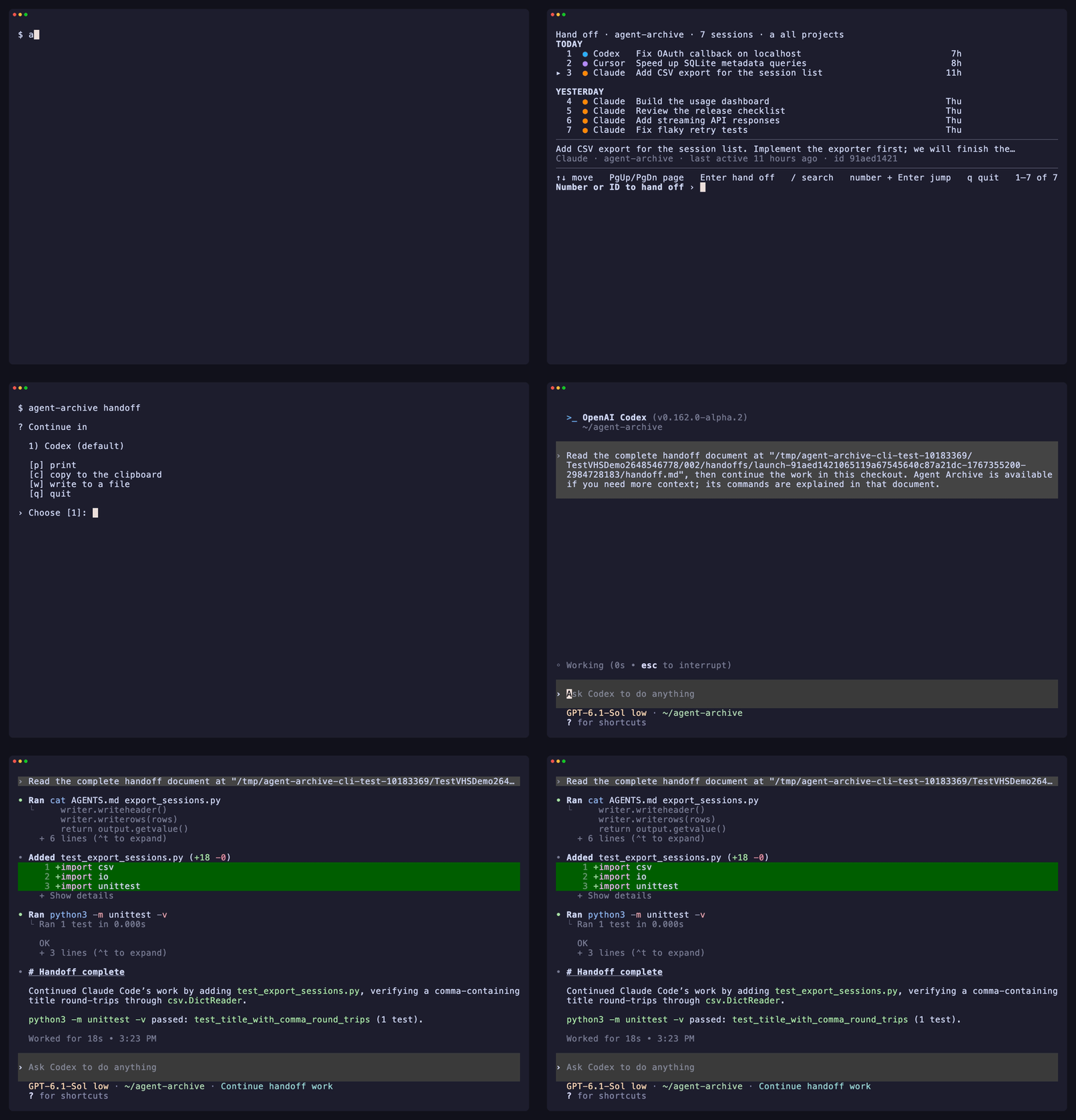
Archive automatically. Upload Claude Code, Codex, and Cursor transcripts to your own S3 or R2 bucket.
Browse your session history. Use
agent-archive listto browse sessions across coding agents. Filter by topic, project, branch, or PR number, then open a session to revisit the conversation (browsing guide).
See your usage and spend. Track session counts, tokens, and estimated spend with
agent-archive stats, broken down by agent, model, and project (usage guide).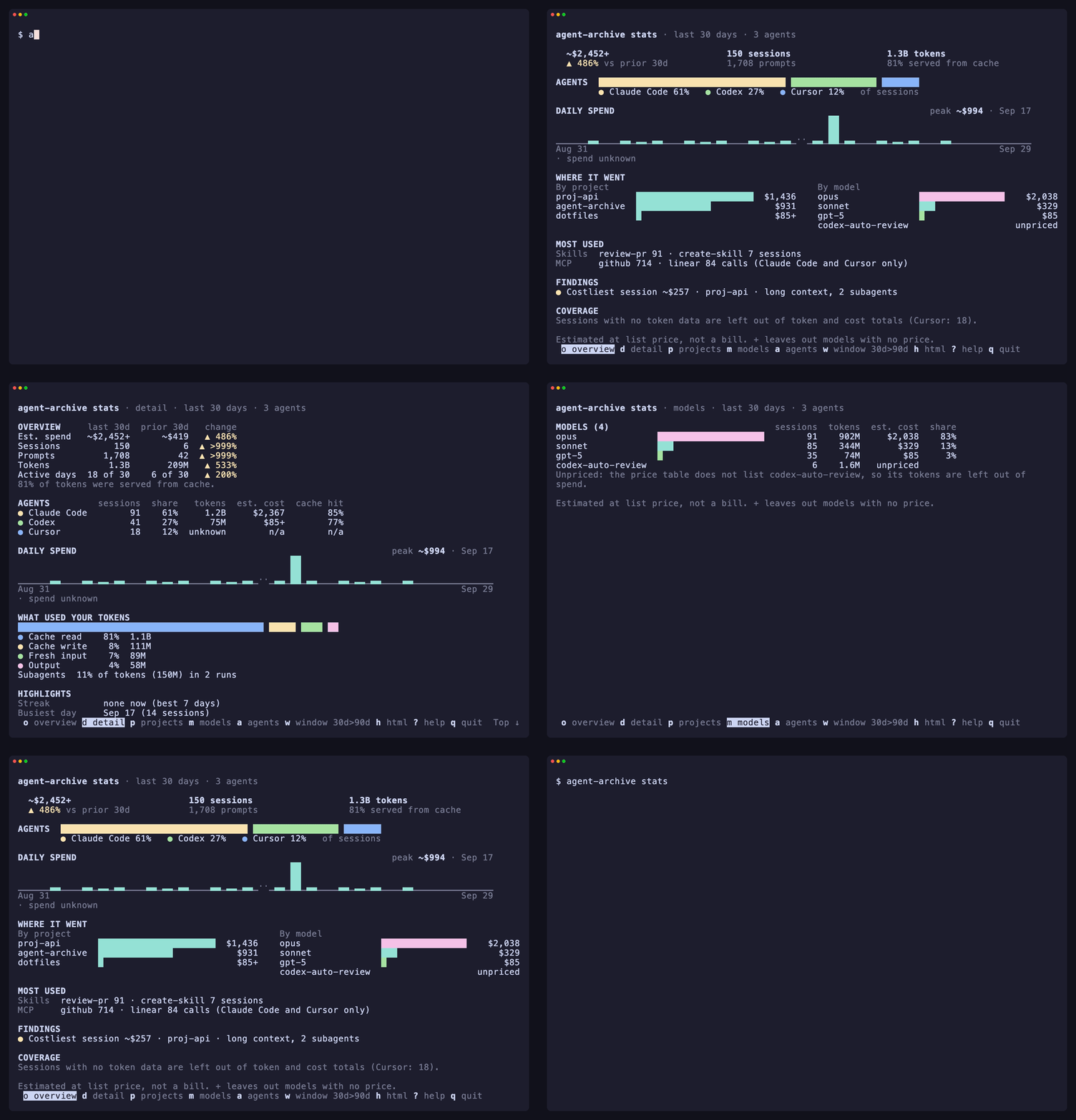
Quickstart
Install:
curl -fsSL https://raw.githubusercontent.com/wangjohn/agent-archive/v0.2.2/install.sh | AGENT_ARCHIVE_VERSION=v0.2.2 shRelease binaries cover macOS (Intel and Apple Silicon) and Linux (x86-64 and arm64).
Continue a session in another agent:
agent-archive handoffPick an existing Claude Code or Codex session, choose the receiving agent, and continue with its conversation context.
Enable automatic archiving (optional):
agent-archive setupConnect your own S3 or R2 bucket if you want your sessions backed up and available from another computer.
Setup guide · Bucket options · Platforms · Privacy · Multiple machines
How it works
flowchart LR
  A["Claude Code · Codex · Cursor"] -- "lifecycle hooks" --> H["agent-archive _hook<br/>records the session"]
  H --> S[("local state<br/>~/.local/share/agent-archive")]
  L["launchd job (macOS) or<br/>systemd timer (Linux)<br/>every 60 s"] --> C["collector<br/>filter → bundle → upload → verify"]
  S --> C
  T --> D["supported Codex discovery<br/>creation-time consent"] --> S
  C --> B[("your S3 / R2 bucket")]
  B --> R["list · show · handoff"]
  T["transcripts already<br/>on this machine"] --> BF["backfill"] --> S
Setup edits each included app's hook settings, adds one background job (a LaunchAgent on macOS, a systemd user timer on Linux), and writes two skill files for Claude Code (in ~/.claude/skills) and two for Codex and Cursor together (in ~/.agents/skills; agent-archive setup --no-skills skips them); for Cursor it also adds a missing version field (everything it changes). Old sessions are deleted from the bucket after 90 days by default.
Command reference
| Command | What it does | Example |
|---|---|---|
setup |
Configure apps, projects, and storage. | agent-archive setup |
status |
Check collection and detected agents; status --issues opens problems, and status claude shows one app in full. |
agent-archive status |
sync |
Collect and upload pending sessions now. | agent-archive sync |
pause, resume |
Pause collection, uploads, and cleanup until you resume (everyday commands). | agent-archive pause |
list |
Find archived sessions, by filters or by a few words. | agent-archive list "retention" |
search |
Search conversation text in a private local index (search guide). | agent-archive search "upload checksum" |
show |
View a session's summary, or its transcript with --transcript. |
agent-archive show SESSION_ID |
stats |
See your usage: tokens by day, estimated cost, agents, models, projects, highlights. | agent-archive stats --days 7 |
backfill |
Preview sessions already on this machine for import. | agent-archive backfill --dry-run |
handoff |
Continue a session in another agent; inside Claude Code, /handoff codex. |
agent-archive handoff |
For all commands and options, see the CLI reference or run agent-archive help COMMAND.
Documentation · Troubleshooting · FAQ · Privacy
Contributing and security
See CONTRIBUTING.md; test without touching your real machine (sandbox recipe). Report vulnerabilities privately as SECURITY.md describes. Changes are in CHANGELOG.md. Released under the MIT License.
Reviews (0)
Sign in to leave a review.
Leave a reviewNo results found