Bossku-Superpowers
Health Warn
- License — License: MIT
- Description — Repository has a description
- Active repo — Last push 0 days ago
- Low visibility — Only 9 GitHub stars
Code Pass
- Code scan — Scanned 12 files during light audit, no dangerous patterns found
Permissions Pass
- Permissions — No dangerous permissions requested
No AI report is available for this listing yet.
Make your AI coding agent work properly: pick the right skill, run its own code, and remember your project rules.
Bossku Superpowers
Make your AI coding agent work properly: pick the right skill, run its own code, and remember your project rules. Free and open source (MIT).
Works with Claude Code, Cursor, Codex, OpenCode and OMP.
Formerly BosskuAI. The bossku command and bosskuai-* skill names are the same, so your skills, hooks and notes still work. If you installed the plugin from a marketplace, reinstall it once.

Why use it?
Your agent is smart, but it forgets your rules and sometimes says "done" without testing anything. Bossku Superpower fixes that.
| Problem | What Bossku Superpower does |
|---|---|
| Agent doesn't know which skill to use | Picks the best skill for your request from 240+ skills |
| Agent writes code but never runs it | Sends the agent back once to run it |
| Agent runs a command that destroys work | Refuses git reset --hard, force push, rm -rf ~ and similar, and tells you how to run it yourself (Claude Code) |
| You told it a rule yesterday, today it forgot | Saves rules and decisions as notes and shows them next session |
| Codex stopped on its usage limit | Claude Code can pick the task up in the same folder with bossku resume |
| Useful tools are hard to set up | bossku tools list shows what's available. Nothing installs unless you say yes |
Skills load only when needed. Hooks are on after bossku install: turn off the run-your-code check with BOSSKU_STOP_GATE=off (the Node stop gate, the default), or with BOSSKU_VERIFY_GATE=0 only if you installed with --no-harness. Remove all hooks with bossku hooks uninstall. The other Node gates in hooks/ have their own switches, listed there.
Does it really help?
We tested it with real agents on the same tasks, with and without Bossku Superpower.
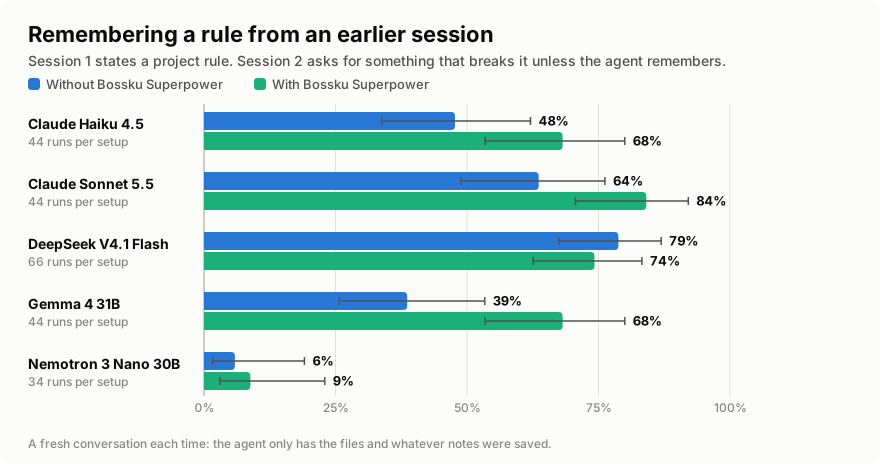
- Memory is the biggest win. When a rule is set in one session and needed in the next, Claude Haiku 4.5 (48% → 68%), Claude Sonnet 5.5 (64% → 84%) and Gemma 4 31B (39% → 68%) passed 20 to 30 points more tasks.
- Models that skip testing run their code more. Gemma and Nemotron ran their code far more often. Small Nemotron passed more HumanEval problems (62% → 92%).
- Better skill picking. The right skill ranked first 81% of the time, vs 56% for keyword search.
- The catch: more tokens. About 1.1× to 4.7× the tokens per run, highest on models that checked the least before.
- No clear change on coding and harder tasks for any model. Samples are small, so read each result with its interval.
- Which setup was measured. Build
b8ccea1, whose Stop hook was the Python verify gate. It also sent the agent back to save a rule it was told and to edit a file instead of pasting code. A default install now uses the Node stop gate, which only checks that code was run, so those two Stop reminders are not in it (the rule reminder on your prompt is).bossku install --no-harnessbrings the Python gate back. Details: memory.
Full numbers, charts and limits: benchmark results. How it was tested: benchmark notes.
Install
Need Python 3.11+ and Git.
git clone https://github.com/wankimmy/Bossku-Superpowers
cd Bossku-Superpowers
pip install -e .
bossku install --vault "/path/to/your/Obsidian/Vault" --memory-storage obsidian
cd /path/to/your/project
bossku init .
bossku doctor --project .
Then open the project in your coding agent and say bossku.
- No Obsidian? Skip
--vaultand--memory-storage. Notes stay in.bossku/memoryinside the project. - Want all skills listed? A first install starts at
--profile lean(about 25 listed, the rest one command away); a laterbossku installkeeps your profile. Use--profile corefor a small set,--profile engineeringfor everything except the marketing skills, or--profile fullfor all 240+. - Other tools? See setup for Claude Code, Cursor, Codex, OpenCode, OMP or portable mode.
What's inside
| Part | What it is |
|---|---|
| 240+ skills | Short checklists for engineering, product, design, security, marketing and founder work |
| Helper hooks (Claude Code; Codex gets the skill hint too) | Suggest a skill for your prompt and show your saved notes at session start. hint_mode v2 in ~/.bosskuai/config.json suggests up to three skills per prompt: it is opt in, because it missed some bars in its offline test |
| Safety gates (Claude Code) | Refuse destructive commands (git reset --hard, rm -rf ~), check the syntax of files the agent writes, and send the agent back once if it never ran its code. Details and switches. Leave them out with bossku install --no-harness |
| Subagents (Claude Code) | Six contracts (orchestrator, planner, designer, executor, auditor, final-reviewer), copied to ~/.claude/agents. Leave them out with --no-agents |
| Resume | When Codex stops on its usage limit, Claude Code shows the task's brief in the same folder after you say "continue". Context only: nothing is saved |
| Tools | Optional programs like Headroom, Moli, e2e, Cypress, Archify, Graft and MarkItDown. Installed only when you ask. Cypress goes into one project, never global |
| Memory | Your rules, decisions and lessons, saved in Obsidian, one folder per project |
Your notes in Obsidian

The agent saves a note only when a future session needs it: a decision, a plan, a fact or a lesson. Secrets are blanked out, and prompts or transcripts are never saved. After each session the notes sync to your vault. It only copies, your originals stay put. If the vault is missing, it tells you the note was not saved.
bossku remember --project . --kind decision "Use the existing test runner for this project."
bossku memory-brief --project .       # newest notes
bossku vault sync --project .         # sync to the vault now
bossku vault tidy                     # preview a clean-up (nothing changes)
More in memory and Obsidian.
Common commands
| Command | What it does |
|---|---|
bossku skills find "<task>" |
Show which skill fits and why (--brief: one line per skill) |
bossku skills show <id> |
Print one skill |
bossku tools list |
See optional tools and what's installed |
bossku tools install <tool> |
Show the plan for a tool. Add --yes to run it (pip and npm tools only). cypress installs into the current project only |
bossku init <project> |
Set up a project (--portable puts the skills inside it) |
bossku hooks install / uninstall |
Add or remove the helper hooks |
bossku install --no-harness |
Leave out the safety gates and deny rules. --no-agents leaves out the subagents, --no-claude the skills in ~/.claude/skills |
bossku resume |
Show the brief of a Codex task that stopped on its usage limit in this folder (nothing is saved) |
bossku doctor --project . |
Check your setup |
bossku update |
Refresh installed skills (run after git pull) |
For contributors
python -m bossku skills index --root .   # only if a skill or routing input changed (a SKILL.md, aliases.json, vendored.json, curated triggers)
python -m bossku validate --root .
python -m unittest discover -s tests -v
Learn more
- Skills and shared instructions
- Benchmark results and how they were measured
- Third-party packs and credits, plus optional requirements
- Claude Code practice review and Archify practice review
License
MIT. Vendored skills keep their own licenses: see third-party.
Reviews (0)
Sign in to leave a review.
Leave a reviewNo results found