codefire-app
CodeFire gives AI coding tools persistent memory, task tracking, and project intelligence. A desktop companion for the AI-native workflow.

CodeFire
Persistent memory for AI coding agents
A cross-platform companion app for Claude Code, Gemini CLI, Codex CLI, and OpenCode




Website · Getting Started · Discord · Community · Download
What is CodeFire?
Your AI coding agent forgets everything between sessions. CodeFire fixes that.
It auto-discovers your projects, tracks tasks and sessions, monitors live coding activity, and exposes project data back to your AI via MCP — creating a persistent memory layer where your agent knows what you were working on, what decisions were made, and what's left to do.
Two platform implementations share the same SQLite database schema and MCP protocol:
| Platform | Technology | Status |
|---|---|---|
| macOS (Apple Silicon) | Swift / SwiftUI | Beta — primary platform |
| Windows (x64) | Electron / React / TypeScript | Early Alpha |
| Linux (x64) | Electron / React / TypeScript | Early Alpha |
| macOS (Intel) | Electron / React / TypeScript | Early Alpha |
Features
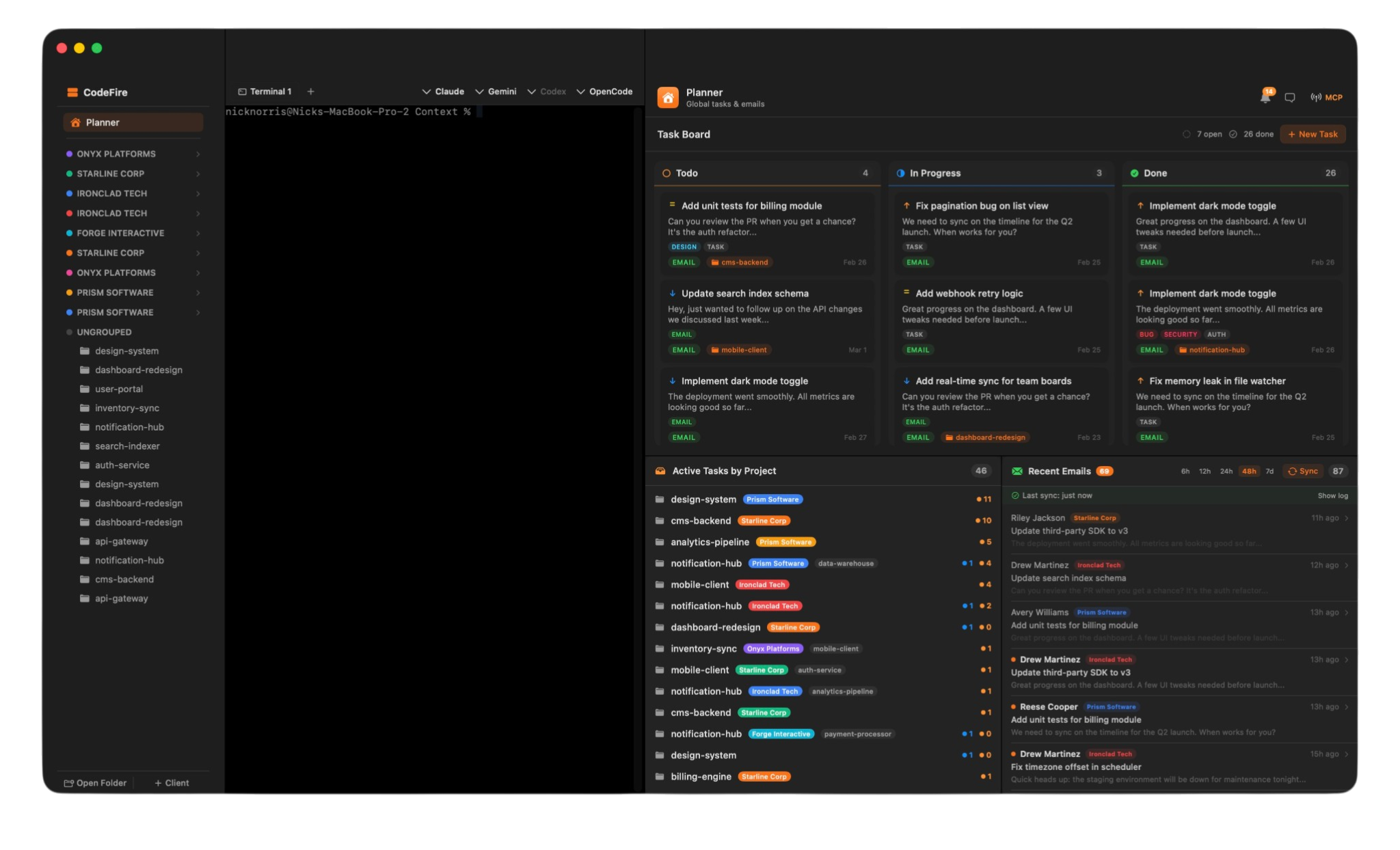
- Persistent memory — Tasks, notes, and session context that survive across CLI sessions
- Task tracking — Drag-and-drop Kanban board with priorities, labels, and task notes
- Live session monitoring — Real-time token usage, cost tracking, and tool call stats
- Semantic code search — Vector + keyword hybrid search across your indexed codebase
- Built-in terminal — Tabbed terminal sessions alongside your project views, with show/hide toggle
- Browser automation — 40+ MCP tools for navigating, clicking, typing, screenshotting (Electron)
- Git integration — Commits, staged changes, diffs, and branch management
- AI chat — Ask questions about your codebase with RAG-powered context
- Image generation — Text-to-image via OpenRouter (Gemini, DALL-E, etc.)
- Notes & briefings — Pin architecture decisions, capture gotchas, get AI-generated daily briefings
- Gmail integration — Sync emails into tasks with whitelist rules
- MCP server — 63 tools exposing project data to any AI coding CLI
- Universal compatibility — Works with Claude Code, Gemini CLI, Codex CLI, and OpenCode
Download
| Platform | Download | Notes |
|---|---|---|
| macOS (Apple Silicon) | CodeFire-macOS.zip | Native Swift app. Unzip and drag to Applications. |
| macOS (Intel) | CodeFire Electron DMG | Electron app. Also runs on Apple Silicon via Rosetta 2. |
| Windows | CodeFire Setup exe | NSIS installer. Windows 10+ required. |
| Linux | Latest Release | AppImage + .deb available when built on Linux CI. |
For detailed setup instructions including API key configuration, see the Getting Started guide.
Quick Start
1. Install & Open
Download for your platform above, install, and launch CodeFire.
2. Add Your OpenRouter API Key
Open Settings and go to the Engine tab (Electron) or CodeFire Engine tab (Swift). Paste your OpenRouter API key. This powers AI chat, semantic code search, and image generation.
3. Connect Your CLI
The fastest way is the one-click install — visit codefire.app/getting-started and click the button for your CLI.
Or configure manually:
# Claude Code — macOS (Swift)
claude mcp add codefire ~/Library/Application\ Support/CodeFire/bin/CodeFireMCP

# Claude Code — Linux (AppImage, auto-synced on first launch)
claude mcp add codefire node ~/.local/share/CodeFire/mcp-server/server.js

# Claude Code — Windows
claude mcp add codefire node "%APPDATA%\CodeFire\resources\mcp-server\server.js"
Gemini CLI — ~/.gemini/settings.json:
{
  "mcpServers": {
    "codefire": {
      "command": "~/Library/Application Support/CodeFire/bin/CodeFireMCP",
      "args": []
    }
  }
}
Codex CLI — ~/.codex/config.toml:
[mcp_servers.codefire]
command = "~/Library/Application Support/CodeFire/bin/CodeFireMCP"
args = []
OpenCode — opencode.json (project root):
{
  "mcpServers": {
    "codefire": {
      "type": "local",
      "command": ["~/Library/Application Support/CodeFire/bin/CodeFireMCP"]
    }
  }
}
Electron users: the MCP server path differs by platform. See the setup guides for exact paths. Linux AppImage users: the MCP server is automatically synced to
~/.local/share/CodeFire/mcp-server/on first launch.
4. Add System Instructions
For the best experience, add CodeFire instructions to your CLI's system prompt file. This teaches your AI agent how to use CodeFire's tools effectively — session workflows, task tracking, notes, and more.
| CLI | Setup Guide |
|---|---|
| Claude Code | codefire-claude-md-setup.md |
| Gemini CLI | codefire-gemini-setup.md |
| Codex CLI | codefire-codex-setup.md |
| OpenCode | codefire-opencode-setup.md |
Each guide includes platform-specific MCP connection instructions (macOS, Windows, Linux) and copy-pasteable system instructions.
5. Start Coding
Open a project folder in CodeFire, then start a CLI session. Your agent now has access to persistent memory, task tracking, browser automation, and code search — all through MCP.
MCP Server
CodeFire's MCP server exposes 63 tools to your AI coding agent:
| Category | Tools | Examples |
|---|---|---|
| Tasks | 6 | Create, update, list, and annotate tasks with notes |
| Notes | 5 | Create, search, pin, and manage project notes |
| Projects | 2 | List projects, get current project context |
| Sessions | 2 | List and search session history |
| Code Search | 1 | Full-text search across indexed codebase |
| Browser | 40+ | Navigate, click, type, screenshot, eval JS, manage cookies |
| Images | 1 | List generated images |
| Clients | 2 | List and create client groups |
Build from Source
macOS (Swift)
cd swift
swift build -c release
See swift/README.md for full build and signing instructions.
Windows / Linux / macOS Intel (Electron)
cd electron
npm install          # Install deps + rebuild native modules
npm run dev          # Start dev server + Electron
npm run build        # TypeScript compile + Vite build
npm test             # Run tests (Vitest)
npm run dist         # Package for current platform
npm run dist:win     # Windows installer (NSIS)
npm run dist:linux   # Linux packages (AppImage + deb)
npm run dist:mac     # macOS DMG + zip
See electron/README.md for detailed architecture and development docs.
Repository Structure
swift/          macOS app (Swift/SwiftUI) — Beta
electron/       Windows/Linux/macOS Intel app (Electron/React/TypeScript) — Alpha
landing/        Marketing website (codefire.app)
assets/         Shared screenshots and branding
scripts/        Build and packaging scripts
CLAUDE.md       Architecture docs for AI coding agents
SECURITY.md     Security policy and vulnerability reporting
Architecture
Both apps follow the same data model:
- SQLite database at
~/Library/Application Support/CodeFire/codefire.db(macOS),~/.config/CodeFire/codefire.db(Linux), or%APPDATA%\CodeFire\codefire.db(Windows) - MCP server communicates via stdio — no network listeners, fully local
- Project discovery scans
~/.claude/projects/for Claude Code session data - Shared schema — both Swift and Electron apps read/write the same database
Electron Architecture
The Electron app follows strict main/preload/renderer process separation:
- Main process (
src/main/) — Database, IPC handlers, services (Git, Terminal, Search, MCP) - Preload (
src/preload/) — Typed bridge exposingwindow.apivia contextBridge - Renderer (
src/renderer/) — React 19 + Tailwind CSS 4 + Vite - MCP server (
src/mcp/) — Standalone Node.js process spawned by CLI tools
Path aliases: @shared, @renderer, @main
Contributing
We're actively looking for contributors, especially for the Electron app on Windows and Linux.
- Getting Started guide — Set up the app
- Testers Wanted — Testing guide with platform-specific instructions
- Developer Wishlist — Areas where we need help (search engine, browser automation, testing, MCP)
- Community Guidelines — How to get involved
- CONTRIBUTING.md — Code style, branch naming, and PR guidelines
- SECURITY.md — Vulnerability reporting
Priority Contribution Areas
- Semantic search improvements — Local embedding fallback, reranking, better chunking
- Browser automation — Network capture, session persistence, Web Vitals
- Testing — Swift unit tests, MCP protocol tests, E2E browser tests, CI matrix builds
- Cross-platform parity — Port features between Swift and Electron
- MCP server extensions — Git operations, custom tool plugins, metrics
Requirements
- macOS (Swift): macOS 14.0 (Sonoma) or later, Apple Silicon
- Electron: Windows 10+, Ubuntu 20.04+, or macOS 10.15+ (Intel or Apple Silicon via Rosetta)
- OpenRouter API key for AI-powered features (get one here)
- An AI coding CLI: Claude Code, Gemini CLI, Codex CLI, or OpenCode
License
MIT
Reviews (0)
Sign in to leave a review.
Leave a reviewNo results found