cctrace
Health Warn
- License — License: Apache-2.0
- Description — Repository has a description
- Active repo — Last push 0 days ago
- Low visibility — Only 5 GitHub stars
Code Pass
- Code scan — Scanned 12 files during light audit, no dangerous patterns found
Permissions Pass
- Permissions — No dangerous permissions requested
No AI report is available for this listing yet.
Self-hosted telemetry for Claude Code and Codex CLI sessions
cctrace
Self-hosted telemetry for Claude Code and
Codex CLI sessions.
cctrace collects what your coding-agent sessions actually did — token usage,
cost, tool calls, and the conversation itself — into your own database, and
serves a dashboard over it. Nothing leaves the machines you run it on.
Status: early. The server API and the database schema still change between
releases. Pin a version if you depend on either.
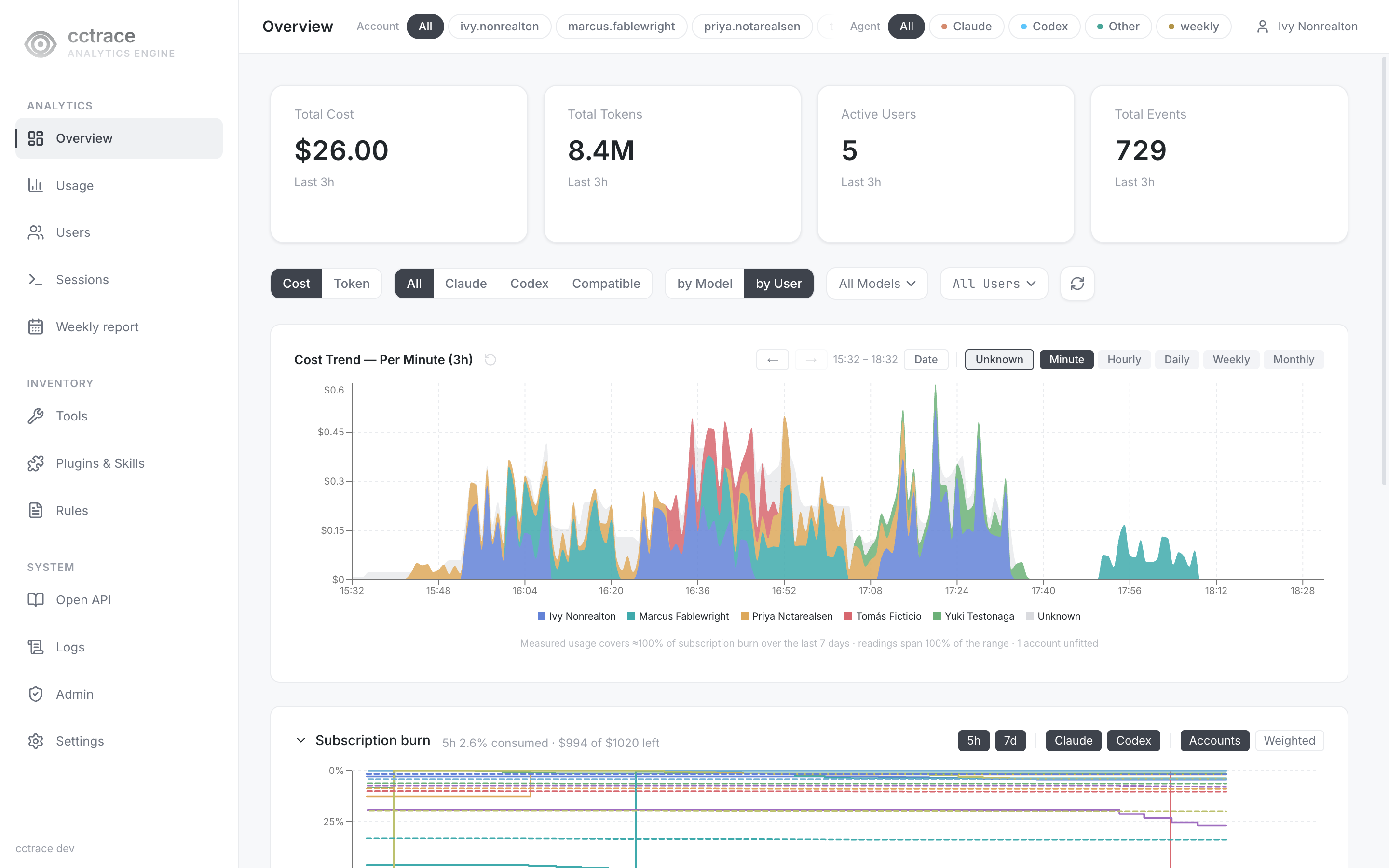
The dashboard above is a fictitious five-person team on a demo server, not a real deployment.
Why
Coding agents emit OpenTelemetry, but the useful questions ("what did this
session cost", "which project burns the most tokens", "what did the agent
actually do at 3pm") need the traces joined against the session transcripts.cctrace ingests both and keeps them together.
How it works
Two ingestion paths feed one store, because neither is sufficient alone.
| Path | Source | Carries | Latency |
|---|---|---|---|
| OTEL | agent's OTLP exporter, gRPC | token counts, cost, metrics | live |
| Sync | session JSONL on disk, HTTP | full conversation, tool calls | periodic |

cctrace— client. Runs on each developer machine, watches the agent's
session directory, uploads records.cctraced— server. Terminates OTLP, accepts sync uploads, serves the
API and the dashboard.- TimescaleDB — hypertables with compression and retention policies.
Requirements
- Go 1.25+
- Node.js 20.9+ (dashboard build —
web/package.jsonengines) - Docker (server + TimescaleDB)
Build
The dashboard is a Next.js static export embedded into the cctraced binary,
so it has to exist before the Go build. make build does not produce it — it
refuses to link against a missing or placeholder internal/web/dist rather
than silently shipping a server that serves an empty page. Build it first:
# requires: network — once, and after any web/package-lock.json change
(cd web && npm ci)
# requires: web-deps — needs web/node_modules; Next.js export -> internal/web/dist
./scripts/build-web.sh
# requires: web-dist — refuses a placeholder; both binaries into dist/
make build
make test-unit           # unit tests
# requires: golangci-lint — built with go1.27, the release LINT_GO names in the Makefile
make lint
# requires: docker — the full suite, including the container integration tests
make test
Lines marked # requires: name what a step needs beyond a fresh clone. The
export gate reads those markers: every unmarked command above is executed
against the exported tree on every export, so the sequence cannot rot into
instructions that no longer work.
make build warns that UPDATE_PUBLIC_KEY is empty. That is expected outside
the release pipeline: clients built without a public key refuse automatic
updates instead of trusting an unsigned manifest.
Run the server
The compose file names two image tags that are not on any public registry —
both are built from this repository.
Both image tags are for local builds only and are not published to a registry.
Compose uses pull_policy: never for both services: without locally built
images, startup fails instead of attempting a pull. If you change IMAGE_TAG
in deploy/.env, the server docker build -t cctrace/cctraced:<IMAGE_TAG> tag
must match exactly; the DB build tag stays cctrace/timescaledb-pgmq:latest.
# 1. Database image: TimescaleDB with the pgmq extension.
# requires: docker
docker build -t cctrace/timescaledb-pgmq:latest docker/timescaledb-pgmq/

# 2. Server image. UPDATE_SIGNING=optional builds without an update-signing
#    key; the default `required` is for the release pipeline, which holds one.
# requires: docker
docker build -f deploy/Dockerfile --build-arg UPDATE_SIGNING=optional \
  -t cctrace/cctraced:latest .
Before starting the stack, know what it publishes. The dashboard binds to127.0.0.1:8080 by default, but OTLP binds to all host interfaces on 4317
and 4318 so other machines can send telemetry, and neither speaks TLS. On a
network you do not control, set GRPC_BIND and OTEL_HTTP_BIND to a loopback
or private address in deploy/.env, or put the stack behind a proxy that
terminates TLS, before the first up -d.
Two values have no default and the stack will not start without them. A third
has a default that you should not keep:
jwt_secret=$(openssl rand -hex 32)
db_password=$(openssl rand -hex 20)
cat > deploy/.env <<EOF
JWT_SECRET=${jwt_secret}
LOGS_DIR=/absolute/path/on/the/host/for/logs
DB_PASSWORD=${db_password}
EOF

# requires: docker
docker compose --env-file deploy/.env \
  -f deploy/docker-compose.yml up -d
DB_PASSWORD falls back to cctrace when unset, so compose starts either way.
Decide it before the first start: Postgres applies the password only when the
volume is initialised, so changing it afterwards leaves the role on the old value
and cctraced enters a restart loop with password authentication failed.
Recovering means dropping the database volume, which discards collected data.
Check that the stack came up before going further. A bad value fails at server
startup, not at the up -d call, so up -d returning cleanly is not the answer:
# requires: docker
docker compose --env-file deploy/.env -f deploy/docker-compose.yml ps
# requires: curl
curl -fsS http://127.0.0.1:8080/api/health
If cctraced is restarting rather than Up, read its logs withdocker compose --env-file deploy/.env -f deploy/docker-compose.yml logs cctraced.
The dashboard is available at http://127.0.0.1:8080 on the server host, or
through an HTTPS reverse proxy. OTLP listens on all host interfaces on 4317
(gRPC) and 4318 (HTTP) for collection from other machines. Set HTTP_BIND,GRPC_BIND, and OTEL_HTTP_BIND in deploy/.env to change host publish
addresses; these are Compose variables, not Go server environment variables.
Before the first visit, read the setup token with docker compose --env-file deploy/.env -f deploy/docker-compose.yml logs cctraced, or set CCTRACE_SETUP_TOKEN in deploy/.env before startup; the token is invalid after first-admin creation.
The first visit walks through creating the admin account. To move any of them,
set HTTP_PORT, GRPC_PORT, OTEL_HTTP_PORT or DB_PORT in the same env file —
deploy/.env.example lists them.
The steps above are the short path. For HTTPS, backup and upgrade procedures,
the full environment table, retention defaults, and troubleshooting, see
docs/guides/guide-installation-and-usage.md.
Run the client
# requires: cctrace — the client binary from `make build`, on your PATH
cctrace init      # prompts for endpoints, writes ~/.cctrace/profile.json
# requires: cctrace
cctrace sync --daemon  # starts the sync daemon
# requires: cctrace
cctrace status
init also wires the agent's OTLP exporter to your server.
Configuration
Endpoints are baked in at link time so that a distributed binary needs no
configuration:
go build -ldflags "-X main.defaultSyncEndpoint=https://cctrace.example.com" ./cmd/cctrace
deploy/local-defaults.env supplies these to make build. It is
machine-local and not committed — deploy/local-defaults.env.example is the
template. Anything set in cctrace init overrides the built-in default.
Privacy
The dashboard stores conversation content. Before pointing this at a team,
decide deliberately:
- Retention — per-table policies, configurable from the admin screen.
- Redaction — privacy settings control what conversation content is stored.
- Excluded accounts — accounts whose data is hidden from all aggregates.
No telemetry goes to a third party. Beyond the server you configure, the
client queries Anthropic's usage API with the local Claude Code login to
read plan limits, and the server downloads OpenAI's public pricing and
changelog pages to price Codex usage. The weekly AI report feature, once an
admin enables it, sends data to the AI provider it is configured with; it
is under active development and not documented here.
Repository layout
cmd/cctrace     client CLI and sync daemon
cmd/cctraced    server
internal/       store, api, otel receiver, session parsers (claude + codex)
web/            Next.js dashboard
deploy/         Dockerfile and compose files
docker/         TimescaleDB + pgmq image
tests/          integration tests (need Docker)
Contributing
This repository is a filtered export of the one we develop in, so pull
requests are reviewed and accepted here but applied upstream rather than
merged — a commit made directly here would be overwritten by the next export.
Your authorship is preserved and export commits credit you.
Read CONTRIBUTING.md before opening one. For a
vulnerability, use private reporting instead: SECURITY.md.
License
Reviews (0)
Sign in to leave a review.
Leave a reviewNo results found