Deep-Research-skills
Health Warn
- No license — Repository has no license file
- Description — Repository has a description
- Active repo — Last push 0 days ago
- Community trust — 347 GitHub stars
Code Fail
- rm -rf — Recursive force deletion command in tests/test_install_codex.sh
Permissions Pass
- Permissions — No dangerous permissions requested
No AI report is available for this listing yet.
Structured deep research skill for Claude Code/Open Code/Codex with human-in-the-loop control
Deep Research Skill for Claude Code / OpenCode / Codex
If you find this project helpful, please give it a star! :star:
Inspired by RhinoInsight: Improving Deep Research through Control Mechanisms for Model Behavior and Context
A structured research workflow skill for Claude Code, OpenCode, and Codex, supporting two-phase research: outline generation (extensible) and deep investigation. Human-in-the-loop design ensures precise control at every stage.
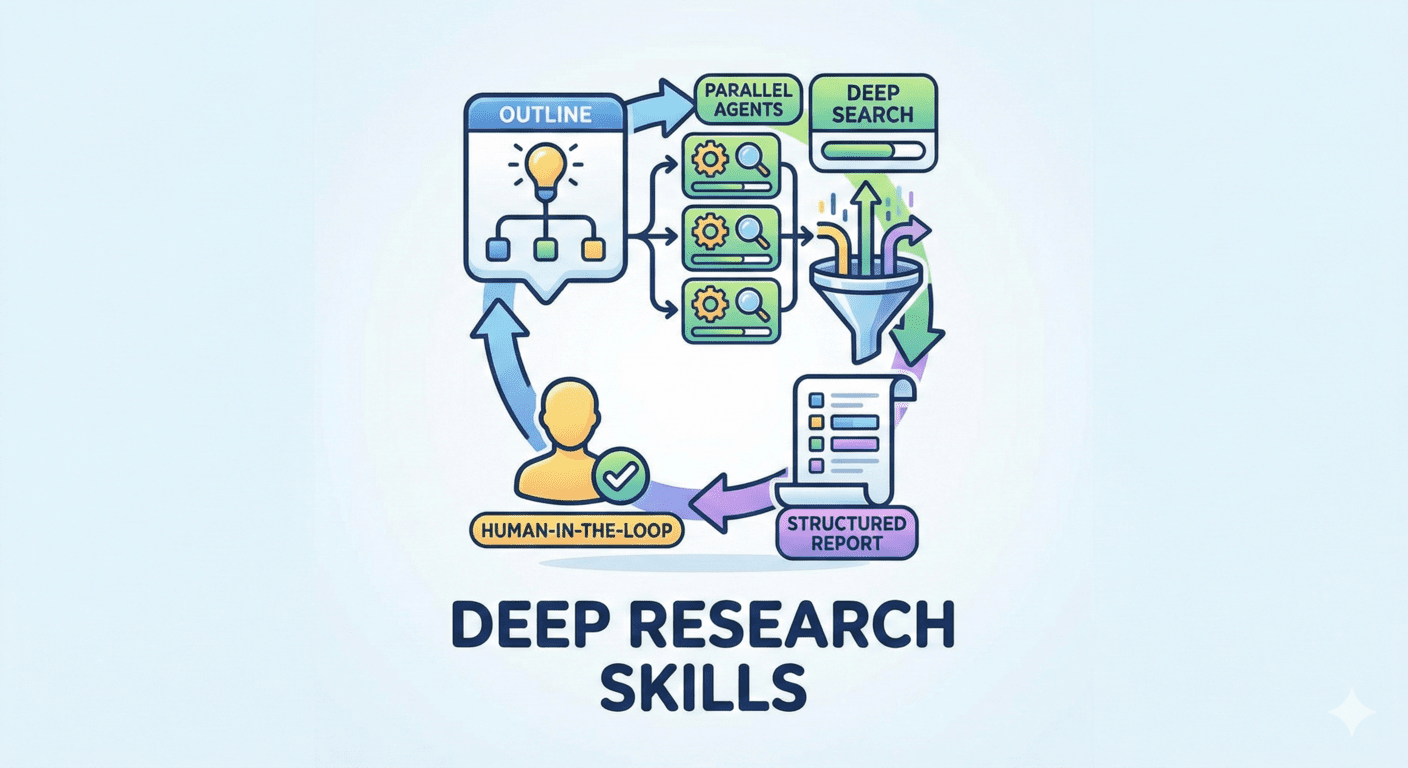
Use Cases
- Academic Research: Paper surveys, benchmark reviews, literature analysis
- Technical Research: Technology comparison, framework evaluation, tool selection
- Market Research: Competitor analysis, industry trends, product comparison
- Due Diligence: Company research, investment analysis, risk assessment
Installation
git clone https://github.com/Weizhena/deep-research-skills.git
cd deep-research-skills
Claude Code
# English version
cp -r skills/research-en/* ~/.claude/skills/

# Chinese version
cp -r skills/research-zh/* ~/.claude/skills/

# Required: Install agent and modules
cp agents/web-search-agent.md ~/.claude/agents/
cp -r agents/web-search-modules ~/.claude/agents/

# Required: Install Python dependency
pip install pyyaml
OpenCode (default: gpt-5.4)
# Skills (same as Claude Code)
cp -r skills/research-en/* ~/.claude/skills/   # or research-zh for Chinese

# Required: Enable web search for current shell
export OPENCODE_ENABLE_EXA=1

# Optional: make it permanent
echo 'export OPENCODE_ENABLE_EXA=1' >> ~/.bashrc
source ~/.bashrc

# Required: Install agent and modules
cp agents/web-search-opencode.md ~/.config/opencode/agents/web-search.md
cp -r agents/web-search-modules ~/.config/opencode/agents/

# Required: Install Python dependency
pip install pyyaml
Important: In OpenCode, ANY model's websearch requires
OPENCODE_ENABLE_EXA=1. A plainexportonly affects the current shell; writing it to~/.bashrcmakes it persistent. Without it, you only getweb fetch, which is weaker for the deep research phase.
Codex
# English version
mkdir -p ~/.codex/skills ~/.codex/agents
cp -r skills/research-codex-en/* ~/.codex/skills/

# Chinese version
mkdir -p ~/.codex/skills ~/.codex/agents
cp -r skills/research-codex-zh/* ~/.codex/skills/

# Required: Install web researcher agent and modules
cp agents-codex/web-researcher.toml ~/.codex/agents/
cp -r agents-codex/web-search-modules ~/.codex/agents/

# Required: Install Python dependency
pip install pyyaml
Add or update ~/.codex/config.toml using either method below:
Option A: Automatic script
cd deep-research-skills
bash scripts/install-codex.sh
Option B: Manual edit
suppress_unstable_features_warning = true

[features]
multi_agent = true
default_mode_request_user_input = true

[agents.web_researcher]
description = "Use this agent when you need to research information on the internet, particularly for debugging issues, finding solutions to technical problems, or gathering comprehensive information from multiple sources. This agent excels at finding relevant discussions. Use when you need creative search strategies, thorough investigation, or compilation of findings from multiple sources."
config_file = "agents/web-researcher.toml"
Commands
Claude Code 2.1.0+: Direct
/skill-nametrigger is now supported!Older versions: Use
run /skill-nameformat instead.Codex: You can trigger these skills from
/skills->List Skills, or ask naturally, for exampleUse the research skill to build an outline for AI Agent Demo 2025.
| Command (2.1.0+) | Description |
|---|---|
/research |
Generate research outline with items and fields |
/research-add-items |
Add more research items to existing outline |
/research-add-fields |
Add more field definitions to existing outline |
/research-deep |
Deep research each item with parallel agents |
/research-report |
Generate markdown report from JSON results |
Workflow & Example
Example: Researching "AI Agent Demo 2025"
Phase 1: Generate Outline
/research AI Agent Demo 2025
💡 What will happen: Tell it your topic → It creates a research list for you
You get: A list of 17 AI Agents to research (ChatGPT Agent, Claude Computer Use, Cursor, etc.) + what info to collect for each
(Optional) Not satisfied? Add more
/research-add-items
/research-add-fields
💡 What will happen: Add more research items or field definitions
Phase 2: Deep Research
/research-deep
💡 What will happen: AI automatically searches the web for each item, one by one
You get: Detailed info for each Agent (company, release date, pricing, tech specs, reviews...)
Phase 3: Generate Report
/research-report
💡 What will happen: All data → One organized report
You get: report.md - A complete markdown report with table of contents, ready to read or share
Need Help?
If you have questions, ask Claude Code, OpenCode, or Codex to explain this project:
Help me understand this project: https://github.com/Weizhena/deep-research-skills
References
- RhinoInsight: Improving Deep Research through Control Mechanisms for Model Behavior and Context
License
MIT
Reviews (0)
Sign in to leave a review.
Leave a reviewNo results found