comicsol
Health Warn
- License — License: MIT
- Description — Repository has a description
- Active repo — Last push 0 days ago
- Low visibility — Only 5 GitHub stars
Code Fail
- Hardcoded secret — Potential hardcoded credential in .github/workflows/web-tests.yml
Permissions Pass
- Permissions — No dangerous permissions requested
No AI report is available for this listing yet.
Comic Sol - local-first AI comic production as a Codex Skill, Python CLI, and MCP server.
Comic Sol





Comic Sol is an installable, provider-neutral, local-first comic production pipeline. The deterministic engine is the product; Agent Skills, CLI, and MCP are adapters that connect it to creator and integration workflows. Comic Sol stores no provider credentials. No build service is required.
This repository, wenn-id/comicsol, is the canonical, independent home of Comic Sol.
Retained live-generated evidence
These two tracked pages are retained live-generated evidence fromsunlight-courier, the repository's only
visual-quality sample. They use only that sample's retained provenance and artifacts.
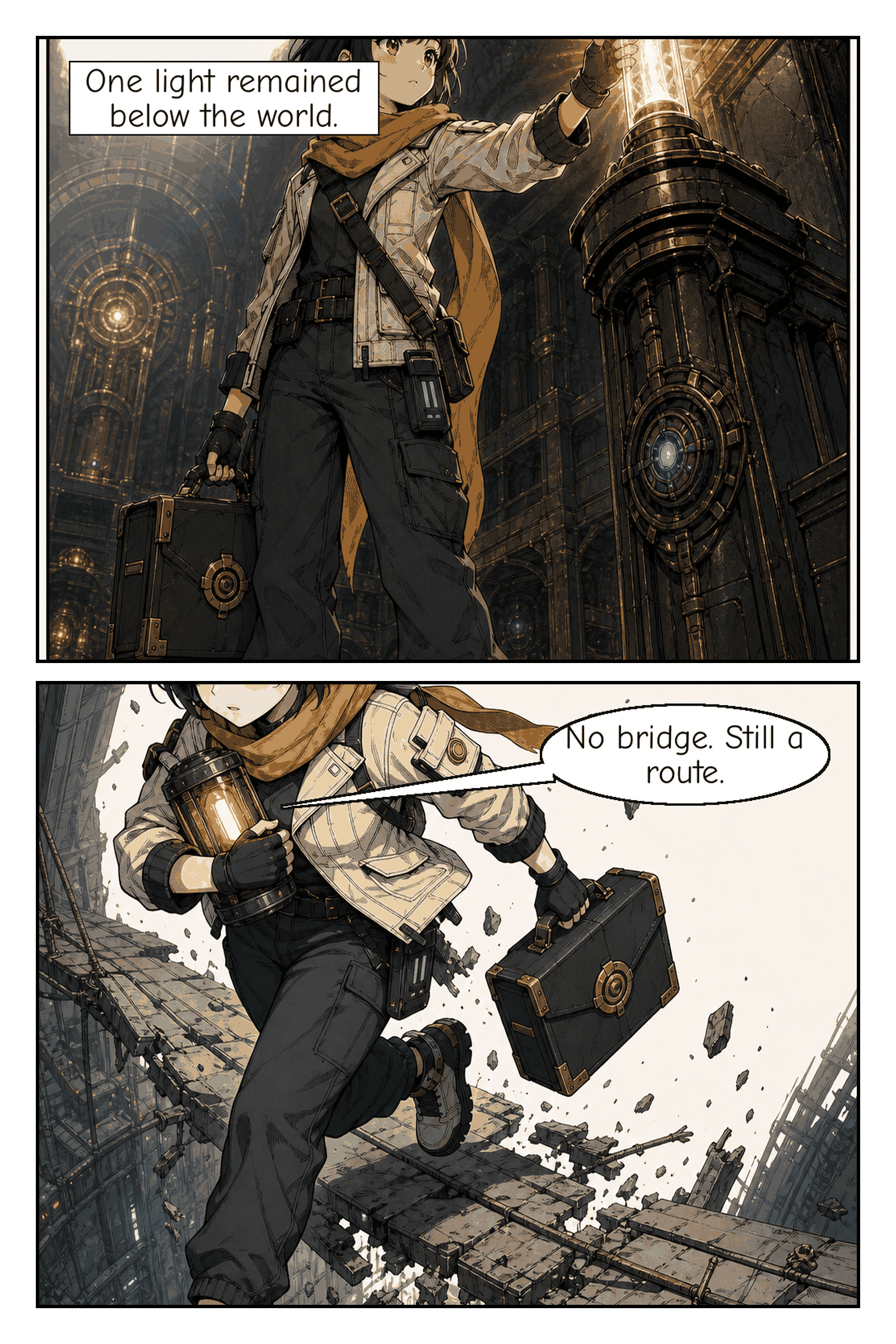
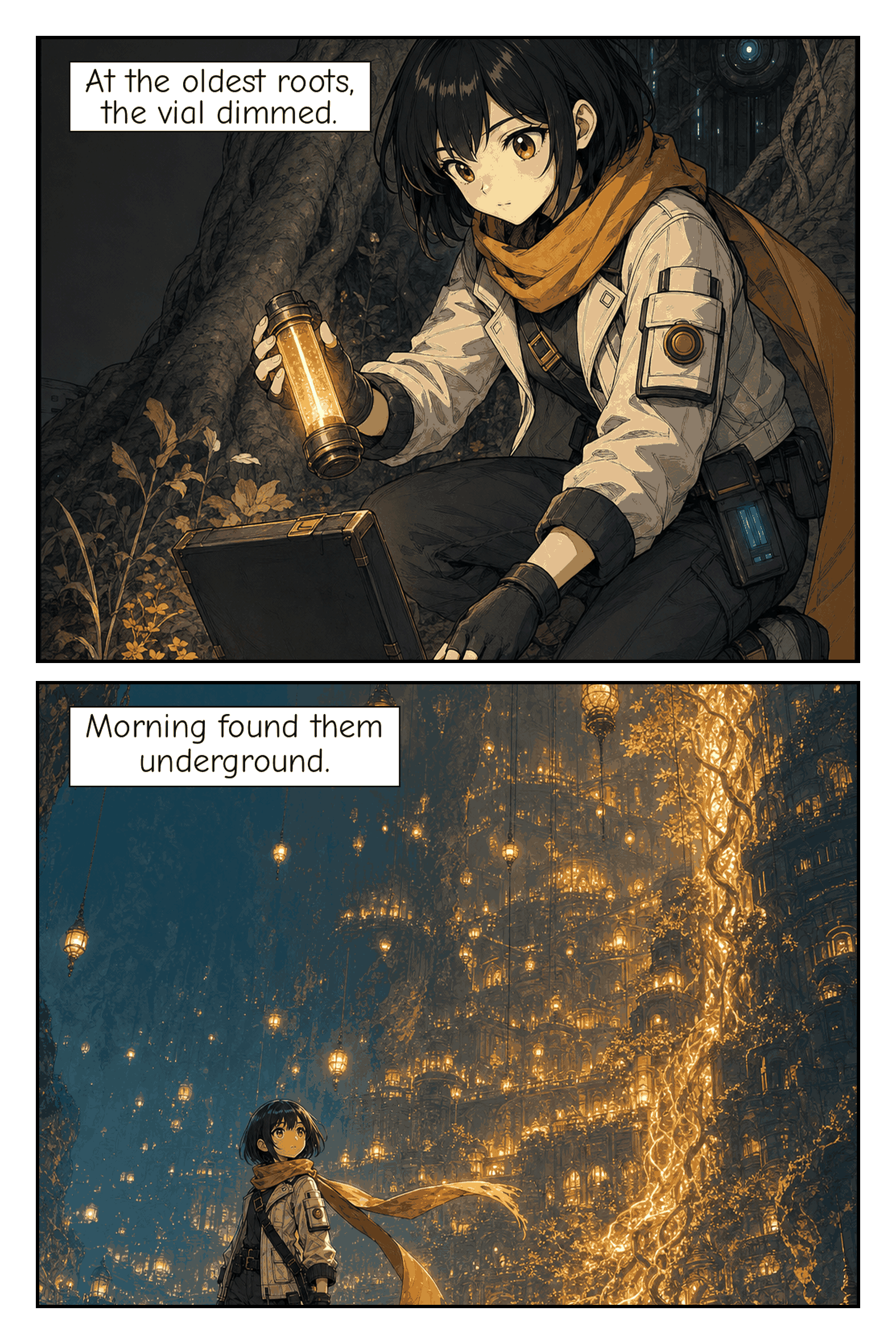
One retained sample does not prove broad illustration quality. Deterministic fixtures
are mechanics-only evidence; placeholder output is not visual-quality proof. The
showcase evidence contract records the exact retained provenance,
limitations, and publication-consent boundary.
Comic Sol is a local-first production pipeline around any compatible AI image generator. Plan anywhere. Render anywhere. Resume everywhere.
The core CLI does not create artwork by itself. It validates, persists, resumes,
repairs, letters, composes, and exports around an agent-supplied compatible image
generator.
Install the Agent Skill
skill-install first ships in v2.0.0rc6, which is prepared but not published.
The latest published prerelease, v2.0.0rc4, does not include skill-install.
Use the command below only after installing an rc6 package or native distribution once
its release assets are available, or from a trusted rc6 source checkout installed as a
package. This is the shortest explicit user-scope route:
comic-sol skill-install --target codex --scope user
Use --target claude --scope user, --target zcode --scope user, or a supported
project scope when appropriate; getting started lists
the exact placements. The surface guide and
support matrix separate host, image capability, launcher, and
output-root claims. “Agent Skills compatible” is a contract claim, not universal
host verification. The agent-host smoke contract keeps
Codex, Claude Code, Google Antigravity, and ZCode experimental until a complete live
record is retained.
Request a comic
Open a fresh session in the host where you installed the Skill. One natural-language
request is enough:
Make a 2-page manga about a courier delivering sunlight to an underground city.
The active agent plans the editable project and selects an image route by declared
capability: compatible native tool, compatible external adapter/API tool, portable
handoff, or an actionable BLOCKED state that preserves the work.
Codex planning → Antigravity rendering
Experimental host example: this Codex-to-Antigravity route is experimental until linked live smoke evidence exists. Antigravity has not been verified.
The commands below use the installed package launcher. From a source checkout, replacecomic-sol handoff with "$PYTHON" scripts/comic_sol.py handoff.
Prepare and inspect in the Codex workspace, then export before crossing a workspace or
device boundary:
comic-sol handoff prepare "$PROJECT"
comic-sol handoff inspect "$PROJECT"
comic-sol handoff export "$PROJECT" --output "$PROJECT.comic-sol-handoff"
At the Antigravity execution destination, import and inspect again. Select only aready job and give the selected image capability the exact jobs[].path returned by
inspection—never an enumerated or guessed descriptor path.
comic-sol handoff import "$PROJECT.comic-sol-handoff" --output-root "$OUTPUT_ROOT"
comic-sol handoff inspect "$IMPORTED_PROJECT"
After that capability writes the raster, accept the result with the required job,
attempt, executor, and path values:
comic-sol handoff accept-result "$IMPORTED_PROJECT" \
  --job JOB_ID --attempt ATTEMPT \
  --executor-kind EXECUTOR_KIND --executor-id EXECUTOR_ID \
  --path RASTER_PATH
Add --approve-reference only when accepting a reference job. If completed
reference jobs report next_action=prepare, prepare again by runningcomic-sol handoff prepare "$IMPORTED_PROJECT" to create panel jobs; inspect again before
retries with comic-sol handoff inspect "$IMPORTED_PROJECT". If the imported project
entered handoff as BLOCKED for image-capability-unavailable, inspect the
destination's exposed tools, record its real provider-neutral capability observation in
the project, and resume only after recording an available capability:
comic-sol resume "$IMPORTED_PROJECT" --json
Otherwise preserve BLOCKED. Then continue normal visual QA and promotion. The
complete handoff lifecycle
defines failure intake, two-phase reference handling, resume, and promotion.
Inspect the retained result
A normal run keeps the same classes of editable project, page, QA, and PDF outputs
under the selected local output root.
Advanced integrations
Creator workflows start with the Agent Skill. For retained advanced routes, use the
CLI/MCP/OCI and surface guide, native archive installer,
source, wheel, and OCI manual, security policy,
and release trust documentation. These cover
CLI automation, MCP, OCI, source/wheel installation, native archives, security, release
qualification, and release trust without competing with the creator path above.
Documentation by audience
- Creators: user-guide index, getting started, resume/repair/export, opt-in creator dogfood program, and troubleshooting.
- Installers and integrators: surface guide, native install, manual install, and structured error contract.
- Contributors and maintainers: contribution guide, agent development constitution,
references/, benchmarks, and release runbooks.
Install
Native core CLI (recommended)
For the bundled core CLI, use the exact-tag installer path indocs/install.md. The guide is prepared for the unpublishedv2.0.0rc6 candidate and becomes executable when that tag's assets appear on
the Releases page. It automatically selects the supported native asset, verifies
the tag-bound Sigstore manifest and archive digest, runs staged doctor, and
prints one absolute doctor command to run next. Advanced local-archive, source,
wheel, and OCI procedures live separately indocs/install-manual.md.
Source installation supports Linux, macOS, Windows, and WSL2 on Python 3.11+.
The pinned runtime dependency is Pillow 12.3.0. Intel macOS is source-install-only;
it has no native archive. The native archive matrix is Linux x86_64, macOS arm64,
and Windows x86_64. WSL2 uses the Linux x86_64 archive; it has no separate native
archive. The deterministic test suite does not need an image provider.
Agent Skill placement
For v2.0.0rc6 and later, the recommended creator route is the transactional
installer shipped by the installed package and native distributions:
comic-sol skill-install --target codex --scope user
Supported placements are Codex user, Claude user/project, Antigravity project, and
ZCode user. Project placements require --project-root. --target auto is safe only
when exactly one supported host location exists; it reports zero or multiple candidates
without writing. The installer copies and verifies one canonical synchronized payload;
path-placement tests prove mechanics, not live compatibility with a host. See
getting started.
A source checkout remains available for development and advanced manual use. Developers
may clone or copy the repository, but skill-install replaces manual placement into a
Codex skills directory for the creator route. Resolve Python 3.11+ as PYTHON, install
the matching hash-locked base requirements, and invoke the source launcher documented in
the surface guide.
Codex Plugin — same repository
This repository is also a skills-only Codex Plugin. The plugin manifest lives at.codex-plugin/plugin.json; its self-contained upload bundle lives underskills/comic-sol/. The root skill files are canonical; the bundle is synchronized
with scripts/sync_plugin_bundle.py. No second repository is required.
Test the same repository through Codex's repo marketplace:
codex plugin marketplace add wenn-id/comicsol --ref main
codex plugin list --available --json
codex plugin add comic-sol@comic-sol --json
The plugin includes the workflow, deterministic scripts, references, templates,
fonts, and legal assets. Start a fresh Codex session after installation. The
optional MCP/CLI engine remains in this repository as a separate local surface;
plugin installation does not require a hosted service or MCP server.
Comic Sol ships as several surfaces — Skill placement, Codex Plugin, source
checkout, installed CLI wheel, native portable archive, MCP server, and OCI
image — each with its own start command and default output root;docs/surfaces.md separates them, anddocs/support-matrix.md publishes the full
platform × install-mode × architecture × runtime matrix. Source and wheel
installation are advanced core-CLI paths documented indocs/install-manual.md.
Recommended companion: Superpowers
For structured brainstorming, planning, debugging, and verification workflows,
we recommend installing Superpowers
alongside Comic Sol. Superpowers is optional, installed separately, and is not
required for Comic Sol to run.
Machine-readable doctor output keeps the stable CLI envelope (ok, command,data, error). data.ready is the authoritative readiness boolean; the legacydata.healthy and data.messages fields remain available for existing consumers.data.checks contains stable check objects with id, status (pass, warn, orfail), message, and remediation. Runtime, Pillow, fonts, templates, references,
and the selected output root fail closed when broken. MCP installation and a missing,
partial, or unknown image-generation capability are actionable warnings because both
remain optional for deterministic project editing.
Before an agent-driven doctor call, the Comic Sol Skill inspects only the image-tool
metadata exposed in that session. It supplies the fixed neutral nameagent-image-generation with declared reference-image and dimension support, reportsunavailable when the
inspectable inventory has no usable tool, or supplies no capability flags when inspection
is unavailable or fails. A fully capable observation passes; a partial, unavailable, or
unknown observation warns without changing deterministic readiness. Detection invokes no
provider, reads no credential, and installs or enables nothing.
The CLI exposes doctor, init, status, validate, resume, finalize,setup, repair, and uninstall, plus the optional mcp launcher. Machine-readable
responses use one stable envelope containing ok, command, data, and error.
Guided project initialization
The installed CLI can guide a new user through project name, an optional bundled
starter, 1–4 page scope and story input for blank projects, and output location:
comic-sol init --interactive
The defaults are Comic Sol Project, a blank project, 2 pages, an English short
prompt, and the platform-native output root. The wizard validates every answer before it creates
the output root or project. It is explicit and human-only: --interactive cannot
be combined with --json or init data flags.
Three explicitly versioned, provider-neutral v1 starters are available:minimal-one-page, dialogue-two-page, and action-focused. A starter produces a
normal STORYBOARDED project with standard plan/storyboard artifacts and no raster
or QA evidence:
comic-sol --json init --output-root /absolute/projects \
  --title "Bridge Run Draft" --starter action-focused
Starter selection supplies source, request settings, and page count as one coherent
bundle, so combining it with --source, --request-json, or --page-count is
rejected. See starter templates for intended use,
format details, provider neutrality, and the QA boundary.
Automation, CI, and AI agents use the equivalent non-interactive path, which
never prompts. --request-json remains available when a caller needs to override
the inferred source_file request settings:
comic-sol --json init --output-root /absolute/projects \
  --title "Sunlight Courier" --source story.md --page-count 2
Lifecycle commands report concise stage progress only on the human-readable surface:WORKING, BLOCKED, FAILED, or COMPLETE, followed by the current stage and known
completed/remaining counts. Progress is written to stderr, so scripts can consumestdout safely. With --json, stdout remains one parseable JSON envelope and both
human progress and error details stay out of the machine stream. The contract is
fail-closed: argument-parse failures emit a CS-CLI-001 envelope instead of argparse
text, unexpected internal failures emit a redacted CS-PROJ-005 envelope instead of a
traceback, and validate reports a project with issues as ok: false with exit
status 2 while keeping the issue list in data. Exit statuses are 0 for success,1 for operational failures, and 2 for usage or input rejection. Every public code,
category, exit status, redaction rule, and CLI/MCP parity behavior is documented indocs/structured-errors.md.
Native Distribution (v2.0.0rc4)
The published v2.0.0rc4 prerelease provides bundled portable archives labelled
for Linux x86_64, macOS x86_64, and Windows x86_64, plus transactional user-local
installers and a non-root OCI image. The macOS archive was built for arm64 despite
its historical x86_64 filename; the current native matrix corrects that name to
macOS arm64. Native archives include Python, Pillow, MCP, fonts, templates, the
Skill, and references, so installed execution does not require a system Python.
Every native bundle includes SHA256SUMS, a Sigstore bundle for that manifest,
deterministic metadata, and a CycloneDX SBOM. The RC artifacts use keyless
Sigstore verification (not Authenticode-signed or Apple-notarized); verify the
manifest signature and archive digest before execution. The recommended path,
upgrade, rollback, and uninstall instructions are indocs/install.md; bootstrap verification and advanced
installation procedures are indocs/install-manual.md. The authoritative
stable-release checklist is docs/releases/v2.0-stable-criteria.md,
the complete release subject set and trust chain — including the OCI distribution
decision — is docs/releases/release-trust-chain.md, and the
immutable-evidence rollback/yank procedures are docs/releases/rollback-runbook.md.
What each milestone delivered, and which issue and pull request delivered it, is recorded indocs/releases/milestone-delivery.md. Milestones v2.0,
v2.1, and v2.2 are complete and unreleased: they are prepared for v2.0.0rc6, which is not
yet published, so the
current published prerelease remains v2.0.0rc4 and the archives described above are its own.
The 2.0.0rc* prereleases shipped the v2.0 product line, not the v2.0 milestone, which merged
afterwards.
Container and Compose deployment commands are documented indocs/install-manual.md; they are optional
and are not required for the normal local CLI workflow.
Native uninstall removes only the runtime. User projects and separately managed
MCP client configurations remain preserved.
MCP Server (Optional)
Comic Sol includes an optional stdio MCP server that exposes the deterministic pipeline as standard tools for Codex-compatible MCP clients.
Sampling should remain disabled to preserve deterministic execution.
MCP trust boundary
MCP uses local stdio and has no authentication layer. Any process that can
launch the configured MCP command can invoke every deterministic tool and write
inside its configured --root. Treat the MCP client and its configuration as
trusted local code. Use a dedicated absolute output root containing only Comic
Sol projects; do not point it at a home directory, repository root, or shared
multi-user folder. The server rejects project traversal and symlinks, but this
is containment, not user authentication.
The CLI status, validate, resume, and finalize commands accept a project
path directly. For the same containment model, keep project paths beneath the
output root and use MCP when an explicit fixed root is required.
To run the MCP adapter, install the SDK alongside Pillow. Use matching command
and lockfile for host platform:
# Linux
"$PYTHON" -m venv ~/.venvs/comic-sol-mcp
~/.venvs/comic-sol-mcp/bin/pip install --require-hashes -r requirements/locks/runtime-linux-x86_64.txt
# macOS
"$PYTHON" -m venv ~/.venvs/comic-sol-mcp
~/.venvs/comic-sol-mcp/bin/pip install --require-hashes -r requirements/locks/runtime-macos-x86_64.txt
# Windows
& $PYTHON -3 -m venv $HOME\.venvs\comic-sol-mcp
& $HOME\.venvs\comic-sol-mcp\Scripts\pip.exe install --require-hashes -r requirements/locks/runtime-windows-x86_64.txt
From the repository root, start the development server with a repository-relative
script path and an absolute selected output root:
OUTPUT_ROOT="$(pwd)/comic-sol-output"
"$PYTHON" scripts/mcp_server.py --root "$OUTPUT_ROOT"
For an MCP client configuration, lock the server to one absolute output root and
keep sampling disabled. An installed package uses the stable launcher:
~/.venvs/comic-sol-mcp/bin/pip install --no-deps '.[mcp]'
~/.venvs/comic-sol-mcp/bin/comic-sol mcp --root /absolute/path/to/comic-sol-output
On native Windows PowerShell:
& "$HOME\.venvs\comic-sol-mcp\Scripts\pip.exe" install --no-deps ".[mcp]"
& "$HOME\.venvs\comic-sol-mcp\Scripts\comic-sol.exe" mcp --root C:\absolute\path\to\comic-sol-output
Transactional client integration is available through:
comic-sol --json setup --output-root /absolute/path/to/comic-sol-output
comic-sol --json repair --dry-run --output-root /absolute/path/to/comic-sol-output
comic-sol --json repair --output-root /absolute/path/to/comic-sol-output
comic-sol --json uninstall --output-root /absolute/path/to/comic-sol-output
repair --dry-run diagnoses each detected integration and previews the intendedcomic-sol command, arguments, config path, action, and backup requirement without
writing. Apply recomputes the plan under the config lock, verifies the backup, writes
atomically, verifies the persisted entry, and verifies rollback after failure. Each
client returns success, no-op, or failure. Selecting an unverified client
returns a failure result; unselected or undetected clients may return no-op withskipped status, and clients whose native format or location has not been verified
return no-op with unsupported status. The complete status matrix is planned
for preview, configured for an applied change, unchanged for a repeat/no-op,skipped when not selected or not detected, unsupported when the native format or
location is unverified, rolled-back when a failed mutation was restored, androllback-failed when restoration could not be verified. Repair exits nonzero if any
client fails. Repeating repair is idempotent.
Repair changes only the comic-sol MCP entry at verified Codex TOML and detected
JSON config locations. It does not create missing third-party config files, repair
unsupported clients, or reinstall runtime components; those cases return diagnostic
and doctor guidance. Uninstall removes only the MCP integration and preserves comic
projects. Clients whose native format or location has not been verified are reported
as unsupported rather than guessed.
During source development, "$PYTHON" scripts/mcp_server.py --root PATH remains
available. Both entry points expose the same protocol-tested deterministic lifecycle
as exactly 17 comic_* tools.
Image-provider boundary
Image generation is agent-managed: the active agent session selects and invokes
its available image capability, then the deterministic CLI/MCP lifecycle validates,
retains, normalizes, and records the resulting raster. Provider credentials, SDKs,
and raw provider payloads remain outside Comic Sol. Before generation, the Skill
automatically inspects exposed tool metadata and passes a provider-neutral observation todoctor; the deterministic engine never discovers or calls a provider itself.
Cross-agent handoff
When the active agent session has no compatible native image tool, Comic Sol supports
cross-agent and cross-device workflows through its handoff lifecycle:
handoff preparecreates generation jobs for pending panels.handoff inspectreports current job readiness and status.handoff exportproduces a portable archive for transfer across devices or workspaces.handoff importresumes a project from a portable archive on another device.handoff accept-resultintakes a completed raster from any executor.handoff record-failurerecords a generation failure by category.
Executor selection follows declared capability: a compatible native image tool is
preferred, then a compatible external executor, then handoff preparation for another
agent. The local ComfyUI adapter is a
reference/experimental external executor that demonstrates the protocol; it is not
part of the deterministic wheel and its integration has not been verified against a
live ComfyUI instance. The deterministic engine owns contracts, validation,
accounting, archive safety, and result intake without owning provider credentials
or provider SDK integrations. Portable archive export and archive import enable
durable project transfer that does not depend on chat-only context.
Invoke
Open Codex with the skill installed and say, for example:
Make a 2-page manga about a courier delivering sunlight to an underground city.
That is the complete user invocation. Comic Sol detects prompt, pasted-story,
source-file, or resume mode; applies documented defaults; and asks only materially
missing questions. It reports an explicit error if the agent session cannot return
a local raster image. Seereferences/capability-detection.md for the
exact capability check and preserved-project recovery procedure. Platform-specific,
provider-neutral image setup is documented inreferences/image-provider-setup.md.
For deterministic diagnostics:
"$PYTHON" scripts/comic_sol.py doctor --output-root /tmp/comic-sol-doctor
# Installed equivalent:
comic-sol --json doctor --output-root /tmp/comic-sol-doctor
These direct calls omit agent capability flags. Human output saysINFO image capability: inspect in agent session; JSON reportsdetails.readiness as unknown. The Skill supplies--image-capability-status available --image-capability-name agent-image-generation and the declared --supports-reference-images and--supports-dimensions flags, or--image-capability-status unavailable when it can conclusively inspect an inventory
with no usable text-to-image tool.
Inspect the result
Each run preserves editable semantic and visual intermediates beneath its generated
project directory. The important outputs are:
project.json                       project manifest and current state
plan/                              story plan, character bible, and storyboard
plan/character-identity-pack.json  per-character identity traits for generation (v2.2)
prompts/                           editable reference and panel prompts
references/                        canonical character and scene images
panels/raw/                        generated panel PNGs
panels/clean/                      accepted clean panel PNGs
panels/*/lettered.png              deterministic lettered panel PNGs
panels/*/sfx-audit.json            authored-SFX authorization records
pages/page-001.png                 ordered 1600×2400 page PNGs
exports/<project-id>.pdf           ordered comic PDF
exports/pdf-verification.json      PDF verification (`pdf_verification` descriptor)
qa/panels/*.json                   seven-check panel QA records
qa/pages/page-001.json             ten-check page QA records (schema 2.1)
qa/report.md                       human-readable QA report
logs/reference-selection.json      which reference images each panel uses (v2.2)
logs/repair-plan.json              selective panel-repair decisions (v2.2)
logs/                              sanitized events, cache, and retry accounting
Treat the QA artifacts as evidence with limits, not as guarantees: deterministic
offline builds prove schema, lettering, composition, export, and validation
mechanics — including the page-QA 2.1 records and the PDF verification descriptor —
while artwork-dependent checks on placeholder builds are recorded as unreviewed
warnings, and live visual quality is established only by the
v2.2 live-visual-evidence contract,
not by a green test suite.
Official examples
To see that structure filled in before running anything yourself, readsamples/README.md. It catalogs three reference projects and
states which of them is evidence of visual quality:
| Example | Pages | Panels | Tier |
|---|---|---|---|
first-light-signal |
1 | 3 | Deterministic |
sunlight-courier |
2 | 4 | Live-generated |
the-quiet-ledger |
4 | 11 | Deterministic |
sunlight-courier tracks real generated artwork and its exported PDF; it is the
one to look at for image output. The two deterministic examples commit only
editable inputs — story plan, character bible, storyboard, and prompts — and build
their pages, QA records, and PDF locally with no provider call:
"$PYTHON" scripts/build_examples.py
Each build is validated at the final stage. Deterministic builds prove schema,
lettering, composition, export, and validation mechanics; their placeholder panel
artwork is not a claimed live sample. Because a placeholder has no artwork to
inspect, those builds record the artwork-dependent QA checks as unreviewed
warnings and terminate as COMPLETE_WITH_WARNINGS rather than claiming a visual
review that never happened. The committed
one-page synthetic fixture remains available as
minimal test data.
Architecture
SKILL.md orchestrates ten agent stages and progressively loads guidance fromreferences/. Agent reasoning creates the editable story, character, storyboard,
prompt, and QA decisions. Python scripts handle only deterministic project state,
validation, resume planning, lettering, page composition, PDF export, and report
rendering. Provider access remains in the agent capability plane; secrets and
provider SDKs do not enter deterministic scripts.
Hybrid lettering
Dialogue is rendered in uppercase, while authored caption casing is preserved.
Dialogue uses bundled Comic Neue Regular, and inline **bold** emphasis uses Comic
Neue Bold with wrapping and centering measured across the mixed runs. Font selection
is per-character: bundled Noto Sans covers Greek and Cyrillic when Comic Neue does not,
and an optional per-script face given as --font-script SCRIPT=PATH is consulted last,
which is how CJK, kana, Hangul syllables, Armenian, Georgian, and Ethiopic letter
without bundling their fonts. Typography preflight refuses text that no configured face
covers before any panel is written, so .notdef fallback boxes are not a pipeline
outcome; letter_panel() called directly still preserves a character absent from every
face as a Noto Sans .notdef rather than silently dropping it. The --font option
still overrides the regular dialogue font; its bold counterpart may fall back to
Comic Neue Bold. Run scripts/font_coverage.py for the coverage inventory, and seedocs/typography.md for the supported scripts, the selected
extension fonts, and the fallback order.
Pillow fits dialogue into adaptive oval balloons, attaches each tail at the nearest
oval boundary toward a validated speaker or device anchor, and renders a tapered
organic cubic tail that stops before the voice source. It also draws compact light caption
strips sized to their text.
Authored SFX takes the other half of the hybrid pipeline: the image model draws
the exact SFX into the artwork, and visual QA verifies spelling, count, and authorization.
Pillow validates and counts SFX but reserves no placement and changes no pixels for it.
Test
Run the complete offline suite:
"$PYTHON" -m unittest discover -s tests -v
"$PYTHON" scripts/comic_sol.py doctor
Base environment (Pillow only, MCP tests skipped)
Create a clean virtual environment and install only the base dependency:
"$PYTHON" -m venv /tmp/comic-sol-base
/tmp/comic-sol-base/bin/pip install --require-hashes -r requirements/locks/base-linux-x86_64.txt
/tmp/comic-sol-base/bin/python -m unittest discover -s tests -v
MCP tests (test_mcp_server.py) are skipped gracefully when the mcp package is absent.
MCP-extra environment (Pillow + MCP, all tests run)
"$PYTHON" -m venv /tmp/comic-sol-mcp-extra
/tmp/comic-sol-mcp-extra/bin/pip install --require-hashes -r requirements/locks/runtime-linux-x86_64.txt
/tmp/comic-sol-mcp-extra/bin/python -m unittest discover -s tests -v
Clean-room Linux/macOS/WSL check:
tmp_dir=$(mktemp -d)
"$PYTHON" -m venv "$tmp_dir/venv"
"$tmp_dir/venv/bin/python" -m pip install Pillow==12.3.0
"$tmp_dir/venv/bin/python" scripts/comic_sol.py doctor --output-root "$tmp_dir/output"
Windows clean-room equivalent:
$TempRoot = Join-Path $env:TEMP "comic-sol-clean-room"
& $PYTHON -3 -m venv "$TempRoot\venv"
& "$TempRoot\venv\Scripts\python.exe" -m pip install Pillow==12.3.0
& "$TempRoot\venv\Scripts\python.exe" scripts\comic_sol.py doctor --output-root "$TempRoot\output"
Support matrix
| Area | Supported | Notes |
|---|---|---|
| Inputs | Short prompt, pasted prose, UTF-8 .txt and .md, resume |
Source limit and defaults are documented in the workflow reference. |
| Output | Panel PNGs, page PNGs, comic PDF, manifest, QA report | Editable intermediate artifacts remain local. |
| Lettering | Comic Neue Regular/Bold; per-character Noto Sans fallback | Adaptive oval dialogue, actual inline bold emphasis, compact captions, and hybrid authored SFX are supported. Font licenses and digests are in assets/README.md. |
| Image generation | Agent-exposed image model returning a local raster | References and exact dimensions are used when supported; exact authored SFX is checked by visual QA. |
| Deterministic scripts | Python 3.11+ and Pillow 12.3.0 | Offline and provider-neutral. |
| Native MCP | Python 3.11+ and MCP SDK 2.0.0 via stdio |
Exposes 17 tools covering the full deterministic lifecycle safely locked to one output root. |
Privacy, IP, and Limitations
Project artifacts stay in the selected local output directory. Prompts and reference
images sent to a selected image tool are governed by its external provider policies.
Minimize private source material and never place secrets in story text or
prompts. Logs contain sanitized paths, hashes, categories, and state changes rather
than raw credentials or story content.
Comic Sol requests original manga/anime direction and translates disallowed artist
or franchise imitation into high-level visual traits. It does not promise perfect
character continuity: results depend on the available image capability, especially
its reference-image and dimension support. Lettering places glyphs by nominal advance
without a shaping engine, so it refuses scripts that need contextual joining, cluster
reordering, mark stacking, or bidirectional runs — Arabic, Hebrew, the Indic scripts,
and Thai among them — because no font choice renders them correctly; seedocs/typography.md. Image-model SFX
spelling is not deterministic, so visual QA and bounded retries remain required.
Offline fixtures prove deterministic stages, not live image quality. Large projects
beyond four pages or twelve panels require an explicit scope decision.
Accessibility and localization limitations
- Exported PDFs are image-based: each page is a rasterized PNG embedded in
the PDF. There is no extractable text layer, the document is untagged, it is
not PDF/UA or otherwise standards-conformant for accessibility, and it
carries no alt text for panels or pages. Screen readers cannot read the
dialogue out of the exported file; use the editableprompts/andplan/
intermediates when you need machine-readable text. - Lettering places glyphs by nominal advance without a shaping engine, so
scripts that need contextual joining, cluster reordering, mark stacking, or
bidirectional runs are refused rather than rendered incorrectly; seedocs/typography.mdfor the supported-script contract
and extension fonts. No font choice adds shaping support. - The CLI and Skill surface — command names, progress, QA reports, and
documentation — are English-only. Story content may use any script the
typography preflight accepts, but Comic Sol does not localize its own
interface or messages.
For support, run doctor, retain the printed project path, and inspectproject.json plus qa/report.md. A BLOCKED project is intentionally resumable;
restore the missing capability or correct the reported artifact, then ask Codex to
resume that Comic Sol project.
License
Comic Sol's original code and documentation are available under the MIT License inLICENSE. The bundled Comic Neue and Noto Sans fonts remain separately
licensed under the SIL Open Font License 1.1; seeassets/README.md.
Contributing, support, and security
Development is review-first through pull requests into main. SeeCONTRIBUTING.md for the required validation gates.
- Support — how to report a problem with the right diagnostics (version,
install mode, error code, JSONdoctoroutput) and when to use the private
route for sensitive reports:SUPPORT.md. - Privacy — what each surface (Skill, plugin, CLI, native archive, MCP,
OCI) keeps local and what leaves the machine through your image provider:PRIVACY.md. - Terms — the terms of use for every distribution surface:
TERMS.md. - Security — report security issues privately as described in
SECURITY.md. - Typography and accessibility limits — supported scripts, extension
fonts, and the accessibility/localization limitations of exported PDFs:docs/typography.mdand
Accessibility and localization limitations.
Reviews (0)
Sign in to leave a review.
Leave a reviewNo results found