ai-research-skills
Health Pass
- License — License: MIT
- Description — Repository has a description
- Active repo — Last push 0 days ago
- Community trust — 18 GitHub stars
Code Pass
- Code scan — Scanned 8 files during light audit, no dangerous patterns found
Permissions Pass
- Permissions — No dangerous permissions requested
This tool is a catalog of 13 verified AI skills designed for academic researchers. It automates the entire research workflow, from finding literature to manuscript submission, and integrates with tools like Claude Code, Zotero, and Obsidian.
Security Assessment
Overall risk: Low. The automated code scan checked 8 files and found no dangerous patterns, no hardcoded secrets, and no requirements for dangerous permissions. The tool interacts with external services (Zotero, NotebookLM) and makes network requests to fetch academic papers. It also requires Python package installation (`pip install`) which inherently executes setup scripts on your machine. While this is standard behavior for a Python tool, users should always review `setup.py` or `pyproject.toml` before installation if they have strict security requirements. No highly sensitive data access or malicious shell execution was detected.
Quality Assessment
Overall quality: Good. The project is actively maintained, with its most recent push occurring today. It uses the permissive MIT license and includes comprehensive documentation. Community trust is modest but positive, currently sitting at 18 GitHub stars. A major strength is the author's emphasis on testing and reliability: the README highlights 10 passing automated tests and end-to-end verification against a real 1100+ paper vault. This indicates a mature, well-tested tool rather than a quick prototype.
Verdict
Safe to use. The codebase is clean, actively maintained, properly licensed, and demonstrates a strong commitment to testing and verification.
Catalog of 13 verified AI skills for researchers — full workflow from literature discovery to manuscript submission. Works with Claude Code, Zotero, Obsidian, NotebookLM. End-to-end tested on a real 1100+ paper vault.
AI Research Skills




Stop asking AI to reread your research project from scratch every
session. Give it skills.
A researcher-facing catalog of 13 verified AI skills that cover the
full research workflow — from finding the first paper to submitting the
final manuscript.
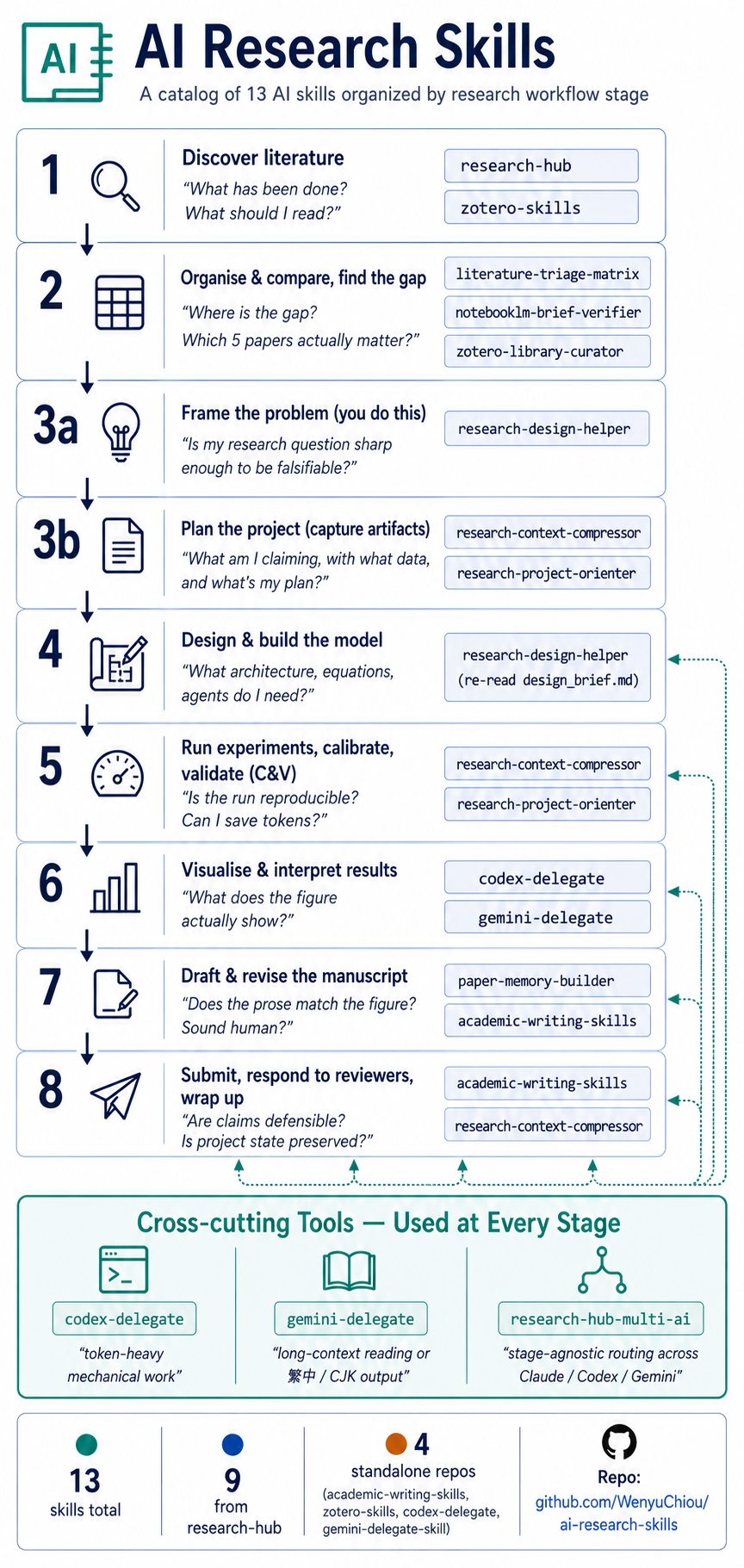
What you get: 13 skills covering the full research workflow.
Verification status: 11 of 13 verified end-to-end (T1) against a
real research workspace (1100+ papers in Zotero, live NotebookLM, real
manuscript audits); 2 of 13 verified at the binary / CLI layer (T2);
0 unverified. See docs/verification.md for the
per-skill matrix. Distribution: 9 skills come from one install
(research-hub-pipeline); 4 are standalone clones.
Who this is for: graduate students, PhD researchers, postdocs,
research engineers, librarians, and research support staff who run real
research projects with AI in the loop.
10-Minute First Try
Want to feel what this catalog does before reading the rest?
Prerequisite: Claude Code installed — see https://claude.ai/code.
The skills below activate inside a Claude Code conversation.
Realistic time: ~10 min the first time (Claude Code login +
research-hub install + paper search + matrix build). Subsequent runs
on a configured machine are closer to 2–3 min.
Scenario: "Find 10 papers on my research topic and produce a
comparison matrix I can use to write a literature review."
# 1. Install + onboard (one command — handles persona, skill install,
#    optional NotebookLM login, sample data)
pip install research-hub-pipeline
research-hub setup --persona researcher
#   ↑ pick `analyst` if you don't use Zotero (Obsidian + NotebookLM only)
#     pick `humanities` for qualitative / archival / interpretive work
#     pick `researcher` for the full Zotero + Obsidian + NotebookLM stack

# 2. Find + ingest 10 papers (skip NotebookLM for the first run)
python -m research_hub auto "your topic here" --max-papers 10 --no-nlm

# 3. In Claude Code, ask for the matrix:
#    "Use literature-triage-matrix to compare the 10 papers
#     in cluster <slug-research-hub-just-printed>"
What you get back: .research/literature_matrix.md with 9 columns
— citation, question, method, data, claim, evidence type, limitation,
relevance, where to use the paper. Reproducible reference output:
test-corpus/.../literature_matrix.md
(real 5-paper run on AI agents and social interaction).
Already have research-hub installed but never picked a persona?
Re-runresearch-hub setup --persona <choice>any time — it's
idempotent.
Pick Your Starting Point
Find the row that matches your immediate goal. Install the named
skills with one command. Skip the rest until you need them.
| Your immediate goal | Skills you'll use | One install command | Time |
|---|---|---|---|
| Find & compare literature | research-hub + literature-triage-matrix |
research-hub setup --persona researcher |
~10 min |
| Write or revise a paper | paper-memory-builder + academic-writing-skills |
above + git clone https://github.com/WenyuChiou/academic-writing-skills ~/.claude/skills/academic-writing-skills |
~15 min |
| Manage a research project / Zotero library | research-design-helper + research-context-compressor + zotero-library-curator |
research-hub setup --persona researcher |
~20 min |
Helping others adopt AI for research (librarian / RA / advisor)?
No install needed — read docs/install.md and
docs/verification.md and recommend.Don't see your goal? The full pipeline below covers 8 stages of
research; find your stage and the matching skill.
Full Research Pipeline (click to expand)
The 8 stages of a research project, with the skills that fit each one.
This is the comprehensive reference — most users will pick from the
persona table above and never need to read this.
1. Discover lit  →  2. Organise & compare  →  3a. Frame  →  3b. Plan
        →  4. Build model  →  5. Run & validate (C&V)  →  6. Visualise
        →  7. Draft manuscript  →  8. Submit, respond, wrap up
Three skills don't belong to a specific stage — they're triggered by
task character, not pipeline position. See Cross-cutting tools
below.
1. Discover literature
"What has been done? What should I read?"
Tools you probably use: Zotero · NotebookLM · Obsidian (no native
OneNote skill — use Obsidian as the notes layer.)
| Skill | What it does |
|---|---|
research-hub |
Search arXiv / Semantic Scholar / CrossRef / PubMed, ingest metadata, write paper notes into Obsidian. |
zotero-skills |
Add, tag, deduplicate, and clean Zotero items beyond the research-hub pipeline. |
2. Organise & compare literature, find the gap
"Where is the research gap? Which 5 papers actually matter?"
| Skill | What it does |
|---|---|
literature-triage-matrix |
Compare papers by method, data, claim, limitation, and relevance — without rereading every PDF. |
notebooklm-brief-verifier |
Verify a NotebookLM brief against the source bundle. Catches missed sources, unsupported claims, and contradictions. |
research-hub |
Build the Obsidian cluster and the NotebookLM source bundle that feed the matrix. |
zotero-library-curator (optional) |
Audit Zotero before comparison — find duplicate DOIs, orphan items, propose tag/collection cleanup. Read-only. |
zotero-skills (optional) |
Apply the cleanup the curator proposes — full CRUD on Zotero items. |
3a. Frame the problem
"Is my research question sharp enough to be falsifiable?"
A Socratic dialog partner that asks structured questions to surface
what you'd otherwise leave implicit.
| Skill | What it does |
|---|---|
research-design-helper |
Walks you through 5 segments — research question → expected mechanism → identifiability check → validation plan → risk register — and writes .research/design_brief.md. |
3b. Plan the project (capture the artifacts)
"What am I claiming, with what data, and what's my plan?"
Once 3a has shaped the question, these skills capture the plan as
machine-readable manifests so future AI sessions don't reread the whole
repo.
| Skill | What it does |
|---|---|
research-context-compressor |
Write .research/project_manifest.yml, experiment_matrix.yml, data_dictionary.yml. Picks up design_brief.md from 3a if present. |
research-project-orienter |
Read those manifests and produce a fast orientation memo when you (or a new AI session) come back to the project. |
4. Design and build the model
"What architecture, equations, agents, or prompts do I need?"
Re-read the design_brief.md produced in Stage 3a as your model spec,
then generate implementation scaffolding.
| Skill | What it does |
|---|---|
research-design-helper |
Same skill as 3a — re-read .research/design_brief.md here when translating "what to model" into "how to model". |
For implementation scaffolding (test harness, plotting, batch edits)
and design review by long-context reading, use the Cross-cutting
tools (codex-delegate, gemini-delegate) below.
5. Run experiments, calibrate, and validate (C&V)
"Is the run reproducible, checkable, extensible? Can I save tokens
across long sessions?"
| Skill | What it does |
|---|---|
research-context-compressor |
Token-saving manifests so each run-and-check session doesn't start from zero. |
research-project-orienter |
Cheap re-onboarding when you switch experiments or come back days later. |
For repeatable sweeps and post-fix verification, delegate via the
Cross-cutting tools below.
6. Visualise and interpret results
"What does the figure actually show? Does my caption match?"
Tools: matplotlib / plotly / your plotting stack of choice.
| Skill | What it does |
|---|---|
codex-delegate |
Generate or refactor plotting scripts (consistent style across N figures, batch re-renders). |
gemini-delegate |
Pair a figure with a draft caption / interpretation paragraph using long-context reading. |
7. Draft and revise the manuscript
"Does the prose match the figure? Does it fit the target journal?
Does it sound human?"
| Skill | What it does |
|---|---|
paper-memory-builder |
Extract .paper/claims.yml and .paper/figures.yml so writing tools see the same numbers as the figures. |
academic-writing-skills |
Manuscript revision, claim-evidence audit, banned-word / humanize pass, figure-text consistency, journal-format check. |
zotero-skills (optional) |
Deep-edit bibliography entries when the writing skill flags references that need cleanup. |
For long-form bilingual rewrites or 繁中 / CJK drafts, use the
Cross-cutting tool gemini-delegate below.
8. Submit, respond to reviewers, wrap up
"Are my claims defensible? Is the reviewer response complete? Is the
project state preserved for future me?"
| Skill | What it does |
|---|---|
academic-writing-skills |
Reviewer response tables, pre-submission checklist, journal-format audit, rebuttal letter. |
research-context-compressor |
Freeze the project's final state so future AI sessions (or future you) can resume in seconds. |
Cross-cutting Tools — Used at Every Stage
Three skills don't belong to a specific stage — they're triggered by
task character:
| Skill | Trigger | What it does |
|---|---|---|
codex-delegate |
Token-heavy mechanical work | Hand batch edits, scaffolding, refactors, test generation, plotting scripts to Codex CLI. |
gemini-delegate |
Long-context reading or 繁中 / CJK output | Hand long-PDF synthesis, bilingual rewrites, second-opinion review to Gemini CLI. |
research-hub-multi-ai |
"Who should do this?" | Stage-agnostic, character-driven routing — produces a delegation plan + handoff prompts. |
All 13 Skills
Fromresearch-hub (9 skills) — one install gets all of them
research-hub— search, ingest, organise papers across Zotero / Obsidian / NotebookLM. (Stages 1, 2)literature-triage-matrix— comparison matrix across method, data, claim, limitation. (Stage 2)notebooklm-brief-verifier— verify NotebookLM briefs against source bundles. (Stage 2)zotero-library-curator— audit Zotero, propose cleanup (preview only). (Stage 2)research-design-helper— Socratic dialog through RQ → mechanism → identifiability → validation → risk. (Stages 3a, 4)research-context-compressor—.research/manifests so future AI sessions skip the rescan. (Stages 3b, 5, 8)research-project-orienter— fast orientation memo from those manifests. (Stages 3b, 5)research-hub-multi-ai— stage-agnostic, character-driven routing across Claude / Codex / Gemini. (Cross-cutting)paper-memory-builder—.paper/claims.ymland.paper/figures.ymlfor manuscript work. (Stage 7)
academic-writing-skills— manuscript revision, claim-evidence audit, banned-word / humanize, journal format, reviewer response. (Stages 7, 8)zotero-skills— full Zotero CRUD, batch metadata, library maintenance. (Stages 1, 2, 7)codex-delegate— Claude → Codex CLI handoff for code-heavy work. (Cross-cutting, also Stage 6)gemini-delegate— Claude → Gemini CLI handoff for long-context, multilingual, or CJK work. (Cross-cutting, also Stages 6, 7)
Standalone use notes
All 13 skills are usable directly after install — no skill depends
on another skill, and none require a research-hub workspace beyond
what research-hub setup --persona <X> configures for you.
The 1 skill below has a workflow chain worth knowing — not a
dependency, just an order:
research-project-orienter— reads.research/manifests for
speed. If none exist yet, the skill falls back to scanningREADME.md+docs/(slower); for repeat orientation, runresearch-context-compressorfirst to produce the manifests.
The other 12 skills work directly with their natural inputs:
- 5 need only Claude Code + your own files:
research-design-helper,research-hub-multi-ai,research-context-compressor,paper-memory-builder,academic-writing-skills. - 4 need one external service you'd already have:
zotero-skills/zotero-library-curator(Zotero local API),codex-delegate
(Codex CLI binary),gemini-delegate(Gemini CLI binary). - 3 work either with or without research-hub-managed inputs:
literature-triage-matrix— paste any paper list (titles + DOIs)
in chat (per SKILL.md mode #0).notebooklm-brief-verifier— accepts manually-downloaded brief +
plain source list (per SKILL.md Manual fallback mode, v0.68.2).
Verified end-to-end
against a fresh-user setup; produces identical results to the
research-hub-managed mode.research-hub(knowledge-base) — pickanalystpersona for
Obsidian + NotebookLM only (no Zotero), orhumanitiesfor
Zotero + qualitative defaults.
Install
Prerequisite: Claude Code (https://claude.ai/code).
How skills actually work: each skill is a Markdown instruction
file (SKILL.md) installed under~/.claude/skills/. AI hosts that
support skills (Claude Code, Cursor with the Claude Code extension,
etc.) automatically read and apply them when your request matches
the skill's trigger description. Skills are not CLI tools or Python
packages — they're prompt scaffolding the host loads on your behalf.
The minimum useful set:
# 1. research-hub — installs 9 skills + onboards your persona in one go
pip install research-hub-pipeline
research-hub setup --persona researcher   # or: analyst | humanities | internal

# 2. academic-writing-skills — for any manuscript work
git clone https://github.com/WenyuChiou/academic-writing-skills \
  ~/.claude/skills/academic-writing-skills
That's it for most researchers. Add as needed:
# Heavy Zotero CRUD (deeper than research-hub bundles)
git clone https://github.com/WenyuChiou/zotero-skills ~/.claude/skills/zotero-skills

# Multi-CLI workflows (Claude + Codex + Gemini)
git clone https://github.com/WenyuChiou/codex-delegate ~/.claude/skills/codex-delegate
git clone https://github.com/WenyuChiou/gemini-delegate-skill ~/.claude/skills/gemini-delegate-skill

# Optional NotebookLM browser automation (handled by `setup` if you
# answer yes when prompted; install separately here if you skipped it)
pip install "research-hub-pipeline[playwright]"
research-hub notebooklm login
Already ran
research-hub install --platform claude-code? That
command still works but only writes the SKILL.md files —setupis
the recommended onboarding because it also handles persona, Zotero
default collection, and NotebookLM login. Both are idempotent; you
can runsetupany time.
Don't want research-hub at all?
Skip pip install research-hub-pipeline and clone only the standalone
repos you need. You'll get up to 4 skills, fully usable, with no
platform install:
# Manuscript revision + reviewer response (most-used)
git clone https://github.com/WenyuChiou/academic-writing-skills ~/.claude/skills/academic-writing-skills

# Deep Zotero CRUD
git clone https://github.com/WenyuChiou/zotero-skills ~/.claude/skills/zotero-skills

# Hand code-heavy tasks to Codex CLI
git clone https://github.com/WenyuChiou/codex-delegate ~/.claude/skills/codex-delegate

# Hand long-context / 繁中 work to Gemini CLI
git clone https://github.com/WenyuChiou/gemini-delegate-skill ~/.claude/skills/gemini-delegate-skill
The other 9 skills (literature-triage, design-helper, compressor,
orienter, paper-memory-builder, etc.) ship together insideresearch-hub-pipeline and aren't separately installable today.
Full guide: docs/install.md. Upgrading from
research-hub-pipeline ≤ 0.45? See the upgrade note in that file.
Verified
All 13 skills exercised end-to-end on a real research workspace
(11 T1 functional + 2 T2 binary; 0 failures). Per-skill matrix +
test-corpus artifacts: docs/verification.md.
Status & License
Lightweight catalog. Each skill is maintained in its canonical repo —
this catalog is the index, not a monorepo.
License: MIT. Contributions welcome — open an issue or PR. New skill
proposals should target either research-hub (workflow integration)
or a standalone repo (deep, single-purpose CRUD).
Reviews (0)
Sign in to leave a review.
Leave a reviewNo results found