research-hub
Health Warn
- License — License: MIT
- Description — Repository has a description
- Active repo — Last push 0 days ago
- Low visibility — Only 7 GitHub stars
Code Pass
- Code scan — Scanned 12 files during light audit, no dangerous patterns found
Permissions Pass
- Permissions — No dangerous permissions requested
This tool is a local-first orchestration layer that bridges Zotero, Obsidian, and NotebookLM into a unified research workspace. It allows AI assistants to automate literature workflows via a CLI, an MCP server, a REST API, and a web dashboard.
Security Assessment
Overall risk: Low. The codebase scan analyzed 12 Python files and found no dangerous patterns, hardcoded secrets, or requests for excessive permissions. However, by design, the tool accesses local research files and acts as a bridge between your local filesystem (Obsidian, PDFs) and external services (Zotero, NotebookLM). Network requests are expected as the REST API and CLI must communicate with these external platforms to sync data and generate briefs. No arbitrary shell command execution vulnerabilities were detected.
Quality Assessment
The project appears to be in active, healthy development. It received its latest code push today, features a comprehensive README, and claims a robust automated test suite with over 1,750 passing tests. It uses the highly permissive MIT license, which is ideal for open-source adoption. The primary concern is its low community visibility; having only 7 GitHub stars means the codebase has not been extensively peer-reviewed by a wide audience. Developers should anticipate the typical unpredictability of an early-stage, niche project rather than a community-vetted standard.
Verdict
Safe to use, though standard caution is advised when connecting local files to external AI platforms.
AI-operable research workspace for Zotero, Obsidian, and NotebookLM. Use any two, or all three, through CLI, MCP, REST, and dashboard.
research-hub
Turn your research stack into an AI-operable workspace.
Use Zotero, Obsidian, and NotebookLM together, or start with any two. research-hub gives your AI assistant a real CLI, MCP server, REST API, and dashboard for repeatable literature workflows.
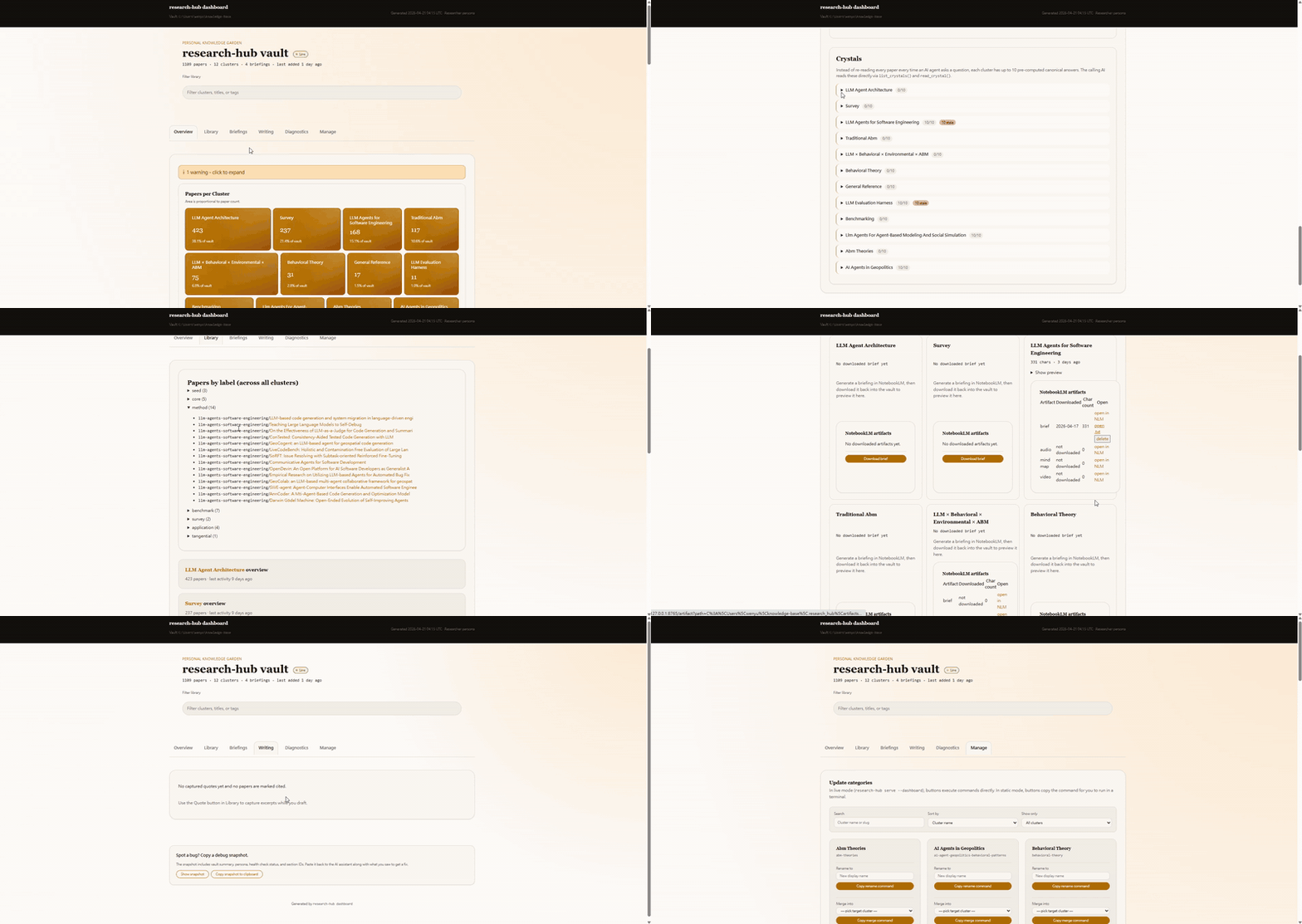




Traditional Chinese: README.zh-TW.md | Watch the full-res mp4
Why this exists
Most research tools are good at one part of the workflow:
- Zotero stores citations, metadata, and PDFs.
- Obsidian stores notes, links, and synthesis.
- NotebookLM turns source bundles into AI-readable briefs.
The painful part is the handoff. research-hub connects those handoffs so an AI agent can search, ingest, tag, summarize, repair, brief, and inspect your workspace without turning your library into an opaque RAG box.
You do not need all three tools on day one.
| Your current stack | What research-hub gives you first |
|---|---|
| Zotero + Obsidian | Paper search, Zotero metadata, Markdown notes, tags, Obsidian Bases dashboards |
| Obsidian + NotebookLM | Local PDF/DOCX/MD/TXT ingest, cluster dashboards, NotebookLM bundles and briefs |
| Zotero + NotebookLM | Zotero-backed paper selection, namespaced tags, NotebookLM upload/generate/download |
| Zotero + Obsidian + NotebookLM | Full loop: discover -> ingest -> organize -> brief -> answer -> maintain |
| No accounts yet | Sample dashboard and local smoke tests before connecting anything |
What it does
research-hub is a local-first orchestration layer for research workflows:
- CLI:
research-hub auto,import-folder,ask,doctor,tidy,clusters,zotero,notebooklm,crystal, and more. - MCP server: lets Claude Desktop, Claude Code, Cursor, Continue.dev, Cline, Roo Code, OpenClaw, and other MCP hosts operate the same workflow.
- REST API: exposes
/api/v1/*for browser-only or HTTP-capable assistants. - Dashboard: gives humans a live view of clusters, papers, diagnostics, briefs, writing support, and management actions.
- Vault format: writes normal Markdown, frontmatter,
.basedashboards, cache files, and logs that you can inspect directly.
The core loop:
topic or source folder
  -> discover or import sources
  -> enrich metadata
  -> write Zotero tags/notes when enabled
  -> write Obsidian Markdown notes and cluster dashboards
  -> bundle/upload/generate with NotebookLM when enabled
  -> cache answers as crystals and structured memory
Install + first run
Option A: preview without accounts
pip install research-hub-pipeline
research-hub dashboard --sample
No Zotero, no NotebookLM, no API keys. This opens the end-state dashboard on a bundled sample vault.
Option B: local-first Obsidian workflow
If you mainly use Obsidian and local files:
pip install research-hub-pipeline[import,secrets]
research-hub setup --persona analyst
research-hub import-folder ./papers --cluster my-local-review
research-hub serve --dashboard
Add NotebookLM later with [playwright] if you want browser-based brief generation.
Option C: full Zotero + Obsidian + NotebookLM workflow
pip install research-hub-pipeline[playwright,secrets]
research-hub setup
research-hub auto "your research topic"
For a first smoke test without NotebookLM automation:
research-hub auto "your research topic" --no-nlm
Let your AI install it
Paste this into Claude Desktop, Claude Code, Cursor, Continue, ChatGPT, Gemini, or another shell-capable AI:
Please install research-hub on my machine. It is a Python package that turns
Zotero, Obsidian, and NotebookLM into an AI-operable research workspace.

1. Check `python --version`. If it is below 3.10, tell me to upgrade first.
2. Run `pip install research-hub-pipeline[playwright,secrets]`.
3. Run `research-hub setup`. Stop and pass me the prompts as they appear.
   Answer the Zotero question on my behalf only if I already told you.
   Chrome-based NotebookLM login may open; I will finish it.
4. Ask me for a topic and run `research-hub auto "TOPIC"`.
| Persona | Best for | Install extra |
|---|---|---|
| Researcher | STEM papers, DOI/arXiv, Zotero-first workflows | [playwright,secrets] |
| Humanities | books, quotes, URL-only sources, Zotero + Obsidian | [playwright,secrets] |
| Analyst | industry research, local PDFs/reports, no Zotero required | [import,secrets] |
| Internal KM | lab/company knowledge bases, mixed file types | [import,secrets] |
Python 3.10+ is required. Optional extras: [playwright] for NotebookLM, [import] for local PDF/DOCX/MD/TXT/URL ingest, [secrets] for OS-keyring credential storage, [mcp] for MCP server dependencies.
Connect your AI host
For Claude Desktop, Cursor, Continue.dev, Cline, VS Code Copilot, OpenClaw, or another MCP host:
{ "mcpServers": { "research-hub": { "command": "research-hub", "args": ["serve"] } } }
Restart the host. Then ask naturally:
Find me 5 papers on agent-based modeling and put them in a notebook.
The AI can call auto_research_topic(topic="agent-based modeling", max_papers=5) and ingest papers, generate a NotebookLM brief, and update the vault.
Install host-specific skill files:
research-hub install --platform claude-code
research-hub install --platform cursor
research-hub install --platform codex
research-hub install --platform gemini
Browser-only or HTTP-capable AIs can use the REST API:
curl -X POST http://127.0.0.1:8765/api/v1/plan \
     -H "Content-Type: application/json" \
     -d "{\"intent\":\"research harness engineering\"}"
Full reference: MCP tools and AI integrations.
Dashboard tour
research-hub serve --dashboard opens http://127.0.0.1:8765/.
Overview: treemap over clusters, storage map, and health summary.
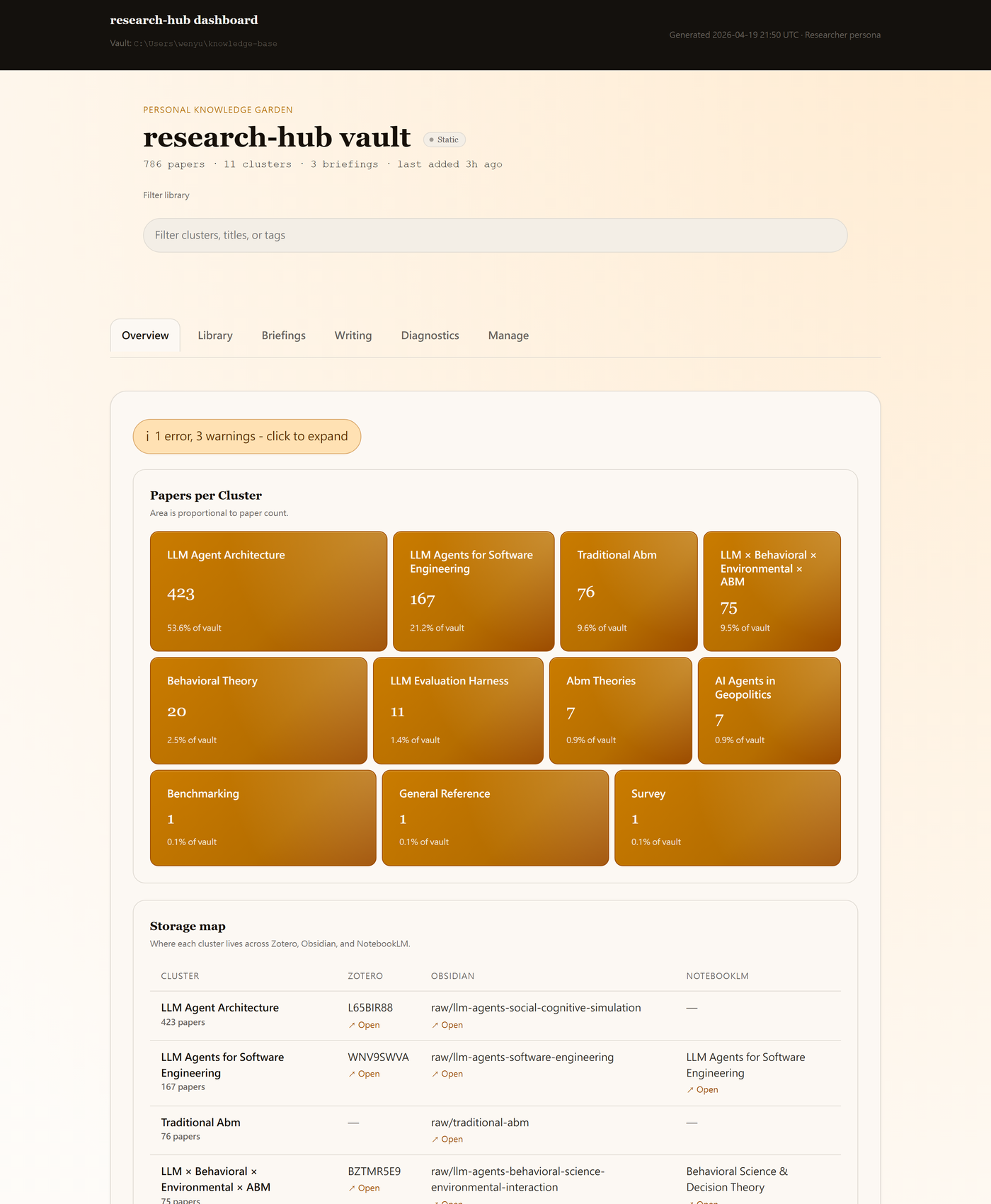
Library: per-cluster drill-down with papers, sub-topics, and per-paper actions.
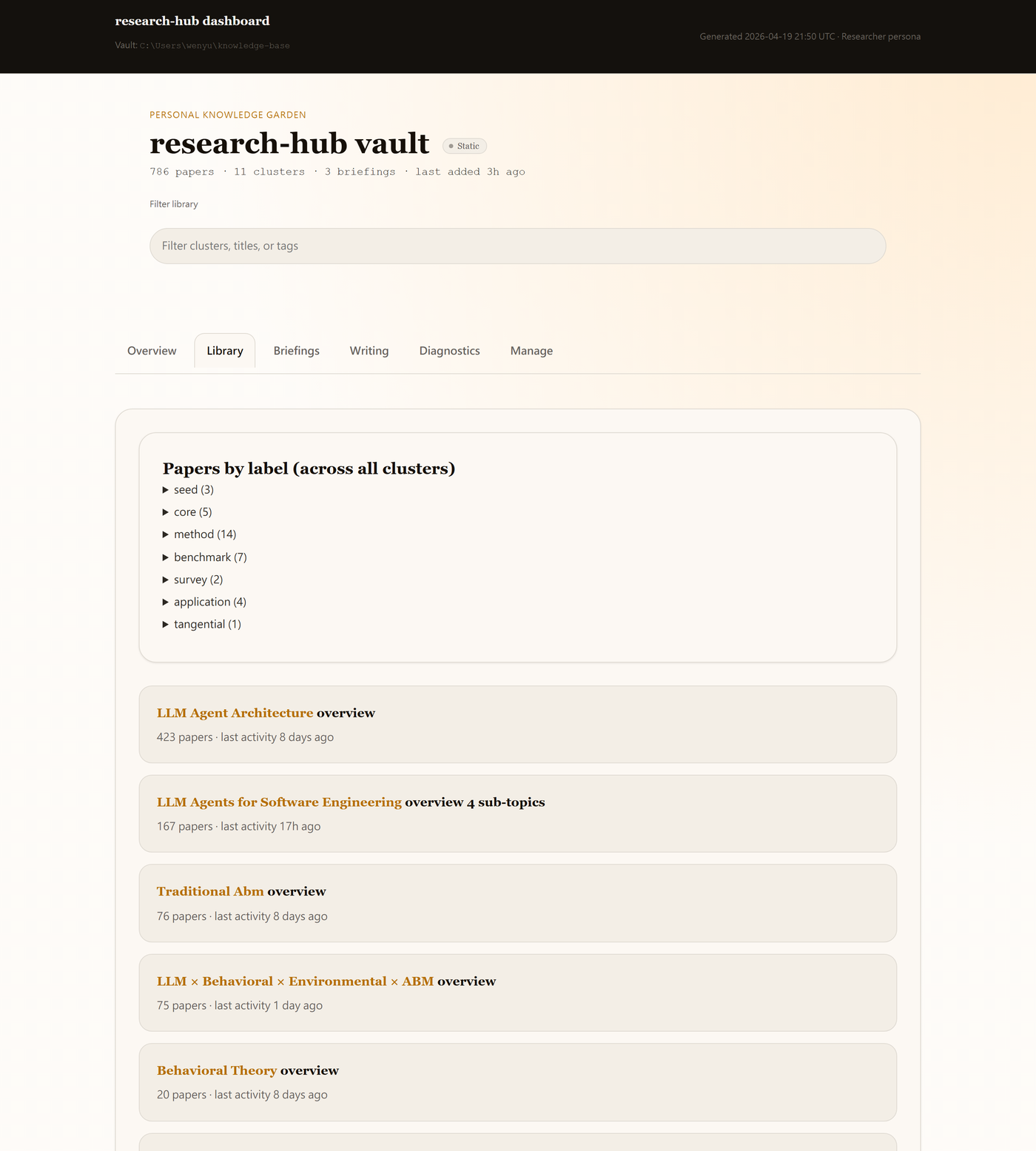
Diagnostics: grouped drift alerts and readiness checks.
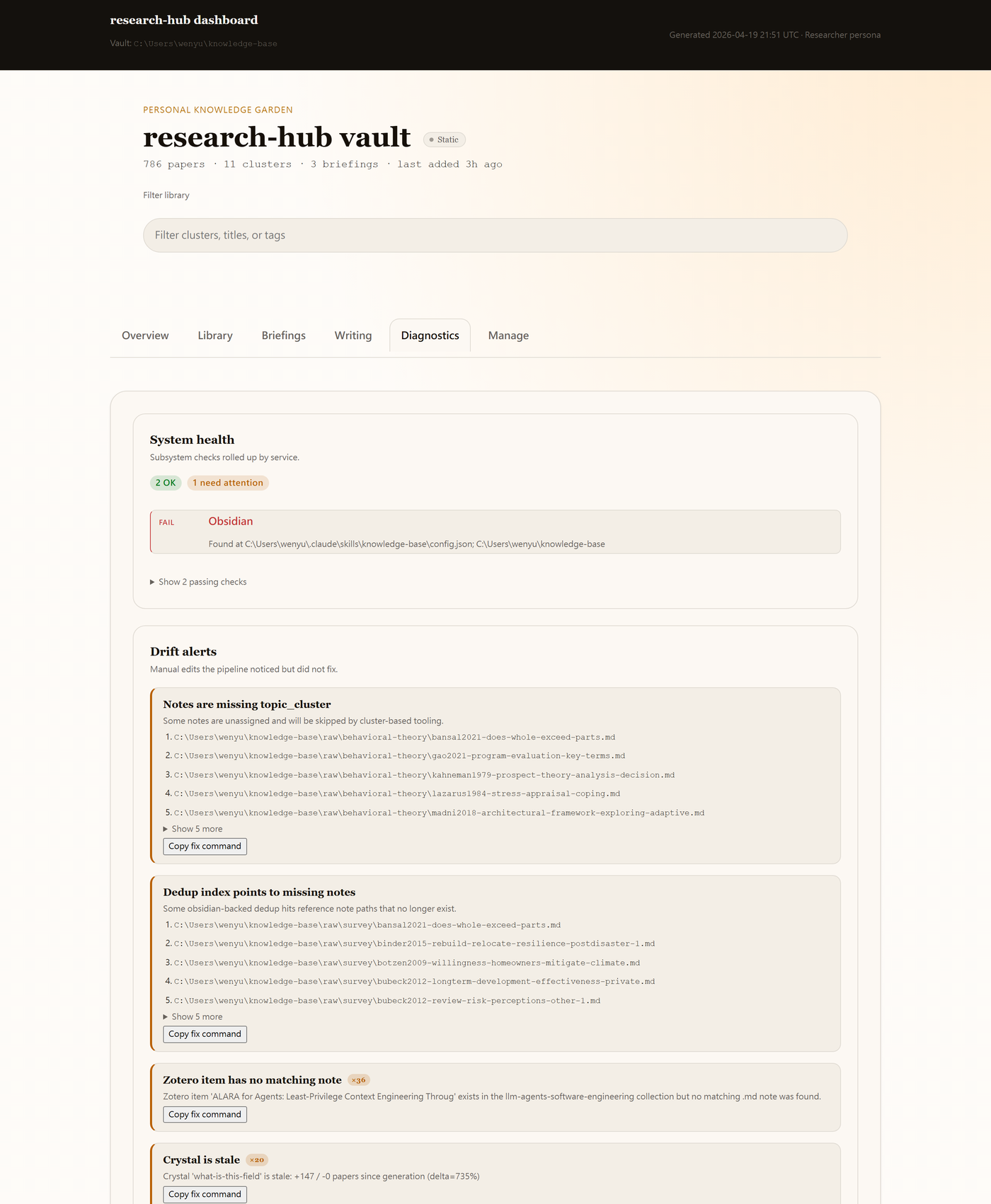
Manage: CLI actions as buttons, inline result drawer, confirmation modal, and per-paper row actions.
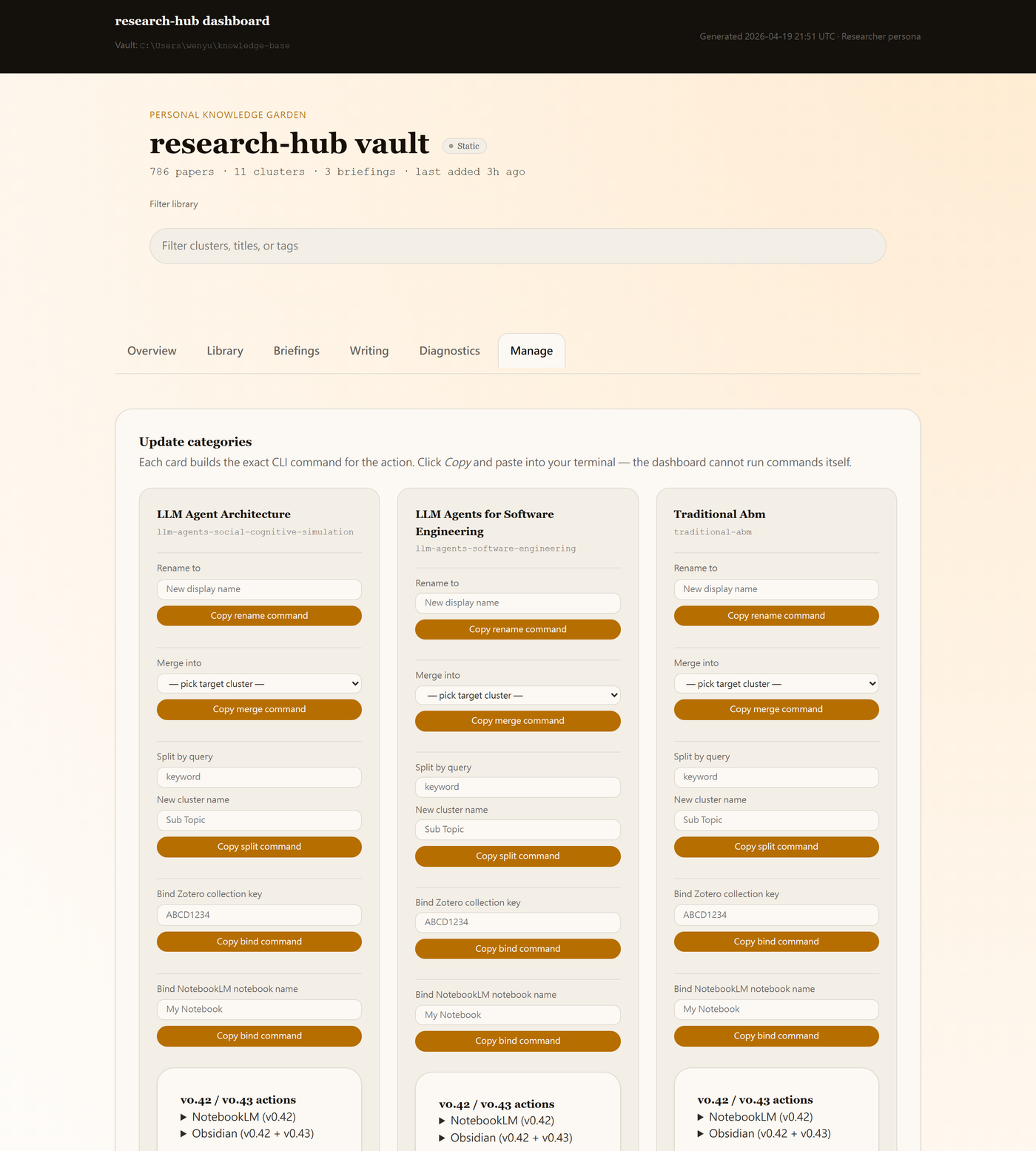
Briefings and Writing tabs are also available. See the dashboard walkthrough and persona variants.
Inside Obsidian
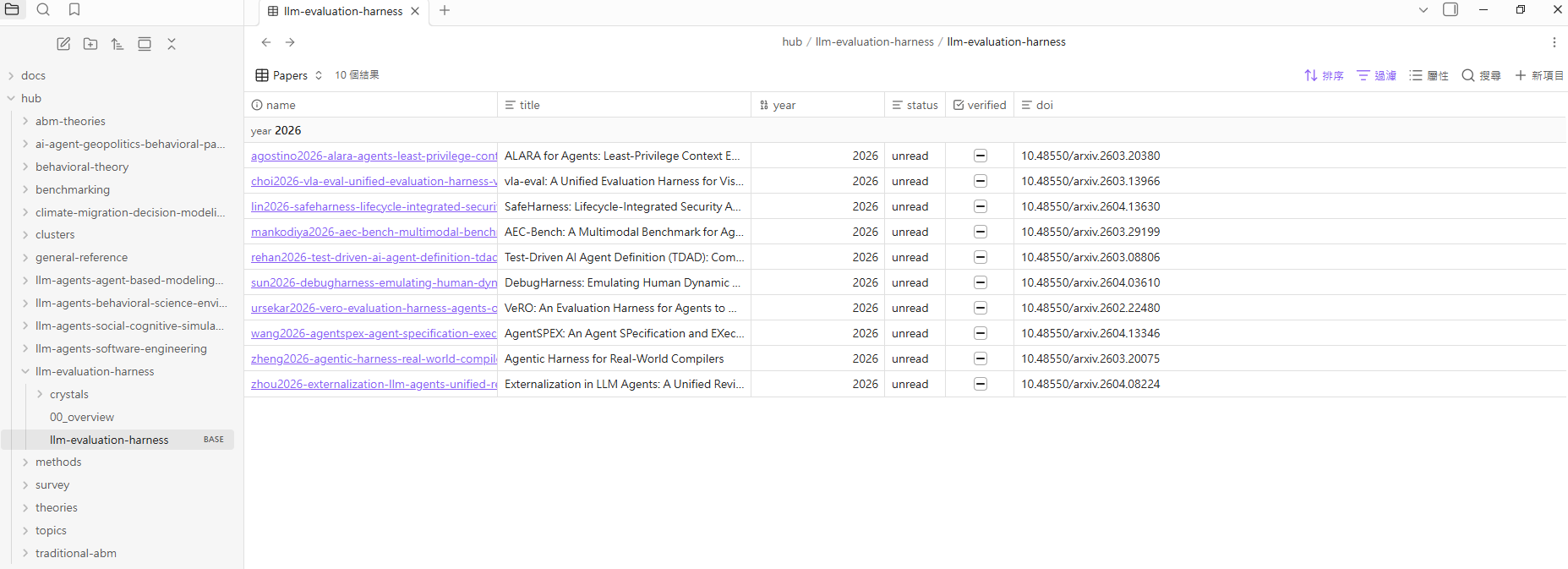
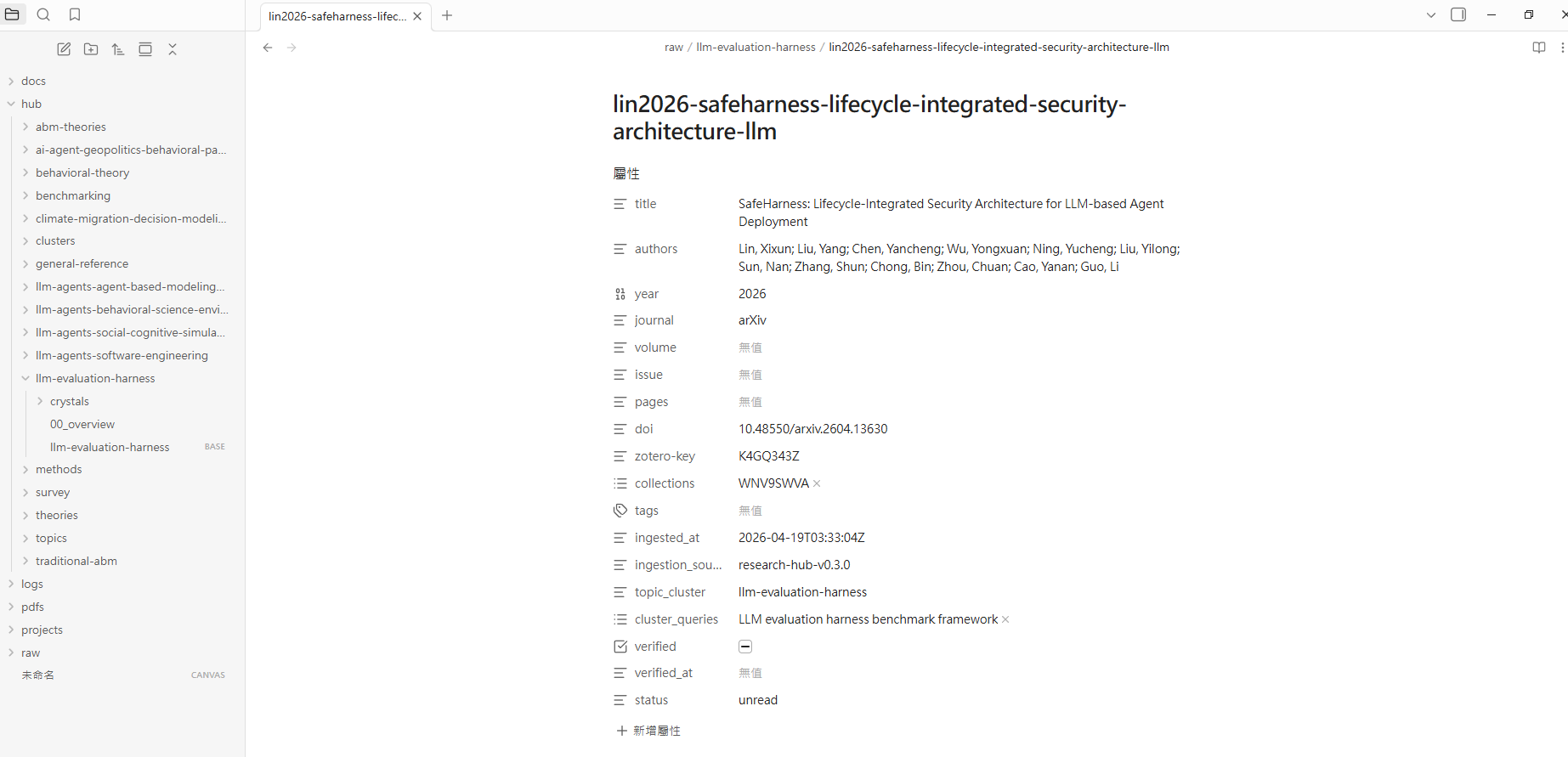
Every ingested paper becomes a real Markdown note with structured frontmatter. Every cluster can also get an Obsidian Bases dashboard.
Cluster Bases dashboard: generated .base file with sortable paper metadata.
Per-paper note: title, authors, year, DOI, Zotero key, tags, status, cluster, and verification metadata.
Crystals are plain Markdown notes under hub/<cluster>/crystals/*.md, so they can be linked, searched, and read by MCP tools at very low token cost.
Inside Zotero
Every ingested paper gets a namespaced tag set so you can filter your library by research-hub context:
| Tag | Meaning |
|---|---|
research-hub |
Ingested through this pipeline |
cluster/<slug> |
Which research cluster the paper belongs to |
category/<arxiv-code> |
arXiv category like cs.AI or econ.GN |
type/<publication-type> |
Review, JournalArticle, etc. from Semantic Scholar |
src/<backend> |
Search backend that discovered it: arxiv, semantic_scholar, crossref, zotero |
Every paper can also get a child note with Summary / Key Findings / Methodology / Relevance, derived from the Obsidian frontmatter. Papers that were in Zotero before research-hub existed can be backfilled with:
research-hub zotero backfill --tags --notes --apply
Feature matrix
| Capability | Command or MCP tool | Notes |
|---|---|---|
| One-shot setup | research-hub setup |
init + install + optional NotebookLM login + guided sample run |
| Lazy research pipeline | research-hub auto "topic" / auto_research_topic |
Search, ingest, bundle, upload, generate, download |
| Plan before running | research-hub plan "intent" / plan_research_workflow |
Suggests field, cluster slug, and max papers |
| Zotero hygiene | research-hub zotero backfill --tags --notes [--apply] |
Fills missing tags and notes on legacy items |
| Cluster cascade delete | research-hub clusters delete <slug> [--apply --force] |
Preview impact on Obsidian, Zotero, dedup, memory, and crystals |
| No-NotebookLM smoke test | research-hub auto "topic" --no-nlm |
Validates search and vault ingest without browser automation |
| Local file ingest | research-hub import-folder <folder> --cluster <slug> |
PDF, DOCX, MD, TXT, URL |
| Ad-hoc cluster Q&A | research-hub ask <cluster> "question" / ask_cluster_notebooklm |
Top-level CLI takes cluster first, then question |
| NotebookLM operations | research-hub notebooklm upload --cluster <slug> |
Browser automation with persistent Chrome |
| Pre-computed crystals | research-hub crystal emit --cluster <slug> |
Canonical answers cached as Markdown |
| Structured memory | research-hub memory emit --cluster <slug> |
Entities, claims, methods |
| Live dashboard | research-hub serve --dashboard |
HTTP dashboard with action buttons |
| Sample preview | research-hub dashboard --sample |
Temporary bundled vault, no accounts |
| Lazy maintenance | research-hub tidy |
Doctor, dedup, bases refresh, cleanup preview |
| Garbage collection | research-hub cleanup --all --apply |
Bundles, debug logs, stale artifacts |
| Cluster repair | research-hub clusters rebind --emit then --apply |
Rebinds orphaned notes |
| Obsidian Bases | research-hub bases emit --cluster <slug> |
Generated .base dashboard |
| Web search | research-hub websearch "query" / web_search |
Tavily, Brave, Google CSE, DDG fallback |
vs alternatives
research-hub does not replace Zotero, Obsidian, or NotebookLM. It connects them so an AI agent can operate the workflow.
| What you can do | Zotero alone | NotebookLM alone | Generic RAG | Obsidian-Zotero plugin | research-hub |
|---|---|---|---|---|---|
| Search arXiv + Semantic Scholar in one command | No | No | DIY | No | Yes |
| Ingest into Zotero and Obsidian and NotebookLM | No | No | DIY | Partial | Yes |
| AI brief from your collection | No | Manual | DIY | No | Yes |
| Cached canonical answers | No | No | Re-fetches | No | Yes |
| Structured memory layer | No | No | Usually chunks | No | Yes |
| Direct AI-agent control via MCP | No | No | DIY | No | Yes |
| Live dashboard with action buttons | No | No | No | No | Yes |
| Per-cluster Obsidian Bases dashboard | No | No | No | No | Yes |
| No OpenAI/Anthropic API key required | n/a | Yes | Usually no | n/a | Yes |
| Local-first vault you own | Partial | No | Depends | Yes | Yes |
The practical fit: research-hub is most useful if you already use at least two of Zotero, Obsidian, and NotebookLM and want your AI assistant to run the repetitive steps.
Troubleshooting
| Symptom | Cause | Fix |
|---|---|---|
research-hub init reports Chrome warnings |
Chrome is missing or patchright cannot find it | Install Chrome, then run research-hub doctor |
research-hub notebooklm login opens a browser but Google blocks login |
New-device or bot challenge | Complete the visible browser sign-in and phone challenge |
research-hub auto finds 0 papers |
Topic too narrow or search backend transient issue | Re-run with --max-papers 20 or rephrase |
| NotebookLM upload or generate fails | NotebookLM UI changed or login expired | Run research-hub notebooklm login; then resume with research-hub notebooklm bundle/upload/generate/download --cluster <slug> |
auto --with-crystals cannot find an LLM CLI |
claude, codex, or gemini is not on PATH |
Install one, or use crystal emit and crystal apply manually |
| Claude Desktop cannot see the MCP server | MCP config is in the wrong file or host was not restarted | Check the host config path and restart Claude Desktop |
init reports Zotero warnings but you do not use Zotero |
Persona expects Zotero | Re-run research-hub setup --persona analyst or --persona internal |
research-hub clusters delete refuses to delete |
Cluster has papers, notes, or Zotero items | Re-run with --apply --force after reviewing the cascade preview |
research-hub auto errors "cluster already has N papers" |
Cluster is non-empty and you ran auto --cluster <slug> without a flag |
Add --append to add more, or --force to overwrite |
Zotero items miss research-hub tags or notes |
Items were created before v0.61 or pipeline failed mid-run | research-hub zotero backfill --tags --notes --apply |
For broader checks, run:
research-hub doctor --autofix
Docs + Status + Dev
Docs: First 10 minutes, lazy mode, dashboard walkthrough, MCP tools, personas, NotebookLM setup, import folder, CLI reference, CHANGELOG.
Status:
- Latest: v0.64.2; see CHANGELOG for package history.
- Tests: 1759 passing.
- MCP tools: 83.
- REST endpoints: 12 at
/api/v1/*. - Bundled skills:
research-hubandresearch-hub-multi-ai.
Developer setup:
git clone https://github.com/WenyuChiou/research-hub.git
cd research-hub
pip install -e ".[dev,playwright]"
python -m pytest -q
Contributing: CONTRIBUTING.md. Package on PyPI: research-hub-pipeline. CLI entry point: research-hub.
License
MIT. See LICENSE.
Reviews (0)
Sign in to leave a review.
Leave a reviewNo results found