metis
Health Warn
- No license — Repository has no license file
- Description — Repository has a description
- Active repo — Last push 0 days ago
- Community trust — 46 GitHub stars
Code Warn
- fs module — File system access in .github/workflows/test-video-cross-platform.yml
- network request — Outbound network request in .github/workflows/test-video-cross-platform.yml
- fs module — File system access in .github/workflows/test.yml
- network request — Outbound network request in .github/workflows/test.yml
- process.env — Environment variable access in desktop/main.cjs
- fs module — File system access in desktop/main.cjs
- network request — Outbound network request in desktop/main.cjs
- fs module — File system access in desktop/provider-config.cjs
Permissions Pass
- Permissions — No dangerous permissions requested
No AI report is available for this listing yet.
Metis is a coding agent that boosts coding performance by 50%

English · 简体中文




A coding agent that searches, remembers, executes, and verifies across terminal and desktop.
Quick start · Highlights · How it works · Documentation
Quick start
Desktop installation
Desktop includes the Metis CLI and Server runtime; Node.js is not required separately.
| Platform | Build | Install |
|---|---|---|
| macOS | Apple silicon (arm64) |
Download Metis-*-macos-arm64.dmg, then drag Metis.app to Applications. |
| Windows | x64 |
Run Metis-*-win-x64-setup.exe, or extract Metis-*-win-x64.zip and launch Metis.exe. |
Download files and matching .sha256 checksums from the latest GitHub Release. If Windows SmartScreen reports an unknown publisher, continue only when the file came from the official release page and its checksum matches.
Requires Node.js >=22.19.0 and npm.
npm install -g --ignore-scripts @wholiver_hu/metis@latest
metis
Use /login for supported subscription providers, or configure an API key. Run metis --help for CLI options and see the Quickstart for the complete first-run flow.
Highlights
- Plan and Build workflows — investigate safely in read-only Plan mode, then execute an approved proposal with a persistent checklist in Build mode.
- Durable memory and recovery — search reusable project knowledge and resume work after interruption, compaction, or session reload.
- Flexible models and authentication — use built-in subscription login, API-key providers, or custom OpenAI-compatible providers with model discovery.
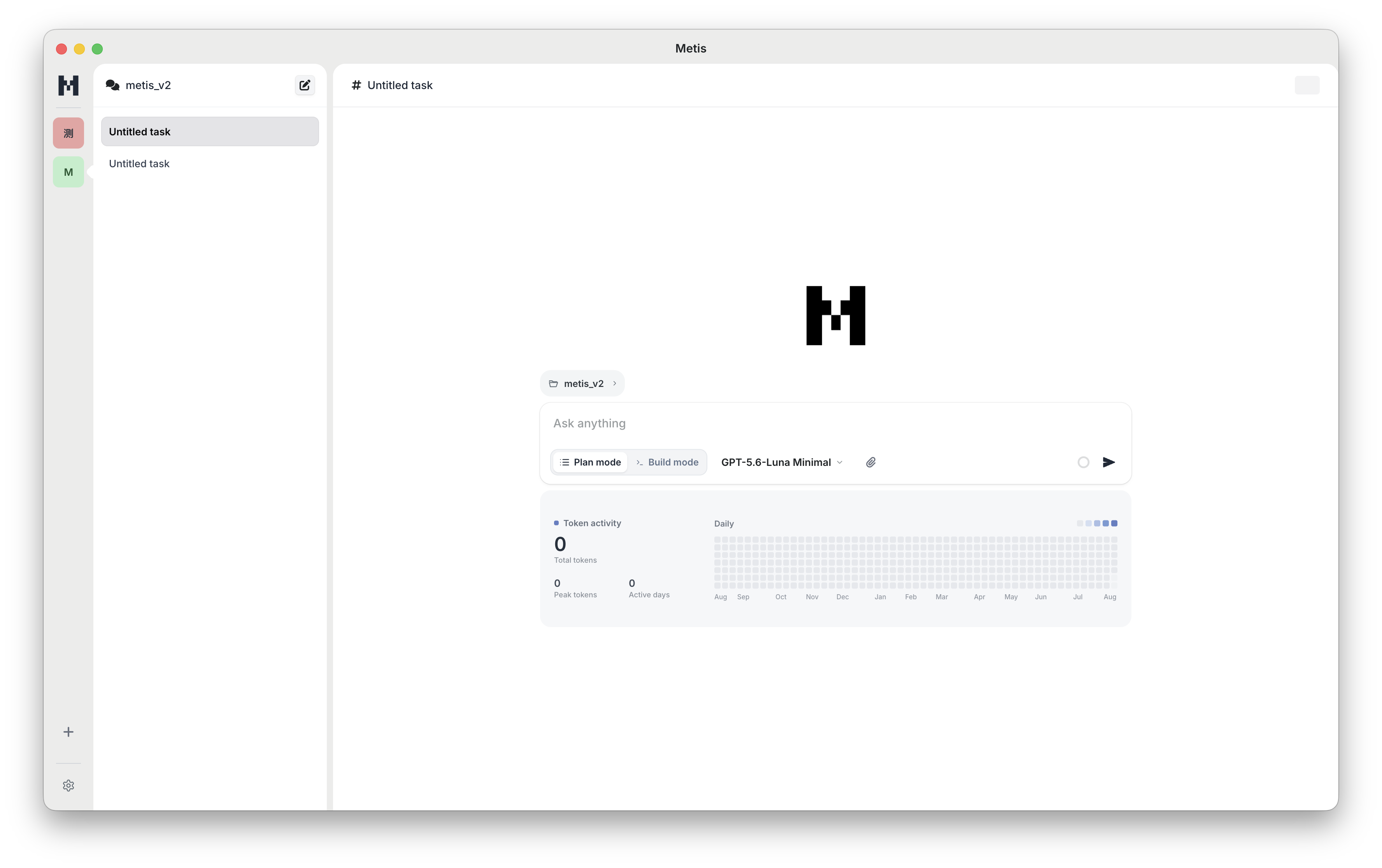
- Desktop workspace — attach images, videos, text, and other files through the picker, clipboard, or drag and drop; manage providers and sessions graphically.
- Recursive Multi-Agent System — native named agent definitions (
coordinator,planner,implementer,reviewer,verifier), L0→L4 recursive delegation, role-based tool sandboxing, physical Git Worktree isolation, and deterministic lifecycle control. - TerminalBench & Harbor Ready — headless machine-readable JSONL execution, standardized exit codes (
0/1/2), final answer separation, full trace aggregation, and official Python harness adapters. - Video evidence — inspect local video through metadata, timestamped storyboards, ordered motion samples, high-resolution frames, subtitles, and local transcription.
- Extensible core — add TypeScript extensions, Agent Skills, prompt templates, themes, and Metis packages; integrate through print, JSON, RPC, Server, or the Node.js SDK.
- Verified execution — coordinate subagents, preserve tool-result ordering, run relevant checks, and compare delivery against the original request.
How Metis works
- Ground — load trusted instructions and relevant context, then search code, memory, or authoritative sources when needed.
- Plan or build — Plan mode stays read-only and produces a durable proposal; Build mode performs evidence-supported changes.
- Persist — retain sessions, message/tool pairs, workflow checkpoints, plans, and compacted context.
- Verify — run risk-proportionate checks and report completed requirements, evidence, and remaining risk.
Deterministic workflow runtime
Metis freezes a StepSnapshot before every model sample. Model, reasoning level, collaboration mode, instructions, messages, visible tools, dispatcher, and context window therefore remain consistent for that step. Safe reads may run in parallel; writes and mixed tools are serialized. Steering and follow-ups are applied only after current tool results persist.
Plans and interactive input
New interactive and Desktop sessions start in Plan mode. /mode plan and /mode build switch workflows when idle. Approved proposals survive reload and compaction through read_plan; Build checklists update in place in TUI and Desktop. Interactive hosts can answer ask_user, while unattended print/JSON and SDK runs return a recoverable unsupported result instead of hanging.
Memory
Metis checkpoints active work after prompts, completed steps, compaction, errors, aborts, and completion. Durable records and their search index live in ~/.metis/memories/state.sqlite. query_memory_db is available on demand in Plan and Build; results are advisory and never override current instructions.
Use /memory status|on|off|run|search|forget|reset. Proposal artifacts and long-term memory remain separate, so an unexecuted draft is not promoted automatically.

In one user test on the same task, Metis finished in 1 minute 30 seconds and OpenCode in 3 minutes 30 seconds, with no observed accuracy difference. This single comparison is not a universal benchmark; results depend on the task, model, tools, and environment.
Documentation
| Topic | Guide |
|---|---|
| Install, authenticate, and start | Quickstart |
| Commands and interactive usage | Using Metis |
| Providers and custom models | Providers · Custom models |
| Multi-Agent System | Named Agents & Delegation |
| Benchmark & Evaluation | TerminalBench & Harbor |
| Sessions and compaction | Sessions · Compaction |
| Extensions, skills, and packages | Extensions · Skills · Packages |
| Programmatic integration | SDK · RPC · JSON |
| Video inspection | Video tool |
| Security and configuration | Security · Settings |
See the documentation index for every guide.
Developer informationnpm run build # Compile TypeScript and copy runtime assets
npm test # Run the Vitest suite
npm run clean # Remove compiled output
npm run build:binary # Build the standalone binary
The package exports the Node.js SDK from @wholiver_hu/metis and the RPC entry point from @wholiver_hu/metis/rpc-entry.
Contributing
Contributions are welcome. See CONTRIBUTING.md for development, Extension and Package integration, testing, and AI-assisted contribution guidance.
License
Distributed under the MIT License.
Reviews (0)
Sign in to leave a review.
Leave a reviewNo results found