3d-printing
Health Warn
- License — License: MIT
- Description — Repository has a description
- Active repo — Last push 0 days ago
- Low visibility — Only 5 GitHub stars
Code Pass
- Code scan — Scanned 12 files during light audit, no dangerous patterns found
Permissions Pass
- Permissions — No dangerous permissions requested
No AI report is available for this listing yet.
3D printing toolkit — AI-powered design skills for Claude Code, Cursor, Windsurf & Copilot, plus parametric OpenSCAD models
3D Printing
One shot from Prompt-to-Print.
Describe the part you want in a sentence. Get back an OpenSCAD model, rendered images, stl file and
a 3mf file ready to open and hit print.
Try it
I would like to use the /3d-print-designer skill to make a functional rain gauge:
- The gauge should be an "old style" mechanical dial, like a water or power meter dial with 4 dials with numbers 0-9 so we can record from 1 to 9999
- It should have a reset mechanism/button
- It should measure in mm of rain
- It should have a tipping bucket mechanism to mechanically turn the dials
- The collector should be a round inverted bucket type.
- The collector should be whatever size is most commonly used for rain guages if there is a standard, but I would suggest about 150mm round diametrer
- The tipper should be calibrated to the bucket diameter/area so 10mm of falling rain equates to 10mm on the dials
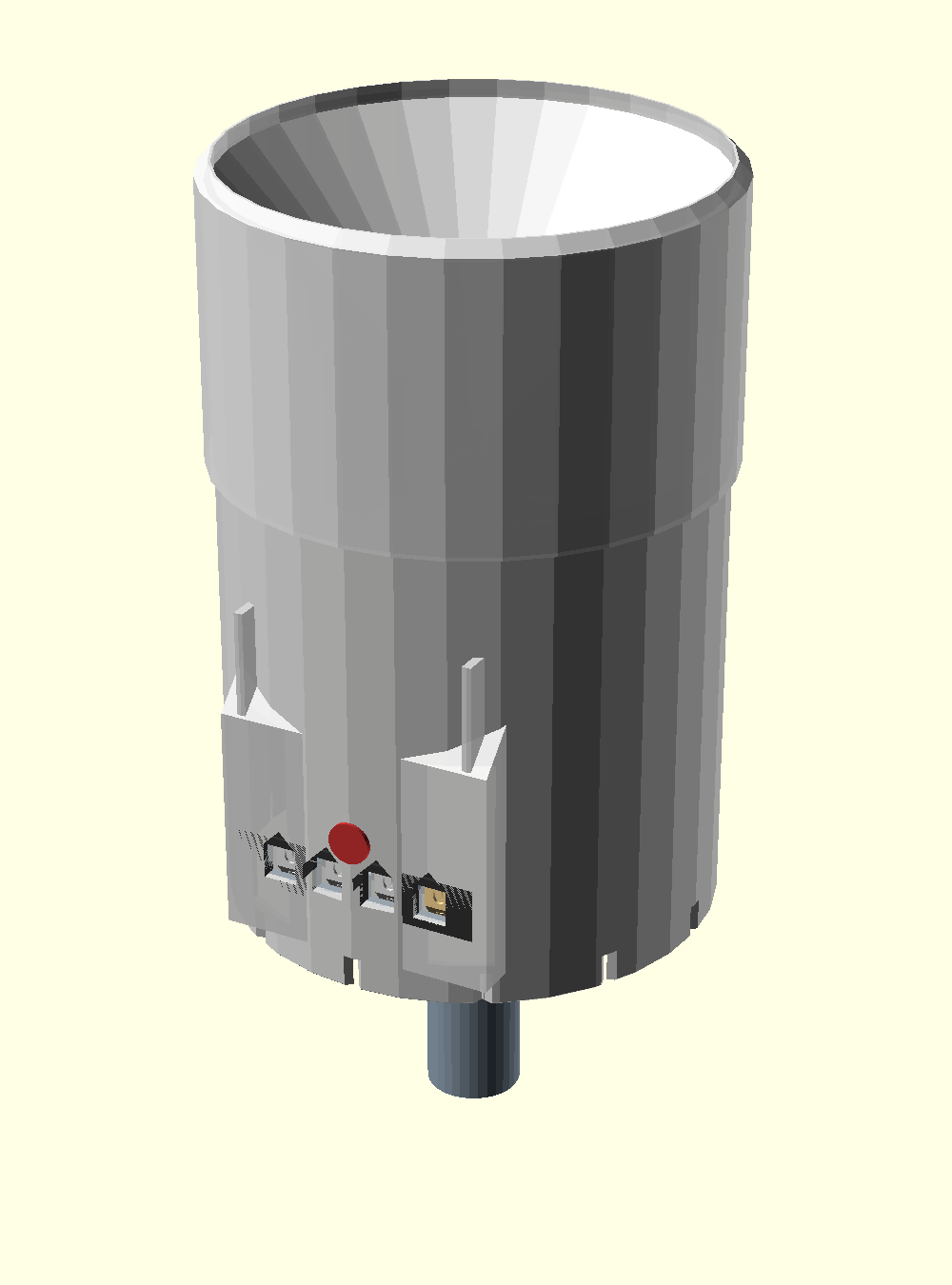
That prompt produced the parametric model, rendered images, a build guide, and a set of Bambu .3mf
files with layer height, walls, infill and supports baked in — five print jobs,
plus per-part files if you'd rather print one at a time. It picked the WMO
standard 200 cm² collector over the suggested 150 mm, calibrated the tipping
bucket at 10 mL a chamber so one dial count is exactly 1 mm of rain, and got
every part printing with no supports — see
the full project.
Other examples:
- "Design a wall-mounted bracket for a 1kg filament spool"
- "Create a snap-fit enclosure for a Raspberry Pi 4"
- "Design a parametric cable management clip"
- "Make a gear train with a 3:1 reduction ratio"
- "Design a plug that mounts an M8 caster wheel into an 18mm steel tube"
- "Make an acoustic diffuser tile for my wall"
How it works
- You describe the part — one sentence is enough but more detail is better.
- It asks which printer you have. Specs for 20+ models are built in (Bambu
Lab X1C / P1S / P1P / A1 / A1 Mini, Prusa MK4S / MK3S+ / XL / Core One,
Creality K1 / Ender 3, Voron 2.4 / Trident / 0.2, Elegoo, Ankermake, Ratrig).
Build volume, nozzle, layer range and material support constrain the design
from there. Unknown printer? It asks for the specs it needs. - It picks a material — PLA, PETG or ABS, filtered by what your printer can
actually run, and applies the design rules for that material. - It designs for your printer — support-free by default, oriented so loads
run along the layer plane, with the tolerances your machine can hold. - You get printable files — the scad source, rendered images, and a stl mesh
ready to slice. Bambu Lab machines get the full treatment for now: a Bambu
Studio project.3mfwith layer height, walls, infill and supports already
applied, so you open it and hit Print. Other printers get an STL plus a
print-settings header to paste into your slicer; more printer-specific
formats to come.
AI Skills
| Skill | Description | Frameworks |
|---|---|---|
| 3d-print-designer | Designs parametric, FDM-optimized OpenSCAD models with material selection, print orientation, and structural optimization | Claude Code, Claude Desktop, Cursor, Windsurf, Copilot, Cline |
3d-print-designer
An AI skill that designs and generates parametric OpenSCAD (.scad) models optimized for FDM printing. It handles:
- Printer configuration — auto-detects specs from 20+ known printer models
- Material selection — PLA, PETG, ABS with material-specific design rules
- Support-free design — 9 techniques to eliminate supports (chamfers, teardrop holes, part splitting, etc.)
- Structural optimization — wall thickness, infill, ribs, layer adhesion
- Mechanical features — gears, threads, snap-fits, living hinges
- Design review — 45-item checklist covering geometry, printability, and assembly
- Print-ready export — STL/3MF, plus settings-baked-in Bambu Studio project files
Install
Pick the section that matches the app you run Claude in. Claude Code installs the skill as a plugin; the Claude Desktop and web chat apps install it from a ZIP instead — they don't use Claude Code plugins.
Claude Code (CLI, VS Code, JetBrains)
Plugin marketplace (recommended):
/plugin marketplace add wilsonwaters/3d-printing
/plugin install 3d-print-designer
Manual copy:
git clone https://github.com/wilsonwaters/3d-printing.git
cp -r 3d-printing/.claude/skills/3d-print-designer ~/.claude/skills/
Claude Desktop & claude.ai
The desktop and web chat apps install skills from a ZIP — they can't add a Claude Code plugin marketplace.
- Download
3d-print-designer.zipfrom the latest release. - In Claude, go to Customize → Skills → Create skill → Upload a skill and select the ZIP.
Enable code execution first. Skills require code execution to be turned on. On Free / Pro / Max, enable it under Settings → Capabilities. On Team / Enterprise, an admin must enable it under Organization settings → Skills.
Cursor
curl -o .cursor/rules/3d-print-designer.mdc \
  https://raw.githubusercontent.com/wilsonwaters/3d-printing/main/adapters/3d-print-designer/cursor/3d-print-designer.mdc
Windsurf
curl -o .windsurf/rules/3d-print-designer.md \
  https://raw.githubusercontent.com/wilsonwaters/3d-printing/main/adapters/3d-print-designer/windsurf/3d-print-designer.md
GitHub Copilot
curl -o .github/copilot-instructions.md \
  https://raw.githubusercontent.com/wilsonwaters/3d-printing/main/adapters/3d-print-designer/copilot/3d-print-designer.md
Cline
curl -o .cline/rules/3d-print-designer.md \
  https://raw.githubusercontent.com/wilsonwaters/3d-printing/main/adapters/3d-print-designer/cline/3d-print-designer.md
Printer support
Printer specs constrain every design decision, so the skill asks which machine
you're on before it writes any geometry. It ships with profiles for:
| Brand | Models |
|---|---|
| Bambu Lab | X1 Carbon / X1C, P1S, P1P, A1, A1 Mini |
| Prusa | MK4S / MK4, MK3S+ / MK3S, XL (single & multi-tool), Core One |
| Creality | K1C, K1 / K1 Max, Ender 3 V3 / V3 SE / V3 KE, Ender 3 / Pro / V2 |
| Voron | 2.4, Trident, 0.2 |
| Elegoo | Neptune 4 / 4 Pro |
| Ankermake | M5 / M5C |
| Ratrig | V-Core 4 |
Each entry carries build volume, nozzle sizes, max hotend and bed temps,
enclosure, extruder type, multi-material and material caveats. Anything not
listed falls back to a short spec questionnaire.
Bambu 3MF export — open and press Print
For Bambu Lab printers the skill generates a Bambu Studio project .3mf
rather than a bare mesh. A plain STL or geometry-only 3MF drops onto the plate
with your slicer defaults; a project 3MF carries the configuration with it, so
layer height, wall count, infill, infill pattern and supports come back exactly
as the model was designed for.
It's built by the bundled make-bambu-3mf.py (Python 3.8+, standard library
only — no pip installs) and binds your own installed Bambu system presets by
name, so you don't get the "customized preset" G-code warning. Filament stays
your choice unless you ask for it to be baked in too. It works without Bambu
Studio installed (it carries the identity of every official Bambu printer
preset), and it checks each file it writes by re-importing it through lib3mf.
This is Bambu Studio / OrcaSlicer specific — PrusaSlicer, Cura and others don't
read the settings-in-3MF format, so for those the skill hands off an STL plus a
PRINT SETTINGS header to enter once.
More example prompts are at the top of this README.
3D Models
Parametric OpenSCAD models in the 3d-models/ directory — each one
designed from a prompt with this skill.
Building Skill Artifacts
Two artifacts are generated from the Claude Code skill source by the Build Skill Artifacts workflow, which runs automatically when skill files change on main (and can be triggered manually):
- Framework adapters (
adapters/) — single-file versions for Cursor, Windsurf, Copilot, and Cline, committed back to the repo. - Installable skill ZIP —
3d-print-designer.zip, published as an asset on the latest release for upload to Claude Desktop / claude.ai.
To build either locally:
python scripts/build-adapters.py    # adapters/
python scripts/build-skill-zip.py   # dist/*.zip
License
Reviews (0)
Sign in to leave a review.
Leave a reviewNo results found