turno
Health Warn
- License — License: Apache-2.0
- Description — Repository has a description
- Active repo — Last push 0 days ago
- Low visibility — Only 5 GitHub stars
Code Pass
- Code scan — Scanned 12 files during light audit, no dangerous patterns found
Permissions Pass
- Permissions — No dangerous permissions requested
No AI report is available for this listing yet.
Switch accounts in your coding agents and keep the conversation, the MCP sign-ins and the browser session.

Switch accounts. Keep everything else.


turno.wimo.dev · Docs · Releases · English · Español
Switching accounts? Keep talking. The same session continues on your other account, with
its whole context, its MCP servers already signed in and a browser profile that keeps its
sign-ins. turno is for people who use a work account and a personal account with their coding
agents.
- Your conversation. A Claude Code session started with one account continues under
another, or forks into a second one:turno session handoff workprints the command. - Your MCP sign-ins. One local gateway logs in to each remote OAuth server once per account
(turno mcp login <server>), and every agent session of that account reaches it through the
gateway. - Your browser session. A real Chrome profile per identity that keeps its sign-ins (the
separateturno-browserpackage), and claude.ai links that open with the session's account
(turno open). - Your control. Three skills of the Claude Code plugin move work between accounts from
inside a session:/switch-account,/fork-sessionand/copy-artifact. - The right account by itself. Each project folder gets its account, in Claude Code, Codex,
Copilot CLI and Cursor CLI. - Easy to try, easy to undo.
npx turno-cli demoruns in a throwaway HOME, andturno undoputs back every file a command changed.
The same gateway starts each MCP server once and shares it between sessions; the measured
memory saving is in Benchmark. turno.wimo.dev tells the
whole story, with a small working picture of each part.

Install
npx turno-cli demo # try it first, in a throwaway HOME; your own setup is not touched
Then install it with the package manager you already use (macOS or Linux, Node 22.11+):
npm install --global turno-cli
pnpm add --global turno-cli
bun add --global turno-cli
yarn global add turno-cli        # yarn 1 (classic); yarn 2 and later have no global installs
brew tap wimo-dev/turno && brew trust wimo-dev/turno && brew install turno
The npm package is turno-cli; the command it installs is turno, and turno upgrade later
updates it with the same tool. npx turno-cli, pnpm dlx turno-cli and bunx turno-cli run it
once without installing. It runs no install scripts, and npm and Homebrew install exactly the
dependency versions that were tested, from its npm-shrinkwrap.json (pnpm, bun and yarn resolve
the dependencies of its dependencies themselves). CI installs it each of these ways on macOS and
Linux. Nothing leaves your machine: no account, no telemetry, no proxy for model traffic.
What it does
A conversation that continues on another account. Your Claude Code profiles share
conversations, skills, commands, hooks, plugins and settings, and keep only their own login.turno work --resume <id>continues a session that another account started, andturno session handoff workprints the exact command (--forkkeeps this session open and
starts a copy). What profiles share.MCP sign-ins, once per account. The gateway logs in to each OAuth remote server once per
account (turno mcp login <server>) and every agent session of that account uses it; a
variant per profile lets work and personal reach two accounts of the same service. Secrets
live in the macOS Keychain or the Linux Secret Service, not in agent configs.
The gateway.A browser per identity (separate package
turno-browser): an MCP server that drives your
installed Chrome with one persistent profile per identity, so an agent works in the sessions
you signed into by hand, andturno open <profile> <url>opens a claude.ai link with the
account that owns it. See Browser with real profiles.Skills that move work between accounts. The Claude Code plugin adds
/switch-account,/fork-sessionand/copy-artifact, and the accounts bridge lets a session delegate a task to
a service only another profile is signed into, asking before it writes.
Skills.The folder picks the account.
turno profile assign ~/code/acme workand every agent you
open in that repository uses your work login;turno autopicks it and says which account and
why, andturno statusshows who is logged in where. The same folder rule can choose which
MCP servers sessions there see. Folder rules.One MCP gateway for every session.
mcpdlistens on127.0.0.1, answersinitializeand
the tool lists from a cache, starts a server the first time one of its tools is called, shares
that process between sessions where it is safe (shared,projectorsessionscope) and
stops it when idle, sooner when memory is low. It speaks MCP 2025-11-25 and 2026-07-28 on the
same endpoint, andturno mcp log,topandsavingsshow its calls, memory and saving. See
docs/mcp.md.Four agents, one setup. The same profiles, folder rules and gateway for:
Agent Profile Gateway entries Example Claude Code ~/.claude-<p>,claude-<p>.claude.jsonturno workCodex CLI ~/.codex-<p>,codex-<p>config.toml, token from the environmentturno auto --agent codexGitHub Copilot CLI ~/.copilot-<p>,copilot-<p>mcp-config.jsoncopilot-workCursor CLI ~/.cursor-<p>,cursor-agent-<p>~/.cursor/mcp.json, routed by environmentcursor-agent-workA profile is one account of one agent. opencode, Gemini CLI, Goose, Crush, Droid and Kiro can
use the gateway too:turno mcp config --agent <name>prints their entries. See
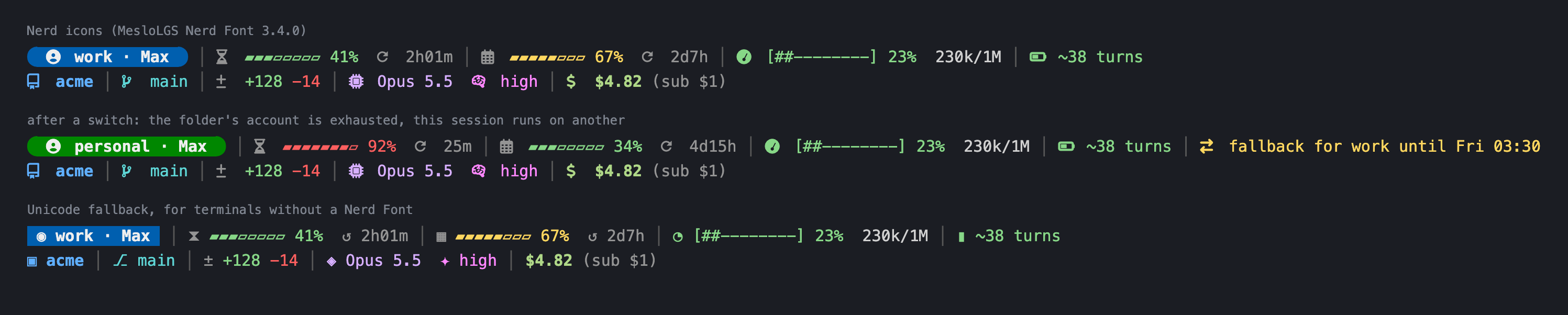
docs/agents.md.A status line for Claude Code with the account, its 5 h and weekly usage, context, branch
and cost, with Nerd Font icons it installs for you (or Unicode where there is none).Easy to check, easy to undo.
turno doctornames each problem and its fix (--fix
repairs what is safe,--reportprints a block for an issue with no secrets),turno mcp call
tries a tool the way a session would,--no-gatewayopens the agent without turno's gateway to
tell whose problem it is, andturno undoputs back every file a command changed.
Troubleshooting.
Quick start
turno init                    # finds your agents, profiles, folders and MCP servers, shows the diff,
                              # then starts the gateway and points every profile at it
claude-work                   # sign in once per profile (/login)
cd ~/code/acme && turno auto  # Claude Code, with this folder's account
turno                         # where you stand: this folder, accounts, gateway, what to do next
turno init asks before it adopts anything and writes everything as one change, so oneturno undo <stamp> reverts it. The gateway runs as a login service (launchd on macOS,
systemd --user on Linux); turno init --no-start leaves it for later (turno mcp daemon start,
then turno mcp sync). Step by step instead:
turno profile add work --color violet     # ~/.claude-work and the claude-work command
turno profile add personal
claude-work                               # sign in once per profile (/login)
turno profile assign ~/code/acme work     # this folder and everything under it
turno config set default personal         # folders without a rule
turno mcp import --move-secrets --write   # mcp.toml from the servers you already have
turno mcp daemon start && turno mcp sync  # the gateway, and every profile pointed at it
cd ~/code/acme && turno auto              # Claude Code, signed in as work
Codex, Copilot and Cursor profiles are the same with --agent codex|copilot|cursor. Point your
terminal or editor at turno auto (or the turno-auto launcher) and every folder opens with
its account. Launchers go in ~/.local/bin; when it is not on your PATH, turno profile add
prints the line to add, and turno work works meanwhile. turno auto never switches accounts
in silence: a missing profile or a broken config.toml stops it with the command that fixes it
(docs/accounts.md).
Benchmark
Six popular local MCP servers (Playwright, Chrome DevTools, filesystem, memory, sequential
thinking, Context7), each session running initialize and tools/list on all of them. Resident
memory of every process involved, Apple M3 with 16 GB, Node 26, 2026-11-16:
| Sessions | Each session starts its own servers | turno, all six servers running | turno, idle (tool lists cached) |
|---|---|---|---|
| 4 | 1,410 MiB, 28 processes | 692 MiB, 8 processes | 101 MiB, 1 process |
| 8 | 3,163 MiB, 56 processes | 847 MiB, 8 processes | 103 MiB, 1 process |
Started the way most server READMEs suggest (npx -y <package>), 4 sessions take
3,123 MiB in 52 processes. Reproduce it with node bench/mcp-ram.mjs --sessions 8;
method and caveats in BENCHMARKS.md.
How it compares
| Accounts per folder | Several agents | Shared MCP processes | Status line | Notes | |
|---|---|---|---|---|---|
| turno | yes | Claude Code, Codex, Copilot CLI, Cursor CLI | yes, lazy | yes | CLI, local only |
| claude-swap | switch, not per folder | Claude Code | no | no | usage dashboard, parallel sessions |
| clauth | switch | Claude Code | no | no | TUI, cross-account delegation |
| cc-switch | no | many | no (manages MCP config) | no | desktop app, provider switching |
| ccstatusline | no | Claude Code | no | yes | the most customizable status line |
| MetaMCP, mcp-proxy | no | any MCP client | aggregates or bridges | no | Docker / transport bridge |
Plain CLAUDE_CONFIG_DIR |
by hand | one | no | no | what turno automates |
If you only need one of these pieces, those tools are good at it. turno is for the case where
you run many sessions of several agents with more than one account.
FAQ
Is using several accounts allowed? That depends on your plan, not on turno. turno runs each
vendor's own, unmodified CLI, and each account signs in with the vendor's own login in its own
folder. The intended use is separate work and personal accounts. Do not use it to get around
usage limits or safeguards; see Vendor terms.
Where are my credentials? Where each agent keeps them, inside that profile's folder (or the
Keychain where the agent uses it). turno never reads, copies or forwards login tokens. MCP
secrets you move with --move-secrets, and the OAuth tokens of remote MCP servers, go to the
macOS Keychain or the Linux Secret Service. What turno stores where: SECURITY.md.
Does turno see my prompts or model traffic? No. It launches the agent and gets out of the
way. Only MCP tool calls go through mcpd, on 127.0.0.1, with a bearer token per profile,
and requests with an Origin header are rejected so web pages cannot reach it.
Linux? Windows? Linux works too: secrets go to the Secret Service (secret-tool), mcpd runs
as a systemd --user unit, and links open with xdg-open. Windows is not supported.
Can scripts and agents run turno? Yes. turno asks only when a person is at a terminal: with--no-input (or TURNO_NO_INPUT=1), when stdin is not a terminal, and inside a Claude Code,
Codex, Copilot CLI or Cursor agent session it never asks. A command that would ask exits with
code 2 and names the flag that answers it, for example turno: init needs an answer; pass --yes (or run it in a terminal). TURNO_NO_INPUT=0 lets you answer in an editor terminal that sets
an agent's variable. A command that needs a profile and gets none (turno profile assign,turno run, turno session handoff, turno limit set) shows a list to choose from on a
terminal (arrows or j/k, type to filter, Enter, Esc to cancel); turno run lists auto first,
named with the profile this folder resolves to (auto (work)). Elsewhere it exits with 2 and
lists the profiles: pass a profile: personal, work.
How do I undo it? Every command that writes keeps a copy of each file it changes:turno undo --list shows them and turno undo <stamp> puts them back (backups older than 30
days are pruned, keeping the newest 10). To remove turno, turno uninstall --dry-run lists what
turno set up (service, launchers, MCP entries, status line, config) and turno uninstall
removes it; then npm uninstall --global turno-cli. Profile folders, which hold your logins,
stay until you delete them. turno uninstall --purge also removes turno's state and caches
(backups, logs, usage, installed MCP servers), after which turno undo has nothing to restore.
Reference
turno --help groups the commands and turno <command> --help explains each. Commands that
only read take --json; commands that write take --dry-run, keep a copy of each file they
change, and print the turno undo <stamp> that puts them back. turno mcp import only previews
(secrets masked) until --write.
| Command | What it does |
|---|---|
turno |
once set up, the status screen and the next step; before that, the help |
turno init [--dry-run] [--yes] [--start | --no-start] |
set turno up in one step: agents, profiles, folder rules, mcp.toml, the gateway (one undo) |
turno demo [--keep] [-- <command>] |
try turno in a throwaway HOME (also npx turno-cli demo); without a terminal it shows what it set up and ends, --keep waits for Ctrl-C |
turno <profile> [args], turno run <profile|auto> [args] |
the profile's agent with that account (args pass through) |
turno auto [--agent codex|copilot|cursor] |
the profile assigned to the current folder |
turno profile list|add|repair|remove|which [--check]|assign|unassign |
the profiles, and which folders use each; which --check exits 0, 3 or 4 for scripts |
turno mcp list|sync|config|import|install|refresh|doctor |
the MCP gateway's servers, and entries for other agents |
turno mcp export [--profile p], turno mcp import <file> |
move servers to another machine, secrets by name only |
turno mcp call <server> [tool] |
list a server's tools or call one through mcpd, as a profile's session here would |
turno mcp login|logout <server> |
log mcpd in to an OAuth remote server, once per account |
turno mcp log|top|savings |
the gateway's tool call log, memory per server, and what it saves |
turno mcp daemon start|stop|restart|status|logs, turno mcp token rotate |
the gateway service, and its token |
turno status [--json] |
one screen: this folder, profiles and usage, sessions, mcpd, and the next step |
turno limit show [--watch] [--json]|set|clear |
usage windows per account, and exhausted marks; --watch --json prints NDJSON |
turno session list|handoff <p> [--fork] |
open sessions, and the command to continue this one under another profile |
turno open [profile] <url> |
open an http(s) or mailto link; claude.ai links use that profile's Chrome profile |
turno identity list|add|remove|login|prefer|log [--verify] |
service accounts for the bridge, browser identities, the audit log |
turno secret set|has|rm|list |
MCP secrets in the macOS Keychain or the Linux Secret Service |
turno ui status|install |
the status line, its font and icons in every terminal |
turno doctor [--fix], turno doctor --security [--fix] |
check everything and repair what is safe to repair; --security checks file modes, the port owner, literal secrets, unpinned servers, token age and the audit log |
turno doctor --report, turno run <p> --no-gateway |
a Markdown block for an issue (no secrets); the agent without turno's gateway, to tell whether a problem is turno's |
turno config path [--all]|get|set|unset|edit|check |
config.toml without losing its comments; path --all lists every path turno uses |
turno undo [--list] [<stamp>|last], turno undo --prune |
put back the files a command changed; prune old backups |
turno upgrade [--check], turno version |
update turno the way it was installed |
turno uninstall [--dry-run] [--yes] [--keep-config] [--purge] |
remove what turno set up (profile folders stay); --purge also removes its state and caches |
turno completion zsh|bash|fish |
shell completion, including profiles and config keys |
turno browser identities|add|show|set|login|remove |
browser identities and their settings (needs turno-browser) |
turno browser vault add|list|remove|submit |
sign-in credentials per site in the OS secret store, filled by the browser_login tool |
turno browser export <id> --out <file>, turno browser import <file> |
move an identity's session to another machine as one encrypted file |
turno browser doctor [--fix], turno browser reputation [<id>] |
check Chrome and every identity; how often each site challenged it |
turno browser bench |
developer diagnostic: browser engine compatibility |
For scripts and hooks: every --json object carries schemaVersion, --json=fields lists the
fields and --json=name,email keeps only those, --watch --json prints one JSON record per
line, and under --json an error is one JSON line on stderr (turno help json). Exit codes
are 0 ok, 1 failure, 2 usage, 3 no profile for the folder, 4 not signed in, 5 mcpd down
(turno help exit-codes); turno profile which --check answers with them, for exampleturno profile which --check || turno profile assign . work. turno help environment lists
every variable turno reads, colors included (NO_COLOR, FORCE_COLOR, CLICOLOR,CLICOLOR_FORCE, TERM=dumb). Commands that write end with a Next: line that says what to
run after them (never under --json); turno config set hints false turns those lines off.
Config
~/.config/turno/config.toml:
system = "personal"     # account the plain `claude` command uses ("" for none)
default = "personal"    # profile for folders without a rule
# fallback = "work"     # optional, off unless set; read "Vendor terms" first

[profiles.work]
color = "violet"        # status line pill
[profiles.personal]
browser = "default"     # claude.ai links open in the default browser
[profiles.cx]
agent = "codex"

[[projects]]
path = "~/code/acme"
profile = "work"

[[projects]]
path = "~/code/oss"
mcp_deny = ["mail"]     # sessions here see every MCP server but mail

[mcpd]
port = 47821
# idle_under_pressure = "5m"     # idle limit while memory is low; false turns it off
# max_request_body = "32MiB"     # between 1MiB and 1GiB
# call_log = true                # logs/calls.jsonl, no arguments or results
A rule may carry a profile, a server set (mcp = [...] keeps only those servers, mcp_deny
removes some), or both. With system = "" there is no default account, so turno auto needs a
rule (docs/accounts.md). turno config --help lists every key.
MCP gateway
~/.config/turno/mcp.toml:
[server.calendar]
command = "cal-mcp"
package = "@calcom/[email protected]"   # installed by `turno mcp install` (see below)
env = { CAL_API_KEY = "keychain:turno/calendar/api-key" }
scope = "shared"                     # one process for every session

[server.devtools]
command = "chrome-devtools-mcp"
scope = "session"                    # one per agent session, stopped when it ends

[server.issues]
command = "issues-mcp"
[server.issues.variant.work]         # the work profile reaches a different account
env = { ISSUES_TOKEN = "keychain:turno/issues/work" }

[server.linear]
url = "https://mcp.linear.app/mcp"
auth = "oauth"                       # mcpd logs in once per account: turno mcp login linear

[server.docs]
url = "https://docs.example.com/mcp" # remote, no secrets: written straight into each profile
Each variant per profile runs separately, so two profiles can reach two accounts of the same
service. A remote server with auth = "oauth" or secret headers goes through mcpd, so no agent
logs in to it on its own. turno mcp install installs each package at an exact version,
without install scripts (--allow-scripts to run them) and with a lockfile per server; until
then npx runs it, with a warning in the server's log. Details: docs/mcp.md.
Browser with real profiles
npm install --global turno-browser   # separate package, not installed with turno
turno identity add browser:school    # an identity and its mcp.toml entry
turno identity login browser:school  # sign in by hand once; cookies persist
turno-browser is its own MCP server. It drives the installed Google Chrome, headed, with a
persistent profile per identity and no injected scripts; each identity keeps its time zone,
languages and locale fixed (turno browser show|set <id>).
- It cleans up after itself. At most 8 tabs per session's browser, an unused tab is parked
after 5 minutes and closed after 15, and popups nobody asked for are closed. Chrome closes
after 15 minutes without a tool call and opens again on the next one, and mcpd stops the
server after 30 (see Browsers). When the agent ends, Chrome closes with
it, and a Chrome that a killed run left open is closed on the next start. - Fewer round trips.
browser_batchruns up to 20 actions in one call, and an action that
fails says which element covers the target, or that it is hidden, disabled or gone. - Sign-ins the agent never sees.
turno browser vault addkeeps a username, a password and
an optional TOTP secret per site in the OS secret store, and thebrowser_logintool fills
them into that site's sign-in page; results are redacted and values are bound to the site. - Sessions you can move.
turno browser export <id> --out <file>writes an identity's
cookies and storage as one file encrypted with a passphrase, with an expiry, andturno browser import <file>reads it on another machine. The vault never leaves. - Lighter pages, when you want them. Per identity and off by default: block trackers,
images, media or fonts, and keep static resources in a cache on disk. - Health you can read.
turno browser doctor [--fix]checks Chrome and every identity, andturno browser reputationshows how often each site challenged it.
More in Browser identities andturno browser.
Acceptable use. Use it with your own accounts, on sites whose terms allow automated access
by you, and at a human pace. Do not use it to get around access controls, paywalls, CAPTCHAs or
rate limits, to scrape at scale, or to access accounts that are not yours.
Accounts bridge
A builtin MCP server (builtin = "accounts" in mcp.toml) lets a session in one profile
delegate a task to a service account (a Linear workspace, a mail connector) that only another
profile is signed into. Reads run with only the account's read tools; writes, and by default
every call to a mail or messaging account, need your confirmation. Every call and its decision
go to a hash-chained audit log (turno identity log, --verify checks the chain). Details:
docs/accounts.md.
Status line
turno ui install                     # font + statusLine in the shared settings.json
turno ui install --terminal current  # also set the font in this terminal
Row 1: profile and plan, 5 h and weekly usage of that account with time to reset, context, and
a warning when the folder belongs to another profile. Row 2: project and worktree, branch, lines
changed, model and effort, and the API-equivalent cost of the conversation including subagents.
Details: docs/ui.md.
Claude Code plugin
plugins/turno adds session handoff and fork skills, a copy-artifact skill that copies a
claude.ai artifact (with its files and assets) from one profile's account to another, and a hook
that records when a profile reaches its usage limit, so turno status can show it:
/plugin marketplace add wimo-dev/turno
/plugin install turno@turno
Files
| Path | What |
|---|---|
~/.config/turno/config.toml |
profiles and folder rules |
~/.config/turno/mcp.toml |
MCP servers behind the gateway |
~/.config/turno/accounts.toml |
service accounts for the bridge |
~/.local/state/turno/ |
usage, run records, logs (with the tool call log logs/calls.jsonl), backups, the gateway tokens |
~/.local/share/turno/ |
installed servers, tool cache, browser identities |
All three honor XDG_CONFIG_HOME, XDG_STATE_HOME and XDG_DATA_HOME.
Disclaimers
Not affiliated
turno is an independent open-source project. It is not affiliated with, endorsed by or
sponsored by Anthropic, OpenAI, GitHub, Google, Anysphere or any other vendor. Claude, Claude
Code, Codex, Copilot, Cursor and Gemini are trademarks of their owners; turno uses the names
only to say which tools it works with. turno runs the vendors' own, unmodified command-line
tools.
Vendor terms
Each account you add is yours and stays bound by its vendor's terms; turno does not change
them. turno never reads, stores or forwards your login tokens, and it does not proxy model
traffic: every agent logs in by itself, in its own directory. Before you use several accounts:
- Check that your plan allows it, and use each account for what its terms allow (for example,
a work account for work). - The
fallbacksetting is off by default. It chooses which of your own accounts opens a
folder while another is marked exhausted. Vendors' usage policies forbid creating or using
accounts to get around usage limits or safeguards, so read your plan's terms before you set
it, and do not use it for that.
No warranty
turno is provided "as is", without warranty of any kind (Apache License 2.0, sections 7 and 8).
It edits agent config files and launches programs as your user; every write keeps a backup
that turno undo restores, and turno uninstall removes what it set up.
Update check
Interactive commands ask the npm registry for a newer version at most once a day, sending only
the package name. Turn it off with update_check = false in config.toml, DO_NOT_TRACK=1,NO_UPDATE_NOTIFIER=1, TURNO_NO_UPDATE_CHECK=1 or TURNO_NO_UPDATE_NOTIFIER=1; it is also off in CI and outside a
terminal. Apart from that, turno only goes online when you ask it to: turno ui install
downloads the status line font, turno mcp install and turno upgrade fetch packages from npm,turno mcp import --write and turno init (once you confirm) ask npm for the command name of
servers you ran with npx, and turno mcp login talks to that server's authorization server.
Previews (--dry-run, turno mcp import without --write) stay offline. There is no telemetry.
Contributing
Issues labeled good first issue
are a good start. Read CONTRIBUTING.md, the
Code of Conduct and the AI policy. Questions and ideas go
to Discussions (there is an Español
category). Security issues: SECURITY.md.
pnpm install && pnpm build
pnpm check       # typecheck, lint (Biome, knip), tests (sandboxed HOME), text rules, licenses
pnpm test:e2e    # also the end-to-end test that needs the network (Cursor)
License
Apache License 2.0 (LICENSE, NOTICE). The bundled fonts keep their own
licenses (packages/fonts/LICENSE.txt); dependencies are listed in
THIRD_PARTY_NOTICES.md.
Documentation
turno.wimo.dev is the site: a landing page that tells the story in
eight parts, and the docs in three areas: guides by problem and
concepts, the reference generated from the code, and one troubleshooting page per turno doctor
finding, with a filter. English and Spanish. Its source is in apps/docs.
Reviews (0)
Sign in to leave a review.
Leave a reviewNo results found