treefold
Health Warn
- License — License: AGPL-3.0
- Description — Repository has a description
- Active repo — Last push 0 days ago
- Low visibility — Only 6 GitHub stars
Code Warn
- process.env — Environment variable access in .github/workflows/release.yml
- process.env — Environment variable access in electron.vite.config.ts
- process.env — Environment variable access in scripts/bundle-app.ts
Permissions Pass
- Permissions — No dangerous permissions requested
No AI report is available for this listing yet.
A local-first macOS app for running AI agents in parallel Git worktrees. Keep code, terminals, and tasks together, then merge changes back cleanly.
Treefold for macOS
English | 简体中文
Run agents in parallel. Fold the work back cleanly.
Treefold is a local-first macOS app for running AI agents in isolated Git worktrees. Keep code, terminals, and tasks together, then merge the results back into your main line of work.
Develop with Codex, Claude Code, OpenCode, or Pi, and use Shell Sessions to run services and tests. Each feature gets its own Workspace, so you can switch tasks without repeatedly switching branches, finding terminals, or reconstructing your progress.
Install · Start your first task · Common workflows · Website · GitHub Releases
Video demo
A 30-second tour of parallel development, review, and delivery. Video in Chinese.
https://github.com/user-attachments/assets/909fffe9-795c-4e07-bd55-4b5d3d8c6793
What you can do with Treefold
- Work in parallel with isolated changes. Give each feature a Workspace and split independent subtasks into Forks. Code, Todos, and Sessions stay with the task. Review the results, then merge into the parent.
- Move several repositories forward together. Keep frontend and backend in one Project, choosing new or existing branches for each repository. Include monorepo subdirectories and reference material too.
- Review changes and prepare delivery. Inspect diffs and history, squash or reset commits, and edit the latest commit message. Squash delivery supports a message per repository while preserving source-branch history.
- Give your Agent the scope for AI Review. Treefold adds repositories and comparison targets, asking the Agent to inspect committed changes, uncommitted changes, and new files. Edit the prompt, then discuss and fix findings in the same Session.
- Share services and logs. People and agents use amux to inspect the same managed processes and output. Find the service across Sessions without asking an Agent to relay its logs.
- Spend less time finding commands and directories. Command Palette keeps the current task context; Open With opens its directory in your IDE, terminal, or Finder.
A look inside
| Explore Treefold |
|---|
| One place for the whole feature Keep Todos, Forks, and Sessions together from planning through delivery. 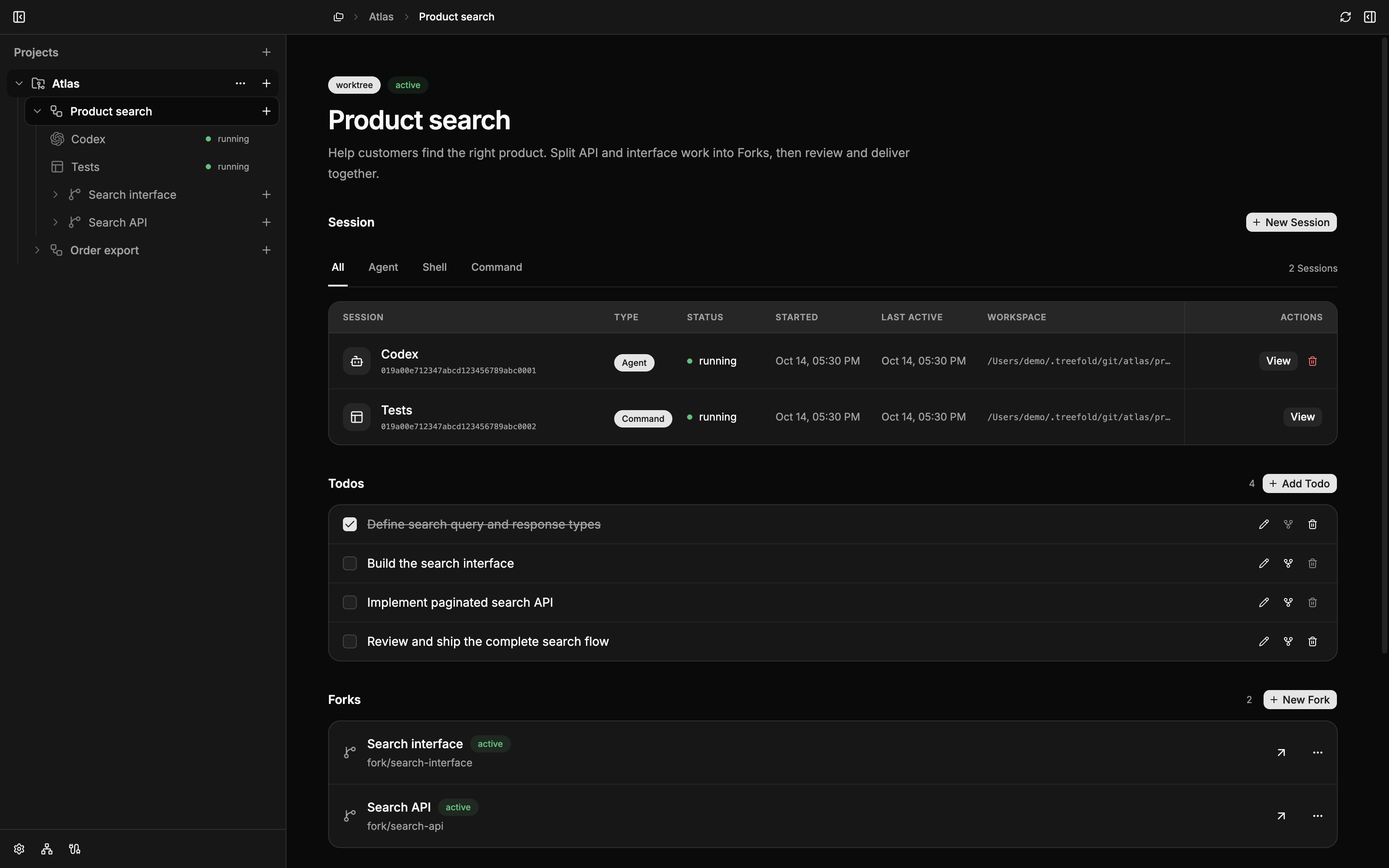 |
| Separate branch choices, one task Start a new frontend branch while continuing existing backend work in the same Workspace. Screenshot in Chinese. 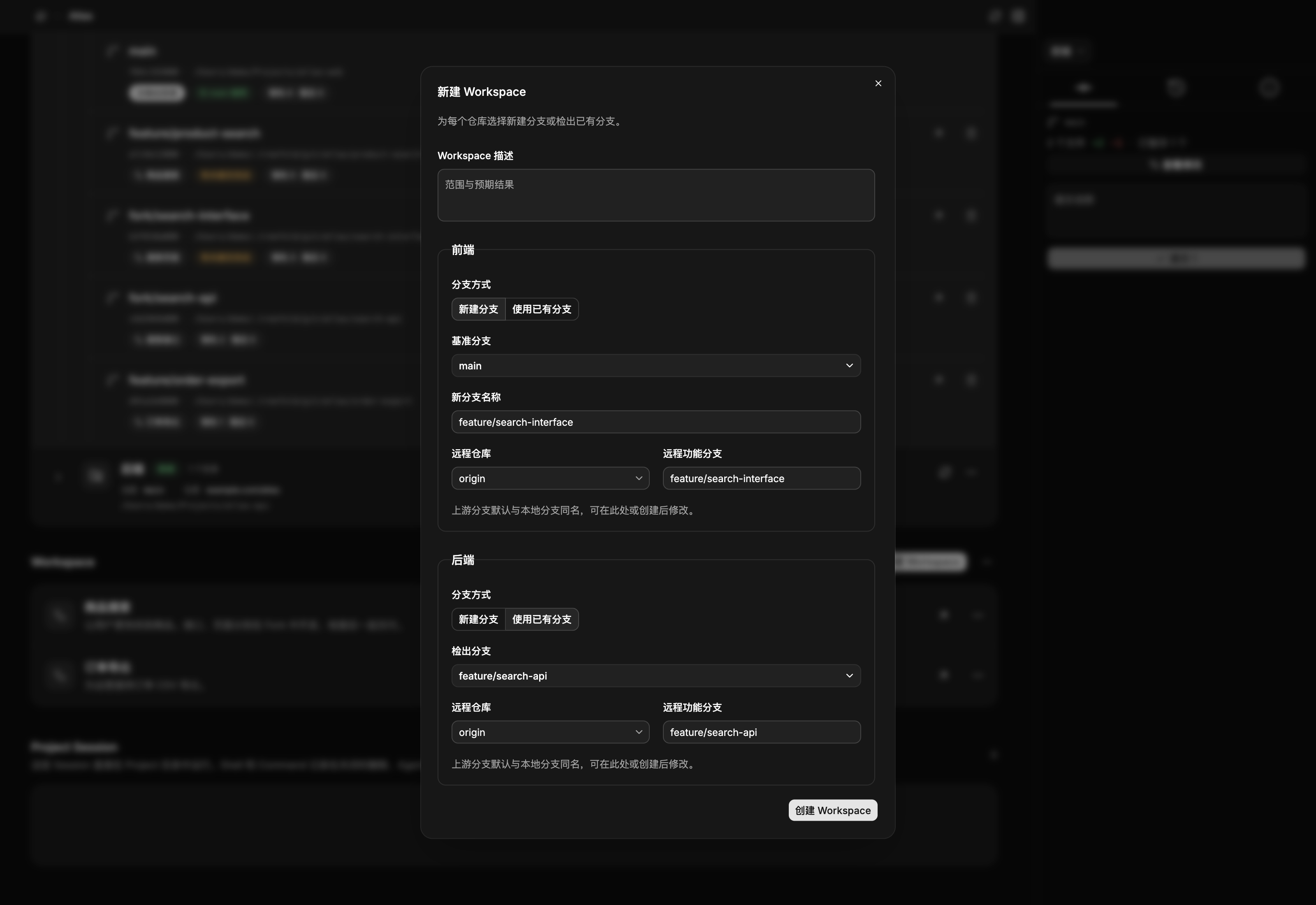 |
| Review changes and history together Inspect diffs and organize commits before delivery. 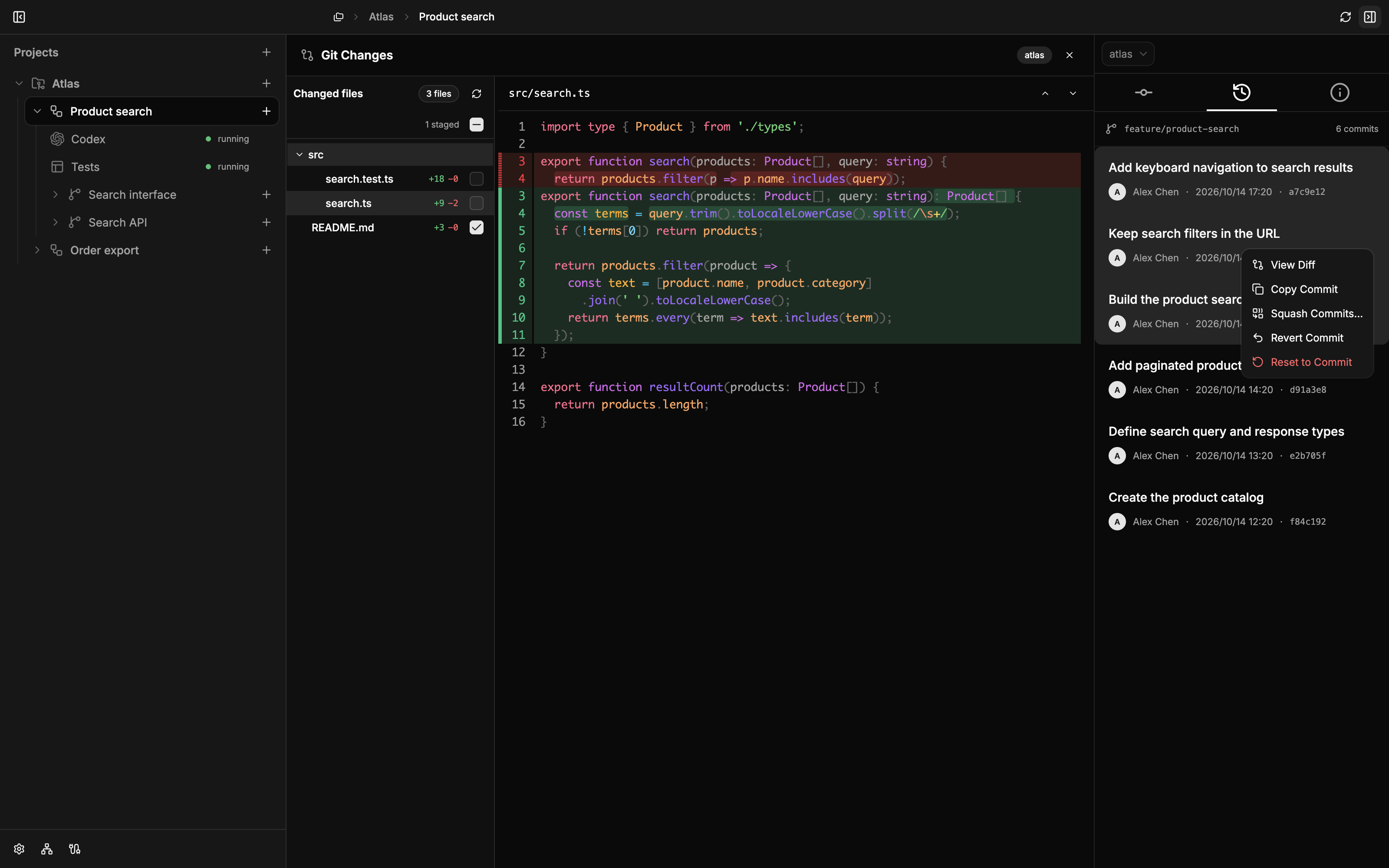 |
| AI Review Choose an Agent and edit the prompt; repository context and comparison scope are added automatically. Screenshot in Chinese. 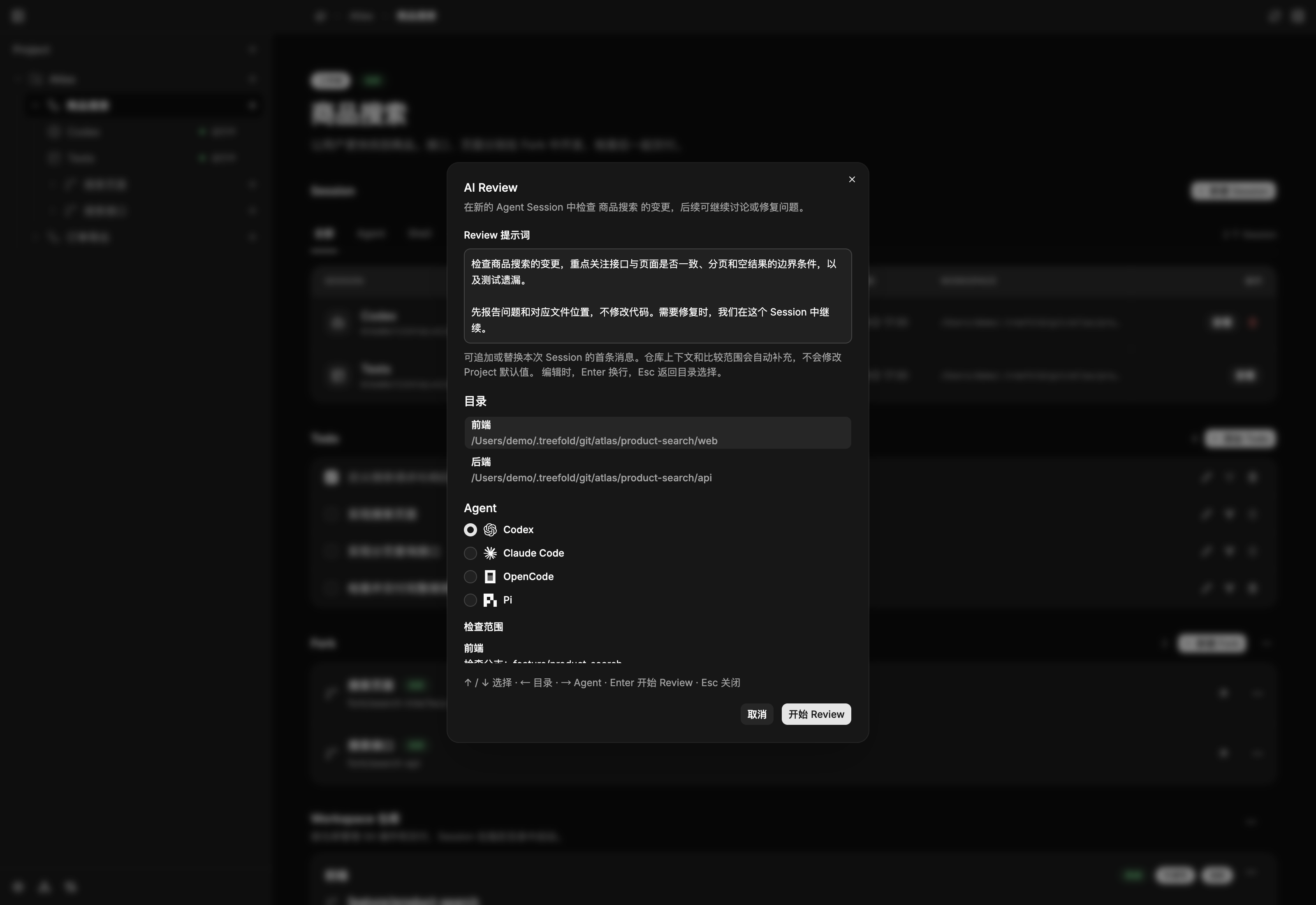 |
| Service logs stay with the task Switch between agents and development services to inspect terminal output directly. 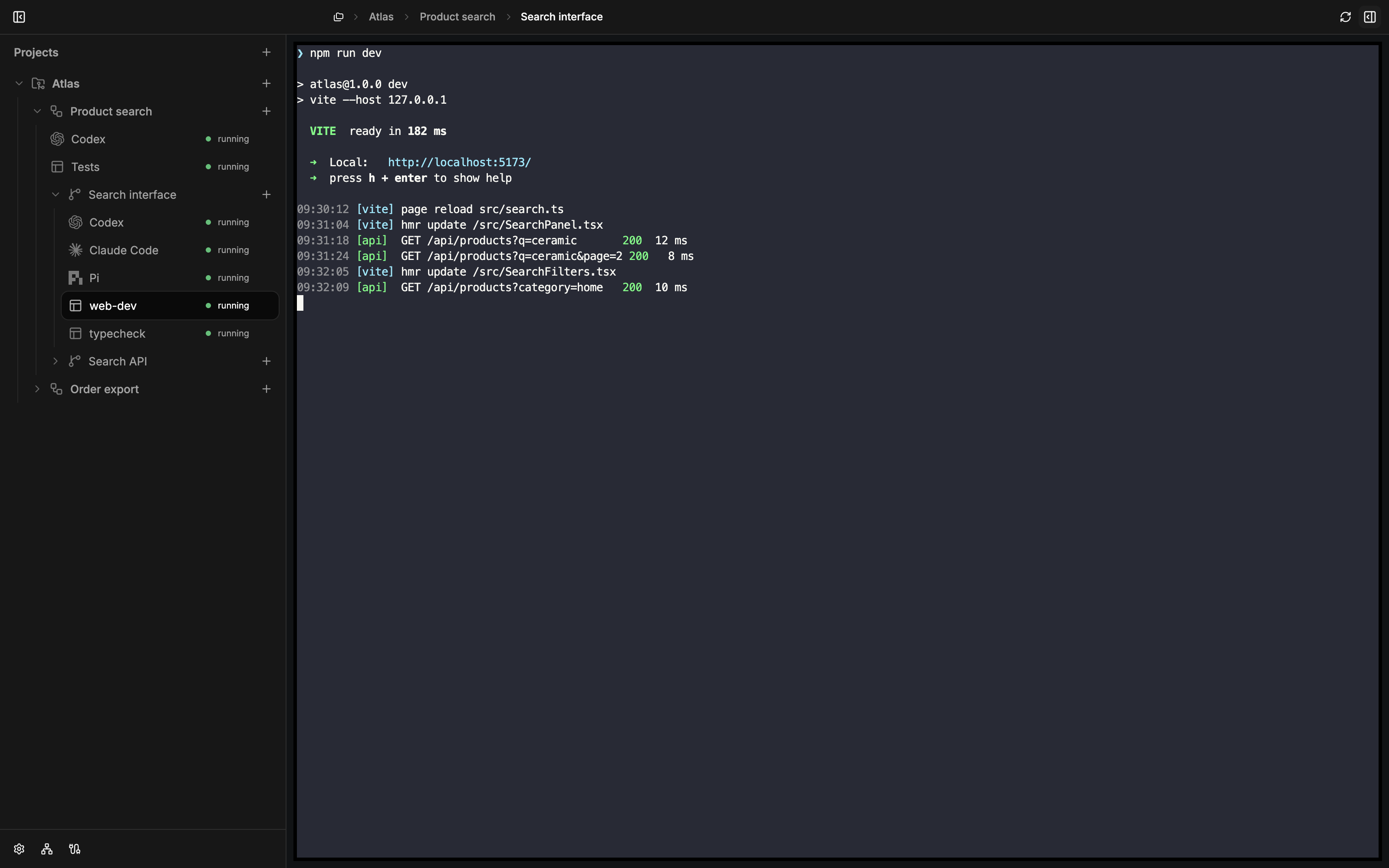 |
Product architecture
Projects organize repositories, Workspaces own features, and Forks isolate subtasks in dedicated worktrees. Agent and Shell Sessions execute the work. Review and merge Fork results into the parent Workspace, then deliver the feature.
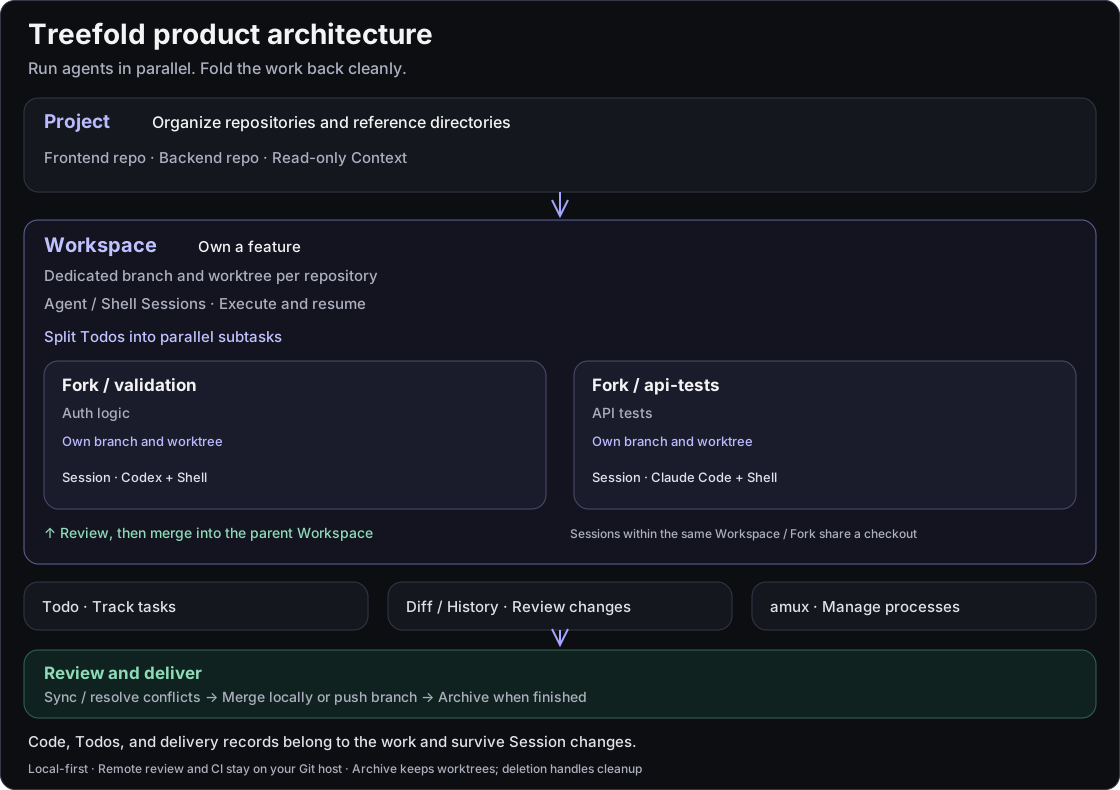
Isolation belongs to the Workspace / Fork. Sessions within the same work share a checkout. Code, Todos, and delivery records survive Session changes.
Install
You need an Apple Silicon Mac running macOS Sonoma 14 or newer, plus Git.
Homebrew
brew install --cask win5do/tap/treefold
Open Treefold from Applications. To update later:
brew update
brew upgrade --cask treefold
Download the app
Visit GitHub Releases, download the Apple Silicon .dmg, open it, and drag Treefold into Applications. Release pages also provide a ZIP archive, SHA-256 checksums, and release notes.
macOS first launch
Treefold is ad-hoc signed and has not been notarized by Apple. If macOS blocks the first launch after either installation method, and you trust the downloaded app, run this command in Terminal, then open Treefold again:
xattr -dr com.apple.quarantine /Applications/Treefold.app
This removes the quarantine attribute only from the installed Treefold app. If you installed it elsewhere, replace the path accordingly. You may need to repeat this after downloading a new version.
Alternatively, choose Open Anyway in System Settings → Privacy & Security, then confirm when prompted.
Set up your agents
Treefold runs locally installed Agent CLIs. Install the ones you want to use, complete their login or model configuration, and confirm they work in your terminal.
| Agent | Default command |
|---|---|
| Codex | codex |
| Claude Code | claude |
| OpenCode | opencode |
| Pi | pi |
Open Settings → Agents to check detection, reorder agents, or customize launch commands. Use Recheck Agents if a newly installed CLI does not appear; for a custom installation location, enter the executable's absolute path. Shell Sessions work independently without an Agent configured.
All four agents support new Sessions and resuming linked native Sessions. Resume requires a recorded native Session ID and retained history; see Agent Session details for integration requirements.
Start your first task
Start with one Project → one Workspace → one Agent Session. You can add Forks later.
- Add a Project. Choose New Project and select an existing local repository, clone a Git URL, or create an empty repository. For a directory containing multiple repositories, select the repositories and reference directories to include.
- Create a Workspace. Name the task, such as “Product search.” Treefold prepares separate branches and worktrees for development.
- Start an Agent. Create a Session in the Workspace, select Agent, choose a CLI and working directory, then describe the task in its terminal. For example: “Add search to the product list. Inspect the existing API and tests first, then implement and verify it.”
- Run and review. Open a Shell Session to install project dependencies, start services, or run tests. Review diffs and Git history in Treefold to check the changes.
- Deliver and archive. Open the delivery flow and choose to merge into the Project checkout's current branch or push the feature branch for remote review. Use intermediate delivery to keep developing, or finish and archive when the task is complete.
Finishing and archiving stops the associated Sessions while retaining worktrees, branches, and records. When you no longer need them, the deletion flow lets you clean up or retain working directories and local branches. PR creation, remote review, and PR merging happen on your Git hosting platform.
Common workflows
Develop two features at once
Create “Product search” and “Order export” Workspaces in the same Project and start an Agent in each. Separate code directories and branches let you implement, test, and deliver each task independently.
Multiple Sessions in the same Workspace share code directories. Create another Workspace or Fork when changes need isolation. If you run several development servers, configure different ports for them too.
Split one feature into parallel subtasks
List API, UI, and test work as Todos in the “Product search” Workspace, then delegate independent subtasks to Forks. For example, use Claude Code for the search API and Codex for the UI.
Each Fork starts from its parent Workspace and works in its own worktrees. Review and merge its results into the parent, test the combined feature, then deliver it. Finish all active Forks before finishing their parent Workspace.
Continue tomorrow, or hand off to another Agent
Return to the Workspace to find its Sessions and Todos. Open a running Session directly, or use Resume for a stopped Agent Session when its native history is available.
You can also create a Session with another Agent in the same Workspace and ask it to continue from the code and Todos. Chat history is not automatically converted between agents.
Core concepts
| Concept | Purpose |
|---|---|
| Project | Groups related repositories, reference directories, and context. |
| Workspace | Owns one feature, with its own worktrees, branches, Sessions, and Todos. |
| Fork | Handles a parallel subtask within a Workspace and merges into its parent. Forks cannot nest. |
| Session | Runs an Agent or Shell in the relevant directory. A Workspace or Fork can own multiple Sessions. |
CLI and agent collaboration
The desktop app includes the treefold CLI and Treefold Skill. Managed Agent Sessions receive their current Project, Workspace, directory, and Todo context. Agents can inspect and claim tasks, update progress, and mark Todos complete.
treefold open /path/to/project
treefold current --json
treefold todo list --json
treefold doctor
Run treefold open . to go directly to the corresponding Project if the directory has already been added, or open the local import dialog otherwise. Omit the path to open or focus the app.
The companion amux runtime manages persistent processes and terminals. When creating CLI and Skill links, Treefold preserves existing user-managed paths.
Local data and preferences
Project state, Session metadata, Todos, and configuration stay on your Mac. The core management workflow does not require a hosted control service. Agent model calls, network access, and costs depend on the corresponding services and your configuration.
Use Settings to adjust language, theme, agents, and key bindings. Configuration lives under $TREEFOLD_HOME, which defaults to ~/.treefold:
config/settings.toml: language, theme, and agent defaults.config/keymap.toml: key binding overrides. Omitted bindings follow defaults;falsedisables a binding.
See configuration and key bindings for details.
Run from source
To try features in the current source or contribute, install stable Rust, Node.js 24.12 or newer, Git, and just:
git clone https://github.com/win5do/treefold.git
cd treefold
npm install
just app-dev
Development data defaults to .treefold-dev/ inside the repository, separate from the usual ~/.treefold home. Run just to list tasks or just build to generate the macOS app, DMG, and ZIP. See the development guide for environment, build, and validation details.
Learn more and give feedback
- Project, Workspace, and Fork model
- Git worktree lifecycle and delivery
- Agent Skills, CLI, and App API
- Report an issue or suggest an improvement
If Treefold helps you, consider giving it a star on GitHub to support the project.
License
Copyright (C) 2026 win5do.
Treefold is licensed under the GNU Affero General Public License v3.0 only (AGPL-3.0-only).
Reviews (0)
Sign in to leave a review.
Leave a reviewNo results found