herdr-agent-watcher
Health Warn
- License — License: NOASSERTION
- Description — Repository has a description
- Active repo — Last push 0 days ago
- Low visibility — Only 5 GitHub stars
Code Fail
- rm -rf — Recursive force deletion command in scripts/fetch-or-build.sh
- process.env — Environment variable access in src/agent/adapter/opencode/plugin/agent-watcher-opencode-bridge.test.ts
- process.env — Environment variable access in src/agent/adapter/opencode/plugin/agent-watcher-opencode-bridge.ts
Permissions Pass
- Permissions — No dangerous permissions requested
No AI report is available for this listing yet.
Coding-agent observability for Herdr: live sidebar cards, lifecycle notifications, and a zero-config Claude Code metrics bridge.
herdr-agent-watcher
Coding-agent observability for Herdr: live sidebar cards, lifecycle
notifications, and a zero-config metrics bridge for Claude Code.
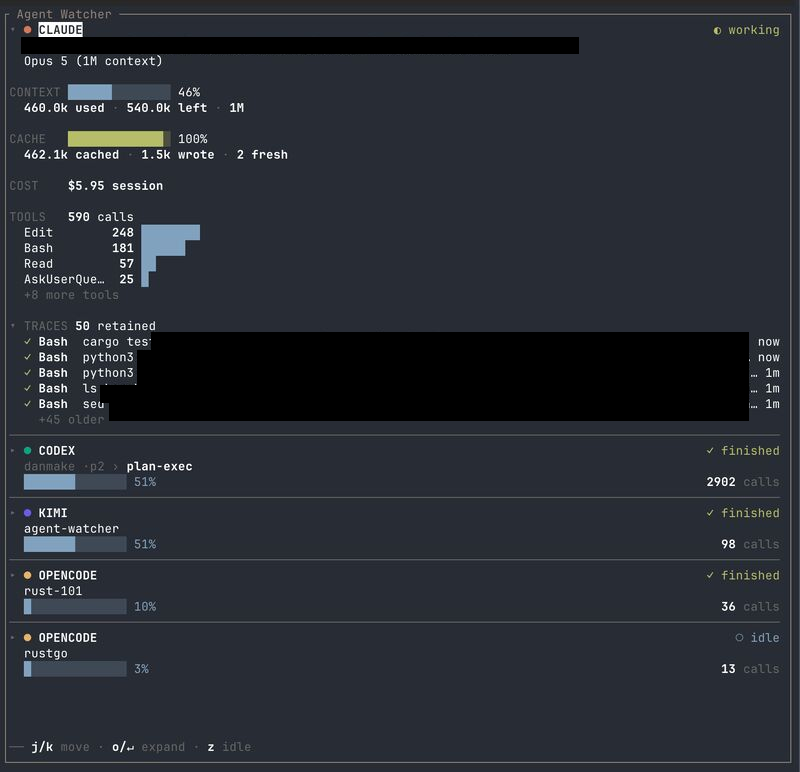
Five sessions across four agents in one pane — working, finished, idle. The expanded
Claude card also carries CONTEXT, CACHE and COST: numbers Claude Code reports through a
status line and nowhere else, which is what the bridge puts there.
The idea began inside Vimeflow, where watching
coding agents was one layer of a much larger Electron app.
Pairs with herdr-agent-title-sync,
which keeps Herdr pane titles in step with what each agent is doing.
Local observation is the default. The one thing that leaves your machine is Kimi's
plan-usage lookup, which is off until you turn it on — see
Kimi usage consent.
Install
herdr plugin install winoooops/herdr-agent-watcher
Requires Herdr 0.8.0+. Install fetches a prebuilt binary for macOS and Linux (x86_64 and
arm64) and checks its SHA256. If no asset matches your platform, or anything about the
download fails, it builds from source instead — that path needs Rust 1.88+, which Herdr
reports rather than installs.
Installing into an already-running Herdr server does not start the daemon. Run it once:
herdr plugin action invoke restart-daemon --plugin herdr-agent-watcher
Herdr's own stock UI works without the sidebar: it receives lifecycle notifications and
pane metadata tokens — agent_watcher_state, agent_watcher_phase, agent_watcher_model,agent_watcher_context_pct, agent_watcher_attention and agent_watcher_title. Those
names are the integration surface with Herdr and are deliberately stable.
Commands
Every action is invoked the same way:
herdr plugin action invoke <id> --plugin herdr-agent-watcher
Output goes to the plugin log — read the last run withherdr plugin log list --plugin herdr-agent-watcher --limit 1.
| Action | What it does | More |
|---|---|---|
restart-daemon |
Start or restart the daemon | |
stop-daemon |
Stop the daemon | |
open-sidebar |
Open the live sidebar in a new split | Sidebar |
bind-sidebar-key |
Bind a key to open the sidebar | Sidebar |
unbind-sidebar-key |
Remove that binding | Sidebar |
enable-claude-bridge |
Install the metrics bridge into Claude's own settings | Claude metrics bridge |
disable-claude-bridge |
Restore the settings file to its pre-enable state | Claude metrics bridge |
doctor |
Say why metrics are missing, and what to do | Doctor |
kimi-consent-on |
Allow Kimi plan-usage lookup | Kimi usage consent |
kimi-consent-off |
Revoke it — takes effect without a restart | Kimi usage consent |
kimi-consent-status |
Show the current setting | Kimi usage consent |
Sidebar
herdr plugin action invoke open-sidebar --plugin herdr-agent-watcher
Each invocation intentionally opens another split. No key opens it until you bind one with
the steps below; the default is prefix+a, which is ctrl+b then a with Herdr's own
prefix. Cards show agent state, agent/model, title, context use, cache hit rate, cost, tool
count, and the three newest tool traces. Expanded cards also show plan usage when the agent
reports it.
Use j/k or PageUp/PageDown to scroll, o/↵ to expand, z to hide idle agents,x to open the menu, ? to list the card-list keys, and q/Esc or Ctrl-C to close.
Each panel lists its own controls in its footer.
To open it with a key, open Settings: its first row shows the configured key and whether
it is bound. Select that row and press o or ↵ to open Keybindings, where ↵ edits
the key and b binds or unbinds it immediately. Herdr validates edits before they are
written. For scripts, the same operation remains available as:
herdr plugin action invoke bind-sidebar-key --plugin herdr-agent-watcher
That writes the binding into Herdr's config, refusing if the key is already taken and
naming what holds it. For a different key, set keys.open_sidebar before running it.
x also offers Update, or u from any panel: it asks GitHub for the newest release and says how it compares
to the build you are running. It asks only when you open it — nothing here contacts the
network on its own. When a newer release exists and the plugin came from GitHub, u
installs it and then asks you to reopen the sidebar, because no process can replace the
binary it is executing. A linked working directory is told to git pull instead: herdr
refuses to install over a link, and the tree belongs to whoever is editing it.
[!WARNING]
Open Keybindings from the first row in Settings and unbind the key there, or rununbind-sidebar-key, before uninstalling the plugin. Herdr runs nothing on uninstall,
so otherwise the binding outlives the action it points at.
If the daemon is unavailable when the sidebar opens, the pane says so and waits for a key.
If it disconnects while the sidebar is open — usually the restart the settings panel just
ordered — the cards stay on screen, a notice counts the seconds, and the sidebar resubscribes
on its own; keys keep working the whole time. After a minute without the daemon it stops
trying and waits for a key. Its state socket ($HERDR_PLUGIN_STATE_DIR/herdr-agent-watcher-state.sock,WIRE_VERSION = 2) is plugin-internal, not a public API.
Stop the daemon with:
herdr plugin action invoke stop-daemon --plugin herdr-agent-watcher
Configuration
Most of this is easier from the sidebar: open it, press x, and the settings panel edits
the same file live — you see each change on the cards as you make it, and only the keys you
touched are written. Reach for the file directly when you want comments, a key the panel
does not expose, or to check something into version control.
Every key is optional and every bad value falls back to its default, so a mistake costs one
setting rather than the plugin.
| Key | Values | Default | What it does |
|---|---|---|---|
daemon.interval_ms |
positive integer | 1000 |
Reconcile interval. Read at startup, so a change needs restart-daemon. AGENT_WATCHER_INTERVAL_MS outranks it |
daemon.prune_after_days |
7, 14, 30; 0 disables |
7 |
Removes session dirs unwritten that long. Startup-only; restart required |
appearance.theme |
inherit, lumon |
inherit |
inherit uses your terminal's colours; lumon paints its own |
appearance.agent_mark |
dot, initial, symbol |
dot |
The agent's mark on a card |
cards.auto_expand |
none, all |
none |
Start cards expanded |
cards.tool_calls |
bars, jar |
bars |
How the context meter is drawn |
cards.trace_lines |
1–20 |
5 |
Traces per expanded card. Out of range clamps, it does not reject |
cards.plan_usage * |
true, false |
true |
Show plan usage on expanded cards |
list.sort |
position, smart, group |
position |
Card order: Herdr's layout, urgency, or grouped by agent. position is the default because it is the only one that does not move under you |
list.hide_idle |
true, false |
false |
Hide idle agents, as z does |
list.scope |
all, workspace |
all |
workspace needs HERDR_WORKSPACE_ID; without it, falls back to all |
keys.open_sidebar |
a Herdr key string | prefix+a |
The key bind-sidebar-key writes. Set it before binding |
agent.<id>.color |
#rrggbb |
built-in | Override an agent's colour |
agent.<id>.label |
any string | built-in | Override its name on cards |
agent.<id>.symbol |
any string | built-in | Its mark when agent_mark = "symbol" |
* Claude and Codex supply plan usage without setup. Kimi supplies it only after
usage consent enables its network fetch; OpenCode does not supply it yet.
Settings live in the plugin's own config.toml — not Herdr's. Herdr ignores tables it
does not recognise, so [daemon] placed in ~/.config/herdr/config.toml does nothing
except make herdr config check report an unknown section.
The plugin's config directory is printed by:
herdr plugin list
By default that is ${XDG_CONFIG_HOME:-~/.config}/herdr/plugins/config/herdr-agent-watcher/.
Create config.toml there if it does not exist.
[daemon]
interval_ms = 5000

[list]
scope = "workspace"
sort  = "position"
Each session directory contains only attention.jsonl and status.json; the scripts live
once at the state root. Removing a quiet directory is safe because the next write recreates
it (append_attention creates its parent). A still-running session comes back without
history that nothing was reading.
Run doctor to see whether a setting was rejected and what was used instead.
Supported agents
| Agent | Where its metrics come from | Bridge | State |
|---|---|---|---|
Claude Code (claude, claude-code) |
its status line, only | required — one enable-claude-bridge |
✅ |
Codex CLI (codex) |
rollout transcript | none | ✅ |
Kimi Code (kimi) |
transcript, plus an opt-in usage API | none | ✅ |
OpenCode (opencode) |
bundled bridge plugin | installed for you on first bind | ✅ |
Only Claude needs a bridge you invoke, and only because no hook event it emits carries
usage data — its status line is the single channel. OpenCode's bridge is a plugin this one
installs on your behalf; Codex and Kimi need nothing.
To add an agent, implement AgentAdapter under src/agents/ and register it withAgentRegistry in src/daemon/run.rs. Agent-specific parsing belongs in the adapter;
Herdr socket details stay behind HerdrPort.
Claude metrics bridge
Claude Code reports CONTEXT, CACHE and COST only through its status line, so it needs a
bridge the other three agents do not.
herdr plugin action invoke enable-claude-bridge --plugin herdr-agent-watcher
That edits Claude's own user settings — it prints which file — and chains your existing
status line behind the bridge so it still runs. No PATH, no new shell: every Claude is
bridged in every pane, including sessions already running, which pick it up on their next
status-line render.
herdr plugin action invoke disable-claude-bridge --plugin herdr-agent-watcher
restores the file, removing the statusLine entirely if you had none. A status line you
changed after enabling is left alone — the bridge takes back only what is still its own.
Doctor
The same report is a keypress away inside the sidebar: x, then the doctor row. r
rebuilds it. Run it from the shell when you want it outside a Herdr pane, or in a script.
Run it when a card reads — bridge not connected (README), or any time metrics are
missing and you want to know why.
herdr plugin action invoke doctor --plugin herdr-agent-watcher
herdr plugin log list --plugin herdr-agent-watcher --limit 1
Doctor names the cause and prints the fix. The one case it cannot fix for you is a project
with its own statusLine, which outranks the user tier — it emits a block to paste into
that project's .claude/settings.local.json, keeping both the project's status line and
your metrics.
It never reports green on an incomplete picture: managed settings are not discoverable
from here, so if every check passes and metrics are still missing, it says exactly that.
Troubleshooting
A Claude card shows — for CONTEXT, CACHE and COST. Those three arrive only through the
status line. Run doctor — it distinguishes the three causes and prints the fix
for each:
- the bridge is not enabled —
enable-claude-bridge; - herdr reports no agent session for this pane — the session in it was replaced, and a
status line whose session no longer matches the binding is refused. Close and reopen the
pane; - no metrics yet — nothing is wrong; the pane has not rendered a status line since you
enabled the bridge. Send it a prompt.
A session that has delegated to a subagent is a fourth, temporary case: the status line then
describes the subagent, so the card shows its model and its usage starts at zero. That one
resolves itself on the main session's next turn.
A pane has no card at all. Herdr reports no agent_session for a pane that was open
before the daemon started, so it cannot be bound. Close and reopen the pane.
A setting changed nothing. [daemon] and [list] belong to the plugin'sconfig.toml, not Herdr's — doctor names them and prints the move if they are
in the wrong one. Open the right file directly with:
$EDITOR "$(herdr plugin config-dir herdr-agent-watcher)/config.toml"
[list] is read when a sidebar opens, so an already-open one keeps the settings it started
with. Close it and open it again.
doctor passes every check and metrics are still missing. It says exactly that rather
than reporting green: managed settings, workspace trust and launch flags are not visible
from here, and any of them can outrank a status line.
Kimi usage consent
Kimi plan-usage lookup sends the configured API key to its /usages endpoint, so it stays
disabled until explicitly enabled. Use the Herdr plugin actions kimi-consent-on,kimi-consent-off, and kimi-consent-status; revocation is picked up by the running
daemon without a restart.
OpenCode bridge
The first OpenCode bind installs or updates the bundled bridge in OpenCode's plugin
directory. AGENT_WATCHER_OPENCODE_PLUGINS_DIR and AGENT_WATCHER_OPENCODE_BRIDGE_DIR
override the install and event directories. The bridge plugin keeps itsagent-watcher-opencode-bridge filename: it lives in the ported sidecar tree, which is
frozen.
Local development
cargo build --release
herdr plugin link "$PWD"
herdr plugin action invoke restart-daemon --plugin herdr-agent-watcher
plugin link skips the build step by design; build the working directory yourself.
DESIGN.md records why the plugin is shaped this way.
Verify
From a source checkout, on the build above.
Scan every supported live agent pane without exposing pane or session IDs:
./tests/verify-live-agents.sh
./tests/verify-sidebar-state.sh
Tier A runs against the deterministic fake Herdr socket and is always enabled:
cargo test --test e2e_fake_herdr
Tier B starts the installed Herdr binary with isolated HOME/XDG directories and is ignored
by default:
cargo test --test e2e_real_herdr -- --ignored
Run all regular tests with cargo test.
Known limitations
- A pane that was open before the daemon started has no card. Herdr reports no
agent_sessionfor it, so it cannot be bound. Close and reopen the pane. - A pane moved between workspaces keeps its retired id. A process's pane id is fixed
at exec, so the daemon no longer recognises it. Doctor shows this rather than failing
silently, but the session has to be recreated. - One Herdr session at a time. The daemon's lock and sockets live in the user-global
$HERDR_PLUGIN_STATE_DIR, so a second Herdr session replaces the first daemon. attention.jsonlis unbounded. Append-only, with a 192KB per-payload cap but no
total cap and no rotation.- A session's first turn may produce no completion notification, and four of the five
hook payloads are stored verbatim — so the guarantee is "the prompt is not persisted",
not "no user text is persisted". Both live in the frozensrc/agent/**tree.
Future work
- Restore current Codex plan usage. The locator queries
logs.feedback_log_bodyforx-codex-primary-used-percent, but every matching row observed was written on 17 June,
61 days ago, and belongs to one finished thread. Codex now logs only the event nameaccount/rateLimits/updatedwith no payload, so the card can only show that expired
snapshot asended. The labels were never wrong: the primary window is 300 minutes
(5 hours) and the secondary is 10080 minutes (7 days). The secondary used-percent header
was present too;sevenDayis null because the parser also requiressecondary-reset-at.
Find where Codex publishes these limits now. A fix touches frozensrc/agent/**and needs
aPORT-SURFACE.mdentry - Remedies you can act on from the doctor panel — copy to clipboard on
↵rather than
running anything, since the fixes edit files outside this plugin
Reviews (0)
Sign in to leave a review.
Leave a reviewNo results found